
Best AI SOP Video Software for Training Teams in 2026
The best AI SOP video software for training teams is a platform that converts existing process documentation—such as PDFs, Word documents, PowerPoints, and manuals—into accurate, branded, and updateable SOP training videos.
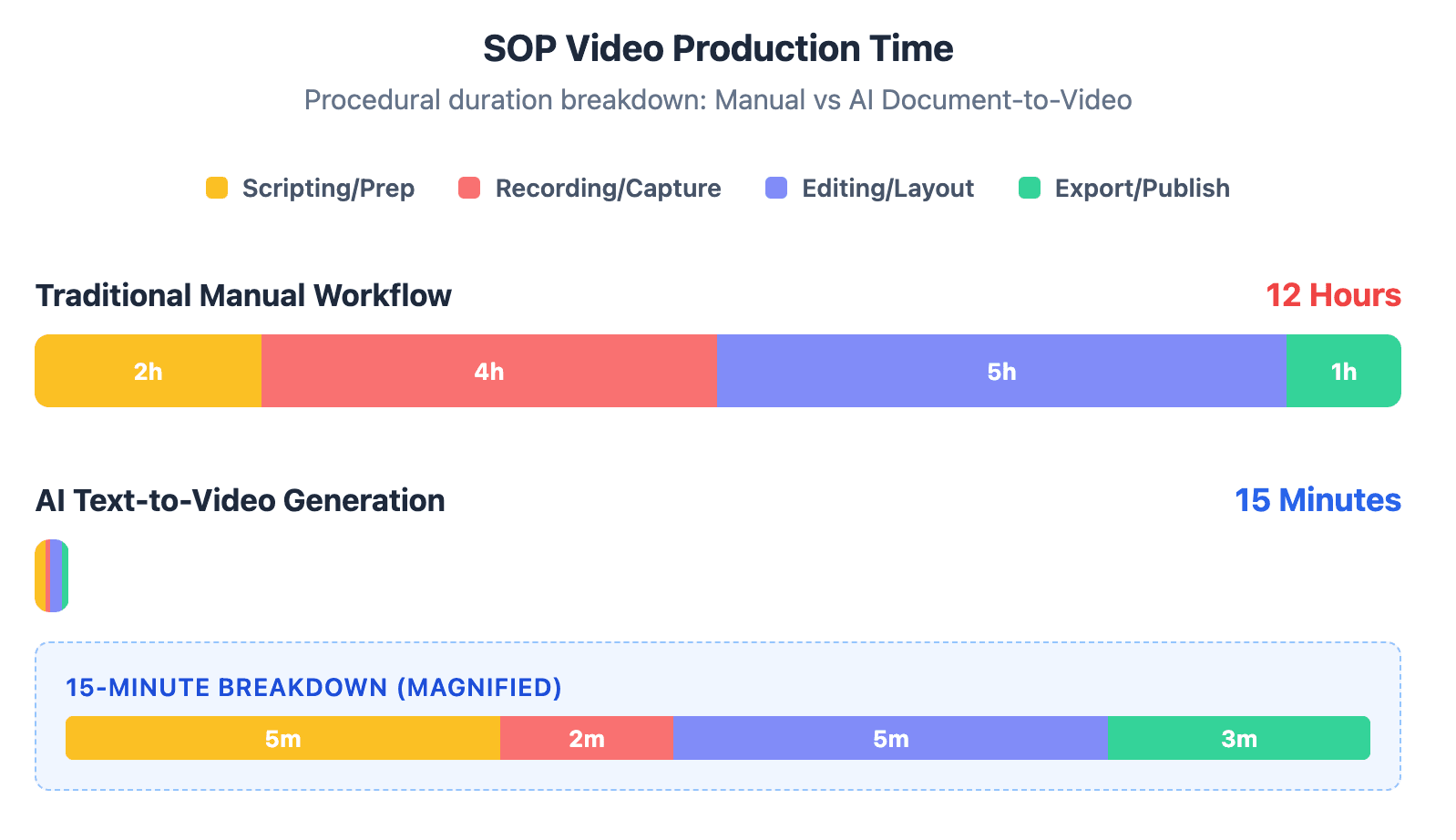
In 2026, the strongest tools go beyond screen recording by adding AI voiceovers, dynamic layouts, multilingual localization, interactive learning features, and easier updates when procedures change. Manual recording slows L&D teams down, and every SOP update creates another editing backlog.
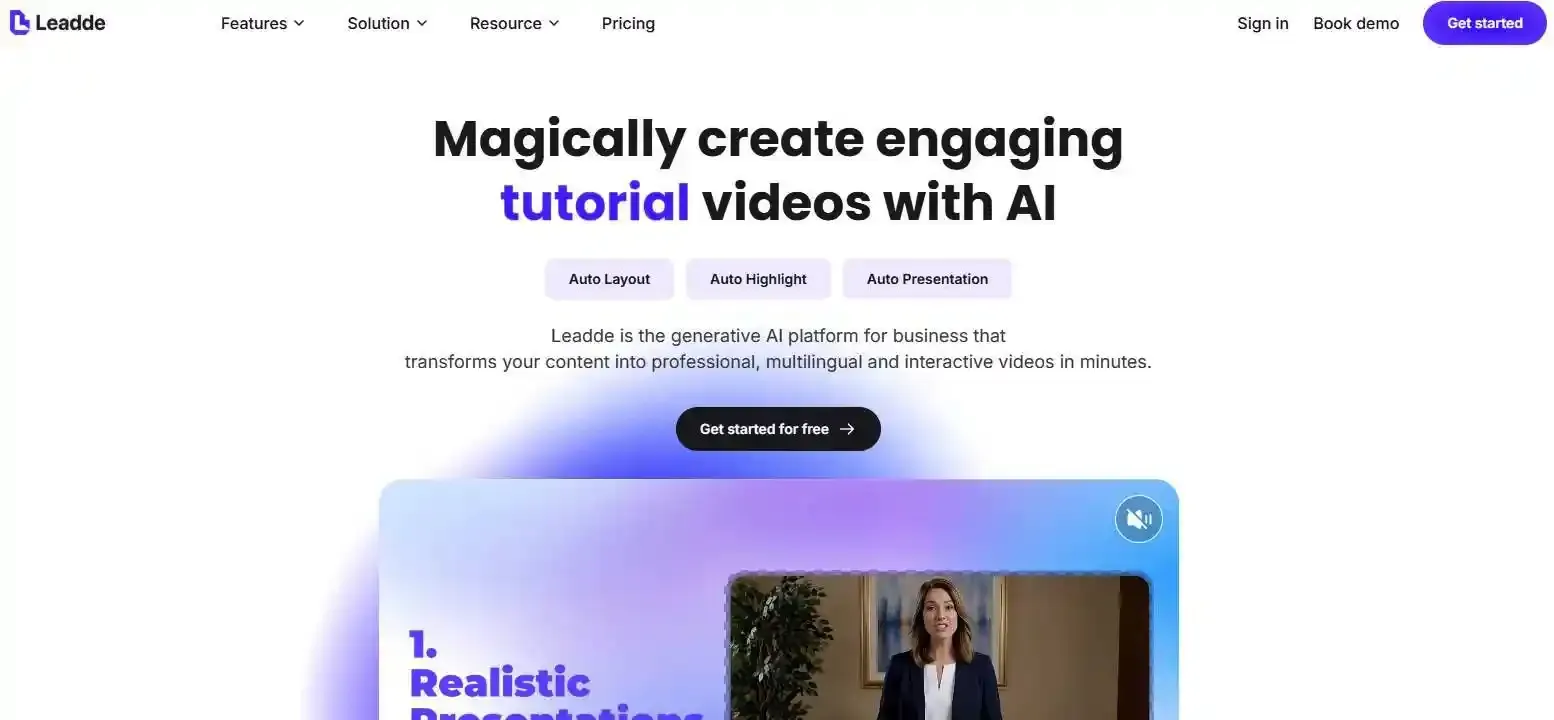
Leadde helps teams turn SOP documents into training videos in minutes, cutting production costs by up to 80% and reducing content creation time by up to 90%.
Best AI SOP Video Software for Training Teams
Traditional screen recorders and legacy SOP tools fail L&D teams when the goal is not just to capture a process once, but to keep training content accurate, branded, localized, searchable, and easy to update over time.
For simple UI walkthroughs, screen recording still works. But for corporate SOP training, the better model is shifting toward document-to-video workflows, where teams upload approved SOPs, manuals, PDFs, PowerPoints, or internal documentation and generate structured training videos without recording every step manually.
The Maintenance Nightmare: Why UI Updates Make Screen-Based SOPs Obsolete
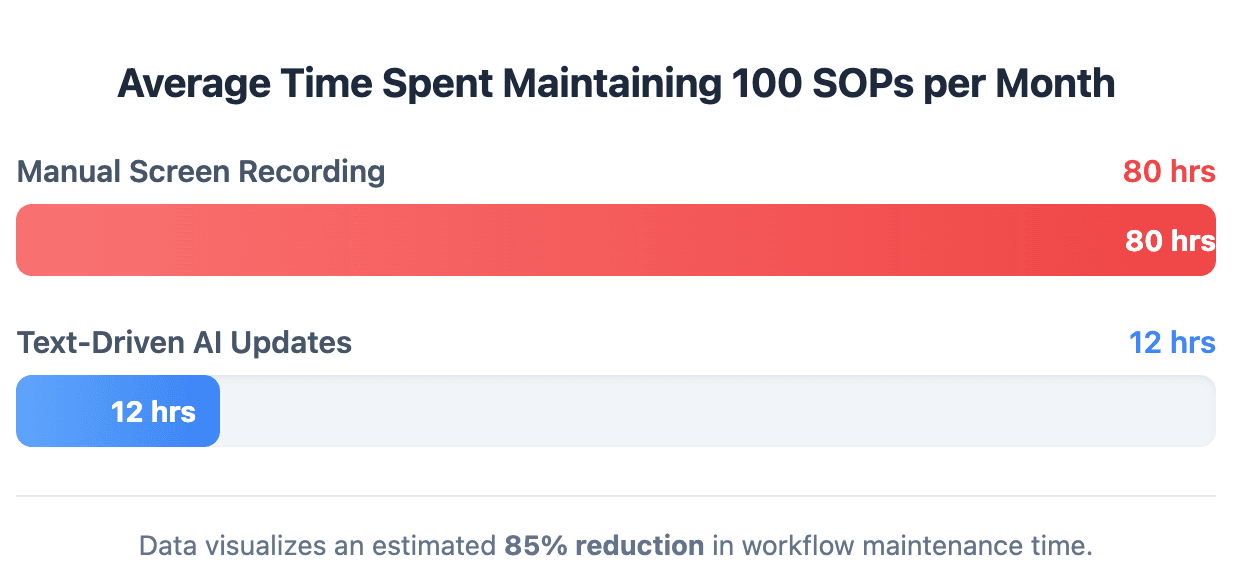
Traditional standard operating procedures rely heavily on legacy software screen recording. When an engineer captures a workflow, the video remains accurate only until the next software development sprint.
As soon as a single UI button changes location, the entire recorded guide becomes obsolete. This forces L&D professionals into a continuous loop of re-recording, leading to massive maintenance backlogs.
- Software Updates: A single UI color or layout update invalidates legacy step-by-step videos.
- Resource Drain: Teams spend up to 40% of their operational time correcting outdated material.
- Outdated Guidance: Trainees follow old interface captures, leading to execution errors and support tickets.
The Screen-Recording Bottleneck: Why “Record First, Edit Later” Does Not Scale
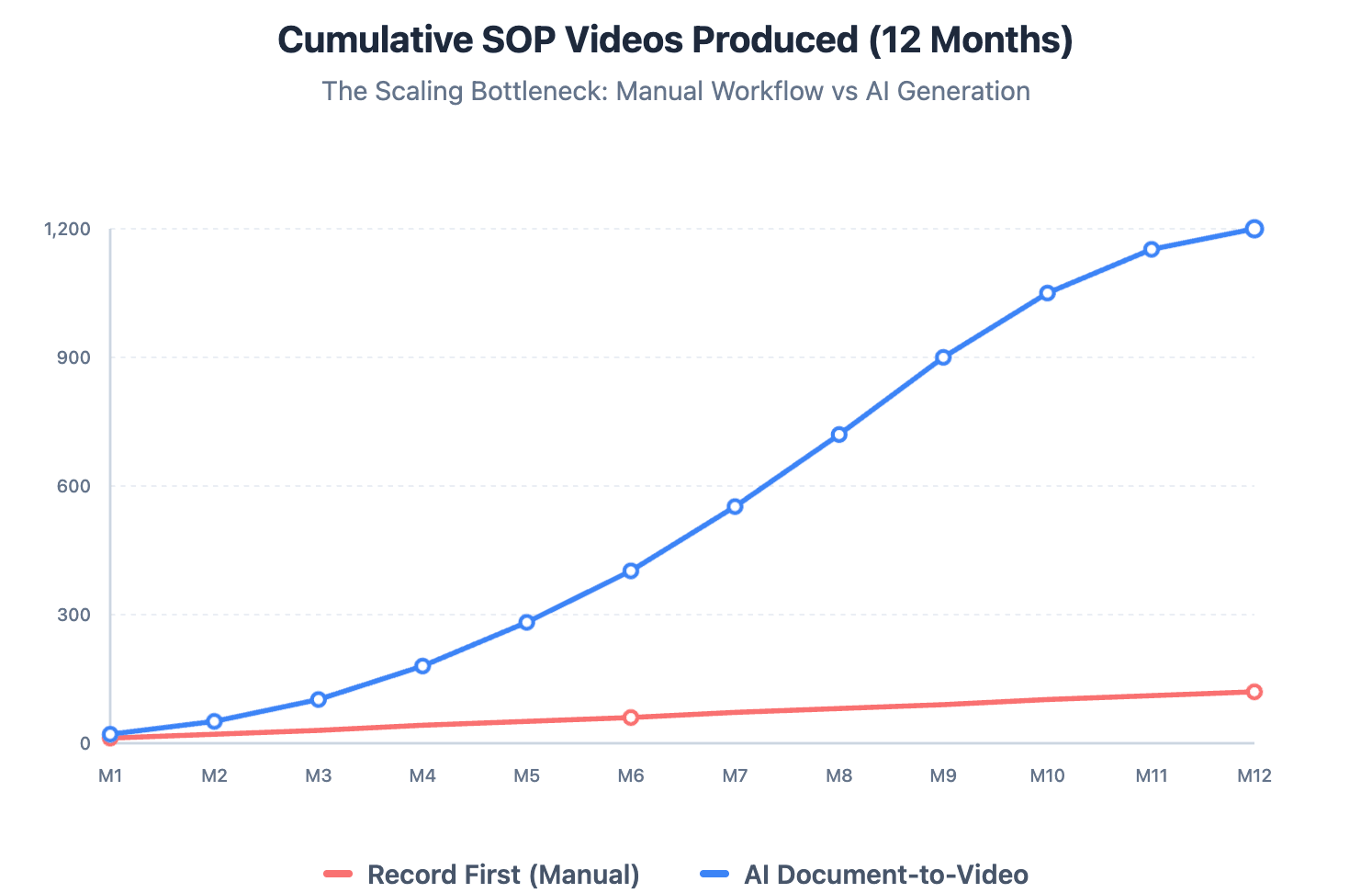
The traditional video production methodology follows a restrictive pipeline where employees must sit down to record original actions first. This approach relies on individuals having flawless performance, quiet environments, and studio-grade hardware.
Because experts are busy with core tasks, they rarely find time to record their screen actions. This creates an immediate asset bottleneck, keeping valuable knowledge locked inside people's heads.
- Production Friction: Setting up recording environments requires massive human effort.
- No Iteration: Changing a sentence in the audio requires a complete video re-shoot.
- Expert Unavailability: High-value specialists lack the schedule flexibility to perform manual voiceovers.
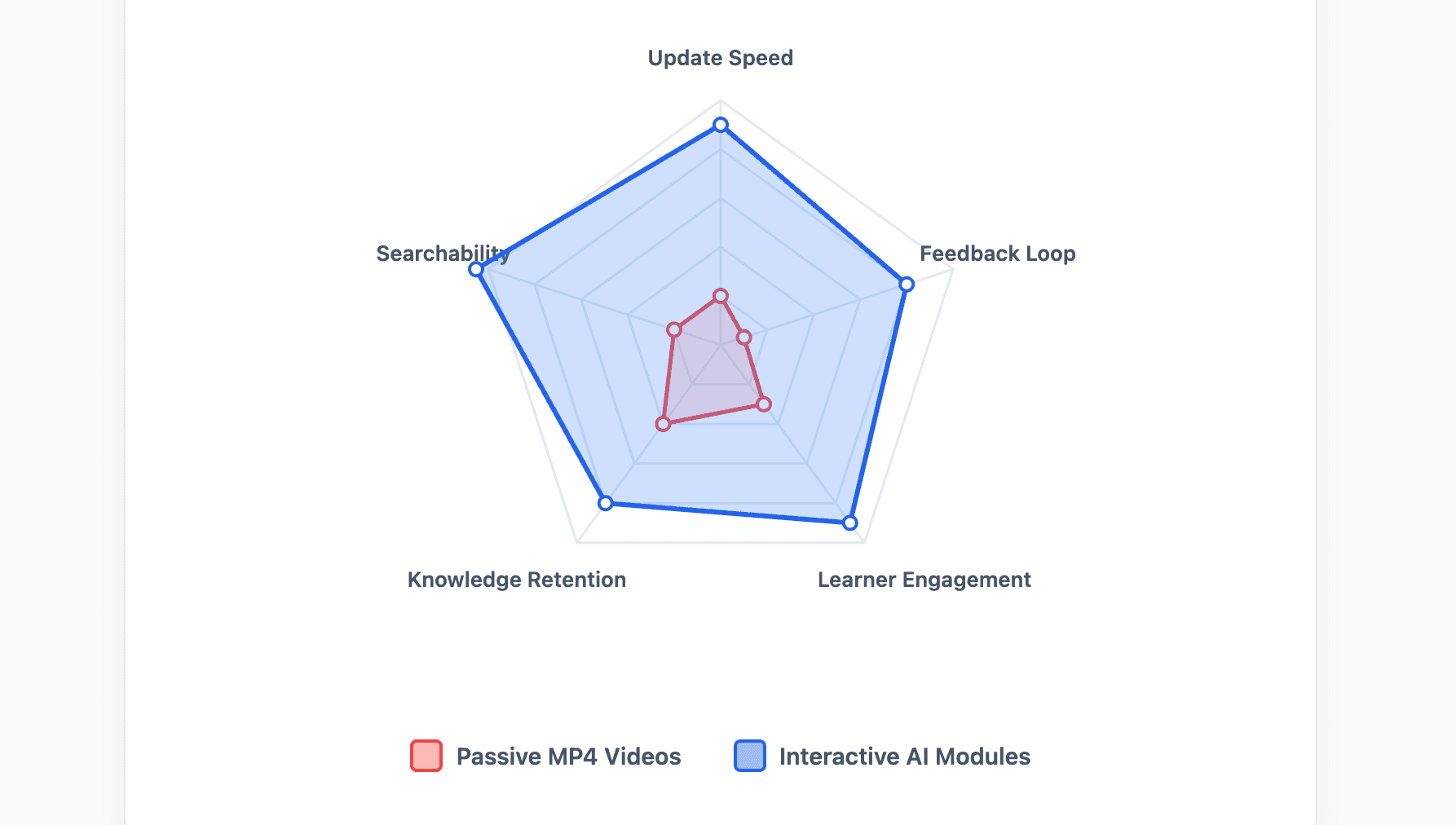
One-Way Video Broadcasts vs. Interactive AI Learning Modules
Legacy corporate tutorials are fundamentally passive media assets that offer one-way broadcast communication. Trainees simply click play and sit through long video timelines without active engagement.
Modern knowledge systems require deep interaction where employees can search, probe, and test procedures in real-time. Moving from passive video to bidirectional AI interactive avatars represents a significant technical leap.
- Zero Engagement: Viewers lose focus within the first two minutes of a static presentation.
- No Feedback Loop: Managers cannot verify if information was actually retained.
- Static Outputs: Traditional MP4 files offer no internal query mechanism for complex troubleshooting.
What Are the Non-Negotiable Criteria for Evaluating Corporate Video SOP Generators?
The best corporate video SOP generator should not be judged only by avatar realism or template quality. Training teams need a platform that supports the full SOP lifecycle: import, structure, generate, review, localize, publish, track, and update.
A strong evaluation framework should include:
| Evaluation Area | Why It Matters |
| Input support | Teams already store SOPs in PDFs, Word docs, PPTs, wikis, and manuals |
| Structured generation | The tool should create scenes, scripts, narration, and layouts |
| Brand control | Training videos must look consistent across departments |
| Localization | Global teams need multilingual voiceover and captions |
| Tracking | L&D teams need visibility into completion and engagement |
| Update workflow | SOP videos must be easy to revise when procedures change |
Native Document-to-Video Ingestion for PDFs, Word Docs, PPTs, Wikis, and SOP Manuals
The single most critical baseline feature for any 2026 enterprise system is direct text-to-video processing. L&D personnel should simply drop an existing raw text manual into the system.
The core AI engine must read the raw material, build a logical storyboard, and render layout assets automatically. This completely bypasses the manual recording phase.
- Format Flexibility: Smooth ingestion of raw Word manuals, Notion links, and old slide decks.
- Zero Asset Requirements: Renders high-quality corporate visuals without demanding prior design experience.
- Automated Structuring: Converts dense, complex paragraphs into clean micro-learning chapters.
Smart Layouts, Brand Templates, Captions, and Visual Consistency
Maintaining institutional brand alignment across hundreds of video modules is historically difficult. New software must provide automated design systems that dynamically adapt layouts to new text inputs.
The visual system must automatically generate typography adjustments, contrasting subtitles, and context-aware accent highlights. This ensures structural consistency regardless of who generates the content.
- Dynamic Auto-Layout: Adapts component sizes instantly whenever corporate scripts are edited.
- Automated Highlighting: Visual indicators focus automatically on key interface terminology.
- Global Brand Safety: Locks specific hex colors, logo files, and fonts across all departments.
Multilingual Voiceover, Avatars, Localization, and Accessibility
Modern corporate operations stretch across various borders, demanding localized workforce instruction. Training software must support diverse voice cloning engines and localized avatars to build native trust.
Instead of paying professional voice actors for every regional dialect, the software engine handles localization instantly. This makes onboarding materials globally accessible within seconds.
- Accent Support: Over 170 target languages equipped with natural corporate dialects.
- Photo-to-Avatar Rendering: Creates realistic enterprise avatars using standard team photographs.
- Voice Cloning Sync: Converts local translations using cloned versions of executive voices.
LMS Readiness, SCORM/xAPI Support, Analytics, and Compliance Tracking
A video SOP asset is only useful if it integrates cleanly with corporate security structures. Enterprise solutions must package output files into standard corporate education formats.
Compliance officers require granular logs showing who watched a procedure, where they paused, and if they completed tests. This data tracking ensures legal verification for mandatory training operations.
- SCORM Compliant: Seamless deployment into standard internal enterprise architectures.
- Granular Metrics: Tracks employee playback performance to optimize training clear rates.
- Procedure Locking: Restricts employee platform privileges until specific compliance chapters are passed.
The 7 Best AI SOP Video Software for Training Teams Ranked and Reviewed
The best tool depends on the source material. A team with approved SOP documents needs a different platform from a team that mainly records software walkthroughs.
Here is a practical ranking for training teams in 2026:
| Category | Leadde | Synthesia | HeyGen | Vidocu / Guidde / Scribe |
| Best starting point | Documents, scripts, slides, SOPs | Scripts, docs, text, slides | Text, images, slides, docs | Screen recordings or workflows |
| Main output | Structured business training video | Avatar-led video | Avatar-led video | SOP guides or video documentation |
| Best fit | SOP-to-video training | Presenter-style learning | Realistic avatar localization | Screen documentation |
| Update workflow | Edit document/script/scenes | Edit script/video | Edit script/avatar video | Recapture or revise workflow steps |
| Learning depth | Interactive and manageable training content | Video + LMS embedding | Avatar video + localization | Documentation and walkthrough support |
| Scribe | Step-by-step SOP documentation | Workflow capture → screenshot guide | ||
| Vyond | Animated training scenarios | Script/document/idea → animated video |
Leadde: Best Overall for Turning SOP Documents Into Structured AI Training Videos
Leadde ranks as the definitive market leader for document-driven enterprise content generation. Its core platform completely reimagines how standard operating procedures are built and maintained.
Instead of demanding screen-capture steps, Leadde converts any raw text file directly into a structured video. It features full dynamic auto-layouts and built-in interactive video chat capabilities.
- Document-to-Video Engine: Keeps your strict branding intact via automated layout processing.
- Ultimate Affordability: The Starter Plan sits at $19/month for unlimited videos, removing minute caps.
- Bidirectional Engagement: Supports live video chat and interactive avatars for real-time employee querying.
- Instant Photo Avatars: Generates high-fidelity customized presenters from a basic employee photo.
Synthesia and HeyGen: Best for AI Avatar-Led Presenter Videos
seful for policy updates, HR onboarding, executive messages, sales enablement, and standardized multilingual presentations.
Synthesia and HeyGen specialize heavily in photorealistic talking-head presentation videos. They are highly effective for top-down corporate communications and external marketing enablement.
However, their systems depend on fixed, non-editable templates that struggle to adapt to fast-evolving text changes. They also impose strict monthly video generation runtime caps on lower tiers.
- Synthesia Model: Entry pricing starts at $29/month but limits production to only 10 minutes per month.
- Monotonous Visuals: Images and video layouts do not scale or change dynamically with dense document text.
- HeyGen Focus: Excellent for realistic human localization but requires higher budgets for full scale.
Vidocu, Guidde, and Scribe: Best for Workflow Capture, Screen Documentation, and Video-to-SOP Use Cases
This category focuses entirely on recording active browser tasks via lightweight extension plugins. Tools like Vidocu, Guidde, and Scribe convert mouse movements into structured screenshot lists.
While highly effective for rapid screen documentation, they cannot build videos from raw document files. They remain stuck in the traditional manual screen capture paradigm.
- Vidocu Extension: Automatically extracts on-screen steps and maps basic voiceovers across captures.
- Scribe System: Excellent for static PDF manual guides but generates minimal independent video assets.
- Maintenance Debt: If an application updates its layout, the entire capture run must be done again.
Vyond: Best for Animated Soft-Skills and Scenario-Based SOP Training
Vyond takes a highly creative approach by utilizing scalable 2D animated characters and cartoon environments. It is a powerful option for building human soft-skills modules, such as customer service or workplace conflict resolution.
Unfortunately, it requires completely manual timeline editing, asset placement, and custom script timing. This classic layout system creates significant friction when producing standard technical documentation.
- Animation Control: Custom scenario creation with diverse cartoon models and props.
- Manual Pipeline: No automated text-to-video ingest features exist for raw operational files.
- Time Intensive: Building a single comprehensive procedure module takes days of timeline asset framing.
Head-to-Head Feature Comparison
The best way to compare these tools is not by asking, “Which one makes the best video?” The better question is: Which tool fits the training team’s source material and update workflow?
| Category | Leadde | Synthesia | HeyGen | Vidocu / Guidde / Scribe |
| Best starting point | Documents, scripts, slides, SOPs | Scripts, docs, text, slides | Text, images, slides, docs | Screen recordings or workflows |
| Main output | Structured business training video | Avatar-led video | Avatar-led video | SOP guides or video documentation |
| Best fit | SOP-to-video training | Presenter-style learning | Realistic avatar localization | Screen documentation |
| Update workflow | Edit document/script/scenes | Edit script/video | Edit script/avatar video | Recapture or revise workflow steps |
| Learning depth | Interactive and manageable training content | Video + LMS embedding | Avatar video + localization | Documentation and walkthrough support |
Input Flexibility: Document-to-Video vs. Script-to-Video vs. Screen Recording
Leadde is strongest when the source material already exists as business content. Its document-first workflow makes it useful for teams that want to convert approved SOPs into training videos.
Synthesia and HeyGen are strong when a team already has a clean script or wants a presenter-style avatar video. Synthesia also notes that users can use templates and AI assistance to transform documents, PDFs, website links, or ideas into polished videos. (Synthesia)
Workflow tools like Vidocu, Guidde, and Scribe are strongest when the team needs to capture a live workflow, software procedure, or screen-based process.
Updateability: Editable SOP Video Workflows vs. Static Recorded Walkthroughs
Maintaining accurate guidance requires an immediate text-based correction loop. When a corporate procedure shifts, administrators must update the video asset by simply changing text lines.
With traditional screen captures, you cannot edit localized asset frames; the creator must re-record everything. Leadde handles updates instantly because its presentation layer renders on top of flexible text data.
- Text-Driven Fixes: Change a line of text in Leadde, and the visuals adjust automatically.
- Template Lock: Synthesia modifications require complete re-rendering of the entire scene structure.
- Capture Expiration: Recorded MP4 walkthroughs must be thrown away when application UIs change.
Interaction and Learning Depth: Passive Video Output vs. Searchable, Trackable Training Content
As of 2026, available information suggests that passive learning reduces workforce retention rates. Traditional tools merely output an MP4 file that employees look at without real focus.
Leadde changes this paradigm by embedding live interactive capabilities directly inside the playback window. Trainees can chat directly with the presenter avatar to clear up confusing operational steps.
- Leadde Interactivity: Supports two-way voice conversation and interactive avatar querying.
- Synthesia Limit: Offers strictly standard, one-way video output files with zero user response tracking.
- Scribe Limit: Limited to linear scrolling on static web pages with minimal human connection.
How to Convert Internal Text Documentation Into Branded SOP Training Videos
The best SOP video workflow starts with approved source material. This helps reduce hallucination risk, keeps the training aligned with internal policy, and makes updates easier when the SOP changes.
Step 1: Upload Existing PDFs, Word Manuals, PPTs, or SOP Text Without Recording First
Begin the video construction process by collecting your team's existing internal knowledge assets. You do not need to prepare complex media scripts, hire actors, or setup recording layouts.
Log directly into the enterprise dashboard, open the secure processing window, and upload your raw text documentation. The internal system parses the structural layout of the material instantly.
- Zero prep work: Drop your unedited operational logs directly into the ingestion pane.
- Branding Ingestion: System checks database settings to match your locked brand design rules.
- Context Reading: The AI maps terms, structural headings, and key processes automatically.
Step 2: Review the AI Outline, Script, Layout, Voiceover, and Brand Style
The system transforms the uploaded text document into a fully designed, multi-chapter storyboard presentation. Reviewers can scan the split-screen workspace to modify any generated component.
Adjust specific narrative text, choose specialized enterprise voice characters, or reposition visual assets. The underlying automated engine maintains complete typographic balance during manual edits.
- Auto Highlight Check: Verify that the dynamic visual highlighters are focusing on the correct software terms.
- Voice Assignment: Pick an appropriate executive style voice clone to execute the vocal narration.
- Asset Swapping: Change specific layout frames while preserving the universal corporate design template.
Step 3: Publish, Translate, Track, and Update the SOP Video as Procedures Change
Once the content is approved by management, execute global deployment with a single click. Choose target regional localization packages to distribute the material in multiple languages simultaneously.
Embed the finalized outputs directly into the company learning management system or internal team wikis. When workflows update later, simply edit the text lines to push a live patch to the file.
- Instant Localization: Translate into over 170 languages with native accent structures.
- Granular Distribution: Export the interactive module directly into standard corporate SCORM systems.
- Hot Patching: Correct procedural text errors instantly without re-rendering the original video file.
Which Use Cases Deliver the Highest ROI for Enterprise Training Teams?
AI SOP video software delivers the highest ROI when the training content is frequent, repeatable, document-heavy, and expensive to update manually.
The best use cases usually share three traits:
- The SOP already exists in written form
- The audience needs consistent instruction
- The process changes often enough to make manual video production painful
SaaS and Customer Education
Software-as-a-Service environments face constant product update cycles and ongoing feature additions. Customer education managers must rapidly build onboarding paths to keep user churn low.
Using automated text ingestion helps training teams push feature overview videos live the same day a patch rolls out. This minimizes customer confusion and reduces inbound support tickets.
- Onboarding Scale: Builds structured onboarding courses from raw technical design specs.
- Changelog Videos: Converts engineering change documents into localized feature overviews.
- Retention Lift: Interactive walkthroughs help clients realize feature value faster, reducing churn.
IT, BPO, and Corporate Operations
Global technical outsourcing hubs and call centers manage thousands of support staff working across various systems. Compliance teams face a constant challenge rolling out mandatory operational updates.
Instead of organizing expensive physical bootcamps, L&D leaders use automated video platforms to push out critical system rollouts. Staff stay current with changing security guidelines.
- Bootcamp Delivery: Transforms dense technical training manuals into engaging new hire micro-learning modules.
- Compliance Broadcasts: Converts mandatory legal and data security documents into trackable visual media.
- Operational Agility: Cuts cross-border standard onboarding timelines from weeks to hours.
Manufacturing, Retail, and Frontline Teams
Frontline manufacturing crews and retail associates work in high-turnover environments where spatial understanding is critical. Reading massive paper handbooks results in low procedural compliance.
Converting factory manuals and store handbooks into clean visual videos ensures standardized performance on the floor. This leads directly to lower accident rates and consistent customer service across locations.
- Line-Side Instruction: Converts dense machine manuals into clear, visual step-by-step safety videos.
- Store Standard Uniformity: Deploys uniform retail customer service guides instantly to hundreds of franchise locations.
- Error Minimization: Visual equipment procedures reduce manufacturing waste and line configuration downtime.
Conclusion
The old way of creating standard operating procedures through manual screen recording, endless editing, and high pricing caps is dead. Modern L&D training teams require tools that turn plain text into structured, branded video modules effortlessly.
Evaluating options like Synthesia and HeyGen reveals high premium costs and inflexible template layouts that slow down technical teams. Meanwhile, raw recording tools create a massive maintenance burden down the road.
Leadde provides the ideal balance for enterprise teams by introducing direct document-to-video conversion, automated layout systems, and uncapped production plans for only $19/month. By switching to text-driven workflows, training managers can eliminate their content backlogs, protect brand design rules, and deploy trackable interactive modules globally.





