HeyGen vs Synthesia: The Ultimate 2026 Comparison

HeyGen vs Synthesia in 2026 depends on your workflow: HeyGen is usually better for marketing, social media, realistic AI avatars, voice cloning, and multilingual creative videos, while Synthesia is stronger for corporate training, employee onboarding, structured e-learning, SCORM, LMS integrations, and enterprise governance.
However, both platforms can become limiting for teams that need to scale video production from documents, scripts, SOPs, or internal knowledge assets because pricing limits, manual editing, and update workflows can affect long-term video ROI.
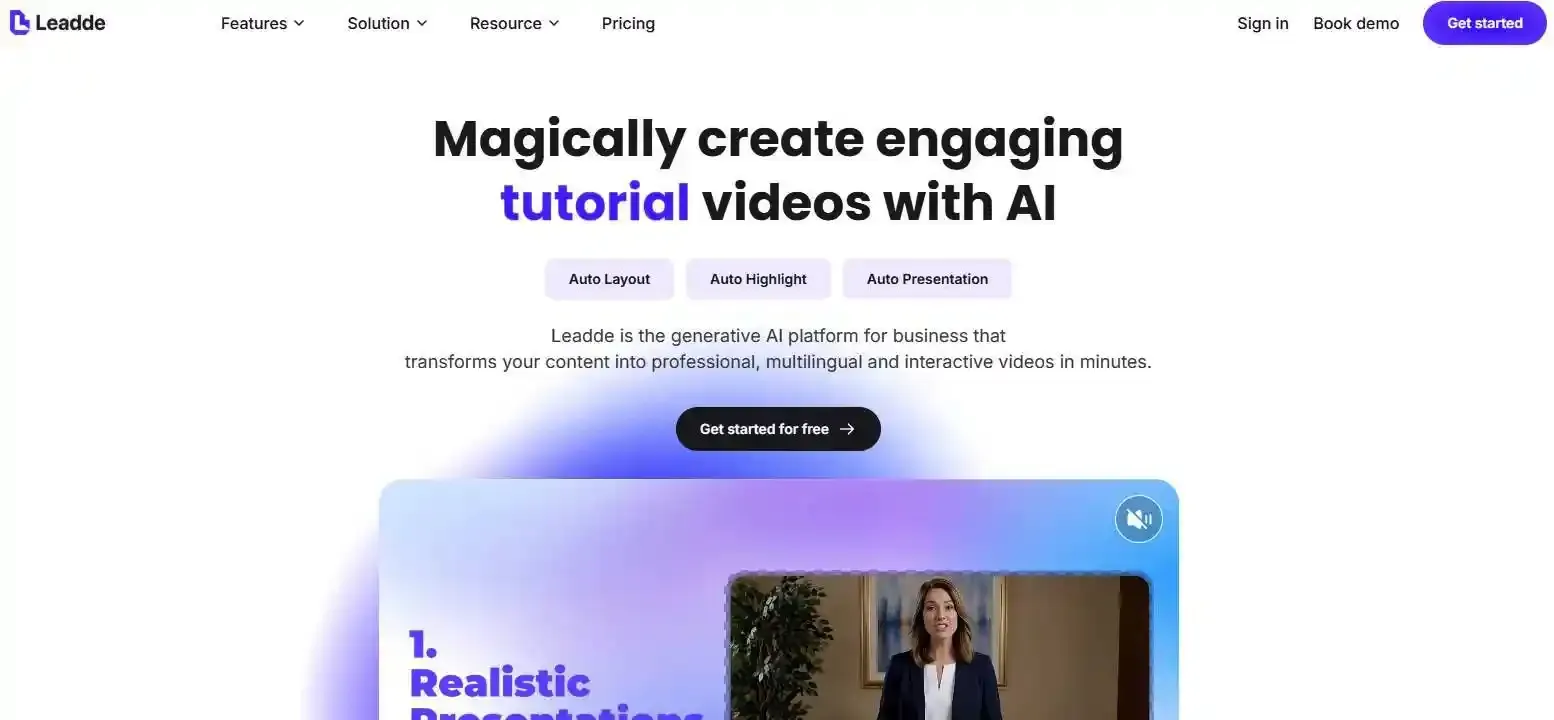
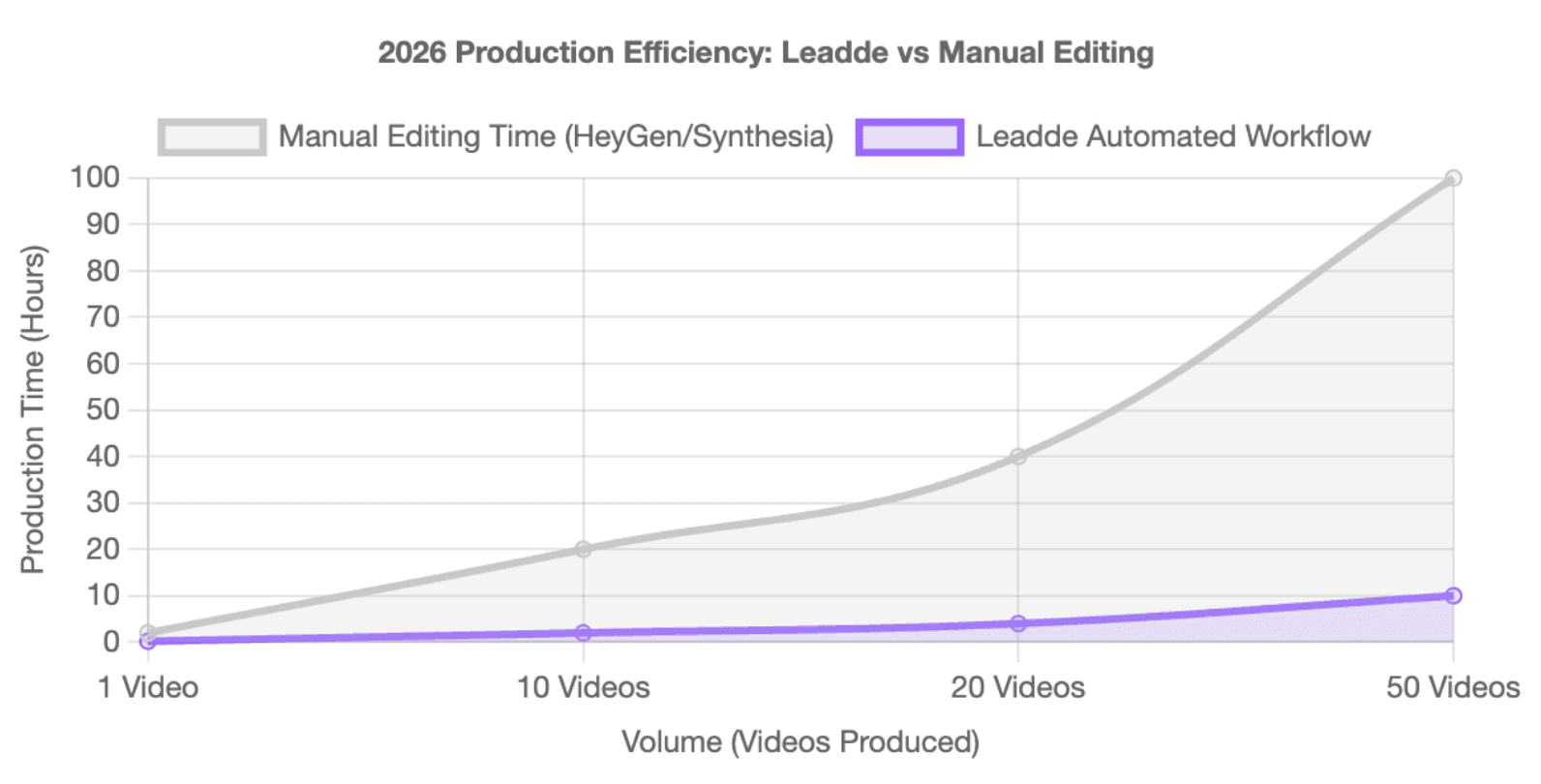
Manual storyboarding, slide formatting, and repeated edits can quickly drain team hours. Leadde solves this by automatically turning documents and text into professional business videos in minutes, helping teams skip manual layouts, reduce production costs by over 80%, and cut content creation time by 90%.
HeyGen vs Synthesia: Which AI Video Generator Wins in 2026?
HeyGen is more creative and campaign-oriented. Synthesia is more structured and enterprise-oriented. The winner depends on whether your team values avatar realism, fast creative output, training governance, or document-based automation.
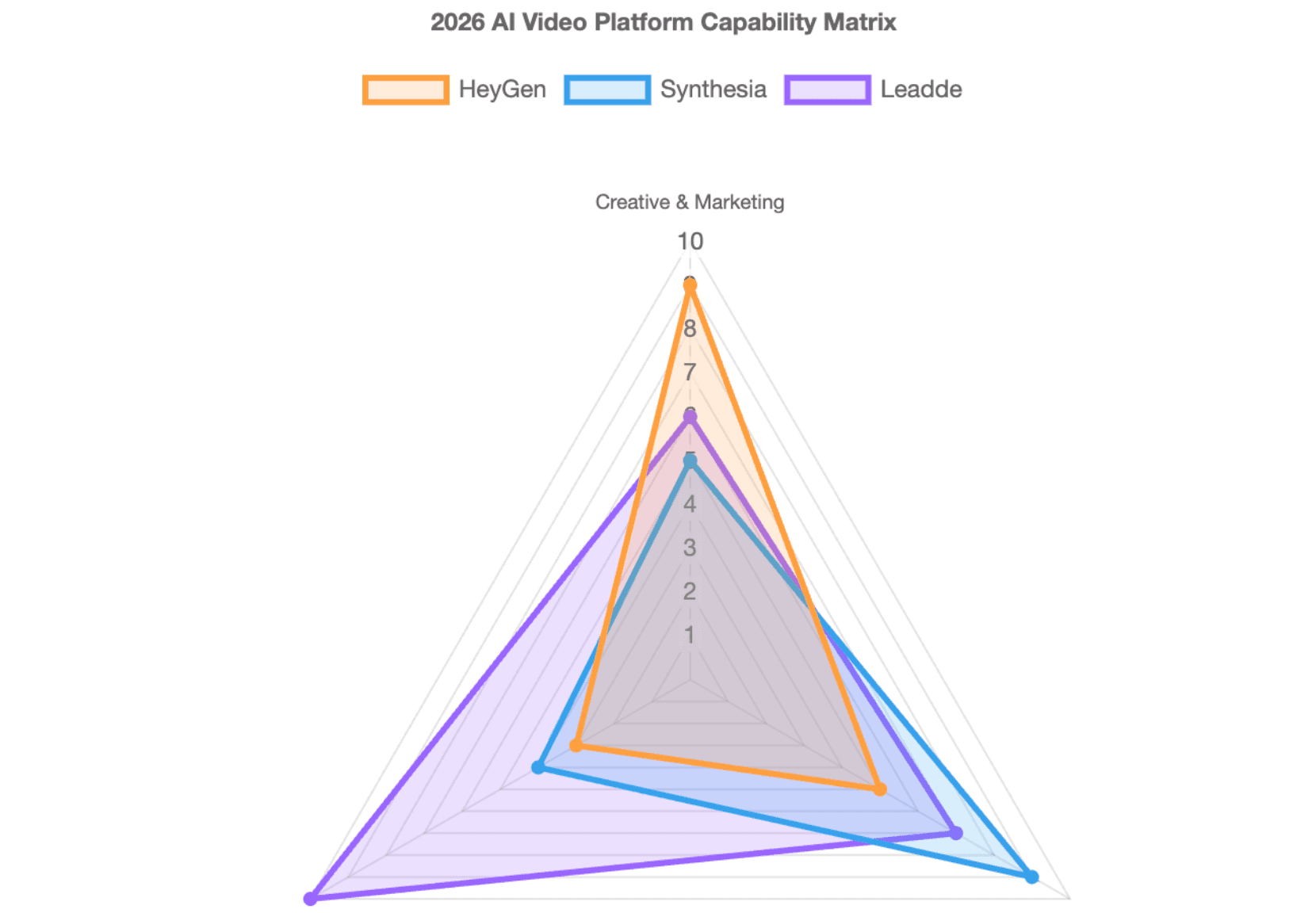
Choose HeyGen for Marketing and Synthesia for Corporate Training
Choose HeyGen if your team creates:
- Social media videos
- Marketing campaigns
- Sales outreach videos
- Personalized avatar content
- Fast multilingual creative videos
HeyGen’s official pricing page lists a free plan with 3 videos per month, access to Avatar IV and Video Agent, 500+ Stock Digital Twins, and 30+ languages. Its paid tiers expand production capacity and creative features.
Choose Synthesia if your team creates:
- Corporate training videos
- Employee onboarding content
- Internal communications
- E-learning modules
- Standardized enterprise videos
Synthesia positions itself as an AI video platform for business, with 240+ avatars, 160+ languages, and a free plan that includes 10 minutes of video per month and 9 stock avatars.
Why Workflow, Pricing, and Content Source Matter More Than Avatar Count
Many reviews focus on avatar count, language count, and video quality. Those are important, but they are not the full decision.
For business teams, the real question is:
- Where does your content start?
- How often do videos need updates?
- How many people need access?
- Do you need SCORM, LMS, SSO, or approval workflows?
- Will pricing scale cleanly when production volume increases?
A tool that looks cheaper for one video can become expensive when a team needs dozens of localized, updated, approved, and re-exported videos every month.
When Neither Platform Is the Best Fit for Business Video Automation
HeyGen and Synthesia are excellent when your main goal is creating avatar-led videos from scripts.
They may be less ideal when your content starts from:
- PPT decks
- PDFs
- Word documents
- SOPs
- Training manuals
- Internal knowledge bases
In those cases, a document-first AI video platform can be more efficient because the bottleneck is not only the avatar. The real bottleneck is turning existing knowledge into structured video scenes, scripts, layouts, and updates.
How Do HeyGen and Synthesia Compare in AI Avatar Realism, Voice, and Localization?
HeyGen is often discussed for expressive avatars, marketing use cases, and fast video localization. Synthesia is often favored when teams need polished, consistent presenters across many training or internal communication videos.
HeyGen Avatar IV vs Synthesia
HeyGen’s creative advantage is its focus on more expressive avatar-led content. It is especially useful for videos where personality, emotion, and visual freshness matter.
Synthesia’s strength is consistency. Its avatars are designed to feel professional, stable, and repeatable across business videos, which matters for L&D, HR, and internal communications.
The best choice depends on your video style:
| Need | Better Fit |
| Social ads | HeyGen |
| Sales videos | HeyGen |
| Creator-style videos | HeyGen |
| Formal training videos | Synthesia |
| Internal announcements | Synthesia |
| Long-form learning modules | Synthesia |
Custom Avatars and Digital Twins: Which Platform Feels More Personal?
Custom avatars are useful when teams want a founder, trainer, executive, or sales leader to appear in many videos without recording each one manually.
HeyGen is usually a better fit when the goal is personal branding, sales personalization, or creator-led content. Synthesia is usually stronger when the goal is polished enterprise representation across standardized video templates.
Before choosing either platform, teams should test:
- Face accuracy
- Lip-sync quality
- Voice quality
- Expression range
- Brand fit
- Consent and data controls
Which Is Better for Global Teams?
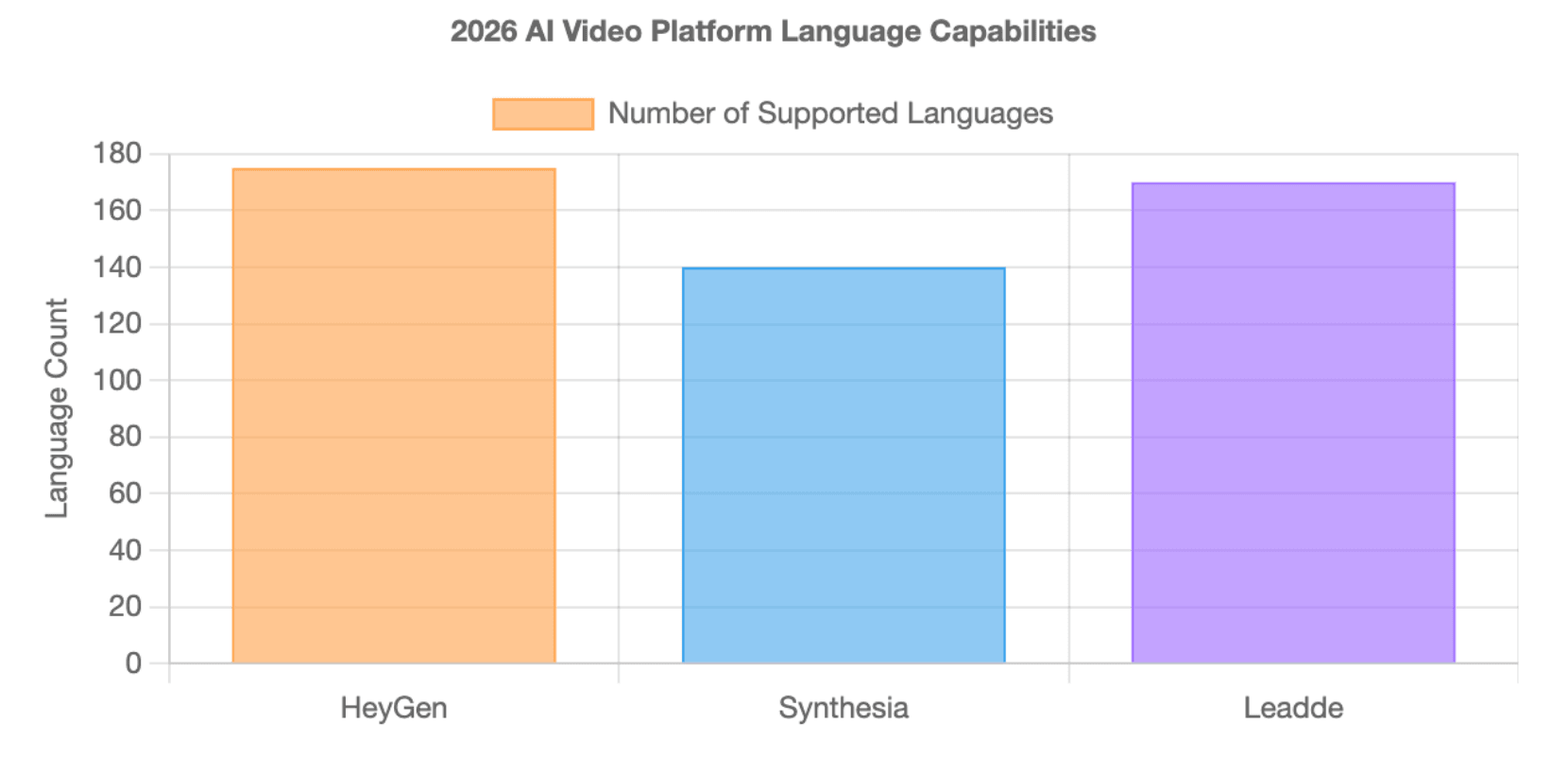
Language support is a major reason teams compare HeyGen vs Synthesia. HeyGen’s own comparison pages emphasize translation into 175+ languages, while Synthesia’s official site states support for 160+ languages.
For global teams, the best test is not the number of languages on the pricing page. The better test is whether the platform works well in your actual target markets.
Test each platform with:
- Your longest script
- Your most technical terms
- Your regional accents
- Your required subtitle format
- Your approval workflow
- Your update process after translation
A platform may support many languages but still require manual review for tone, terminology, and industry-specific wording.
Which Platform Has the Faster Video Editing and Production Workflow?
HeyGen and Synthesia both reduce the need for cameras, actors, and traditional editing. But neither platform removes every workflow step. The faster platform depends on whether your team starts from a clean script, a slide deck, a PDF, or a long business document.
Scene-Based Editing vs Slide-Deck Style Editing
HeyGen’s workflow is often better for fast creative production. It works well when a marketer, founder, or sales team wants to turn a message into a short avatar video quickly.
Synthesia’s editing experience is more aligned with structured business content. It is often easier for training and HR teams that already think in slides, scenes, modules, and learning objectives.
Use this simple rule:
- Choose HeyGen when speed and creative flexibility matter most.
- Choose Synthesia when consistency and structured editing matter most.
- Choose a document-first tool when your starting point is not a script but a file.
Where Manual Work Still Remains
Script-to-video is useful, but many business teams do not start with a polished script.
They start with:
- A 40-slide training deck
- A PDF product manual
- A Word document SOP
- A compliance checklist
- A long internal knowledge article
This is where manual work often remains. Someone still needs to extract the key points, organize scenes, shorten text, create layouts, and update the final video later.
Leadde is designed for this document-first workflow. Its official product overview says it converts PowerPoint files, PDFs, Word documents, scripts, and text into structured video presentations, automatically generating outlines, scenes, voice-over scripts, and visual layouts.
Why Small Edits Can Increase Time and Cost
Small edits are common in business video production. A product name changes. A compliance rule changes. A pricing line changes. A training slide becomes outdated.
The problem is that a small text change can trigger a larger workflow:
- Edit the script
- Adjust scene timing
- Regenerate audio
- Re-render the video
- Review the video again
- Re-export subtitles
- Re-upload to LMS or CMS
For one video, this is manageable. For 100 training videos in several languages, this becomes a real operational cost.
What Are the Real Enterprise Features, Security Controls, and LMS Capabilities?
Enterprise buyers should not evaluate AI video tools only by video quality. They should evaluate the full operating system around video creation. The key questions are about control, compliance, access, approvals, and long-term governance.
SCORM Export, LMS Integration, Quizzes, and Training Governance
For L&D teams, SCORM and LMS support can be more important than avatar realism.
Training teams need to know:
- Can the video be tracked in an LMS?
- Can learners complete quizzes?
- Can managers verify completion?
- Can the video be updated after policy changes?
- Can different regions use localized versions?
HeyGen’s comparison content emphasizes LMS delivery and SCORM tracking, while Synthesia’s business positioning focuses strongly on training, e-learning, and enterprise video workflows.
Brand Kits, Team Collaboration, Approval Workflows, and Version Control
Enterprise video production needs consistency. Without governance, teams may create off-brand videos with outdated logos, wrong fonts, old scripts, or unapproved messaging.
Buyers should check whether the platform supports:
- Brand kits
- Shared libraries
- Team workspaces
- Commenting
- Approval flows
- Version history
- Admin roles
- Template control
This is where Synthesia often feels stronger for structured teams, while HeyGen can feel more flexible for creative teams.
Data Privacy, SOC 2, GDPR, SSO, and AI Training Policy Questions
Security should be checked before uploading sensitive business content.
Ask each vendor:
- Is SOC 2 documentation available?
- Is GDPR support documented?
- Is SSO or SAML available?
- Is SCIM available?
- Are audit logs available?
- Is customer content used for AI training?
- Where is data stored?
- Can the vendor sign required enterprise agreements?
Do not rely only on comparison pages for security claims. Enterprise buyers should verify current compliance documents directly with each vendor before purchase.
HeyGen vs Synthesia Pricing
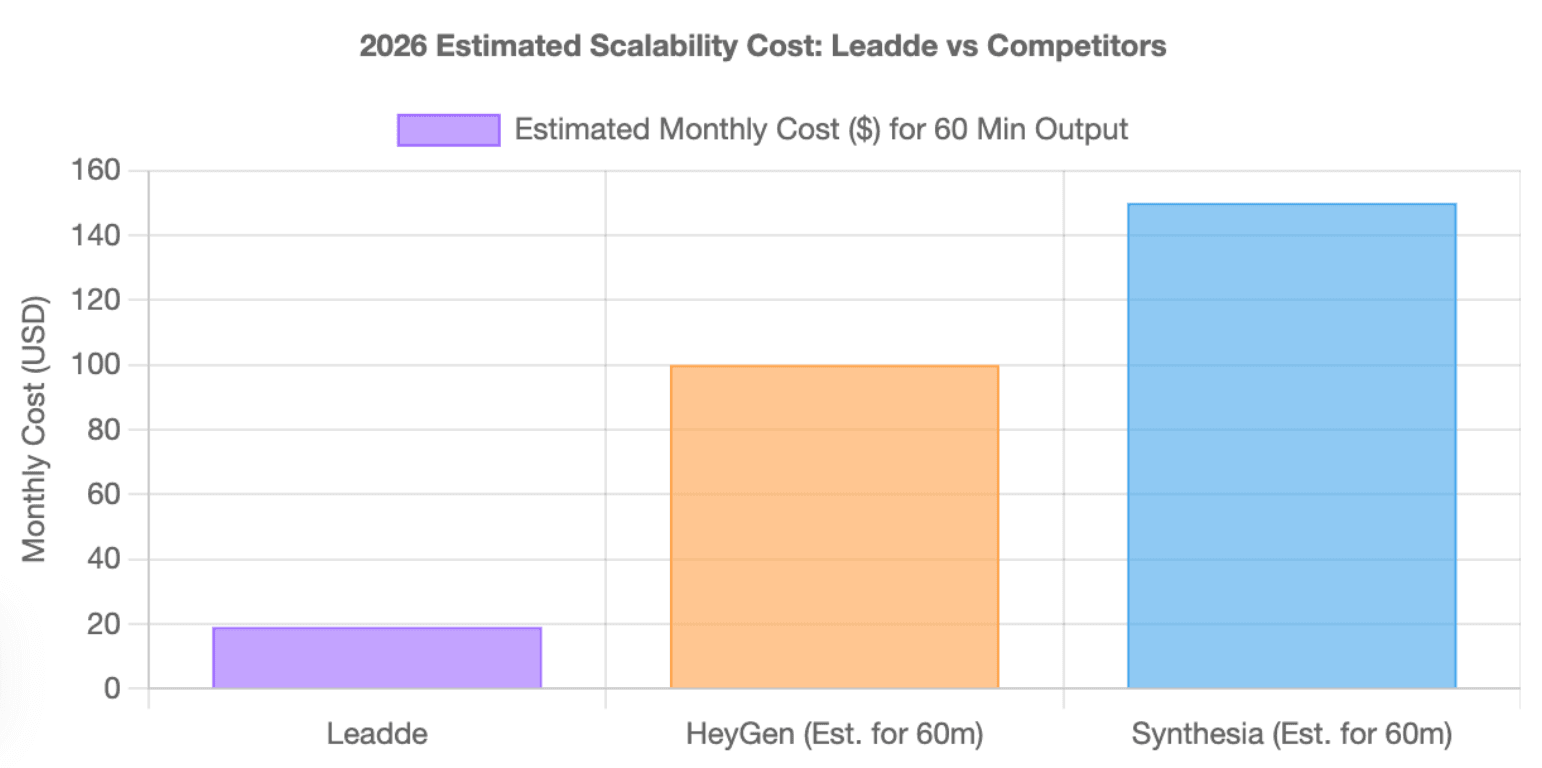
Pricing is one of the most confusing parts of the HeyGen vs Synthesia comparison. The lowest monthly price rarely reflects the real cost for a business team. Real cost depends on minutes, credits, seats, avatar features, translation, exports, enterprise controls, and update frequency.
Why Published Pricing Can Mislead Business Buyers
HeyGen and Synthesia use different pricing logic. HeyGen’s pricing page lists a free plan with 3 videos per month and videos up to 1 minute. Synthesia’s pricing page describes usage limits in generated video minutes and shows Creator at $89/month when billed monthly.
This creates a key buyer question:
| Pricing Factor | Why It Matters |
| Minutes | Limits long-form training output |
| Credits | Can affect advanced avatars or translation |
| Seats | Impacts team cost |
| Exports | Affects final production quality |
| Watermarks | Limits business use |
| Enterprise features | May require higher-tier plans |
The safest approach is to calculate your expected monthly video volume before choosing a plan.
Custom Avatars, Premium Features, Team Seats, and Enterprise Add-Ons
The true cost may increase when teams need:
- Custom avatars
- Premium avatar models
- Higher-resolution exports
- Translation at scale
- SSO or SAML
- SCORM export
- Team collaboration
- API access
- Dedicated support
- Enterprise procurement terms
A platform that looks affordable for one creator may become less predictable for a training team, sales team, or global organization.
Free Plan Limitations, Watermarks, Export Quality, and Scaling Risks
Free plans are useful for testing, but they are rarely enough for business production.
Use the free plan to test:
- Avatar quality
- Voice quality
- Translation quality
- Script editing
- Export flow
- Rendering speed
- Watermark behavior
- Team handoff
Then test the paid plan with a real project. Do not evaluate a platform using only a short demo script.
How Does Leadde Compare With HeyGen and Synthesia as a Document-First Alternative?
From PPT, PDF, Word, and Text to Business Videos
While legacy platforms force users into an avatar-first design loop, Leadde champions a document-first paradigm. This architecture is built directly for operational managers, Customer Success teams, and L&D specialists who already hold vast libraries of text assets.
Instead of writing scripts from scratch, users upload standard PowerPoint files, technical PDFs, SOP manuals, or Word files. The engine automatically parses the material into structured video presentations.
AI Auto Layout, Script Generation, Multilingual Videos, and Interactive Playback
Leadde’s advantage is not only video generation. It is workflow automation. According to its official product overview, Leadde supports multilingual workflows across 88 languages and 175 dialects, layered PowerPoint import and editing, 300 AI avatars, Chat with Video, advanced playback modes, smart updates (where the shared link always shows the latest version), analytics, and content management.
That means Leadde can support a broader business video lifecycle:
- Import content
- Generate outline
- Build scenes
- Create voice-over script
- Apply visuals
- Localize content
- Keep shared video links updated automatically
- Track performance
- Support interactive viewing
For teams with many existing documents, this can reduce the manual production burden.
When to Choose Leadde Instead of Avatar-First AI Video Generators
Choose Leadde when your biggest problem is not “I need a talking avatar.” Choose it when your real problem is “We have too much business content and not enough time to turn it into videos.”
Leadde is a strong fit when your team needs:
- Document-to-video automation
- PPT-to-video workflows
- SOP video creation
- Multilingual business videos
- Interactive learning videos
- Smart updates (shared link always shows the latest version)
- Analytics
- Reusable video assets
HeyGen and Synthesia can still be excellent choices. But if your team’s content starts from documents, Leadde may fit the workflow better.
HeyGen vs Synthesia vs Leadde
| Category | HeyGen | Synthesia | Leadde |
| Best For | Marketing, sales, social video | Training, onboarding, enterprise video | Document-based business video |
| Core Workflow | Avatar-first creative video | Structured business video | Document-first video automation |
| Strongest Use Case | Realistic avatar campaigns | Corporate training | PPT, PDF, Word, SOP to video |
| Language Strength | Broad video translation positioning | 160+ language business video support | Multilingual workflows in 88 languages and 175 dialects |
| Enterprise Fit | Good for creative business teams | Strong for structured enterprise teams | Strong for business content operations |
| Content Source Fit | Script, avatar, existing footage | Script, slides, training content | Documents, decks, scripts, text |
| Differentiator | Realistic and flexible avatars | Consistency and governance | Auto layout, interactive video, smart updates |
Synthesia states that it supports 240+ avatars and 160+ languages. Leadde’s official overview states support for 88 languages and 175 dialects, 300 AI avatars, document-to-video workflows, interactive video, smart updates, analytics, and content management.
Best Choice by Use Case: Marketing, Corporate Training, Sales, SOPs, and Internal Knowledge
- Social Ads & Viral Marketing: Select HeyGen to maximize viewer engagement with highly expressive Avatar IV models.
- Institutional compliance LMS training: Select Synthesia to enforce strict governance with corporate presentation slides and native SCORM delivery.
- High-Volume Content Operations: Select Leadde to scale product manuals, multi-plant manufacturing SOPs, SaaS onboarding courses, and interactive knowledge databases.
Final Verdict: Choose Based on Workflow Fit, Not Just AI Avatar Quality
The best platform is not always the one with the most avatars or the most languages.
Use this decision rule:
- Choose HeyGen if your team needs creative speed and realistic avatar-led campaigns.
- Choose Synthesia if your team needs structured training and enterprise-grade consistency.
- Choose Leadde if your team needs to turn documents, slides, and text into professional business videos at scale.
In 2026, AI video competition is no longer just about who has the best avatar. It is about who removes the most work from your real production workflow.
Conclusion
HeyGen and Synthesia represent excellent, specialized endpoints for distinct creative goals. HeyGen serves marketing teams requiring hyper-realistic avatars for short-form campaigns, while Synthesia supports enterprise L&D teams managing rigid LMS compliance architectures.
However, for modern enterprises looking to scale video production without massive manual design hours, the primary barrier is not actor realism—it is the operational bottleneck of manually assembling presentation layouts.
By providing robust document-first automation, scalable credit-based generation, and immersive video chat interaction, Leadde removes the manual friction of content scaling. Choose HeyGen for social ad campaigns, Synthesia for formal slide presenting, and Leadde for automated, high-scale document-to-video operations.