GPT Image 2.5 Flare vs Sunburst: Which Model Is Better?

GPT Image 2.5 Flare and Sunburst are built for different priorities. Flare is the better starting point for fast iteration, high-volume generation, and everyday creative work, while Sunburst is designed for workflows where editing precision, asset stability, and final-image control matter more than speed. Both support image generation and editing, so the best choice depends less on which model is “better” and more on what your workflow actually needs.
In this guide, we compare Flare and Sunburst across image quality, speed, editing precision, pricing, quality settings, and real-world use cases. If you want to explore the landscape of modern visual generation or work with GPT Image 2.5 without setting up a separate API workflow, Leadde currently integrates GPT-Image-2.5 Flare, letting you generate and refine images in the same workspace and reuse them in videos, presentations, storyboards, and social content.

GPT Image 2.5 Flare vs Sunburst: What’s the Main Difference?
OpenAI describes Flare as its fastest model for high-quality everyday image generation and recommends it as the default for most API applications. Sunburst is its most capable model for image generation and editing, with an emphasis on workflows where editing precision matters most.
| Feature | Flare | Sunburst |
| Main priority | Speed and throughput | Precision and control |
| Best for | Variations, social, prototyping, volume | Detailed edits, final creative, product refinement |
| Generation speed | Generally faster | Generally slower |
| Image editing | Yes | Yes; precision emphasized |
| Quality settings | Low–Max + Auto | Low–Max + Auto |
| Official token rates | Same | Same |
| Good default | Yes | Use when precision justifies the wait |
Are Flare and Sunburst Designed for Different Image Styles?
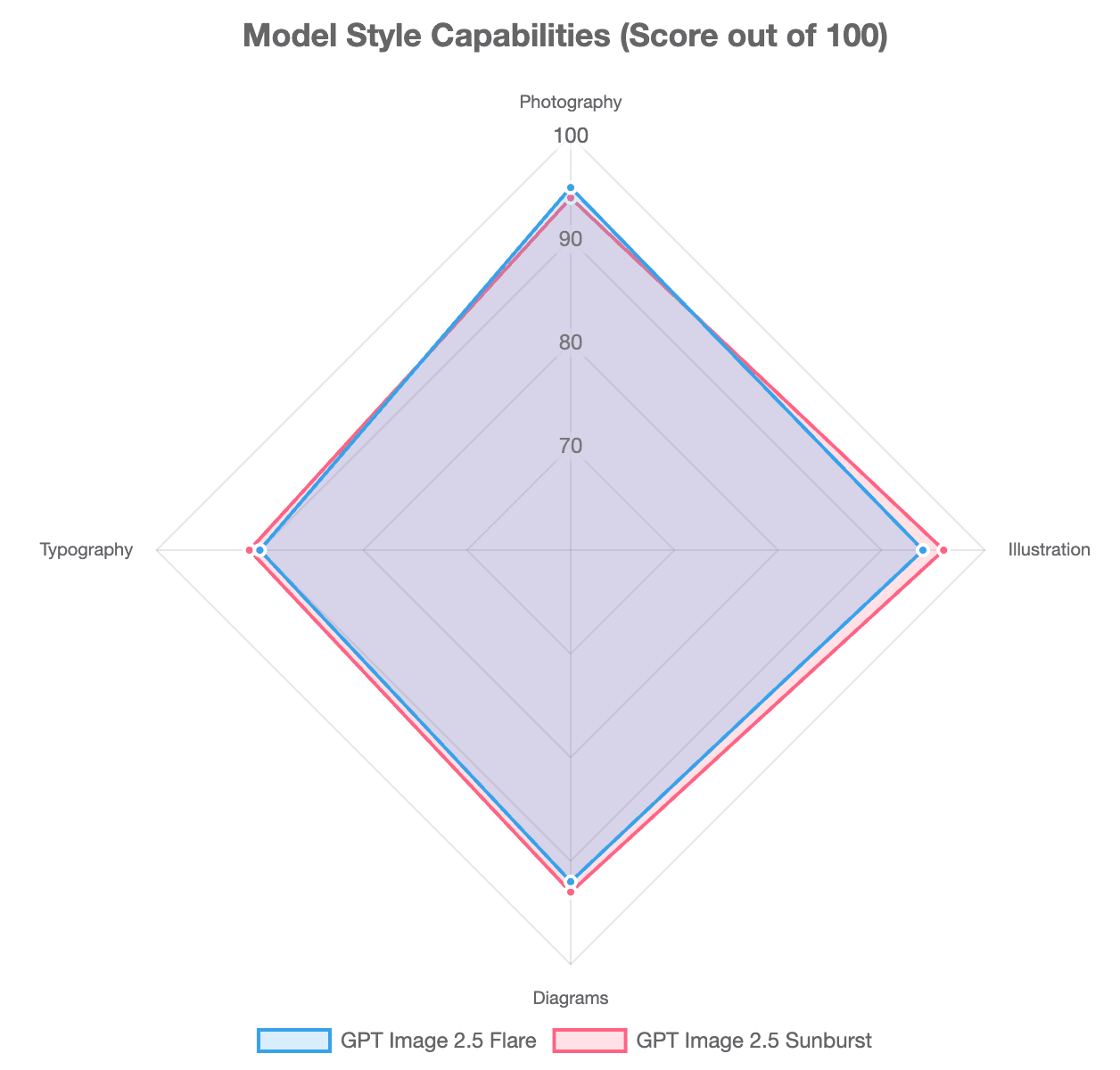
No. Flare is not a “photorealistic model” while Sunburst is a “stylized model.” Both can create photography, illustrations, posters, diagrams, product imagery, and other visual styles.
The official distinction is operational: Flare prioritizes faster everyday generation, while Sunburst prioritizes tighter control in demanding creative and editing workflows.
Choose by Acceptance Threshold, Not by “Best Model”
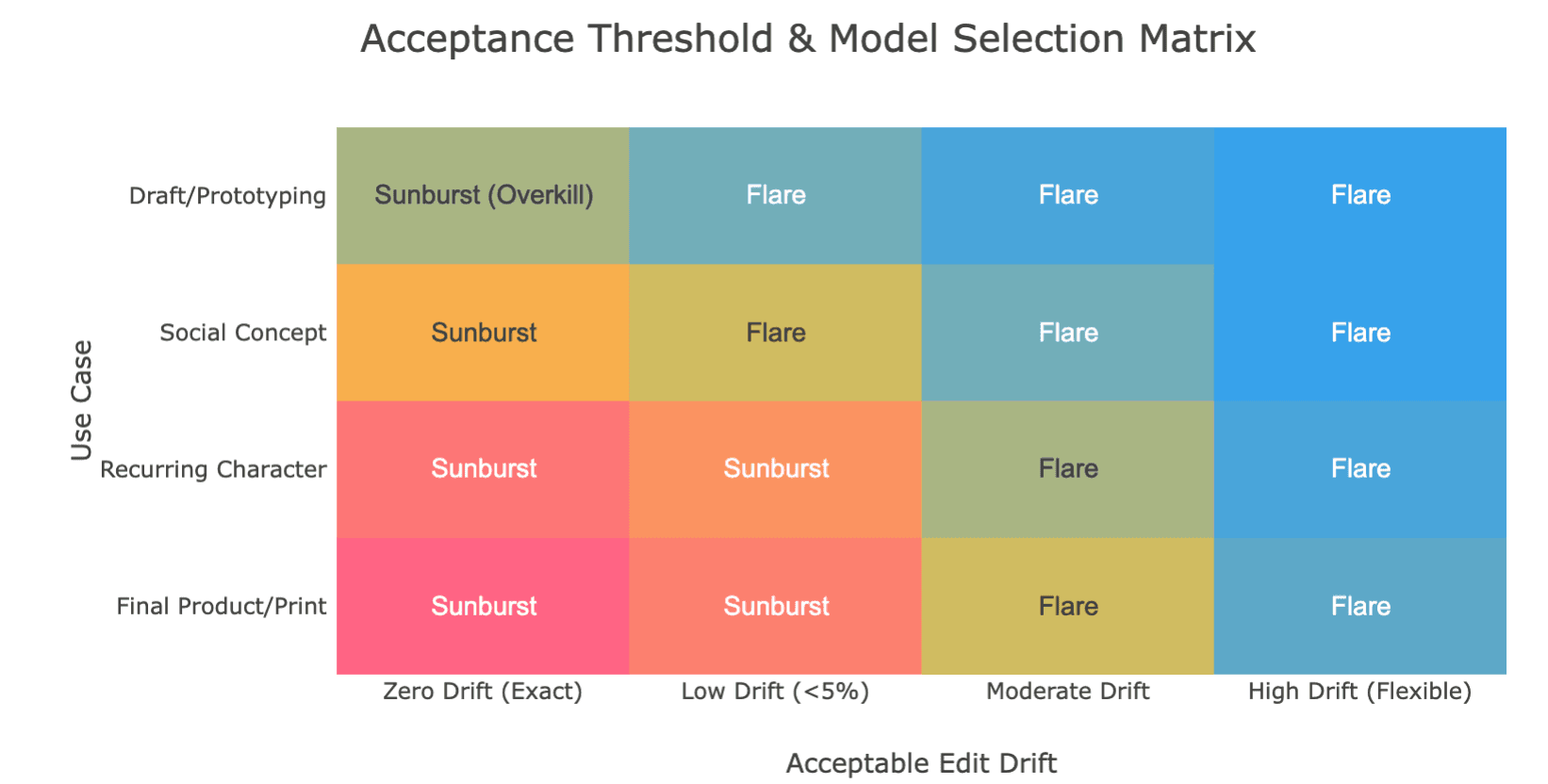
A production team should define what makes an image acceptable before choosing the model.
For a product image, that might mean the packaging geometry stays correct, the label is readable, the background follows the brief, and no unwanted objects appear. For a character, face, clothing, and proportions may be the critical constraints.
If Flare consistently passes those requirements, moving to Sunburst simply because it is the higher-precision model may add latency without adding useful value.
A better decision framework is:
Throughput × Output Fidelity × Edit Stability
rather than simply “speed versus quality.”
How Do Flare and Sunburst Compare in Quality, Speed, and Real-World Tests?
“Image quality” is too broad to be useful by itself. A visually richer image can still be worse for production if it ignores the prompt, changes a product, or introduces unwanted text.
Image Quality Is More Than Visual Polish
For practical testing, evaluate six separate dimensions:
- Instruction fidelity — Did the model follow the brief?
- Visual richness — Are lighting, texture, and depth convincing?
- Reference fidelity — Did the person or product remain recognizable?
- Edit precision — Did only the requested area change?
- Text accuracy — Are wording and spelling correct?
- Fine-detail realism — Do small materials, edges, and features hold up?
In Puter’s same-prompt poster test at xhigh, both models rendered all required text correctly. Flare stayed closer to the specified formatting, while Sunburst produced a richer scene but also introduced harbor elements that were not requested. The authors correctly treated this as a small test rather than proof that either behavior is universal.
How Much Faster Is Flare?
OpenAI reports that Flare can deliver higher-quality images than GPT Image 2 at up to 50% lower latency. Independent tests broadly support the speed-oriented positioning, although exact numbers differ by provider, quality level, size, and prompt.
For example, Thumix measured 16.2 seconds for Flare versus 24 seconds for Sunburst at high quality in one test. Segmind also observed a widening latency gap at higher quality settings. These are platform-specific measurements, not universal benchmarks.
For production teams, accepted assets per hour is more useful than seconds per generation. A faster model that requires repeated rerolls can ultimately be less efficient than a slower model with a higher approval rate.
First-Pass Quality vs Accepted-Asset Quality
The first image is rarely the whole workflow.
A better comparison measures:
Generation → review → retry → edit → approval
If Flare needs three attempts to meet a locked product brief while Sunburst succeeds in one, Sunburst may be more efficient despite slower individual generations.
This is why model comparisons should track accepted-output rate, not just which first image looks better.
Is Sunburst Better for Precision Editing and Multi-Turn Changes?
This is where Sunburst’s positioning becomes most meaningful. OpenAI specifically recommends it when editing precision matters most, especially for polished product imagery and production-ready creative.
What Does “Editing Precision” Actually Mean?
Precision can be measured by asking:
- Did the requested element change?
- Did unrelated areas remain stable?
- Did a reference subject retain its identity?
- Did earlier edits survive later edits?
- How much cumulative drift appeared?
Segmind measured this directly in a targeted editing experiment. In its test, Sunburst showed lower pixel drift outside the requested edit region than Flare. However, even Sunburst still changed parts of the image that were supposed to remain untouched. The practical lesson is important: precision editing is not the same as pixel-preserving compositing.
Use an Edit Invariant Contract
A useful editing pattern is to define three things before every important change:
Change: what this turn is allowed to modify.
Keep visually consistent: identity, pose, product geometry, framing, lighting direction, layout.
Keep pixel-exact: assets such as logos, approved labels, legal copy, or UI screenshots that should be composited rather than regenerated.
Community testing summarizes this effectively as:
“Change only X. Keep exactly Y.”
The same testing also suggests restating important constraints during long edit chains because drift can still accumulate.
Know Your Drift Budget
Different assets tolerate different levels of change.
A social concept may tolerate moderate variation. A recurring character needs much tighter identity consistency. A final product packshot or approved campaign layout may tolerate almost none.
Once the drift budget approaches zero, stop regenerating the full frame. Move to masking, compositing, or conventional image editing instead.
How Much Does GPT Image 2.5 Cost, and Which Quality Setting Should You Use?
Flare and Sunburst currently have the same published OpenAI token rates: $5 per million text-input tokens, $8 per million image-input tokens, and $30 per million image-output tokens, with lower cached-input rates.
That does not mean every finished image costs the same.
Low, Medium, High, XHigh, Max, or Auto?
Both models support:
low, medium, high, xhigh, max, and auto.
Higher quality generally increases rendering effort, but quality is not the same as resolution. In Thumix testing, changing the quality tier changed output-token usage and detail while the returned pixel dimensions remained the same.
A practical starting point:
| Quality | Good Starting Use |
| Low | Rough concepts and cheap exploration |
| Medium | Everyday social and draft creative |
| High | Product images, portraits, detailed assets |
| XHigh / Max | Use only when lower settings fail a real requirement |
| Auto | Convenient, but avoid for controlled model comparisons |
For small labels or dense typography, community testing suggests trying the next quality level before repeatedly rewriting an already clear prompt.
Calculate Cost per Accepted Asset
The more useful business metric is:
Cost per accepted asset = generation + retries + edits + review cost ÷ approved images
A model with the same API rate can still have a different real production cost if it requires more retries or manual corrections.
Also keep pricing layers separate. OpenAI API pricing, third-party credit systems, and Leadde plan pricing are not interchangeable. Leadde states that GPT Image 2.5 usage follows its plan rather than charging a separate model fee.
Which GPT Image 2.5 Model Should You Use for Different Workflows?
For most teams, start with Flare and move to Sunburst only when precision becomes the bottleneck.
| Workflow | Best Starting Point | Why |
| Social variations | Flare | Fast iteration |
| Concept exploration | Flare | More directions quickly |
| High-volume generation | Flare | Throughput |
| Ecommerce catalog concepts | Flare | Efficient variation |
| Sensitive product edits | Sunburst | Better precision target |
| Multi-round client revisions | Sunburst | Edit stability matters |
| Final campaign refinement | Sunburst | Control outweighs speed |
| Unsure | Flare | OpenAI’s default recommendation |
Flare for Exploration, Sunburst When Precision Becomes the Bottleneck
A useful workflow is:
- Generate several directions with Flare.
- Select the strongest asset.
- Test whether it already meets the acceptance criteria.
- Move to Sunburst only if a remaining edit requires tighter control.
Do not automatically regenerate every approved Flare image in Sunburst. That can introduce new composition or identity drift without solving an actual problem.
How Can You Keep the Same Person, Product, or Character Consistent?
Start with a clean reference image and repeat identity-critical details in major edits.
For recurring characters, one community workflow used a 16-panel reference sheet containing front, side, back, expression, pose, and detail views on a plain white background. The author reported consistent results across several scenes, although this is a community experiment rather than a guaranteed OpenAI workflow.
For multiple references, assign each image one job:
- Reference 1: identity
- Reference 2: clothing
- Reference 3: product
- Reference 4: lighting or palette only
Also state what a reference must not control. This reduces the risk of identities, environments, and styles blending together.
Production Workflows for Ecommerce, Marketing, and Video Teams
For ecommerce, Flare fits catalog variations and background concepts, while Sunburst becomes relevant when a locked product asset needs precise refinement.
Marketing teams can use Flare for campaign directions and ad variations, then introduce Sunburst for demanding final edits to improve b2b marketing videos.
For video and learning workflows, an image can also be an intermediate asset rather than the endpoint. Leadde currently uses Flare and lets teams generate or edit an image, then reuse it in a video scene, turn ppt into elearning video, create storyboards, or transform product url to ai video without leaving the workspace.
What Are the Limitations of GPT Image 2.5, and Where Can You Use It?
GPT Image 2.5 improves reference fidelity and multi-turn editing, but it is not a deterministic graphics editor.
What Can Still Go Wrong?
Important limitations include:
- Edit drift: unrelated details can still change.
- Masks are not guaranteed to be pixel-exact: Segmind observed changes outside a masked edit area in its test.
- Text still needs proofreading: especially labels, packaging, and print assets.
- Lighting can conflict with a new background: Puter observed strong subject preservation but less convincing lighting integration in one reference-image test.
- Multiple references can blend incorrectly if their roles are not clearly defined.
Most importantly, recognizable is not the same as identity-exact. A person may still look like the same person while facial landmarks shift slightly. A package may look correct while small typography or geometry changes.
Where Can You Use Flare and Sunburst?
Developers can explicitly select:
gpt-image-2.5-flare
or
gpt-image-2.5-sunburst
through OpenAI’s image-generation APIs and supported Responses API workflows.
ChatGPT also uses Images 2.5, but OpenAI’s public launch announcement does not state that the normal ChatGPT interface exposes a direct Flare/Sunburst selector. Third-party speculation about which variant ChatGPT uses by default should therefore not be treated as official confirmation.
The 4-Part Information Loss Test
How Does Leadde Use GPT Image 2.5?
Leadde currently provides GPT-Image-2.5 Flare, not Sunburst. Users can start with a prompt or reference image, adjust the aspect ratio and output count, refine the result, and then reuse the final visual in other Leadde content workflows.
For teams already producing presentations, storyboards, training content, or videos, this changes the role of image generation: the image becomes a reusable content-production asset, not an isolated output. Teams can easily turn long power point decks into microlearning videos or streamline other media operations directly within the suite.
FAQ
Is Sunburst always better than Flare?
No. Sunburst is optimized for demanding image generation and precision editing, while Flare is optimized for fast everyday production. If Flare already meets your quality and consistency requirements, Sunburst may add latency without providing meaningful workflow value.
Is Flare faster than Sunburst?
Flare is OpenAI’s speed-oriented model and is generally the faster choice. Independent tests have also observed lower Flare latency at higher quality settings, although exact differences vary by prompt, provider, size, and load.
Do Flare and Sunburst cost the same?
Their published OpenAI token rates are currently the same. Actual cost per finished asset can still vary because quality level, input references, retries, editing rounds, and human review affect the total workflow cost.
Which model is better for image editing?
Start with Sunburst when the edit involves a valuable existing asset and minimizing unrelated changes is important. For ordinary edits where speed matters and some variation is acceptable, Flare may be sufficient.
Which GPT Image 2.5 model is best for product photography?
Flare is well suited to generating product concepts, variations, and catalog-scale imagery. Sunburst is the stronger starting point for precision-sensitive refinements to polished product assets.
Should I use High, XHigh, or Max quality?
Use the lowest quality setting that meets the requirement. High is a sensible starting point for detailed product or portrait work. Move to XHigh or Max only when a lower tier fails a specific requirement, because higher settings increase generation effort and latency.
Can GPT Image 2.5 keep the same character across multiple images?
It can maintain reference subjects more reliably than earlier GPT Image workflows, but consistency is not guaranteed. Reusing the same reference, repeating defining traits, and using multi-view character sheets can reduce drift.
Does Leadde support both Flare and Sunburst?
No. Leadde’s current GPT Image 2.5 page states that it uses Flare, while Sunburst is “not currently” available there.
Conclusion
Flare is the practical starting point when speed, iteration, and volume matter; Sunburst becomes more useful when editing precision and asset stability become the bottleneck. Instead of choosing the model with the highest theoretical capability, choose the workflow that reaches your acceptance standard with the fewest retries, edits, and production compromises.