
How to Create an Avatar-Led Presentation from PowerPoint in 2026

To create an avatar-led presentation from PowerPoint, upload your PPT or PDF to an AI video platform that can extract slide content, turn speaker notes into narration scripts, sync the voice with an AI presenter, and export the result as a professional video.
The strongest 2026 workflow keeps your original slide assets editable, matches the avatar and voice to your audience, and lets teams update, translate, or reuse the presentation without recording a human presenter again.
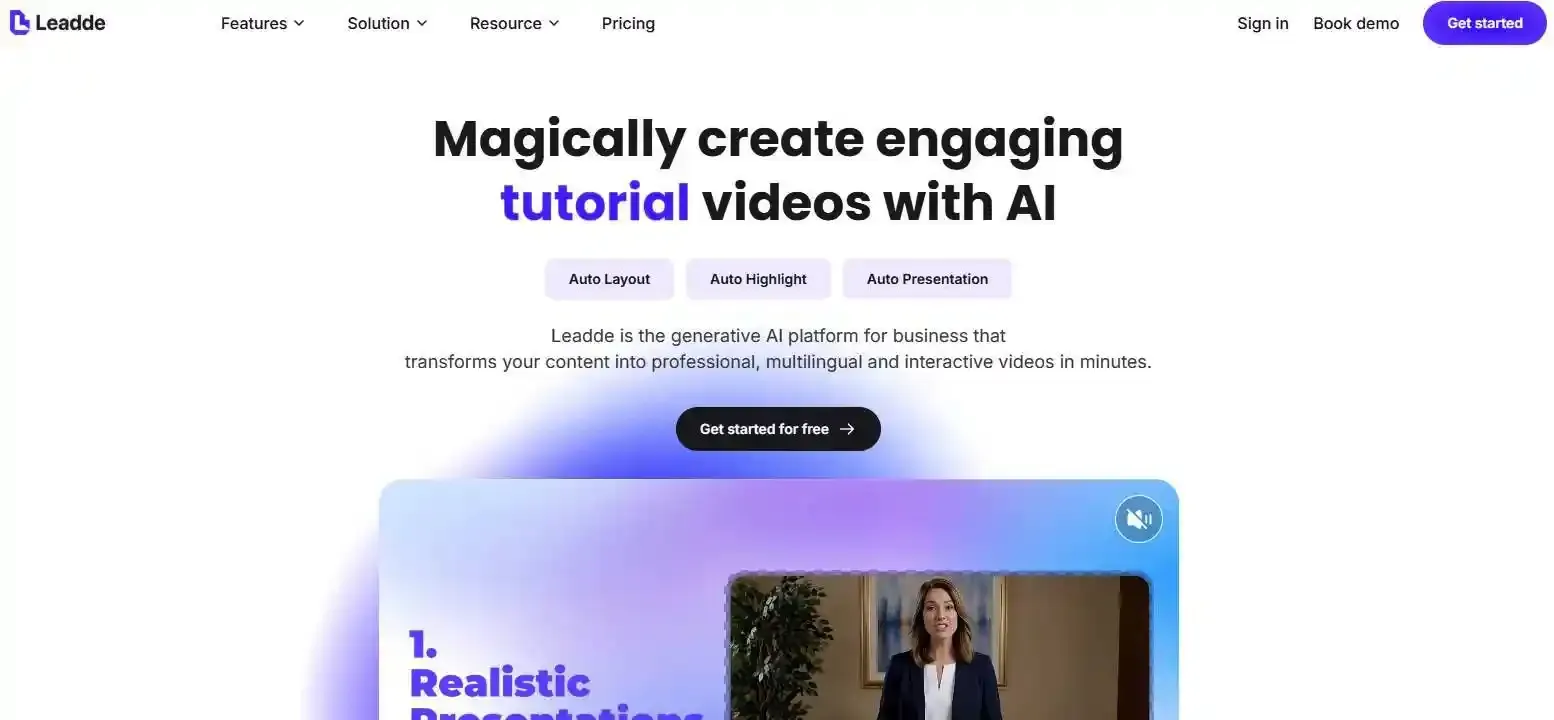
Manual production turns every deck update into another round of recording, editing, and redesign. Leadde removes that bottleneck by turning PowerPoint files and documents into professional business videos in minutes, helping teams cut up to 80% of production costs and 90% of content creation time.
How to Create an Avatar-Led Presentation from PowerPoint
Creating an avatar-led presentation from PowerPoint means turning a slide deck into a narrated video where an AI presenter explains each slide. The best workflow uses the PowerPoint file as the source, converts slides into scenes, turns speaker notes into narration, and syncs the script with an avatar.
This is different from simply exporting a PowerPoint as MP4. PowerPoint can export a presentation as a video, but it does not automatically create an AI presenter, generate voice-over, or localize the content into multiple languages.
The Fastest Workflow: Upload PowerPoint, Generate Script, Choose Avatar, Export Video
- Upload Your Assets: Start by saving your local PowerPoint deck as a clean PDF or native PPTX file before pulling it into your AI generation platform.
- Configure Your Script: Paste your pre-written presentation notes directly into the slide-by-slide text input panel to serve as the voiceover foundation.
- Select and Export: Choose a professional digital presenter that aligns with your audience demographic, preview the layout synchronization, and render the final MP4 video file.
Why Speaker Notes Are the Key to Natural Avatar Narration
- Direct Script Mapping: Modern AI presentation platforms scan the embedded metadata within your presentation files to automatically extract your local speaker notes.
- Contextual Timing: By parsing your existing slide-level commentary, the underlying text-to-speech model automatically aligns its verbal pacing with specific visual animations.
- Reduced Manual Entry: Utilizing speaker notes cuts out the repetitive task of copying and pasting text scripts for every single slide scene.
What to Prepare Before Uploading Your Presentation Deck
- Aspect Ratio Verification: Ensure your slide canvas is strictly configured to a modern 16:9 widescreen format to avoid black bars or stretched graphics in the final video layout.
- Declutter Visual Text: Remove paragraphs of dense text from the slides themselves, leaving only high-impact keywords since the digital avatar handles the heavy spoken explanation.
- High-Resolution Graphics: Swap out compressed web imagery for crisp vector icons and high-contrast visuals so your brand assets remain clean after rendering.
Why Should You Convert Static PowerPoint Slides into Avatar-Led Videos?
Static slides are easy to create but hard to watch without a presenter. An avatar-led video adds voice, pacing, facial presence, and guided explanation.
For business teams, the main value is not just visual polish. It is the ability to turn existing training, sales, onboarding, and product decks into repeatable video assets.
How AI Presenters Make Text-Heavy Slides Easier to Watch
- Visual Anchor Points: Having a dynamic, realistic human face on screen gives viewers a natural point of focus, which significantly reduces digital screen fatigue.
- Multisensory Learning: Combining targeted slide graphics with crisp spoken audio helps corporate learners retain complex data far better than reading raw text walls.
- Polished Communication: Professional AI presenters maintain perfect posture, steady eye contact, and continuous clarity without vocal stumbles or awkward pauses.
How Avatar Videos Reduce Camera, Editing, and Production Costs
- Zero Hardware Overhead: Producing professional presentation videos no longer requires investing thousands of dollars in high-end studio cameras, advanced lighting arrays, or green screens.
- Eliminate Talent Expenses: You can bypass the costly process of hiring professional actors, voiceover specialists, or scheduling executive recording sessions.
- Lower Post-Production Bills: The entire editing pipeline is handled instantly through cloud software, removing the need for expensive third-party video editors.
Why “Regenerate, Not Re-Record” Matters for Business Training
- Text-Based Revisions: When software interfaces update or standard operating procedures change, you simply edit the text script to deploy an updated presentation.
- Instant Asset Refresh: Traditional video requires assembling the exact same spokesperson and camera setup for updates, while AI updates your presentation slides instantly.
- Zero Content Obsolescence: Training materials stay completely up to date in real time, ensuring global teams never review outdated corporate information.
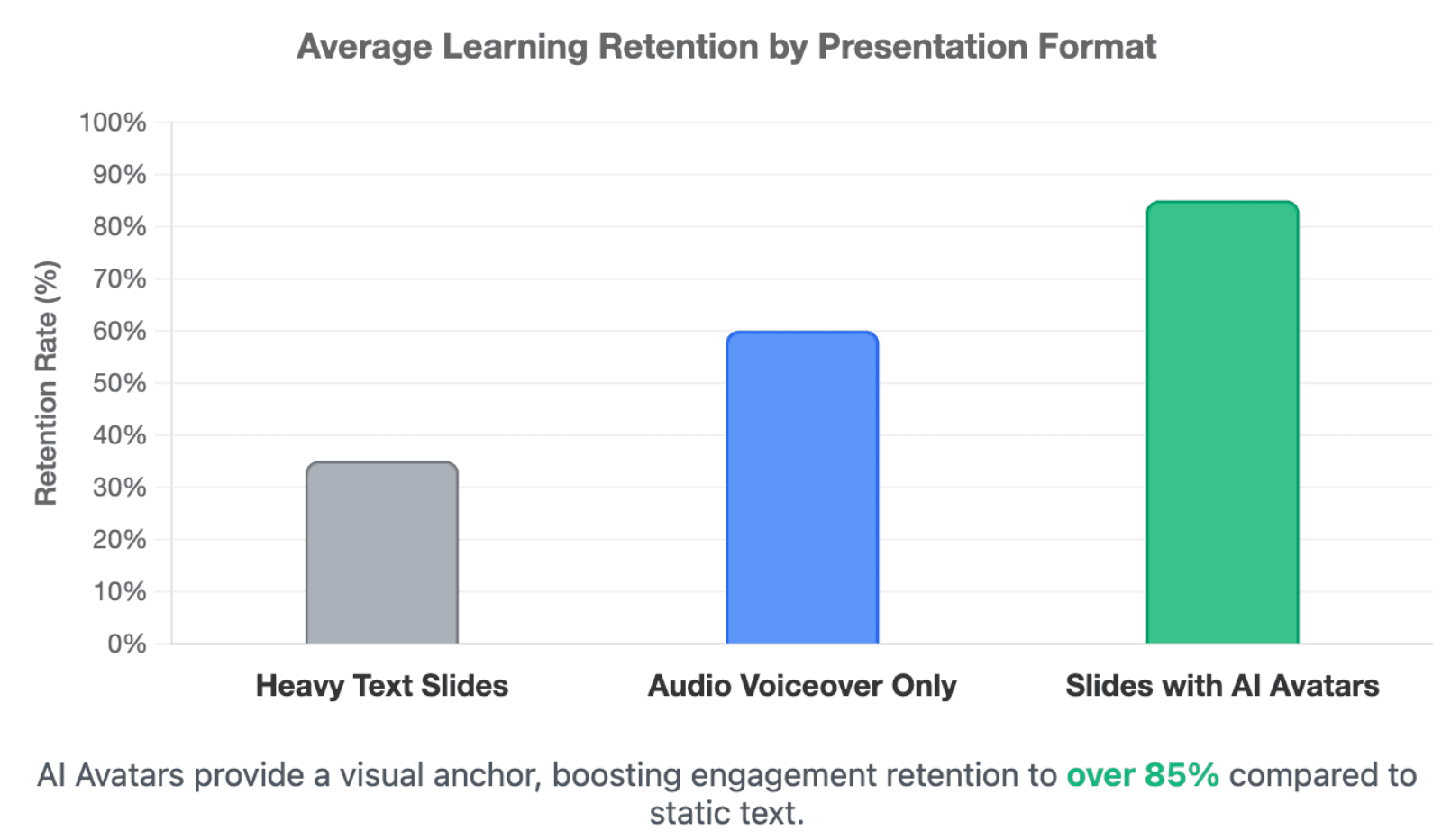
Average Learning Retention by Presentation Format
How Do AI Avatar Presentation Tools Convert PowerPoint into Video?
AI avatar tools usually convert a PowerPoint deck into scenes. Each slide becomes a video segment, and the speaker notes or generated script become the narration.
Some tools keep the original slide as a visual layer. Others rebuild the slide into a new video layout. The best choice depends on whether you care more about brand accuracy or creative video transformation.
The Standard Slide-to-Scene Workflow
Most tools follow this path:
| Stage | What Happens |
| Import | Upload PPT, PPTX, or PDF |
| Parse | AI reads text, layout, visuals, and notes |
| Script | Speaker notes become narration or AI creates a script |
| Avatar | A presenter is added to each scene |
| Voice | Text becomes speech |
| Edit | User adjusts scenes, timing, and layout |
| Export | Final video is downloaded or shared |
HeyGen’s 2026 help documentation describes PPT/PDF-to-video as a way to convert presentations into editable, avatar-driven videos.
How AI Tools Match Avatars, Voices, Languages, and Accents
- Cross-Border Localization: Leading systems analyze text structures to deploy localized synthetic voices across 140+ distinct international languages.
- Regional Accent Pairing: Advanced voice engines support specific accents, allowing an English script to be read with a clear British, American, or Australian tone.
- Hyper-Realistic Lip Syncing: Neural audio networks dynamically adjust the physical lip movements of the selected digital character to match the phonemes of the audio script.
Common Limits: Frozen Layouts, Robotic Voices, and Broken Branding
- Static Canvas Constraints: Traditional platforms lock down your imported PowerPoint slides into a single uneditable block, forcing a very rigid presentation structure.
- Monotonous Formats: Because visuals are completely non-editable after upload, images and video clips cannot change dynamically alongside the spoken audio script.
- Loss of Visual Identity: Standard non-editable templates often break custom company font hierarchies, specific hex colors, and exact margin spacing rules.
What Are the Best AI Avatar Tools for PowerPoint Presentations in 2026?
The best tool depends on your goal. Some teams need realistic avatars. Some need LMS-ready training videos. Others need fast document-to-video automation with multilingual support and repeat updates.
As of 2026, available information suggests that PowerPoint-to-avatar tools are moving toward editable imports, speaker-note narration, multilingual output, and reusable business video workflows.
HeyGen: Strong Avatar Realism for Polished Presenter Videos
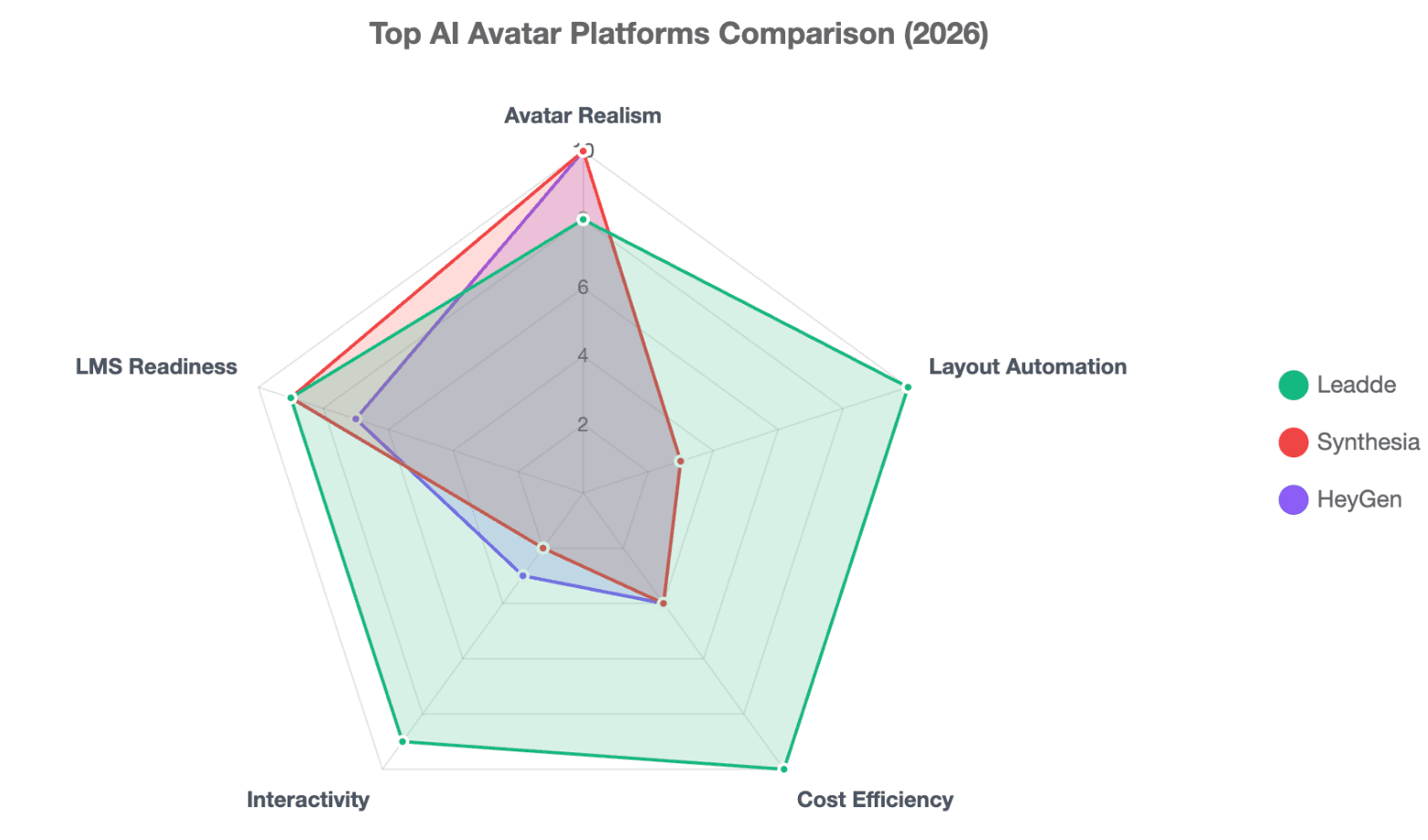
- High-Fidelity Rendering: Known for providing top-tier facial tracking metrics and highly detailed physical animations for formal business videos, though some scaling teams explore HeyGen alternatives to manage budgets.
- Slide Notes Integration: Offers clean imports for basic slide decks, pulling text notes into its editing interface with relative ease.
- Premium Pricing Friction: The subscription tiers carry premium price points that can strain budgets when expanding production across large departments.
Synthesia: Enterprise-Ready Video Creation and Training Workflows
- LMS Compatibility: Features structural integrations built tailored for enterprise Learning Management Systems and cross-region compliance communication. If strict minute limitations hold you back, examining Synthesia alternatives can offer more flexibility.
- Starter Plan Constraints: As of 2026, the basic Starter Plan costs $29/month but restricts users to a highly limiting 10 minutes of video per month.
- Template Inflexibility: Relies heavily on rigid, non-editable templates, making it difficult to adjust layouts once your deck is imported into the system.
Leadde: Document-to-Video Automation for Branded, Multilingual, Interactive Presentations
- Disruptive Pricing Structure: Shakes up the market by offering an aggressive $25/month Starter Plan providing unlimited video generation.
- Dynamic Canvas Control: Unlike competitors with frozen layouts, Leadde fully supports Auto Layout and Auto Highlight features that adjust visuals to the script.
- Unmatched Core Customization: Empowers corporate users with instant Photo-to-Avatar creation and high-accuracy voice cloning across 170+ distinctive accent languages.
- Two-Way Engagement Loops: Moves past standard one-way video by introducing Video Chat and Chat-Enabled Interactive Avatars to capture direct customer data.
What Do Real Users Complain About When Turning PowerPoint into Avatar Videos?
The biggest user complaints are not only about avatar quality. They are often about control, branding, pronunciation, and how well visuals match the spoken narration.
A good avatar-led presentation should feel like a guided business presentation, not a talking head pasted on top of frozen slides.
Why Fixed Templates Can Damage Corporate Visual Identity
Many companies already have branded PowerPoint templates. If an AI tool forces those slides into a generic video template, the final result may look off-brand.
Brand damage can happen when:
- Fonts are replaced.
- Colors shift.
- Icons lose alignment.
- Slide spacing changes.
- Layouts are rebuilt without brand rules.
For corporate teams, preserving the original slide identity is often more important than adding flashy motion effects.
Why Visuals Should Change Dynamically with the Narration
A strong avatar video should not leave the same slide frozen for too long. The visual flow should follow the spoken explanation.
Better presentation videos use:
- Step-by-step highlights.
- Visual focus on the current point.
- Scene changes when the topic changes.
- Stock images or diagrams when slides are too plain.
- Shorter segments for dense material.
Leadde’s materials describe automation for scene layout, key-point highlighting, presentation flow, and voice-over generation, which directly supports this kind of guided visual experience.
How to Avoid Pronunciation Errors in Acronyms, Product Names, and Technical Terms
AI voices can mispronounce brand names, acronyms, technical terms, or drug names. This is a serious issue for SaaS, healthcare, compliance, and enterprise training.
Before final export, review:
- Product names
- Acronyms
- Executive names
- Medical or legal terms
- Industry jargon
- Regional pronunciation
A practical fix is to write phonetic spelling in the script or replace acronyms with the full phrase where needed.
How Can Leadde Create an Avatar-Led Presentation from PowerPoint Automatically?
Leadde’s workflow is designed to turn business content into structured videos. Instead of treating PowerPoint as a flat visual file, Leadde can use the deck as a source for outlines, scenes, scripts, presenters, and multilingual versions.
This makes it useful for teams that already have large libraries of training decks, onboarding slides, product explainers, SOPs, or internal communication materials.
Step 1: Upload Your PowerPoint While Preserving Brand Assets
- Full Identity Retention: Pull your native PowerPoint presentation files directly into the platform while maintaining perfect business branding guidelines.
- Asset Vector Protection: The conversion engine respects your corporate color palette, custom font styles, and original logo layout grids without flat rasterization.
- Speaker Note Extraction: Spoken scripts are parsed out automatically from your slide notes, instantly assigning clean speech boundaries to every scene.
Step 2: Generate Scenes, Voice-Over Scripts, and Dynamic Visual Layouts
- Intelligent Auto Layout: The interface actively shifts graphical components on the fly to prevent your slide assets from overlapping with the speaker.
- Automated Keyword Highlighting: The system deploys Auto Highlight tech to visually emphasize important metrics on screen exactly as the avatar says them.
- Fluid Asset Updating: Swap out supporting images, update body text, or refresh background videos natively without ever freezing your underlying template structure.
Step 3: Add AI Avatars, Multilingual Narration, and Interactive Video Experiences
- Persona Generation: Create a customized digital presenter in seconds using a single corporate headshot via Photo-to-Avatar generation.
- Cloned Voice Deployments: Activate accurate voice clones tailored across 170+ international languages and specialized regional accents.
- Conversational Presentations: Deploy a Chat-Enabled Interactive Avatar that turns your static video presentation into a live, interactive workspace.
Step 4: Share, Update, Analyze, and Reuse the Presentation Over Time
- Single-Link Access: Distribute your completed avatar-led presentation via a simple web URL or embed it directly onto your internal training landing pages.
- Instant Text Patches: Correct minor script typos or update numerical quarterly statistics by changing the text, instantly regenerating the video without rendering fees.
- Bidirectional Interaction Tracking: Analyze viewer drop-off points, trace user question logs, and score actual engagement metrics via Leadde's analytics panel.
Which AI Avatar Presentation Workflow Is Best for Your Industry?
Different industries use avatar-led PowerPoint videos in different ways. The best workflow depends on content type, update frequency, compliance needs, and audience language.
For most business teams, the strongest workflow is one that supports reusable scripts, editable scenes, multilingual output, and easy updates.
SaaS and Enterprise Software: Customer Onboarding and Product Education
SaaS teams often have many decks for onboarding, feature launches, customer education, and internal sales enablement. These decks become outdated when the product UI or workflow changes.
Avatar-led videos help SaaS teams:
- Turn feature decks into product walkthroughs.
- Create repeatable customer onboarding.
- Update modules after product changes.
- Localize training for global users.
- Reduce the need for live demos.
Retail and E-Commerce: Training, SOPs, and Service Standardization
Retail teams need consistent training across stores, countries, and seasonal campaigns. Static PowerPoint decks are easy to distribute but hard to enforce.
Avatar-led videos help retail teams explain:
- Store opening procedures
- Customer service standards
- Product knowledge
- Safety rules
- Seasonal campaign training
The key benefit is consistency. Every employee receives the same explanation, tone, and visual guidance.
Healthcare and Compliance: Multilingual Training and Policy Explanations
Healthcare, compliance, and regulated industries need clear, accurate, repeatable communication. A small wording error can create confusion.
Avatar-led presentations help these teams turn complex decks into guided videos for:
- Policy updates
- Drug explainers
- Safety training
- Compliance education
- Patient or staff onboarding
For AI-generated voice, companies should clearly disclose when the voice is AI-generated and not a human voice, following OpenAI’s TTS disclosure guidance and broader AI transparency best practice. (OpenAI开发者)
Conclusion
Creating an avatar-led presentation from PowerPoint has evolved from a manual, complex recording workflow into a fully automated cloud process. Traditional market platforms like Synthesia and HeyGen deliver high avatar realism but struggle with restrictive monthly video minute limits, high premium pricing structures, and rigid, uneditable templates that freeze slide designs.
As of 2026, Leadde rewrites the industry standard by offering an accessible $25/month Starter Plan packed with unlimited video generation. By pairing deep brand asset preservation with innovative automation features like Auto Layout, Auto Highlight, and two-way Chat-Enabled Interactive Avatars, Leadde shifts the PowerPoint-to-video workflow away from boring, static playbacks into highly scalable, dynamic, and conversation-driven corporate business assets.





