
How to Create Medical Software Demo Videos for Hospitals and Clinics

Creating high-converting medical software demo videos for hospitals and clinics starts by mapping the product to real clinical, operational, and IT workflows. Instead of a generic feature tour, the video should show one buyer role, one high-value task, and one PHI-safe walkthrough using synthetic or anonymized data.
The strongest demos are short, modular, and proof-driven: they explain the workflow problem, demonstrate the interface, highlight security and integration readiness, and guide buyers toward a next step such as a workflow demo, sandbox request, or technical review.
But manual screen recording gets expensive fast. Every product update, release note, or interface change can trigger another rewrite.
Leadde turns documents and text into professional business videos automatically, helping healthcare software teams create update-ready demos in minutes while cutting production costs by 80% and content creation time by 90%.
How to Create Medical Software Demo Videos for Hospitals and Clinics That Drive High-Value B2B Conversions?
A medical software demo video must do more than show screens. It should help hospital and clinic buyers answer one commercial question: “Can this system work inside our environment without creating new risk?”
That means the demo should connect product value to clinical workflows, IT requirements, compliance expectations, and procurement confidence.
Defining the Healthcare SaaS Audience
Healthcare software buying is rarely a single-person decision. A strong demo video should speak to several stakeholders without becoming scattered.
| Stakeholder | What They Need to See |
| CIO / IT Director | Integration, uptime, security, SSO, APIs, data exchange |
| CMIO / Clinical Leader | Clinical workflow fit, usability, adoption risk |
| Doctors / Nurses | Fewer clicks, clearer handoffs, faster documentation |
| Compliance / Privacy Officer | PHI controls, access permissions, audit trails |
| Billing / Revenue Cycle Team | Claims, insurance verification, coding, payment workflow |
| Procurement / CFO | Implementation effort, training needs, operational value |
The demo should not try to satisfy all roles equally in one long video. It should lead with the primary buyer and then provide proof points for secondary reviewers.
Why Traditional One-Way Explainer Videos Fail to Impress Clinicians, IT Teams, and Buyers
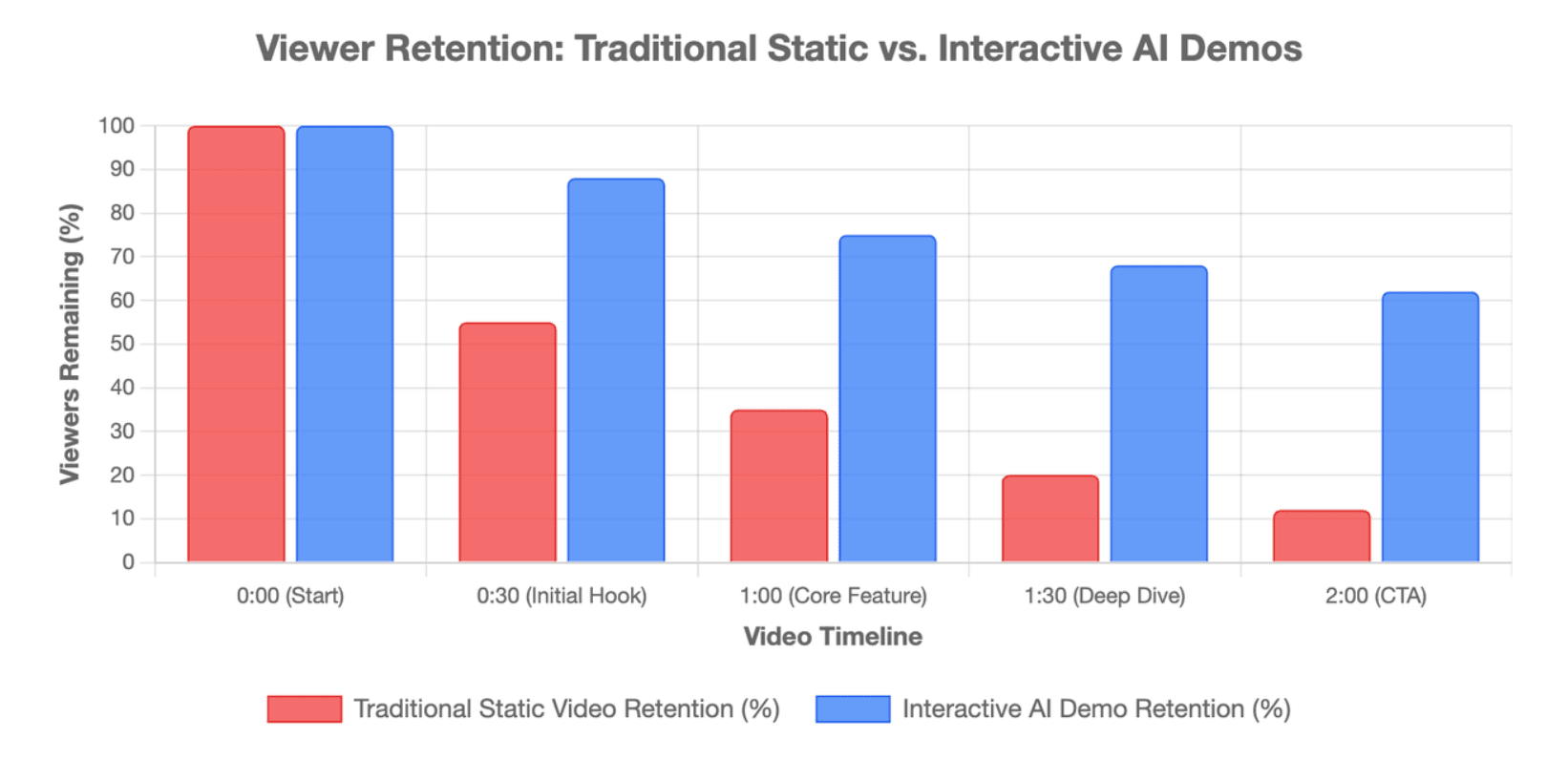
Traditional video assets usually offer static product tours that gloss over real-world clinical environments. Medical buyers reject overly polished marketing fluff that lacks technical data substance typical of older explainer videos:
- Passive Monotone Output: Static videos do not allow procurement leads to jump to specific module stress-tests.
- Lack of Edge-Case Proof: Generic walk-throughs hide system errors, making experienced clinicians skeptical of true software reliability.
- Update Friction: Traditional production makes it too difficult to swap UI snapshots when software interfaces get updated.
What a Strong Medical Software Demo Must Prove in the First 30 Seconds
Hospital buyers operate under severe cognitive load and extreme time constraints. Your video must establish instant E-E-A-T authority by proving immediate system value:
- Immediate Workflow Fit: Show the actual interface solving a specific departmental pain point within the first five frames.
- Visual Trust Factors: Avoid stock graphics and utilize high-fidelity, professional UI mockups that mirror real hospital software layouts.
- Value Quantification: Explicitly state the software's time-saving metrics or data management improvements right away.
What Demo Format Should You Create for a Hospital or Clinic Buyer Journey?
Not every medical software video should be the same. The best format depends on the buyer journey stage, audience role, and product complexity.
A homepage visitor may need a short overview. A hospital IT team may need a deeper integration walkthrough. A clinic manager may need a workflow demo that shows scheduling, intake, and billing in one clear path.
Product Marketing Demos for the Commercial Investigation Phase
During early-stage discovery, buyers require high-level structural overviews that summarize key platform advantages. These marketing assets should focus on answering broad institutional questions:
- Interoperability Focus: Highlight how easily your application interfaces with existing hospital management software matrices.
- Role-Based Dynamic Visuals: Demonstrate clear dashboard views tailored for specific hospital personas like doctors or billing clerks.
- Clear Next-Step Callouts: Guide prospective enterprise leads seamlessly toward deep-dive technological sandboxes or pricing evaluations.
Workflow Walkthrough Videos for EHR, Billing, Patient Intake, Telehealth, and Analytics Software
Workflow walkthrough videos are the strongest format for serious buyers.
They show the software in action across a real task, such as:
| Workflow | What the Demo Should Show |
| Patient intake | Forms, missing fields, staff review, routing |
| EHR documentation | Chart review, note creation, order workflow |
| Billing | Eligibility check, claim status, payment workflow |
| Telehealth | Appointment setup, patient join flow, provider view |
| Analytics | Dashboard filters, reporting views, operational insights |
| Care coordination | Task assignment, handoffs, alerts, follow-up |
| Task | Nurse review required |
The goal is not to show every menu. The goal is to show how one important task moves from start to finish.
Clinical Software Training and Onboarding Modules Built as Micro-Learning Blocks
Post-sale adoption depends entirely on how quickly medical staff can master new user interfaces. Break long training materials into bite-sized video assets:
- Mayer’s Multimedia Learning Rules: Limit video lengths to under 3 minutes to optimize physician focus and knowledge retention.
- Brand Identity Preservation: Keep user interfaces visually uniform to avoid confusing nursing teams during platform rollouts.
- Dynamic UI Layouts: Use smart visual highlights to emphasize button paths during intricate multi-step clinical processes.
Step-by-Step Walkthrough: How Do You Design a Rigorous and Engaging Clinic Software Demo?
A rigorous demo starts before recording. The real work happens in planning, workflow mapping, script validation, and compliance review.
The goal is to create a video that feels simple to watch, even if the system behind it is complex.
Step 1: Map Departments, User Roles, and Real Clinical Workflow Realities
Before capturing any screen frames, plan out your presentation sequence based on exact hospital user environments. Avoid creating idealized, unconvincing product scenarios:
- Map Real Intitutional Hurdles: Frame your software demonstration around an actual department's typical daily operational challenges.
- Cross-Department Synchronicity: Show how smoothly your system transfers data records from a clinic desk straight to the central lab.
- Persona Isolation: Label each scene clearly so nurses, doctors, and tech leads know exactly whose workflow is being shown.
Step 2: Write a Workflow-Based Script with Product, Clinical, and Technical Validation
A strong script should explain the workflow, not narrate every click.
Use this structure:
| Script Section | Purpose |
| Hook | Show the hospital or clinic pain point |
| Role setup | Identify who is using the software |
| Workflow walkthrough | Show the task from start to finish |
| Trust proof | Mention security, permissions, integrations, or audit logs |
| Outcome | Summarize operational value without exaggeration |
| CTA | Guide the buyer to the next step |
Before production, the script should be reviewed by:
- Product team
- Clinical advisor or subject matter expert
- Compliance or privacy reviewer
- Security or IT stakeholder
- Marketing or sales owner
If the software includes clinical decision support, AI recommendations, or medical-device-like functionality, be especially careful with claims. FDA guidance clarifies how the agency thinks about certain clinical decision support software functions and when digital health policies may apply. (U.S. Food and Drug Administration)
Step 3: Use Professional Visual Elements While Controlling the Medical “Fear Factor”
Medical software media requires specialized design guidelines to maintain a professional, calm user focus. Choose clean, modern design styles over graphic imagery:
- Avoid Graphic Clinical Realism: Do not show real blood, surgical wounds, or needle injections, as this causes visual discomfort.
- Modern Visual Aesthetics: Use 3D glassmorphism designs and clean UI outlines to illustrate medical concepts elegantly.
- Interface Component Density: Ensure your screen captures feel clean, well-spaced, and easy to navigate on mobile devices.
Step 4: Record the Interface with Clear Callouts, Captions, and a Simple Click Path
When capturing actual user interface frames, guide the viewer's eye exactly where crucial data changes happen. Avoid rapid, erratic mouse movements across the software layout:
- Enforce Automated Zooming: Apply clear focal adjustments to enlarge smaller data cells or complex chart metrics.
- High-Contrast Captions: Include crystal-clear text captions so clinicians can watch your video silently on busy hospital floors.
- Deliberate Cursor Pathways: Move your cursor slowly along a logical user path to show exactly how to complete system actions.
How Do You Keep Medical Software Demo Videos HIPAA-Safe and Clinically Accurate?
A medical software demo video should never expose real patient data unless your organization has a clear legal basis, proper authorization, and a controlled review process.
For most marketing, sales, and training videos, the safer approach is to use synthetic or properly de-identified data.
Anonymizing PHI and Masking Practice Management Database Interactivity
Exposing real patient records in promotional videos violates federal privacy laws and ruins product credibility. Take extreme security precautions during production:
- Sanitize Practice Dashboards: Mask every single row of patient names, birth dates, and geographical data markers.
- Eliminate Real Interactivity Signs: Scrutinize system metadata, background windows, and browser tabs to prevent accidental data leaks.
- Strict Access Governance: Store all production files on encrypted servers to prevent unapproved external access.
Building Synthetic Patient Data Profiles for EHR, EMR, and Interface Demonstrations
Synthetic patient data is often the best choice for demo videos.
A good synthetic profile should feel realistic without being real.
Example:
| Field | Synthetic Demo Example |
| Patient Name | Jordan Miller |
| Age | 54 |
| Visit Type | Follow-up appointment |
| Condition | Hypertension management |
| Insurance Status | Verified |
| Intake Status | Missing medication update |
| Task | Nurse review required |
Use synthetic data consistently across the video so the workflow feels believable.
For example, if the intake screen says the patient has missing medication information, the nurse workflow should show that same issue being resolved.
Creating a Review Loop with Compliance, Clinical, Product, and Security Stakeholders
Every medical software demo should go through a structured review before publication.
A practical review loop includes:
- Product review — Are the screens accurate?
- Clinical review — Is the workflow realistic?
- Compliance review — Is PHI removed or controlled?
- Security review — Are permissions and access claims accurate?
- Marketing review — Is the message clear and conversion-focused?
- Version review — Does the video match the current product release?
Do not treat compliance review as a final checkbox. Build it into scripting, recording, editing, and publishing.
How Do You Demonstrate Reliability, Integrations, and Real-World Healthcare Infrastructure?
Hospital buyers do not only evaluate the interface. They evaluate whether the system can survive real healthcare infrastructure.
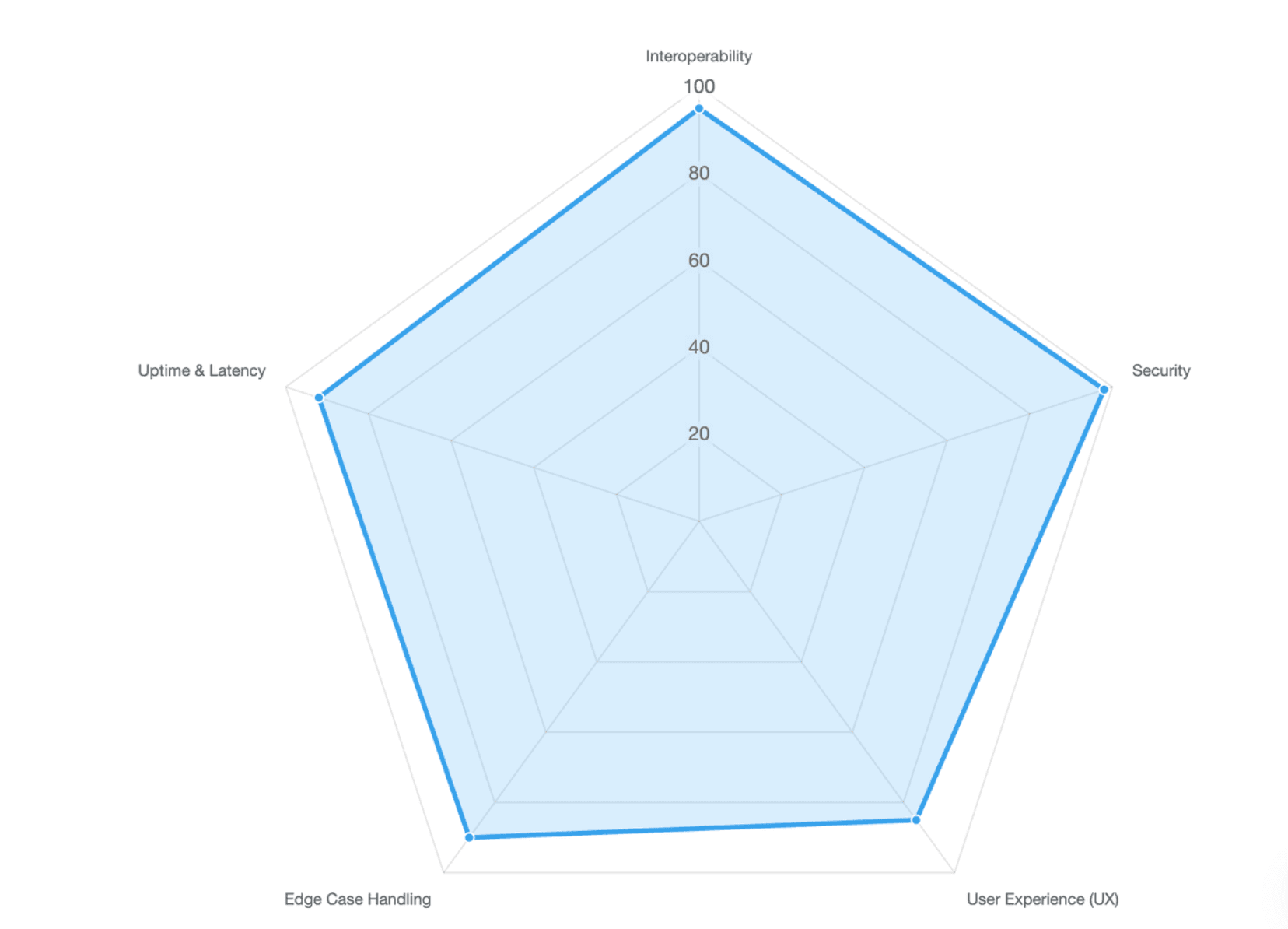
A demo that looks perfect but avoids integration, authentication, latency, or edge cases may feel incomplete to technical buyers.
Showing EHR, PACS, FHIR, HL7, API, SSO, and Audit Log Readiness
Hospital IT leads evaluate system interoperability far more than marketing aesthetics. Prove your application can integrate smoothly into modern medical infrastructure:
- Display API Capabilities Clearly: Show your software exchanging data via modern FHIR JSON payloads or standard HL7 v2/v3 messages.
- EHR and PACS Compatibility: Demonstrate your viewing portal rendering DICOM files cleanly alongside central patient charts.
- Enterprise Governance Proof: Explicitly feature your Single Sign-On (SSO) panels and real-time HIPAA audit logs in action.
Handling Edge Cases, Network Latency, Inter-System Lag, and Interface Errors in Screen Recordings
Reddit IT forums show that technical buyers reject unrealistic software demos that show impossible, instantaneous load speeds. Show your product handling real-world tech bottlenecks:
- Incorporate Real Network Realities: Show your system successfully resolving common database lag or connectivity drops.
- Graceful Error Management: Feature your interface alerting staff clearly to scheduling conflicts or drug-to-drug interactions.
- Honest Processing Speeds: Keep realistic loading bar animations intact so data managers can assess true operational efficiency.
Avoiding the Post-Update Trap with Version Control and Modular Demo Video Updates
Medical software changes often.
Screens change. Release notes change. EHR integrations change. Compliance language changes. A single long demo video becomes outdated quickly.
A better approach is to build a modular demo library:
| Module Type | Example |
| Role-based | Nurse workflow, billing workflow, IT admin workflow |
| Workflow-based | Intake, telehealth, reporting, claims |
| Feature-based | Audit logs, SSO, analytics, messaging |
| Buyer-stage-based | Overview demo, technical review demo, training demo |
| Version-based | Product release update, new interface walkthrough |
Leadde supports document and text-to-video workflows, multilingual creation, AI avatars, version control, sharing, and analytics, which can help teams maintain video assets as product materials change.
What Tools and AI Automation Platforms Are Transforming Healthcare Video Production in 2026?
In 2026, healthcare video production is moving from slow, linear editing to faster, document-driven, update-ready workflows.
The best setup depends on your team’s needs, budget, compliance process, and update frequency.
Traditional Linear Production: Cameras, Microphones, Lighting, Screen Recording, and Editing Costs
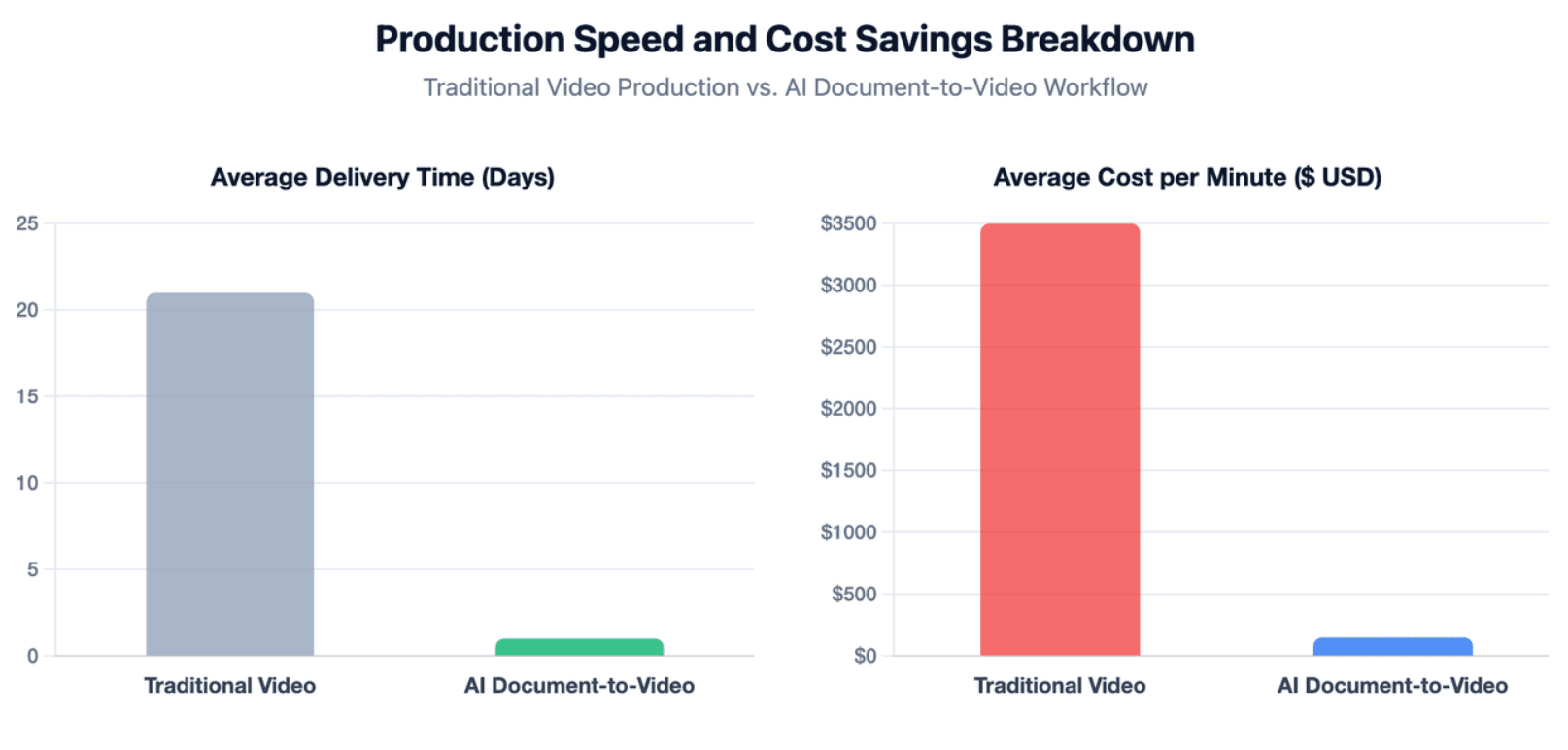
Traditional human-centric production workflows generate massive financial overhead and extensive delivery friction. This creates a challenging bottleneck for agile software development teams:
- High Resource Expenses: As of 2026, standard custom healthcare videos cost thousands of dollars per finished minute.
- Extensive Production Timelines: Coordinating live voice actors, specialized recording gear, and design changes takes weeks.
- Scalability Bottlenecks: Manual voice re-recordings make deploying prompt multilingual variations across international regions nearly impossible.
Document-to-Video AI: Turning Software Manuals, SOPs, Release Notes, and Product Decks into Demo Videos
Modern text-to-video platforms allow software teams to convert raw data manuals straight into high-fidelity demonstrations. This workflow dramatically speeds up production:
- Automated Structural Formatting: Advanced software turns standard operational text into structured, visual layouts automatically.
- Instant Visual Highlighting: AI platforms automatically zoom in on your interface screenshots based on your uploaded manual text.
- Uniform Corporate Styling: Ensure all video elements stay perfectly aligned with your clinic’s official brand guidelines.
Interactive AI Video Experiences: Helping Buyers Ask Technical, Workflow, and Integration Questions
The biggest breakthrough in 2026 is moving away from static, one-way media toward responsive, two-way conversational video tech. This technology completely transforms product demos:
- Real-Time Conversational Interfaces: Hospital buyers can chat directly with the video avatar to ask specific architectural questions.
- Instant Video Search: Buyers can tell the avatar to jump straight to specific feature walkthroughs like billing codes or lab plug-ins.
- Integrated Knowledge Bases: Avatars use your software whitepapers to answer technical hospital procurement questions instantly.
How Can Medical SaaS Vendors Reduce Video Cost, Production Lag, and Update Friction?
Medical SaaS vendors should stop treating demo videos as one-time assets.
A better strategy is to build a reusable video system that can support sales, onboarding, implementation, training, and support.
Reusing One Demo Across Sales, Onboarding, Training, Support, and Implementation
One workflow demo can serve multiple teams if it is structured well.
For example, a patient intake demo can be reused as:
| Team | Use Case |
| Sales | Show buyer value in discovery calls |
| Marketing | Embed on a landing page |
| Implementation | Prepare new customers before rollout |
| Training | Teach staff the workflow |
| Support | Reduce repeat questions |
| Customer Success | Reinforce adoption after launch |
To make this work, avoid overly salesy scripts. Focus on clear workflow education.
Creating a Modular Demo Library by Specialty, Workflow, Buyer Role, and Product Version
A modular library helps healthcare software companies scale.
Organize videos by:
- Specialty
- Department
- User role
- Workflow
- Product module
- Buyer stage
- Product version
- Language
Example library:
| Category | Video Examples |
| By Role | Physician demo, nurse demo, billing demo, IT admin demo |
| By Workflow | Intake, documentation, telehealth, reporting |
| By Specialty | Cardiology, primary care, urgent care, behavioral health |
| By Buyer Stage | Overview, technical review, implementation, training |
| By Version | Release 4.1 update, new dashboard walkthrough |
This structure helps teams update only the changed video segment instead of rebuilding a full product tour.
Using AI Avatars, Multilingual Voiceovers, Captions, and Analytics Without Replacing Human Review
Leveraging advanced artificial intelligence helps scale healthcare communications efficiently across diverse nursing teams. Combine automation with expert review:
- Localization at Scale: Localize your training materials into dozens of dialects with accurate medical pronunciations.
- Expert Clinical Quality Loops: Ensure your internal medical review team validates every AI-generated script for accuracy.
- Viewer Engagement Tracking: Analyze video drop-off data to pinpoint and simplify confusing steps in your software interface.
Conclusion
A strong medical software demo video is not just a polished product tour. It should prove workflow fit, protect patient data, show real healthcare infrastructure readiness, and guide hospital or clinic buyers toward the next step. The best strategy is to start with one high-value workflow, create a PHI-safe and role-based demo, then expand it into a modular video library that supports sales, training, onboarding, and long-term product updates.





