
How to Train AI Avatars with Company-Specific Content (Complete Guide for 2026)

Imagine spending weeks filming a corporate training video, only to realize the content is outdated the moment your product updates. When you rely on traditional production, scaling your educational content becomes a slow and expensive bottleneck.
To overcome these challenges, agile L&D and sales teams are changing their strategy. By mastering how to train ai avatar with company-specific content, they are ensuring complete brand accuracy without the hassle of a recording studio.

With a specialized platform like Leadde, converting existing knowledge into a fleet of ready-to-share AI avatars is effortless. You simply upload your internal documents, like PDFs or PPTs, and the AI engine automatically extracts the core insights to generate professional scripts and narrations in 170+ languages.
Most importantly, you never have to settle for a generic, robotic delivery. You can easily refine your message and define how to set personality and tone of ai avatar to match your corporate identity perfectly.
Read on to discover the 2026 standard for turning static manuals into dynamic, high-impact corporate communication.
Why is Company-Specific Content Essential for AI Avatars in 2026?
Static training materials fail to capture the fast-paced nature of modern industry standards. In 2026, the demand for AI avatars shifts from generic digital guides to sophisticated presenters that embody corporate DNA.
Authentic communication requires a human connection that only personalized, brand-aligned content can provide to modern learners.
Traditional video production remains a significant bottleneck for growing organizations.
Most L&D teams now prioritize the efficiency of AI avatars to scale their instructional libraries without expensive studio fees. Transitioning to an automated workflow allows for consistent messaging across global departments in record time.
| Production Phase | Traditional Video Process | Leadde AI Workflow |
|---|---|---|
| Planning & Scripting | 1-2 Weeks | 1-2 Hours |
| Filming & Generation | 1-3 Days | 30-60 Minutes |
| Total Timeline | 3-5 Weeks | 2-4 Hours |
Efficiency translates directly into massive cost and time savings for businesses.
Transforming Complex Manuals into Engaging Narratives
Generic tools often struggle with the sheer volume of corporate data. Leadde solves this by supporting high-capacity uploads of up to 200MB for various business formats.
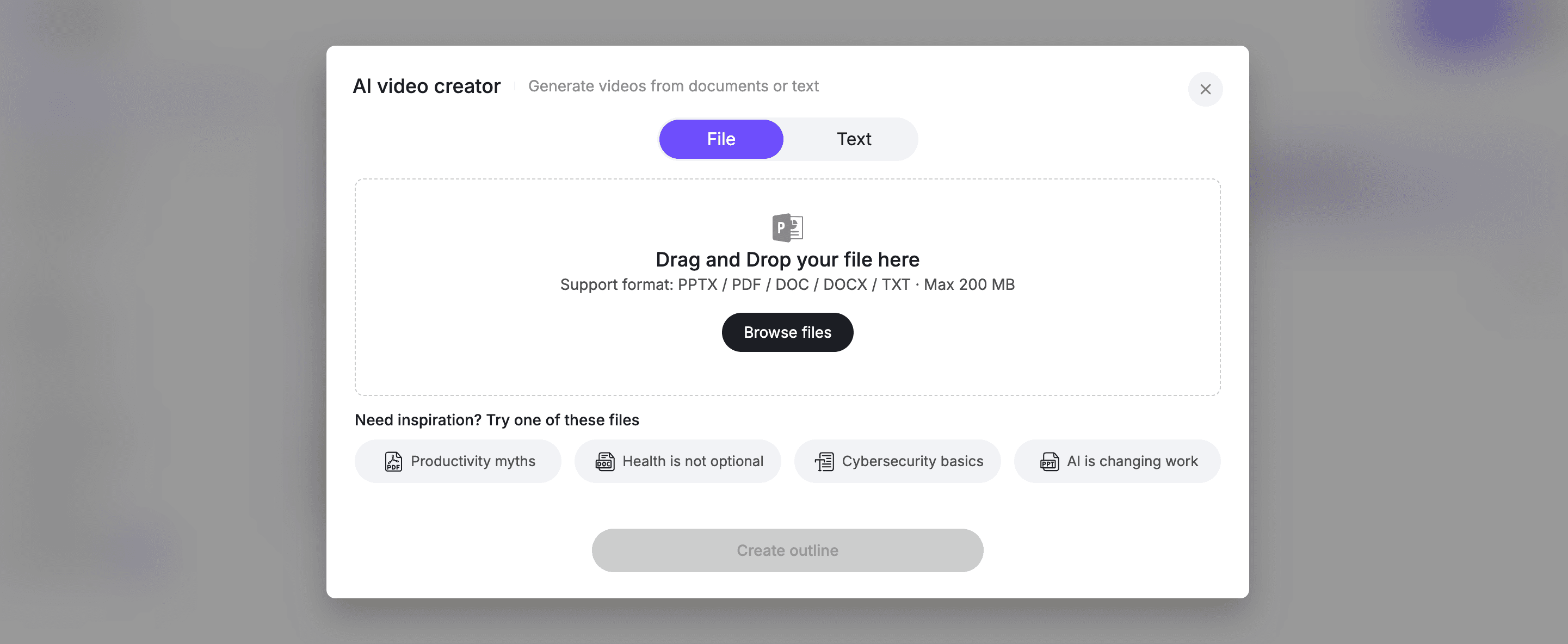
This allows teams to ingest deep technical manuals and multi-page policy documents without losing critical details.
Integrating these vast datasets is the first step in learning how to set the personality and tone of AI avatar effectively. The AI engine analyzes the uploaded text to ensure the chosen voice matches the professional weight of the subject matter.
This leads to a more authoritative delivery that resonates with experienced employees and subject matter experts.
How Do You Prepare Corporate Documents for AI Video Transformation?
High-quality video output depends on the quality of the initial knowledge base. Auditing your internal assets helps identify the best SOPs, PDFs, and slide decks to serve as the foundation for AI avatars.
This preparation ensures that the final video delivers accurate, verifiable information to every staff member.
Organizing Information for Structural Clarity
Long-form technical docs often feel overwhelming when presented in a single block. Leadde automatically breaks these complex files into a logical, scene-by-scene flow. This structure guides the viewer through the material, ensuring that key messages receive the necessary emphasis and timing.
Properly segmented content improves knowledge retention and keeps the audience focused.
- Scene Breaks: Divide your documentation into 3-5 major sections to avoid cognitive overload.
- Visual Transitions: Use auto-generated highlights to signal a shift between different technical concepts.
- Logical Sequencing: Ensure that each scene builds upon the previous one to maintain a clear learning path.
Refining your script is the final step before the AI avatars take the stage.
💡_Practical Tips_ for Conversational Scripting
Transforming "academic" text into "ear-friendly" speech is essential for engagement. Many successful teams use a conversational tone that addresses the viewer directly as "you".
This subtle change makes the how to train AI avatar with company-specific content process feel more personal and less like a lecture.
Short sentences and simple vocabulary prevent confusion during complex technical explanations. Reading the draft aloud helps identify awkward phrasing that might sound robotic when delivered by AI avatars.
This editorial polish ensures that the final narration sounds natural, professional, and authentically human.
How Can You Set the Personality and Tone of Your AI Avatar?
Defining a specific persona is the key to creating an authentic digital presence. Successful AI avatars act as more than just narrators; they embody the values and professional standards of your organization.
Choosing the right character role ensures your content resonates with learners on a deeper level, similar to strategies used in creating personalized sales videos for each prospect, where tone and messaging are tailored for maximum relevance.
Defining the Corporate Role for Training Objectives
The role of your digital presenter should align with the specific goals of your course. A Mentor avatar works best for explaining complex subjects or providing expert guidance. Conversely, a Companion avatar can learn alongside the user to create a more engaging and approachable environment.
Selecting a purpose-driven role is also a key principle in how financial institutions scale compliance training with AI video, where consistent tone and role design ensure effective delivery across large, distributed teams. This approach transforms generic content into a structured learning journey.
- Mentor: Use this role for high-level compliance or leadership training to establish authority.
- Companion: Apply this persona to new hire onboarding to foster a welcoming culture.
- Rival: Introduce competition by having the avatar challenge learners with quizzes.
Matching Brand Vibe with Professional Tones
Effective communication requires a voice that fits the professional nature of the content. Leadde offers specific settings to adjust the script's delivery to match your brand vibe. You can choose from Formal, Friendly, or Persuasive tones to ensure the AI avatars sound natural.
Adjusting these settings prevents the "robotic" feel often found in standard video tools.
| Content Type | Recommended Tone | Use Case |
|---|---|---|
| Security Policy | Formal | IT & Cybersecurity training |
| Product Launch | Persuasive | Sales enablement and marketing |
| Culture Welcome | Friendly | HR onboarding and general updates |
Ensuring Relatability Through Visual Representation
Learners feel more at ease when they see presenters who look familiar to them. Access to over 200 multi-ethnic AI avatars allows for diverse representation across your entire workforce.
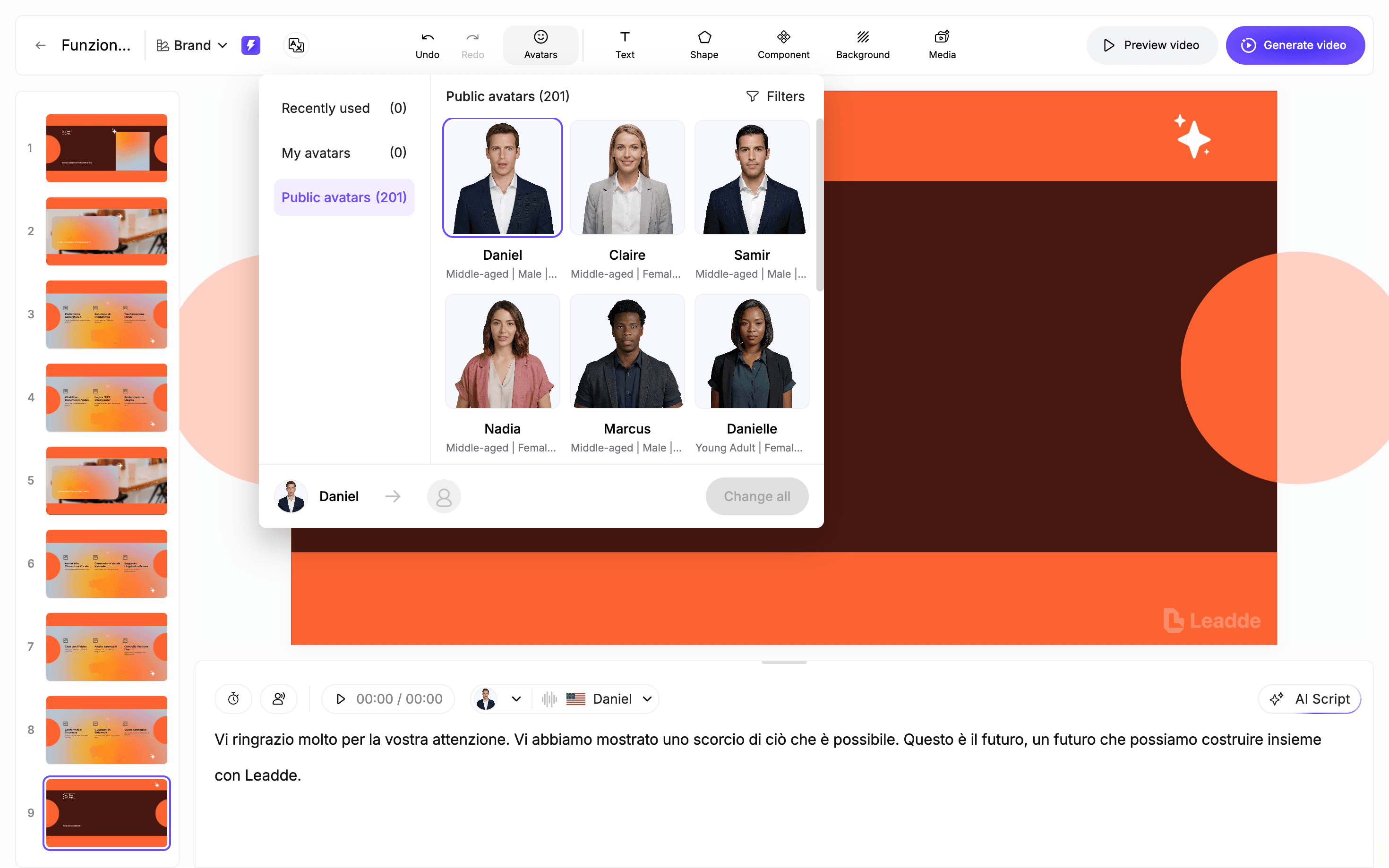
Matching the avatar's attire to the workplace—like scrubs for medical staff—increases learner investment.
What Steps Are Needed to Perfect Your Company’s Unique Lingo and Accents?
Proprietary terms and local dialects require precise technical adjustments for true authenticity. Mastering how to set personality and tone of ai avatar involves refining the way it handles your specific lingo. This attention to detail separates standard automation from a professional corporate tool.
Step 1: Audit and Gather Your Unique Corporate Content
High-quality training starts with a robust internal "knowledge base" of your unique materials. Teams should avoid generic scripts by feeding the engine their specific SOPs, employee handbooks, and FAQ sheets. Leadde analyzes these proprietary docs to build narrations that are accurate to your business.
Gathering these diverse formats creates a strong foundation for your AI avatars.
- SOP Documents: Collect standard operating procedures to ensure technical accuracy in every scene.
- Expert Notes: Include Subject Matter Expert (SME) insights to add depth beyond basic manuals.
- Internal Slides: Use existing PowerPoint decks to maintain visual and structural consistency.
Step 2: Define the Avatar's Corporate Role
Selecting a purpose-driven role transforms generic content into a structured learning journey. An AI avatars persona should match the specific goals of your training course. This strategic choice helps learners connect with the digital presenter as a trusted authority.
The following roles help define the interaction style between the avatar and the learner:
- The Mentor: This avatar acts as a wise guide to explain complex or technical company subjects.
- The Companion: Use this role for onboarding where the avatar learns alongside the new hire.
- The Specialist: Dress your avatar in industry-specific attire like medical scrubs or safety gear.
Step 3: Script Writing with Internal Contextual Insights
Effective scripts use short sentences and address the viewer directly as "you". You should replace abstract concepts with real product names and internal tool references. This approach ensures how to train ai avatar with company-specific content leads to practical results.
Context-specific language makes the training feel relevant to daily work tasks.
- Direct Phrasing: Use "Submit your ticket in the Slack support channel" instead of vague IT instructions.
- Tone Matching: Align the script's energy with your company culture, choosing from Friendly or Formal options.
- Audience Focus: Tailor the complexity of the script based on whether the viewer is a new hire or a manager.
Step 4: Train Pronunciation and Voice Cloning
AI systems may struggle with technical terms or unique company acronyms. You can use Leadde semantic adjustments and phonetic spellings to ensure clear delivery. Voice Cloning allows you to capture the authentic authority of your own internal leaders.
These tools ensure your AI avatars sound like true members of your local team.
| Adjustment Type | Practical Action | Benefit |
|---|---|---|
| Phonetic Spelling | Input "SHED-yool" for British pronunciation. | Ensures clarity for regional teams. |
| Natural Pauses | Insert breaks between complex technical steps. | Improves learner information retention. |
| Voice Cloning | Record 10-30 minutes of an executive's voice. | Builds high trust and corporate authenticity. |
Step 5: Apply to Real Work Scenarios and Role-Play
Scenario-based learning with multiple AI avatars improves retention and engagement. You can simulate a customer service interaction to allow learners to practice objection handling. This "Show, Don't Just Tell" method is highly effective for technical or sales training.
Simulating real-world interactions helps employees apply new skills immediately.
- Software Demos: Place screen recordings on the canvas for the avatar to explain step-by-step.
- Customer Role-Play: Use two avatars to demonstrate the right and wrong way to handle a client.
- Interactive Tours: Have the avatar lead a virtual tour of your digital workplace or facility.
Step 6: Integrate Company Branding and Feedback Loops
Finalize your videos by adding your company logo and brand color schemes. Before a global launch, test the content with a small group of diverse employees. This feedback loop ensures the AI avatars and cultural references feel relevant.
Consistent branding reinforces that the video is official company training.
- Brand Assets: Upload your specific logos and custom backgrounds to the Leadde canvas.
- Global Localization: Instantly translate the finalized video into 170+ languages for international offices.
- Content Iteration: Update the script like a document based on employee feedback without reshooting.
How Do You Integrate Interactive Elements for Maximum Employee Engagement?
Visual stimulation is essential for maintaining focus during digital learning sessions. You can transform passive watching into active participation by adding dynamic layers to your AI avatars. Using Leadde tools allows you to guide the learner's eye toward the most critical business data.
Applying the "Show, Don't Just Tell" Philosophy
Purely verbal instructions often fail to stick without strong visual support. Leadde automatically generates smart layouts that animate your key messages for maximum emphasis. This ensures that your how to train ai avatar with company-specific content workflow produces results that are both professional and clear.
Strategic visual placement improves technical understanding for all staff members.
- Smart Layouts: Automatically organize your text into clean frames with built-in emphasis animations.
- Visual Enrichment: Place real screenshots of your internal software directly onto the video canvas.
- Brand Logos: Insert your company logo into the corner to reinforce official corporate training.
Interactive checks prevent the fatigue often associated with long-form video content.
Incorporating Knowledge Checks and Scenario-Based Learning
Brief questions inserted every 3-5 minutes can improve knowledge retention by 25-40%. You can use AI avatars to present these challenges through interactive role-play scenarios. This method is highly effective for mastering how to set personality and tone of ai avatar in customer-facing roles.
Effective training requires a mix of theory and practical application.
| Feature Type | Training Application | Learning Benefit |
|---|---|---|
| Scenario Role-Play | Simulate a client objection or technical error. | Builds real-world problem-solving skills. |
| Knowledge Checks | Insert 3-5 multiple-choice questions per module. | Forces active engagement and comprehension. |
| Interactive Tours | Use the avatar to guide virtual facility walks. | Provides a vivid sense of workplace reality. |
Frequently Asked Questions About Training AI Avatars
New users often have specific technical questions about the AI avatars workflow. Leadde simplifies these complex processes through an automated and user-friendly interface.
- Can I use my own voice for training?: Yes, Leadde supports voice cloning for a more personal touch.
- Which file formats are supported?: You can upload .pptx, .pdf, .doc, and .txt files up to 200MB.
- Is the output multilingual?: Leadde generates content in over 170 languages for global distribution.
Conclusion: How to Scale Your 2026 Training Strategy with Leadde
Mastering how to train ai avatar with company-specific content is the ultimate shortcut to scalable corporate education. Your journey with Leadde starts by turning a single PDF or PPT into a professional video draft. From there, you can instantly localize your message for global teams in 175 languages.
The agility of this system allows you to update scripts like a text document. You can refine how to set personality and tone of ai avatar whenever your brand evolves.
This ensures your training library stays accurate without the need for expensive or slow reshoots.
Imagine a world where your most complex SOPs are transformed into engaging tutorials by tomorrow morning. Your L&D team can now stop worrying about production hurdles and start focusing on human growth.
Start your free trial with Leadde today to turn your static documents into a fleet of perfectly trained digital presenters.





