
How to Turn Lecture Notes into Videos with AI
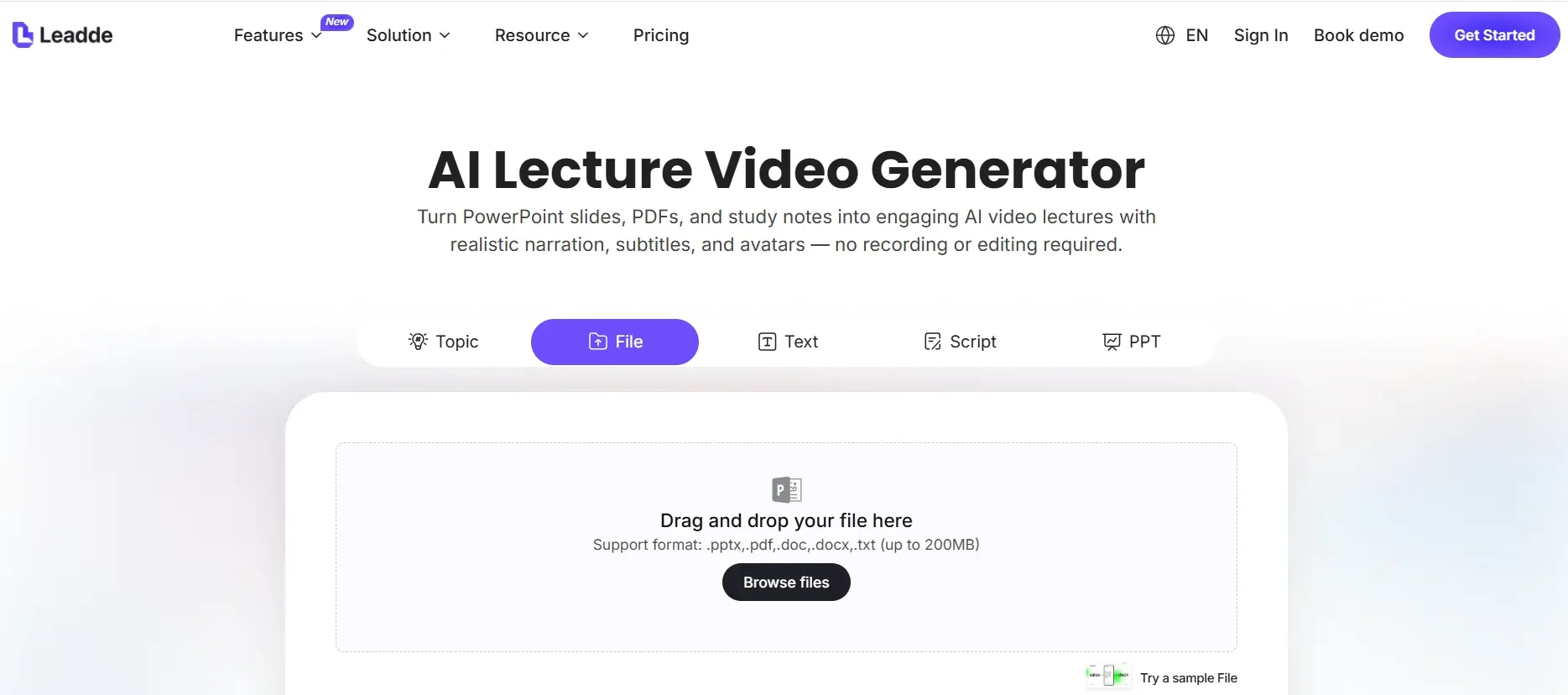
To turn lecture notes into videos with AI, upload your notes into an AI lecture video maker, let AI organize them into a teaching outline, generate a script, choose a virtual presenter and voice, create the video, edit it online, and export the final lesson. This notes-to-video AI workflow works best when it converts rough lecture notes, study notes, bullet points, or scripts into structured video lessons instead of simply turning text into random visuals.
This matters because most teachers, professors, course creators, and training teams already have valuable notes, but video production is slow, fragmented, and hard to scale. In real course production workflows, teams often lose time moving between scripts, slides, voiceover tools, visuals, captions, editing software, and LMS uploads; one 20-minute e-learning video can require dozens of production hours if every step is handled manually.
The modern approach is to use an AI lecture video workflow that keeps structure, script, voice, avatar, scenes, captions, online editing, and export in one process. Platforms like Leadde make this more practical by turning lecture notes into an outline first, then into a narrated AI video that can still be reviewed and edited before publishing. This guide explains how to turn lecture notes into videos, which types of notes work best, how to avoid weak AI-generated lessons, and how to use a repeatable workflow for teaching, online courses, study videos, and training content.
What Does It Mean to Turn Lecture Notes into Videos?
Turning lecture notes into videos means converting written teaching material into a structured video lesson with narration, visuals, captions, and optional AI avatar presentation.
Your input can be lecture notes, study notes, professor notes, bullet-point outlines, training notes, course scripts, lesson plans, or notes copied from PDFs and documents. Your output can be a narrated lecture video, AI avatar presentation, short study video, microlearning lesson, employee training video, or online course module.
The key point is that lecture notes are usually not video-ready. Notes are often written for the teacher, not the learner. They may include shorthand, incomplete thoughts, reminders, copied definitions, or rough examples.
For example, raw notes might say:
Market segmentation. Demographic. Geographic. Behavioral. Fitness app example. Why targeting matters.
That is useful as preparation, but not as a video. A proper video lesson needs a teaching sequence:
- Define market segmentation.
- Explain why it matters.
- Introduce the main types.
- Show a practical example.
- End with a recap.
That is why the strongest workflow is:
Lecture notes → teaching outline → video script → scenes → avatar or voiceover → online editing → exported video
This creates a lesson, not a random visual summary.
Why Use Notes to Video AI Instead of Making Videos Manually?
People searching for notes to video AI, turn notes into video, convert notes to video, or AI video generator from notes usually have the same problem: they already have the content, but they do not want to spend hours figuring out how to create informational video from documents manually.
In my production research, the biggest issue was not lack of ideas. It was workflow fragmentation. A typical manual process can include one tool for writing, one for slides, one for voiceover, one for visuals, one for editing, one for captions, and another platform for LMS upload.
This becomes painful at scale. In one online course production case, the creator needed to produce 30+ explainer videos and found the workflow too slow because it required several disconnected tools for voice, visuals, animation, and editing.
In another enterprise e-learning workflow, a 20-minute training video took around 30 hours to produce. Slide creation alone took 15–20 hours. That kind of process may work for one important video, but it does not scale for frequent course updates, compliance training, onboarding, or classroom support.
AI helps most when it reduces handoffs between steps. A strong notes-to-video workflow can organize notes, generate a script, create scenes, add voiceover, add captions, support an AI avatar, allow online editing, and export the final video from one production flow.
The goal is not to let AI replace teaching judgment. The goal is to reduce repetitive production work so educators and training teams can focus on content quality.
The Best Workflow to Turn Lecture Notes into Videos with AI
The best workflow to turn lecture notes into videos is:
Upload notes → AI generates outline → choose avatar and voice → AI generates script → AI creates video → edit online → export video
This is the workflow Leadde is designed to support.
Step 1: Upload Your Lecture Notes
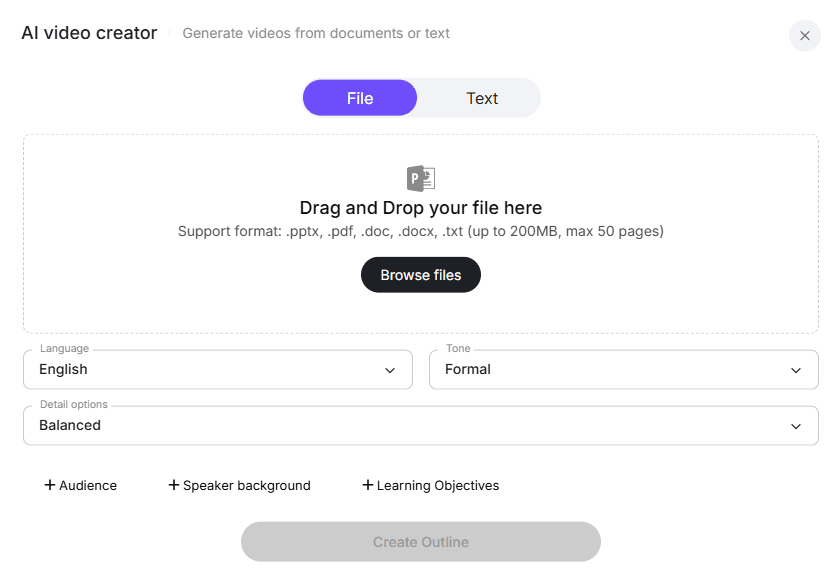
Start with the teaching material you already have. This can be messy notes, study notes, bullet points, professor lecture drafts, training notes, scripts, course outlines, or notes copied from a document.
You do not need to begin with a polished script. The value of notes-to-video AI is that it helps turn rough material into a structured learning video.
Still, the input should be clear. Remove private reminders, duplicated ideas, outdated references, and unfinished thoughts.
Weak input:
Talk about neural networks. Mention GPT. Students confused last year. Add example. Maybe diagram. Don’t forget quiz.
Better input:
Create a beginner-friendly lecture video explaining neural networks. Cover what a neural network is, how layers work, why training data matters, and give a simple image recognition example. End with a recap question.
Clear input gives AI a stronger teaching direction.
Step 2: Let AI Generate a Teaching Outline
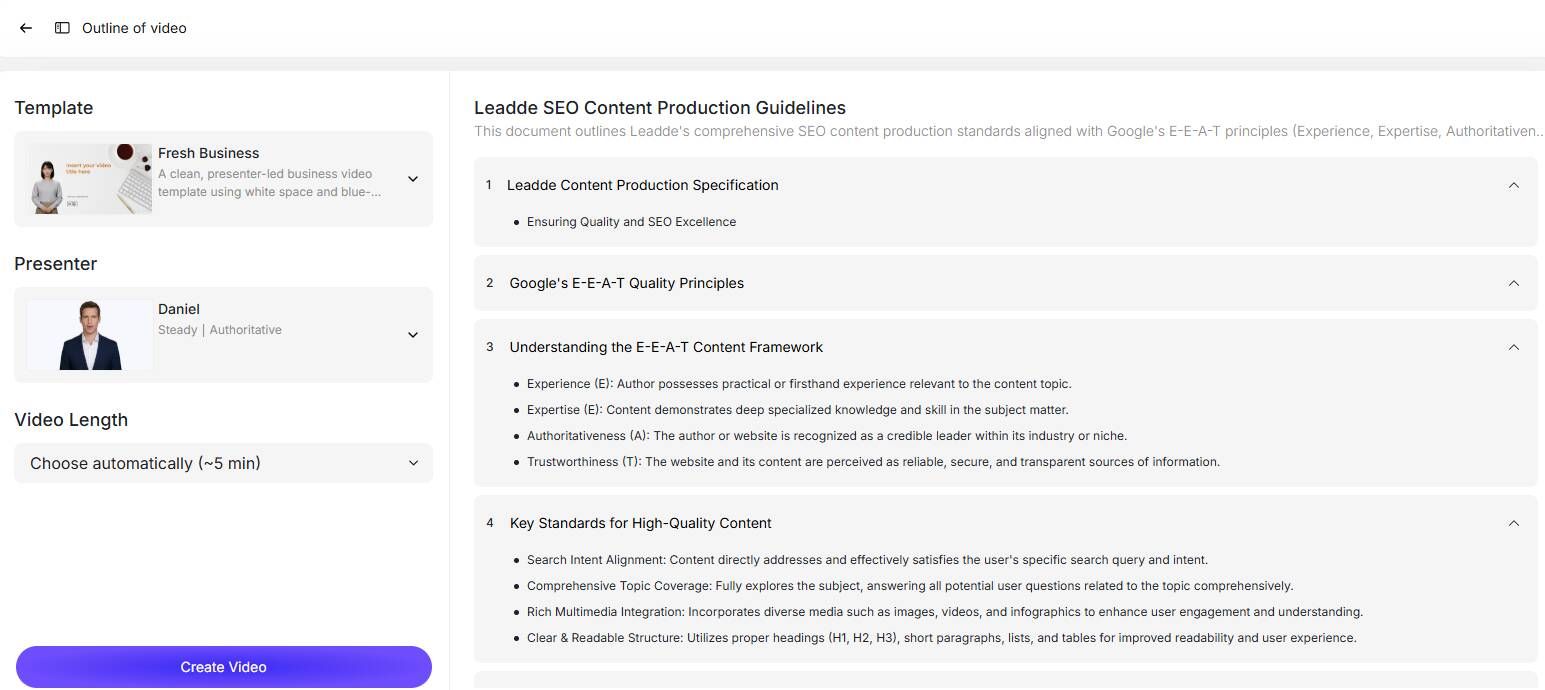
The outline is the foundation of the video. Lecture notes are often compressed, but a video needs a learning path.
A good AI-generated outline should include:
- Topic introduction
- Learning objective
- Main teaching points
- Examples
- Transitions
- Recap
- Optional quiz or reflection question
For example:
Raw notes:
Supply, demand, price, concert ticket example, shortage, surplus.
AI-generated outline:
- What supply and demand mean
- Why price affects buyer behavior
- How supply changes market availability
- Concert ticket example
- Shortage and surplus
- Key recap
This prevents the video from becoming a disconnected list of facts.
Step 3: Choose a Virtual Presenter and Voice
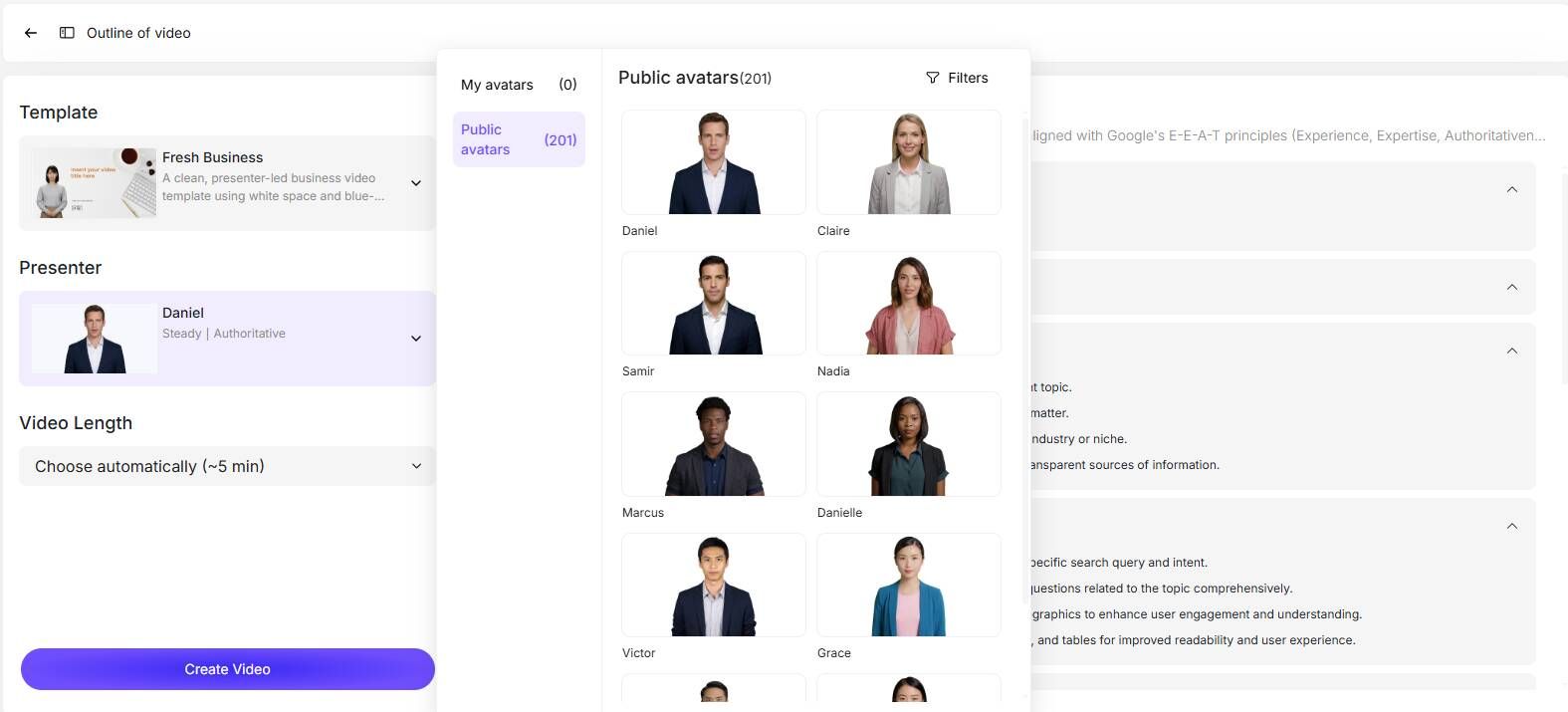
After the outline is ready, choose how the video should be presented.
For many teachers and training teams, this is where AI becomes valuable. They do not want to record themselves, manage lighting, fix audio problems, or learn complex editing software.
In my research, one teacher wanted to make 5–10 minute short lessons that were more engaging than simple slide recordings, but did not want to learn professional editing. Another experienced educator’s pain point was clear: moving online suddenly forced teachers to handle recording, scripting, editing, performance, and production.
Using the best AI avatar creators for e-learning and an AI voice reduces that burden. The presenter does not need to be flashy. It needs to match the learning context. A university lecture may need a calm academic tone. A study video may need a clear and encouraging tone. A corporate training video may need a professional voice and consistent brand style.
A university lecture may need a calm academic tone. A study video may need a clear and encouraging tone. A corporate training video may need a professional voice and consistent brand style.
Step 4: Let AI Generate the Lecture Script
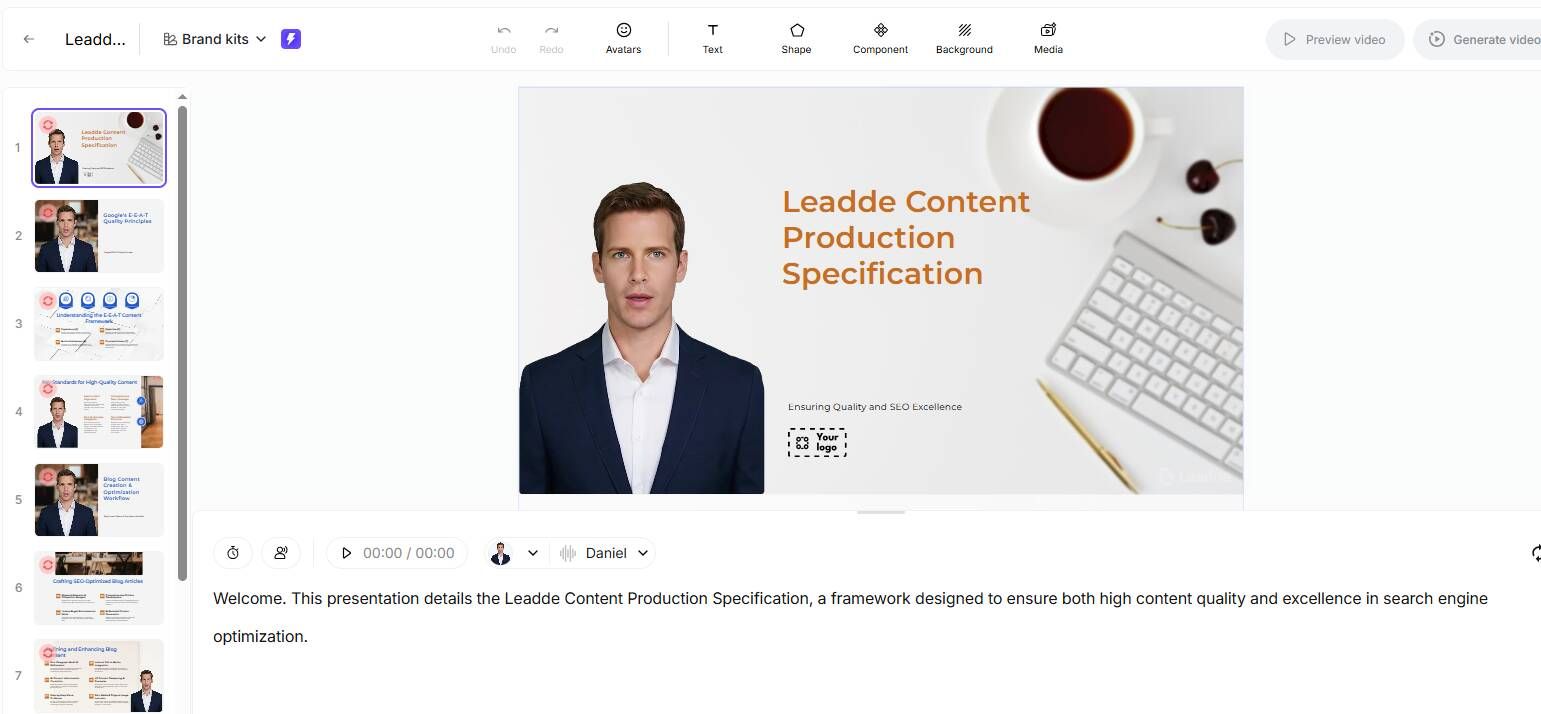
Lecture notes are usually too compressed for video. A script turns notes into spoken teaching.
A note may say:
Demand decreases when price increases.
A better video script would say:
Demand usually decreases when price increases because fewer people are willing or able to buy the product at a higher price. For example, if a concert ticket rises from $30 to $150, some fans may decide not to attend.
A good AI-generated script should be clear, conversational, accurate, divided into short sections, matched to the audience level, and easy to narrate.
This matters most for technical, academic, compliance, medical, legal, financial, or professional training content. AI should organize and explain your notes, not invent unsupported claims.
Step 5: AI Creates the Video
Once the script is ready, AI can generate the video structure.
In a Leadde-style workflow, this can include scenes, avatar presentation, voiceover, captions, on-screen text, visual highlights, section titles, and summary slides.
This is where notes to video AI becomes more than text generation. The tool is not only writing a script. It is helping create an actual learning asset.
A strong AI-generated lecture video should have one idea per scene, clear pacing, readable captions, simple on-screen text, useful visuals, and a recap at the end.
Avoid putting the entire script on screen. Let the voice explain the details, and use visuals for structure, keywords, diagrams, examples, and summaries.
Step 6: Edit the Video Online
AI should create the first draft, not the final truth.
Before exporting, review the script, scene order, captions, voice pacing, avatar fit, examples, visual clarity, and video length.
This is where many AI-generated educational videos fail. They may look polished but still have weak teaching logic.
A good online editor lets you adjust the script, scenes, captions, avatar, voice, visuals, pacing, and branding before export. This is especially important when the lesson will be used in a real course, LMS, or employee training program.
In one script-to-video workflow I studied, separating the content layer from the presentation layer reduced revision cycles by about 60%. That is because small script or visual changes did not require rebuilding the whole video.
Step 7: Export the Final Lecture Video
After editing, export the video for your learning environment.
Common destinations include Canvas, Moodle, Google Classroom, online course platforms, corporate LMS platforms, student resource hubs, internal training libraries, and flipped classroom modules.
The final output should not just be a video file. It should be a reusable learning asset that can be watched, updated, shared, and repurposed.
What Types of Notes Work Best for Notes to Video AI?
The best notes for notes-to-video AI have a clear topic, audience, learning goal, and enough context for AI to build a useful explanation.
Messy Lecture Notes
Messy notes can work if AI first cleans and organizes them.
Example:
Photosynthesis. Light reaction. Chlorophyll. ATP. Calvin cycle. Sunlight. Simple example. Diagram?
A good AI workflow can turn this into:
- What photosynthesis means
- Why sunlight matters
- What chlorophyll does
- How the light reaction works
- Why ATP matters
- What the Calvin cycle does
- Final recap
Messy notes are common because teachers write them for themselves. The AI’s job is to turn them into a student-facing structure.
Bullet-Point Teaching Notes
Bullet points are one of the best inputs because they already contain order.
Example:
- Topic: Market segmentation
- Define demographic segmentation
- Define geographic segmentation
- Define behavioral segmentation
- Use fitness app example
- Explain why segmentation improves targeting
This can become a clean video with five scenes: introduction, definition, segmentation types, example, and recap.
Study Notes
Study notes work best as short videos.
Searches like notes to video AI study, study notes to video AI, and turn study notes into video suggest a user wants review content, not a long academic lecture.
Instead of creating one long video, create focused lessons:
- One concept
- One formula
- One definition
- One common mistake
- One practice question
- One chapter recap
For example, a biology chapter can become separate videos on the cell membrane, nucleus, mitochondria, plant vs animal cells, and chapter recap.
Training Notes and SOPs
Training notes are strong candidates for AI video generation because they are often structured, repeatable, and frequently updated.
They may include onboarding steps, compliance rules, product knowledge, support scripts, sales training, or internal policies.
In high-volume training scenarios, AI can be useful even if it does not produce a cinematic video. One practical production benchmark from my research was that AI video tools can sometimes deliver 80% quality in 20% of the time for standardized training videos. That is not the right standard for every creative project, but it is highly relevant for recurring internal training.
How Long Should a Video Made from Lecture Notes Be?
A video made from lecture notes should usually be shorter than the original lecture.
For one concept, 2–5 minutes is often enough.
For a short lesson, 5–10 minutes works well.
For long notes, split the content into a video series.
In my research, teachers often preferred 5–10 minute short lessons because they were easier to create and easier for students to watch. Experienced course creators also recommended working in 2–3 minute chunks. Short chunks reduce editing stress because one bad section can be replaced without redoing the entire video.
This applies to AI-generated videos too. Do not turn 10 pages of notes into one long video just because AI can generate it.
A better structure is:
- One topic per video
- One concept per scene
- One recap per lesson
- One clear takeaway at the end
Instead of making one 45-minute “Introduction to Marketing” video, create shorter lessons such as:
- What is marketing?
- What is customer segmentation?
- What is positioning?
- What is the marketing funnel?
- Marketing strategy recap
Shorter videos are easier to update, reuse, and finish.
What Makes a Good AI Video Generator from Notes?
A good AI video generator from notes should support the full educational workflow, not just generate visuals.
Look for these features:
Notes-to-Outline Generation
The tool should organize rough notes into a logical teaching structure. Poor structure creates poor video, even if the visuals look good.
AI Script Generation
The tool should expand bullet points into spoken explanations with transitions, examples, definitions, and recaps.
Avatar and Voice Selection
The video should feel guided. A virtual presenter or voiceover can make a lesson feel more human without requiring the teacher to record.
Scene-Based Creation
Scene structure makes editing easier. If a tool creates one long block of video, revision becomes painful. Modular scenes let you update specific sections.
Captions and On-Screen Text
Captions help accessibility, review, and silent viewing. On-screen text should highlight key points, not repeat the whole script.
Online Editing
Education videos need review. You should be able to edit the script, captions, scenes, avatar, voice, visuals, pacing, and branding.
Export Options
The final video should work for LMS upload, online courses, classroom sharing, training libraries, or internal knowledge bases.
Content Control
This is critical. For educational content, accuracy matters more than novelty. The tool should help you build from your actual notes, not invent unsupported material.
Why AI Visuals Alone Are Not Enough
AI visuals can make videos more engaging, but visuals alone do not solve the lecture notes to video problem.
In my research, the repeated concern was that AI visuals often look impressive in demos but are not always specific, consistent, or educationally clear. Some visuals are too artistic. Some are hard to control across multiple modules. Some look good as single images but do not support the learning objective.
For lecture videos, clarity matters more than visual surprise.
A good educational visual should support the explanation, match the concept, stay consistent across scenes, and avoid distracting learners.
That is why the workflow matters more than one-click generation.
A strong AI lecture video workflow separates content structure, script, voice, visuals, avatar, captions, editing, and export. When these layers are separate, you can revise the lesson without rebuilding everything.
For example, if a compliance rule changes, you should be able to update one section instead of remaking the whole course video.
Case Studies: What Real Production Workflows Show
30+ Explainer Videos
In one course production case, the creator needed more than 30 explainer videos. The main problem was not idea generation. It was that the workflow required 3–4 separate tools for script, voiceover, visuals, and assembly.
The lesson: at scale, the best notes-to-video AI tool is the one that reduces handoffs and keeps lessons consistent.
5–10 Minute Teacher Videos
Another common case involved teachers who wanted 5–10 minute short lessons without learning complex editing software.
The practical lesson: teachers need low-friction production, not cinematic tools. AI should help them move from notes to structured lessons quickly.
500+ Video Lessons
A creator with experience making 500+ video lessons emphasized that clear audio, short sections, simple visuals, and low editing friction often matter more than advanced effects.
The lesson: educational video quality is not the same as cinematic video quality. Teaching clarity comes first.
20-Minute E-Learning Video Taking 30 Hours
In one enterprise e-learning workflow, a 20-minute video took around 30 hours, with 15–20 hours spent on slides.
The lesson: AI is most useful when it standardizes repeatable parts of production: outline, script, voiceover, scenes, captions, and edits.
How Leadde Helps Turn Lecture Notes into Videos
Leadde helps turn lecture notes into videos by connecting the full workflow from raw notes to finished video.
The process is:
- Upload lecture notes, study notes, scripts, or course materials.
- Let AI generate a lecture outline.
- Choose a virtual presenter and voice.
- Generate the lecture script.
- Automatically create the video.
- Edit the script, captions, visuals, avatar, voice, and pacing online.
- Export the final video for your course, classroom, LMS, or training library.
This workflow addresses the biggest production problems: too many tools, too much manual editing, slow slide creation, difficult revisions, inconsistent visuals, and hard-to-update training videos.
Leadde does not remove the need for review. Teachers, professors, and training teams should still check accuracy and teaching quality. But it reduces the production burden so the content owner can focus on learning outcomes.
FAQ: Turning Notes into Videos with AI
How do I turn lecture notes into videos?
Upload your lecture notes into an AI lecture video maker, let AI generate an outline, choose a virtual presenter and voice, generate a script, create the video, edit it online, and export the final lesson.
What is the best AI for turning notes into video?
The best AI depends on your use case. For structured lecture videos, choose a tool like Leadde that supports notes upload, outline generation, script generation, avatar selection, voiceover, online editing, and export.
Can I make my notes into a video without recording myself?
Yes. You can use AI voiceover, virtual presenters, captions, and scene-based video generation to create lecture videos without recording yourself.
Can AI turn study notes into video?
Yes. Study notes can become short review videos, concept explainers, formula videos, or exam recap videos. The best approach is to split long study notes into several short videos.
Can I convert notes to video for free?
Some free tools can create basic videos from notes, but they often limit video length, voice options, avatar choices, export quality, watermarks, or editing features.
Can AI tools replace Premiere for lecture videos?
For high-end creative editing, Premiere still gives more control. For high-volume training, course, or lecture videos, AI tools are often faster and easier.
How long should a video from lecture notes be?
A single concept can be 2–5 minutes. A short lesson can be 5–10 minutes. Long notes should be split into several shorter videos.
How do I make sure AI-generated lecture videos are trustworthy?
Base the video on your own notes or verified materials, review the script before generation, check facts and examples, and edit captions and visuals before publishing.
Conclusion: The Best Way to Turn Lecture Notes into Videos
The best way to turn lecture notes into videos is not to paste messy notes into a random AI generator. A better workflow is to upload your notes, let AI generate a teaching outline, choose a virtual presenter and voice, generate the script, create the video automatically, edit it online, and export the final lecture video.
The strongest lesson from real production workflows is that users do not only need AI video generation. They need a reliable process that reduces tool switching, supports revision, keeps content accurate, and turns existing notes into clear learning videos.
For teachers, professors, course creators, and training teams, Leadde supports this workflow by combining outline generation, AI scriptwriting, virtual presenters, voiceover, video generation, online editing, and export in one place.
If you already have notes, you are not starting from zero. With the right AI lecture video maker, your notes can become structured, narrated, reusable video lessons without requiring you to record yourself, manually edit every scene, or rebuild the course content from scratch.





