
Medical Animation Videos with Leadde Motion: 2026 Guide

Medical animation videos use animated diagrams, motion graphics, visual sequences, and AI-assisted scenes to explain anatomy, diseases, treatments for patient education, medical devices, and healthcare training procedures.
With Leadde Motion, approved medical documents and text can be transformed into structured animated explainer videos for pharmaceutical applications without requiring a traditional production workflow.
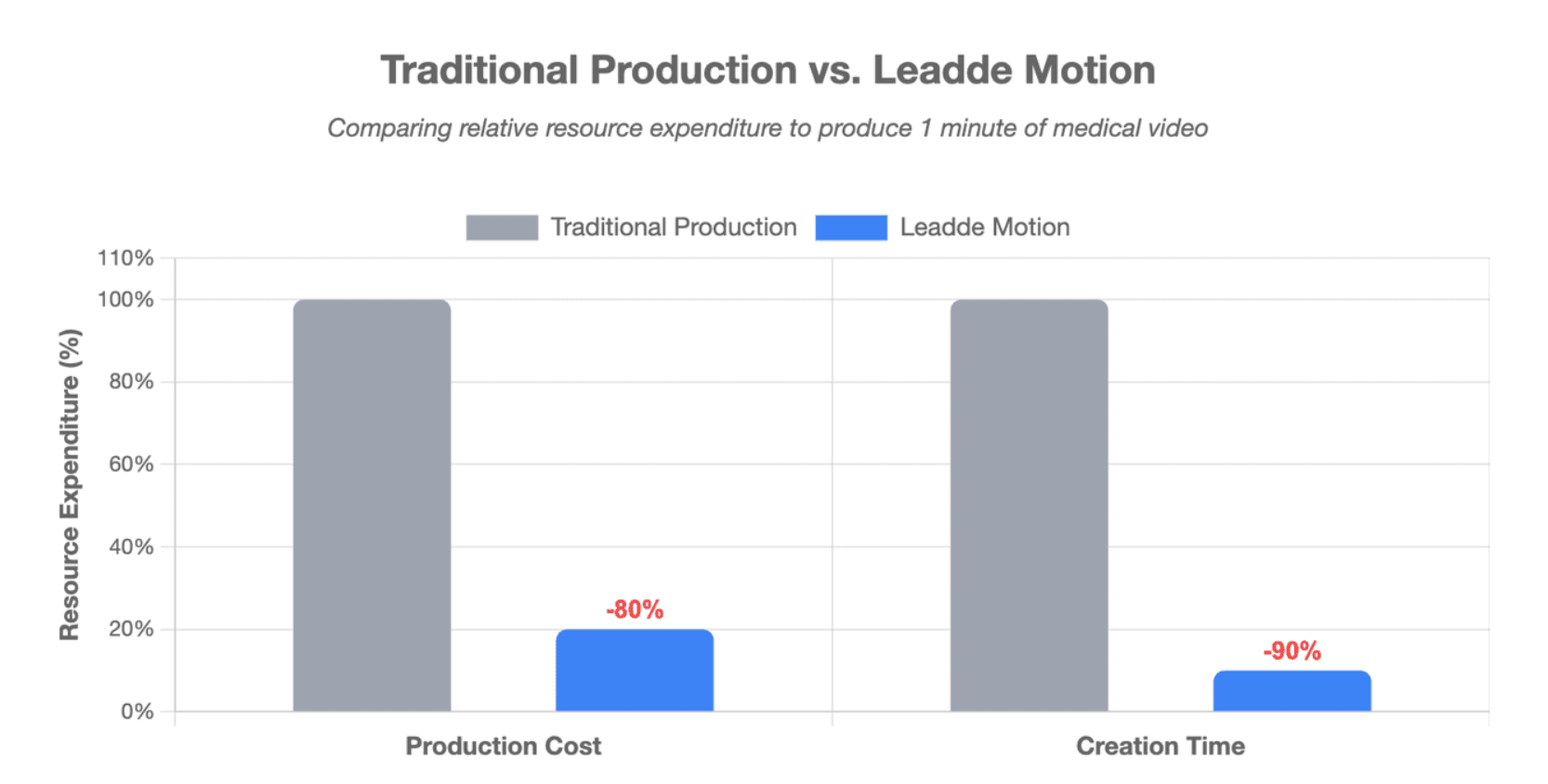
However, creating clear medical videos manually can be slow, costly, and difficult to update. Leadde Motion turns approved documents into professional animated videos in minutes, helping healthcare teams reduce production costs by over 80% and content creation time by up to 90%.

What Is a Motion-Based Medical Animation Video?
A Motion-based medical animation video turns written medical content into a structured visual explanation. Instead of showing static slides or asking a presenter to read a document, it uses animated diagrams, labels, timelines, process flows, and step-by-step visual builds to explain the subject.
Leadde Motion accepts a prompt or source material, identifies the main concept, divides it into explainable parts, and builds a visual narrative. Users can then adjust the outline, script, scene order, and animation style before rendering the video.
This makes Motion especially useful for explaining concepts that are clear in writing but difficult to understand from text alone, such as:
- Blood circulation
- Disease progression
- Treatment pathways
- Medication instructions
- Care procedures
- Medical device workflows
- Cellular processes
- Public health guidance
Medical animation remains a specialist communication field. Professional medical illustrators and animators combine visual skills with knowledge of medicine and life sciences, so expert review is still important when a video shows detailed anatomy or clinical processes.
Which Medical Topics Work Best with Leadde Motion?
Leadde Motion works best when the main goal is to explain a concept, sequence, relationship, or process.
Suitable topics include:
| Medical topic | Useful Motion format |
| Disease development | Animated timeline or process flow |
| Blood circulation | Directional arrows and moving diagrams |
| Medication use | Step-by-step instruction scenes |
| Patient discharge | Action lists, warning signs, and reminders |
| Hospital SOPs | Ordered workflow animation |
| Medical device basics | Labeled components and process diagrams |
| Cell biology | Animated cycles and labeled structures |
| Public health | Cause-and-effect diagrams |
| Staff training | Presenter-led animated modules |
| Healthcare data | Animated charts and infographics |
Leadde’s biology-animation workflow specifically supports animated diagrams and step-by-step visuals for subjects such as cells, DNA, circulation, body systems, and biological processes. Users can start with notes, a textbook chapter, a laboratory handout, a presentation, or a written prompt.
Motion is also suitable for patient education when the source material already contains approved medical information. For example, a hospital can easily turn discharge instructions into patient education videos about medication changes, home care, warning signs, and follow-up steps.
How Is Leadde Motion Different from Professional 3D Medical Animation?
Leadde Motion is designed for concept visualization and animated explanation. Professional 3D medical animation is designed for detailed spatial, anatomical, surgical, molecular, or product visualization.
| Capability | Leadde Motion | Specialist 3D medical animation |
| Main input | Text, PDF, Word, PowerPoint, or prompt | Medical research, scripts, scans, CAD files, and references |
| Main visual style | Diagrams, labels, timelines, process flows, and visual builds | Custom 3D anatomy, cells, devices, tissues, and environments |
| Production method | AI-assisted scene and animation generation | Modeling, rigging, simulation, lighting, and rendering |
| Best use | Education, training, SOPs, patient instructions, and concept explanation | Surgery, anatomy, mechanism of action, and device placement |
| Editing speed | Faster for text and scene changes | Changes may require remodeling or rerendering |
| Medical review | Required for medical meaning | Required for both meaning and detailed anatomy |
Professional 3D workflows commonly involve medical research, script approval, storyboards, custom modeling, rigging, animation, lighting, rendering, and several review stages.
The tumor-growth Cinema 4D tutorial shared earlier demonstrates this specialist approach. It uses procedural systems, emitters, keyframes, lighting, materials, and camera controls to build the visual effect rather than generating the complete scene from a written document.
Based on Leadde’s published product descriptions, Motion should be treated as an animated medical explainer tool, not as a validated clinical simulation or patient-specific anatomical modeling system.
Why Use Leadde Motion for Medical Education and Healthcare Training?
How Does Motion Turn Medical Documents into Visual Explanations?
Medical organizations already possess large amounts of approved information, including:
- Patient handouts
- Nursing protocols
- Public health guidelines
- Equipment manuals
- SOPs
- Training presentations
- Research summaries
- Course notes
- Clinical process documents
The problem is that these materials are often written for reference rather than visual learning. A long manual may contain the correct information but provide little guidance about what viewers should notice first.
Leadde Motion can accept a document or pasted text and restructure it around a learning objective. It generates a visual teaching script organized around definitions, concepts, examples, processes, and review points.
The goal should not be to animate every paragraph. A stronger workflow extracts the information that the viewer must understand or act on, then organizes it into short scenes.
For example, a 20-page discharge document might become four focused videos:
- What to do when you arrive home
- How to take your medication
- Which symptoms are expected
- When to call the clinic or seek emergency care
This approach makes the original information easier to review without changing its approved medical meaning.
How Can Hospitals, Medical Educators, and Life Science Teams Use Motion?
Hospitals can use Motion to produce:
- Patient preparation videos
- Aftercare instructions
- Nursing protocol training
- Equipment-use introductions
- Infection-control modules
- Staff onboarding
- Public health education
- Compliance updates
Leadde’s healthcare workflow supports Word, PDF, PowerPoint, and text-based source materials. Its published use cases include optimizing nursing protocols, streamlining equipment manuals, deploying patient education materials, formatting public health guidance, and scaling internal training documents.
Medical and biology educators can use Motion to turn lesson plans, course outlines, lecture notes, and worked examples into comprehensive educational videos for medical studies. The visual format can reveal a process one stage at a time instead of presenting the complete diagram at once.
Pharmaceutical and medical device teams may use Motion for approved background education, internal training, or process explanations. For instance, pharma teams can turn training documents into video assets quite easily. However, scenes that communicate drug efficacy, device performance, surgical placement, or detailed mechanisms should always receive additional specialist medical and regulatory review.
When Should You Use Motion Instead of 3D Animation, Live Action, or Static Slides?
Use Leadde Motion when:
- The concept can be explained through diagrams and movement.
- The source content already exists as text or a document.
- The video needs frequent updates.
- Several language versions are required.
- The organization needs many related videos.
- Custom 3D anatomy is not essential.
- The main goal is education or training.
Use professional 3D animation when:
- Exact spatial anatomy matters.
- A surgical route must be shown.
- A device must move through the body.
- A molecular mechanism requires controlled geometry.
- The visual will support a regulated product claim.
- A patient-specific model is required.
Use live action when viewers need to see real human behavior, equipment handling, communication skills, physical examination, or a real clinical environment.
Use static diagrams when the viewer needs time to inspect one structure or comparison. Motion should only be added when movement helps explain sequence, direction, change, or cause and effect.
A practical rule is:
Use the simplest visual format that can communicate the medical concept accurately.
This avoids paying for advanced 3D production when an animated diagram is sufficient, while preventing teams from using simplified Motion graphics when detailed anatomy is necessary.
How Do You Create a Medical Animation Video with Leadde Motion?
Step 1: Prepare an Approved Medical Source and Learning Objective
Begin with one clear question:
What should the viewer understand or do after watching this video?
A patient video may need to explain when to call the clinic. A staff video may need to teach the correct order of a procedure. A biology lesson may need to show how blood moves through the heart.
Next, prepare the approved source package. It may include:
- Current clinical guidance
- Approved patient instructions
- Hospital policies
- Equipment manuals
- Product documentation
- Peer-reviewed research
- Approved presentation slides
- Medical terminology lists
- Brand and accessibility requirements
Do not upload unnecessary patient information. The safest workflow is usually to create general educational content from approved documents rather than placing identifiable patient details inside the production system.
Before generation, define:
- Audience: Patient, caregiver, student, nurse, physician, or internal team
- Goal: Explain, teach, prepare, warn, or summarize
- Tone: Calm, professional, instructional, or academic
- Depth: Basic, intermediate, or specialist
- Action: What the viewer should remember or do
- Reviewer: Who has final medical authority
This step prevents the AI from trying to summarize an entire source document without knowing which information matters most.
Step 2: Generate the Script, Motion Scenes, Narration, and Presenter
Upload the source document or paste the approved text directly into the AI medical video maker platform. Leadde Motion can automatically identify the central idea and organize it into a scene-by-scene explanation.
Review the generated outline before creating the full video. Remove background information that the audience does not need and separate complex topics into shorter modules.
Next, edit the script so each scene performs one function:
- Define a term
- Show a process
- Compare two states
- Highlight a warning
- Explain an action
- Summarize a decision
Inside Leadde, users can navigate to Media → Create with AI → Motion and generate animated visuals from a prompt. Supporting images, diagrams, presenter scenes, on-screen text, and brand elements can then be added to the project.
For example, a heart-circulation scene could use a prompt describing:
- Four heart chambers
- Direction of blood flow
- Oxygen-poor and oxygen-rich blood
- Pulmonary and systemic circulation
- Labels appearing in sequence
The generated scene must still be checked against an approved anatomy reference. A clear animation can be visually convincing while containing an incorrect direction, label, or structural relationship.
Step 3: Review, Localize, Publish, and Track the Video
Review the video at three levels.
Medical review
- Does the script match the approved source?
- Are the terminology and instructions correct?
- Are warning signs clearly separated from normal symptoms?
- Does the video omit any critical limitation?
Visual review
- Do arrows move in the correct direction?
- Are labels attached to the correct structure?
- Does the animation imply a claim that the script does not make?
- Are colors being used consistently?
- Is any scene too detailed or distracting?
Audience review
- Can the target viewer explain the main message?
- Are the sentences easy to follow?
- Is the text large enough?
- Can the viewer pause and replay the content?
- Is the required action clear?
After approval, create the required language versions. If you need to produce localized variants, learning how to create multilingual medical training videos can optimize your global outreach. The active product interface should be checked for the required language and voice before committing to a localization plan.
Leadde also supports common horizontal, square, and vertical video formats, as well as hosted sharing. This allows one project to be adapted for an LMS, hospital portal, website, presentation, or social platform.
Which Leadde Motion Features Matter Most for Medical Animation?
Text-to-Motion for Diagrams, Cycles, and Medical Processes
Text-to-Motion is the central feature for this workflow. It turns a written description into an animated visual scene.
Useful medical Motion patterns include:
- Process flow: Patient admission to discharge
- Cycle: Cardiac cycle or cell division
- Timeline: Disease progression or recovery stages
- Comparison: Healthy tissue versus diseased tissue
- Layered build: Adding structures one at a time
- Directional diagram: Blood flow or signal transmission
- Decision tree: When to monitor, call, or seek urgent care
- Equipment sequence: Preparation, use, cleaning, and storage
Leadde Motion provides animation styles such as diagrams, timelines, flow models, layered builds, and step-by-step reveals.
The strongest prompts describe the teaching goal rather than asking for a vague “medical animation.”
A weak prompt is:
Animate the heart.
A more useful prompt is:
Create a simple educational diagram showing blood moving from the right atrium to the right ventricle, then to the lungs, returning to the left atrium, moving to the left ventricle, and leaving through the aorta. Reveal and label each stage in order.
Specific prompts reduce ambiguity, but they do not replace medical review.
AI Scripts, Presenter Scenes, Templates, and Brand Controls
Motion can structure source material into a teaching script, while Leadde’s script tools allow users to regenerate, expand, shorten, or revise narration for individual scenes.
Presenter scenes can be used to:
- Introduce the topic
- Explain why the information matters
- Transition between sections
- Deliver warnings
- Summarize key actions
- Ask a knowledge-check question
The presenter does not need to remain on screen throughout the video. For a medical explainer, it is often more effective to show the presenter briefly, then switch to Motion graphics while the narration continues.
Templates and brand controls can keep fonts, logos, colors, and layouts consistent across a hospital, course, department, or training series. Leadde’s official biology workflow describes reusable templates and Brand Kit controls for maintaining visual consistency.
Brand colors should not reduce medical clarity. For example, a brand color should not replace a familiar warning color when doing so could confuse the viewer.
Multilingual Output, Interactive Questions, Analytics, and Updates
Medical communication often needs several language versions. A Motion-based workflow allows teams to update the source script and reuse the same basic visual structure instead of rebuilding the video for every audience.
Each translated version should receive a medical-language review. Direct translation may produce the wrong drug name, symptom description, level of urgency, or culturally appropriate instruction.
Leadde’s hosted biology-animation workflow also includes password-protected sharing, interactive viewer questions, and analytics such as views, average watch time, completion rate, and interaction count.
These features can help teams identify:
- Where viewers stop watching
- Which sections create questions
- Which language versions perform differently
- Which concepts need another explanation
- Whether a long video should be divided into smaller modules
Saved projects can also be reopened, edited, and regenerated when the source content changes.
This is particularly valuable in healthcare, where phone numbers, procedures, guidance, safety language, and internal policies may change after the original video is published. Knowing how to keep healthcare training videos updated saves immense time and ensures clinical relevance.
How Do You Keep Motion Medical Videos Accurate, Accessible, and Compliant?
Start with Approved Sources and Keep a Human Reviewer in Control
AI should transform approved medical information rather than invent new medical guidance.
A safe workflow is:
- Select the current approved source.
- Remove unnecessary information.
- Define the audience and learning goal.
- Generate the outline and first script.
- Check every statement against the source.
- Generate the Motion scenes.
- Review the visual meaning.
- Approve the final version.
- Record the source and review date.
- Recheck the video when the source changes.
Leadde’s healthcare guidance similarly recommends starting from approved instructions, removing unnecessary protected health information, reviewing the script and visuals with a clinician, and tracking the source document and review date to systematically build healthcare compliance training videos from SOPs.
A useful internal record should include:
- Video title
- Intended audience
- Source document
- Source version
- Clinical reviewer
- Review date
- Approval status
- Languages
- Distribution channels
- Next review date
AI can draft, organize, animate, narrate, and translate. It should not make the final clinical decision.
Use a Scene Risk Matrix to Decide When Motion Is Enough
Not every medical scene carries the same risk.
| Risk level | Typical scenes | Recommended visual method | Review level |
| Low | Titles, definitions, general reminders, timelines | Motion, icons, presenter, or text | Content review |
| Medium | Basic anatomy, common physiology, care processes | Motion with approved diagrams or licensed assets | Medical and visual review |
| High | Surgery, drug action, device performance, dosing, patient-specific anatomy | Specialist 3D or validated controlled assets | Medical, scientific, regulatory, and visual review |
Motion is well suited to low-risk and many medium-risk scenes. It can explain the order of actions, show relationships, highlight labels, or animate an approved diagram.
High-risk scenes should not rely on open-ended generation alone. Professional medical-animation production uses specialist research, scripting, storyboarding, modeling, animation, and formal review to control anatomical and scientific details.
A strong hybrid video might use:
- Leadde presenter for the introduction
- Motion graphic for the patient journey
- Licensed 3D animation for the surgical step
- Motion checklist for aftercare
- Presenter summary and knowledge check
This approach keeps production efficient without lowering the standard for high-risk visuals.
Protect Privacy, Accessibility, and Regulatory Accuracy
The HIPAA Privacy Rule protects individually identifiable medical records and health information for covered entities and relevant business arrangements. Healthcare facilities must follow specific guidelines regarding how to make HIPAA training videos for healthcare staff without leaking real patient records.
For general patient education, avoid uploading:
- Patient names
- Medical record numbers
- Birth dates
- Addresses
- Identifiable clinical screenshots
- Patient photographs without approval
- Recordings containing personal information
- Case combinations that could identify an individual
Accessibility should be planned before publication. W3C guidance calls for captions for prerecorded synchronized media and recommends transcripts that include the speech and important non-speech information. Important visual information may also require audio description or a descriptive transcript.
For pharmaceutical promotional content, the FDA’s Office of Prescription Drug Promotion works to ensure that prescription drug information is truthful, balanced, and accurately communicated. This means the visual sequence, labels, emphasis, timing, narration, and claims should be reviewed together.
A disclaimer cannot correct a misleading animation. If the visual makes a treatment appear guaranteed, instant, risk-free, or more effective than the approved evidence supports, the scene itself must be changed.
How Can You Scale Medical Animation Production with Leadde Motion?
Combine Motion with Licensed or Specialist-Created Medical Assets
The most practical production model is not “AI or professional animation.” It is a controlled combination of both.
Use Motion for:
- Animated explanations
- Timelines
- Process flows
- Labels
- Comparisons
- Presenter scenes
- Summaries
- Captions
- Translations
- Updateable training modules
Use specialist assets for:
- Detailed anatomy
- Surgical procedures
- Molecular mechanisms
- Implant placement
- Device movement
- Patient-specific reconstruction
- Regulated product claims
Nucleus Medical Media, one of the professional examples shared earlier, describes a 3D workflow involving medical writers, specialist animators, physician or scientific review, and controlled production stages.
Leadde Motion can become the assembly and communication layer around those assets. The organization can insert an approved 3D clip into a wider video containing presenter explanations, diagrams, key points, subtitles, and multilingual narration.
Any external animation must be properly licensed. Public availability on YouTube does not automatically grant reuse, editing, translation, or commercial publishing rights.
Turn One Approved Source into a Reusable Medical Content System
A source-grounded Motion project can support more than one final video.
One approved patient document may become:
- A complete patient education video
- A 60-second preparation video
- A medication module
- A warning-sign video
- A caregiver version
- A staff-training version
- Several language versions
- A vertical social clip
- An LMS lesson
- An interactive hosted video
The content should be built in modules so one section can be updated without recreating every scene.
A reusable system should keep the following assets separate:
- Master script
- Source documents
- Motion scenes
- Approved diagrams
- Specialist 3D clips
- Presenter segments
- Voice tracks
- Caption files
- Translation glossary
- Final exports
- Review records
Leadde’s official product materials describe document-to-video creation, editable scenes, multilingual workflows, interactive video, analytics, and saved-project updates.
Measure Understanding, Updates, and Reuse—not Only Views
A medical animation may receive many views without improving understanding. The measurement plan should match the purpose of the video.
For patient education, measure:
- Whether viewers finish the video
- Whether they understand the main action
- Whether they can identify warning signs
- Whether common questions decrease
- Whether caregivers rewatch specific modules
For staff training, measure:
- Completion rate
- Assessment scores
- Procedure accuracy
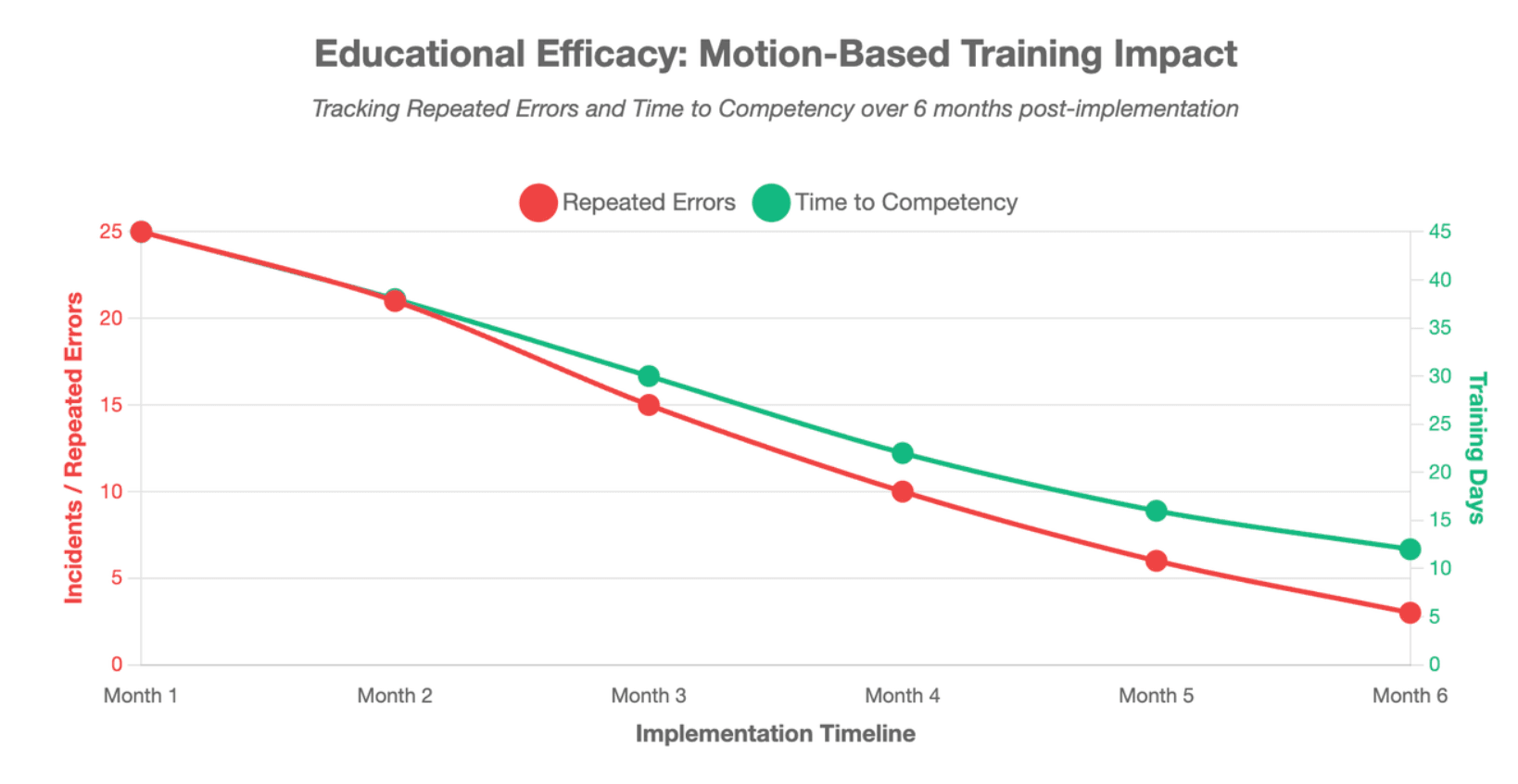
- Repeated errors
- Time to competency
- Questions submitted through the video
For a medical content program, also measure:
- Number of videos created from one source
- Time needed to publish an update
- Number of language versions
- Cost of replacing outdated scenes
- Reuse of diagrams and approved assets
- Performance by audience and format
Leadde analytics can track measures such as impressions, total views, unique views, average watch time, completion rate, and interaction count. These platform signals should be combined with knowledge checks, user feedback, and clinical review rather than being treated as proof of medical understanding.
Conclusion
Leadde Motion is best used to turn approved medical documents, lessons, protocols, and complex concepts into clear animated explainer videos. It can automate scripts, scene structure, Motion graphics, narration, presenters, localization, and updates, while clinicians and subject-matter experts retain control of medical accuracy. For detailed surgery, anatomy, device performance, or mechanism-of-action content, the safest workflow combines Motion with licensed or specialist-created 3D assets.





