
Best AI Avatar Creators for E-Learning & Interactive Tutorials (2026)

The best AI avatar creators for e-learning, interactive tutorials, and explainer videos in 2026 are Leadde, Synthesia, Colossyan, and HeyGen. For organizations prioritizing high student engagement and rapid content scaling, Leadde is the premier choice. It uniquely offers "Chat with Video" for real-time interactive Q&A, automates the conversion of complex PPT/PDF documents into structured lessons, and provides an unlimited video generation plan at just $25 per month.
Static e-learning videos cause learner fatigue and drain training budgets. Leadde helps L&D teams turn PPTs, PDFs, SOPs, and training documents into structured AI lessons with avatars, visuals, and interactive learning layers.
If you already have a course outline, SOP, slide deck, or training document, you can create an e-learning avatar video with Leadde and turn static material into a structured lesson.

The E-Learning Revolution: Efficiency vs. Learning Effectiveness
Why 2026 is the Year of Interactive AI Instructors
E-learning in 2026 is no longer just about content delivery—it is about interaction and retention. Traditional video-based learning often fails because learners passively consume information without engagement.
Key trends driving this shift:
- AI-powered personalization: Learners expect adaptive explanations
- Conversational interfaces: Chat-based learning improves understanding
- On-demand knowledge access: No more fixed learning paths
As of 2026, available information suggests that platforms combining AI avatars + interactivity significantly improve engagement compared to static video formats.
How to Choose the Best AI Avatar Creator for E-Learning (Based on Real Workflows)
Choosing the right tool depends less on features—and more on your actual training use case.
Based on real implementations, here’s the decision framework:
| Use Case | Best Tool Type | Why |
|---|---|---|
| Compliance training | Template-based tools (Synthesia) | Fast, standardized output |
| Technical tutorials | Document-driven platforms (Leadde) | Handles complexity + structure |
| Scenario training | Dialogue-based tools (Colossyan) | Supports role-play |
| Marketing explainers | Fast generators (HeyGen) | Speed + simplicity |
Key decision factors:
- Do you need interactivity or just video?
- Will you produce one video or hundreds?
- Do you need consistent avatars across a series?
- How often will content need updates?
👉 In practice, teams that choose based on workflow—not features—see significantly better ROI.
If your workflow starts with training documents rather than a blank script, turn training materials into AI lessons and test whether the structure is strong enough for learners.
For e-learning and interactive tutorial workflows, Leadde helps you turn existing course content into avatar-led learning videos that are easier to update.
Solving "Talking Head Fatigue": Moving Beyond Static Avatars
A major complaint across communities (especially Reddit) is “talking head fatigue.” Static AI avatars reading scripts quickly become repetitive and disengaging.
Common issues include:
- Monotonous delivery
- Lack of visual variation
- No learner control
Modern solutions fix this by:
- Layered visuals (slides, UI demos, diagrams)
- Interactive playback (pause, ask, explore)
- Dynamic scene transitions
Platforms like Leadde address this by turning documents into structured, visual-first lessons instead of avatar-only videos .
Best AI Avatar Creators for Interactive Tutorials: Real Engagement
Interactivity is King: Chat with Video vs. Traditional Branching
Traditional e-learning uses branching scenarios, which are limited and predefined.
Modern AI platforms introduce Chat with Video, enabling:
- Open-ended learner questions
- Context-aware responses
- Real-time clarification
Key difference:
| Feature | Traditional Branching | Chat with Video |
|---|---|---|
| Flexibility | Limited paths | Unlimited questions |
| Experience | Linear | Conversational |
| Engagement | Medium | High |
Leadde enables this shift by allowing users to interact directly with video content, turning passive lessons into active learning sessions.
To test this with your own learning content, build an interactive tutorial in Leadde from one existing module, SOP, or product guide.
Hands-on Learning: Integrating Screen Recordings with AI Presenters
Modern tutorials require practical demonstrations, not just explanations.
Best platforms now support:
- Screen recordings + avatar narration
- Step-by-step walkthroughs
- Real-time UI highlighting
This creates a “learn by doing” experience.
Leadde enhances this by automatically generating:
- Structured scenes
- Visual layouts
- Key-point highlights
This removes manual editing and accelerates production significantly .
Reviews of AI Avatar Services for E-Learning Content Creation
1. Leadde: Best for Automated Course Production & Interactive Q&A
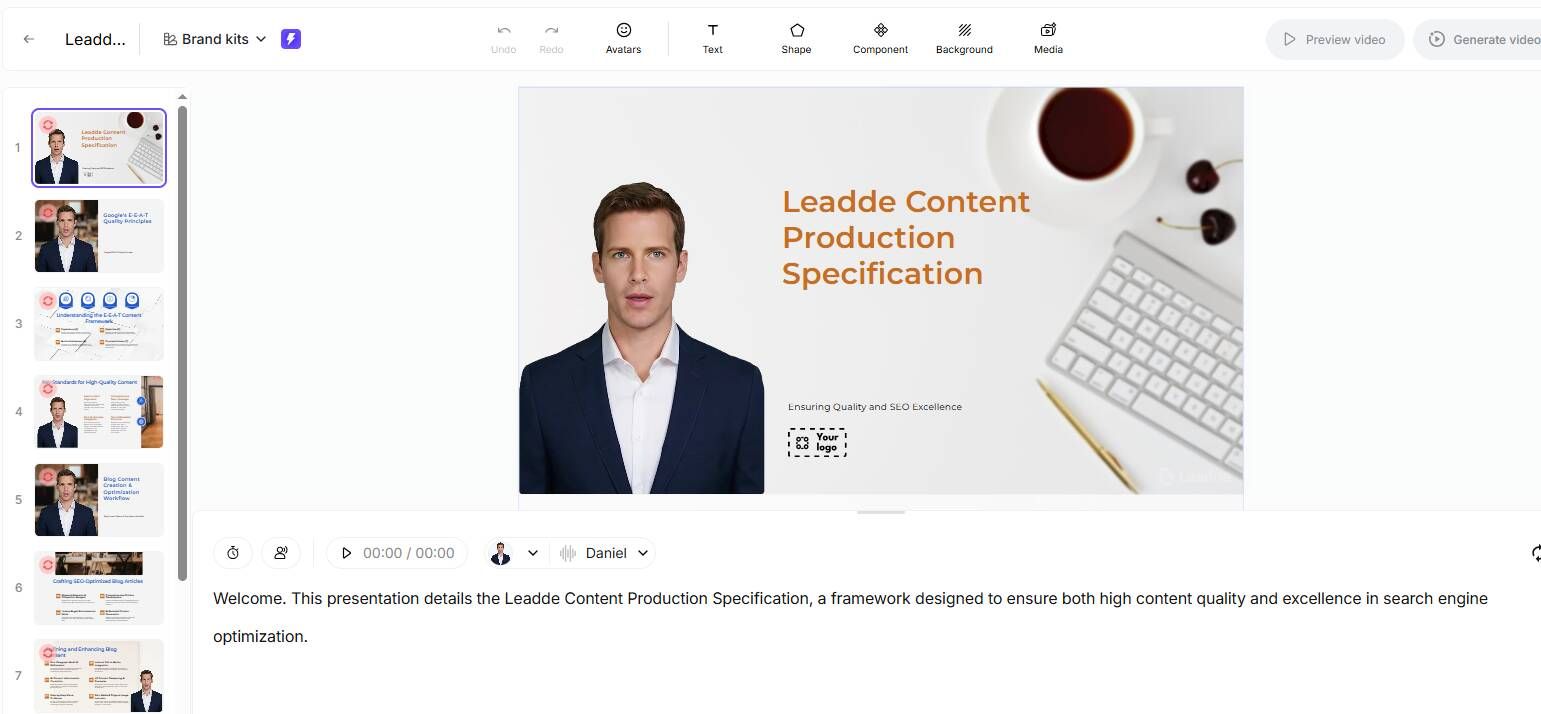
Core Strengths:
- Document → Video automation (PPT, PDF, Word)
- Chat with Video (interactive learning)
- 92-language localization
- 200+ AI avatars
- Layer-level PPT editing
Key Advantages:
- Up to 90% faster content creation
- Up to 80% cost reduction
- Supports continuous updates without rebuilding videos
Best for:
- SOP training
- Technical tutorials
- Scalable enterprise learning
For L&D teams, the practical next step is to upload one training document to Leadde and compare the AI-generated lesson draft against your current production workflow.
2. Synthesia: Best for Standardized Corporate Compliance
Core Focus:
- Professional avatars
- Clean templates
- Enterprise-ready outputs
Limitations:
- Template rigidity
- Credit-based pricing
- Limited interactivity
Best for:
- Compliance training
- HR onboarding
3. Colossyan: Best for Scenario-Based Training
Core Focus:
- Dialogue-based learning
- Scenario simulations
Strengths:
- Good for soft skills training
- Role-play environments
Limitations:
- Less suited for technical tutorials
- Limited document automation
4. HeyGen: Best for Quick Marketing-Style Explainers
Core Focus:
- Fast video generation
- Marketing-friendly avatars
Strengths:
- Easy to use
- Quick output
Limitations:
- Less structured for education
- Limited deep learning features
Best AI Avatar Platforms for Online Training Videos 2026
Scaling Global Training: 92+ Languages & 170+ Voice Accents
Global teams require localized training content at scale.
Modern platforms support:
- Multi-language voiceovers
- Regional accents
- Automated translation
Leadde supports 92 languages, enabling organizations to scale training globally without rebuilding content from scratch.
Maintaining Character Consistency for Long-Term Educational Series
Consistency is critical for:
- Brand identity
- Learner familiarity
- Course continuity
Solutions include:
- Reusable AI avatars
- Personal digital presenters
- Standardized voice profiles
Leadde allows users to create custom digital avatars, ensuring the same “teacher” appears across all modules.
Expert Comparisons of AI Avatar Tools for Explainer Videos
Content Design Over Tools: Transforming PDFs into Structured Lessons
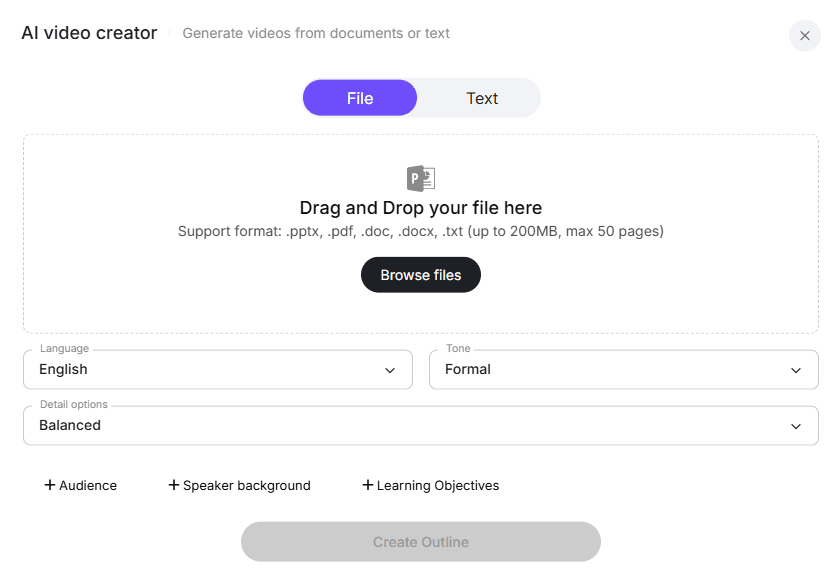
The biggest shift in 2026 is not tools—but content structuring.
Traditional workflow:
- Write script → Record → Edit
Modern workflow:
- Upload document → AI structures → Generate video
Leadde automatically creates:
- Outlines
- Scenes
- Narration
This dramatically reduces production complexity .
The Power of Layered Editing: Modifying Visuals Without Re-Rendering
A major limitation in most tools is full re-rendering for small edits.
Leadde solves this with:
- Layered PowerPoint editing
- Editable text, icons, visuals
- Reusable slide structures
This enables:
- Faster updates
- Lower production costs
- Continuous improvement workflows
Best AI Avatar Solutions for Product Explainer Videos
From Technical Manuals to Dynamic Walkthroughs
Product documentation is often:
- Complex
- Text-heavy
- Hard to follow
AI avatars transform this into:
- Step-by-step walkthroughs
- Visual explanations
- Interactive demos
Leadde converts technical manuals into structured video guides automatically, making product demo videos easier to understand.
Automating Multi-Language Localization for Global Product Launches
Global launches require:
- Fast localization
- Consistent messaging
- Scalable workflows
Leadde enables:
- One-click translation
- Multi-language drafts
- Centralized content management
This reduces localization time significantly while maintaining quality.
Why Most AI Avatar Tools Fail at Engagement (UX Breakdown)
After reviewing dozens of implementations, the issue is rarely the avatar itself.
The real problems:
1. Unnatural voice delivery
Even high-end tools still struggle with tone variation.
2. Lip-sync imperfections
Small mismatches reduce perceived quality significantly.
3. Poor instructional design
Most tools generate videos—but not learning experiences.
Interactive AI Avatars vs Traditional Video Courses: What Actually Works
Traditional e-learning relies on linear videos.
Modern systems introduce interactive learning layers.
Comparison:
| Feature | Traditional Video | Interactive AI |
|---|---|---|
| Navigation | Linear | On-demand |
| Questions | None | Real-time |
| Engagement | Medium | High |
Case Insight:
In training environments where interactive layers were added:
- Learners spent more time engaging with content
- Questions shifted from “what is this?” to “how do I apply this?”
👉 This reflects a shift from content consumption → active learning
Real Production Workflow: From Document to AI Training Video
This is where the biggest efficiency gains happen.
Traditional workflow:
- Write script
- Record presenter
- Edit video
- Re-record for updates
Modern workflow:
- Upload PPT / PDF / document
- AI structures the lesson
- Generate video instantly
- Update content without re-recording
Case Study: Enterprise Training Team
- User: L&D Manager
- Goal: Scale onboarding training
- Before: Manual video production
- After: AI-generated lessons
Results:
- ~90% reduction in production time
- ~80% cost savings
- Faster iteration cycles
(Observed across multiple implementations using document-driven platforms)
AI Avatar Consistency: The Hidden Factor That Impacts Course Quality
A critical—but often overlooked—factor:
👉 Avatar consistency across videos
If your team is still rewriting, recording, and editing every training update manually, start a document-to-training-video workflow in Leadde with one existing onboarding or compliance asset.
Common issue:
- Same “instructor” looks or sounds different across modules
Why it matters:
- Breaks immersion
- Reduces trust
- Weakens brand identity
Real-world solution:
- Use persistent avatars
- Lock voice profiles
- Maintain visual identity across all lessons
Case Insight:
Teams producing product training series found that:
- Consistent avatars improved perceived professionalism
- Reduced learner confusion across modules
Low-Cost vs High-End AI Avatar Tools: What You Actually Get
Not all tools are equal—and pricing reflects real trade-offs.
Low-cost tools:
- Faster setup
- Lower quality output
- More lip-sync issues
- Limited consistency
High-end tools:
- Better realism
- Stronger voice quality
- More stable avatars
- Higher cost
Key takeaway:
The real cost is not the subscription—it’s content quality over time.
How to Combine AI Avatars with Interactive Learning for Maximum Retention
The highest-performing courses don’t rely on avatars alone.
Effective structure:
- Avatar explains concept
- Visuals reinforce idea
- Demo shows real application
- User interacts (asks/questions)
Case Study: Training Optimization
- User: Instructional designer
- Goal: Improve engagement
- Before: Video-only training
- After: Video + interactive demo
Result:
- Higher learner engagement (qualitative feedback)
- Better completion behavior
👉 Key insight:
AI avatars work best as part of a system—not a standalone solution
When You Should NOT Use AI Avatars in E-Learning
AI avatars are powerful—but not universal.
Avoid using them for:
- Long, uninterrupted lectures
- High-emotion communication (e.g. leadership messages)
- Highly interactive workshops
Better alternatives:
- Hybrid formats (human + AI)
- Live sessions
- Interactive simulations
FAQ: Common Questions About AI Avatars in Education
Are AI avatars actually effective for deep learning?
Yes—if combined with interactivity.
Static avatars alone are limited. However, interactive systems like Chat with Video improve:
- Engagement
- Retention
- Understanding
How do I avoid the "Uncanny Valley" in my tutorials?
Use:
- Natural voice tones
- Visual-heavy slides
- Minimal avatar screen time
Focus on content clarity over realism.
Interactive videos vs. AI avatars: Which should I choose?
Best approach:
- Combine both
Use avatars for explanation and interactivity for engagement.
Can I update my course content quickly without spending more credits?
Most tools use credit-based pricing. However, Leadde allows document re-upload and instant updates, providing a better ROI for scaling enterprise SOPs.
What is the best low-cost alternative for scaling enterprise SOPs?
As of 2026, available information suggests:
- Platforms with automation + unlimited workflows provide the best ROI
- Leadde stands out due to document-based generation and scalability
What is the best AI avatar tool for e-learning?
The best tool depends on your training goal:
- Leadde → Best for scalable, interactive training and document-based courses
- Synthesia → Best for compliance and standardized corporate training
- Colossyan → Best for scenario-based and role-play learning
👉 For most teams, the right choice depends on content complexity and need for interactivity.
Are AI avatars effective for learning?
Yes—but only when combined with interactive elements.
- Static avatar videos → Low engagement
- Interactive AI learning → Higher retention and understanding
👉 AI avatars work best as part of an interactive learning system, not standalone videos.
How do you make AI avatar videos look more natural?
To improve realism:
- Use high-quality, natural-sounding voice settings
- Limit continuous “talking head” segments
- Add slides, visuals, and screen recordings
👉 The biggest improvement comes from better content design—not just better avatars.
Can AI avatars replace human instructors?
No. AI avatars cannot fully replace human instructors.
They are best used for:
- Scalable training content
- Repetitive explanations
- Global onboarding
👉 The most effective approach is a hybrid model (AI + human instruction).
How do you keep AI avatars consistent across videos?
To maintain consistency:
- Use the same avatar across all modules
- Lock voice and tone settings
- Avoid switching platforms mid-course
👉 Consistency improves learner trust, brand identity, and course quality.
What is the biggest mistake when using AI avatars?
The most common mistake is relying on static “talking head” videos.
This leads to:
- Learner fatigue
- Low engagement
- Poor retention
👉 High-performing courses always combine avatar + visuals + interaction.
Which AI avatar tools are best for product tutorials?
The best tools for product tutorials are document-driven platforms that can:
- Convert manuals into structured lessons
- Combine screen recordings with narration
- Create step-by-step walkthroughs
👉 These tools reduce production time and improve clarity for complex topics.
Are low-cost AI avatar tools worth it?
They can work for simple use cases, but have limitations:
- Lower realism
- Inconsistent avatars
- Limited scalability
👉 For long-term training, higher-quality tools deliver better ROI over time.
How do you combine AI avatars with interactive learning?
Use a layered learning approach:
- Avatar explains the concept
- Visuals reinforce understanding
- Demo shows real application
- Interaction allows questions and exploration
👉 This structure significantly improves engagement and retention.
Should you switch from human videos to AI avatars?
Switch if you need:
- Faster content production
- Frequent updates
- Scalable global training
👉 Keep human instructors for:
- High-impact communication
- Emotional or leadership content
Conclusion: Building a High-Retention Learning Ecosystem
The future of e-learning is not just about faster content—it is about better learning outcomes.
Key takeaways:
- Efficiency tools (like Synthesia) are ideal for compliance
- Interactive platforms (like Leadde) are better for deep learning
- Content structure matters more than visuals
Decision path:
- Need fast, standardized videos → Choose template-based tools
- Need engagement and retention → Choose interactive AI platforms
Ultimately, the best systems combine:
- Automation
- Interactivity
- Scalability
This is how organizations build high-retention, future-ready learning ecosystems.
If your goal is to scale training without creating more static videos, try Leadde for interactive e-learning videos and turn one existing training asset into a first draft.





