How to Add Quizzes to Healthcare Training Videos

To add quizzes to healthcare training videos, first define the behavior staff must demonstrate. Then place short knowledge checks after the most important parts of the video.
The best healthcare training quizzes are scenario-based, role-specific, PHI-safe, and tied to approved SOPs or policies. They should also track completion data, scores, attempts, version history, and reviewer approval.
A quiz should not only test definitions. In healthcare training, a quiz should confirm whether the learner knows what to do in a real workflow.
That may include how to protect PHI, when to escalate a call, how to follow an SOP, how to document in the EHR, or what to do after a safety incident.
HIPAA’s Privacy Rule requires covered entities to train workforce members on privacy policies and procedures as appropriate for their roles. The Security Rule also includes security awareness and training for workforce members.
That makes quiz-backed healthcare training videos useful for two reasons. They improve learning, and they create compliance evidence.
Interactive video tools like Leadde.ai can help healthcare teams add quiz-style knowledge checks directly into AI-assisted training videos, so staff can learn, respond, and generate measurable completion evidence in the same workflow.

Why Add Quizzes to Healthcare Training Videos
Quizzes turn healthcare training videos from passive content into measurable learning assets.
A video view only proves that someone opened or played the training. A quiz helps prove that the learner understood the workflow, policy, or safety requirement.
This matters because healthcare training often supports privacy, patient safety, infection control, EHR use, billing, call center escalation, onboarding, and compliance.
In our healthcare training workflow research, the most common issue was not lack of content. Most teams already had too much content.
They had PDFs, slide decks, SOP binders, policy manuals, EHR guides, and long recorded sessions. The failure point was that staff skimmed, skipped, forgot, or could not identify the latest version after workflows changed.
Quizzes solve three problems.
First, they force the training to define what matters. If a quiz cannot be written clearly, the video probably does not have a clear learning objective.
Second, they check application, not just exposure. A strong quiz asks, “What should you do next?” rather than “What does this acronym mean?”
Third, they create audit evidence. Completion dates, quiz scores, attempts, passing thresholds, and version records help show who was trained, when, on which version, and whether they passed.
Start with the Healthcare Training Outcome
Before writing quiz questions, define the outcome of the training video.
The question is not, “What can we ask about this video?” The better question is, “What must the learner do correctly after watching?”
Examples:
- After this HIPAA video, front desk staff can verify identity before discussing appointments.
- After this EHR video, nurses can document the workflow using a demo environment, not real patient screenshots.
- After this infection control video, staff can identify when PPE is required.
- After this call center video, agents can escalate safety concerns correctly.
- After this onboarding video, new employees can locate and follow the correct SOP.
A useful rule is simple. Build each healthcare training video around 3–5 key points, then write 3–5 quiz questions.
In our training research, short 2–5 minute modules worked better than long-form training. They fit real healthcare work: shift changes, patient care, phone queues, charting, and onboarding schedules.
Long training creates friction.
In one EHR training case, trainees wanted a 2x speed option because required videos felt too slow. The deeper issue was not only playback speed.
The training needed to be shorter, searchable, and aligned with actual workflows.
Use AI to Turn SOPs, Policies, and PowerPoints into Quiz Questions
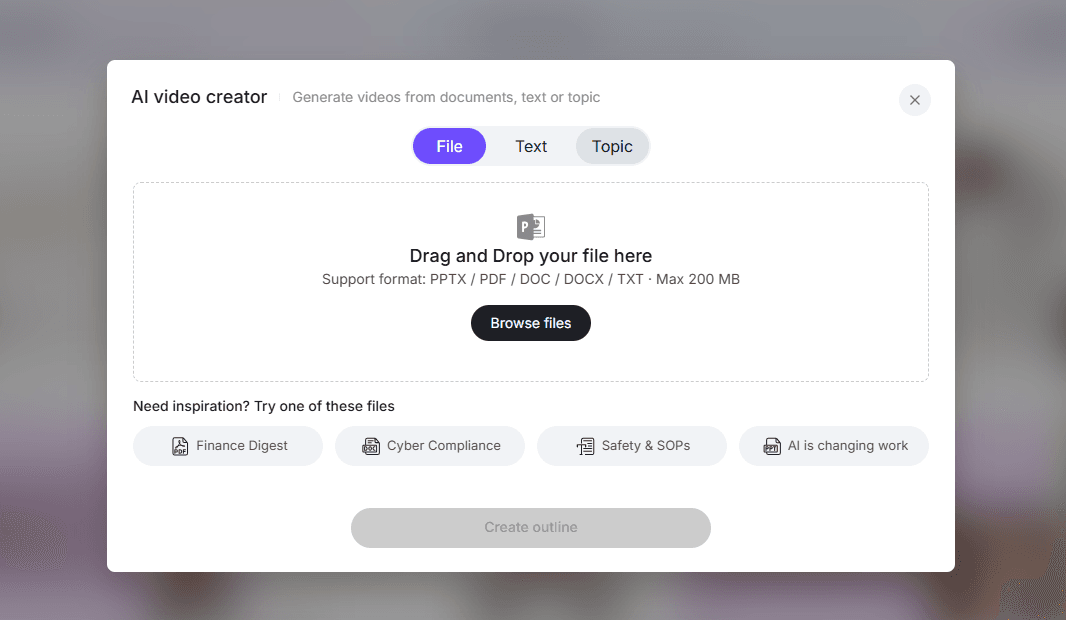
AI is useful for healthcare training quizzes because it can quickly extract key actions from approved documents.
This is especially valuable when teams need to convert SOPs, policies, PDFs, PowerPoints, onboarding manuals, EHR guides, or compliance documents into video-based training.
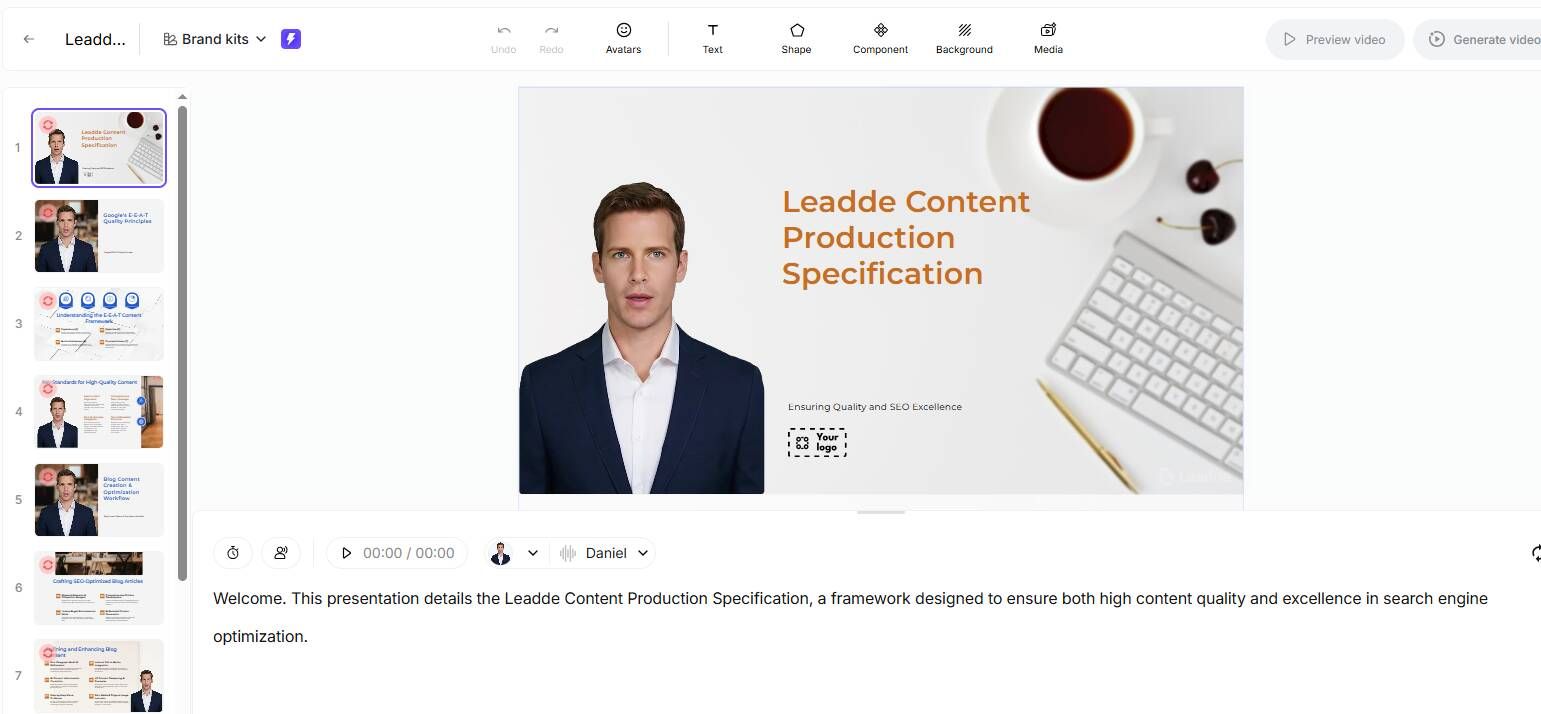
A practical AI workflow looks like this:
- Start with an approved source document.
- Remove PHI or use de-identified training materials.
- Extract the key learning objectives.
- Identify the actions staff must take.
- Convert each action into a scenario-based question.
- Generate answer options and explanations.
- Flag questions that need expert review.
- Add the quiz after the relevant video section.
- Track completion, score, attempts, and version.
- Repeat the workflow when the SOP or policy changes.
AI should draft the quiz, not approve it.
In healthcare, final questions should be reviewed by the right owner. Compliance should review HIPAA questions. Clinical leaders should review care workflows.
IT or informatics should review EHR training. Quality teams should review incident reporting. Operations should review call center and onboarding workflows.
This matches what we observed in practical healthcare AI use cases. AI creates the most value when it summarizes existing information, creates structured drafts, reduces repetitive work, and helps experts move faster.
In one clinical workflow, AI saved 20–30 minutes per day for a clinician seeing 14–16 clinic patients. Another admission-note workflow saved 10–20 minutes per note.
A separate clinic workflow saved at least one hour of charting after a half-day clinic.
The lesson for training teams is simple. AI is strongest when it restructures approved information into usable drafts.
It becomes risky when it invents policy, clinical guidance, or compliance interpretations without review.
Where to Place Quizzes in Healthcare Training Videos
Quiz placement should depend on video length and risk level.
For short videos under 3 minutes, place one quiz at the end. This works well for quick policy updates, single-workflow SOP videos, and short compliance refreshers.
For 3–8 minute videos, place one knowledge check in the middle and one at the end. This keeps attention high and checks understanding before the learner moves on.
For longer compliance courses, split the video into chapters. Add a quiz after each section.
This is better than forcing staff to watch a long video and answer all questions only at the end.
A strong healthcare quiz structure looks like this:
- One question after the policy explanation
- One question after the role-based scenario
- One question after the “common mistake” section
- One final question asking what action the learner should take next
For example, a HIPAA training video for call center staff might include identity verification, failed verification handling, call documentation, and escalation.
Each section should have one practical question tied to the actual decision the agent must make.
Write Scenario-Based Healthcare Training Quiz Questions
The best healthcare training quizzes use realistic scenarios.
Scenario-based questions are more useful than definition-based questions. Healthcare staff need to make decisions in context.
Weak question:
“What does PHI stand for?”
Better question:
“A caller asks for appointment details for an adult patient but cannot verify the patient’s identity. What should you do next?”
Strong scenario questions include a role, a realistic situation, a decision point, one best answer, plausible wrong answers, a short explanation, and a link back to the policy or SOP.
Examples by use case:
HIPAA training: A front desk employee is asked to confirm a patient’s appointment in a crowded waiting room. What should they do?
EHR training: A nurse needs to document a wound care step but cannot find the correct field. What is the safest next action?
Medical call center training: A caller reports chest pain while asking about a billing issue. What should the agent do first?
Infection control training: A staff member is exposed to blood during a procedure. What is the first required step?
Pharma SOP training: A new employee is assigned several SOPs. Which SOPs are required before performing the task independently?
OSHA’s bloodborne pathogens training requirements are a useful reminder that some healthcare training is recurring and role-dependent.
Training may be required at initial assignment, annually, and when new or modified tasks affect exposure risk. For these topics, quizzes help show that staff understood role-relevant safety concepts.
Make Healthcare Training Video Quizzes Audit-Ready
If the quiz supports required training, design it for audit readiness from the beginning.
For each quiz, track:
- Training title
- Source document
- Source document version
- Video version
- Quiz version
- Assigned learner
- Role or department
- Completion date
- Score
- Number of attempts
- Passing threshold
- Reviewer approval
- Renewal date
- Change history
This matters when policies change.
If a privacy workflow changes, it is not enough to know that staff completed HIPAA training last year. The organization may need to know whether they completed the correct version after the policy update.
For audit-ready healthcare training, a quiz is not just a learning activity. It is part of the evidence package.
Keep Healthcare Training Quizzes PHI-Safe
Healthcare training quizzes should avoid unnecessary PHI.
Even when the topic is clinical, privacy, or EHR-related, most quizzes can use fictional scenarios, simulated patients, redacted examples, or demo environments.
Avoid real patient names, medical record numbers, dates of birth, patient addresses, real phone numbers, unredacted EHR screenshots, real call recordings, and visit-specific details.
Use fictional names, simulated EHR screens, generic screenshots, synthetic call transcripts, de-identified cases, approved sample workflows, and role-based scenarios instead.
Before using AI to generate quiz questions, confirm how prompts, uploads, screenshots, and outputs are handled.
If PHI could be involved, compliance and legal teams should review the workflow before production.
Case Study: From 200 SOPs to Short Videos with Knowledge Checks
One life sciences onboarding workflow we analyzed showed the cost of document-heavy training.
A new employee was assigned around 200 SOPs on the first day. Each SOP was at least 10 pages, and some reached 50 pages.
Most of the workflow involved reading an SOP and signing off. Only some documents included short quizzes, and there were no video modules or supporting learning materials.
The result was predictable: information overload, low retention, and uncertainty about which SOPs mattered most for the role.
Some teams tried to limit the load to 10, 12, or 15 SOPs per day. One trainee pushed through 25 SOPs in one day and still felt overloaded.
A better workflow converts the SOP library into role-based video modules with quizzes.
Before: 200 SOPs assigned at once, 10–50 pages per SOP, mostly reading and sign-off, limited knowledge checks, little role-based prioritization, and low confidence in retention.
After: SOPs grouped by role and workflow. Each module is limited to 2–5 minutes.
Each video is tied to one learning objective. Each quiz includes 3–5 scenario-based questions.
Completion, score, attempts, and version are tracked.
This is where AI is especially useful. AI can extract key actions from SOPs, draft video scripts, generate scenario-based questions, and create role-specific variants.
Human reviewers then approve the final version.
Case Study: Adding Quizzes to EHR and Medical Software Training Videos
EHR training is one of the best places to add quizzes.
Staff need to perform specific steps, not simply remember concepts.
In our EHR training research, a common frustration was that required training videos felt too slow. Another pattern was that practical workflow tips were scattered and hard to find.
This creates a gap between “training completed” and “staff can actually do the workflow.”
A better EHR training quiz tests workflow performance:
- Which field should you update first?
- Which action should you avoid in a live patient chart?
- When should you use a demo patient?
- What should you do if the template does not match the visit?
- Which step confirms the task was routed correctly?
For medical software demos, place quizzes after each workflow section.
Example:
Video section: How to document a refill request
Quiz question: The refill request is missing a required lab result. What should you do next?
Video section: How to escalate a patient safety concern
Quiz question: Which scenario requires immediate escalation?
These questions make training practical. They also give managers evidence that staff understand the workflow.
Healthcare Training Video Quiz Checklist
Use this checklist before publishing.
Learning design: one clear learning objective per video, 3–5 quiz questions per short module, scenario-based questions, plausible wrong answers, explanations, and role-specific examples.
Compliance and audit readiness: source policy or SOP linked, source version recorded, quiz version recorded, reviewer approval captured, completion date tracked, score and attempts tracked, passing threshold defined, and renewal date set.
Privacy and security: no unnecessary PHI, fictional or de-identified examples, demo EHR screens only, and AI workflow reviewed for data handling.
Usability: mobile-friendly format, questions placed near relevant content, feedback shown after answers, retake process defined, and manager reporting available.
Conclusion: Healthcare Training Video Quizzes Should Prove Understanding
Adding quizzes to healthcare training videos is one of the simplest ways to make training more effective, measurable, and audit-ready.
Start with an approved SOP, policy, PDF, PowerPoint, EHR workflow, or training document.
Use AI to extract key actions, draft scenario-based questions, generate explanations, and create role-specific variants. Then have the questions reviewed before publishing.
The best healthcare training quizzes are short, practical, role-based, PHI-safe, version-controlled, and tied to real workflow decisions.
AI can make the process faster and more creative. But the value comes from better learning evidence: staff watched the training, understood the material, and know what to do next.