ChatGPT Images 2.5 Pricing: Plans, API Costs & Real Cost per Image

ChatGPT Images 2.5 pricing depends on how you use it. In ChatGPT, image generation is included across Free and paid plans with different usage levels. Through the OpenAI API, GPT Image 2.5 is billed by text, image input, and image output tokens, so the real cost per image changes with quality, resolution, editing, and reference images.
For developers and content teams, the headline API price is only part of the picture. Retries, multi-turn edits, and rejected outputs can make the cost per approved image much higher than the cost of a single generation. This guide breaks down ChatGPT plans, API rates, Flare vs Sunburst, quality-level costs, and the hidden expenses that matter in real production workflows.
If you want to use GPT Image 2.5 without managing API calls directly, Leadde integrates GPT Image 2.5 Flare into the same workspace used for images, presentations, and AI video creation, making it easier to move a generated visual into a broader content workflow.

ChatGPT Images 2.5 Pricing: How Much Does It Cost?
There are two main pricing systems to understand.
| How you use Images 2.5 | Pricing model | Best for |
| ChatGPT | Monthly subscription/access limits | Individuals and creators |
| OpenAI API | Token-based usage | Developers and automation |
| Leadde | Included according to Leadde plan | Content, presentation, and video workflows |
OpenAI says Images 2.5 is available across ChatGPT, ChatGPT Work, and Codex. Its current pricing page describes Free image generation as limited and slower, Go as offering higher image-generation allowances, Plus as supporting more complex and accurate image creation, and Pro as providing unlimited and faster image generation subject to abuse guardrails.
Is ChatGPT Images 2.5 free?
Yes. Free ChatGPT users have limited access to image generation. In the U.S., ChatGPT Go is $8 per month and Plus is $20 per month. OpenAI currently offers a $100 Pro tier with higher usage; new sign-ups for the $200 Pro tier have been temporarily paused since September 10, 2026.
Does ChatGPT Plus include API credits?
No. ChatGPT Plus and OpenAI API billing are separate. A $20 Plus subscription includes image generation inside ChatGPT, but API usage is billed independently.
What Are the GPT Image 2.5 API Prices and Cost per Image?
OpenAI offers two API models: GPT-Image-2.5 Flare and GPT-Image-2.5 Sunburst. Both currently use the same token rates.
| Token type | Standard | Cached |
| Text input | $5 / 1M tokens | $1.25 / 1M |
| Image input | $8 / 1M tokens | $2 / 1M |
| Image output | $30 / 1M tokens | — |
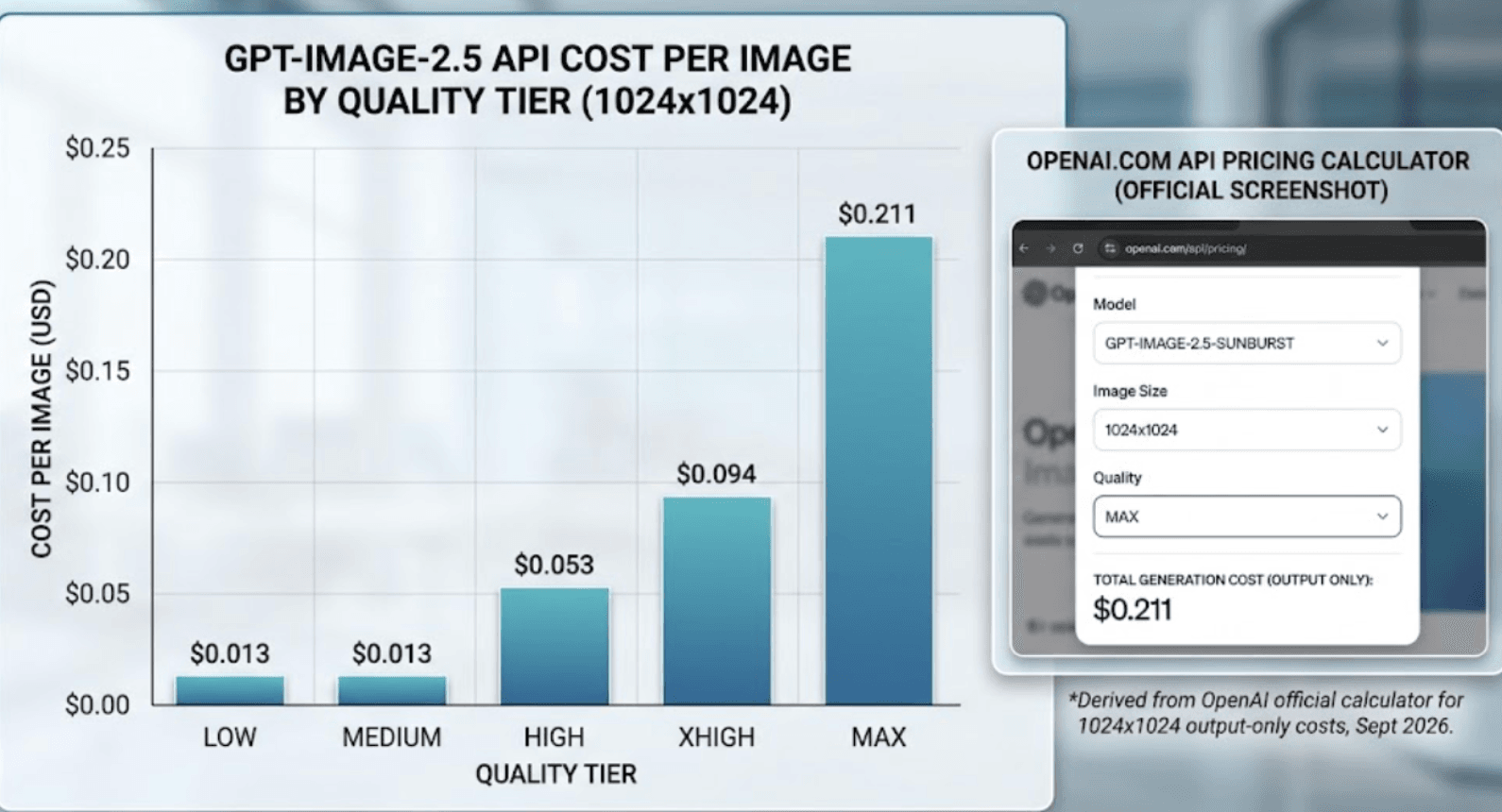
For a 1024×1024 image, OpenAI's current calculator shows the following image-output costs:
| Quality | Output tokens | Output-only cost |
| Low | 196 | $0.01 |
| Medium | 439 | $0.01 |
| High | 1,756 | $0.05 |
| XHigh | 3,122 | $0.09 |
| Max | 7,024 | $0.21 |
These are not complete request prices. OpenAI explicitly excludes prompt tokens, reference-image input and streaming partial images from the calculator's output estimate.
How do quality and image size affect pricing?
Quality is one of the largest cost levers. At 1024×1024, moving from Medium to High increases image-output cost from about $0.013 to $0.053, while Max reaches about $0.211.
Resolution is less intuitive. OpenAI notes that a larger non-square image can sometimes consume fewer output tokens than a smaller or square image at the same quality. For reliable budgeting, set an explicit quality and size and measure the API response's actual usage.
Why can image editing cost more than text-to-image?
A basic text-to-image request mainly combines text input with image output. Editing adds image-input tokens for the source or reference image.
That difference becomes significant when teams use several reference images or repeatedly refine an asset. The output image may cost the same, while the accumulated input and editing requests raise the total production cost.
Flare vs Sunburst: Which GPT Image 2.5 Model Should You Use?
| Flare | Sunburst | |
| Main priority | Speed and scale | Precision and editing |
| Token rates | Same | Same |
| Best for | Drafts, variants, everyday generation | Detailed edits, polished final assets |
| Generation speed | Faster | Longer |
| Positioning | Default | Precision-focused |
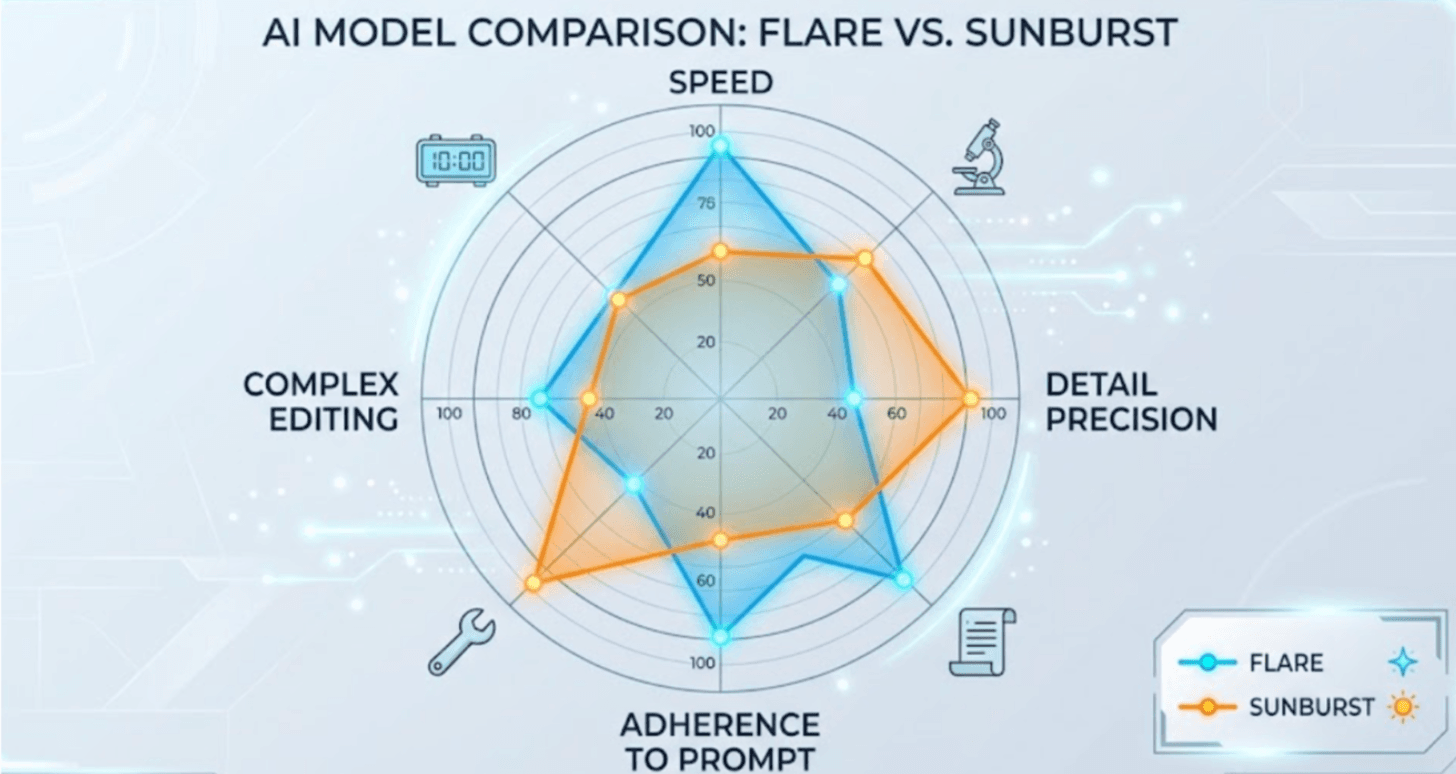
OpenAI describes Flare as its fastest high-quality everyday image model. Sunburst is its most capable model for image generation and editing, intended for workflows where editing precision matters most.
Is Sunburst more expensive than Flare?
Not on a per-token basis. Both models use the same input and output rates. However, equal token rates do not guarantee an identical final workflow cost because actual token consumption, quality choice, edits and retries can differ. OpenAI recommends measuring the usage returned by real requests.
Should you use Flare first and Sunburst later?
For many content workflows, that is a practical approach: use Flare for exploration and rapid variants, then reserve Sunburst for precision-sensitive final edits.
Do not assume Sunburst automatically follows every instruction better. In one independent Puter poster test, Flare stayed closer to the requested formatting, while Sunburst produced richer visual detail but added scene elements that were not requested. The test was only one prompt, so it is useful as workflow evidence rather than a universal benchmark.
What Hidden Costs Make GPT Image 2.5 More Expensive Than the Calculator?
The official image-output estimate is a useful baseline, but production workflows contain additional costs.
If you use GPT Image 2.5 through the Responses API, OpenAI charges the mainline model's token usage in addition to the image-generation tokens. Streaming previews also have a cost: each partial image adds 100 image output tokens, equivalent to about $0.003 at the current $30-per-million output rate.
Why retries matter more than the cheapest token price
An API request can succeed technically while failing creatively. Incorrect text, product geometry, facial drift, misplaced logos or unwanted layout changes can force another generation.
This is why professional teams should distinguish cost per generated image from cost per usable image. A cheaper quality level is not cheaper in practice if it causes substantially more revisions.
How can you reduce expensive re-generation loops?
A practical workflow is to:
- Explore concepts with Low or Medium quality, then increase quality only after the direction is approved.
- Lock approved elements such as subject identity, product shape, composition and logo placement before requesting another edit.
- Make one major change at a time rather than rewriting the entire image.
- Give reference images clear roles—for example, one for identity, one for product appearance and another for style.
- Use explicit size and quality when benchmarking instead of
auto. - Avoid unnecessary streaming previews and track actual API
usage.
From a production perspective, improving first-pass acceptance rate can save more money than optimizing a few prompt tokens.
What Is the Real Cost per Approved Image?
The most useful metric for a marketing, ecommerce or content team is not the cost of one successful API response. It is:
Cost per approved asset = total generation + editing + retry costs ÷ approved assets
Suppose a team needs 1,000 approved High-quality 1024×1024 images. At the output-only baseline of $0.05268 per generation, a 90% first-pass acceptance rate requires roughly 1,111 generations, or about $58.53 in image-output cost. At 70% acceptance, it rises to roughly $75.26. At 50%, about 2,000 generations are needed, raising the baseline to $105.36—before editing and input costs.
What would 100, 1,000 or 10,000 images cost?
| Images generated | Low | Medium | High |
| 100 | $0.59 | $1.32 | $5.27 |
| 1,000 | $5.88 | $13.17 | $52.68 |
| 10,000 | $58.80 | $131.70 | $526.80 |
These are output-only estimates for 1024×1024 images. Reference images, Responses API usage, edits, partial images and retries increase the total.
For teams producing content at scale, I would track both cost per approved asset and time to approved asset. A model that costs slightly more per request can still be cheaper operationally if it cuts revision cycles and human review time.
Should You Use ChatGPT, the OpenAI API, or Leadde for GPT Image 2.5?
Use ChatGPT when you want conversational creation, Sketch, templates and iterative editing without building an integration. Use the OpenAI API when you need automation, precise usage tracking, programmatic controls or thousands of requests.
Leadde fits a different workflow. Its current GPT Image 2.5 integration uses Flare, and Leadde says image generation is covered by eligible Leadde plans rather than a separate GPT Image 2.5 model fee. Generated images can stay in the same workspace and move into presentation slides or AI video scenes.
That matters when an image is not the final deliverable. For training teams, marketers and educators, a visual may ultimately need to become part of a product tutorial, explainer video, presentation or localized content package. In those workflows, tool switching and downstream production time are also costs, even if they never appear on the API invoice.
Conclusion
ChatGPT Images 2.5 does not have one universal price per image. ChatGPT users pay through subscription access, while API users pay according to token usage. For production teams, the more meaningful number is often the cost per approved asset after references, edits and retries. Flare is the practical default for speed and scale, while Sunburst is better suited to precision-sensitive refinement.
FAQ
How much does ChatGPT Images 2.5 cost? ChatGPT image generation is included across Free and paid plans with different access levels. API usage is separate: GPT Image 2.5 currently costs $5 per