How to Make a Video Essay: Step-by-Step Guide & Best Tools

To make a successful video essay, start with a clear thesis, structure your ideas into an audio-visual script, design visuals alongside your narration, record clean voiceover, edit for pacing and retention, and publish in a format matched to your audience. The most effective video essays are not written essays with images—they are visual arguments designed for watching.
If speed and scalability matter, modern AI video tools such as Leadde and Synthesia can automate scripting, voice generation, scene layout, and multilingual localization. Traditional editing workflows still offer full creative control, but they require significantly more production time and technical effort.
This guide walks through both approaches.

What Is a Video Essay?
A video essay is a structured piece of visual storytelling built around an idea, argument, or analysis.
Unlike traditional videos that focus mainly on entertainment or direct presentation, a video essay combines:
- a clear thesis
- spoken narration
- visual evidence
- pacing designed for viewer retention
- storytelling structure
Common video essay formats include:
- film analysis
- cultural commentary
- history explainers
- business analysis
- political breakdowns
- educational explainers
- internal corporate knowledge videos
The format has evolved far beyond YouTube commentary.
In creator workflow research, we found that the same production structure used for YouTube essays is increasingly being used for:
- training videos
- product education
- executive communication
- internal enablement
- multilingual business storytelling
That shift matters because it changes the production expectations.
A video essay is no longer just a creator format. It is now a scalable communication format.
The Core Elements of a Successful Video Essay
Every effective video essay relies on three pillars.
1. A Strong Thesis
Weak:
“AI is changing video production.”
Strong:
“How AI eliminated the traditional video editing bottleneck in 2026.”
Your thesis should create tension.
Good video essays answer a question, challenge an assumption, or explain a surprising shift.
Without a thesis, you are making a presentation—not an essay.
2. Clear Voiceover Audio
Audio quality directly affects watchability.
Even highly polished visuals fail if narration sounds:
- echoey
- monotone
- robotic
- rushed
- inconsistent
Production audits consistently show viewers tolerate imperfect visuals more than poor audio.
3. Visual Evidence
Visuals should support the argument—not decorate the screen.
This includes:
- B-roll
- stock footage
- charts
- maps
- motion graphics
- screenshots
- archive footage
- typography
- animated explainers
The strongest creators think visually while writing.
The weakest creators write first and panic later.
Pre-Production: How to Choose a Video Essay Topic
How to Find a Video Essay Topic That Actually Works
Most beginners choose topics that are too broad.
Examples:
Bad:
“The History of Marketing”
Better:
“How Performance Marketing Broke Brand Strategy”
Bad:
“The Future of AI”
Better:
“Why AI Killed Manual Video Editing for Small Teams”
The narrower the angle, the stronger the essay.
A practical framework:
Ask:
What specific tension exists here?
Examples:
- what changed?
- what failed?
- what are people misunderstanding?
- what trend matters now?
- what hidden mechanism explains this?
Avoid Analysis Paralysis
A recurring workflow failure in creator research was over-researching.
Creators collect:
- 40 tabs
- endless notes
- screenshots
- references
Then never produce.
Use this rule:
If research does not directly support your thesis, remove it.
Create a skeleton:
- intro
- argument 1
- argument 2
- argument 3
- conclusion
Then fill gaps.
How to Structure a Video Essay Script for Better Viewer Retention
Why Written Essays Fail as Video Scripts
One of the most common production mistakes is writing like an academic essay.
Written prose often sounds unnatural aloud.
Example:
Bad:
“Historically speaking, one may reasonably conclude…”
Better:
“Here’s what changed.”
Video narration must sound spoken.
Not written.
The Best Video Essay Script Structure
A practical retention-friendly structure:
1. Hook (0–30 seconds)
Goal:
earn attention.
Use:
- bold claim
- unexpected question
- tension
- contradiction
- strong promise
Example:
“Making a video essay used to take days. Now it can take minutes.”
2. Context (30–90 seconds)
Explain:
- why this matters
- what changed
- what problem exists
3. Core Argument Sections
Break long essays into segments.
A common benchmark in creator workflows is approximately 160 spoken words per minute.
That means:
10-minute video ≈ 1,600 words
20-minute video ≈ 3,200 words
This helps pacing decisions.
4. Payoff
Answer the thesis clearly.
Never end vaguely.
How to Make a Video Essay That Doesn’t Feel Like a PowerPoint Presentation
One of the most common beginner problems is creating a narrated slideshow.
The symptoms:
- static images
- bullet-point energy
- disconnected B-roll
- weak movement
- no visual storytelling logic
This instantly makes a project feel amateur.
Slideshow vs Real Video Essay
Slideshow:
audio + unrelated images
Video essay:
argument + synchronized visual storytelling
Difference:
A slideshow illustrates.
A video essay persuades.
Use Visual Anchors
A strong production technique:
alternate between:
visual anchor → explanation → visual anchor → explanation
Visual anchors include:
- maps
- close-up footage
- headlines
- animated diagrams
- screenshots
- symbolic imagery
This creates narrative rhythm.
Case Study: From Slideshow to Professional Storytelling
In creator workflow analysis, one recurring pattern appeared:
New creators often begin with:
“voiceover + stock image slideshow”
The problem was not software.
It was storytelling design.
The highest-performing transition came from redesigning scripts visually instead of decorating them afterward.
Key insight:
Do not ask:
“What image fits this sentence?”
Ask:
“What visual experience makes this argument obvious?”
How to Plan Visuals While Writing Your Video Essay Script
This is where many productions fail.
The traditional beginner workflow:
research → full script → visuals later
This creates editing chaos.
A better workflow:
research → thesis → AV scripting → production
Use a Two-Column AV Script
Structure:
| Audio | Visual |
|---|---|
| Narration | Exact scene |
| Explanation | Supporting visual |
| Transition | Motion / scene change |
Example:
Audio:
“AI eliminated traditional production bottlenecks.”
Visual:
split screen:
manual timeline editing vs automated generation
This reduces revision pain.
Why This Matters
One production team documented needing:
- 4 remakes
- 3 entirely different versions
because structural problems appeared too late.
That is expensive.
The fix:
design visually from the beginning.
How to Keep a Video Essay Engaging Without Overwhelming the Viewer
Engagement is not about motion everywhere.
Bad pacing causes two failure modes.
Failure Mode 1: Too Slow
Symptoms:
- static visuals
- long explanations
- monotone narration
- no transitions
Result:
viewer exits.
Failure Mode 2: Too Fast
Symptoms:
- visual chaos
- excessive movement
- dense information
- too many overlays
Result:
cognitive overload.
Better Pacing Principles
Ask:
- Does this scene change because meaning changed?
- Is this movement useful?
- Is the viewer processing too much?
Less is often stronger.
Voiceover Speed
A practical benchmark:
~160 WPM for explainers.
Too slow:
boring.
Too fast:
stressful.
Match energy to complexity.
How to Visualize Abstract Ideas in a Video Essay
This is where creators struggle most.
If your topic is:
- economics
- psychology
- philosophy
- geopolitics
- software
- culture
you may not have obvious footage.
That is normal.
Methods That Work
Maps
Best for:
- geopolitical analysis
- market expansion
- supply chains
Diagrams
Best for:
- systems
- frameworks
- process explanation
Typography
Best for:
- key concepts
- definitions
- contrasts
- numbers
Symbolic Visual Metaphors
Example:
instead of “market fragmentation”
show:
shattering blocks.
Archive Footage
Best for:
historical context.
Core Rule
The challenge is rarely “finding footage.”
The challenge is translating thought into visuals.
Traditional Voiceover vs AI Voice Workflows
Recording manually requires:
- microphone
- acoustic treatment
- editing
- cleanup
- retakes
This increases cost.
AI workflows now reduce friction dramatically.
Modern systems can clone voice characteristics from as little as a 10-second sample.
Capabilities often include:
- 170+ accents/languages
- tone control
- pronunciation control
- multilingual scaling
This changes economics significantly.
Video Editing: Traditional Editors vs AI Video Essay Workflows
Once your script and visuals are structured, production becomes an editing problem.
This is where many video essay projects stall.
Creators often underestimate how much time traditional editing requires.
A typical manual workflow includes:
- importing footage
- organizing assets
- syncing narration
- cutting dead air
- adding transitions
- inserting B-roll
- animating text
- balancing audio
- exporting revisions
For solo creators, this can consume entire days for a single long-form video.
Traditional Video Editing Workflow
The standard stack includes:
- Adobe Premiere Pro
- DaVinci Resolve
- Final Cut Pro
These are powerful tools.
But they come with real costs:
Steep Learning Curve
Beginners must learn:
- timeline editing
- keyframing
- transitions
- audio cleanup
- motion graphics
- export settings
That is not a content problem.
It is a software mastery problem.
Revision Bottlenecks
A single structural script change can force:
- timeline rebuilds
- visual replacement
- re-timing narration
- subtitle corrections
This is where production slows dramatically.
In creator workflow reviews, one team rebuilding a single essay ended up producing 4 remakes and 3 completely different versions before arriving at a satisfactory structure.
That is a storytelling failure, not an editing failure.
AI Video Essay Creation: Faster Workflow for Modern Teams
AI video creation changes the production equation.
Instead of building every scene manually, creators can now move from script or document directly into structured video generation.
Platforms like Leadde support:
- script-to-video workflows
- PDF-to-video conversion
- PowerPoint-to-video
- Word document conversion
- text-to-video generation
This shifts production from timeline assembly to creative review.
Business Impact of Automated Video Workflows
Internal production benchmarks show measurable efficiency gains.
Teams using automated AI video generation report:
- up to 90% reduction in content creation time
- up to 80% reduction in production costs
That matters if you are producing:
- recurring content
- educational videos
- training assets
- multilingual explainers
- product walkthroughs
- corporate communications
Traditional editing scales poorly.
Automated workflows scale efficiently.
How AI Changes the Video Essay Workflow
Traditional:
research → script → record → edit manually → source visuals → revise repeatedly → export
AI-assisted:
research → script/document upload → auto scenes → AI narration → layout review → export
This removes the most repetitive production bottlenecks.
Faceless Video Essay vs On-Camera Format: Which Works Better?
One of the most common strategic questions in video essay production:
Should you appear on camera?
The answer depends on your goals.
Faceless Video Essays
Best for:
- educational content
- explainers
- documentary-style storytelling
- corporate content
- analytical channels
Advantages:
- no camera setup
- lower production complexity
- easier iteration
- scalable production
- reduced performance anxiety
Challenges:
- weaker emotional connection
- heavier dependence on visuals
- pacing mistakes become more noticeable
Faceless videos work exceptionally well when visual storytelling is strong.
They fail when they become static voiceover slideshows.
On-Camera Video Essays
Best for:
- personal brand building
- thought leadership
- creator identity channels
- audience trust building
Advantages:
- stronger human connection
- easier trust formation
- better parasocial retention
- less dependence on constant visual variation
Challenges:
- lighting requirements
- recording logistics
- retakes
- performance pressure
- production complexity
AI Avatars as a Hybrid Solution
A modern middle ground is AI presentation.
Leadde offers:
- 200+ AI avatars
- multiple presentation styles
- multilingual presenter support
- automatic lip sync
- facial animation
This helps creators who want presenter-driven storytelling without camera production.
Digital Twin Branding
For businesses and creators scaling content, digital identity consistency matters.
Modern systems now allow personal avatar cloning.
Benefits:
- brand consistency
- no repeated filming
- multilingual scaling
- rapid iteration
This is particularly useful for:
- consultants
- educators
- sales teams
- founder-led brands
Copyright and Fair Use for Video Essays
Copyright anxiety blocks many creators.
The core question:
Can you use third-party footage?
The practical answer:
Sometimes—but context matters.
General Fair Use Principles
Transformative use is stronger when you:
- analyze
- critique
- educate
- comment
- reinterpret
Weak usage:
uploading clips without meaningful transformation
Stronger usage:
using short excerpts to support analysis
Practical Safety Guidelines
Reduce risk by:
- using only necessary clip lengths
- adding commentary
- transforming context
- avoiding full scene dependence
- prioritizing licensed stock where possible
Important:
Fair use is jurisdiction-specific and fact-specific.
This is production guidance, not legal advice.
Step-by-Step Workflow: How to Make a Video Essay
Here is the most practical production workflow.
Step 1: Choose a Narrow Thesis
Bad:
“The history of AI”
Better:
“How AI removed the video production bottleneck”
Strong topics create tension.
Step 2: Build a Skeleton Outline
Use:
- hook
- setup
- argument 1
- argument 2
- argument 3
- conclusion
This prevents structural drift.
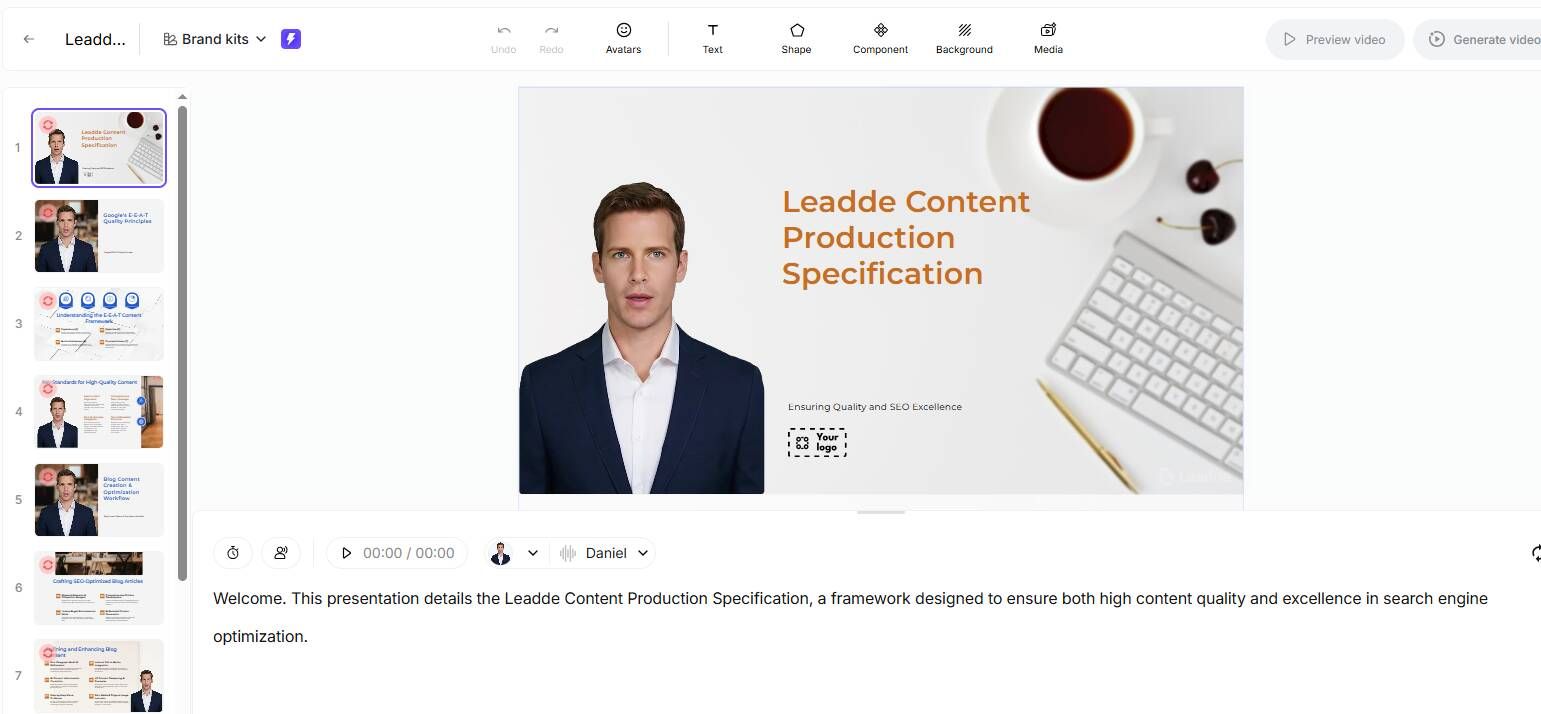
Step 3: Create an Audio-Visual Script
Do not separate script from visuals.
Use two columns:
This reduces revision waste.
You can also use AI to automatically generate the script.
Step 4: Gather or Generate Visual Assets
Possible sources:
- stock footage
- charts
- screenshots
- diagrams
- archive footage
- product captures
- AI-generated scenes
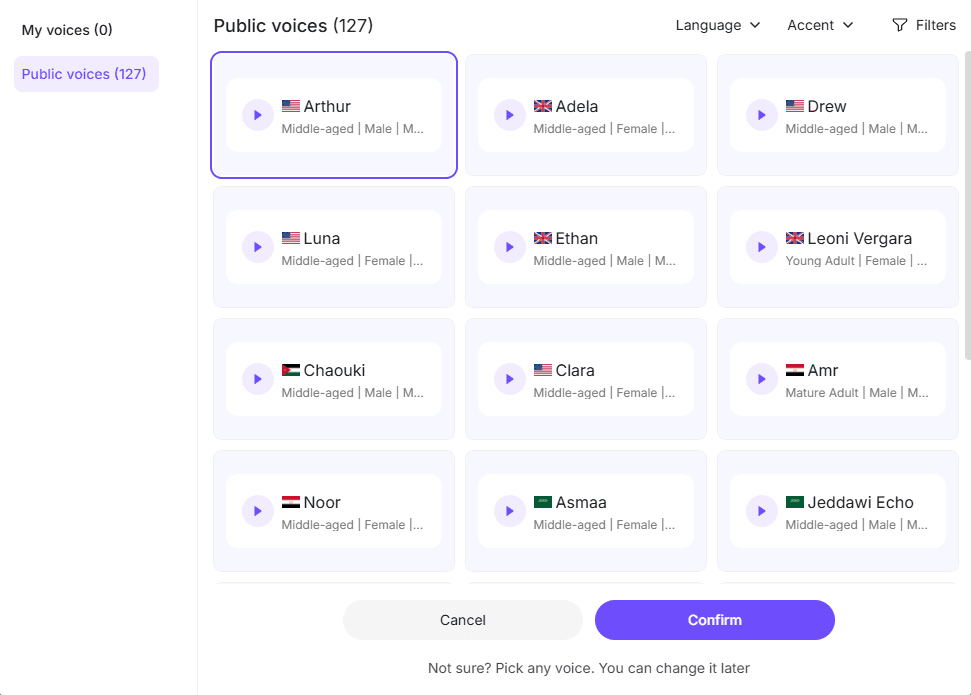
Step 5: Record or Generate Narration
Manual:
best for custom performance
AI:
best for scale
Modern AI voice workflows support:
- fast iteration
- multilingual output
- accent flexibility
AI can also automate voiceovers for your video essay. By uploading a sample of your own voice, you can generate a realistic AI voice clone for narration, saving you a significant amount of time.
Step 6: Edit for Retention
Check:
- pacing
- dead air
- scene rhythm
- clarity
- transitions
- information density
Ask:
“Would I keep watching this?”
Step 7: Review Before Publishing
Critical checklist:
- thesis clear?
- opening strong?
- visuals support argument?
- narration natural?
- pacing balanced?
- ending decisive?
Case Studies from Real Production Workflows
Case Study 1: The “Awkward Script” Problem
A recurring issue in creator workflow analysis:
scripts that looked polished on paper sounded unnatural when spoken.
Common symptoms:
- formal phrasing
- long sentences
- academic tone
- low energy narration
Fix:
- read scripts aloud
- rewrite conversationally
- shorten sentence structure
- test pacing against spoken delivery
Key lesson:
A video essay script is performance writing, not essay writing.
Case Study 2: The Production Spiral
One production team documented:
- 4 full remakes
- 3 major structural versions
Why?
Because visual structure was not designed early.
Result:
massive editing inefficiency.
Lesson:
story architecture must happen before timeline work.
Case Study 3: Long-Form Creator Benchmark
A creator targeting culture-focused essays aimed for approximately 20-minute long-form videos.
This revealed a practical challenge:
At ~160 spoken words per minute, that requires roughly:
3,200 words of narration
That changes planning dramatically.
Lesson:
long-form video essays are publishing systems, not quick uploads.
Case Study 4: Business Video Production Scaling
Teams producing recurring educational or internal video content increasingly shift to AI-assisted generation.
Observed impact:
- up to 90% faster production
- up to 80% lower production costs
Why?
Because repetitive assembly work disappears.
This matters when scaling globally.
FAQ: Real Questions About Making Video Essays
How do I make a video essay not feel boring?
Focus on:
- strong hook
- narrative pacing
- scene variation
- meaningful visuals
- concise narration
Boredom usually comes from weak pacing, not weak topics.
How long should a video essay be?
Depends on complexity.
Guidelines:
- 5–8 minutes: concise explainers
- 10–15 minutes: balanced analysis
- 20+ minutes: deep long-form breakdowns
Retention matters more than duration.
Do I need to show my face?
No.
Faceless video essays perform well when visuals are strong.
Show your face if trust and personal branding matter.
What is the best script format for a video essay?
A two-column audio/visual script.
This prevents structural editing chaos.
How fast should narration be?
A practical benchmark:
~160 WPM
Adjust for audience and complexity.
How do I make abstract topics visual?
Use:
- diagrams
- maps
- typography
- symbolic metaphors
- animated frameworks
Can I use movie clips in my video essay?
Potentially, if your use is transformative.
But copyright risk depends on context.
What if I have no editing skills?
Use AI-assisted production tools or start with template-driven workflows.
Traditional editing has a steep learning curve.
Is AI voice good enough?
For many educational, business, and multilingual workflows: yes.
For highly expressive creator branding, human narration may still be stronger.
How do I scale video essays globally?
Use multilingual AI workflows.
Modern platforms support up to 92 languages for multilingual localization.
Final Thoughts
Making a great video essay is no longer about mastering complex software first.
It is about mastering communication.
The strongest video essays do five things well:
- clear thesis
- strong structure
- visual storytelling
- controlled pacing
- efficient production
Traditional workflows still offer maximum control.
But for creators and businesses producing at scale, AI has fundamentally changed what is possible.
Leadde, for example, combines:
- document-to-video generation
- AI voice cloning
- multilingual localization
- avatar presentation
- automated layouts
That makes video essay production dramatically faster for teams that prioritize speed and scale.
But regardless of tools, the core principle remains the same:
A successful video essay is not a narrated slideshow.
It is a visual argument designed to be watched from beginning to end.