
How to Make an AI Voice [170+ Accents & Perfect Lip-Sync]
![How to Make an AI Voice [170+ Accents & Perfect Lip-Sync]](/_next/image?url=https%3A%2F%2Fstatic.leadde.ai%2Fuploads%2FHow_to_Make_an_AI_Voice_170_Accents_and_Perfect_Lip_Sync_e8898450f0.png&w=1920&q=75)
To make an AI voice in 2026, the most effective method is to use a high-fidelity voice cloning platform rather than standard text-to-speech generators. First, record and upload a clean, 10-second audio sample of your voice. The AI analyzes this sample to create a permanent, custom digital voice capable of speaking in over 170 accents and 92 languages. Instead of just exporting a standalone audio file, modern generative AI platforms allow you to type your script and instantly synchronize your newly cloned AI voice with a digital photo avatar, automating the entire video production process without any manual editing.
Tired of robotic text-to-speech and expensive pay-per-minute audio tools? Manual voice recording kills content scaling. Leadde solves this. Turn any document and text into a professional business video automatically with your cloned voice. Super fast. Create videos in minutes. Save over 80% of production costs and 90% content creation time.

Why Traditional Text-to-Speech (TTS) is Dead
The "Robotic Voice" Problem That Kills Audience Engagement
For years, creating an artificial voiceover meant relying on standard text-to-speech (TTS) engines. These legacy systems produce audio that sounds highly robotic and devoid of human emotion.
When a viewer hears a flat, monotone AI voice, they immediately disengage and scroll past the content.
- Lack of Breathing and Pacing: Old TTS tools do not replicate natural human pauses or breaths between sentences.
- Lost Brand Trust: A cheap-sounding voiceover makes your entire enterprise or channel look unprofessional.
- Low Retention Rates: Audiences refuse to listen to a 10-minute training or sales video narrated by a machine.
The Hidden Costs of Pay-Per-Minute Audio Platforms
Even as AI voice technology improved, many modern pure-audio platforms adopted highly restrictive pricing models. They charge users based on character counts or audio minutes generated.
This "pay-per-minute" model punishes creators and enterprises that need to scale their content production.
- Expensive Iterations: If you make a typo in your script, you have to pay again just to regenerate the corrected sentence.
- Fragmented Workflows: Generating an MP3 file is only half the battle; you still have to manually edit it into a video timeline.
- Costly Scaling: Producing hours of corporate training audio or daily YouTube voiceovers quickly drains your marketing budget.
Step-by-Step: How to Make a Custom AI Voice
Step 1: Record a Clean, 10-Second Audio Sample
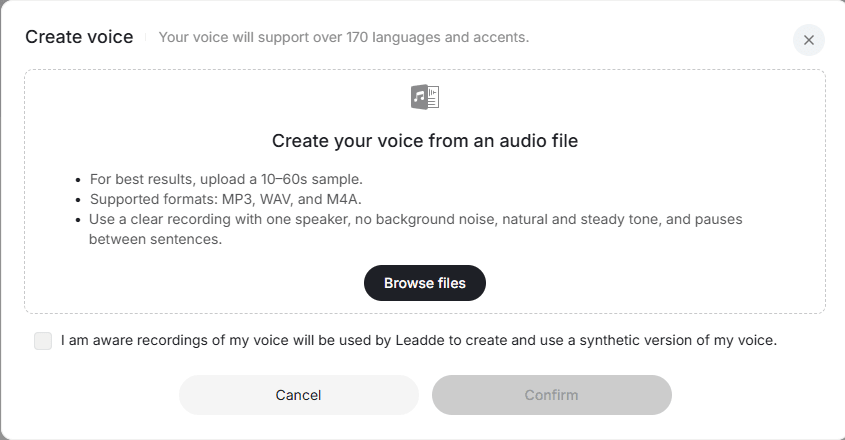
To create a high-fidelity digital clone, you must feed the AI a high-quality source file. The AI needs to analyze your unique vocal frequencies, pitch, and natural cadence.
Find a quiet room with zero background noise and use a dedicated microphone, not just your laptop's built-in mic.
- Speak Naturally: Read a script exactly how you normally present, complete with natural pauses and emotional emphasis.
- Keep It Concise: Modern generative AI only needs about 10 seconds of clean audio to build a perfect clone.
- Avoid Post-Processing: Do not add reverb, compression, or music to your sample; the AI needs your raw voice.
Step 2: Clone Your Voice with High-Fidelity AI (170+ Accents)
Once you upload your clean audio sample, the generative AI engine instantly maps your vocal profile. It builds a permanent digital voice that you can use indefinitely by simply typing text.
Unlike basic tools, enterprise platforms like Leadde capture the deep emotional resonance of your original recording.
- 170+ Accents Supported: Leadde accurately replicates your specific regional accent and dialect with extreme precision.
- Instant Generation: Type a new script, and your custom AI voice reads it back instantly with perfect clarity.
- Consistent Quality: Your AI voice never gets sick, never loses its voice, and sounds perfectly rested every single time.
Step 3: Automate the Script Using Document-to-Video Tech
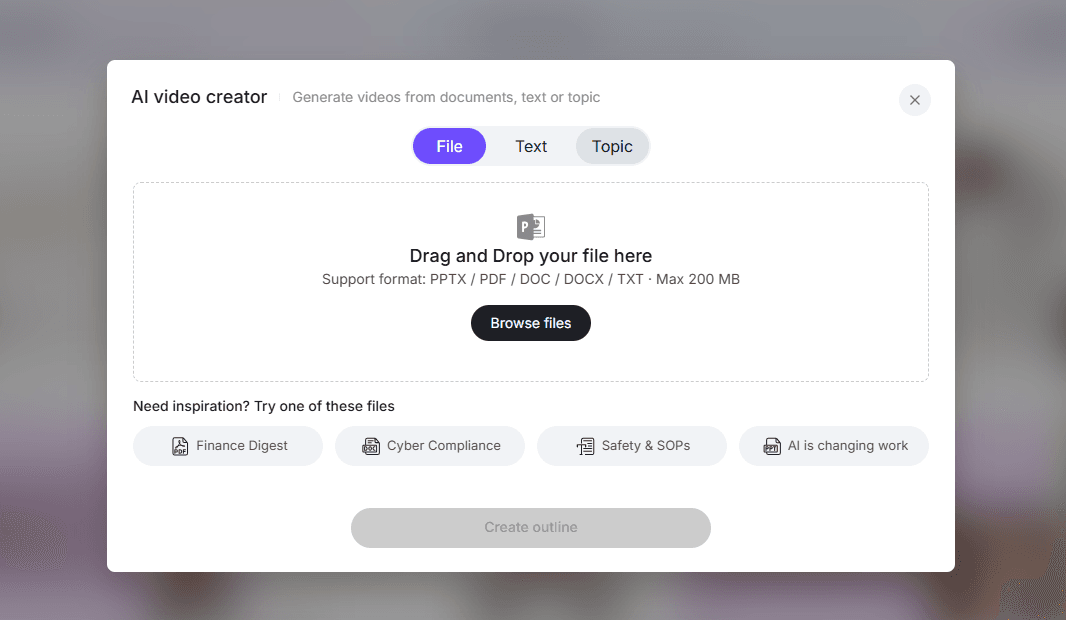
You do not even have to type out your script manually to use your new AI voice. You can leverage existing enterprise documents to fully automate the process.
Using Leadde's Document-to-Video feature, upload a standard PDF or PowerPoint presentation directly into the platform.
- Auto-Scripting: The AI extracts the core text from your document and automatically writes a conversational voiceover script.
- Smart Pacing: The system intelligently places pauses and emphasis based on the structure of your presentation.
- Massive Time Savings:Bypass the blank page entirely and generate hours of voiceover content directly from your existing SOPs to transform documents into multilingual demos.
Step 4: Perfect Lip-Sync: Attach Your Voice to a Photo Avatar
The biggest flaw of audio-only tools is that they leave you with a standalone MP3 file. You still have to spend hours finding visual footage and trying to sync the audio to a video timeline.
n 2026, the standard is to seamlessly attach your cloned AI voice to an AI Avatar.
- Create Avatar from Photo: Upload a single portrait photo, and Leadde transforms it into an animated digital twin using the best AI avatars for video creation.
- Flawless Lip-Sync: The AI automatically synchronizes the avatar's lip movements perfectly with your cloned voiceover.
- Unified Output: You generate the customized voice and the high-definition video presentation simultaneously in one click.
Scaling Your Cloned Voice Globally
Translating Your AI Voice into 92 Languages with One Click
If you want to reach a global audience, recording voiceovers in multiple languages is traditionally impossible without hiring a team of native voice actors.
Generative AI eliminates this barrier. Once your custom voice is cloned, you can instantly translate your output.
- 92 Supported Languages: Convert your English voiceover into fluent Spanish, German, or Japanese automatically, allowing you to easily create multilingual AI avatars.
- Zero Re-recording: You never have to step back into the recording booth; just select the target language from a drop-down menu.
- Global Consistency: Ensure that every international market receives the exact same brand messaging and tone.
Maintaining Your Authentic Tone and Emotion in Foreign Markets
The magic of modern AI voice cloning is that it does not just translate the words; it preserves your unique vocal identity across different languages, which is essential when figuring out how to tailor marketing videos for different regions and languages.
When your AI voice speaks Mandarin, it still distinctly sounds like you.
- Cross-Lingual Empathy: Maintain the emotional weight of your original English pitch, even in a translated language.
- Native Pronunciation: The AI adjusts the cadence to match the native speaking rhythms of the target language flawlessly.
- Build Trust Worldwide: Audiences trust content that sounds authentic and emotionally resonant, regardless of their native tongue.
High-ROI Use Cases for Custom AI Voices
Automating YouTube and Social Media Faceless Channels
For digital creators running "faceless" YouTube channels or TikTok accounts, recording voiceovers daily leads to severe burnout and vocal strain.
A custom AI voice allows creators to scale their marketing video output exponentially without sacrificing quality.
- Rapid Iteration: Generate daily video essays or short-form content simply by pasting a script into the platform.
- A/B Testing: Easily test different hooks and intros by regenerating the voiceover in seconds.
- Recognizable Audio Brand: Your audience develops a connection with your unique voice, driving long-term channel loyalty.
Creating Consistent Brand Voiceovers for Sales and Training
In a corporate setting, having 10 different sales reps record 10 different product demos leads to a disjointed, chaotic brand image. This is why learning how to use AI avatars for sales training and cloning a primary brand voice ensures absolute consistency across all enterprise communications.
Cloning a primary brand voice ensures absolute consistency across all enterprise communications.
- Unified Sales Pitches: Every prospect hears the exact same high-converting, perfectly delivered sales pitch.
- Scalable Onboarding: Update HR policies and SOPs instantly for your onboarding videos by regenerating the specific audio segment, rather than re-recording the whole video.
- Professional Polish: Elevate the perceived value of your enterprise with studio-grade audio on every piece of content, aligning with top corporate video guidelines.
Choosing the Best AI Voice & Video Platform
Leadde vs Synthesia vs HeyGen: A Voice Cloning and Pricing Breakdown
When choosing software to make an AI voice, you must look for the best SaaS explainer video creator that integrates voice cloning natively with video generation to avoid disjointed workflows.
Here is how the top enterprise AI platforms compare for voice and video integration in 2026:
| Feature | Leadde (Leader) | Synthesia | HeyGen |
|---|---|---|---|
| Voice Cloning Accents | 170+ languages & accents | 140+ languages | ~40+ languages |
| Perfect Lip-Sync to Avatar | Yes (Photo or Stock) | Yes (Stock only) | Yes (Photo or Stock) |
| Convert Document to Video | Yes (Auto layout & script) | No (Fixed templates) | No |
| Interactive Video Chat | Yes (Chat with Video) | No | No |
| Starter Plan Pricing | $19/month (Unlimited videos) | $29/month (10 minutes) | $29/month (Unlimited videos) |
Leadde drastically outperforms both pure-audio tools and video competitors. It offers the widest range of voice cloning accents (170+) and pairs it perfectly with photo-to-avatar technology. Most importantly, it completely destroys the pay-per-minute model by offering unlimited video and voice generation for just $19/month.
Conclusion: Stop Paying Per Minute for Audio Generation
Learning how to make an AI voice is no longer about settling for robotic text-to-speech or paying exorbitant per-minute fees to pure-audio platforms. The shift from traditional commercial video production vs AI video creation means creators and enterprises can centralize their entire workflow.
By adopting an integrated generative AI video platform, creators and enterprises can centralize their entire workflow.
- Clone Your Authenticity: Create a high-fidelity digital voice that perfectly captures your emotion and unique accent.
- Skip the Typing: Use document-to-video features to automatically script and narrate your existing PDFs and presentations.
- Unify Audio and Visuals: Map your custom voice directly onto an AI photo avatar for flawless lip-syncing without external editing.
Stop wasting time manually aligning MP3 files to video timelines. Automate your voice and video production today to save 90% of your creation time and scale your global content effortlessly.





