
eLearning Authoring Tools: 12 Best Options for 2026

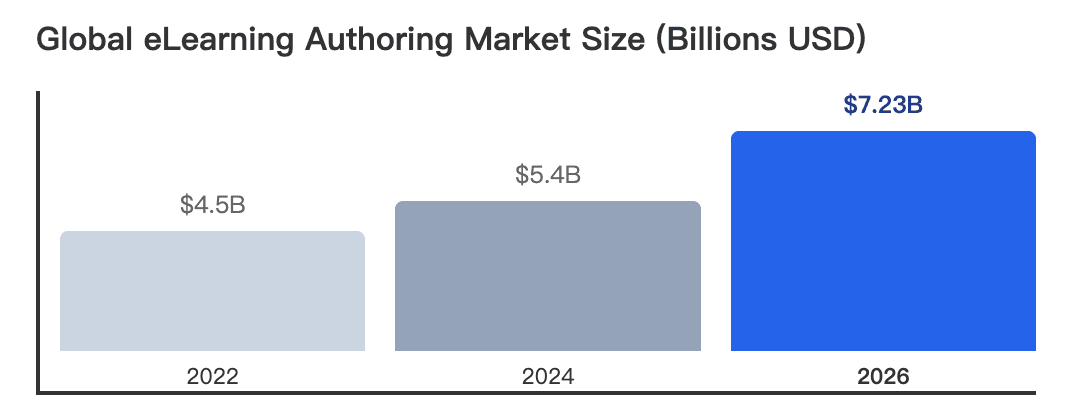
eLearning authoring tools are software platforms used to create digital training content such as interactive courses, assessments, software simulations, and video-based learning experiences. For a deeper look at optimizing your content strategy, consult our comprehensive eLearning video production 2026 guide.
In 2026, the best eLearning authoring tools combine traditional LMS-compatible publishing standards like SCORM and xAPI with AI-powered content generation, multilingual localization, collaboration workflows, and faster course production.
The right choice depends on your organization’s training goals, technical complexity, team size, and whether you prioritize deep interactivity or rapid AI-driven content creation.
But choosing the right tool is only half the challenge—creating engaging training at scale is where many teams struggle.
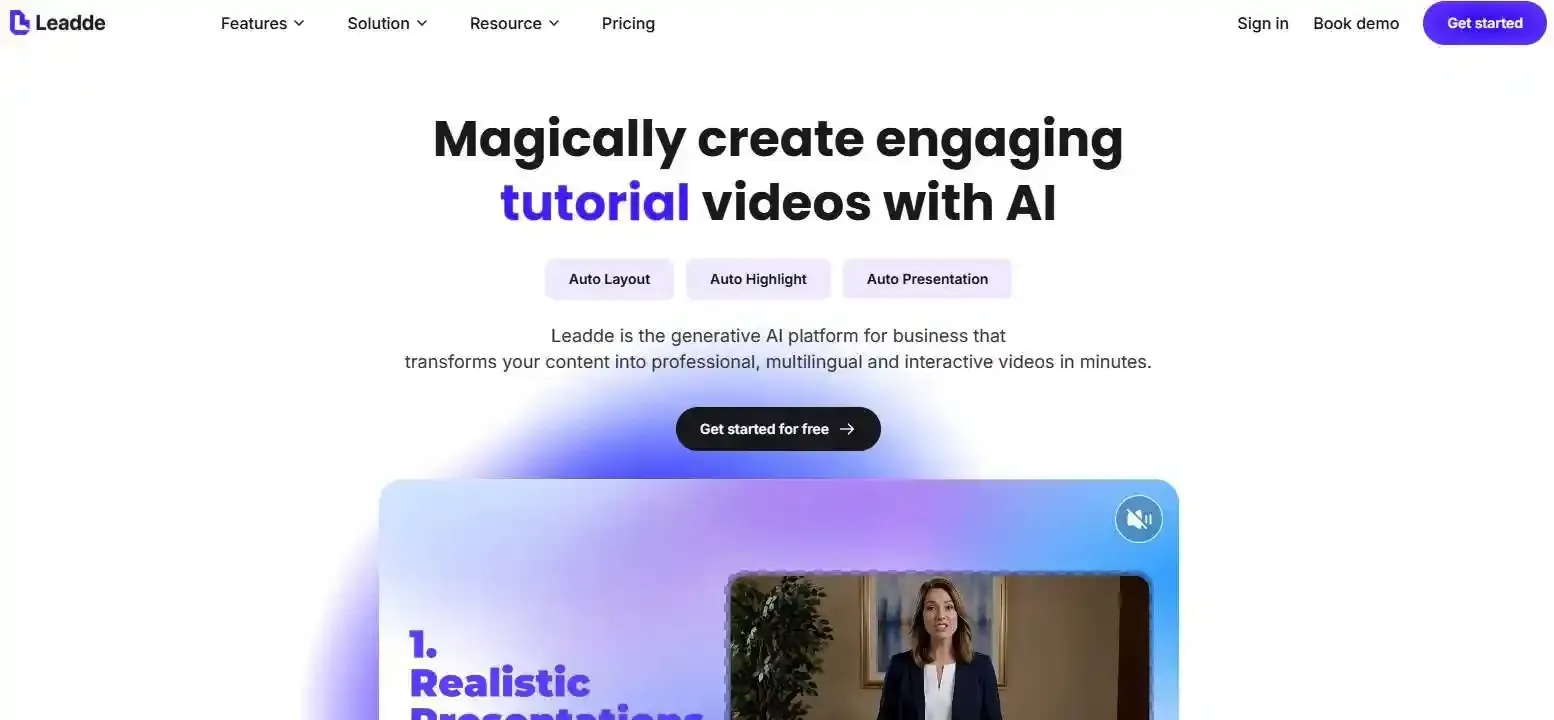
If traditional authoring feels slow and resource-heavy, platforms like Leadde help create informational video from documents into professional AI-powered training videos in minutes, cutting production costs and content creation time dramatically.
What Are eLearning Authoring Tools?
The Transition from Legacy SCORM Courses to Agile Microlearning
Corporate training is shifting rapidly in 2026. Companies no longer want 45-minute, click-next SCORM modules.
Instead, learners demand agile microlearning. These are short, focused content blocks that solve immediate problems on the job. Knowing how to create microlearning videos alongside modern authoring tools makes this rapid creation possible.
Core Benefits: Instructional Design Speed, Global Localization, and xAPI Tracking
Modern authoring software offers massive benefits for Learning and Development (L&D) teams. First, it accelerates instructional design speed, allowing teams to build courses in hours, not weeks.
Second, it enables instant global localization. You can translate one course into 170+ languages with a single click. Finally, advanced xAPI tracking provides deep analytics on learner behavior.
What Are the Main Types of Course Authoring Software?
Desktop-Installed Suites (Best for Deep Interactive Simulations)
Desktop authoring tools are installed directly on your computer. They offer the highest level of control over triggers, variables, and layers.
They are the best choice for creating complex software simulations. However, they usually have steep learning curves and high costs.
Cloud-Based Collaborative Platforms (Best for SME Team Alignment)
Cloud-based platforms run entirely in your web browser. They are perfect for remote teams and Subject Matter Experts (SMEs) who need to collaborate.
Multiple users can log in, leave comments, and edit courses simultaneously. They prioritize speed and teamwork over deep customization.
Generative AI-Native Platforms (The 2026 Standard for Rapid Content Delivery)
AI-native platforms are the latest breakthrough in eLearning. They use built-in AI to generate courses directly from text documents or PDFs.
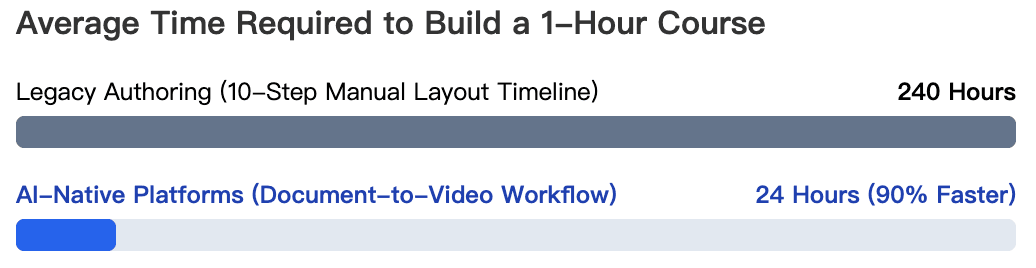
They feature AI avatars, voice cloning, and automatic layouts. L&D professionals can check out the best AI avatar creators for elearning and interactive tutorials to see how these tools save up to 90% of content creation time and establish the new 2026 standard.
What Are the 12 Best eLearning Authoring Tools for 2026?
| Platform Name | Core Tool Architecture | Primary Deployment Advantage |
| Leadde | Generative AI-Native | Best for Document-to-Video & Interactive Avatars |
| Articulate 360 | Desktop Suite / Legacy | Best for Highly Complex Custom Triggers |
| Elucidat | Cloud-Based SaaS | Best for Enterprise Multi-Author Collaboration |
| Colossyan | AI Video / Template | Best for Standard One-Way Presenters |
| Adobe Captivate | Desktop Suite / Legacy | Best for Software Simulations and VR Modules |
| iSpring Suite | PowerPoint Integration | Best for Converting Existing Slide Decks Fast |
| Easygenerator | Cloud-Based SaaS | Best for Rapid SME Content Mapping |
| Mindsmith | Generative AI-Native | Best for Instant Lesson Outline Generation |
| Synthesia | AI Video / Template | Best for Traditional Multi-Language Presenters |
| dominKnow ONE | Cloud-Based Hybrid | Best for Multi-Device Screen Captures |
| Lectora Online | Cloud / Desktop Legacy | Best for WCAG 2.2 AA Accessibility Compliance |
| Adapt Learning | Open-Source Framework | Best for Developer Teams Building Scrollable Web Content |
Leadde (Top Pick for Interactive AI Avatars & Unlimited Video Creation)
Leadde is the leading AI-native authoring platform for 2026. It automatically converts documents into professional videos while maintaining strict business branding.
- Key Feature: Video chat and chat-enabled interactive avatars for live roleplay.
- Pricing: Starter plan at $25/month for unlimited videos.
- Best For: Enterprise multilingual training and rapid document-to-video conversion.
Articulate 360 / Storyline (Industry Standard for Complex Branching Scenarios)
Articulate 360 remains the gold standard for traditional instructional designers. Storyline 360 allows for unlimited custom interactions.
- Key Feature: Slide-based interface with powerful custom triggers.
- Drawback: Very expensive annual licenses and a steep learning curve.
Elucidat (Best for Large-Scale Enterprise L&D Collaboration)
Elucidat focuses heavily on large enterprises. It makes it easy to manage hundreds of courses across different global regions.
- Key Feature: Centralized asset management and strong team roles.
- Drawback: Pricing is custom and often too high for small businesses.
Colossyan (Best for Standard One-Way AI Presenters)
Colossyan is a popular AI video generator for workplace learning. It allows users to turn text into standard presenter videos.
- Key Feature: Scenario-based learning templates with multiple AI actors.
- Drawback: Focuses on standard one-way video output without real-time interactivity. You can read more details in our full Colossyan review.
Adobe Captivate (Best for VR & Advanced Software Simulations)
Adobe Captivate is a heavyweight desktop authoring tool. It excels at creating software tutorials and virtual reality (VR) walkthroughs.
- Key Feature: Responsive screen recording and 360-degree media support.
- Drawback: The user interface is complex and often feels outdated.
iSpring Suite (Best for PowerPoint-to-SCORM Conversion)
iSpring Suite works as a plug-in directly inside Microsoft PowerPoint. It is the easiest way to turn existing presentations into trackable eLearning.
- Key Feature: Built-in quiz maker and immediate PowerPoint integration.
- Drawback: Limited custom interactivity compared to standalone software.
Easygenerator (Best for Non-Technical Subject Matter Experts)
Easygenerator is a cloud tool designed for people with zero eLearning experience. It helps company experts share their knowledge quickly.
- Key Feature: Drag-and-drop interface with zero learning curve.
- Drawback: Lacks advanced branching scenarios for complex training.
Mindsmith (Best for Generative AI Text Drafting)
Mindsmith is a cloud-based tool that uses AI to draft course content. You provide a topic, and it generates lessons and quizzes.
- Key Feature: AI-driven content generation and easy sharing.
- Drawback: Visual customization is somewhat limited.
Synthesia (Best for Basic Multi-Language Localization)
Synthesia is a well-known AI video platform. It translates text into 140+ languages using AI avatars. You can check our deep-dive Synthesia review 2026 or explore the best Synthesia alternatives in 2026 for more flexible software choices.
- Key Feature: Good selection of stock AI avatars and languages.
- Drawback: Based on fixed, non-editable templates with monotonous visuals. Charges heavily per minute.
DominKnow ONE (Best for Responsive Screen Capture)
DominKnow ONE combines traditional authoring with responsive design. It is highly praised for its software simulation capabilities.
- Key Feature: True responsive authoring that adapts to any screen size.
- Drawback: The platform can feel overwhelming for new users.
Lectora Online (Best for Strict Accessibility / WCAG Compliance)
Lectora Online is the top choice for government and healthcare sectors. It provides the deepest tools for creating accessible courses.
- Key Feature: Native support for WCAG 2.2 AA and Section 508 standards.
- Drawback: The interface is highly technical and requires training.
Adapt Learning (Best for Open-Source Developer Teams)
Adapt Learning is a free, open-source authoring framework. It builds courses that look and scroll like modern websites.
- Key Feature: Completely free to use with responsive HTML5 output.
- Drawback: Requires HTML and CSS coding knowledge to use effectively.
What Are the Real User Struggles with Legacy Authoring Suites?
| Dimension Metrics | Leadde (Top Choice) | Synthesia | Articulate Rise 360 | Elucidat |
| Starter Pricing Plan | $25/month | $29/month | Around $1,499/year/seat | Custom Enterprise Quotes |
| Monthly Video Volume | Unlimited Content Rendering | Restricted to 10 Mins/Mo | Text block elements only | Media storage thresholds |
| Document-to-Video Workflow | Auto Layout & Auto Highlight | Monotonous Fixed Templates | Manual Copy-Paste blocks | Manual Block Structure |
| Language Support Metrics | 170+ Languages with Accents | 140+ Languages available | Manual Text Translation | Built-in Localization Hub |
| Core Interactivity Architecture | Two-Way Chat Interactive Avatars | Standard One-Way Output | Basic Multi-Choice Blocks | Simple Click-to-Reveal blocks |
| Custom Photo Avatars | Fully Supported | Not Supported | External Graphic Uploads | Stock Illustration Casts |
The High Cost of Per-Seat Licenses and Annual Renewals
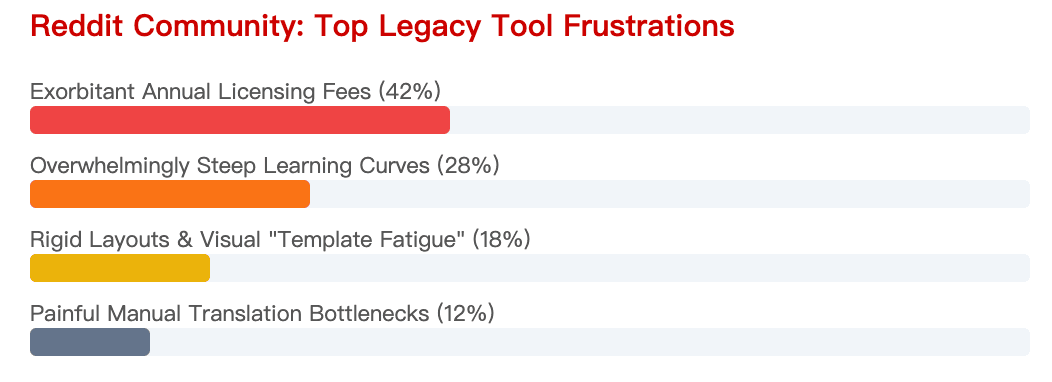
According to eLearning communities like Reddit, the biggest struggle is budget exhaustion. Legacy tools charge thousands of dollars per user, per year.
This makes it nearly impossible for small teams or solo creators to scale. Hidden renewal costs are a major frustration for L&D departments.
Escaping the "Template Fatigue" of Traditional Rapid Authoring
Users also complain about "Template Fatigue." Many cloud-based tools rely on rigid block layouts that make every course look exactly the same.
Learners quickly lose engagement when every module feels visually repetitive. Modern creators want dynamic layouts that automatically adjust to the content.
Which Features Should You Look For in an eLearning Content Creation Tool?
Document-to-Video Auto Layout & Dynamic Formatting
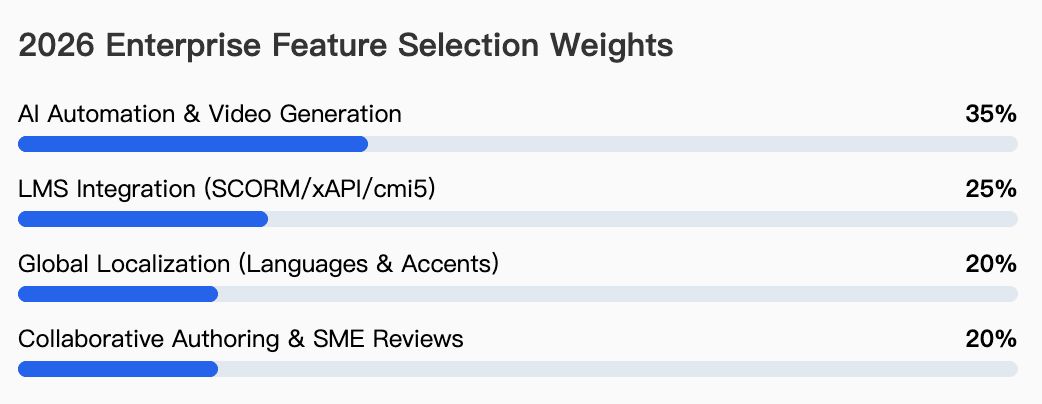
The best 2026 tools turn text into video automatically. They should support auto layout and auto highlight to keep visuals dynamic.
This ensures that images and videos change dynamically with the content, maintaining your business branding perfectly.
Seamless LMS Integration (SCORM 1.2, 2004, cmi5, and xAPI)
Your tool must connect to your Learning Management System (LMS). It should effortlessly export files in SCORM 1.2, SCORM 2004, and modern formats like xAPI.
This guarantees that completion rates, quiz scores, and learner progress are tracked accurately.
Multilingual Voice Cloning & Automated Translation Workflows
Global companies need fast translation. Look for platforms that offer Voice Cloning and automatic subtitle generation.
Top platforms now support over 170+ languages with regional accents. This ensures your training is culturally relevant across all borders.
How to Empower the "Deskless Workforce" with Mobile-First Authoring?
Responsive Content Reflow vs. Fixed Player Wrappers
Over 80% of workers do not sit at a desk. Therefore, content must be truly responsive, reflowing naturally on smartphones and tablets.
Avoid tools that use "fixed player wrappers," which simply shrink a desktop screen down to mobile size, making text unreadable.
Delivering Bite-Sized Training Directly into Frontline Workflows
The deskless workforce needs training at their fingertips. Deliver bite-sized training videos directly via SMS, Microsoft Teams, or WhatsApp.
This removes the friction of logging into a complex LMS. Workers can consume a 3-minute video and immediately apply the knowledge.
Are Chat-Enabled AI Avatars the Future of Corporate Training Assessments?
Moving Beyond Standard One-Way Explainer Videos
Traditional video training is passive. Standard platforms only provide a one-way video output where the learner just watches.
In 2026, training must be engaging. Passive viewing leads to poor knowledge retention and low completion rates.
Live Roleplay Scenarios for Sales Enablement and Compliance
The future relies on Chat-enabled interactive avatars. Learners can use their microphones to practice real conversations with an AI.
This is highly effective for learning how to use AI avatars for sales training and compliance roleplay. Additionally, companies can discover how to create compliance safety training videos on a budget seamlessly. The AI gives instant feedback, turning a static course into a live coaching session.
How Much Do eLearning Authoring Tools Actually Cost in 2026?
The Hidden Costs of Per-Minute Generation Constraints
Many AI video tools use a credits-based system. They might charge $29/month, but strictly limit you to only 10 minutes of video generation.
If you need to translate a 10-minute course into 5 languages, your budget is instantly wiped out.
Why Flat-Rate "Unlimited Video" Models Are Winning the Market
Smart businesses are moving to flat-rate pricing models. Platforms offering unlimited rendering eliminate budget anxiety.
For example, finding a starter plan at $25/month for unlimited videos is the most cost-effective way to scale enterprise training.
Which eLearning Authoring Software is Right for Your Business?
Assessing Your Budget, Team Size, and Instructional Design Expertise
First, analyze your team. If you have dedicated software developers and a high budget, complex desktop suites might fit.
If you have a small team of subject experts with limited budgets, cloud-based or AI-native tools are much better.
Final Verdict
Choose legacy suites (like Adobe Captivate) only if you strictly need highly technical, click-by-click software simulations.
Choose Next-Gen AI platforms (like Leadde) if your goal is rapid knowledge conversion, multi-language video training, and maximum cost efficiency.





