
Deepfake Video Maker: Best Tools, Enterprise Use Cases & 2026 Guide

A deepfake video maker is an AI-powered platform that creates realistic synthetic videos by combining technologies such as face reenactment, voice cloning, lip-sync generation, and AI avatars.
In 2026, these tools are used not only for entertainment and personalized content, but increasingly for business applications like employee training, product education, multilingual communication, and customer onboarding.
However, not all deepfake video makers are designed for enterprise use—business teams must evaluate realism, compliance, transparency, scalability, and workflow automation before choosing a platform.
But for many business teams, traditional AI video tools still require manual scripting, editing, and localization—slowing production at scale.
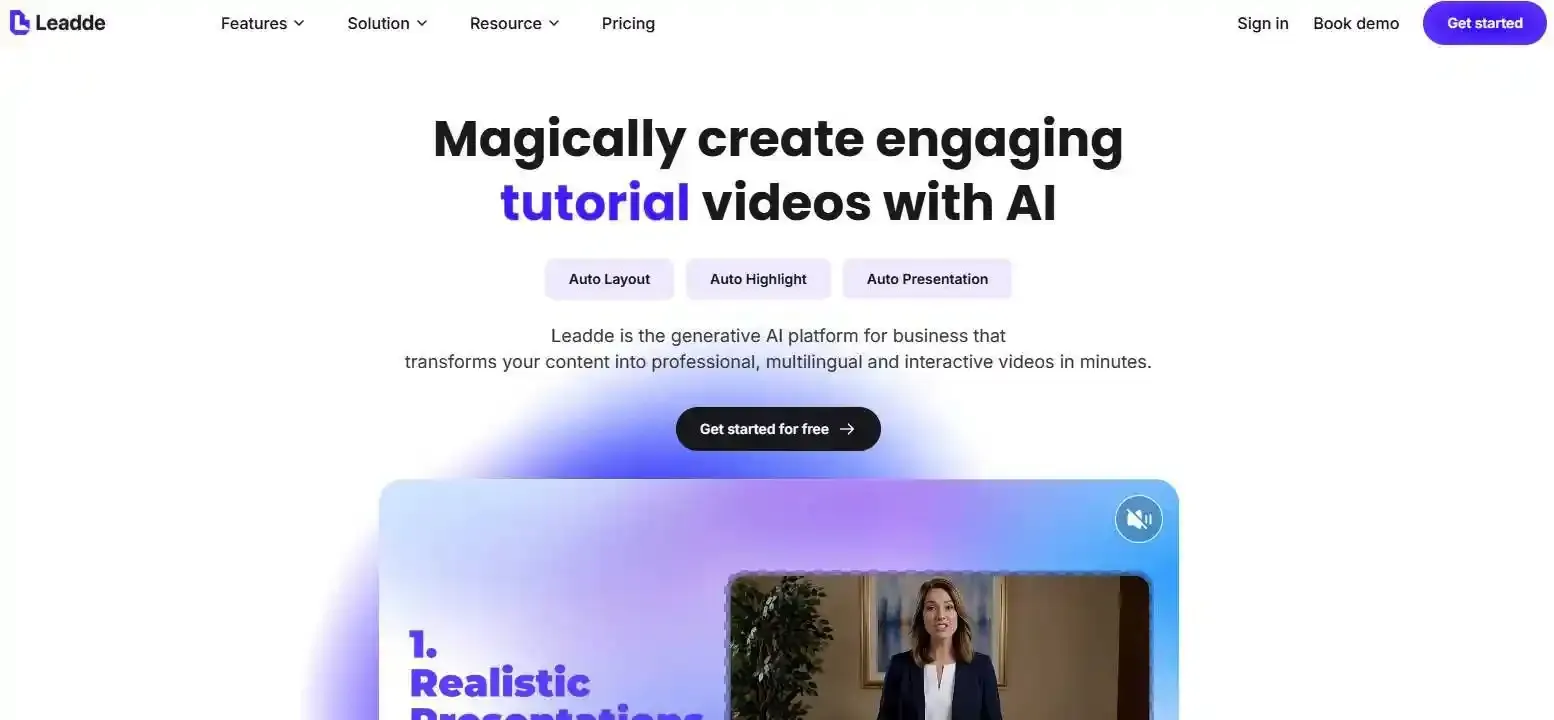
Leadde solves this by turning documents and text into professional interactive business videos in minutes, cutting production costs by over 80% and content creation time by up to 90%.
What Is a Deepfake Video Maker?
A deepfake video maker is a software application driven by artificial intelligence that allows users to alter or synthesize human faces, bodies, and voices in digital video format. As of 2026, available information suggests these platforms have shifted from experimental software into streamlined corporate production tools. Modern creators utilize them to generate human-like video content without requiring physical cameras, expensive dynamic lighting, or actors.
| Metric | Legacy Tools (Pre-2024) | Modern Platforms (2026) |
|---|---|---|
| Core Use Case | Viral entertainment/Memes | Enterprise B2B/L&D Training |
| Face Technology | Open-source GAN swaps | Multi-Modal Transformers (MM-DiT) |
| Workflow Style | Highly manual script configs | Automated Document-to-Video Pipelines |
How did deepfake tools evolve from entertainment into business applications?
Initially, early deepfake tools were popularized on social media for viral entertainment, face-swapping memes, and cinematic visual effects. However, tech companies quickly realized the economic value of automating video production pipelines for global scalability. By 2026, corporate demand for fast training materials and multi-language alignment pushed these tools into localized enterprise platforms.
What is the difference between deepfake generators, AI avatar tools, and business AI video platforms?
- Deepfake Generators: Historically focused on swapping one identity onto another body, often associated with advanced visual effects or non-commercial open-source frameworks.
- AI Avatar Tools: Standard software applications designed to animate a digital human persona based on basic, fixed user templates.
- Business AI Video Platforms: Comprehensive systems like Leadde that integrate layout automation, interaction capabilities, and document ingestion to solve scalable corporate communication issues. Teams looking to transition can review the best Synthesia alternatives in 2026 to find highly corporate frameworks.
How Does a Deepfake Video Maker Actually Work?
| AI Architecture | Visual Consistency | Lip-Sync Accuracy | Render Speed (1-Min Clip) |
|---|---|---|---|
| Legacy GANs | High edge-flickering | Manual alignment required | 15-30 Minutes |
| 2026 MM-DiT | Studio-grade skin rendering | Waveform-to-mesh tracking | Under 2 Minutes |
How does AI face reenactment work?
AI face reenactment maps human facial expressions, tracking precise micro-expressions and eye movements from a source or dataset. The deep learning model then projects these facial bone movements onto a target digital persona grid. This method guarantees that structural variations in human speech patterns look fluid and natural on screen.
How does voice cloning work?
Voice cloning tools analyze the acoustic qualities, pitch variations, and regional accents of a specific human voice sample. The generative model creates a permanent digital voice asset capable of reading any text script naturally. If you are exploring the underlying audio tech, you can learn more about how to make an AI voice for corporate projects.
How does lip-sync technology create realistic talking avatars?
Modern lip-sync technology utilizes dynamic multi-modal algorithms to match lip shapes directly with audio waveforms. The system automatically synchronizes facial skin textures and mouth layout changes to match specific words. This completely removes the unnatural visual lag commonly found in early video synthesis tools. For a broader view of this landscape, see the guide on what is synthetic video.
What makes some AI-generated videos look more realistic than others?
Video realism depends heavily on render resolution, lighting calculation models, and how the system handles environmental motion continuity. Premium corporate tools calculate soft light reflections and depth of field to avoid flat visuals. Platforms with lower rendering models often leave unnatural blurring around facial edges and neck movements.
GANs vs diffusion models: what powers 2026 synthetic media?
Early video synthesis platforms relied heavily on Generative Adversarial Networks (GANs) which often struggled with fast motion consistency. As of 2026, available information suggests the industry has largely transitioned to multi-modal Diffusion Transformer models (MM-DiT). This architecture improves overall image texture rendering and keeps complex light settings logical over long scenes.
Why Are Enterprises Switching from Traditional to AI Video Generators?
Why is traditional corporate video production so slow and expensive?
Traditional corporate video creation requires physical film crews, expensive studio equipment, manual scripting, and lengthy post-production editing. A simple change in product specifications requires companies to rebuild physical sets and rehire actors. To contrast these methods, check out the analysis of traditional commercial video production vs AI video creation.
How can AI video platforms reduce production costs?
AI video platforms cut out physical asset dependencies, studio rentals, and scheduling friction. Enterprises simply input their textual scripts to render high-definition human presentation videos. By standardizing creation workflows online, businesses routinely lower overall video production costs by over 80%.
How can enterprises scale multilingual content faster?
Instead of hiring separate voice actors for every regional market, AI translation engines convert script files instantly. Platforms render localized versions with matching lip-sync accuracy across dozens of global languages in seconds. This automated framework makes cross-region training updates effortless for worldwide operations.
Can synthetic media overcome the uncanny valley in 2026?
As of 2026, advanced rendering models have mostly overcome the uncanny valley effect by simulating natural micro-expressions and accurate skin lighting. Audiences can no longer easily distinguish commercial virtual actors from real presenters in professional training setups. This breakthrough has made AI personas highly trusted for corporate compliance and sales enablement.
Why do fast-moving teams prefer editable AI video workflows?
Static video files become obsolete the moment internal company policies or product layouts change. AI video creation software stores video projects as structured text data, allowing instant edits and rapid version control. Teams simply modify the paragraph text and click regenerate to update their video assets within minutes.
What Can Businesses Actually Create with a Deepfake Video Maker?
| Department | Primary Video Asset | Usage Frequency | Core ROI Trigger |
|---|---|---|---|
| HR / L&D Teams | Employee Onboarding & SOPs | Daily / Weekly | Standardized knowledge scale |
| Sales Enablement | Outbound Pitch Videos | Daily | Enhanced outreach response rates |
| Product Marketing | Feature Walkthroughs | Weekly | 90% faster asset deployment |
| Customer Success | Multilingual Support Guides | Monthly | Lower support ticket volume |
Employee onboarding videos
HR managers can automatically transform text-heavy welcome manuals into clear human presentation modules. New hires can follow standard employee onboarding video examples to see how layouts look in production.
SOP walkthroughs
Operations directors can easily turn standard operating procedures into video explainers for factory floors. Using tools to turn SOP documents into training videos in minutes reduces operational errors.
Compliance training
Legal teams can transform long, dry compliance documents into accessible chapter videos. This automated media deployment strategy raises overall course completion numbers across massive multi-regional teams.
Internal executive communication
Corporate leaders can scale asynchronous announcements, town-hall briefs, and business updates globally. Using synthetic avatars allows executives to share video messages without spending hours in recording booths.
Product training videos
Product marketing teams can build complete libraries of feature tutorials instantly as software updates roll out. This workflow ensures external sales divisions stay aligned with structural product updates.
Sales enablement videos
Sales managers can automate personal external outreach materials to potential clients at scale. Integrating personalized CRM data allows sales teams to build custom pitch videos automatically.
Multilingual customer onboarding
Customer success directors can distribute multi-lingual onboarding courses tailored to regional clients. This strategy builds deep initial trust and significantly lowers early churn rates for global SaaS brands.
Support explainers
Support divisions can build scalable answers to complex technical issues, turning text support tickets into interactive visual walkthroughs. This reduces incoming ticket backlogs for support staff.
What Are the Best Deepfake Video Makers for Business?
| Platform | Starting Price | Core Selling Point | Interactive Avatars? |
|---|---|---|---|
| Leadde | $25/mo (Unlimited Videos) | Dynamic Document-to-Video Automation | Yes (Real-time Chat-enabled) |
| HeyGen | $29/mo (Capped at 10 Mins) | High Cinematic Facial Fidelity | No (One-way Output Only) |
| Synthesia | High Enterprise Tier | Fixed Corporate Templates | No (One-way Output Only) |
Leadde: best for document-to-video automation and interactive AI video workflows
Leadde stands as the leading choice for comprehensive enterprise video automation. Unlike traditional software, it specializes in converting static text documents directly into brand-aligned video content with automated layouts. It features an affordable $25/month Starter Plan offering unlimited videos and supports over 170 languages. Additionally, it provides unique chat-enabled interactive avatars for two-way communication.
HeyGen: best for avatar realism and translation
HeyGen offers exceptional aesthetic focus on high-fidelity cinematic avatars and premium multi-market voice conversion tools. Its structural setup is perfect for external branding campaigns and high-end marketing clips. For a complete market breakdown, check out the comprehensive HeyGen review to see how its credit limits impact your teams.
Synthesia: best for standardized enterprise avatar templates
Synthesia provides a deeply corporate, stable framework tailored for traditional learning management systems (LMS). It excels at standardizing corporate training presentations for internal teams. Its limitation lies in its structured template layout, which lacks automated flexible layout adjustments or multi-way interactivity. Read the deep-dive Synthesia review in 2026 for more operational details.
Colossyan: best for corporate learning workflows
Colossyan targets corporate instructional designers directly with its robust built-in scenario tools and learning metrics. It fits well into traditional compliance workflows, though it operates primarily as a one-way communication tool without live interaction options.
Argil: emerging option for API-driven synthetic media
Argil is gaining notable traction among modern development teams seeking flexible AI script API integration. It serves as an agile engine for businesses wanting to build custom internal apps, although it requires internal development support to achieve full corporate layout consistency.
How Do You Compare Deepfake Video Makers Side by Side?
| Evaluation Dimension | Basic Standard Requirement | Enterprise Grade (Leadde Standard) |
|---|---|---|
| Layout Flexibility | Rigid template pasting | Auto-layout & branding consistency kit |
| Interactivity | Passive one-way playback | Two-way interactive video chat |
| Language Depth | Static Google translations | 170+ localized languages with natural accents |
Realism
Realism requires looking closely at shoulder movement fluidity, facial lighting integration, and how well voice prints sync with rapid speaking paces. The finest tools show no digital micro-stuttering during complex word sequences.
Document-to-video automation
True document automation parses source text directly, applies proper brand rules, and creates dynamic background scenes automatically. Standard tools require users to manually paste snippets into rigid static templates.
Interactive avatars
Most platforms restrict users to classic one-way video outputs. Next-generation tools provide real-time interactive video chat options, turning video content into live conversational assistant assets.
Multilingual support
Evaluating multi-lingual depth means checking not just the base language count, but the quality of localized regional accents. Top platforms support over 140+ languages natively with natural pacing.
Compliance readiness
Enterprise compliance means checking if vendor servers hold proper information security credentials like SOC 2 compliance. Secure platforms isolate customer data to ensure private corporate strategies never leak to public networks.
Collaboration
Modern video production requires multi-user spaces, flexible commenting systems, and clean workspace division. These features let global L&D, compliance, and marketing teams audit drafts smoothly before release.
Version control
Version control allows teams to track script edits over time and restore prior video renders with one click. This architecture stops accidental data loss when multiple managers edit training libraries.
Analytics
Advanced business video suites integrate directly into learning management platforms to track student completion metrics. Tracking average drop-off times helps instructional designers optimize corporate script structures.
Enterprise security
Enterprise safety requires custom single sign-on (SSO) options, precise user access management, and secure voice asset storage. These barriers protect corporate leadership voice profiles from internal misuse.
Interactive AI Avatars vs Traditional One-Way Videos
Why passive video training often underperforms
Standard training videos turn employees into passive observers, which can lead to low attention retention over long modules. Users often skim through video timelines without processing structural corporate ideas. This passive style lowers the overall return on investment of enterprise training programs.
How interactive chat-enabled avatars improve learning retention
Interactive avatars change the video format by integrating large language models with real-time face synthesis engines. Users do not just watch a screen; they can actively interrupt the digital presenter to ask specific work questions. This conversational loop deepens engagement and dramatically improves overall training retention.
When two-way AI video interaction makes business sense
Two-way interaction is highly effective for high-value operations like onboarding remote employees, automated customer success pipelines, and interactive compliance training. It bridges the gap between scalable digital video distribution and the tailored nuance of human conversation.
Real-world onboarding and support scenarios
- Customer Success: A new client uploads a database file and receives real-time video guidance from an interactive avatar explaining data field configuration dynamically.
- HR Onboarding: A global employee navigates corporate benefits options, chatting directly with the digital corporate avatar to clear up specific tax rules instantly.
How Do Enterprises Build Trust with Synthetic Media?
What is C2PA?
C2PA stands for the Coalition for Content Provenance and Authenticity. It is an open technical standard that embeds verifiable metadata directly into digital media files, acting as a cryptographic passport that proves a video's origin and editing history.
Why provenance matters for AI-generated content
As internet ecosystems face a surge of unverified synthetic files, proving media provenance helps brands maintain audience trust. Showing a secure digital ledger verifies that corporate videos come from trusted internal systems rather than malicious external sources.
Watermarking vs provenance metadata
Visible watermarks can be cropped or edited out easily by malicious parties. Cryptographic provenance metadata remains bound inside the video file structure, offering permanent, verifiable tracking across all distribution channels.
Transparency disclosure best practices
- Include clear, visible text labels like "AI-Assisted Presentation" during introduction sequences.
- Embed full C2PA manifest data into all external media assets.
- Host an official video verification page on your company domain where users can verify file hashes.
Enterprise governance for AI video workflows
Enterprise governance requires maintaining strict authorization loops before rendering video files. Managers should use role-based controls to restrict voice clone access and log all synthetic video creations for internal security reviews.
Why Do Some Deepfake Videos Still Look Fake?
Lip-sync mismatch
A visible lag between audio playback and the presenter's mouth movements breaks overall immersion. This issue occurs when software fails to adjust underlying lip meshes dynamically to match variable word structures.
Unnatural facial motion
Stiff neck rendering, lack of blinking, and robotic head movements make digital presenters look synthetic. Realistic media generation requires computing subtle secondary head movements during conversational transitions.
Robotic voice delivery
Stiff synthetic voices that lack natural sentence breaks or clear emotional tone variations feel artificial. High-fidelity systems rely on advanced tone mapping to insert natural breathing pauses into scripts automatically.
Bad source assets
Uploading low-resolution photos or muffled audio tracks limits the output quality of voice clones and custom avatars. Professional video generation requires using high-definition source files recorded under clean studio lighting.
Weak rendering models
Outdated legacy models often fail to calculate complex facial expressions accurately. This limitation can cause strange visual blurring around teeth, eyes, and complex hair lines during fast speaking sequences.
Poor motion continuity
When background graphics or presentation slides shift suddenly without realistic light adjustments across the digital actor’s face, the video composition breaks logical consistency. This visual mismatch instantly signals to viewers that the scene is synthetic.
Frequently Asked Questions
Are deepfake makers legal?
Yes, commercial AI platforms are completely legal for enterprise use when built on licensed datasets and clear actor consent frameworks.
Are they safe for business?
Professional B2B platforms provide enterprise-grade security, SOC 2 compliance data separation, and secure access permissions to protect critical corporate media assets.
Which platform is best for training teams?
Leadde provides the most efficient enterprise training setup by allowing teams to convert static training text documents directly into video modules automatically.
Can AI-generated videos be detected?
Yes, modern security networks use forensic software to spot synthetic edits, which is why embedding verifiable C2PA data is essential for maintaining brand trust.
Conclusion
Choosing the ideal deepfake video maker requires aligning platform features directly with your operational goals. While cinematic tools work well for creative marketing, they often add manual editing friction to large-scale enterprise documentation pipelines.
For modern enterprises focused on maximizing return on investment, the smart move is selecting an automated workflow platform like Leadde. By combining fast document-to-video conversion with interactive avatars, Leadde turns static documentation into active corporate assets—saving your company over 80% in production costs while keeping your branding fully consistent across global teams.





