
Video Essay Script: Structure, Template, and Examples

A video essay script is a production plan that combines a clear thesis, spoken narration, visual evidence, audio cues, and editing directions.
To write one effectively, choose a focused question, research credible sources, organize each section around a claim and supporting evidence, then format the script scene by scene so the narration and visuals work together to explain or prove the central argument.
But turning a strong script into a polished video can still take days, require multiple tools, and raise production costs.
Leadde removes that bottleneck by automatically transforming documents and text into professional business videos in minutes, cutting production costs by up to 80% and creation time by up to 90%.

Video Essay Script: What Is It and How Is It Different From a Regular Essay?
A video essay script is the working plan for an audiovisual argument. It explains what viewers will hear, what they will see, how the evidence supports the main idea, and how each scene moves the argument forward.
Unlike a regular essay, it cannot depend on words alone. Macalester College describes video essays as works that structure an argument or inquiry through writing, visuals, and audio. The script must therefore plan the relationship between these elements instead of treating the visuals as decoration.
How narration, visuals, audio, and editing work together
Each part of a video essay has a different job:
- Narration explains the argument and guides the viewer.
- Visuals provide evidence, examples, context, or contrast.
- On-screen text highlights names, quotations, dates, and key data.
- Audio creates emphasis, mood, rhythm, and breathing space.
- Editing controls when information appears and how ideas connect.
These parts should not repeat the same information. When the narrator says, “The interface became harder to navigate,” the screen should show the confusing design choice rather than display the same sentence as text.
A useful test is to ask:
Would this scene lose part of its meaning if the visual were removed?
When the answer is no, the visual may only be filler. Replace it with evidence, a comparison, an original demonstration, or a more useful graphic.
Video essays vs. documentaries, explainers, reviews, and commentary videos
The formats overlap, but they do not have identical goals.
| Format | Main purpose | Typical structure |
| Video essay | Develop and support an interpretation | Thesis, claims, evidence, analysis |
| Documentary | Investigate or document a real subject | Story, interviews, observations, evidence |
| Explainer | Make a topic easier to understand | Question, explanation, examples, summary |
| Review | Evaluate a work, product, or experience | Criteria, strengths, weaknesses, verdict |
| Commentary video | Respond to an event, opinion, or trend | Context, reaction, interpretation |
| Video essay | Prove why an interpretation matters | Argument, visual proof, synthesis |
A video can combine several formats. For example, a cultural video essay may use documentary footage, explanatory graphics, and personal commentary. What makes it an essay is the presence of a central argument that connects the material.
Full scripts, bullet-point outlines, and script-free formats
A full script works best when the video contains research, quotations, technical explanations, or precise claims. It reduces factual errors and makes timing easier to manage.
A bullet-point outline gives the presenter more freedom. It may work for personal essays, informal commentary, interviews, or creators who sound less natural when reading complete sentences.
A script-free format, such as a visual supercut, builds meaning mainly through the order and contrast of clips. Even without spoken narration, it still needs a clear concept, selection rule, and editing plan.
Beginners should normally start with a full script. The text can later be shortened into speaker notes if a looser delivery sounds more natural.
How Do You Choose, Research, and Build a Strong Video Essay Thesis?
A strong video essay begins with a focused question rather than a broad subject.
“Artificial intelligence” is a subject. “How is AI changing employee training?” is a question. “AI is changing employee training mainly by making updates and localization faster, not by replacing subject-matter experts” is a thesis.
Choosing a focused topic, audience, and research question
Start by defining five points:
- Topic: What are you examining?
- Audience: Who needs this explanation?
- Existing knowledge: What does the audience already understand?
- Research question: What uncertainty will the video resolve?
- Viewer outcome: What should viewers understand after watching?
A useful topic must also be visually workable. Before committing to it, check whether you can find or create:
- Primary documents
- Screenshots or screen recordings
- Relevant clips
- Photographs or archival material
- Charts or diagrams
- Original demonstrations
- Credible quotations
A topic may be interesting but unsuitable for a video essay when every argument must be presented through abstract narration. In that case, narrow the question or identify a visual method before writing.
Building a source log for claims, quotations, timestamps, and visual evidence
Do not collect sources in an unstructured list. Create a source log that connects every item to a planned claim.
| Field | What to record |
| Claim | The statement the source supports |
| Source | Author, publisher, and title |
| Publication date | When the information was released |
| Location | Page number, section, or timestamp |
| Evidence | Quotation, statistic, event, or observation |
| Visual asset | Screenshot, clip, table, or document |
| Confidence | Confirmed, uncertain, or disputed |
| Usage status | Approved, permission needed, or replace |
| Script section | Where the evidence may appear |
Separate three types of information:
- Verified fact: Directly supported by a reliable source
- Interpretation: Your explanation of what the fact means
- Speculation: A possible explanation that cannot yet be confirmed
This separation prevents an opinion from being presented as a proven fact. It also makes fact-checking easier after the script has been edited several times.
Turning a broad topic into a specific and visually provable thesis
A useful thesis should be:
- Specific: It makes one clear central claim.
- Defensible: A reasonable person could question it.
- Supportable: Reliable evidence is available.
- Relevant: It answers a question the audience cares about.
- Visually provable: The video can show examples or evidence.
Use this formula as a starting point:
Although [common belief], the evidence suggests [main claim] because [reason one], [reason two], and [reason three].
For example:
Although minimalist interfaces are often described as easier to use, removing visible controls can make unfamiliar software harder to learn because users lose labels, navigation cues, and immediate feedback.
This thesis already suggests three body sections. It also tells the writer what visual evidence to collect.
Before drafting, perform a one-sentence thesis test:
- Can the thesis be understood without the rest of the video?
- Does it make a claim rather than announce a topic?
- Can each body section support part of it?
- Can the claim be shown through evidence?
- Would removing one section weaken the conclusion?
Treat the first thesis as temporary. Research may reveal that the original claim is too broad, partly incorrect, or focused on the wrong cause. Changing the thesis after reviewing evidence is a sign of responsible research, not failure.
What Is the Best Structure for a Video Essay Script?
The most reliable structure moves the viewer from curiosity to understanding:
Hook → Context → Thesis → Argument → Complication → Synthesis → Conclusion
The exact order can change, but each section should have a clear purpose.
Writing a hook, introduction, and clear viewer promise
The hook should introduce the central tension immediately. It can use:
- A surprising contrast
- A focused question
- An unusual visual
- A short story
- A commonly accepted belief that the video will challenge
- The result before the explanation
Avoid opening with a long greeting, channel history, or broad definition. The viewer should understand what the video is about and why it matters within the opening scenes.
YouTube’s audience-retention guidance states that a strong intro often means the first 30 seconds matched the expectations created by the title and thumbnail. It also recommends moving compelling material earlier when the strongest moments appear late in the video.
After the hook, provide only the context required to understand the thesis. Do not summarize your entire research process.
A focused introduction can follow this pattern:
- Show the problem.
- Explain why it matters.
- identify the common assumption.
- State the thesis.
- Preview the direction of the argument.
Building body sections with claims, evidence, visual proof, and analysis
Each body section should answer one smaller question that supports the thesis.
Use this structure:
| Element | Function |
| Claim | States what the section will prove |
| Evidence | Provides a reliable fact, example, or source |
| Visual proof | Lets viewers inspect the evidence |
| Analysis | Explains why the evidence matters |
| Thesis link | Connects the section to the main argument |
| Transition | Creates a reason to continue |
A weak section presents several facts and moves on.
A strong section explains:
This happened. Here is the evidence. This detail is important because it reveals a larger pattern. That pattern supports the thesis in this specific way.
Visual evidence can include:
- A before-and-after comparison
- Two clips shown side by side
- A highlighted quotation from an original document
- A screen recording of a process
- A chart created from verified data
- Repeated visual patterns from several examples
Do not assume the evidence explains itself. Tell viewers where to look and what the example demonstrates.
Adding counterarguments, transitions, a final payoff, and a meaningful ending
A credible video essay acknowledges uncertainty.
A counterargument section may introduce:
- A competing interpretation
- An exception to the pattern
- A limitation in the available evidence
- A case that appears to contradict the thesis
- A practical reason people still support the opposing view
Do not add a weak opposing argument only to dismiss it. Address the strongest reasonable challenge and explain whether it changes, narrows, or strengthens the thesis.
Transitions should create movement rather than announce headings mechanically.
Instead of:
Now let us discuss the second reason.
Try:
But removing visible controls creates another problem—new users no longer know which actions are possible.
The conclusion should not simply repeat the introduction. It should combine the findings and reveal what they mean together.
A useful ending can:
- Answer the opening question
- Refine the original thesis
- Explain the wider importance
- Show a consequence
- Offer a practical next step
- End with a visual that reflects the opening scene
The viewer should leave with a clearer idea than the thesis alone could provide.
How Do You Write and Format a Production-Ready Video Essay Script?
A production-ready script gives the narrator, editor, reviewer, and video tool enough information to build the same intended scene.
A continuous block of narration is not enough. The script should separate spoken words from visuals, sources, timing, and production notes.
Writing natural voice-over with short sentences, active voice, and clear pacing
Write for the ear, not the page.
A sentence that looks polished in an article may be difficult to understand when heard once. Spoken narration needs simpler sentence structures, clear references, and space between important ideas.
Use these principles:
- Keep one main idea in each sentence.
- Prefer active voice.
- Replace formal transitions with natural ones.
- Explain technical terms when they first appear.
- Avoid placing several numbers in one sentence.
- Use contractions when they fit the tone.
- Read names and technical terms aloud.
- Mark intentional pauses.
Columbia University recommends a conversational tone, repeated read-aloud testing, and a baseline of about 130 spoken words per minute for educational video scripts. The right speed still depends on the speaker, subject, visuals, and audience.
Compare these examples:
Written style
The implementation of increasingly minimalist navigation systems has consequently resulted in a reduction of immediately perceivable interaction possibilities.
Spoken style
As navigation became more minimal, users could see fewer of the actions available to them.
The second version is shorter, easier to say, and easier to understand.
Planning visual evidence, B-roll, charts, screenshots, music, and silence
Plan visuals during writing, not after the narration has been approved.
For every scene, ask:
- What is the narrator claiming?
- What can the viewer inspect on screen?
- Is this visual evidence, context, or atmosphere?
- Does the viewer have enough time to understand it?
- Is narration required during the entire scene?
Use visual evidence for important claims:
- Original sources
- Demonstrations
- Comparisons
- Diagrams
- Data
- Relevant extracts
Use B-roll mainly for context, pacing, or transitions. Generic stock footage should not replace proof.
Charts should communicate one main point. Remove decorative labels and unrelated data. When the narrator mentions a specific change, highlight that change instead of displaying a dense chart without guidance.
Sound also carries meaning:
- Music can establish mood or mark a transition.
- Ambient sound can make a location or archive clip feel present.
- Sound effects can direct attention.
- Silence can create emphasis and give viewers time to process a visual.
Do not fill every second with narration. A visual-only moment can be more persuasive than another explanation when the evidence is easy to see.
Using a two-column or three-column video essay script template
Synthesia defines a video script template as a roadmap that records narration, visual and audio elements, scenes, and other production details. Its guidance also recommends documenting each scene in a logical order and including the scene name, narration, and visuals.
A two-column script is suitable for an individual creator:
| Visual | Narration and audio |
| What appears on screen | Spoken words, music, silence, and sound |
A three-column script adds timing:
| Time | Visual | Narration and audio |
A production team may need a more detailed format:
| Field | Example |
| Scene ID | S04 |
| Purpose | Prove that hidden controls slow new users |
| Duration | 24 seconds |
| Narration | Approved voice-over text |
| Visual evidence | Screen recording of two interfaces |
| On-screen text | “Visible controls” vs. “Hidden controls” |
| Source | Usability report, page 14 |
| Audio | Narration with light interface sounds |
| Editing note | Freeze and highlight menu locations |
| Status | Research verified / narration approved |
| Rights status | Original recording |
This structure reduces confusion. It also makes later updates easier because each scene can be revised without rebuilding the whole script.
How Do You Turn a Video Essay Script Into a Finished Video?
A script becomes useful only when it can survive recording, visual production, revision, and editing.
The fastest workflow is not always the one that uses the fewest tools. It is the workflow that prevents the same scene from being rewritten, rerecorded, and rebuilt several times.
A complete scene-by-scene video essay script example
The following short example demonstrates how a thesis can move through a complete audiovisual structure.
Example title: Why Silence Can Make a Video Essay More Persuasive
Thesis: Silence can strengthen a video essay when it gives viewers time to inspect evidence, feel a contrast, or reach a conclusion before the narrator explains it.
| Scene | Narration | Visual and audio direction | Purpose |
| 1. Hook | “Most video essays never stop talking. Every second is filled with explanation, music, or both. But sometimes, the most persuasive part of an argument is the moment when the narrator says nothing.” | Rapid montage of dense narration waveforms. Cut suddenly to silence and a still image. | Introduce the contrast |
| 2. Problem | “Constant narration can guide the viewer, but it can also compete with the evidence on screen. When an image contains important detail, the audience must listen and inspect it at the same time.” | Show a detailed chart while several labels appear. Lower the narration volume briefly. | Explain the problem |
| 3. Thesis | “Used with purpose, silence creates room for three things: observation, emotional contrast, and independent judgment.” | Display the three terms one at a time. No background music. | State the thesis |
| 4. Visual proof | “Consider these two versions of the same scene.” | Version A plays with continuous narration. Version B pauses for four seconds while the key visual remains on screen. | Set up a comparison |
| 5. Analysis | “The second version does not remove information. It changes when the information arrives. The viewer sees the evidence first and hears the interpretation second.” | Replay Version B. Highlight the key visual after the silent pause. | Explain what the comparison proves |
| 6. Counterargument | “Silence is not automatically meaningful. A pause without visual purpose may feel slow, confusing, or unfinished.” | Show an empty visual with an unnecessarily long pause. | Address the limitation |
| 7. Practical rule | “Use silence when the screen can carry the argument alone. If the viewer has nothing important to observe, the pause probably does not belong.” | Show a checklist: evidence, contrast, emotion, reflection. | Turn analysis into guidance |
| 8. Conclusion | “A strong video essay does not explain everything at once. Sometimes it presents the evidence, steps back, and trusts the viewer to look.” | Return to the opening still image. Hold for three seconds before fading out. | Deliver the payoff |
Notice that each scene has one primary function. The visuals do not merely repeat the narration, and the counterargument prevents the thesis from becoming an absolute rule.
Estimating script length, reading aloud, revising, recording, and editing
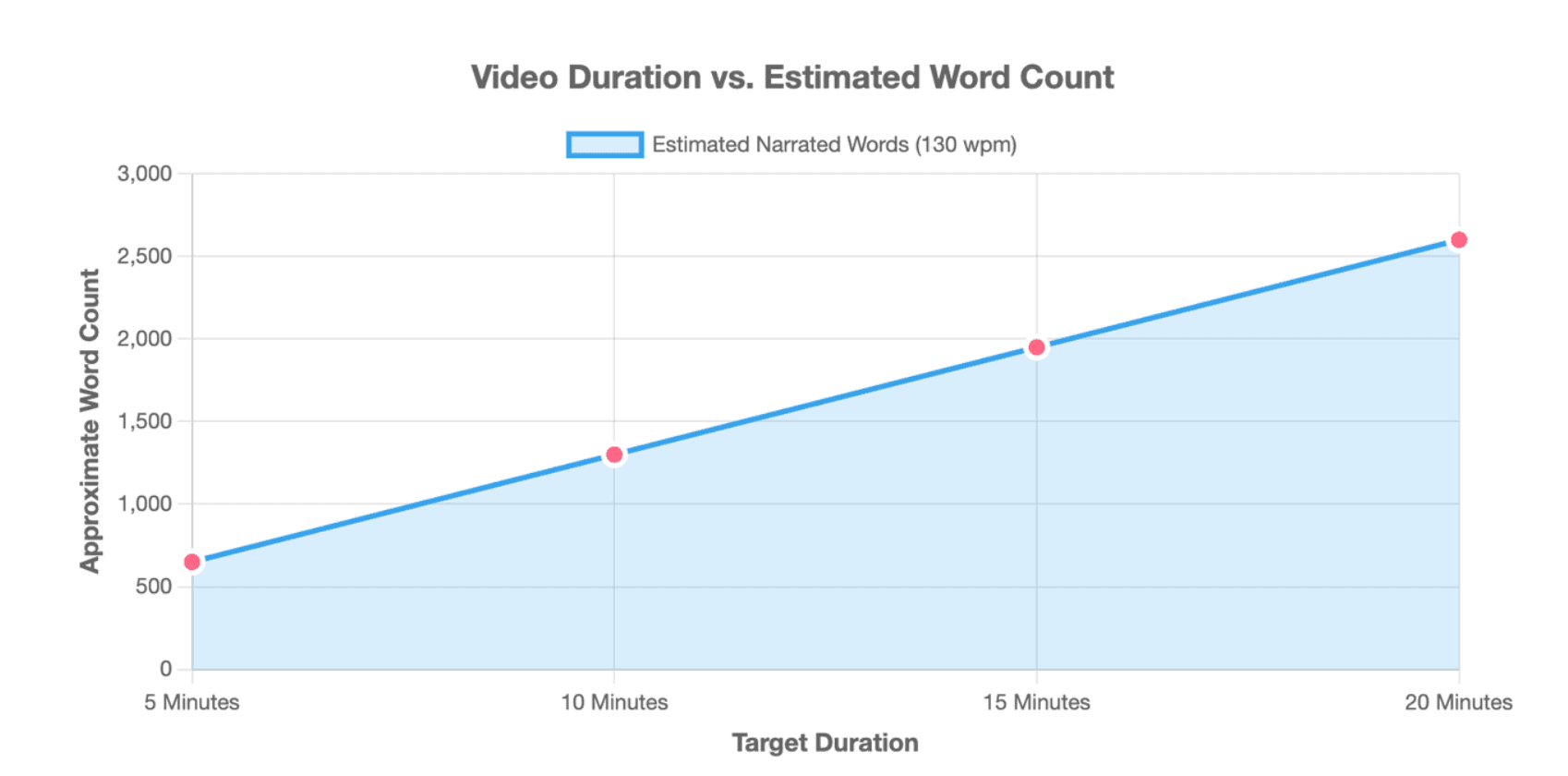
Using Columbia University’s educational-video baseline of approximately 130 words per minute, an initial estimate would look like this:
| Target duration | Approximate narrated words |
| 5 minutes | 650 words |
| 10 minutes | 1,300 words |
| 15 minutes | 1,950 words |
| 20 minutes | 2,600 words |
These are starting estimates, not fixed limits. Interviews, clips, demonstrations, pauses, and visual-only scenes reduce the number of narrated words required.
Use this production sequence:
- Read the script aloud. Mark difficult phrases, unclear references, and unnatural transitions.
- Create a temporary voice track. It does not need final audio quality. Its purpose is to reveal timing and visual gaps.
- Build a rough visual cut. Use placeholders when the final media is not ready.
- Review the argument. Check whether the evidence appears at the right moment and remains visible long enough.
- Revise scene by scene. Shorten narration that competes with visuals. Add context only where viewers need it.
- Record the final voice-over. Record difficult sections in smaller pieces so mistakes are easier to correct.
- Complete sound, captions, and graphics.
- Watch the full video without editing. Record notes, then fix the most important problems in one final revision pass.
After publication, use retention data to review the script. YouTube identifies flat sections, gradual declines, spikes, dips, and top moments. A spike may indicate strong interest or unclear information that viewers replayed, while a dip may reveal a slow, repetitive, or confusing section.
Using AI and document-to-video tools while fact-checking sources, managing copyright, and protecting the creator’s original voice
AI can assist with organizing research notes, comparing sources, creating a first outline, rewriting difficult sentences, suggesting scene boundaries, generating visual checklists, creating draft captions, finding repetition, and converting long documents into shorter scene plans.
OpenAI’s official prompting guidance recommends giving models clear, specific instructions and enough context to understand the task. For video scripts, provide the audience, thesis, verified source material, tone, scene format, and restrictions instead of requesting a complete script from one short prompt.
A safer AI workflow is:
Verified sources → Human thesis → AI-assisted outline → Human approval → Scene drafts → Source check → Voice revision → Visual review
Do not use an AI-generated quotation, statistic, attribution, or historical fact without checking the original source. AI should organize and transform evidence, not become the evidence.
Document-to-video platforms can reduce repetitive production work. According to the provided Leadde product materials, Leadde can transform PowerPoint files, PDFs, Word documents, scripts, and text into structured video presentations, including draft outlines, scenes, narration, and visual layouts. Its workflow allows users to review the generated outline, select presentation settings, edit scripts scene by scene, preview the result, and then generate the final video.
Automation still requires human approval. Review:
- Whether the generated thesis matches the source
- Whether important qualifications were removed
- Whether visuals genuinely support the narration
- Whether the tone sounds like the creator
- Whether translations preserve the original meaning
- Whether each source is accurately represented
Copyright must also be planned before editing. YouTube explains that fair use in the United States is decided case by case under four factors, including the purpose of the use, the nature of the original work, the amount used, and the effect on the market. Credit, disclaimers, or statements such as “no infringement intended” do not automatically make a use fair.
For every third-party asset, record:
- Rights holder
- Source location
- Clip or image duration
- Reason it is necessary
- How the video transforms or comments on it
- License or permission status
- Possible replacement asset
This is not a substitute for legal advice. When the rights status is unclear, use an original recreation, licensed media, public-domain material, or a visual explanation that does not require the protected clip.
Most importantly, protect the creator’s point of view. AI can imitate a clean structure, but it cannot replace the lived experience, judgment, humor, uncertainty, and interpretation that make the essay worth watching.
Conclusion
An effective video essay script connects a focused thesis with credible sources, clear narration, visual evidence, sound, and deliberate editing. Start with one research question, organize the answer into scene-level arguments, test every claim against its source, and revise the script aloud before production. AI and document-to-video tools can make this process faster, but the final argument, evidence choices, and creative voice should remain under human control.





