Where to Use Seedance 2.5: Official Platforms and Access Guide
Seedance 2.5 is officially available through Jimeng AI and Doubao Pro, while Dreamina is rolling out access gradually based on region, subscription, age, and account eligibility.
BytePlus ModelArk API access has not yet been fully released. Seedance 2.5 is best used for 30-second, reference-heavy videos that require stronger control over characters, camera movement, audio, editing, and visual continuity.
However, fragmented access, complex reference setup, and repeated rerenders can make AI video production slow and expensive.
Leadde offers a faster path for business content, automatically turning documents and text into professional videos in minutes while reducing production costs by over 80% and content creation time by up to 90%.

Where to Use Seedance 2.5 in 2026: Official Platforms, Access, Use Cases, and Workflows
Where to Use Seedance 2.5: Official Platforms and Current Access
Seedance 2.5 was officially launched by ByteDance Seed on July 31, 2026. However, an official launch does not mean that every platform, country, subscription, or user account receives access at the same time.
Users should separate three different states:
- The model has been officially announced.
- A platform has started rolling it out.
- The model is visible and usable inside a specific account.
This difference explains why some users can see Seedance 2.5 while others still see Seedance 2.0 or no 2.5 option at all.
Dreamina, Jimeng AI, and Doubao Pro
Jimeng AI and Doubao Pro are the clearest official access routes listed by ByteDance Seed. The official launch article gives the following paths:
- Jimeng Web → Video Generation → Seedance 2.5
- Doubao Pro → Video Generation → Seedance 2.5
Access may still depend on the account, local product version, and rollout stage. Users should confirm that the model selector says Seedance 2.5, rather than assuming that every video-generation page uses the newest model.
Dreamina is the main international creator-facing option. Dreamina states that Seedance 2.5 is rolling out to subscriber accounts for users over 16 in Europe, Asia, the Middle East, and South America.
The United States was not included in that initial Seedance 2.5 rollout list. Dreamina may expand availability later, but users should check their own workspace instead of relying on influencer demonstrations or general product announcements.
BytePlus ModelArk and API Availability
ByteDance’s launch announcement said that Seedance 2.5 API access was coming through BytePlus ModelArk. Since then, BytePlus has added Seedance 2.5-related documentation, a model landing page, API documentation, and a pricing calculator reference.
However, the public BytePlus website still marks Dreamina Seedance 2.5 as “Coming soon.” No clearly documented public model ID was visible in the official materials reviewed for this article.
Developers should therefore treat ModelArk access as a changing rollout rather than a fully confirmed public API release. Before planning production integration, check the actual ModelArk console for:
- A selectable Seedance 2.5 model
- An official model ID
- Available regions
- Input and output limits
- Pricing
- Rate limits
- Commercial terms
Documentation appearing online does not always mean that every account can create a production endpoint immediately.
Can You Trust Third-Party Seedance 2.5 Platforms?
Many third-party websites use “Seedance 2.5” in page titles, model selectors, and marketing claims. This alone does not prove that the site is connected to ByteDance or that it is running the real Seedance 2.5 model.
Some platforms may still use Seedance 2.0, another video model, or an internal workflow while displaying a newer model name. A third-party service should ideally disclose:
- The underlying model provider
- The exact model version
- Whether it uses an official API
- Generation duration and reference limits
- Credit and refund rules
- File-retention policies
- Watermark and commercial-use terms
Avoid uploading confidential business files, client assets, faces, or unreleased products until the platform explains how it stores and processes them. Community discussions around Seedance access also show that users frequently struggle to identify which sites are official and which platforms actually use the claimed model.
| Platform | Target Audience | Access Route / Status |
| Jimeng AI | Chinese Creators | Jimeng Web → Video Gen → Seedance 2.5 |
| Doubao Pro | Professional / Enterprise | Doubao Pro → Video Gen → Seedance 2.5 |
| Dreamina | International Creators | Rolling out (EU, Asia, ME, SA) to subscribers 16+ |
| ModelArk (API) | Developers | "Coming Soon" / Rolling rollout |
How Can You Verify Seedance 2.5 Access?
The safest way to confirm access is to inspect the live creation workspace. A blog post, landing page, email announcement, or social media demonstration cannot confirm what is available inside your account.
Verification should happen before you buy a long subscription or upload important reference material.
Check the Live Model Selector and Available Controls
Open the platform’s video-generation workspace and find the model selector. It should explicitly display Seedance 2.5.
Next, inspect the controls. Officially confirmed Seedance 2.5 capabilities include:
- Up to 30 seconds in one generation
- Multi-round video extension
- Up to 30 image references
- Up to 10 video references
- Up to 10 audio references
- Timestamp-level control
- Green-screen editing
- Camera-perspective editing
- Reference-based editing
A platform may not expose every capability, but a page that only offers a basic short text-to-video form provides little proof that the full Seedance 2.5 workflow is present.
Run a small test after checking the interface. Use one subject, one action, and a clear camera instruction. Save a screenshot showing:
- Model name
- Date
- Platform
- Duration setting
- Reference options
- Credit cost
This evidence makes it easier to compare platforms or contact support later.
Why Seedance 2.5 May Be Missing From Your Account
Seedance 2.5 can be missing even after an official launch because access is being introduced gradually.
Possible reasons include:
- Your region is not part of the current rollout.
- Your account is not on an eligible subscription.
- Your age or account information does not meet the stated requirement.
- The mobile and web versions are updating at different times.
- Your app is outdated.
- The platform is using account-level testing or staged deployment.
- Your account has not yet received the feature flag.
A Reddit user reported seeing Dreamina’s official announcement while still finding no Seedance 2.5 option in the account. This is useful evidence of rollout confusion, although it does not establish the exact cause for every missing account.
Before contacting support, update the app, sign out and back in, check the web version, and inspect the model menu again. Do not assume that repeated refreshing or changing a prompt will unlock an account-level feature.
How to Verify Region, Subscription, and Model Version
Start with the platform’s official rollout notice rather than a third-party guide. Dreamina’s launch announcement specifies subscriber accounts, users over 16, and an initial group of regions.
Compare that information with:
- Your account registration country
- Current location
- Billing region
- App-store region
- Subscription type
- Account age information
Dreamina’s announcement names Europe, Asia, the Middle East, and South America for its initial rollout. This does not prove that every country or every subscriber in those regions receives access at the same moment.
Finally, verify the model version inside the creation workspace. A platform may offer several Seedance models at the same time. Seeing “Seedance” without a version number is not enough to confirm 2.5 access.
| Verification Point | True Seedance 2.5 Indicator | Warning Sign (Fake/Old Model) |
| Model Name | Explicitly "Seedance 2.5" | "Seedance" (no version) or missing |
| Max Duration | Up to 30 seconds | Capped at 5 to 15 seconds |
| Image References | Up to 30 | Only allows 1 or none |
| Video References | Up to 10 | Feature completely missing |
| Editing Tools | Timestamp control, green-screen | Basic text-to-video only |
What Can Seedance 2.5 Do?
Seedance 2.5 is designed as more than a basic prompt-to-video tool. Its main value is the combination of longer generation, multimodal reference control, synchronized audio-video creation, and targeted editing.
These tools make it better suited to planned production workflows where users need to control characters, products, motion, camera work, sound, and scene continuity.
Generate 30-Second Videos and Extend Existing Scenes
Seedance 2.5 can generate an audio-video clip of up to 30 seconds in a single pass. ByteDance says the model can organize connected shots into a story with a setup, development, turning point, and ending instead of extending one simple movement for the full duration.
The model also supports multiple rounds of extension. An existing result can be continued while attempting to preserve:
- Main characters
- Environment
- Visual style
- Narrative pace
- Sound effects
- Overall audio-video language
ByteDance describes this as a way to build multi-minute content from connected generations. It should not be confused with one native multi-minute generation. Each extension still needs review because identity, motion, sound, or scene details may drift between segments.
Thirty seconds is not automatically better for every project. A stable 8- or 12-second shot may be more useful than a complex 30-second result with too many actions and camera changes.
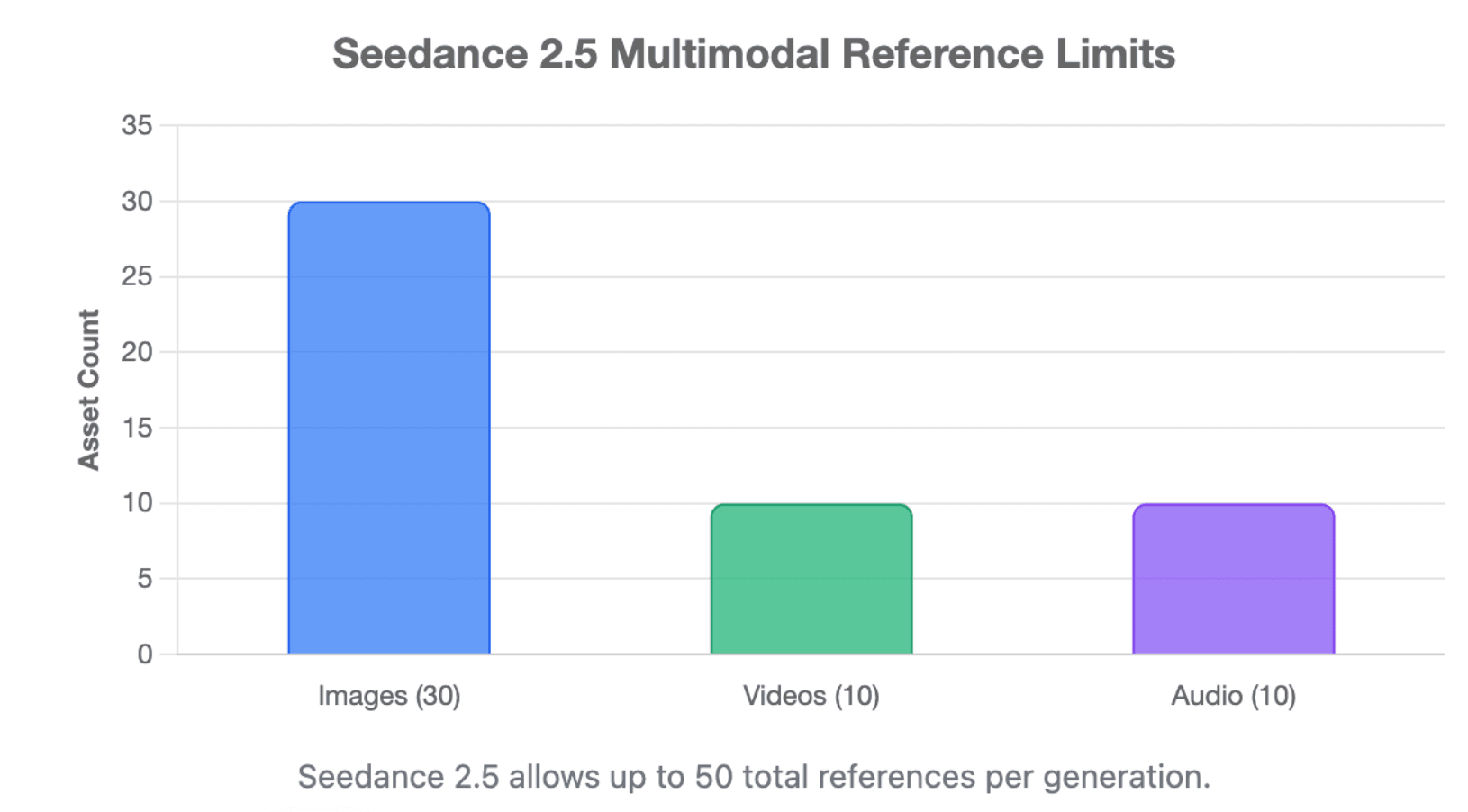
Control Videos With Up to 50 Image, Video, and Audio References
The official ByteDance limit is:
- 30 images
- 10 video clips
- 10 audio clips
- 50 total reference assets
These references can guide characters, props, locations, composition, visual style, movement, voices, camera work, and sound. Seedance 2.5 also strengthens clay-render, motion, and creative references.
More references do not always produce a better result. References can conflict when they show different faces, clothes, lighting, proportions, movements, or styles.
Each reference should have one clear role. For example:
- Use front, side, and full-body images for identity.
- Use separate images for important products or props.
- Use a short video for camera movement.
- Use a clay render for blocking and spatial structure.
- Use audio for rhythm, voice, or atmosphere.
A focused set of six strong references can be more useful than 40 unrelated files.
Edit Characters, Objects, Camera Movement, and Specific Time Ranges
Seedance 2.5 supports timestamp-level control during generation. A prompt can define what happens during specific parts of the video, including character movement, camera direction, scene development, and rhythm.
After generation, users can target specific clips or moments and modify characters, actions, or story elements. ByteDance also highlights green-screen editing, camera-perspective editing, and reference-based editing.
This can reduce the need to regenerate an entire shot because one product, background object, action, or camera move is wrong. However, targeted editing should not be treated as perfectly isolated.
Always review the full clip after an edit. Changes in one area can affect lighting, shadows, continuity, audio, or nearby objects.
Where Should You Use Seedance 2.5?
Seedance 2.5 is most useful when a project benefits from longer scenes and rich reference control. Its value becomes clearer when the creator needs consistent people, products, camera work, sound, or spatial structure.
It is less valuable when the project only needs a simple short clip with little continuity.
Social Media, Advertising, Product Videos, and Short Films
For social media, Seedance 2.5 can create:
- Story-led short videos
- Product reveals
- Fashion clips
- Music and performance scenes
- Cinematic hooks
- Branded mini-stories
A creator can control when the product appears, how the camera moves, what sound is present, and how the final shot supports a call to action.
For advertising and e-commerce, multiple references can help preserve:
- Product shape
- Packaging
- Brand colors
- Presenter identity
- Set design
- Camera style
The 30-second format is useful for advertisements that need an opening hook, product benefit, demonstration, and closing frame. Dreamina also positions Seedance 2.5 for products, stories, social media, and business creative work.
For short films and AI dramas, use one continuous scene or a small number of controlled actions per generation. Do not treat a single prompt as an explainer video or a complete edited trailer with many unrelated locations and hard cuts.
Film Previsualization, Education, Training, and Industrial Demonstrations
Clay-render references make Seedance 2.5 useful for film previsualization. A filmmaker can define:
- Character positions
- Motion paths
- Camera angles
- Shot size
- Scene blocking
- Spatial relationships
The model can then use separate visual references for materials, characters, lighting, and final style. This allows teams to test a camera plan or scene concept before filming or completing expensive 3D production.
ByteDance also identifies education and manufacturing as real-world application areas. The model can visualize historical settings, scientific ideas, experimental procedures, assembly steps, equipment demonstrations, and industrial processes, making it a powerful option for creating training videos.
Generated educational or technical videos must still be reviewed by a qualified person. Visual quality does not guarantee factual, historical, scientific, or safety accuracy.
ByteDance also discusses synthetic video for robotics and autonomous-driving research. These outputs may support training and testing, but they should not replace real-world validation or be treated as certified sensor data.
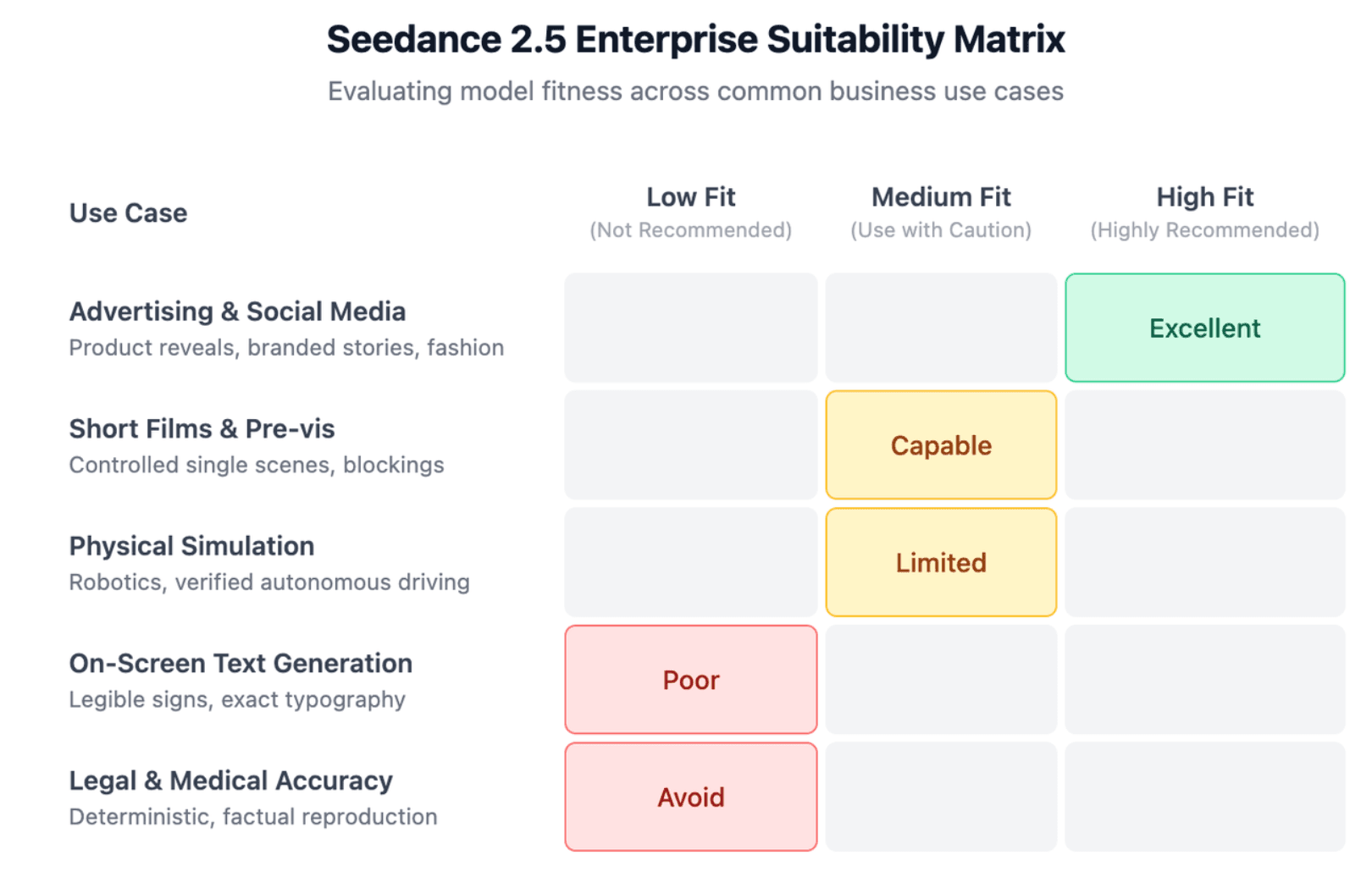
When Seedance 2.5 Is Not the Best Choice
Seedance 2.5 may be unnecessary when the project only requires:
- A simple five-second visual
- One subject with basic motion
- A low-cost background clip
- A fast draft with no identity requirements
A simpler or shorter-form model may complete these tasks faster and with fewer credits.
Seedance 2.5 is also not the safest choice when the result requires:
- Perfectly readable on-screen text
- Exact legal, medical, or engineering accuracy
- Deterministic reproduction
- Verified physical simulation
- Guaranteed multi-person interaction
- Immediate production API access
ByteDance officially acknowledges that complex-motion physics and scenes involving interactions among multiple subjects still need improvement.
How to Use Seedance 2.5 Effectively
A strong Seedance 2.5 workflow begins before the prompt is written. The user should first define the shot, organize references, and decide what success will look like.
Trying to solve character identity, action, camera work, sound, lighting, and a complex story in the first generation makes errors harder to diagnose.
Build a Focused Character, Style, Motion, and Audio Reference Pack
Organize reference assets by purpose.
Character references can include:
- Front portrait
- Three-quarter portrait
- Side profile
- Full-body image
- Important clothing details
Style references can define:
- Lighting
- Color
- Lens feel
- Texture
- Environment
Motion references should show the exact type of movement required, such as a slow push-in, handheld follow shot, orbit, dance move, or product rotation.
Audio references can guide voice, rhythm, ambience, music, or timing.
Start with the smallest set that clearly defines the shot. Add a new reference only when it solves a specific problem. This reduces conflict and makes it easier to understand why a generation changed.
Write a Time-Coded Prompt and Generate a Short Proof Clip
A useful prompt should define:
- Subject and environment
- Camera position
- Main action
- Timeline
- Sound
- Visual style
- Details that must remain unchanged
For a longer shot, divide the action into clear time ranges:
- 0–5 seconds: establish the scene
- 6–15 seconds: perform the main action
- 16–24 seconds: introduce the change or response
- 25–30 seconds: complete the scene and hold the final frame
ByteDance’s official examples use this time-based structure to control characters, camera paths, actions, and scene changes.
Before spending credits on the full concept, generate a simpler proof clip. Test one main question:
- Does the face remain stable?
- Is the product shape correct?
- Does the camera follow the reference?
- Does the action look natural?
- Does the audio match the scene?
Once that part works, add more duration, characters, or actions.
Review Consistency, Repair Weak Areas, and Extend the Video
Review the entire result from beginning to end. Check:
- Face and body consistency
- Clothing and prop details
- Product shape and labels
- Hand-object contact
- Camera direction
- Physical movement
- Audio synchronization
- Background stability
- Final-frame quality
Pay extra attention to complex actions and scenes with several interacting people. These are areas where ByteDance still recognizes limitations.
Use targeted editing when most of the clip is already correct. Replace or modify the weak character, action, object, camera move, or time range rather than immediately generating a completely new video.
Extend the scene only after the first segment is approved. Use the final frames, character references, sound direction, and visual style from the approved clip to guide the next generation.
How Should You Choose the Best Seedance 2.5 Platform?
The best platform is not always the one with the lowest displayed credit price. It is the platform that reliably provides the real model, the required tools, acceptable generation speed, clear rights, and usable results.
Evaluate the full production workflow rather than one marketing claim.
Compare Access, Credits, Queue Time, and Cost per Usable Video
First confirm that the model is actually available in your account. A cheap plan has little value when Seedance 2.5 is missing, the queue is too long, or the platform only exposes limited controls.
Compare:
- Subscription cost
- Credits per generation
- Cost by duration
- Reference limits
- Queue priority
- Failed-generation refunds
- Editing costs
- Extension costs
- Upscaling costs
- Watermark removal
Calculate cost per approved video, not only cost per generation.
For example, a low-cost platform that requires eight attempts may cost more than a higher-priced platform that produces an acceptable result in two attempts. Community discussions around earlier Seedance versions show wide concern about platform pricing and identifying the best-value provider, but those reports should not be treated as official Seedance 2.5 pricing.
As of August 2, 2026, official Seedance 2.5 pricing is not presented consistently across every platform. Check the live checkout page or pricing calculator before publishing exact costs.
Review Limitations, Moderation Rules, Commercial Rights, and Data Policies
Platform rules can be as important as model quality.
Dreamina states that its safeguards include:
- Invisible watermarks
- C2PA Content Credentials
- Visible AI labels
- Prompt blocking
- Content moderation
- Protection against unauthorized likeness use
- Intellectual-property safeguards
These systems can affect which prompts, people, brands, and assets users may generate.
Before commercial use, review:
- Ownership and license terms
- Watermark rules
- AI-label requirements
- Celebrity and real-person restrictions
- Copyright and trademark rules
- Music and voice rights
- Data-retention periods
- Whether files train future models
- Client-confidentiality requirements
Do not assume that rights are identical across Dreamina, Jimeng, Doubao, ModelArk, and third-party providers. The platform’s terms control the user relationship even when the underlying model is the same.
Seedance 2.5 vs Seedance 2.0 and Other AI Video Models
Seedance 2.5 is a stronger choice than Seedance 2.0 when the project needs:
- Up to 30 seconds in one generation
- More multimodal references
- Richer long-form storytelling
- More precise timestamp editing
- Stronger green-screen and camera editing
- Complex reference-based production
ByteDance states that Seedance 2.5 extends single-pass generation from 15 to 30 seconds and supports up to 50 image, video, and audio references.
Seedance 2.0 may remain more practical when it is already available in the user’s account, costs less, or provides enough control for a short clip.
Compared with other current models:
- Kling 3.0 supports native audio-video output, element binding, storyboard control, and videos up to 15 seconds according to its official guide. It may suit users already working inside the Kling ecosystem.
- Google Veo 3.1 focuses on native audio, prompt adherence, realism, physics, and tools such as scene extension and reference-based controls through Gemini and Flow. It may be stronger for teams centered on Google’s creative workflow.
- Sora’s consumer web and app products were discontinued on April 26, 2026, so Sora is no longer a current public product choice in the same way it was previously.
- Short-form image-to-video models may be more efficient for quick motion, simple B-roll, or low-cost concept tests.
The best decision is often made shot by shot. Use Seedance 2.5 when longer duration and many structured references create real value. Use another model when it offers better access, physics, speed, price, or a workflow that fits the specific scene.
| Feature / Model | Seedance 2.5 | Seedance 2.0 | Kling 3.0 | Google Veo 3.1 |
| Max Base Duration | 30 seconds | 15 seconds | 15 seconds | Varies (Workflow specific) |
| Audio Generation | Native synced audio | No/Limited | Native synced audio | Native synced audio |
| Reference Capacity | Up to 50 combined | Image/Video limited | Storyboard/Element binding | Strong prompt/Gemini reference |
| Best Used For | Complex 30s storytelling | Simple short clips | Kling ecosystem users | Google Flow/Gemini users |
Conclusion
Seedance 2.5 is best used on a verified official platform for projects that need longer scenes, multiple references, synchronized audio, precise camera direction, and targeted editing. Jimeng AI, Doubao Pro, and Dreamina are the main creator-facing routes, while BytePlus ModelArk access should be confirmed directly before API planning. The right platform depends on actual account access, feature availability, cost per usable result, moderation rules, commercial rights, and the complexity of the video being produced.