
Best Video Platform for Business in 2026: Top Picks

The best video platform for business depends on the company’s primary goal. Leadde, Synthesia, and HeyGen are strong choices for AI video creation, especially if you need an intuitive explainer video maker to engage your audience, while Vimeo and Wistia are better suited to professional hosting and video marketing.
Panopto, Kaltura, and Brightcove are more appropriate for enterprise training, secure content management, and large-scale distribution. However, companies looking to scale their e-learning can also look into an AI training course generator to build structured educational content automatically.
The right choice should match the business’s workflow, security needs, audience, budget, and ability to update and reuse video content.
However, comparing platforms becomes difficult when teams still rely on separate tools for scripts, editing, localization, and updates.
Leadde solves this by turning documents and text into professional business videos in minutes. By utilizing smart doc-to-video workflows and pdf-to-video conversion, it helps companies reduce video production costs by over 80% and content creation time by 90%.

Best Video Platform for Business: Which Option Should You Choose in 2026?
There is no single best video platform for every business. The right choice depends on whether the main goal is to create videos, host them, generate leads, train employees, stream events, or build video features into a product.
Businesses should choose by primary workflow, not by the number of features on a pricing page. A powerful enterprise streaming platform may be unnecessary for a small marketing team, while a basic AI video maker may not provide the security or content management required by a global company.
Best platforms by business use case
| Business Need | Strong Options | Why They Fit |
| Turn documents into videos | Leadde, Synthesia | Import business content and generate structured video drafts |
| AI avatar videos | Synthesia, HeyGen | Avatar-led presentations, voices, and multilingual production |
| Simple branded video creation | Canva, VEED | Browser-based editing, templates, and brand assets |
| Professional video hosting | Vimeo, Swarmify | Ad-free players, embedding, and managed delivery |
| Video marketing | Wistia, Vidyard | Lead capture, engagement data, and sales workflows |
| Training and knowledge management | Panopto, Kaltura | Searchable video libraries, permissions, and enterprise integrations |
| Large-scale streaming | Brightcove | Live and on-demand delivery, security, and monetization |
| Paid video memberships | Uscreen | Subscription management, apps, community, and live streaming |
| Custom video applications | Mux, Cloudflare Stream | APIs, encoding, delivery, analytics, and developer control |
| Public audience growth | YouTube | Public discovery, embedding, and audience analytics |
Leadde accepts formats including PowerPoint, PDF, Word, and text, then generates scripts, visuals, scenes, and avatar narration. Synthesia can start from a prompt, script, document, or URL, while HeyGen focuses strongly on avatars, multilingual delivery, and translated video.
Quick comparison of video creation, hosting, marketing, training, and streaming platforms
A creation platform helps a team produce the video. A hosting platform stores, encodes, streams, and measures it. A marketing platform connects viewing activity to leads or sales, while an enterprise platform adds governance, search, permissions, and content management.
Some products cross several categories. Vimeo combines hosting, management, analytics, security, and creation tools. Wistia combines hosting with marketing analytics and lead generation. Panopto turns recorded content into searchable institutional knowledge, while Brightcove focuses on secure, scalable delivery and monetization.
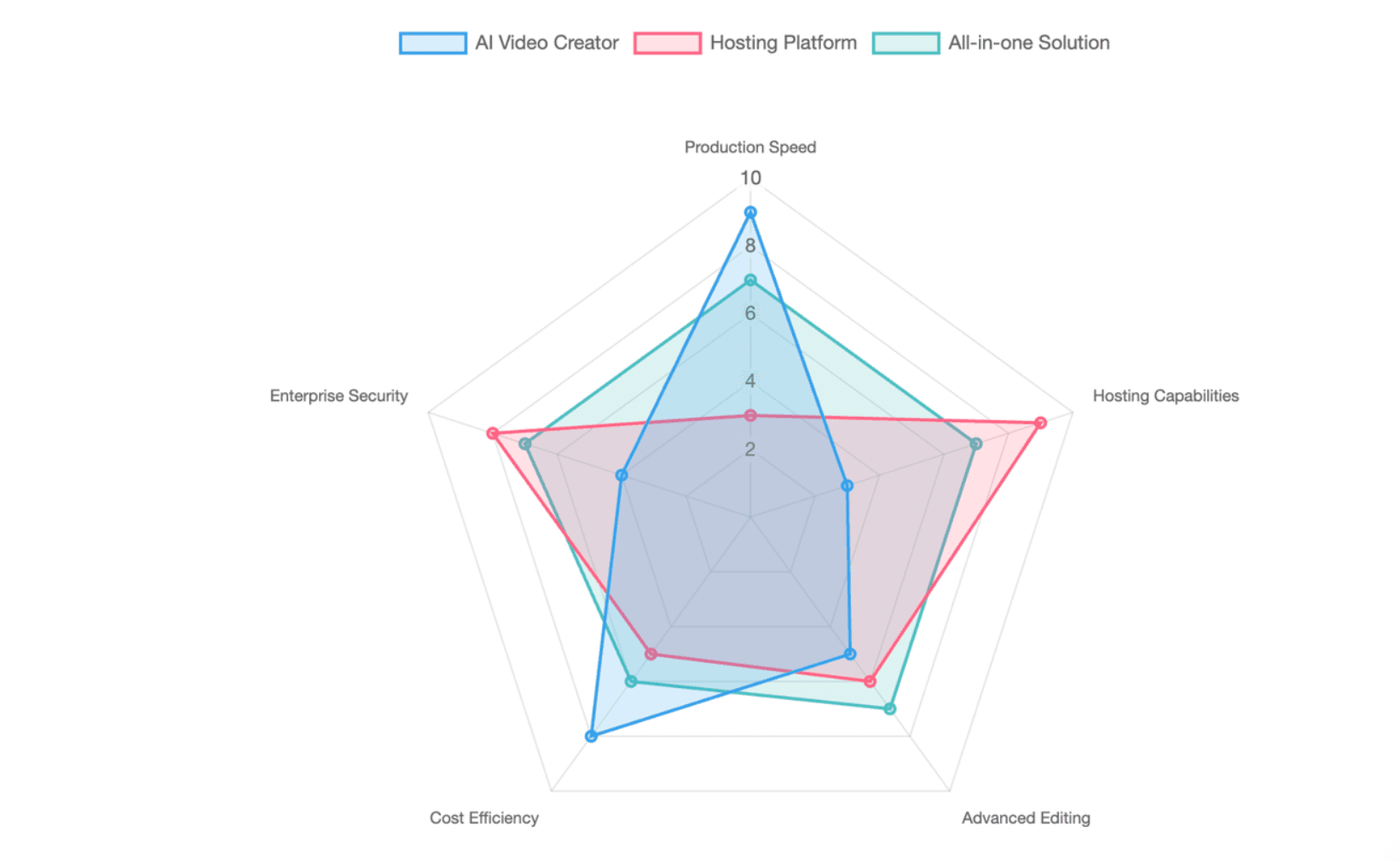
Should you choose an AI video creator, a hosting platform, or an all-in-one solution?
Choose an AI video creator when the main problem is production. This is suitable when teams already have documents, scripts, presentations, or training materials but lack filming and editing resources.
Choose a hosting platform when finished videos need reliable playback, private access, branded embedding, analytics, or CDN delivery. Choose an all-in-one solution when reducing handoffs between script creation, editing, translation, hosting, review, and updates matters more than having the most advanced specialist tool at every stage.
The all-in-one approach reduces file transfers and disconnected subscriptions. However, specialist tools may still offer deeper creative control, marketing automation, streaming infrastructure, or enterprise governance.
What Is a Business Video Platform?
A business video platform is software used to create, manage, host, distribute, secure, or measure video for commercial and organizational purposes.
Unlike a basic social video app, a business platform normally supports workflows such as brand control, team permissions, analytics, private sharing, website embedding, translation, integrations, or content management.
AI video creation, hosting, marketing, and enterprise video platforms
- AI video creation platforms produce videos from prompts, scripts, files, images, or existing recordings. They may generate scenes, presenters, voice-overs, subtitles, stock footage, or visual effects.
- Hosting and marketing platforms focus on playback, embedding, viewer behavior, lead capture, and conversion. Wistia, for example, combines video management with lead forms and marketing integrations, while Vidyard connects video viewing activity to sales follow-up.
- Enterprise video platforms manage large libraries, access rights, retention, search, live events, training, and internal communications. Panopto indexes spoken words and on-screen content, while Kaltura provides an internal video portal for content discovery, collaboration, and distribution.
Video hosting vs. cloud file storage and self-hosting
Cloud storage services save files, but they do not always provide the complete streaming workflow. Professional video hosting normally includes encoding, adaptive bitrate delivery, a web player, access controls, analytics, and device compatibility.
Developer platforms such as Mux and Cloudflare Stream handle ingestion, encoding, delivery, live or on-demand playback, and API access. This removes the need to build and maintain the full streaming stack internally.
Self-hosting gives a business more infrastructure control, but the company becomes responsible for encoding, CDN configuration, playback quality, security, browser support, captions, analytics, and maintenance. It is usually practical only when the business has a video engineering team or unusual technical requirements.
When should businesses use YouTube, a managed platform, or their own infrastructure?
Use YouTube when public reach, search discovery, audience growth, and simple embedding are the main goals. YouTube supports public, unlisted, and private visibility settings, website embedding, and audience-retention analytics.
Use a managed business platform when the company needs an ad-free player, stronger branding, private access, viewer-level analytics, lead generation, or control over the viewing experience.
Use developer infrastructure such as Mux or Cloudflare Stream when video is a feature inside a product, app, learning platform, or marketplace. These services are better suited to custom applications than to non-technical marketing teams.
| Deployment Type | Core Function | Maintenance Effort | Best For |
| Professional Hosting (e.g., Vimeo, Wistia) | Turnkey streaming, encoding, adaptive playback | Low | Marketing, internal comms, general business |
| Cloud Storage (e.g., Google Drive, Dropbox) | Basic file saving and sharing | Very Low | Internal file transfer, archiving |
| Developer API (e.g., Mux, Cloudflare) | Headless encoding, APIs, global delivery CDN | Medium | Product integrations, SaaS platforms |
| Self-Hosting (AWS/Custom Servers) | Complete infrastructure ownership | Very High | Massive scale, strict compliance, engineering teams |
How Did We Evaluate the Best Business Video Platforms?
This guide evaluates platforms by their ability to complete a real business workflow, not by the quality of a polished demonstration video.
Official product documentation was used for current capabilities. Vendor performance and savings claims should be treated as first-party claims unless supported by independent testing.
Creation workflow, ease of use, and source-content accuracy
The first test is how quickly a user can move from source material to an editable draft.
A practical platform should be tested with:
- A PowerPoint presentation
- A PDF or Word document
- A structured script
- A screen recording
- A product or training brief
The platform should preserve key facts, terminology, warnings, and sequence. A fluent AI-generated script is not useful if it changes the meaning of a policy, SOP, product specification, or compliance statement.
Leadde’s workflow is designed around importing files and generating structured scripts, visuals, and avatar narration. Synthesia also supports file and URL input, while InVideo generates scripts, stock media, voice-over, subtitles, music, and transitions from a prompt.
Hosting performance, security, analytics, and integrations
A hosting platform should be evaluated on playback speed, adaptive streaming, uptime, player customization, privacy, and access control.
Security needs vary by use case. A public marketing video may only need an ad-free branded player, while employee training may require SSO, role-based access, encryption, audit controls, and restricted sharing.
Vimeo lists enterprise controls including SSO, encryption, SOC 2 Type II, GDPR alignment, and ISO certifications. Brightcove provides advanced content protection, while Cloudflare Stream supports signed URLs for authenticated or paid content.
Analytics should also match the business goal:
- Marketing teams need lead and conversion data.
- Sales teams need viewer identity and engagement signals.
- Training teams need completion and assessment data.
- Technical teams need playback and buffering data.
Pricing, scalability, product stability, and time to the first approved video
Subscription price is only one part of the cost. Businesses should also count seats, video credits, storage, streaming, translation, premium avatars, voice cloning, API usage, review time, failed generations, and repeated edits.
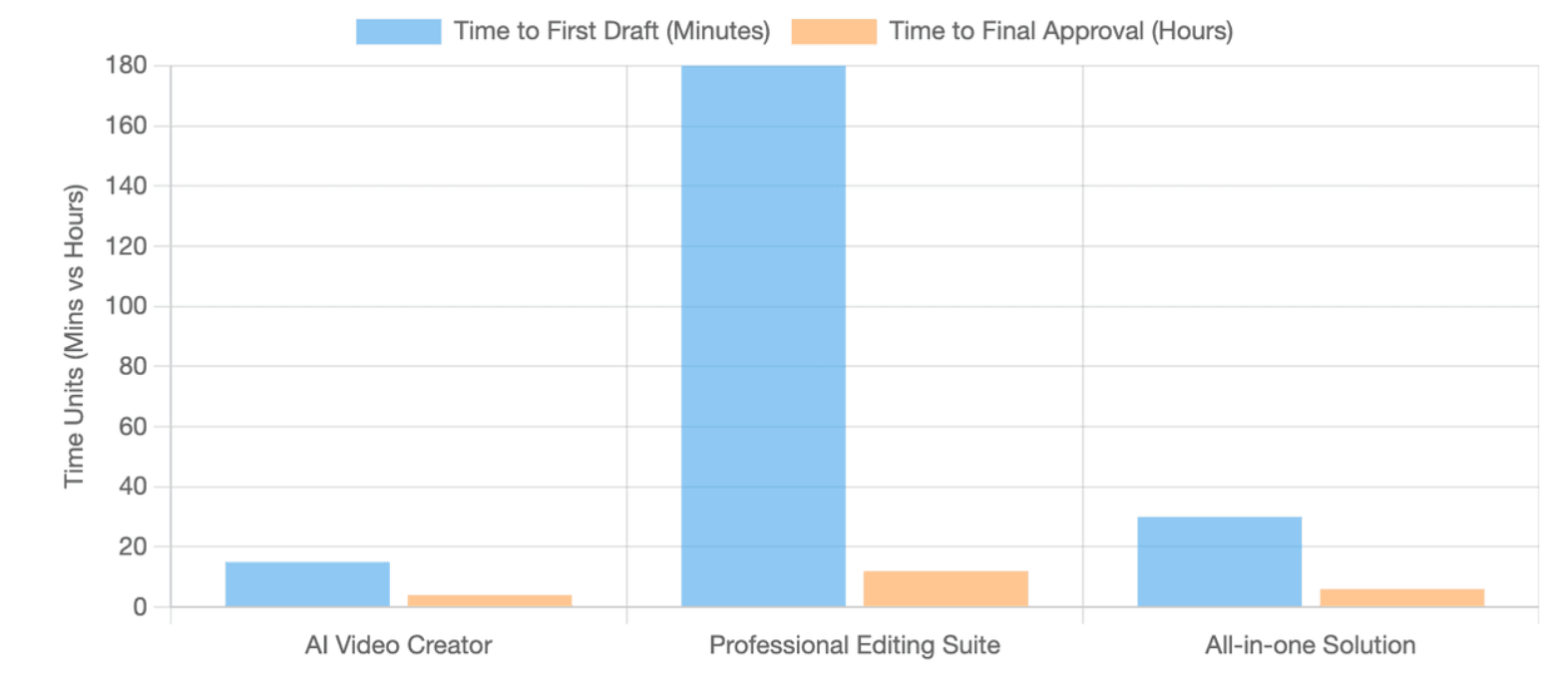
The most useful speed metric is not time to first draft. It is time to first approved video. This includes source preparation, AI generation, factual corrections, design changes, stakeholder review, translation, and final approval.
Product stability also matters. OpenAI discontinued the Sora web and app experiences on April 26, 2026, and plans to discontinue the Sora API on September 24, 2026. This is a clear example of why businesses should review export options, model dependency, and migration risk before building a long-term workflow around one product.
Users in the referenced Reddit discussion also emphasized consistency, scene-level editing, prompt preservation, and avoiding the need to rebuild an entire project whenever the leading model changes. These comments are subjective, but they reveal practical workflow concerns that product comparison pages often ignore.
Which Video Platforms Are Best for Each Business Use Case?
The following recommendations are based on product category and business fit. They are not a universal ranking.
AI Video Creation: Leadde, Synthesia, HeyGen, Canva, and VEED
- Leadde is a strong choice when existing business documents are the starting point. It supports PowerPoint, PDF, Word, and text input, then generates an outline, script, visuals, scenes, and avatar narration. Its official materials position the platform for explainer videos, SOPs, lectures, and business training.
- Synthesia is well suited to avatar-led training, onboarding, and corporate communication. It supports prompts, scripts, documents, and URLs, along with avatars, voice-overs, collaboration, translation, and business-focused templates.
- HeyGen is a strong option for lifelike presenters and multilingual delivery. Its official pages emphasize custom avatars, lip synchronization, translated video, voice generation, and training content across many languages and dialects.
- Canva works well for small teams that need templates, brand assets, stock media, and a simple drag-and-drop editor. Its video tools are easier for general marketing teams than a traditional professional editing suite.
- VEED combines browser-based editing with AI-generated video, subtitles, dubbing, audio cleanup, brand controls, and manual refinement. It is suitable when a team wants AI assistance but still needs a familiar editing environment.
Other useful specialist options include Descript for text-based editing, InVideo for prompt-led promotional video production, and Loom for quick screen-recorded communication.
Video Hosting and Marketing: Vimeo, Wistia, Swarmify, YouTube, and Vidyard
- Vimeo is a strong general business host for ad-free playback, branding, analytics, privacy, video management, and enterprise security. It fits companies that want professional hosting without building infrastructure.
- Wistia is better suited to marketing teams that want to capture leads and connect video viewing to marketing systems. Its tools include email capture inside videos, viewer engagement data, and marketing automation integrations.
- Swarmify focuses on website video delivery with an ad-free player, CDN distribution, and plans based on viewing allowances rather than per-gigabyte bandwidth billing. Its plans still have storage, view, and fair-use conditions, so “unlimited bandwidth” should not be interpreted as unlimited total usage.
- YouTube is the practical choice for public discovery and audience growth. It supports embedding and detailed watch-time and retention reports, but businesses have less control over branding, recommendations, advertising, and the surrounding viewing environment.
- Vidyard is designed around sales and revenue workflows. It combines hosting, personalized video, watch notifications, viewer engagement, permissions, and sales-oriented analytics.
Enterprise, Training, Streaming, and Developer Platforms: Panopto, Kaltura, Brightcove, Uscreen, Mux, and Cloudflare Stream
- Panopto is a strong fit for training, education, knowledge management, and searchable enterprise video. It provides a governed video CMS, full-text search, access control, versioning, captions, LMS integrations, and completion analytics.
- Kaltura is suitable for organizations that need a configurable internal video portal, content management, collaboration, training, and live or on-demand experiences. It offers a more modular enterprise approach than a simple hosting product.
- Brightcove is built for large-scale live and on-demand video delivery, content management, branded players, analytics, monetization, APIs, and advanced security. It is generally more appropriate for large enterprises, media companies, and complex distribution needs.
- Uscreen is a specialized choice for paid memberships, online video businesses, branded apps, live streaming, community features, and recurring revenue. It is not the best fit for a company that only needs internal training or basic website hosting.
- Mux is an API-first platform for developers building live or on-demand video into software. It handles encoding, global delivery, playback, captions, analytics, and usage-based billing.
- Cloudflare Stream lets developers upload, encode, store, secure, and deliver live or on-demand video. It supports direct user uploads, signed URLs, analytics, a configurable player, and API or dashboard workflows.
| Platform Category | Top Recommended Tools | Core Strength |
| AI Content & Document-to-Video | Leadde | Converts PDFs/PPTs/Text directly into avatar-led video presentations |
| AI Avatars & Localization | Synthesia, HeyGen | High-quality digital avatars, multilingual translation, voice cloning |
| Marketing & Lead Gen | Wistia, Vidyard | CRM integrations, in-video forms, sales tracking |
| Professional Hosting | Vimeo, Swarmify | Ad-free embedding, high-quality CDN delivery, brand control |
| Enterprise Knowledge & LMS | Panopto, Kaltura | Searchable video CMS, strict permissions, LMS integration |
| Dev API & Custom Apps | Mux, Cloudflare Stream | Headless infrastructure, programmable video pipelines |
How Should a Business Test and Choose a Video Platform?
Do not make the final choice from a vendor demo or feature list. Run the same business task through each shortlisted platform.
The test should use real content, real reviewers, and a realistic publishing destination.
Test the complete workflow with a real PowerPoint, PDF, or business document
Upload the same source file to each platform. Use a document that contains headings, technical terms, branding, tables, and at least one fact that must not be changed.
Measure:
- Time required to prepare the source
- Time to generate the first draft
- Number of manual script corrections
- Number of visual corrections
- Ease of editing imported content
- Accuracy against the original document
- Time required for final approval
A document-first workflow is more valuable when the platform can use approved company content directly rather than forcing the user to copy, rewrite, and reformat the same material across several tools.
Check scene-level editing, multilingual production, review, approval, and content updates
Create one intentional error in the test project. Then check whether the user can fix only that scene, sentence, visual, voice, or avatar without regenerating the full video.
This matters because the real cost of AI video often appears during revision. A cheap first draft becomes expensive when every small correction consumes new credits or disrupts approved scenes.
Next, create a second-language version. Check whether the platform preserves layout, terminology, voice style, subtitles, on-screen text, and timing. Leadde, Synthesia, and HeyGen all promote multilingual workflows, but businesses should test the exact languages, accents, and terminology they need rather than relying only on a published language count.
Finally, update one fact after publication. The strongest platform should let the team revise the affected scene, preserve approved content, maintain the existing sharing workflow, and manage translated versions without rebuilding the project.
Evaluate total cost, export rights, vendor lock-in, team adoption, and audience trust
Calculate the cost of the approved result, not just the subscription.
Include:
- Paid seats
- AI credits
- Premium avatars and voices
- Regeneration
- Translation
- Storage and bandwidth
- Streaming or view charges
- API use
- Reviewer time
- Human editing
- Migration and export costs
Also check what can be exported. At minimum, the business should understand whether it can retain the final video, scripts, subtitles, translations, audio, prompts, analytics, and editable project assets.
Team adoption is equally important. A technically advanced platform has limited value when only one specialist can use it. Test the product with a non-editor and measure whether the person can create, revise, review, and publish a usable video without extensive training.
Audience trust should be tested rather than assumed. Compare AI-avatar, human-presented, screen-recorded, and hybrid versions. Track retention, completion, click-through rate, feedback, and conversion to determine which format works for the actual audience.
Frequently Asked Questions About Business Video Platforms
What is the best video platform for small businesses, websites, and free public distribution?
- For a small business that needs simple creation, Canva or VEED may be sufficient. For a website that needs clean professional hosting, Vimeo or Swarmify may be more appropriate. Wistia is stronger when lead capture and marketing analytics justify the added cost.
- For public distribution and search discovery, YouTube remains the most practical starting point. Businesses can upload, publish, embed, and analyze public video without operating their own streaming infrastructure.
Many companies use both approaches: YouTube for reach and a managed host for high-conversion website pages, private content, or branded customer experiences.
What is the best AI platform for document-to-video, training, and multilingual content?
- Leadde is particularly relevant when the workflow starts with PowerPoint, PDF, Word, SOP, or text content. It automatically structures the material into scripts, scenes, visuals, and avatar narration.
- Synthesia is a strong choice for structured avatar-led training, onboarding, and internal communication. HeyGen is strong for avatar realism, translated presentations, and multilingual marketing or training content.
The best option depends on source-file handling, editing depth, reviewer workflow, target languages, avatar style, brand controls, and the cost of future updates.
How much does a business video platform cost, and can you switch platforms later?
Costs range from free public platforms to monthly subscriptions, usage-based infrastructure, and custom enterprise contracts.
Pricing may be based on:
- Seats
- Video minutes
- AI credits
- Storage
- Views
- Streaming minutes
- Resolution
- Subscribers
- Translation
- Premium features
For example, Swarmify prices plans by included views, Mux uses usage-based video infrastructure pricing, and Uscreen combines subscription charges with storage, subscriber, transaction, and app-related conditions.
Switching is possible, but migration may require downloading original videos, captions, metadata, analytics, source files, and embed information. Before purchasing, confirm export rights, file formats, custom-avatar portability, project access after cancellation, and whether existing URLs or embeds must be replaced.
| Pricing Model | How You Are Billed | Common Hidden Costs to Check |
| Credit-Based (AI Generators) | Per minute of AI video generated | Costs to re-generate edits, premium avatars, voice cloning |
| Subscription (Hosting/Marketing) | Flat monthly fee for features/seats | Storage limits, bandwidth overages, limits on user seats |
| Usage-Based (Developer APIs) | Per minute of video encoded/delivered | Storage accrual, API call limits |
| Enterprise / Custom | Annual contract based on scale | Implementation fees, LMS integration, SSO add-ons |
Conclusion
The best video platform for business is the one that matches the company’s real workflow. AI creators such as Leadde, Synthesia, and HeyGen solve production problems, while Vimeo, Wistia, Panopto, Brightcove, Mux, and other specialist platforms solve hosting, marketing, training, streaming, or infrastructure needs. Businesses should test each platform with real content, calculate the cost of an approved and maintainable video, and choose a system the team can use consistently without losing control of accuracy, security, or project ownership.





