
Best Platform for Training Videos: Top Tools for 2026

The best platform for training videos depends on how the content will be created, delivered, tracked, and updated.
AI video generators are best for turning documents into presenter-led videos, screen recorders suit software tutorials, animation tools support scenario-based learning, while LMS and video hosting platforms handle quizzes, completion records, security, and large-scale distribution.
Yet producing consistent training videos can still consume days of scripting, editing, and localization, especially when source content changes.
Leadde turns documents and text into professional business videos in minutes, helping teams cut production costs by over 80% and content creation time by up to 90%.
Best Platform for Training Videos: Which Tool Is Best for Each Use Case?
There is no single best platform for every training video. If you are planning how to make a training video, the right choice depends on the source material, video style, delivery method, update frequency, learner tracking needs, and the skills available inside your team.
Quick Comparison of the Best Training Video Platforms
| Training need | Suitable platforms | Why they fit |
| Turn documents into training videos | Leadde, Synthesia, HeyGen, Colossyan | These platforms can create structured videos from text, slides, or documents without a traditional filming process. Leadde’s workflow includes document import, automatic outlines, scene creation, script editing, and multilingual production. |
| Record software tutorials | Camtasia, Loom, ScreenPal, Trupeer | Camtasia combines screen recording with detailed editing and SCORM export, while Loom focuses on fast recording and link-based sharing. Trupeer uses AI to clean screen recordings and generate video and written process guides. |
| Create animated scenarios | Vyond, Powtoon | Animation works well for soft skills, workplace conversations, abstract ideas, and situations that are difficult or unsafe to film. Vyond provides templates, characters, AI-assisted video creation, and translation tools. |
| Create AI presenter videos | Synthesia, HeyGen, Colossyan, Leadde | These platforms replace cameras and presenters with digital avatars, synthetic voices, and editable scenes. They are useful when teams need frequent updates or many language versions. |
| Build interactive courses | Articulate Storyline, iSpring Suite, LearnWorlds, Colossyan | These tools support quizzes, branching, interactive activities, or LMS-ready learning packages. |
| Host and manage large video libraries | Vimeo, Panopto, Echo360 | These platforms focus on secure hosting, searchable libraries, interactive playback, analytics, and LMS integrations. |
| Manage enterprise learning programs | Docebo and other enterprise LMS platforms | An LMS manages users, courses, learning paths, reports, assignments, permissions, and training records rather than only producing video files. |
The best result often comes from selecting a platform by task rather than choosing the product with the longest feature list.
Best Platforms by Training Format, Team Size, and Budget
- A small team that produces short internal tutorials may only need Loom or a lightweight screen recorder. These tools reduce setup time and make it easy for subject-matter experts to record and share knowledge. Loom’s paid plans add unlimited recording, basic editing, downloads, and branding controls.
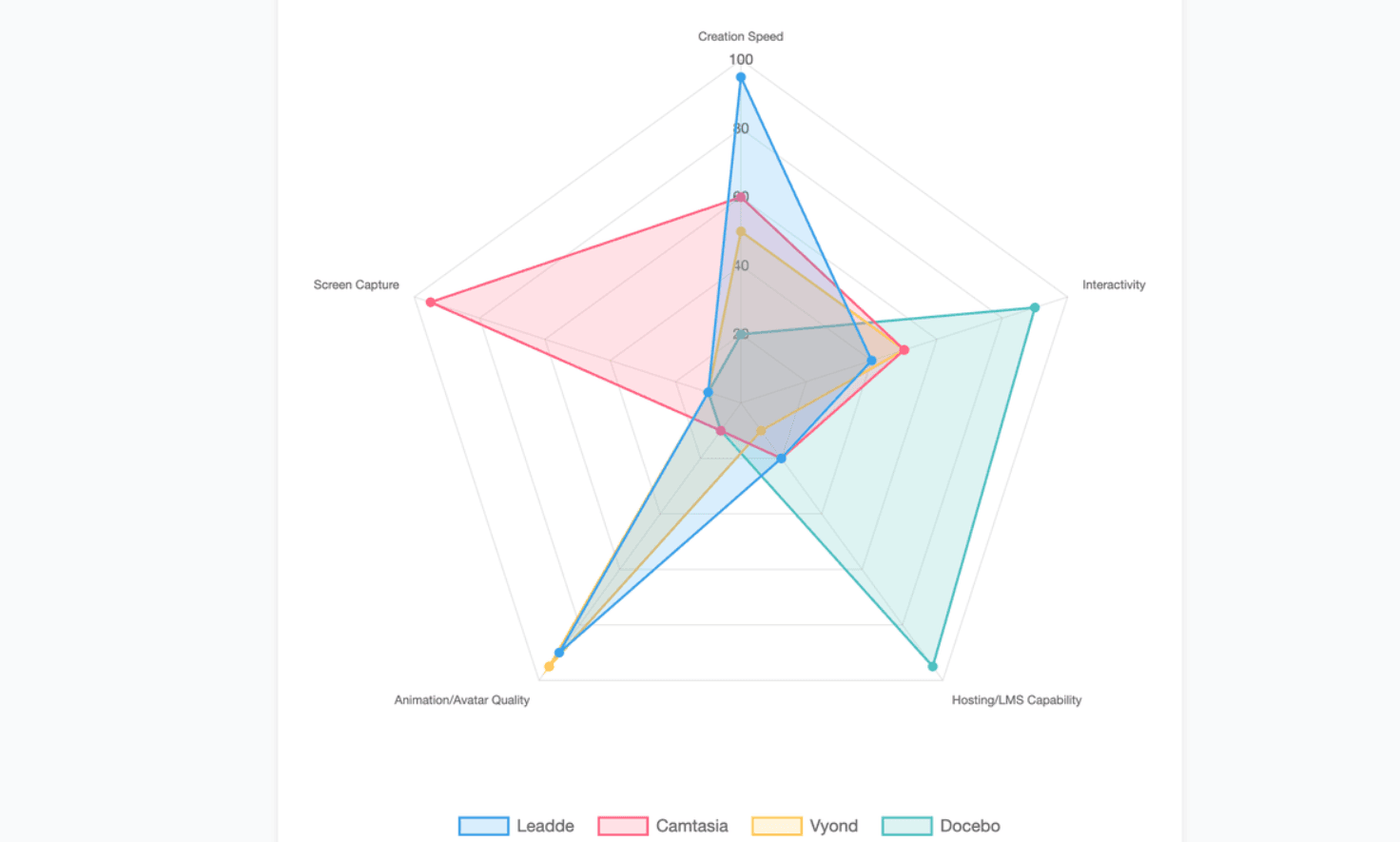
- A growing L&D team usually needs more control. Camtasia is suitable for detailed software tutorials, while Leadde, Synthesia, HeyGen, or Colossyan can reduce the work required to produce presenter-led and multilingual content. Vyond is stronger when storytelling and animated workplace scenarios are central to the training.
- Large organizations should look beyond production speed. They often need SSO, role-based access, compliance reports, searchable content, LMS integration, version control, and clear data-governance policies. Enterprise LMS and video-management platforms such as Docebo, Panopto, and Echo360 are designed around these broader requirements.
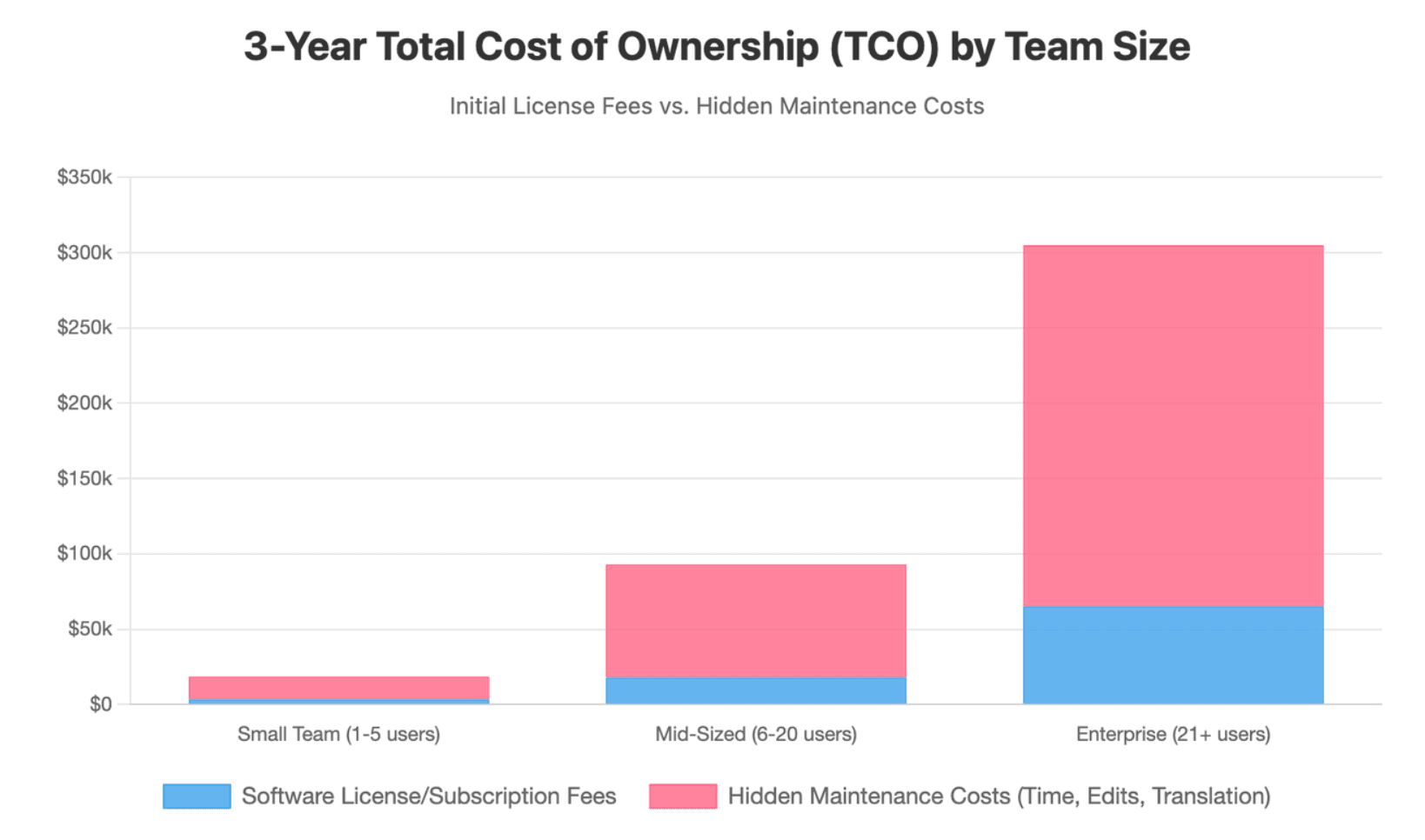
Budget should be measured across the full content lifecycle. A low-cost tool can become expensive when every update requires manual editing, new voice recording, repeated translation, or rebuilding old project files.
Can One Platform Create, Host, and Track Training Videos?
Some platforms now cover several parts of the workflow, but few are equally strong at creation, hosting, course delivery, assessment, and enterprise reporting.
For example, an AI video platform may generate a polished video and export it as an MP4 or SCORM package. An LMS is still normally responsible for enrollment, completion records, learning paths, certification, and employee-level reporting.
A practical tool stack may include:
- A creation platform for scripts, scenes, avatars, animation, or screen recording.
- A video host or LMS for secure delivery and access control.
- An authoring tool when formal quizzes, simulations, or branching are required.
- A reporting system when training data must connect with HR or compliance records.
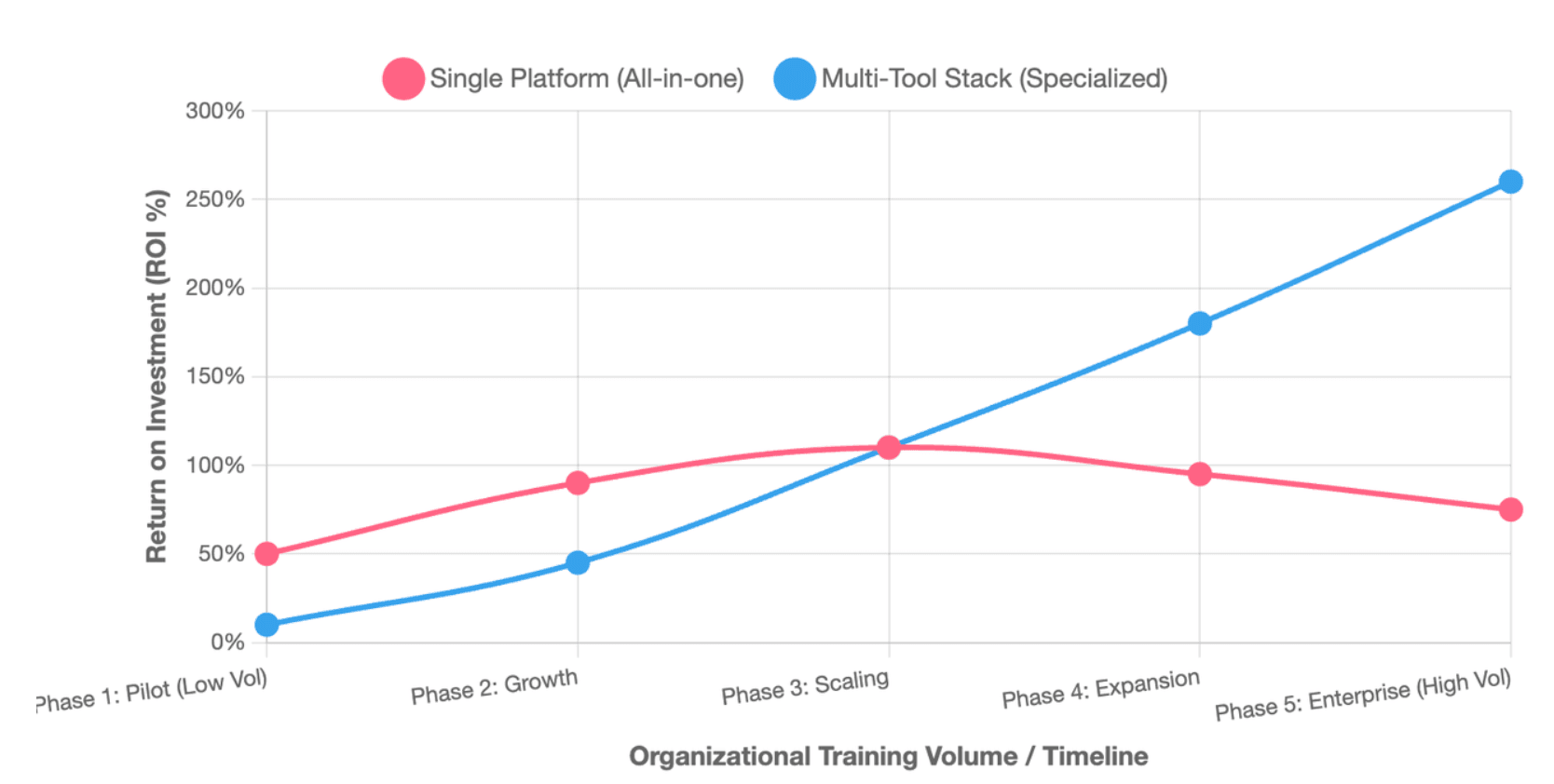
A single platform is most realistic when training needs are simple. A combined system is usually more flexible when an organization produces several types of learning content.
What Type of Training Video Platform Do You Actually Need?
The word “platform” is used for products that perform very different jobs. Before comparing brands, identify which part of the training workflow is causing the problem.
Video Creation Software vs. Video Hosting vs. LMS Platforms
| Platform type | Primary purpose | Typical output or result |
| Video creation software | Produce and edit the training asset | MP4, hosted video, project file, or SCORM package |
| Video hosting platform | Store, stream, secure, organize, and analyze videos | Searchable video library and embedded player |
| Authoring tool | Create interactive lessons, quizzes, and simulations | SCORM, xAPI, cmi5, or HTML5 course |
| LMS | Assign, deliver, track, and report training | Learner records, scores, completions, and certifications |
| Online course platform | Package, host, market, and sell courses | Paid course site, membership, or learning community |
A video host may show watch time and viewer behavior, while an LMS can connect the activity to a named learner, assigned course, deadline, score, or certification.
An ordinary MP4 does not contain a complete learning-management system. To report completion and quiz scores, it normally needs a compatible interactive player, SCORM package, or LMS integration. Camtasia, Synthesia, Colossyan, and iSpring all provide forms of LMS-ready export, although availability can depend on the selected plan.
AI Video Generators, Screen Recorders, Animation Tools, and Professional Editors
- Knowing how to use AI for training videos is incredibly useful when the source is a script, document, slide deck, or policy. They can create narration, presenters, visuals, captions, and language versions without a filming crew.
- Screen recorders are better when learners must see a real interface or workflow. They capture the actual clicks, menus, forms, and results that employees will use.
- Animation tools are effective for conversations, choices, safety situations, and abstract concepts. They allow teams to show events that would be expensive, sensitive, or difficult to film.
- Professional editors provide the most visual control, but they also require more editing skill and production time. They are best when live-action footage, advanced effects, detailed audio work, or strict visual standards are required.
The training format should follow the task. A real software process usually needs a screen recording, while a customer-service conversation may be clearer as animation or branching role-play.
When Should You Use One Platform or a Combination of Tools?
Use one platform when:
- The organization creates one main type of video.
- Training does not require complex assessments.
- A basic embed or shared link is enough.
- The team values simplicity more than advanced control.
Use a tool stack when:
- Some content needs screen recording and other content needs animation or avatars.
- Videos must be delivered through an existing LMS.
- Formal quiz scores or compliance records are required.
- A secure, searchable library must contain content from several creation tools.
- Different teams need separate creation, approval, and publishing roles.
The goal is not to reduce the number of tools at any cost. The goal is to remove duplicate work and ensure that each tool has a clear role.
Which Training Video Platforms Are Best for Different Training Scenarios?
A platform should be judged against a real training task. The following categories reflect the most common business use cases.
Best for Turning PowerPoints, PDFs, SOPs, and Documents Into Training Videos
Document-to-video software is useful when a company already has approved PowerPoints, policies, manuals, Word files, PDFs, or SOPs. Discovering how to seamlessly turn SOP documents into training videos allows businesses to unlock value from static documentation instantly.
- Leadde supports a workflow in which users upload a document or paste text, select settings such as language, tone, detail level, audience, speaker background, and learning objectives, and then review an automatically generated outline and script. Users can select a template, presenter, visual source, and video length before editing scenes and generating the final video.
- Leadde’s product materials also describe layered PowerPoint import, multilingual project management, AI avatars, video translation, image-text translation, analytics, version control, and Chat with Video. These functions make it relevant to teams that need to reuse existing business materials rather than start every project from a blank timeline.
- Synthesia and HeyGen also support training workflows based on text, slides, or documents. HeyGen’s official training-video tool states that users can turn scripts, PDFs, or slide decks into videos, while Synthesia provides AI presenters, screen recording, interactive elements, and SCORM delivery.
- Colossyan focuses more strongly on structured L&D content. Evaluating the best AI video platforms for e-learning often leads back to platforms like Colossyan, which natively supports document-based creation, quizzes, branching, scored assessments, translations, and SCORM export.
Document-to-video works best when the source material is accurate, current, and organized. Poorly structured documents can produce polished videos that still contain unclear or unnecessary information. Every AI-generated outline should therefore be reviewed before production.
Best for Screen Recording, Software Tutorials, and Product Walkthroughs
Camtasia is a strong option when the tutorial requires detailed editing. It records the screen, webcam, microphone, and system audio, while its editor supports cursor effects, captions, visual callouts, and SCORM-ready quizzes.
Loom is better for speed. A subject-matter expert can record the screen and webcam, make basic edits, and share the video with a link without waiting for a long production process. It is useful for short process updates, internal explanations, and quick product walkthroughs.
ScreenPal offers a lighter recording and editing workflow, while Trupeer uses AI to remove filler, add zoom effects, generate voice-over, apply branding, translate the output, and create a written process guide from the same recording.
Before recording, remove or replace sensitive information. Use a test account or sandbox rather than a live customer record whenever possible. Check browser tabs, notifications, account names, email addresses, file paths, passwords, and visible metadata.
Software tutorials also need a maintenance plan. If the product interface changes frequently, divide the video into short modules so that one changed screen does not require a complete rebuild.
Best for AI Avatars, Animation, Role-Play, and Scenario-Based Learning
Synthesia, HeyGen, Colossyan, and Leadde are suitable when training needs a consistent presenter without repeated filming. They can help teams create multiple language versions, change scripts, and update individual scenes without bringing a presenter back into a studio.
The quality of an AI presenter should be judged by more than visual realism. Review pronunciation, timing, lip synchronization, gestures, voice emotion, eye contact, and the match between the presenter and the subject.
A presenter is useful for introductions, summaries, policy explanations, and internal announcements. It may be less useful for a detailed software process, a sensitive accident investigation, or a lesson in which the presenter remains on screen without adding information.
Vyond and Powtoon use animation rather than relying mainly on a digital presenter. Vyond supports character-based scenes, templates, text-to-video workflows, screen recording, and translation. This makes it useful for workplace conversations, role-play, ethics, leadership, customer service, and soft-skills training.
Animation should not be selected only because it looks entertaining. The characters and visual style must fit the age, culture, role, and expectations of the audience. A playful style can weaken credibility when the subject involves a serious injury, legal duty, or major compliance risk.
Best for Interactive Courses, Video Hosting, LMS Delivery, and Learning Analytics
- Articulate Storyline is suited to complex branching scenarios, graded quizzes, realistic practice, and custom interactions. Its official product information highlights branching practice, negative scoring, multiple quizzes, and combined assessment results.
- iSpring Suite is a practical choice for teams that already use PowerPoint. It can reuse existing slides and documents, add quizzes, narration, role-play, and screencasts, and publish the result as LMS-ready content.
- LearnWorlds combines course delivery with interactive video. Its editor can add questions and other interactive elements directly to a video, while its reports can connect video activity with assessment scores and learner status.
- Vimeo is useful when the main need is professional hosting, privacy, branded playback, analytics, live streaming, and interactive video elements such as hotspots, chapters, and calls to action.
- Panopto and Echo360 are better aligned with large, governed learning libraries. Panopto provides searchable video, completion tracking, quiz overlays, and LMS integration. EchoVideo combines capture, management, offline recording, captioning, grade synchronization, and LMS connections.
- Docebo is broader than a video platform. It manages courses, audiences, workflows, reports, and enterprise learning programs, while its Creator tool can generate structured lessons, assessments, translations, and AI-presenter content from prompts or documents.
How Should You Compare Training Video Software?
A useful comparison should use the same source material, learning objective, language, brand assets, reviewers, and publishing destination for every platform.
Ease of Use, Production Speed, Editing, and Brand Control
Measure the full time required to create an approved video, not only the time required to generate a first draft.
Track:
- Source preparation
- Outline and script editing
- Scene creation
- Voice and visual corrections
- Caption editing
- Review rounds
- Rendering
- Publishing
- Later updates
A fast first draft has limited value if reviewers must correct many factual, visual, or pronunciation errors.
Editing depth should match the content. A basic trim tool may be enough for a short internal recording, while formal product training may require layers, reusable scenes, cursor control, audio repair, transitions, and precise timing.
Brand control should include more than adding a logo. Check whether the platform can manage fonts, colors, templates, presenters, intros, outros, lower thirds, music, and visual standards across multiple projects.
The strongest practical test is to change the company logo, update one policy sentence, and replace one screenshot. Measure how many projects and language versions must be edited manually.
Interactivity, Accessibility, Localization, and AI Accuracy
Interactivity should support the learning objective. A short knowledge check can confirm basic understanding, while branching scenarios are better for decisions, conversations, and consequences.
Accessibility should be tested in the published player, not only inside the editor. WCAG 2.2 requires captions for prerecorded audio in synchronized media, and captions should include meaningful sound information as well as spoken words. Audio descriptions or media alternatives may also be required when visual information is essential.
Check whether learners can:
- Use the player with a keyboard
- Read accurate captions
- Open a transcript
- Understand content without relying only on color
- Access interactive controls with assistive technology
- Use the course on a mobile device
Localization involves more than changing the voice. Review subtitles, slide text, images, buttons, dates, measurements, names, legal terms, and cultural examples.
AI output requires human review. Confirm that the script matches the approved source, required warnings have not been removed, visuals do not misrepresent the instruction, and all translations use the correct business terminology.
LMS Integration, Analytics, Security, and Total Cost of Ownership
SCORM is useful when a course must report information such as completion, status, and quiz results to a compatible LMS. xAPI can record a broader range of learning and performance experiences inside and outside a traditional course.
Do not treat all analytics as equal:
| Analytics type | What it usually measures |
| Video analytics | Views, watch time, completion, rewatches, and drop-off |
| Interaction analytics | Clicks, choices, poll answers, and quiz activity |
| Learning analytics | Scores, course completion, certification, progress, and learner status |
| Business metrics | Time to competency, errors, support volume, safety events, or performance |
Panopto, LearnWorlds, and Echo360 provide examples of systems that connect viewing behavior with quizzes, completion, or learning reports.
Security checks should include:
- SSO
- Role-based permissions
- Encryption
- Data location
- Audit logs
- Content retention
- Export rights
- AI model-training policies
- Avatar and voice consent
- Access removal when an employee leaves
Total cost of ownership should include licenses, creator seats, AI credits, video minutes, storage, bandwidth, translation, implementation, integrations, migration, review time, and future updates.
The most useful cost measure is often cost per approved and maintained training minute, not cost per automatically generated minute.
How Do You Create, Publish, and Maintain Effective Training Videos?
Good software cannot repair a weak learning objective or an inaccurate source. A repeatable production process is more important than any individual visual effect.
Build a Repeatable Workflow From Learning Objective to Final Approval
Use the following workflow:
- Define the audience. Identify the learner’s role, current knowledge, work environment, and device.
- Define one observable objective. State what the learner should be able to do after the training.
- Select the format. Choose document-to-video, screen recording, animation, presenter video, live action, or interactive course.
- Audit the source. Remove outdated, duplicated, or unnecessary information.
- Create the outline and script. Organize the lesson around actions and decisions rather than document headings.
- Build the video. Generate, record, animate, or edit the required scenes.
- Add accessibility. Edit captions, supply transcripts, and review the player controls.
- Add practice. Use a question, scenario, simulation, or real task when the objective requires application.
- Run expert review. Ask the content owner to verify every critical instruction.
- Publish and track. Deliver through the correct host or LMS and confirm that reporting works.
- Archive editable assets. Store the source document, script, project, media, captions, approvals, and final file.
- Schedule a review date. Assign an owner and define the event that will trigger an update.
Research on online educational video found that shorter videos were generally associated with stronger viewing engagement and recommended dividing long material into focused segments. This should be treated as a design principle rather than a strict rule for every topic.
A video should be as long as needed to achieve one clear objective, but no longer.
Validate AI-Generated Scripts, Visuals, Translations, and Instructions
Use a formal review checklist before publishing AI-generated training:
- Does the script match the approved source?
- Did the system omit warnings, exceptions, or required steps?
- Are product names and technical terms pronounced correctly?
- Do screenshots and stock visuals show the correct process?
- Are captions accurate?
- Does the translated version preserve the original meaning?
- Are measurements, dates, and legal terms localized correctly?
- Does the avatar or voice fit the subject?
- Are all claims supported?
- Has an authorized subject-matter expert approved the video?
For compliance, safety, medical, financial, or technical content, the reviewer should compare the video directly with the controlled policy or source document.
The platform should make it easy to identify what changed. Version history, comments, approvals, and links to source documents reduce the risk of publishing an unapproved update.
Conversational video tools also need controls. Answers should be grounded in approved content, and the system should redirect learners to a human expert when the source does not provide a reliable answer.
Keep Large Video Libraries Accurate When Products and Policies Change
Every published video should have:
- A content owner
- A source document
- A version number
- An approval date
- A next-review date
- A status such as current, under review, or retired
Modular videos are easier to maintain than long courses. A five-minute tutorial about one stable task is usually easier to update than a 30-minute overview covering an entire product.
Searchable transcripts and structured libraries make content easier to find and govern. Panopto emphasizes searchable, centrally managed video libraries, while EchoVideo provides video-management, captioning, and LMS-connected tools.
Use analytics to prioritize updates. A heavily viewed video with repeated rewatches or a high drop-off point may deserve attention before a rarely used archive item.
When a product release or policy change occurs:
- Identify every affected video.
- Update the source material first.
- Edit only the affected scenes where possible.
- Review every language version.
- Preserve the public link when the hosting platform allows replacement.
- Confirm that LMS records and embedded courses still work.
- Retire the old version and record the change.
Leadde’s documented version-control and multilingual-management capabilities are relevant to teams that update document-driven videos regularly.
A video that cannot be maintained is not a durable training asset, regardless of how quickly it was first created.
Which Training Video Platform Should You Choose?
Choose a document-to-video platform such as Leadde when the organization already has PowerPoints, PDFs, SOPs, or written business content that must become professional, editable, multilingual video.
Choose Camtasia, Loom, ScreenPal, or Trupeer when the learner must see a real software process. Use Synthesia, HeyGen, Colossyan, or Leadde for presenter-led AI video, and use Vyond or Powtoon for animated scenarios.
Select Storyline, iSpring, or LearnWorlds when formal interaction and assessment are central, and choose Vimeo, Panopto, Echo360, or an enterprise LMS when secure distribution, search, completion records, and large-scale governance matter most.
The strongest decision is based on a real pilot project, full lifecycle cost, accuracy, accessibility, update effort, and integration requirements—not the fastest first draft.





