
How Explainer Videos Help Businesses Grow in 2026
Explainer videos help businesses simplify complex ideas, explain products and processes clearly, and guide customers or employees toward the next action.
By combining concise narration, purposeful visuals, and a focused message, they can improve understanding, support sales and onboarding, reduce repetitive explanations, and turn existing business knowledge into reusable content.
Yet creating those videos manually can be slow, costly, and difficult to scale.
Leadde turns documents and text into professional business videos automatically, helping teams create videos in minutes while saving up to 80% in production costs and 90% in content creation time.
How Explainer Videos Help Businesses Solve Communication and Growth Problems
Explainer videos help businesses communicate information that may be difficult to understand through product pages, presentations, or written instructions alone. Their value comes from combining a focused message with narration, visual examples, and a clear next step.
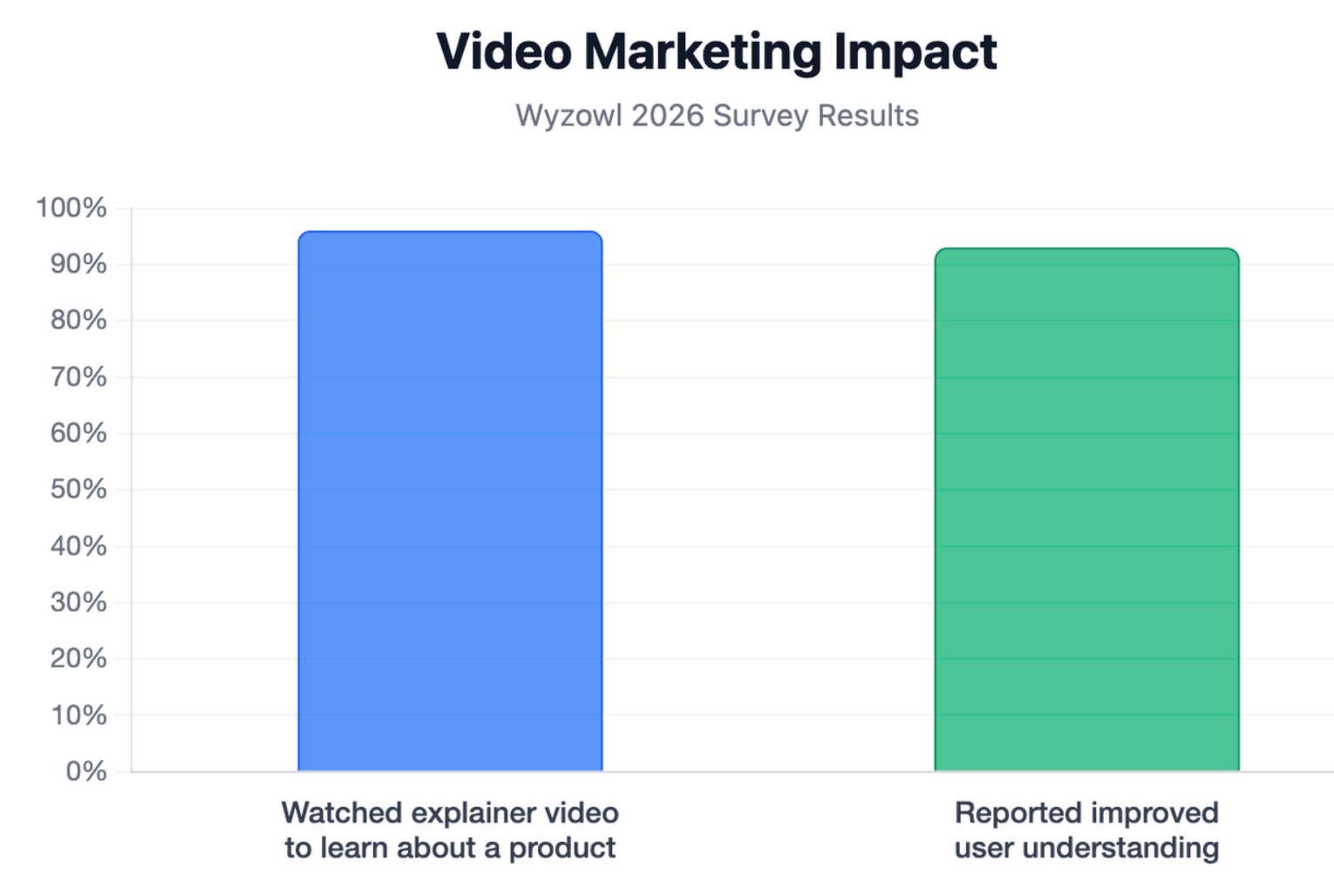
In Wyzowl’s 2026 survey, 96% of respondents said they had watched an explainer video to learn about a product or service, while 93% of video marketers said video had improved user understanding. These are vendor-reported survey results rather than universal guarantees, but they show how commonly businesses now use video for product education.
Simplify complex products, services, and business processes
Complex products often involve technical terms, hidden systems, or several connected steps. An explainer video can show these relationships through diagrams, interface demonstrations, animated workflows, and practical examples.
For example, instead of describing a software integration in several paragraphs, a video can show information moving from one platform to another. The viewer can see what starts the process, what happens automatically, and what result the user receives.
Simplification should not mean removing important facts. For technical, financial, medical, or regulated topics, the script must preserve necessary conditions, limitations, and definitions.
Improve engagement, trust, and brand recall
Video combines movement, voice, text, and visual structure. This gives businesses several ways to direct attention and make an important message easier to recognize later.
Trust improves when the video shows how a product works instead of relying only on broad claims. Real interfaces, workflows, customer situations, and specific outcomes are usually more convincing than decorative animation.
A consistent visual style, presenter, tone, and message can also strengthen brand recall. However, visual quality should support the explanation. Attractive animation cannot repair a confusing or inaccurate story.
Support conversions while reducing repetitive sales and support explanations
An explainer video can answer basic questions before a prospect contacts the sales team. It can clarify what the product does, who it serves, how it works, and what the viewer should do next.
The same video can reduce repetitive explanations after the sale. Customer-success and support teams can use short videos to explain setup steps, recurring tasks, or common problems.
Video does not automatically increase conversions or reduce support costs. Results depend on whether the content answers a real question, appears at the right stage of the customer journey, and gives the viewer a relevant next action.
Where Can Businesses Use Explainer Videos?
Explainer videos can support both external communication and internal knowledge sharing. Their role should change according to the audience, channel, and desired outcome.
A homepage video may introduce a value proposition, while an onboarding video should help the user complete a specific task. Using one unchanged video for every situation usually weakens its effectiveness.
Marketing and sales: websites, landing pages, campaigns, and presentations
On a homepage or landing page, an explainer video can give visitors a quick overview of the problem, solution, and expected benefit. It should support the page rather than repeat every sentence already shown in the text.
Sales teams can use explainer videos before or after meetings to create a consistent introduction. Short videos can also support proposals, product launches, email campaigns, paid ads, trade shows, and investor presentations.
The CTA should match the viewer’s stage. A new visitor may need to learn more, while a qualified prospect may be ready to book a demonstration or begin a trial.
Customer onboarding, product adoption, and self-service support
Onboarding videos can guide new customers through account setup, key features, and the first successful workflow. This can help users reach value without waiting for a live training session.
Product-adoption videos should focus on one task or feature at a time. A short library of focused videos is usually easier to search, update, and reuse than one long overview.
Support teams can place troubleshooting videos inside help centers, knowledge bases, or customer portals. The video should be supported by written steps so users can scan instructions, confirm precise settings, and access the answer even when watching is inconvenient.
Employee training, SOPs, compliance, and internal communication
Businesses can turn standard operating procedures, onboarding materials, policies, and software instructions into consistent training videos. Every employee receives the same core explanation, regardless of location or trainer availability.
For compliance or safety content, the video should be connected to an approved source document. Subject-matter experts should review the script, examples, and final version before publication.
Training effectiveness should not be measured only by completion. Knowledge checks, task accuracy, error rates, and real workplace performance provide stronger evidence that employees understood the material.
| Use Case Category | Primary Audience | Key Channels | Primary Goal |
| Marketing & Sales | Prospects, Leads, Investors | Website, Landing Pages, Ads, Emails | Drive conversions, introduce value proposition |
| Customer Success | New & Existing Customers | Help Center, Product UI, Portals | Improve product adoption, reduce support tickets |
| Internal Ops | Employees, Contractors | Intranet, LMS, Knowledge Base | Ensure consistent training, maintain compliance |
Which Type and Length of Explainer Video Fits Each Business Goal?
The best format depends on what the viewer needs to understand. Businesses should choose a style after defining the message, not because a particular animation style is popular.
Length should follow the same principle. The goal is to use the shortest duration that can explain the subject accurately and support the required action.
Animated, live-action, motion graphics, and whiteboard videos
- 2D animation works well for abstract ideas, services, and processes that are difficult to film. Characters and simplified environments can help place an unfamiliar concept in a relatable situation.
- Live action is useful when people, physical locations, or real products are central to the message. It can be especially effective when trust depends on seeing employees, customers, leaders, or equipment.
- Motion graphics are suitable for data, systems, business models, and conceptual relationships. Whiteboard videos can support step-by-step explanations, although the format should match the company’s brand and audience expectations.
Screencasts, product demonstrations, and AI-presenter videos
A screencast is often the clearest choice for explaining software. It shows the real interface and helps the viewer connect instructions to the actions they will perform.
Product demonstrations are more detailed than general explainer videos. They should show how the product works, while the explainer focuses on why the product matters and what problem it solves.
AI presenters can provide consistent delivery without repeated filming. They are useful for training, internal communication, localization, and frequently produced content. Businesses should still review pronunciation, timing, gestures, technical accuracy, and whether the presenter style fits the subject.
How to choose the right length based on complexity, channel, and audience intent
A 30–60 second video may be enough for an advertisement, product teaser, or simple value proposition. A 60–90 second video can introduce a product and explain its main benefit without covering every feature.
Complex workflows, training subjects, and product demonstrations may require two to five minutes. When a subject contains several learning objectives, it is often better to create a series of focused videos.
Length should be evaluated through completion rate, drop-off points, understanding, and action. A shorter video is not successful when it removes the information users need, while a longer video is not successful when it repeats ideas or delays the answer.
| Video Goal / Type | Ideal Format | Recommended Length |
| Ad / Teaser | 2D Animation / Live-Action | 30 - 60 seconds |
| Product Intro | Motion Graphics / Screencast | 60 - 90 seconds |
| Deep-Dive Training | Screencast / AI-Presenter | 2 - 5 minutes |
What Makes an Explainer Video Actually Work?
An effective explainer video is not defined by animation quality alone. It works because the story, visuals, narration, and CTA all support the same communication goal.
For complex B2B and technical topics, accuracy is especially important. A visually impressive video can damage trust when it misrepresents the product or avoids the details buyers need.
Start with one audience, one problem, and one core message
The production process should begin by identifying who will watch the video and what they should understand or do afterward.
A video for a technical buyer may need to explain integration, security, and workflow details. A video for an executive buyer may focus more on cost, risk, implementation, and business outcomes.
The Rule of One is useful: one primary audience, one main problem, one central message, and one main CTA. Supporting details can be included, but they should reinforce the same conclusion.
Use a Problem–Solution–How It Works–Outcome story structure
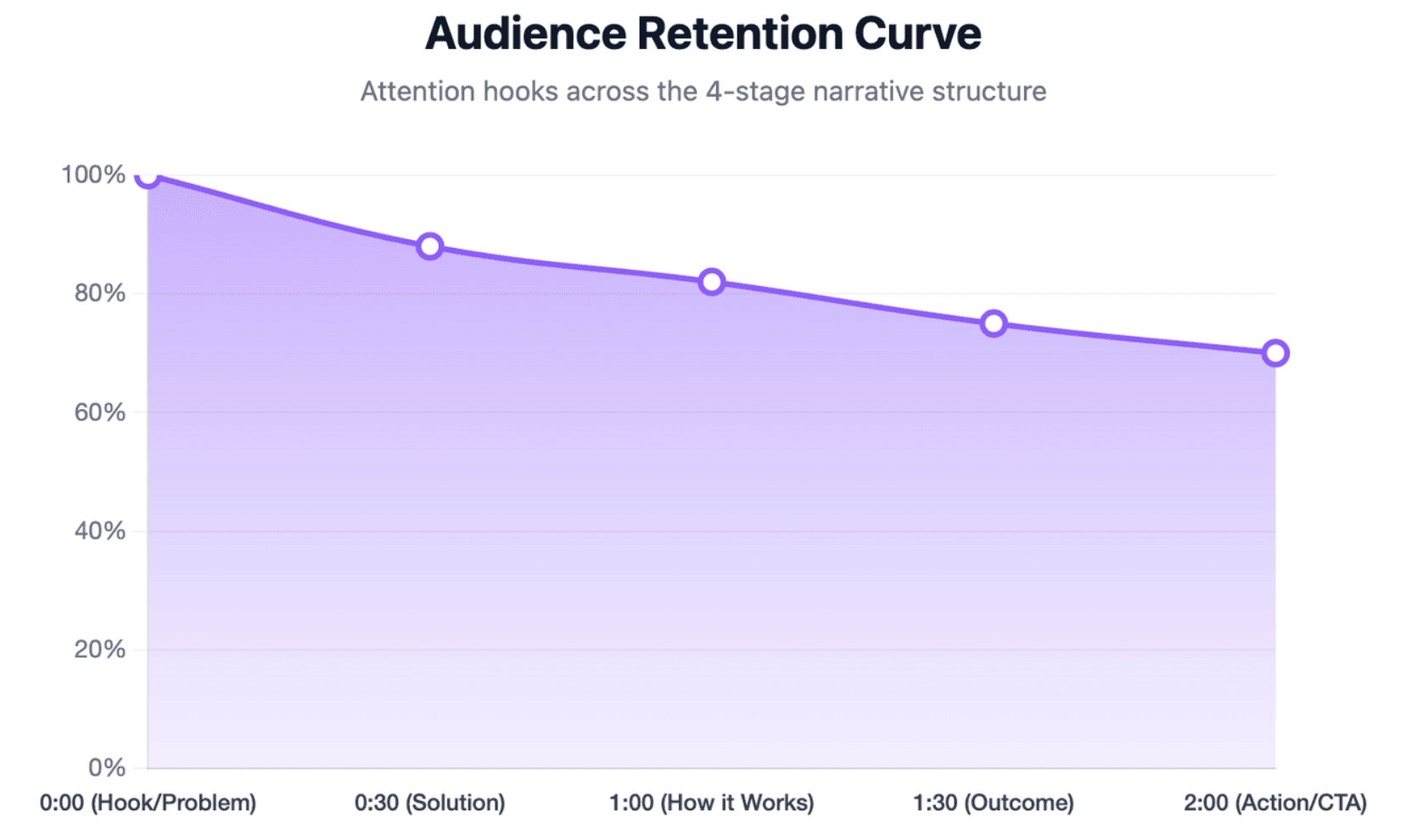
A clear explainer video script commonly follows four stages:
- Problem: Show the situation or difficulty the viewer recognizes.
- Solution: Introduce the product, service, or new process.
- How it works: Explain the essential mechanism or workflow.
- Outcome: Show what improves and what the viewer should do next.
Starting with the product before establishing the problem can make the video feel like an advertisement without context. The viewer needs to recognize why the subject matters before evaluating the proposed solution.
The outcome should be specific. Instead of saying that a product “transforms business,” explain whether it reduces manual work, shortens onboarding, standardizes training, or helps users complete a task.
Combine purposeful visuals, proof, clear narration, captions, and the mute test
Every visual should have a communication purpose. It may show a step, highlight a relationship, compare two processes, demonstrate an interface, or direct attention to a key point.
Proof can come from real product footage, accurate workflows, demonstrations, customer examples, or clearly sourced results. Generic stock footage should not replace evidence when the viewer needs to understand the actual product.
The mute test asks whether a viewer can understand the main story without sound. Accurate captions, concise screen text, clear scene order, and meaningful visual cues improve silent viewing and accessibility. Narration should add context rather than simply read every word displayed on screen.
How Can Businesses Create, Repurpose, and Keep Explainer Videos Up to Date?
Businesses should plan for the full content lifecycle, not only the first publication. A video that cannot be edited easily may become expensive when products, processes, or regulations change.
The strongest workflow connects the video to an approved source of truth and separates the content into reusable scenes.
Turn PowerPoint files, PDFs, documents, and scripts into structured video scenes
Existing business documents already contain useful product knowledge, training material, policies, and process instructions. They can provide a strong starting point for an explainer video.
The document should not simply be read aloud. Teams need to identify the audience, remove unnecessary detail, choose one objective, and convert the material into a logical visual story.
AI video platforms can accelerate this process by analyzing source content and generating an initial outline, scene structure, narration draft, and visual layout. Leadde, for example, supports PowerPoint, PDF, Word, scripts, and text as source formats, while allowing users to review and edit the generated structure before producing the video.
Build modular videos that are easier to edit, translate, and update
A modular video is divided into independent scenes. When a price, interface, policy, or workflow changes, the team can replace the affected scene instead of rebuilding the entire video.
Scripts, visuals, voice-over, and source documents should remain organized and connected. Each video should have an owner, publication date, source version, and scheduled review date.
Multilingual videos require additional control. A change to the source version should trigger a review of every translated script, voice-over, caption file, and screen-text element.
Leadde’s official product materials describe multilingual workflows across 92 languages, along with version control, sharing, analytics, and content-management features. These capabilities are designed to help businesses maintain multiple video versions, although organizations should verify language quality and enterprise requirements for their specific use case.
Repurpose one core video across sales, social media, support, and training channels
A core explainer video can become several related assets:
- A short social-media version
- A silent version with stronger screen text
- A product-page overview
- A sales-presentation segment
- An onboarding chapter
- A support tutorial
- A translated regional version
Repurposing improves the value of the original research, script, and visual work. However, each version should be adapted to its channel rather than exported unchanged.
A social video may need a faster opening, while a training video needs clearer steps and knowledge checks. A landing-page video may use a sales CTA, while a support video should direct the viewer to the next troubleshooting action.
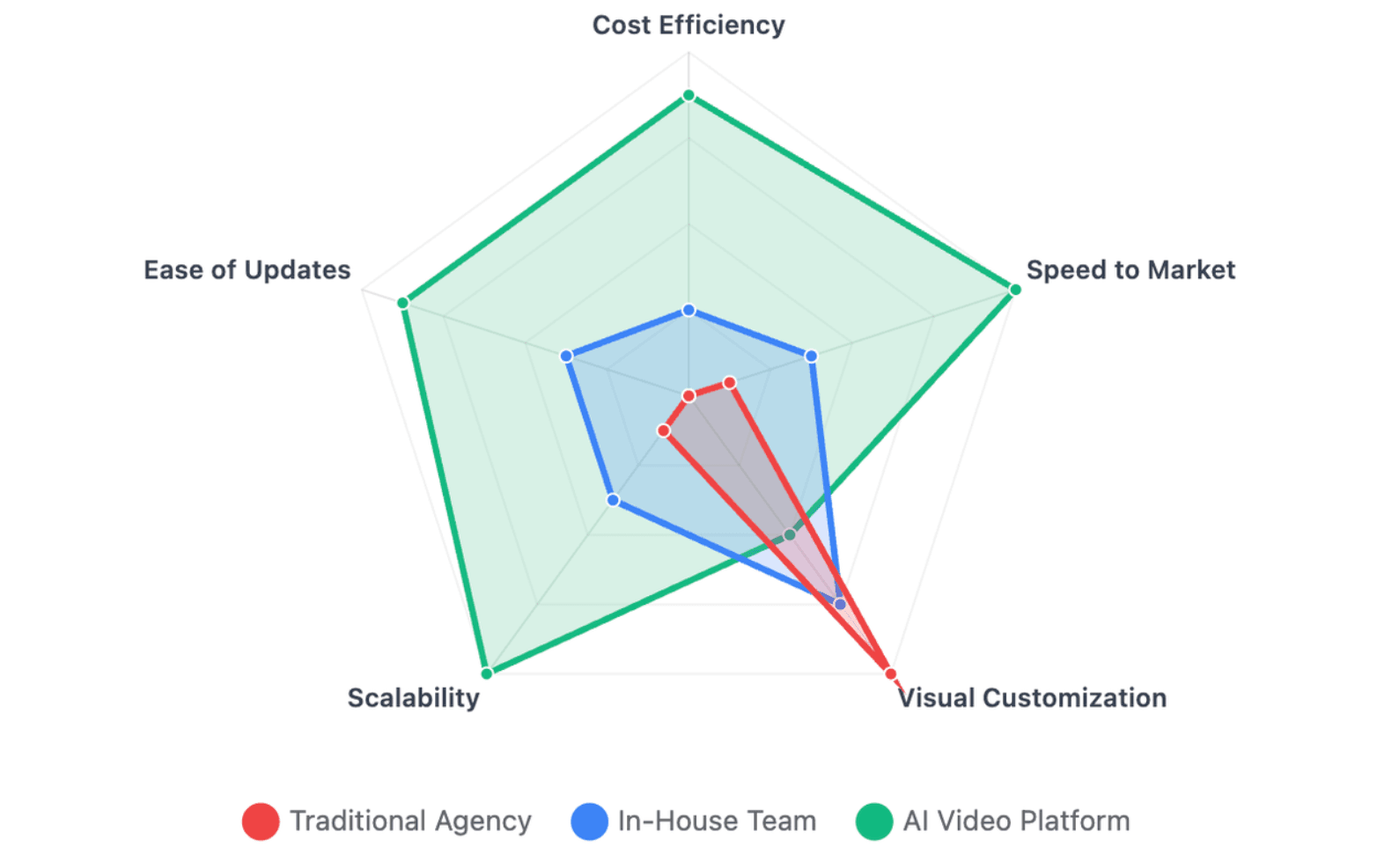
Should Businesses Hire an Agency, Produce Videos In-House, or Use an AI Video Platform?
There is no single production model that fits every business. The correct choice depends on volume, complexity, brand standards, update frequency, available skills, and risk.
Businesses should compare the full lifecycle cost rather than only the price of producing the first version.
Compare quality, speed, cost, customization, and production volume
A traditional agency is often suitable for high-profile brand campaigns, original character animation, complex 3D work, or projects that require custom creative direction.
An internal production team can provide strong product knowledge and brand control. However, the business must maintain scriptwriting, design, recording, editing, and project-management skills.
Template tools and AI video platforms are often more practical for frequent training, onboarding, support, and internal-communication videos. They allow teams to create more content without repeating a full filming and editing process.
The best option is not always the one with the highest visual production value. It is the one that can deliver the required quality, accuracy, volume, and maintenance process.
Choose based on update frequency, multilingual needs, security, and brand control
A video that explains a stable brand story may remain useful for years. A software tutorial or compliance video may require regular updates.
Businesses with frequent changes should prioritize editable scenes, reusable templates, replaceable voice-over, and clear version control. Global teams should also assess translation quality, language management, and whether updates can be synchronized.
For sensitive enterprise content, buyers should review data handling, access controls, compliance documentation, content ownership, AI-training policies, and deletion procedures before uploading confidential documents.
Use AI for scripts, scenes, presenters, and localization while keeping human review
AI can help convert source documents into outlines, scripts, scenes, visuals, narration, subtitles, and translated versions. This reduces repetitive production work and helps teams move from source material to an editable first draft.
Human review remains necessary. Subject-matter experts should check facts, product behavior, legal wording, technical terms, pronunciation, brand voice, visual relevance, and translated meaning.
The most reliable approach is usually a hybrid workflow:
- Use approved source material.
- Let AI create the first structured draft.
- Review the script and scenes.
- Correct facts and brand language.
- Preview the video.
- Approve the final version.
- Monitor performance and update it when needed.
How Should Businesses Measure Explainer Video SEO Performance and ROI?
A video should be measured according to the problem it was created to solve. Views alone do not show whether users understood the message, completed a task, or made a buying decision.
Businesses should define the goal and measurement plan before production begins.
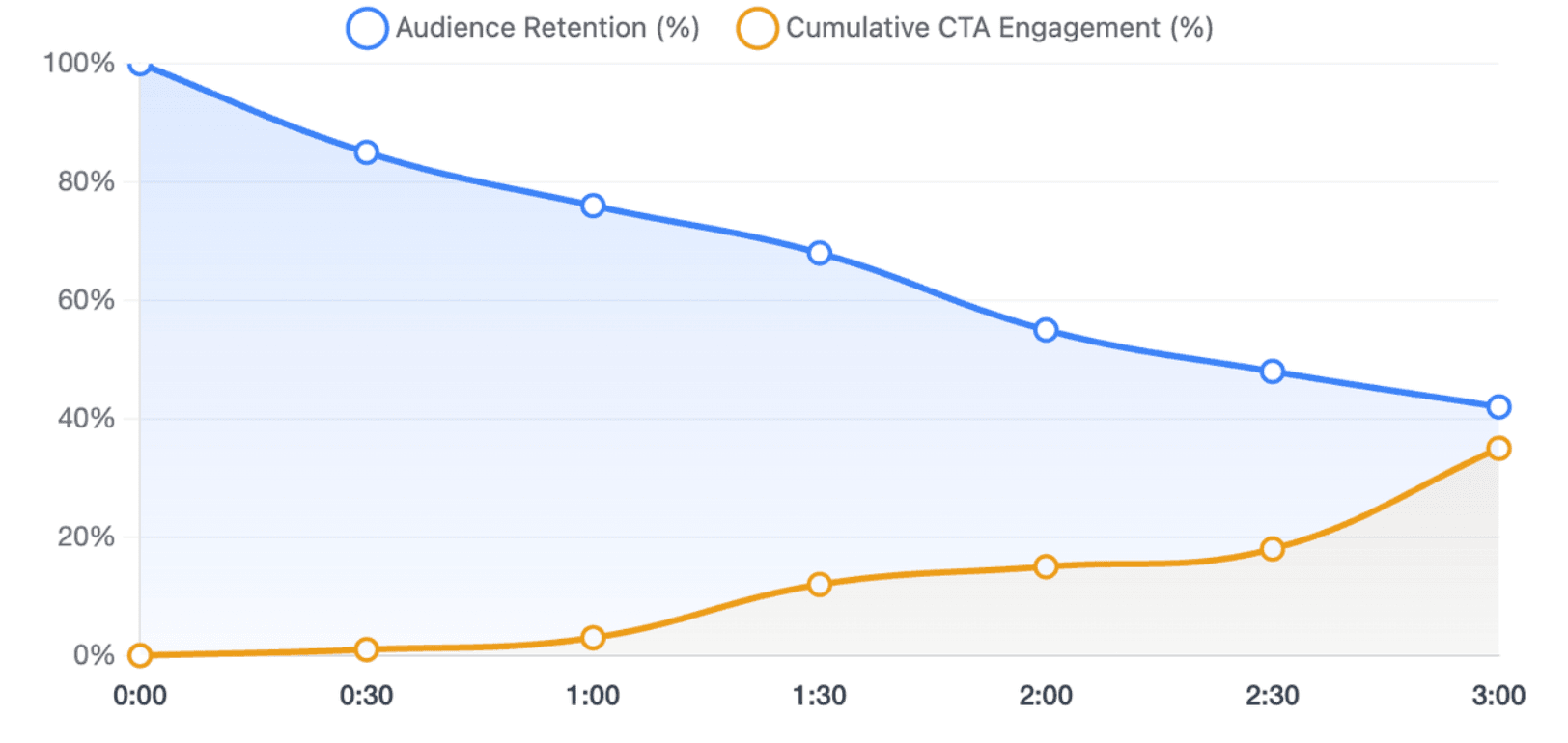
Track watch time, completion rate, drop-off points, and CTA clicks
Watch time shows how much of the video people consume. Completion rate indicates how many viewers reach the end, while drop-off points reveal scenes where attention declines.
These metrics require interpretation. A drop may mean the opening is too slow, the message is no longer relevant, the explanation is confusing, or viewers received the answer they needed early.
CTA clicks show whether viewers take the proposed next step. The CTA should be tracked separately for different channels, audiences, and versions so the business can identify which placement is producing meaningful action.
Measure conversions, product understanding, activation, support reduction, and training results
A marketing explainer may be evaluated through qualified leads, trial starts, demonstration bookings, or purchases. A sales video may be measured through follow-up engagement and deal progression.
An onboarding video should be connected to activation, setup completion, or time to value. A support video can be evaluated through ticket deflection, self-service success, and repeated-question volume.
Training videos require learning measures such as knowledge scores, task accuracy, error rates, and workplace performance. Completion is useful, but it does not prove that the employee understood or applied the content.
Production ROI should also include reuse and maintenance. A video that supports five departments, ten markets, and several years of updates may provide more value than a single high-performing campaign asset.
Use dedicated video pages, transcripts, structured data, thumbnails, and Key Moments for video SEO
Adding a video does not automatically improve search rankings. Google recommends making videos discoverable, allowing Google to fetch the video file, using stable URLs, and creating pages where the video is a clear and relevant part of the content.
Businesses can add VideoObject structured data with accurate information about the video to boost video SEO. Chapters or Key Moments can be defined through supported structured data or YouTube timestamps, helping users navigate to relevant sections.
A video sitemap can help Google discover video pages, while descriptive thumbnails, captions, transcripts, and supporting text provide useful context. Structured data creates eligibility for enhanced search features, but Google does not guarantee that a rich result will appear.
Conclusion
Explainer videos help businesses when they solve a specific communication problem with a clear story, accurate information, and purposeful visuals. The best results come from matching the format to the audience and business goal, building content that can be updated and reused, and measuring understanding and action rather than views alone. AI can make production, localization, and versioning faster, but human review remains essential for factual accuracy, brand quality, and trust.





