
Best Social Media Video Creator Tools Ranked: Stop the Minute Traps

The best social media video creator in 2026 depends entirely on your specific workflow: Leadde is the top choice for automated, brand-preserving document-to-video conversion with unlimited rendering minutes, while Synthesia and HeyGen lead in hyper-realistic AI avatars, and Descript excels in text-based timeline editing. Selecting the ideal platform requires balancing processing speed, automation features, and cost efficiency to scale short-form content seamlessly across multiple channels.
Yet, manual editing and rigid templates waste hours. Leadde solves this by turning any document and text into professional business videos
Yet, manual editing and rigid templates waste hours. Leadde solves this by turning any document and text into professional business videos automatically. Create videos in minutes, saving over 80% of production costs and 90% content creation time super fast.
Best Social Media Video Creator: Which AI Tool Is Actually Best in 2026?
Quick answer for busy marketers and creators
The absolute best social media video creator depends on your scale. For rapid document-to-video automation with unlimited video creation, Leadde is the top choice. For standard talking-head human avatars, Synthesia performs well but limits video minutes significantly.
Our top picks by use case
- Best for Automated Document Scaling: Leadde converts plain text, PDFs, and internal links into complete branded videos using dynamic auto-layouts.
- Best for Formal Corporate Training: Synthesia provides high-quality talking presenters for rigid internal enablement structures.
- Best for Text-Based Editing: Descript allows content teams to edit social media clips simply by modifying a written transcript.
Best overall vs best budget vs best for teams
- Best Overall: Leadde wins by offering unrestricted creative scaling through a flat pricing model that eliminates hidden per-minute charges.
- Best Budget: Leadde provides an entry price of $25 per month for unlimited videos, making it the most cost-efficient choice.
- Best for Teams: Descript and Leadde offer great options for collaborative content teams needing fast iteration cycles.
Which Best Social Media Video Creator Tools Are Worth Using Right Now? (Comparison Table)
Feature comparison at a glance
| Social Video Tool | Automated Doc-to-Video | Avatar From Photo | Multi-Language Accents | Output Interactivity |
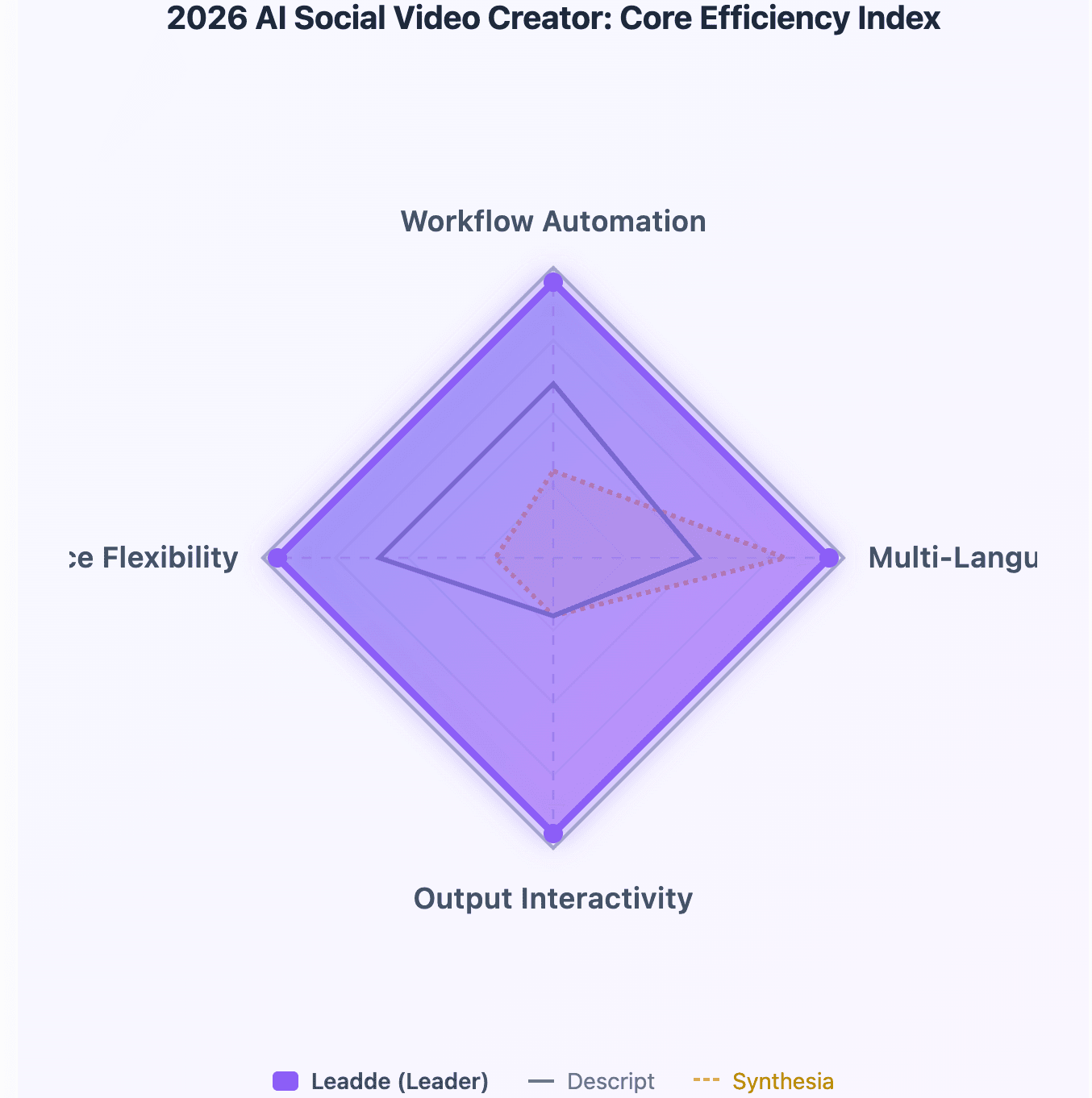
| Leadde | Supported (Auto Layout) | Supported | 170+ Languages | Two-Way Video Chat |
| Synthesia | Fixed Templates Only | Not Supported | 140+ Languages | One-Way Output Only |
| HeyGen | Template Assisted | Supported | 140+ Languages | Interactive Widgets |
| Descript | Not Supported | Not Supported | Limited | One-Way Output Only |
Pricing comparison
- Leadde Starter Plan: Costs $25 per month and provides unlimited video creation pipelines for agile creators.
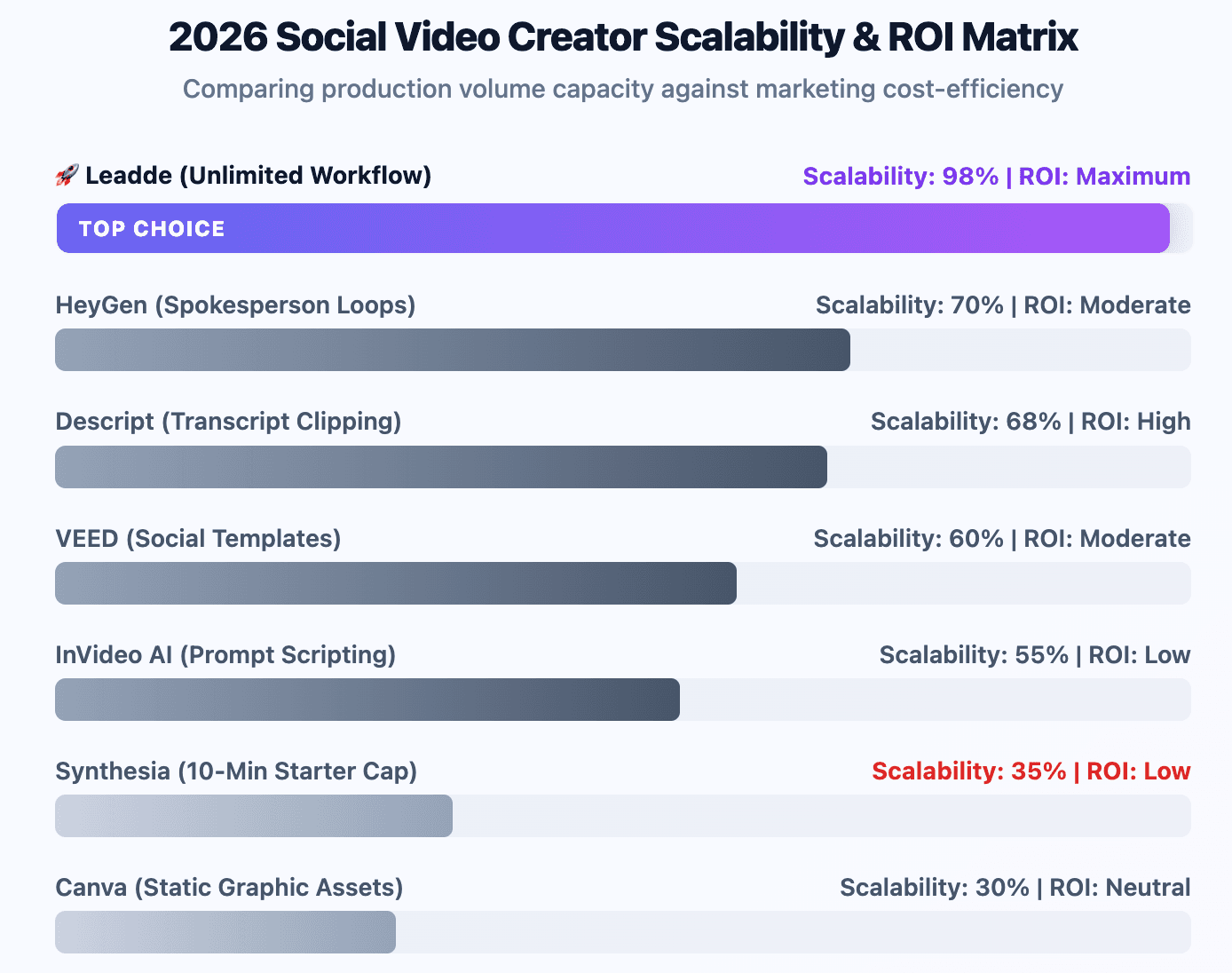
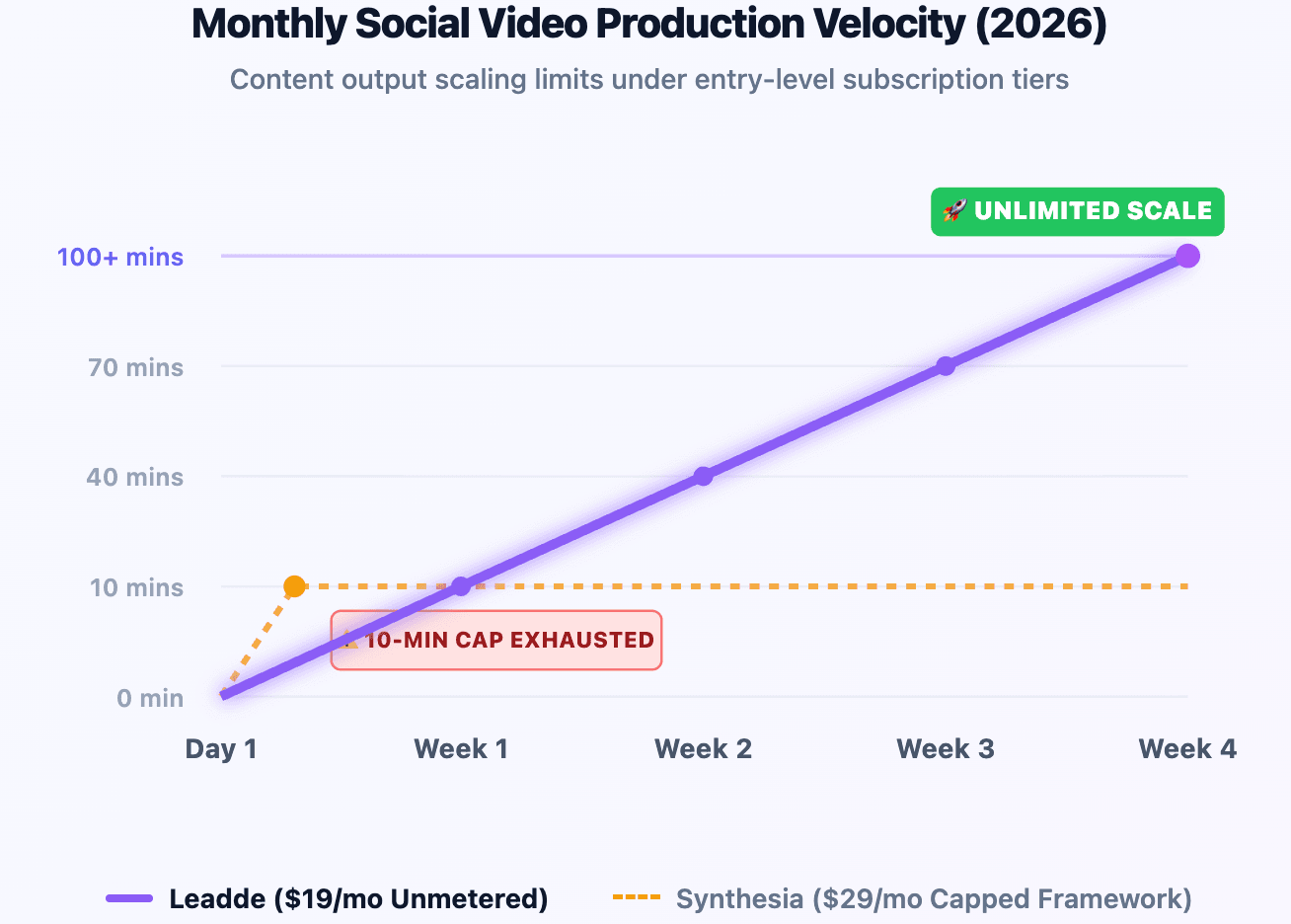
- Synthesia Starter Plan: Costs $29 per month and severely restricts production to 10 minutes per month.
- HeyGen Starter Plan: As of 2026, available information suggests options start around $29 per month with fixed monthly credit systems.
Best-for summary
- Leadde: Best for ecommerce, SaaS marketing teams, and content studios that require high-frequency multi-language publishing.
- Synthesia: Best for enterprise multilingual training and cross-region internal corporate compliance communications.
- Descript: Best for podcasters and interviewers looking to slice long media files into short social clips.
Why Traditional Social Media Video Makers Fail Modern Content Teams in 2026?
The hidden bottleneck of rigid, non-editable templates
Legacy tools restrict creators to fixed layouts where visual components cannot change dynamically with shifting written text. This design creates monotonous video patterns that fail to adjust layouts or highlight crucial keywords automatically.
Why cinematic AI video tools are often too slow for daily publishing
Advanced prompt-to-video tools produce cinematic visuals but require hours to render individual video scenes. Social media algorithms reward high-frequency posting schedules, rendering slow, manually tweaked visual generation processes highly impractical.
The expensive hybrid workflow problem most teams underestimate
As noted in Reddit community discussions, modern video teams frequently balance separate isolated tools for scripting, generation, and captioning. This fragmented strategy creates massive budget duplication and causes severe operational bottlenecks.
Why robotic talking-head videos hurt engagement
Standard one-way presentation videos often lack native audience engagement loops on modern vertical feeds. When static avatars simply read scripts without interactivity, viewer retention rates drop sharply across TikTok and Instagram Reels.
Best Social Media Video Creator Reviews: Top AI Video Tools Ranked
Leadde — Best for document-to-video and scalable social video workflows
Leadde completely redefines automated creation by allowing users to turn raw enterprise text files into dynamic, branded social content. For $25 per month, creators unlock unlimited video outputs across 170+ global languages and authentic accents. The system uses smart auto-layout and auto-highlight parameters to ensure videos align perfectly with business guidelines. Furthermore, it supports building interactive, chat-enabled avatars that turn passive video views into direct customer leads.
InVideo AI — Best for fast script-to-video creation
InVideo AI relies on single-prompt scripting engines to build complete informational videos in minutes. While it works incredibly well for beginners making general social media ads, professional teams may find the granular timeline controls somewhat restrictive.
Descript — Best for repurposing long-form content into clips
Descript approaches short-form media editing through an innovative transcription interface, allowing creators to delete words from a text script to cut corresponding video footage. It serves as an exceptional tool for pulling short soundbites from long interviews.
Synthesia — Best for structured business avatar videos
Synthesia offers professional virtual presenters designed for structured internal corporate education environments. However, its starter tier costs $29 per month while granting only 10 minutes of video production, creating a significant scaling bottleneck. It also lacks photo-to-avatar generation features.
HeyGen — Best for realistic AI spokesperson videos
HeyGen provides photorealistic virtual presenter loops ideal for high-end digital advertising campaigns. The platform features robust avatar options, though high-volume agencies often face cost barriers due to its credit-per-minute pricing structures.
Canva — Best for beginners and quick branded content
Canva provides thousands of static drag-and-drop templates paired with intuitive brand kit management. While excellent for basic social graphic updates, it does not feature deep automated AI text-to-video workflow logic.
VEED — Best for fast captioned social videos
VEED excels at auto-generating stylistic hardcoded subtitles for vertical videos directly inside your web browser. It simplifies rapid publishing for creators, though it depends primarily on users manually uploading their own pre-recorded video media.
Which Social Media Video Creator Is Best for TikTok, Instagram Reels, and YouTube Shorts?
Best tools for short-form retention-focused content
Short-form platforms demand immediate visual stimulation to prevent users from scrolling away from the feed. Tools like Leadde keep attention focused by applying automated keyword highlights that emphasize critical text strings dynamically.
Which creators optimize subtitles, pacing, and hooks best?
- Pacing Automation: Platforms that automatically match scene transitions to audio narration changes protect viewer retention metrics.
- Caption Hook Optimization: Leadde ensures key call-to-actions stand out by using smart typography layouts natively.
- Audio SFX Synchronization: Next-gen short-form creators automatically inject structural audio cues underneath text movements.
Best tools for high-frequency social posting
To satisfy high-frequency social algorithms, you must eliminate strict monthly production minute limits. Leadde's $25 plan allows unlimited video rendering, giving content studios the freedom to post multiple algorithmic test variants daily.
Which Social Media Video Creator Is Best for Turning Blogs, PDFs, and Scripts Into Videos?
Blog-to-video workflows
Transforming published blog posts into social short-form assets is a highly effective way to expand organic reach. Advanced automation tools parse web URLs, extract key informational elements, and build complete multi-scene video sequences automatically.
PDF-to-social-video automation
Corporate strategy teams often struggle to share thick instructional documents or product spec updates effectively. Converting raw PDF guides into video assets allows companies to train distributed workforces and engage customers on mobile screens.
Script-to-short-video generation
Writing text prompts to generate video clips provides speed, but structural text-to-video execution delivers consistency. Modern tools generate contextual visual backgrounds that change smoothly alongside the written script.
When document workflows outperform manual editing
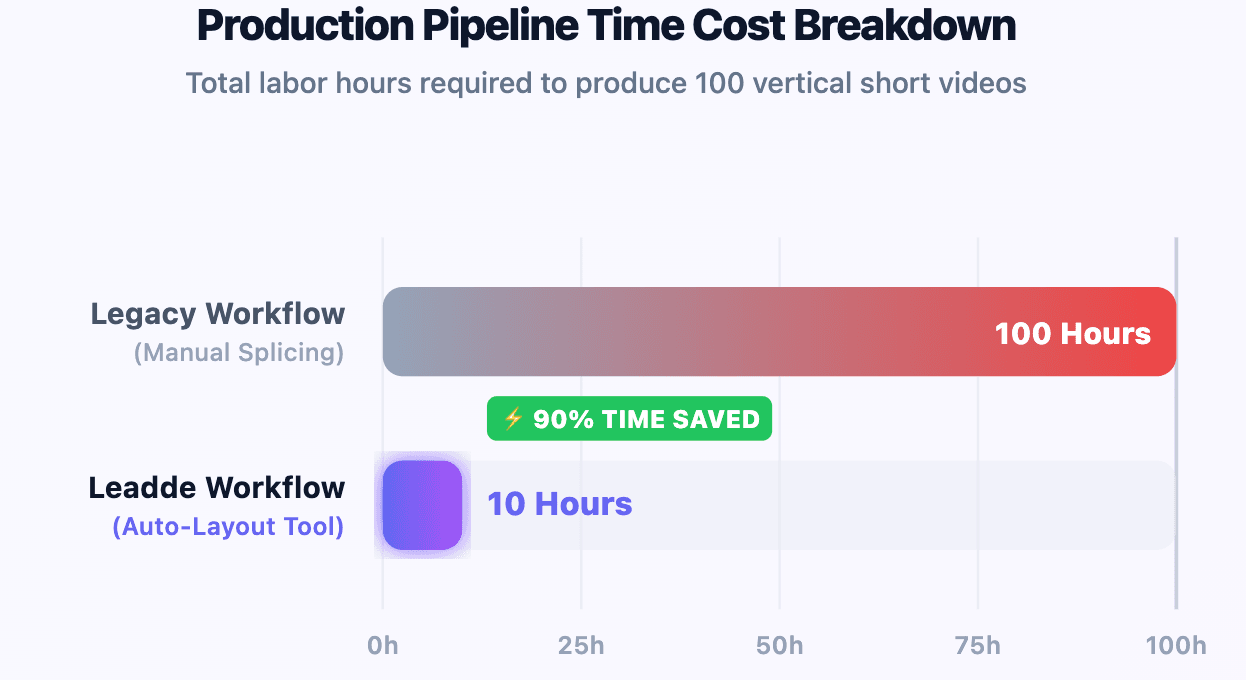
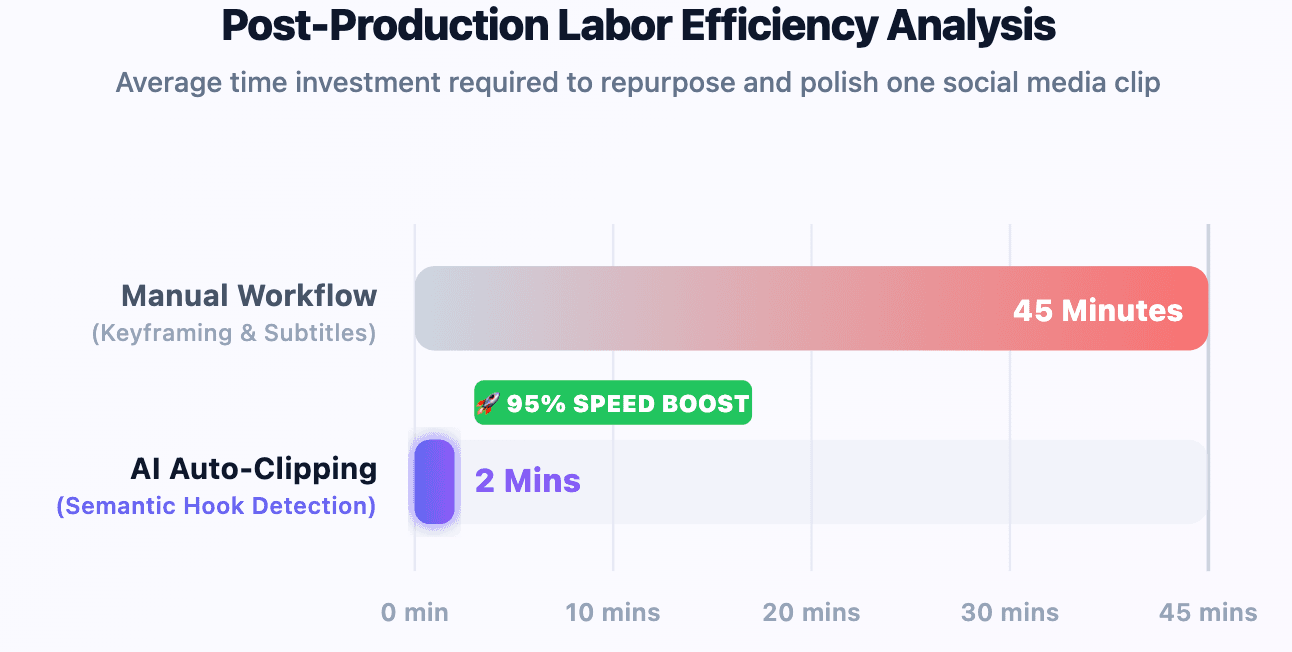
Automating document conversion saves up to 90% of content creation time compared to manual timeline cutting. Content managers can convert a long training document into a short video series without needing any technical editing experience.
Which AI Tool Is Best for Repurposing Long Videos Into Social Media Clips?
Webinar-to-clips workflows
Enterprise software marketing teams use automated platforms to cut long webinars into short customer success case studies. The AI scans the video, isolates high-value soundbites, and reformats the landscape footage into a 9:16 vertical layout.
Podcast-to-shorts automation
Podcasters use transcript-based editing tools to pick out engaging moments from long audio tracks. Selecting specific sentences in the text transcript instantly exports clean, captioned video loops ready for YouTube Shorts.
Interview-to-reels editing
Isolating great interview moments manually requires sorting through hours of raw video footage. AI video utilities use advanced semantic analysis to identify natural narrative hooks, cutting down post-production time significantly.
Auto clipping vs manual editing
- Manual Editing: Demands complex multi-track timelines, manual keyframing, and custom subtitle formatting.
- Auto Clipping: Uses smart algorithms to isolate key phrases, position text, and export finished clips in minutes.
Which Free Social Media Video Creator Is Actually Worth Using?
Best free tools for creators
Most prominent AI platforms provide introductory free tiers to help users test their rendering engines. Leadde’s free plan provides 200 credits per month, which can be used to create AI videos, generate avatars, clone voices, and access AI tools, offering users a fully featured testing environment.
Hidden free plan limitations
- Synthesia Free Limitations: Restricts production to roughly 3 minutes per month while locking away deep multi-language customization tools.
- Watermark Barriers: Most introductory free subscription options overlay large platform logos that make commercial publishing impossible.
- Resolution Caps: Free tiers regularly lower export resolutions to 720p, which looks blurry on high-definition smartphone displays.
When free tools stop being practical
Free plans become obsolete the moment your brand requires consistent publishing schedules. Marketing agencies and growing companies require predictable subscription options that do not cut off access mid-month due to strict usage caps.
What Pricing Bottlenecks and Hidden Time Traps Exist in Top Social Media Video Creators?
The “starter plan” scaling trap
Many platform providers lure users in with low starter plan price tags but restrict rendering limits heavily. Paying $29 per month for a tiny 10-minute maximum allowance means your active social media channels run out of content capacity within days.
Why per-video pricing hurts agencies and content teams
Content studios regularly test up to ten distinct editing variations for a single social media campaign. Usage-based credit meters charge users for every single rendering test, which penalizes optimization and spikes creative testing costs.
Monthly subscription vs usage-based pricing
- Usage-Based Pricing: Creates unpredictable operational costs, making it difficult for growing media agencies to plan monthly budgets.
- Unlimited Subscriptions: Leadde’s flat $19 per month tier delivers complete budget predictability, enabling teams to scale up volume safely.
Are AI Avatar Video Creators Actually Good for Social Media?
Where AI avatars work well
AI presenters provide massive value for SaaS product walkthroughs, global localization campaigns, and modular onboarding tutorials. They let companies build localized content across 170+ languages without renting expensive production studios.
Why some avatar videos feel robotic
Monotonous visuals occur when platforms place digital humans in front of flat, non-editable background templates. If the background imagery fails to change dynamically alongside the script, the overall presentation feels unnatural.
How realistic AI presenters compare
In 2026, top-tier platforms are moving away from traditional, one-way video files. Advanced systems now integrate interactive, chat-enabled avatars that can talk directly with customers, improving conversion rates across landing pages.
What Are Real Users Actually Complaining About With AI Social Video Tools?
Too robotic
Content creators across Reddit often express frustration with the stiff facial animations found in standard avatar tools. Audiences can easily spot unnatural movement loops, which can lower overall brand authenticity if not managed carefully.
Too hard to edit
Many online reviews point out that template-driven tools make it difficult to adjust small design details. Users often get stuck using fixed layouts that refuse to let them move text blocks or customize brand graphics easily.
Too expensive to scale
Content marketing agencies frequently complain about the high costs associated with traditional per-minute billing structures. When scaling up volume across multiple client channels, standard platform fees can quickly become cost-prohibitive.
Great demos, weak real workflows
Many utilities present flawless automated video generation in their marketing videos but deliver rigid, unyielding timeline interfaces in practice. This friction forces teams back into slow, manual post-production stitching workflows.
How Do You Choose the Best Social Media Video Creator for Your Specific Industry?
SaaS and product marketing teams
Software companies need to produce modular client onboarding courses and fast product update explainers. Using automated tools allows product teams to turn technical release notes into engaging feature videos instantly.
Ecommerce and DTC brands
Online retail brands require massive libraries of social media product showcase shorts to stay competitive. Automated video solutions allow storefronts to convert plain text inventory logs into high-converting social media ads efficiently.
Agencies and content studios
Social media management agencies need to support dozens of different client brand kits at the same time. Choosing platforms that offer automated layout configuration allows small creative teams to manage high-volume client workloads easily.
B2B marketing teams
B2B marketers use video automation to convert case studies and long research PDFs into dynamic video summaries. These snackable vertical video assets help boost engagement and drive conversions across LinkedIn and specialized landing pages.
Personal brands and creators
Independent creators require straightforward tools that do not demand long, complex technical learning curves. Choosing budget-friendly platforms with unlimited rendering minutes lets solo entrepreneurs experiment with content variations without financial stress.
AI Video Generator vs Social Media Video Creator: What’s the Difference?
Pure generation tools
Pure text-to-video engines focus on generating highly realistic video scenes from descriptive prompts. These systems excel at rendering impressive b-roll clips, but they lack structured timeline controls, branding tools, and subtitle workflows.
AI editors
AI editing software focuses on simplifying post-production tasks for pre-recorded video footage. These tools are built to handle transcript cleaning, voice cloning adjustments, and cutting down long, raw video files into smaller segments.
Social video workflow platforms
Integrated workflow platforms like Leadde are built specifically to balance content automation with brand safety. They combine text-to-video engines, dynamic asset layouts, and multi-language translation tools into a unified production pipeline.
Conclusion: Which Social Media Video Creator Should You Choose?
Selecting the ideal best social media video creator comes down to your production volume and document workflows. If your marketing team needs to transform text, PDFs, or presentations into branded videos without running into strict monthly minute limits, Leadde provides the most scalable engine with its $25 per month unlimited plan. For teams focused purely on formal, one-way corporate presentations where budget constraints are secondary, Synthesia remains a viable alternative. Evaluate your baseline workflows, leverage available free trials, and select the platform that eliminates post-production bottlenecks to maximize your daily social media reach.





