GPT Image 2.5 Review: Flare vs Sunburst, Pricing & Tests
GPT Image 2.5 is a meaningful upgrade if you care more about precise editing, reference consistency, and controllable workflows than simply generating a good-looking image on the first try. OpenAI now offers two API models—Flare for faster everyday generation and Sunburst for precision-focused work—with stronger multi-turn editing, text rendering, reference fidelity, and support for higher-quality production workflows.
In this GPT Image 2.5 review, I’ll look at how it performs in real-world tests, where Flare and Sunburst differ, how pricing and quality settings affect results, and how it compares with models such as Nano Banana Pro. I’ll also examine the problems that still matter in production, including unwanted edits, repeated-edit degradation, synthetic textures, and typography.
For teams that want to move beyond standalone image generation, Leadde currently integrates GPT Image 2.5 Flare into its creative workspace, so generated product visuals, campaign assets, and storyboard images can continue into slide and AI video workflows without switching tools.

GPT Image 2.5 Review: Is It Actually Better Than GPT Image 2?
The Short Verdict: What GPT Image 2.5 Actually Improves
Yes—but the biggest improvement is control rather than raw aesthetics.
OpenAI positions Images 2.5 around better preservation of people and objects from reference images, more precise edits, stronger consistency across multiple edits, and more natural lighting and textures. Flare is also positioned as delivering higher-quality results than GPT Image 2 with up to 50% lower latency.
That changes how the model should be evaluated. In a production workflow, the important question is not only, “Does the first image look better?” It is also:
How much already-approved work survives the next edit?
A model that creates a beautiful first image but forces you to rebuild the composition after every small revision can create more work than a slightly less dramatic model that preserves what has already been approved.
GPT Image 2 vs GPT Image 2.5: What Changed?
| Area | GPT Image 2 | GPT Image 2.5 |
| API models | Single main model | Flare + Sunburst |
| Editing | Capable | More targeted and consistent |
| Reference fidelity | Strong | Improved |
| Quality levels | Low, medium, high | Low through max |
| Speed | Previous baseline | Flare up to 50% lower latency |
| Workflow focus | Generation + editing | Faster iterative production |
Both 2.5 API models support low, medium, high, xhigh, max, and auto. OpenAI currently lists the same token rates for Flare and Sunburst.
One migration detail deserves attention. In Tosea’s 41-call API test, GPT Image 2.5’s high used the same output-token budget as GPT Image 2’s medium, while 2.5’s max matched the old high. That is an independent observation, not an official OpenAI mapping, but it means developers should benchmark equivalent workloads instead of assuming the same quality label buys the same output budget.
How Good Is GPT Image 2.5 at Image Quality, Text, and Reference Consistency?
Photorealism, Lighting, and Texture Quality
OpenAI says Images 2.5 produces more natural lighting and textures, and reference subjects are more likely to remain recognizable.
Independent testing suggests the picture is more nuanced. Curious Refuge found GPT Image 2.5 highly capable at understanding visual tasks, but observed overly sharpened skin and synthetic fine detail in some photorealistic portraits. In its comparisons, Nano Banana Pro often produced more natural skin and cleaner photographic texture.
That distinction matters: visual intelligence and photorealism are not the same benchmark. GPT Image 2.5 may understand a difficult edit better even when another model creates a more natural-looking portrait on the first attempt.
Can GPT Image 2.5 Generate Accurate Text and Follow Complex Prompts?
This is one of its strongest areas.
Puter gave Flare and Sunburst the same travel-poster prompt containing three exact text elements and a defined layout. Both rendered all three pieces without spelling errors, although Flare followed the requested formatting more literally while Sunburst added extra scene detail.
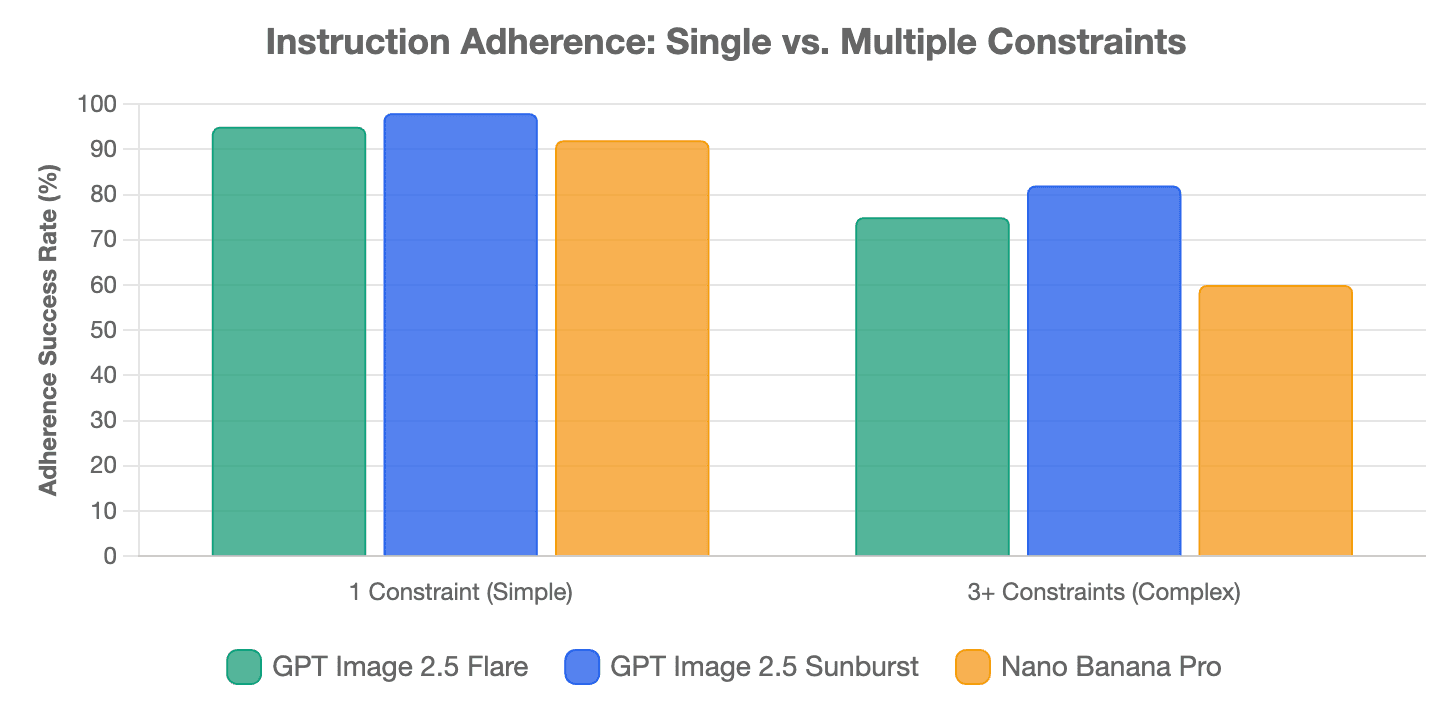
MindStudio also found strong literal instruction-following in tests such as a clock showing 5:15 and a wine glass filled to the top. But performance deteriorated when several independent constraints were stacked into the same scene, creating spatial and anatomical mistakes.
The practical takeaway is simple: accurate text generation does not equal finished professional typography. Posters, packaging, labels, and small-print designs should still be proofread before publishing or printing.
Character, Product, and Multi-Reference Consistency
Reference handling is where GPT Image 2.5 becomes particularly useful for commercial workflows.
Curious Refuge tested a character reference, a composition reference, and a style reference together. GPT Image 2.5 preserved the requested composition more closely while integrating the character and visual style. It also performed well when replacing products inside lifestyle photography while adapting perspective, lighting, and environmental interaction.
A useful production technique is reference role binding: tell the model exactly what each reference controls. For example, one image controls identity, another clothing, and a third composition. This reduces ambiguity when multiple references contain competing visual information.
How Precise Is GPT Image 2.5 Image Editing?
Can It Change One Thing Without Changing Everything Else?
Puter tested Flare by changing only a child’s red shirt into a tuxedo while measuring changes outside the clothing area. In that single test, only 0.22% of pixels outside the defined edit region crossed its change threshold, with an outside-edit SSIM of 0.938.
That is useful evidence of localized editing, but it should not be interpreted as a universal “99.78% preservation rate.” It was one image, one prompt, and one generation.
The broader value is that targeted editing can reduce the need to regenerate an entire approved composition just because one product, color, background element, or line of copy needs to change.
Multi-Turn Editing: Consistency vs Image Degradation
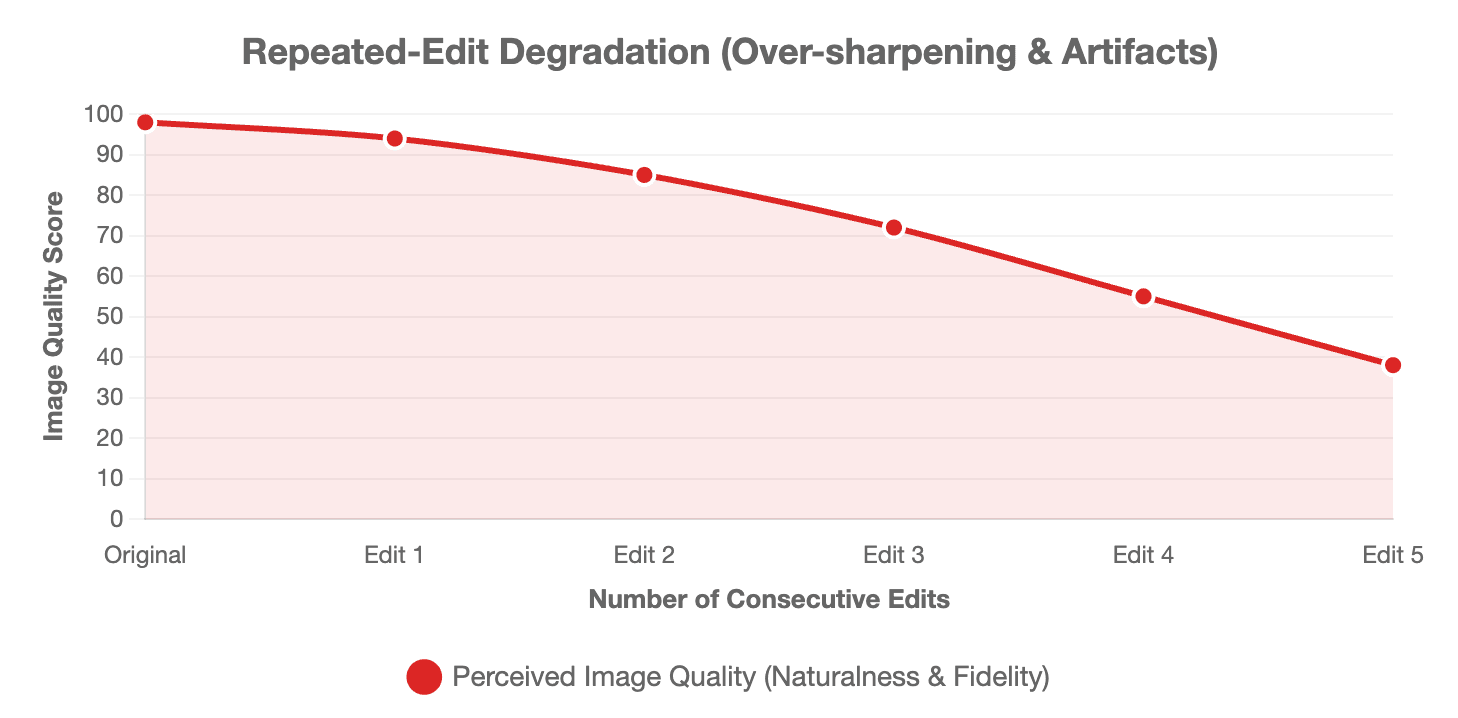
OpenAI explicitly designed Images 2.5 to retain earlier details more reliably across multiple edits.
However, semantic consistency is different from image-quality preservation.
Curious Refuge found that repeated edits gradually made one test image sharper, more saturated, and more synthetic. Its recommendation was to use targeted edits and return to an earlier clean version when larger changes are required.
A practical approach is to maintain a keep list with every important edit: identity, pose, crop, camera position, product geometry, background, logo, lighting direction, and already-approved text. If a version is approved, branch future experiments from that checkpoint instead of endlessly editing the latest generation.
When Should You Stop Prompting and Use Photoshop or Figma?
Generative editing is valuable, but it is not always the final production tool.
If a deliverable requires pixel-exact logos, legal copy, precise chart values, architectural dimensions, or final typography, deterministic editing software is usually safer.
A useful hybrid workflow is patch-ready editing: crop the problematic area from a high-resolution master, use the AI model to repair only that section, then composite the corrected region back into the approved original. This preserves more of the finished asset instead of asking the model to rebuild everything.
GPT Image 2.5 Flare vs Sunburst: Which Model Should You Use?
Flare vs Sunburst: Speed, Precision, and Quality
| Area | Flare | Sunburst |
| Primary role | Fast everyday generation | Precision-focused creative work |
| Best for | Iteration, social, product concepts, volume | Detailed edits, premium assets |
| Published token rates | Same | Same |
| Generation time | Faster | Longer |
| Default API choice | Yes, for most applications | Use when extra precision matters |
OpenAI recommends Flare as the default choice for most applications and Sunburst for premium workflows requiring tighter control across edits.
Sunburst is not simply “Flare but better.” In Puter’s same-prompt poster test, Flare followed the requested formatting more literally, while Sunburst created a richer scene but introduced a harbor, boats, and a pier that were not requested. Sunburst also took about twice as long in that particular test.
How Fast Is GPT Image 2.5, and What Does It Cost?
OpenAI lists Flare at $5 per million text-input tokens, $8 per million image-input tokens, and $30 per million image-output tokens; Sunburst uses the same published rates.
Tosea’s matched-token testing found Flare averaged 19.7 seconds versus 37.3 seconds for GPT Image 2 on its 2048×1152 slide workload, while Sunburst averaged 27.7 seconds. Those results support the direction of OpenAI’s latency claim, but they are workload-specific rather than a universal speed guarantee.
For production teams, cost per accepted image is often more useful than cost per generation. A cheaper call that needs four retries may cost more—in API spend and human review time—than a more expensive generation that is approved immediately.
Should You Start With Flare and Finish With Sunburst?
A practical strategy is to use Flare for exploration and only move to Sunburst when the asset fails a precision requirement.
That means Sunburst should not automatically become the “final step.” If Flare already meets the acceptance criteria, switching models simply because Sunburst is positioned as the premium option may add latency without adding useful value.
GPT Image 2.5 vs Nano Banana Pro and Other AI Image Models
GPT Image 2.5 vs Nano Banana Pro: Which Is Better?
There is no useful universal winner.
Curious Refuge preferred Nano Banana Pro for some photorealistic base images because of its more natural facial texture, while GPT Image 2.5 performed better in its complex multi-reference, product-replacement, style-matching, and controlled-editing tests.
MindStudio reached a similar task-dependent conclusion: GPT Image 2.5 performed strongly on literal instructions and, in one four-angle character test, maintained identity better than Nano Banana 2 and Nano Banana Pro.
The better question is therefore not “Which AI image model is best?” but “Which model is strongest for this specific task?”
GPT Image 2.5 vs Midjourney, Ideogram, and Seedream
GPT Image 2.5 is particularly compelling when the job requires editing, references, structured instructions, or iteration.
Midjourney can still make sense when immediate aesthetic polish is the priority. Typography-focused workflows may justify testing Ideogram, while Seedream and other models remain useful alternatives for particular visual styles or production constraints.
A production team does not need one model to win every benchmark. It needs a model-selection process that minimizes revisions.
How Should You Use GPT Image 2.5 in Real Production Workflows?
A Better GPT Image 2.5 Prompting Workflow
Instead of relying on prompt filler such as “masterpiece,” “8K,” or “ultra-detailed,” define the visual job clearly.
A useful production workflow is:
- Define the asset: subject, composition, camera, lighting, materials, style, and final use.
- Assign references: specify whether each image controls identity, product, clothing, style, or composition.
- Separate change from preservation: state exactly what should change and what must remain unchanged.
- Save approved checkpoints: branch new edits from a clean accepted version rather than endlessly chaining revisions.
This approach makes failures easier to diagnose and protects work that has already passed review.
Best Use Cases for GPT Image 2.5
The model is especially relevant for product photography, advertising variations, packaging concepts, posters, merchandise, character development, storyboards, and instructional visuals.
For educational content, the distinction between illustration and factual visualization is important. A generated process illustration can support learning, but exact diagrams, labels, statistics, or compliance information should still be verified by a human.
From GPT Image 2.5 to Storyboards and AI Video
From an AI video production perspective, character and product consistency should not be solved only after video generation begins.
A stronger workflow establishes approved still references first: character appearance, wardrobe, products, locations, color palette, and visual style. Those images can then act as the visual specification for storyboard frames and downstream video scenes.
This is also where Leadde’s implementation becomes useful. Leadde currently runs GPT Image 2.5 Flare and positions generated images as assets that can move directly into video scenes or slides in the same workspace. Its listed use cases include product imagery, ads, packaging concepts, and storyboards.
For training, marketing, and educational teams, that creates a more continuous workflow:
source content → visual direction → image assets → storyboard → video → localization
The value is not merely generating another image. It is reducing the manual handoffs between visual ideation and finished communication.
Conclusion
GPT Image 2.5 is most compelling when your workflow depends on controlled iteration rather than one attractive first generation. Flare is the practical starting point for speed and volume, while Sunburst is designed for precision-sensitive work. Its biggest strengths are reference handling, localized editing, and instruction following; its remaining weaknesses include cumulative edit degradation, synthetic textures in some photorealistic work, and the need for human QA on exact typography and layout. For production teams, the best results will come from combining AI generation with checkpoints, clear preservation rules, and deterministic design or video tools when exactness matters.
FAQ
What is the difference between GPT Image 2.5 Flare and Sunburst?
Flare is OpenAI’s faster GPT Image 2.5 API model and the recommended default for most applications. Sunburst takes longer but is designed for workflows where editing precision and detailed creative control matter more. Both currently use the same published token rates.
Is GPT Image 2.5 better than Nano Banana Pro?
It depends on the task. Independent testing has favored GPT Image 2.5 for controlled editing, complex references, and instruction-following, while Nano Banana Pro has produced more natural-looking skin and photographic texture in some comparisons. Neither should be treated as the universal winner.
Can GPT Image 2.5 generate 4K images?
Yes through supported API and platform workflows. Independent API testing has used resolutions such as 3840×2160, while third-party platforms have also exposed 4K generation. Resolution availability and cost can vary by interface and quality setting.
Can GPT Image 2.5 accurately generate text in images?
It performs strongly on headlines, labels, numbers, and structured poster text. Puter’s controlled poster test produced three requested text elements correctly with both Flare and Sunburst. However, small text and final professional typography should still be reviewed manually.
Does GPT Image 2.5 support transparent backgrounds?
Yes. GPT Image 2.5 supports transparent-background workflows, making it useful for product cutouts, layered creative assets, and compositing. The feature is particularly useful when generated subjects need to move into design, presentation, or video workflows.
Can GPT Image 2.5 maintain the same character across multiple images?
It is substantially better suited to reference-driven character work than earlier generations, but consistency is not guaranteed. Character sheets, clearly assigned reference roles, repeated identity constraints, and approved visual checkpoints can make multi-scene workflows more reliable.