
Colossyan vs Synthesia (2026): Which AI Video Generator Wins for Training?
When deciding between Colossyan and Synthesia in 2026, the winner depends on your core instructional objective: Colossyan is purpose-built for Learning and Development (L&D) teams requiring native timeline quizzes, multi-avatar dialogues, and self-serve SCORM export, whereas Synthesia remains the enterprise benchmark for broadcast-grade single-presenter realism, Fortune 100 governance, and 140+ language translation.
Selecting the wrong platform creates compounding bottlenecks. Training teams often find themselves locked into custom enterprise contracts just to integrate basic SCORM packages into a Learning Management System (LMS), or stuck manually rewriting static slide decks into engaging scripts. Meanwhile, organizations seeking end-to-end training video automation are increasingly adopting dedicated educational solutions like Leadde to convert PDFs to videos online and parse heavy manuals directly into modular video lessons, bypassing the manual design overhead of traditional timeline editors.
In this guide, you will evaluate how Colossyan and Synthesia compare across avatar expression engines, LMS interoperability, and maintenance economics, plus how to structure an automated document-to-video workflow that scales your corporate curriculum.
What is an AI Video Generator?
An AI video generator is a cloud-based software platform that converts text inputs, documents, or presentations into professional video content using synthetic voices and photorealistic digital avatars. These systems eliminate physical cameras, recording studios, and actors, allowing organizations to produce, localize, and update training media in minutes directly from a browser.
Colossyan vs Synthesia: Which AI Video Generator is Better for Corporate Training?
The Core DNA: Broadcast Polish vs. Interactive Learning
From an instructional design perspective, product architecture dictates operational output. Synthesia was built from the ground up as a visual communication platform for business marketing, external product tutorials, and corporate announcements. Its priority is broadcast-grade polish: clean lighting, pristine speech cadence, and visually engaging single-speaker presentations. To understand how alternative platforms stack up in this category, see our deep-dive on Synthesia alternatives and comprehensive Synthesia review.
Colossyan approached the market from an L&D-first foundation. Rather than treating video as a passive viewing stream, Colossyan structures its canvas around active learning. The platform incorporates native multiple-choice quizzes, clickable branch choices, and curriculum-level organization directly into its editor. If your department's primary metric is proving learner comprehension and tracking quiz completion rates within an LMS, Colossyan’s fundamental architecture aligns directly with instructional requirements—a focus detailed further in our Colossyan review and analysis of the best Colossyan alternative tools.
Feature Comparison At a Glance
| Evaluation Factor | Colossyan | Synthesia | Leadde (Specialized Alternative) |
| Primary Use Case | Interactive e-learning, compliance testing, HR onboarding | Global corporate communications, marketing, product explainers | High-volume educational video creation & document-to-video automation |
| Interactive Quizzes | Native timeline multiple-choice & branching | None (linear video playback only) | AI-structured knowledge checks & assessments |
| SCORM Export | Available on self-serve Professional plan ($59/mo) | Gated behind custom-priced Enterprise tiers | Built for curriculum & LMS export pipelines |
| Avatar Capabilities | NEO 2 engine; up to 4 avatars talking in one scene | Express-2 engine; micro-expressions & tonal body language | Topic-focused presenter generation designed for tutorials |
| Document Input | PPT, PDF, and DOC import with script generation | PPT and PDF import with AI Assistant re-writing | Deep structural document-to-course parsing |
How Do Express-2 and NEO 2 AI Avatars Compare for Learner Engagement?
Synthesia Express-2: Mastering Micro-Expressions for Corporate Comms
Synthesia leads the synthetic media sector in single-presenter realism. Powered by its proprietary Express-2 engine, Synthesia’s avatars capture subtle human nuances: reflexive eyebrow movement, micro-nodding, realistic breathing patterns, and script-aware inflection. The avatar automatically reads the emotional tone of the prompt—softening its cadence for sensitive HR updates or projecting confident authority for quarterly executive briefings. For broader head-to-head performance benchmarks, explore our breakdown comparing HeyGen vs Synthesia.
Colossyan NEO 2: Multi-Speaker Conversations for Behavioral Training
Colossyan targets behavioral modeling through its NEO 2 engine. While individual facial micro-expressions are slightly more rigid than Synthesia's flagship models, Colossyan solves a deeper pedagogical problem: multi-speaker interactions.
Instructional designers can place up to four avatars in a single scene, adjusting side-profile camera angles and assigning dialogue turns. In professional training workflows, this capability is invaluable for building realistic workplace scenarios, such as:
- Manager-employee performance reviews
- Customer de-escalation and complaint handling
- Workplace harassment and compliance intervention scenarios
Managing Cognitive Load in Long-Form Training Videos
Deploying 20-minute digital learning modules presented by a single static AI avatar creates severe visual monotony and rapid learner fatigue. Content teams frequently observe drop-off rates when viewers are subjected to an unmoving talking head for extended periods. To optimize retention, modern e-learning workflows alternate speaking roles using Colossyan’s multi-avatar mode, switch visual layouts every 15–20 seconds, and follow strategies on how to create microlearning videos or how to make engaging corporate training videos rather than letting a single avatar speak continuously.
What Are the Key Differences in Interactive E-Learning and SCORM Export?
Moving Beyond Passive Viewing with Native Branching
Passive video content suffers from low knowledge retention. Colossyan overcomes this limitation by integrating native interactivity directly into the video canvas. Creators can add clickable action buttons, knowledge checks, and branching pathways where a learner’s choice routes the video to a corresponding feedback scene. For teams adopting these tactics, learning how to make interactive video or evaluating modern e-learning authoring tools is critical to keeping completion rates high.
Synthesia videos, by contrast, are strictly linear. To add branching paths or interactive assessments to a Synthesia video, teams must export the raw MP4 file and import it into third-party authoring tools like Articulate 360 or Adobe Captivate, doubling software subscription costs and production timelines.
The SCORM Export Divide: Self-Serve vs. Enterprise Gatekeeping
For corporate training teams, SCORM (Shareable Content Object Reference Model) compatibility is mandatory. SCORM packages communicate learner progress, quiz scores, and course completion data directly back to your Learning Management System (LMS) such as Cornerstone, Workday, or Moodle.
This is where the pricing divide becomes critical:
- Colossyan includes SCORM export on its Professional plan ($59/month billed annually), allowing small-to-midsize businesses to deploy trackable modules immediately.
- Synthesia restricts SCORM export exclusively to its Enterprise tier, requiring custom procurement contracts, security reviews, and higher annual spending commitments.
Which Platform Offers Better Multilingual AI Video Translation and Localization?
Global Scale: Synthesia’s 140+ Language Dominance
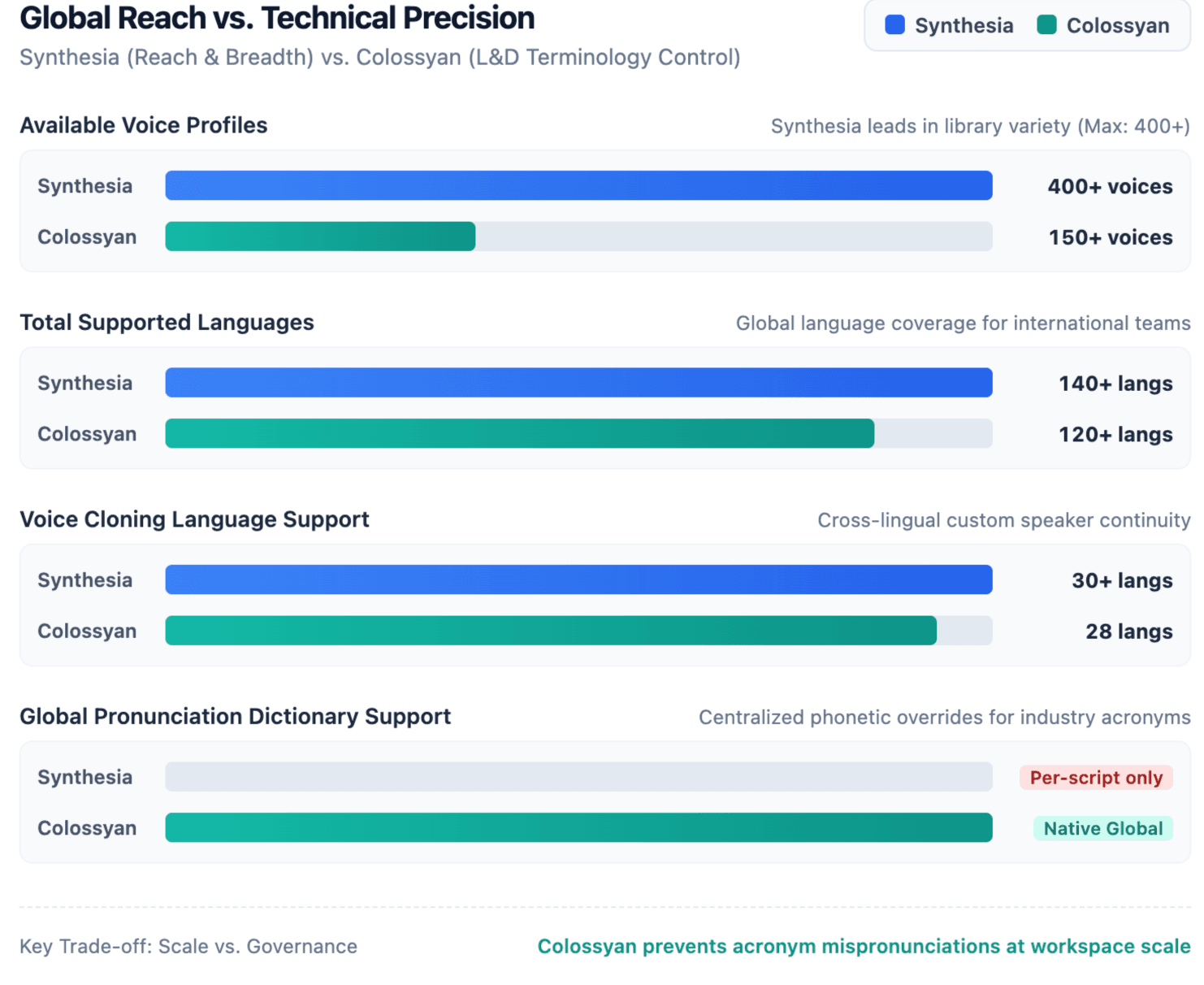
For multinational enterprises distributing unified training across dozens of territories, Synthesia remains the industry standard. It supports 140+ languages and over 400 voices with automated 1-click translation and voice cloning. A master English video can be instantly duplicated into localized versions where the avatar’s lip movements automatically synchronize to each translated audio track, drastically reducing global localization cycles. Teams scaling globally can combine these engines with dedicated video localization workflows or leverage the best video translator guide.
Technical Accuracy: Why Colossyan’s Pronunciation Dictionary Matters
While Colossyan supports a narrower selection (120+ languages), it provides a feature that instructional designers often find indispensable: a custom pronunciation dictionary.
AI text-to-speech models notoriously mispronounce industry-specific jargon, proprietary software acronyms, and medical terminology (e.g., misreading "HIPAA", "SaaS", or chemical compounds). Colossyan allows teams to establish phonetically corrected rules once across their organization, ensuring synthetic narrators pronounce technical nomenclature accurately across every subsequent module.
How Does the 2026 Pricing Compare for High-Volume L&D Teams?
Decoding Per-Minute vs. Per-Month Economics
At first glance, entry tiers look comparable: Synthesia Starter begins at roughly $18/month (billed annually), while Colossyan offers a permanent free Starter tier and a Professional plan at $59/month (billed annually). However, their consumption models operate on fundamentally different mechanics:
Synthesia (Credit-based, Annual Allocation)
└── Starter: $18/mo billed yearly (15,000 credits/yr; ~120–150 min/year)
└── Pro: $64/mo billed yearly (72,000 credits/yr; ~720 min/year)
└── Overages require purchasing add-on credit bundles or Enterprise plans

Colossyan (Monthly Generation Allocation)
└── Starter: Free (20 NEO min/mo, no card required)
└── Professional: $59/mo billed yearly (30 NEO + 10 NEO 2 min/mo, SCORM export, up to 3 editors)
└── Enterprise: Custom contract for unlimited rendering & SSO
For teams with steady monthly video production schedules requiring LMS reporting, Colossyan’s bundled seats and self-serve SCORM export provide better per-user economics. Synthesia charges on an individual-seat basis on lower tiers, and restricts LMS packaging to sales-gated contracts.
The Hidden Maintenance Tax: Version Control and Video Updates
When calculating ROI, instructional leaders must account for the "maintenance tax"—the labor required to update compliance regulations, product interfaces, and SOPs after initial publication.
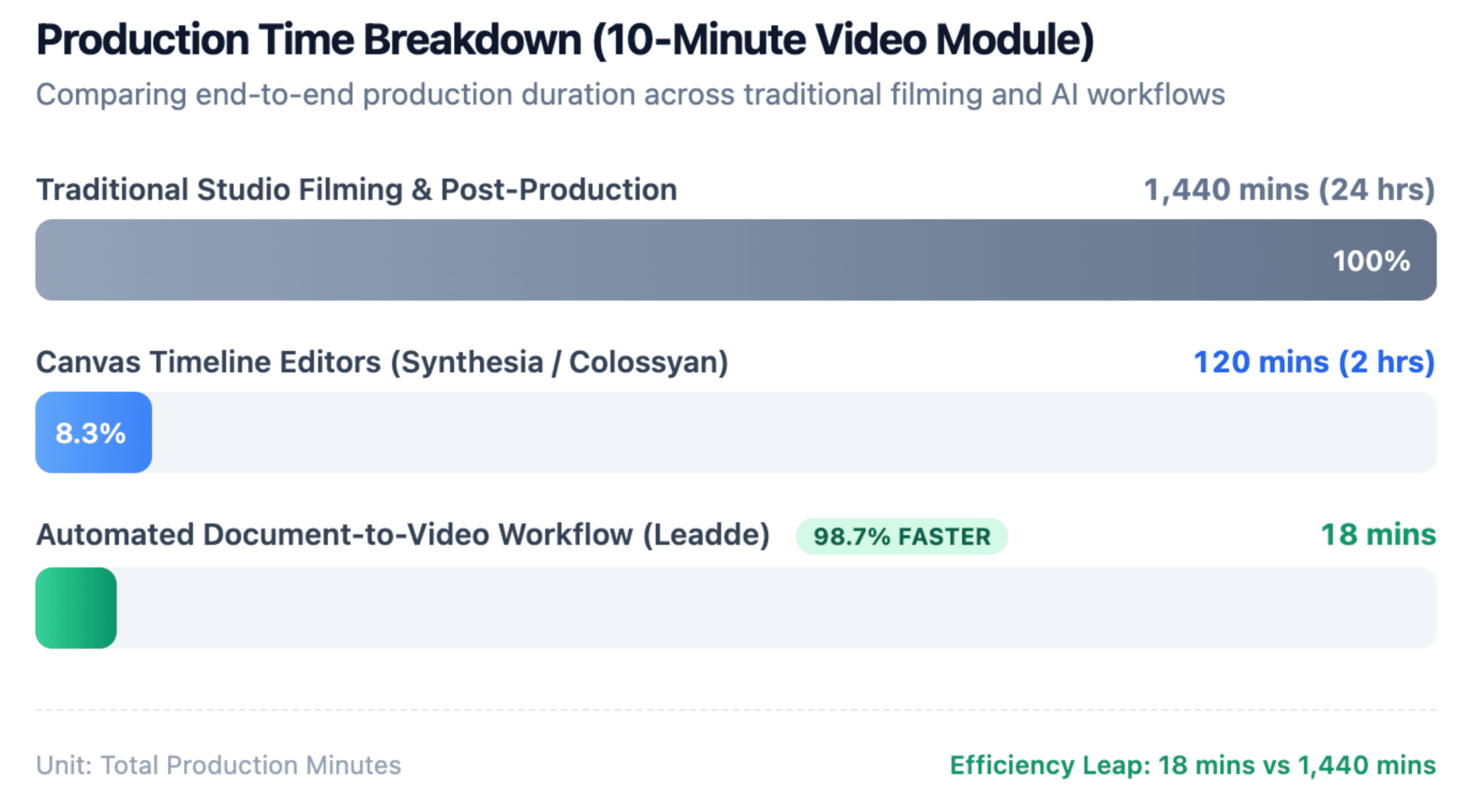
In traditional video production, changing a single software feature requires scheduling studio time, recalling talent, and re-rendering entire footage reels. Both Synthesia and Colossyan eliminate filming costs by allowing creators to edit text scripts and re-render only the affected scenes. However, Colossyan simplifies this maintenance loop for LMS administrators by letting creators update the hosted SCORM package directly, preserving historic completion analytics without generating broken LMS links.
How Can Training Teams Automate Document-to-Video Workflows?
The Limitations of Basic PowerPoint Imports
Both Synthesia and Colossyan feature PowerPoint and document upload tools. However, in practice, converting raw presentations often produces substandard learning assets. Basic importers tend to extract on-slide text directly into voiceover scripts, producing monotonous, slide-reading avatars that fail modern engagement standards. Teams looking for alternatives often explore how to turn PowerPoint into video lessons or evaluate the best PPT to video AI tools.
Training teams with extensive documentation require an authoring engine that analyzes curriculum hierarchy, isolates key takeaways, and generates natural pedagogical dialogue rather than simple mechanical recitations.
The Leadde Advantage: Scaling PDF-to-Video Course Generation
While tools like Colossyan and Synthesia function primarily as timeline canvas editors, specialized solutions like Leadde are increasingly adopted by training teams prioritizing automated educational video creation and scalable content production.
Leadde focuses on the upstream instructional engineering problem: deep document-to-video automation. By analyzing lengthy standard operating procedures (SOPs), onboarding handbooks, and compliance PDFs, Leadde breaks complex training documentation into bite-sized, logically sequenced video lessons with automated narration and contextual visual pacing—making it easy to turn SOP documents into training videos or create informational video from documents.
Raw Training Assets (PDF / SOP / PPT)
               │
               ▼
   [Leadde Automated Parsing Engine]
   ├─ Concept Extraction & Summarization
   ├─ Natural Spoken Script Generation
   └─ Modular Multi-Scene Course Structuring
               │
               ▼
   Deployable AI Training Modules (LMS-Ready)
Standardized 5-Step Document-to-Video Workflow for Corporate Training:
- Source Document Audit: Format standard operating procedures, PDF training manuals, or slide decks by stripping redundant legal disclaimers and organizing headers into sequential learning objectives.
- Automated Parsing & Script Structuring: Ingest source files through a document-to-video workflow engine (like Leadde) to automatically translate technical bullet points into conversational spoken language and modular scenes.
- Presenter & Voice Assignment: Select avatars that align with the subject matter. Assign authoritative, formal presenters to compliance modules and approachable avatars to casual onboarding topics.
- Interactive Checkpoint Injection: Embed knowledge-check quizzes and decision-branching points within the video to convert passive viewing into demonstrable retention.
- LMS SCORM Deployment: Export the finalized module as a SCORM package (or host via secure web player) to maintain continuous tracking of user engagement, watch time, and test scores.
Are These AI Video Platforms Secure for Internal Enterprise Data?
Navigating SOC 2, GDPR, and ISO 42001 Compliance
Corporate training video projects routinely contain non-public internal software demos, intellectual property, and proprietary strategic workflows. Enterprise procurement teams require strict data compliance guarantees before granting platform access.
Synthesia sets the category benchmark for enterprise governance. Trusted by over 60% of the Fortune 100, it provides SOC 2 Type II, GDPR, and ISO 42001 (AI Management System) certifications. Synthesia also enforces rigorous biometric human consent verifications for custom avatar creation and maintains proactive content moderation systems. Colossyan provides robust SOC 2 Type II and GDPR compliance with enterprise SAML/SSO options, ensuring that corporate data remains isolated and encrypted during training content creation.
| Compliance & Security Standard | Synthesia Status | Colossyan Status | Enterprise Procurement Impact |
| SOC 2 Type II | Verified & Certified | Verified & Certified | Mandatory for US enterprise data isolation |
| GDPR Compliance | Full Compliance | Full Compliance | Mandatory for EU employee data protection |
| ISO 42001 (AI Governance) | Certified (Category Pioneer) | In Progress / Roadmap | Emerging requirement for ethical AI vetting |
| Biometric Consent Protocol | Strict video & phrase verification | Standard verification flow | Prevents unauthorized executive deepfakes |
| Enterprise SAML / SSO | Available on Enterprise tier | Available on Enterprise tier | Required by corporate IT security policies |
Final Verdict: Which AI Video Tool Should You Choose in 2026?
The decision between Colossyan and Synthesia rests on whether your primary deliverable is visual communication or measurable instruction:
- Choose Colossyan if: You are an L&D manager, instructional designer, or HR professional building interactive courses that must report completion and test data to an LMS via SCORM without paying exorbitant custom enterprise fees.
- Choose Synthesia if: Your goal is broadcast-grade corporate announcements, global marketing campaigns, or executive messaging requiring the industry's highest avatar realism and 140+ language localization.
- Integrate Leadde if: Your operational challenge is scaling content production from static training libraries, requiring automated document-to-video processing that converts heavy PDFs and curriculum documentation directly into structured e-learning videos.
FAQ
Question: Is Colossyan cheaper than Synthesia for corporate training?
Answer: While Synthesia Starter begins at $18/month (billed annually) for video creation, Colossyan is significantly more cost-effective for corporate training operations. Colossyan includes interactive quizzes, branching scenarios, and SCORM export on its $59/month Professional plan, whereas Synthesia restricts SCORM export and collaborative workspaces to custom-priced Enterprise tiers.
Question: Can I export SCORM packages with Synthesia?
Answer: Yes, but only on Synthesia’s custom Enterprise plan. Synthesia does not offer SCORM export capabilities on its Starter or Pro plans. Teams requiring self-serve, budget-predictable SCORM exports for direct LMS integration typically select Colossyan.
Question: Which platform has more realistic AI avatars?
Answer: Synthesia leads in single-speaker visual fidelity. Its Express-2 avatar engine accurately simulates micro-expressions, breathing cadence, and tonal shifts. Colossyan’s NEO 2 avatars are highly natural for training, with the distinct advantage of allowing up to four avatars to converse together in a single scene.
Question: Does Synthesia support interactive quizzes like Colossyan?
Answer: No. Synthesia produces linear video files that play continuously from start to finish. Colossyan features native interactive authoring, allowing creators to add multiple-choice questions, clickable buttons, and branching scenarios directly into the video timeline without requiring third-party tools.
Question: How does Leadde fit into an AI training video workflow?
Answer: Leadde specializes in document-to-video automation and educational video creation. Rather than requiring teams to design slides manually on a blank timeline canvas, Leadde ingests heavy training manuals, SOPs, and PDFs, automatically parsing them into structured, localized video courses optimized for learning retention.
Question: Do these platforms allow voice corrections for technical terminology?
Answer: Colossyan includes a dedicated pronunciation dictionary where teams define custom phonetic rules for technical acronyms, brand names, and medical terminology. Synthesia handles pronunciation adjustments directly within the script editor using phonetic spelling, though it lacks a centralized global dictionary feature.





