
How Much Does It Cost to Convert PowerPoint to AI Video at Scale?

Converting PowerPoint presentations into AI videos at scale can cost far more than the platform’s monthly subscription. The real cost depends on deck volume, video length, AI narration or avatars, human review, regeneration, localization, and future updates. For large projects, the most useful metrics are cost per approved video, cost per 100 PowerPoints, and annual TCO.
As teams move from 10 presentations to 100, 500, or 1,000, hidden costs such as credits, QA, multilingual versions, and revisions become much more important. Leadde supports a document-first workflow that turns PowerPoint files, PDFs, SOPs, and other knowledge assets into structured AI videos with narration, avatars, and multilingual delivery.
This guide breaks down the real cost of converting PowerPoints into AI videos at scale and shows where teams can reduce production and maintenance costs.

PowerPoint to AI Video at Scale: How Much Does It Cost for 10, 100, or 1,000 Decks?
There is no reliable universal price per PowerPoint because platforms charge in different ways: video minutes, credits, slides, seats, or enterprise contracts.
A useful starting model is:
Total Cost = Platform + Generation + Content Preparation + Human Review + Regeneration + Localization + Maintenance
Consider a simple library in which every presentation becomes a five-minute video:
| Batch | Finished Video Runtime | What Usually Changes |
| 10 PPTs | 50 minutes | Self-service plans may still work |
| 100 PPTs | 500 minutes | Usage limits and review labor become significant |
| 500 PPTs | 2,500 minutes | Enterprise workflow and automation matter |
| 1,000 PPTs | 5,000 minutes | TCO, throughput, localization, and maintenance dominate |
Public pricing illustrates why monthly price alone is misleading. Synthesia currently lists Starter at $29/month for 10 video minutes and Creator at $89/month for 30 minutes, while its enterprise tier lists unlimited video minutes. Colossyan’s Professional plan is $59/month on an annual plan, with 30 monthly NEO minutes and 10 NEO2 minutes; Enterprise lists unlimited minutes.
At full utilization, those public allowances imply roughly $2–$3 per available standard video minute, but a 500-minute project already exceeds their self-service monthly capacity many times over. At that point, the enterprise quote—not the homepage subscription—is the relevant number.
HeyGen shows another model: Creator is currently $29 for 600 credits, Pro $49 for 1,000 credits, and Business $149 for 1,500 credits. HeyGen explicitly states that credit consumption varies by model, duration, and generation complexity.
For enterprise teams, I recommend tracking cost per approved video, not cost per render. A generated video that requires two rounds of corrections is not economically equivalent to one approved on the first pass.
What Actually Drives the Cost of Bulk PowerPoint-to-AI-Video Conversion?
Slides, Runtime, Speaker Notes, and Content Complexity
Two projects with 100 PowerPoints can have completely different economics.
A library of 10-slide presentations with complete narration notes is easier to automate than 80-slide technical decks containing inconsistent layouts, missing scripts, animations, and specialist terminology.
Speaker notes are especially valuable. HeyGen can use PowerPoint speaker notes as the script and import slide content as editable elements; its PPT/PDF workflow currently accepts up to 50 slides at a time. Synthesia also imports speaker notes as scripts and supports PPTX files up to 150 slides, although original PowerPoint animations are not imported.
This means source quality has a financial value. Well-prepared decks reduce scripting, layout repair, and review work before video generation even begins.
AI Narration vs. AI Avatars vs. Generative Video
Not every PowerPoint needs the same production level.
A practical hierarchy is:
| Workflow | Best For | Cost Pressure |
| Slides + AI narration | Internal knowledge, simple training | Low |
| Slides + AI avatar | Onboarding, courses, product training | Moderate |
| Structured document-to-video | Complex training libraries | Workflow-dependent |
| Generative AI B-roll | Premium visual scenes | High |
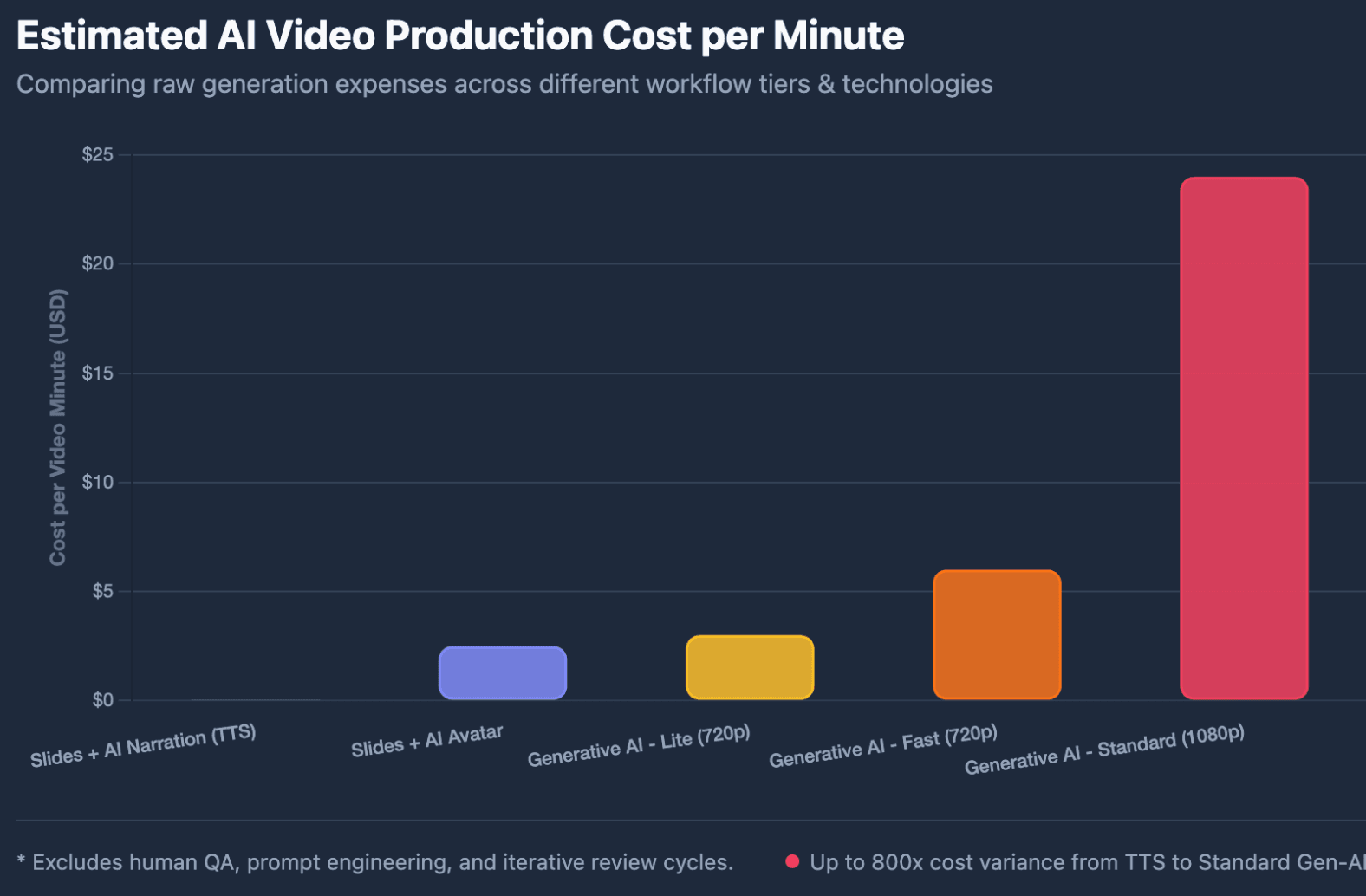
Fully generative footage can change the economics dramatically. Google currently prices Veo 3.1 Lite 720p at $0.05/second ($3/minute), Fast 720p at $0.10/second ($6/minute), and Standard at $0.40/second ($24/minute).
For 500 finished minutes, generating every second with Veo would therefore mean approximately $1,500 at Lite 720p or $12,000 at Standard, before editing, retries, or QA.
From a production perspective, this is why I generally treat generative video as selective B-roll, not the default visual layer for an entire training library.
Editable PowerPoint Layers vs. Static Slides
Flattening slides into images can accelerate initial production, but editable layers matter when teams need to correct text, change branding, or localize content.
HeyGen supports either editable layouts or static slide images. Leadde similarly supports static-image import or fully editable PPT layers and can import PowerPoint notes as speaking scripts.
For frequently updated content, editability can matter more than the cheapest first render.
How Do You Calculate the Real Cost per PowerPoint When Converting in Bulk?
Step-by-Step Bulk Cost Formula
Use this workflow instead of dividing a subscription by the number of decks:
- Calculate slides: decks × average slides.
- Estimate runtime: decks × average finished minutes.
- Apply platform usage: minutes, credits, slides, or enterprise capacity.
- Add human review: reviewer time × internal labor cost.
- Add regeneration: failed or rejected outputs create additional usage and labor.
- Divide total cost by approved videos—not generated videos.
Cost per Approved Video = Total Batch Cost ÷ Approved Videos
Example: What Would 100 PowerPoints Cost?
Assume:
100 decks × 5 minutes = 500 finished minutes.
For a narration/avatar workflow, public self-service plans can provide a useful benchmark, but 500 minutes substantially exceeds common monthly allowances, making an enterprise quote more realistic.
For fully generated visual footage, current Veo rates would put raw generation between roughly $1,500 and $12,000 depending on the model described above. A hybrid workflow—retaining PowerPoint visuals and generating only selected B-roll—can reduce that expense significantly.
AI narration itself can be comparatively inexpensive at API level. For example, OpenAI currently lists TTS-1 at $15 per million characters. In professional PowerPoint workflows, the expensive part is often not generating speech; it is preparing accurate content, reviewing output, fixing errors, and maintaining the library.
Why Failed Generations and Revisions Change the Math
A useful distinction is:
Generated → Usable → Approved → Published
If 100 videos require 125 renders before approval, your effective production cost should be divided by 100 approved assets, not 125 generation attempts.
That is why first-pass approval rate is one of the best operational metrics for a large AI video program.
What Hidden Costs Appear When You Scale From 100 to 1,000 PowerPoints?
Human Review, QA, and First-Pass Approval Rate
Training videos still need people to verify:
- factual accuracy,
- pronunciation,
- slide timing,
- terminology,
- branding,
- captions,
- compliance requirements.
A good workflow approves recurring elements—voice, avatar, terminology, templates, pronunciation, and brand rules—before hundreds of videos are generated. This prevents teams from correcting the same problem repeatedly.
Multilingual Video and the Cost of Change Propagation
Localization multiplies output volume.
A 500-minute source library translated into five additional languages produces 3,000 delivered language-minutes across six versions.
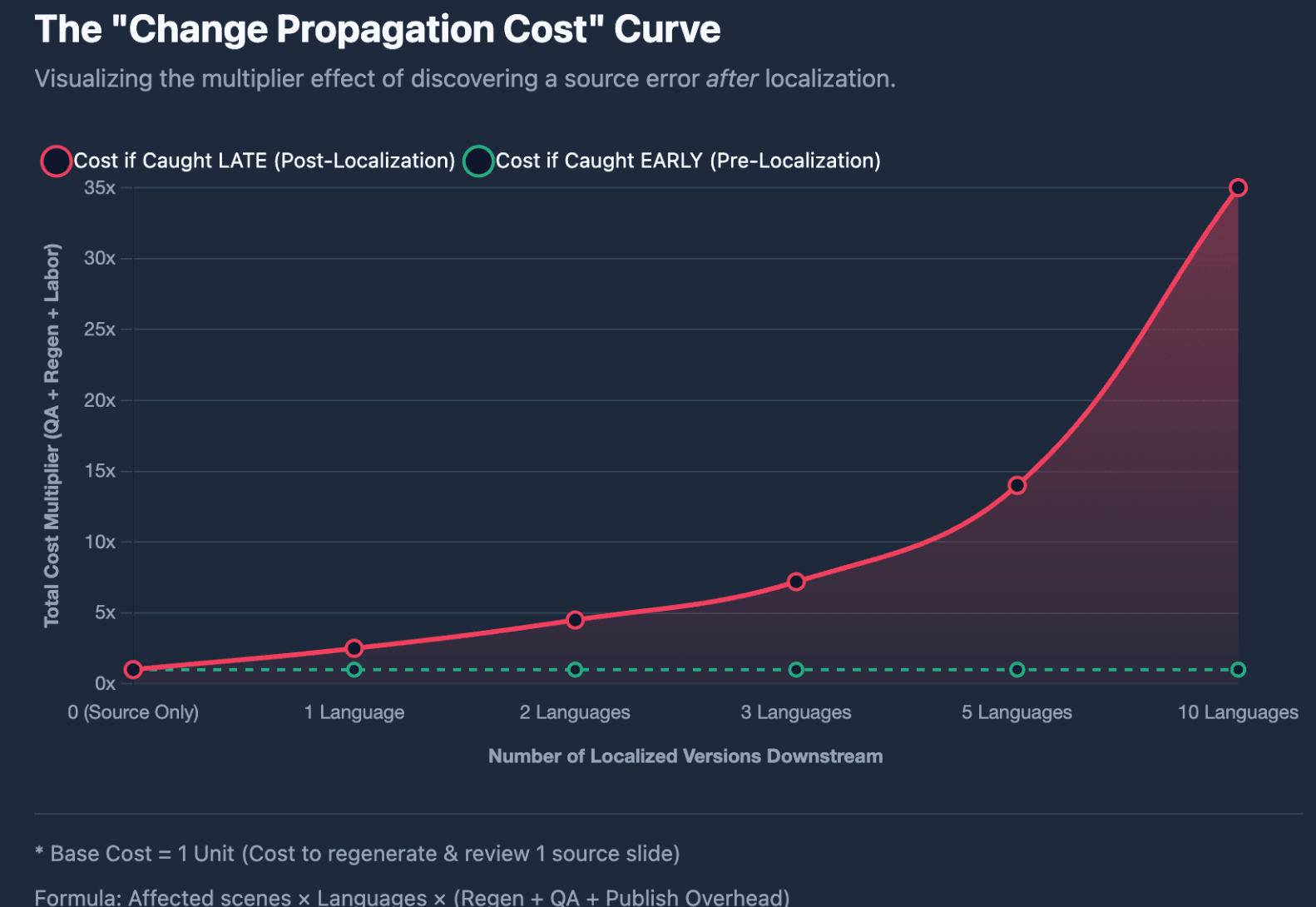
The deeper issue is what I call Change Propagation Cost:
Affected scenes × affected languages × regeneration + QA + republishing
If an incorrect figure on slide 12 is discovered only after ten localized versions are published, one source correction can become ten downstream corrections.
For this reason, approve the source-language version before scaling localization.
Concurrency, Queues, and Production Throughput
Price per minute is only part of enterprise cost. A 1,000-video migration also depends on how many videos can be processed concurrently and how quickly reviewers can approve them.
Leadde’s current pricing page, for example, lists up to three queued videos for Starter, six for Creator, and a custom queue quantity with priority processing for Enterprise. Enterprise also lists unlimited monthly video generation and custom pricing.
For large projects, measure videos approved per production day alongside cost per minute.
How Can Teams Reduce the Cost of Converting PowerPoints to AI Video at Scale?
Prepare the PowerPoint Library Before Batch Generation
Before choosing the cheapest tool, calculate your PPT Batch Readiness.
Check whether decks have:
- current content,
- consistent slide masters,
- usable speaker notes,
- standardized terminology,
- approved branding,
- clear content owners.
The principle is simple: fix upstream problems before paying to generate downstream assets.
Test the Hardest Deck, Not the Easiest Demo
A pilot should include the presentation most likely to break the workflow—not a polished 10-slide sample.
Test the deck with the:
- highest slide count,
- longest expected runtime,
- most technical terminology,
- most complex layouts,
- greatest localization requirements.
This produces a much more useful estimate of enterprise cost and throughput.
Use Different Production Levels for Different PowerPoints
Not every document deserves a premium avatar or generative scene.
I would typically segment a library into:
High-value training: structured video + avatar + localization. Frequently updated SOPs: editable, modular video. Simple internal knowledge: narration over existing slides. Low-use material: keep as searchable documentation unless video adds clear learning value.
This portfolio approach prevents teams from spending premium generation budgets on low-value content.
When Is AI PowerPoint-to-Video Actually Cheaper Than Manual Production?
PowerPoint Export vs. AI Video vs. Traditional Production
PowerPoint itself can export recorded presentations as MP4 while preserving narration, timings, animations, and pointer movements. Microsoft notes that complex or long presentations can take hours to render.
If a company already has Microsoft 365, the incremental software cost of basic export may be minimal. But people still need to record narration, manage timing, correct mistakes, create language versions, and repeat the work when content changes.
AI becomes more economically useful when that repeated labor is the bottleneck.
How Do Update Frequency and Library Size Change the Break-Even Point?
A five-video project that will never change has very different economics from a 1,000-video SOP library updated every quarter.
For ongoing programs, use:
Annual TCO = Initial Production + Platform + Review + Localization + Updates
The larger and more frequently updated the library becomes, the more important modular editing and scene-level regeneration are.
When Is AI Not the Cheapest Option?
AI automation is not automatically the lowest-cost choice. Manual or human-led production may still make more sense for:
- one or two simple presentations,
- executive communications requiring nuanced delivery,
- emotionally sensitive storytelling,
- source material requiring major expert rewriting,
- presentations with little expected audience use.
The goal is not to convert every PowerPoint. It is to identify where automation creates repeatable economic value.
Conclusion
The real PowerPoint-to-AI-video cost at scale is not the number displayed on a pricing page. For 100, 500, or 1,000 decks, teams should measure generation, review, regeneration, localization, throughput, and maintenance together. The most useful benchmarks are cost per approved video, cost per 100 PowerPoints, first-pass approval rate, and annual TCO.
FAQ
How much does it cost to turn a PowerPoint into an AI video?
There is no universal price. Self-service avatar platforms can imply only a few dollars per available video minute when plan allowances are fully used, while premium generative footage can cost substantially more. Human review, revisions, localization, and maintenance must also be included.
How much does it cost to convert 100 PowerPoints to video?
If 100 presentations average five finished minutes each, the project contains 500 video minutes. At this volume, common self-service allowances may be too small, so enterprise pricing and review costs become more relevant than the headline monthly subscription.
How much would it cost to convert 1,000 PowerPoints to AI video?
The cost depends on runtime, workflow, languages, and review requirements. At five minutes each, 1,000 decks represent 5,000 source video minutes before localization. Teams should request enterprise pricing and calculate labor, throughput, updates, and localization separately.
Is AI PowerPoint-to-video pricing based on slides or video minutes?
It can be based on minutes, credits, slides, seats, or enterprise capacity. Always identify the billing unit before comparing tools.
Is there a bulk discount for converting PowerPoints to AI video?
Some enterprise AI and cloud services offer custom or volume-based terms, but discounts vary. Do not assume that a self-service per-minute rate will apply to hundreds or thousands of presentations.
Does adding an AI avatar make a PowerPoint video more expensive?
It can. Avatar models may consume additional credits or generation capacity depending on the platform. A narration-only workflow is generally simpler than an avatar-led or fully generative video workflow.
How much does it cost to translate PowerPoint videos into multiple languages?
Localization depends on source runtime, number of target languages, translation method, avatar or lip-sync requirements, and language QA. For budgeting, calculate source minutes × language versions, then add review and regeneration.
Is PowerPoint’s built-in video export cheaper than AI video?
For a small number of simple presentations, it can be. PowerPoint already exports presentations to video, but manual narration, editing, localization, and repeated updates create labor costs. AI becomes more compelling when those tasks must be repeated across a large content library.





