How to Narrate a PDF: Read It Aloud, Create Audio, or Turn It Into an AI-Narrated Video

Narrating a PDF means turning a static document into spoken content that people can listen to, follow, or watch. The simplest approach is text-to-speech, which reads the PDF aloud. More advanced AI workflows can clean the document, fix reading order, summarize or rewrite dense sections for spoken delivery, and even convert PDFs to videos online with synchronized visuals.
The right method depends on the document and the goal. A text-heavy report may work well as audio, while a scanned PDF may need OCR first. Training materials, SOPs, presentations, and PDFs with charts or diagrams often need more than word-for-word reading because important meaning depends on visual structure. In fact, many teams turn SOP documents into training videos rather than just relying on audio, as the visual structure carries crucial meaning.
This guide explains how to narrate a PDF with built-in read-aloud tools and AI, how to handle scanned and complex documents, how to make narration sound natural and accurate, and when converting a PDF into an AI-narrated video is more useful than creating audio alone.
How to Narrate a PDF: Which Method Should You Use?
The best way to narrate a PDF depends on what the listener needs from the document. A simple novel and a visual SOP should not use the same workflow.
| Goal | Best Method | Best For | Main Limitation |
| Hear the original text | Read Aloud / TTS | Books, simple reports | May read layout noise |
| Listen offline | PDF-to-audio | Study, commuting | Visual context may be lost |
| Understand key ideas | AI explanatory narration | Reports, learning content | Not a verbatim copy |
| Teach or demonstrate | PDF-to-video | Training, SOPs, tutorials | Requires visual restructuring |
Read Aloud, Clean Narration, or Explanatory Narration?
A verbatim read preserves nearly every meaningful sentence. It is useful when accuracy matters more than listening efficiency.
A clean narration removes repeated page numbers, headers, footers, and other layout artifacts while preserving the source meaning.
An explanatory narration goes further. It rewrites dense written material into language that is easier to follow by ear.
From an instructional design perspective, this choice should be made before selecting a voice. A realistic voice cannot fix a script that was never designed for listening.
Do You Need Audio or a Narrated Video?
Audio works well for linear content such as articles, book chapters, and text-heavy reports.
Video is often better when meaning depends on diagrams, software interfaces, processes, slides, or charts. In those cases, removing the visuals can remove part of the explanation.
Is Your PDF Text-Based or Scanned?
Try selecting a sentence in the PDF. If the text is selectable, most TTS tools can work with it directly. If the page behaves like an image, OCR is usually needed first.
This distinction matters because OCR errors can turn names, numbers, or technical terms into incorrect narration.
How Can You Narrate a PDF With AI Step by Step?
A reliable AI narration workflow should process the document before generating speech.
Step 1–2: Prepare the PDF and Fix the Reading Order
First, check the text layer and run OCR where needed. Then inspect how the document is structured.
PDFs do not always store content in the order a human sees it. W3C guidance notes that PDF reading order is primarily determined by the document’s tag and content structure. In a poorly structured file, columns or other elements may therefore be presented in an unexpected sequence.
Remove obvious listening noise such as repeated page numbers, but do not automatically delete every footnote or parenthetical statement. Some of those details may change the meaning.
Step 3–5: Decide What Should Be Spoken and Rewrite It for Listening
Use a simple Narration Fidelity Policy:
- Legal, policy, and compliance: preserve wording closely.
- Research: clean repetitive citations but preserve evidence and qualifications.
- Education: explain difficult ideas in spoken language, which is especially useful if you want to turn PDFs into lecture videos.
- Training and marketing: restructure more freely around audience needs.
Written information often relies on visual structure. A heading, indentation, bold text, or arrow tells the reader how ideas relate. Narration needs to rebuild that structure with spoken cues such as “There are three steps,” “Next,” or “The main finding is…”
Step 6–8: Generate, Review, and Export the Narration
Choose the voice, language, pace, and pronunciation rules, then generate the audio or video.
Do not stop at “Does the voice sound natural?” Review the narration against the PDF:
- Was important information omitted?
- Are dates, percentages, and units correct?
- Are acronyms pronounced correctly?
- Is the reading order logical?
- Are visual explanations delivered at the right moment?
This content-fidelity review is especially important for training, technical, financial, and policy material.
How Do You Read a PDF Aloud on Different Devices and Tools?
Built-in tools are often enough when the PDF is simple and the goal is just to listen.
Adobe Acrobat and Microsoft Edge on Windows
Adobe Acrobat includes Read Out Loud. Adobe notes that tagged PDFs follow the document’s logical structure, while Acrobat must infer the reading order of untagged files.
Microsoft Edge also supports Read Aloud for PDFs and provides playback and speech-speed controls.
These tools are practical for normal text PDFs. For complicated layouts or content that must be rewritten for audio, a document-aware AI workflow is more appropriate.
iPhone, iPad, Android, and Mac
On Apple devices, accessibility features can speak selected text or screen content. Current Apple guidance provides voice and speaking-rate controls under its accessibility Read & Speak/Spoken Content settings.
Android can read selected supported text aloud through accessibility features such as Select to Speak.
These accessibility tools should not be confused with a dedicated document narrator. A screen reader may also describe interface elements, while a PDF narration tool is designed around the document itself.
When Should You Use a Dedicated AI PDF Narration Tool?
For complex PDFs, compare tools on more than voice realism. Useful capabilities include:
OCR, reading-order detection, multi-column handling, pronunciation controls, highlighting, navigation, multilingual narration, visual understanding, and export options.
For PDF narration, document intelligence can matter more than voice realism. If the source content is extracted incorrectly, a better voice simply reads the wrong information more convincingly.
Why Does PDF Narration Sound Wrong, and How Can You Fix It?
Many bad PDF narration experiences come from the document structure rather than the speech model.
Why Do Page Numbers, Columns, and Headings Break the Listening Flow?
A two-column academic paper may look obvious to a human but become confusing when the text extraction order is wrong. Headings can also run directly into paragraphs, while page numbers or captions may interrupt sentences.
Adobe provides a Reading Order tool specifically for inspecting and correcting how page regions are ordered, which illustrates why this is a document-structure problem rather than only a TTS problem.
The practical principle is:
Visual hierarchy must become audio hierarchy.
How Should Charts, Tables, Images, Footnotes, and References Be Narrated?
Use a Three-Choice Visual Rule:
Skip: decorative visuals that add no meaning.
Summarize: charts where the listener needs the conclusion rather than every value.
Keep Visual + Narrate: diagrams, interfaces, workflows, or tables that cannot be understood accurately through speech alone.
W3C PDF accessibility techniques similarly recognize that decorative images can be treated as artifacts rather than meaningful reading content.
Do not automatically remove footnotes or text inside parentheses. The right question is not “Is this outside the main paragraph?” but “Would removing it change the meaning?”
How Do You Fix Acronyms, Names, Numbers, and Technical Terms?
Create a pronunciation check before final generation. Test acronyms, product names, people, dates, percentages, measurements, and specialized vocabulary.
For example, an internal acronym may need to be spoken letter by letter rather than interpreted as a word. Numbers deserve separate QA because a natural-sounding error is still an error.
| Visual Element Type | Recommended Action | Example Scenario |
| Decorative Graphics | Skip | A stock photo of people shaking hands in a business report. |
| Data Charts (Bar/Line) | Summarize | "Sales increased by 15% in Q3," rather than reading all axis points. |
| Process Diagrams / UI | Keep Visual + Narrate | A software interface screenshot where the audio explains where to click. |
How Can You Make PDF Narration Natural, Accurate, and Easy to Follow?
Rewrite for the Ear, Not Just the Page
Written language and spoken language solve different communication problems.
A sentence with multiple clauses, citations, parentheses, and cross-references may work on paper because readers can stop and look back. In audio, that same sentence can become difficult to follow.
Shorten long structures, introduce sections verbally, and use transitions. The goal is not to make the content simplistic. It is to make its structure audible.
Use the Three-Page Narration Test Before Processing a Long PDF
Before generating a 100-page document, test three representative pages:
- A normal page for paragraphs and headings.
- The worst-layout page with columns, tables, charts, or diagrams.
- A reference-heavy page containing footnotes, numbers, citations, and technical terms.
If these three pages work, you have much more confidence in the full workflow. This small test can reveal structural problems before they are repeated across an entire narration.
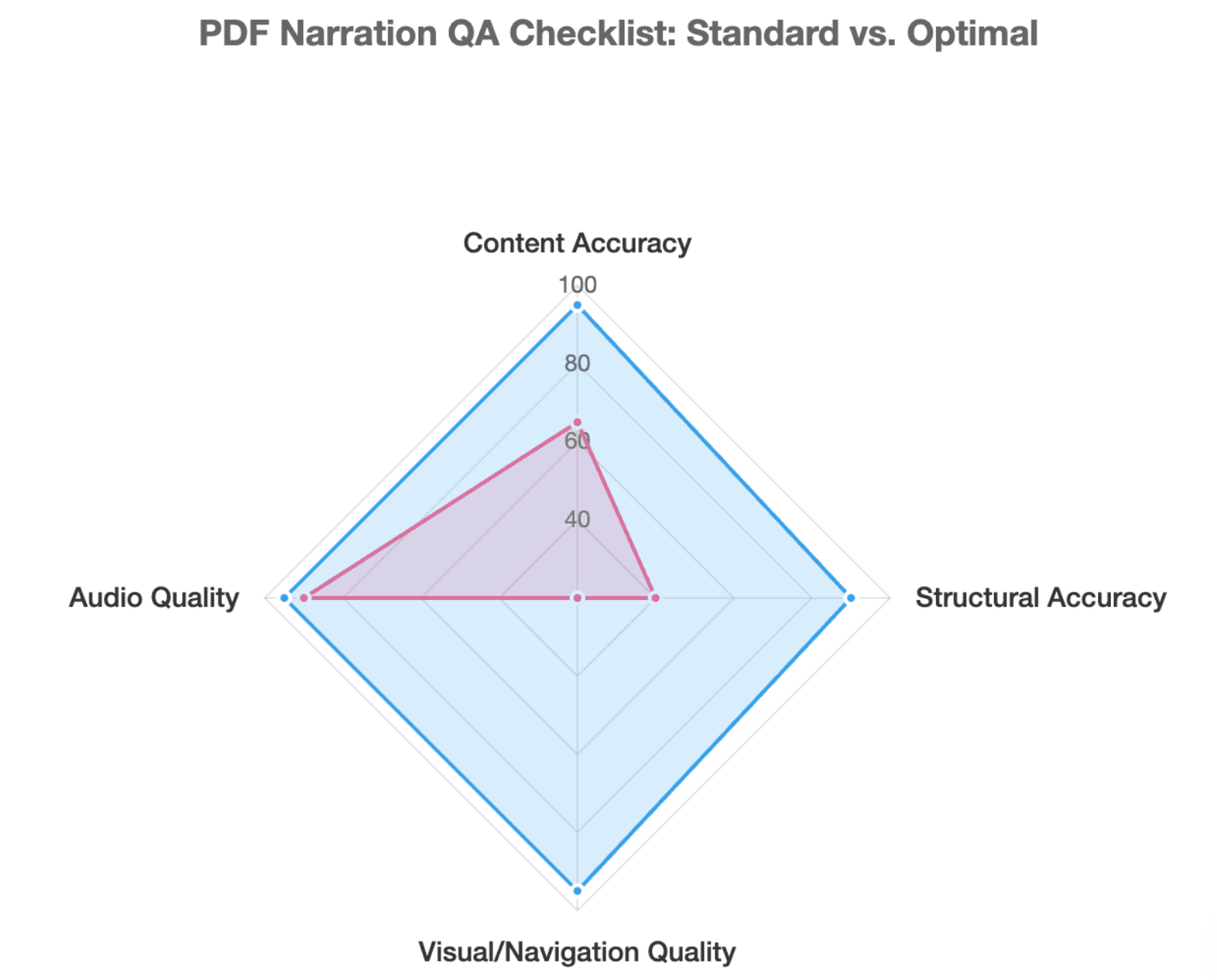
Use a PDF Narration QA Checklist
Review four areas:
Content accuracy: meaning, names, dates, and numbers remain correct.
Structural accuracy: sections, lists, and columns follow the correct order.
Audio quality: pauses, pronunciation, and pacing support comprehension.
Visual and navigation quality: important visuals appear when needed and long content can be navigated by section.
Good narration should not only be listenable. It should also be accurate and navigable.
When Should You Turn a PDF Into an AI-Narrated Video Instead of Audio?
Which PDFs Work Better as Video Than Audio?
Training manuals, SOPs, educational materials, product guides, software tutorials, and visually dense presentations often work better as narrated video. Knowing how to convert a PDF manual into a training video can drastically improve comprehension.
Consider an employee learning a machine procedure. Hearing the steps may help, but seeing the relevant control, warning label, or diagram can remove ambiguity.
How Does a PDF-to-Video Narration Workflow Work?
A stronger workflow is:
PDF → understand the content → identify key information → organize the narrative → create scenes → write narration → pair narration with visuals → review → localize
The important rule is:
PDF page boundaries should not automatically become video scene boundaries.
Page breaks are layout decisions. Scene breaks should be communication decisions. One PDF page may contain three ideas that need separate scenes, while several pages may support one continuous explanation.
Leadde is designed around this document-first approach. According to its supplied official product overview, the platform analyzes document logic, key information, section structure, and narrative flow to generate video scenes, scripts, narration, and visual presentation rather than simply placing PDF text into a template.
How Can PDF Narration Support Training, Education, and Multilingual Content?
A training team can turn an SOP into a structured employee video. An educator can convert lesson material into a narrated explanation. A SaaS company can repurpose product documentation into customer tutorials.
For global teams, the same structured content can then be localized instead of rebuilding the production from the beginning, which is highly efficient when you need to generate multilingual online courses with AI. Leadde’s supplied materials specifically position document-to-video, AI narration, AI avatars, and multilingual generation as parts of the same workflow.
The key is that the narration and visuals should complement each other. Do not make the voice simply repeat every sentence already displayed on screen. Use visuals for data, interfaces, processes, and key terms; use narration for meaning, context, and transitions.
| Document Type | Recommended Format | Why? |
| Novels / Articles | Audio (MP3/Podcast) | Linear text requiring imagination; no visual dependency. |
| Financial Reports | Audio + Clean Script | Focus is on numbers and analysis; users can listen while commuting. |
| SOPs / Software Guides | Narrated Video | High ambiguity if visuals are removed; requires precise visual context. |
| Presentations (Pitch Decks) | Narrated Video | Slides are inherently visual; separating audio from slides destroys context. |
Frequently Asked Questions About How to Narrate a PDF
Can ChatGPT narrate a PDF?
Yes, ChatGPT can work with PDF uploads, and as of August 7, 2026, ChatGPT Voice supports file uploads, allowing users to discuss and ask questions about uploaded files in a voice conversation.
For developer workflows, OpenAI’s PDF input processing can provide vision-capable models with both extracted text and page images, which is useful when a document contains visual information. Separate speech-generation APIs can then convert prepared text into audio.
For a long, finished narration or structured PDF-to-video project, you will usually want a workflow that explicitly handles document cleaning, script generation, speech, and output review.
Can I narrate a scanned PDF?
Yes, but a scanned PDF usually needs OCR because each page may be stored as an image instead of machine-readable text. After OCR, review the extracted text before narration, especially names, numbers, tables, and low-quality scans. OCR errors that look minor on screen can become misleading when spoken confidently by an AI voice.
Can I convert a PDF into MP3 or audiobook audio?
Yes. PDF-to-audio tools can extract or prepare text and then generate speech that can be saved as an audio file, depending on the tool. This is different from a browser’s real-time Read Aloud feature. For long documents, splitting the content by chapter or logical section usually creates a more useful listening experience than producing one continuous track.
Can AI explain charts and tables instead of reading them word by word?
Yes, when the AI workflow can interpret the visual information. For example, OpenAI’s PDF file-input workflow can provide both page images and extracted text to vision-capable models.
The better narration strategy is usually to explain the chart’s purpose and key takeaway rather than read every label or table cell. If exact values matter, keep the visual available while the narration guides the viewer through it.
Can I make a PDF read aloud for free?
Yes. Built-in accessibility and browser tools can read many text-based PDFs without a dedicated paid service. Examples include Adobe Read Out Loud, Microsoft Edge Read Aloud, and operating-system accessibility features.
Why is my PDF being read in the wrong order?
The PDF’s logical or tagged reading order may not match its visual layout. This is especially common with columns, sidebars, and poorly tagged documents.
How do I stop a PDF reader from reading page numbers?
Use a document-aware reader or clean the extracted text before generating narration. For repeatable professional workflows, treat page numbers, repeated headers, and decorative content as layout artifacts unless they carry meaning.
Can a PDF be turned into a narrated video?
Yes. A document-to-video workflow can transform the PDF’s information into scenes, narration, visuals, and optionally an AI presenter. Leadde’s supplied official documentation describes this type of structured PDF/document-to-video workflow for training, education, product communication, and knowledge sharing.
Conclusion
Narrating a PDF can be as simple as turning on text-to-speech, but complex documents require more thought. The strongest workflow preserves important meaning, removes genuine listening noise, converts visual structure into spoken structure, and keeps charts or diagrams visible when audio alone is not enough. For training, education, and other visual content, turning the PDF into a structured narrated video may communicate the source material more clearly than reading every page aloud.