What Is a Spatial Avatar? AI Avatars That Look, Point, and Explain

A Spatial Avatar is an AI presenter whose gaze, pointing, gestures, body orientation, and timing are grounded in the visual content it is explaining. Instead of simply speaking beside a slide, diagram, product, or interface, a Spatial Avatar can direct attention toward specific information and coordinate its behavior with the explanation.
AI avatar development has already made major progress in realism, identity consistency, expressions, and full-body motion. HeyGen, for example, positions Avatar V around maintaining identity across angles, appearances, and longer videos, while Synthesia has expanded some avatars from talking-head delivery into prompted actions.
But explaining visual information creates another problem: the presenter needs to know what viewers should look at, where that information appears, and when to direct attention toward it.
Meet Leadde Spatial Avatar — an AI presenter designed to interact with the content it explains. Start from a single image and create a presenter that can look toward visual targets, point to relevant content, and coordinate gestures with the explanation.
Spatial Avatar focuses on this relationship between the presenter and the scene. This guide explains what “spatial” means, how spatial grounding works, how Spatial Avatars differ from traditional and interactive avatars, where they are useful, and how to evaluate whether the interaction is actually correct.

What Is a Spatial Avatar?
A Spatial Avatar is an AI video presenter designed to maintain a meaningful spatial relationship with the information around it.
Imagine an avatar explaining an engine diagram. When the narration mentions the intake valve, a conventional avatar might continue looking at the camera while making a general speaking gesture. A Spatial Avatar can instead turn toward the valve, look at it, point to its position, and coordinate that movement with a visual highlight.
The important change is not simply that the avatar moves. Its movement has a visual referent.
A useful shorthand is:
See → Ground → Point → Explain
| Action Phase | Conventional Avatar | Spatial Avatar |
| Narration cue | "Look at the intake valve..." | "Look at the intake valve..." |
| Gaze | Stares directly at the camera | Turns to look at the specific valve on screen |
| Gesture | Makes generic hand movements | Points exactly to the intake valve's coordinates |
| Coordination | Speaking and moving independently | Synced perfectly with visual highlights |
What Makes an AI Avatar “Spatial”?
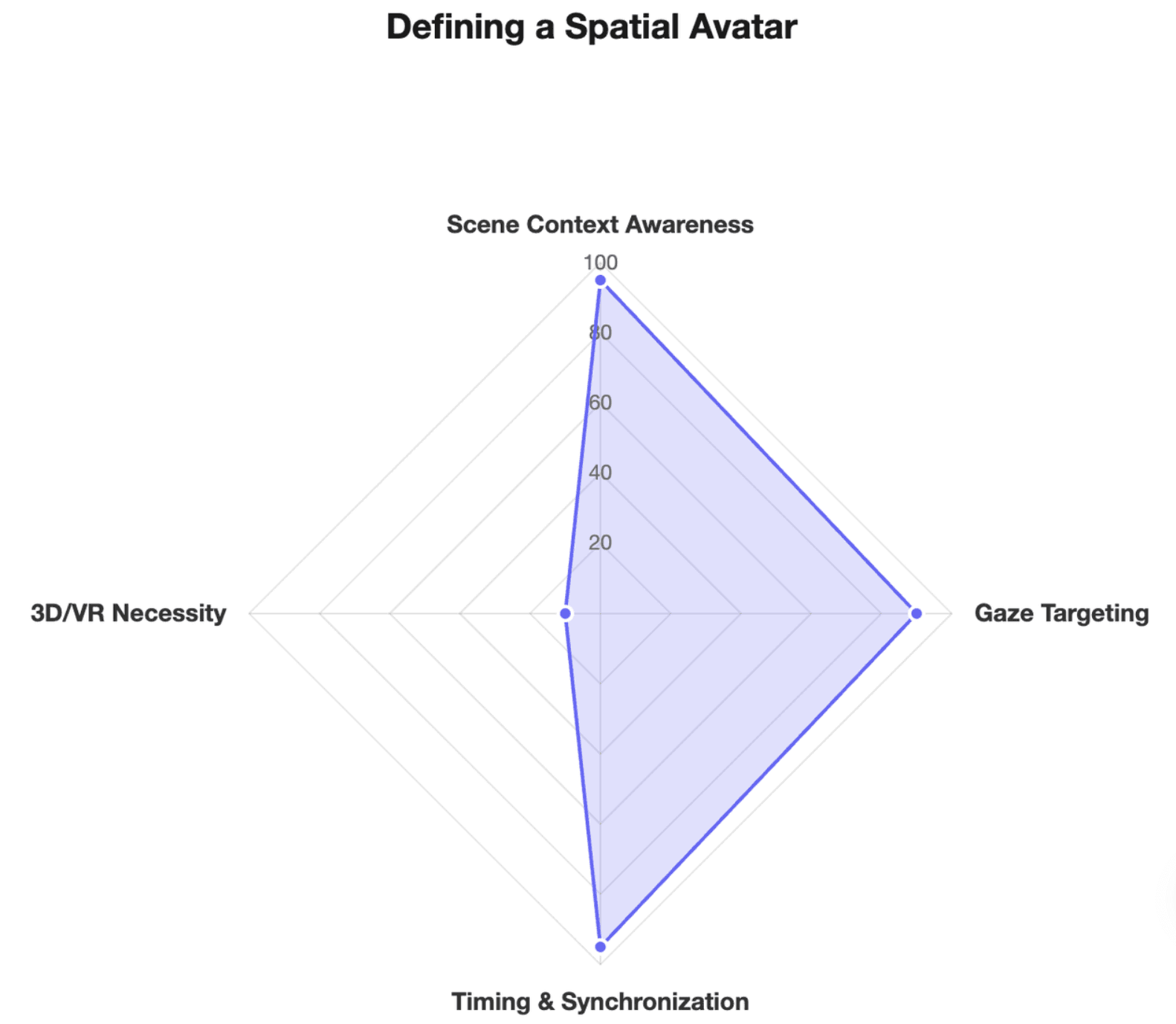
“Spatial” does not necessarily mean 3D, VR, AR, a metaverse avatar, or an avatar moving inside a virtual world.
Here, spatial describes the relationship between the presenter and the visual scene:
- What is the presenter discussing?
- Where does that information appear?
- How should the presenter direct attention toward it?
- When should the gaze or gesture occur?
Research on gesture generation shows why this distinction matters. Natural co-speech motion can be generated without meaningful information about the surrounding environment; recent research instead explores adding scene context so an agent's gestures can respond to the space around it.
A Spatial Avatar is therefore defined by how it behaves in relation to content—not by whether the avatar itself is 2D or 3D.
What Are the Core Behaviors of a Spatial Avatar?
Spatial interaction can combine:
- scene awareness
- gaze targeting
- pointing
- body orientation
- referential gestures
- speech–gesture synchronization
- visual highlight synchronization
- movement between multiple visual targets
This leads to an important design principle:
The goal is not more motion. It is more meaningful motion.
A random hand movement can make an avatar appear expressive. A gesture that directs viewers toward the exact information being discussed can contribute to the explanation itself.
How Is a Spatial Avatar Different From Traditional and Interactive AI Avatars?
The clearest difference is what the avatar is interacting with.
| Avatar Type | Main Relationship | Typical Behavior | Best Fit |
| Traditional AI Avatar | Presenter → audience | Speaks with general expressions and gestures | Announcements, presenter videos |
| Interactive Avatar | User ↔ avatar | Listens and responds | Support, agents, conversations |
| 3D / VR Avatar | Avatar ↔ virtual environment | Moves within digital space | VR, games, virtual worlds |
| Spatial Avatar | Presenter ↔ visual content | Looks, points, gestures, and explains according to scene context | Training, education, demonstrations, explainers |
Regular AI avatars remain useful. Leadde, for example, supports avatars created from a photo, full-body presentation, content-aware gestures, and video creation from documents, scripts, or templates. Spatial Avatar adds a more specific requirement: the presenter's behavior should correspond with the location and meaning of the visual content being explained.
Spatial Avatar vs. Interactive Avatar
An interactive avatar usually responds to a person:
User input → avatar understands → avatar responds
Current interactive avatar products often emphasize listening, conversation, and real-time responses.
A Spatial Avatar focuses on another relationship:
Narration → visual content → avatar behavior → viewer attention
The two concepts can eventually be combined. An avatar could converse with a learner while also pointing to a relevant diagram. But conversational interaction and spatial interaction solve different problems.
Spatial Avatar vs. an Avatar That Takes Action
An avatar performing an action is also not automatically spatially grounded.
Synthesia, for example, lets users create a talking explanation and then prompt the same avatar to perform a short action such as walking to a whiteboard or placing an object on a table.
The distinction is:
Waving a hand = action.
Saying “this valve,” locating that specific valve, looking toward it, and pointing at the correct moment = grounded interaction.
Spatial Avatar is therefore less about whether an avatar can act and more about whether the action is relevant to a specific visual reference.
How Does a Spatial Avatar Understand and Interact With On-Screen Content?
A useful Spatial Avatar workflow requires the system to coordinate scene understanding, language, motion, and timing rather than treating each as an independent video layer.
From Scene Understanding to Spatial Grounding
Consider the sentence:
“Now look at the pressure valve on the left.”
Semantic understanding answers:
What does this instruction mean?
Spatial grounding answers:
Which visible object is the pressure valve, and where is it?
This distinction has become increasingly important in multimodal AI. OpenAI's current vision documentation, for example, treats precise spatial localization as a distinct challenge from general image understanding, while its multimodal guidance separately discusses localization tasks such as producing bounding boxes around target regions. (OpenAI Developers)
Avatar research is moving in a similar direction. The 2026 InteractAvatar paper describes grounded human-object interaction as an open challenge that requires environmental perception and text-aligned interactions with objects in the scene.
It is also useful to separate two meanings of “grounding”:
Knowledge grounding: Which information should the AI use?
Spatial grounding: Which visible object or region does that information refer to?
How Gaze, Pointing, and Speech Work Together
A simplified Spatial Avatar pipeline is:
- Understand the scene and identify relevant objects or regions.
- Understand the narration and determine what is being referenced.
- Ground the reference to a visual target.
- Plan attention through gaze and body orientation.
- Choose an appropriate gesture, such as pointing or presenting.
- Synchronize speech, movement, and visual emphasis.
- Maintain continuity as the explanation moves to another target.
The interaction may look like:
spoken keyword → gaze shift → pointing gesture → target highlight
That final coordination is the important part. The avatar and the graphics should not feel like two unrelated layers placed in the same composition.
Attention Choreography: Knowing When to Look, Point, or Stay Still
In professional video workflows, more gestures are not automatically better. I use Attention Choreography as a practical way to think about spatial presentation: deliberately coordinating the avatar's gaze, gestures, narration, and visual emphasis according to where viewers should focus.
It can include four states:
Audience Mode: look toward viewers during introductions, transitions, or conclusions.
Reference Mode: look or point toward the content currently being explained.
Transition Mode: move attention between targets during comparisons or sequences.
Rest Mode: avoid unnecessary motion when a gesture adds no information.
This produces an important rule for Spatial Avatar design:
A good Spatial Avatar also needs to know when not to point.
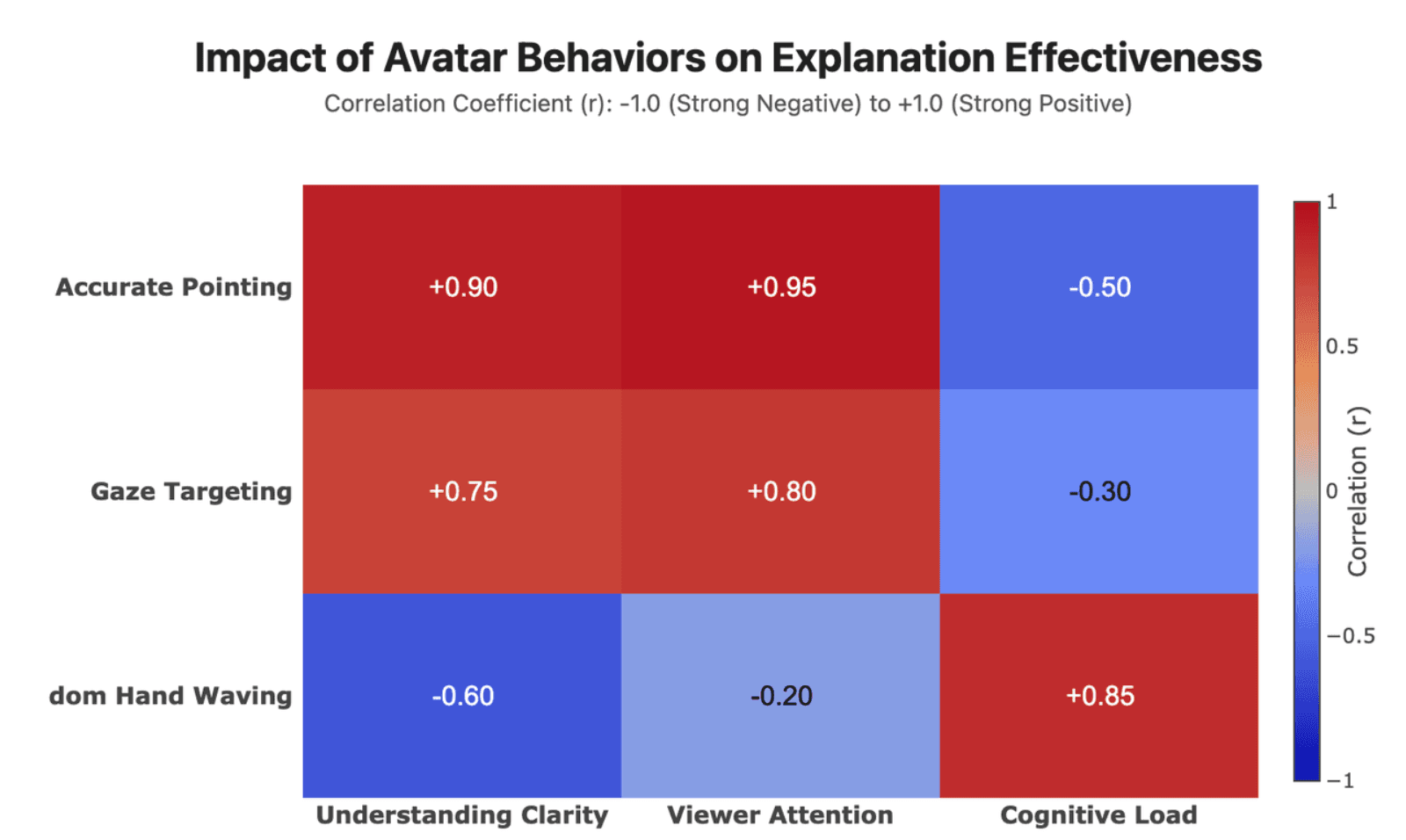
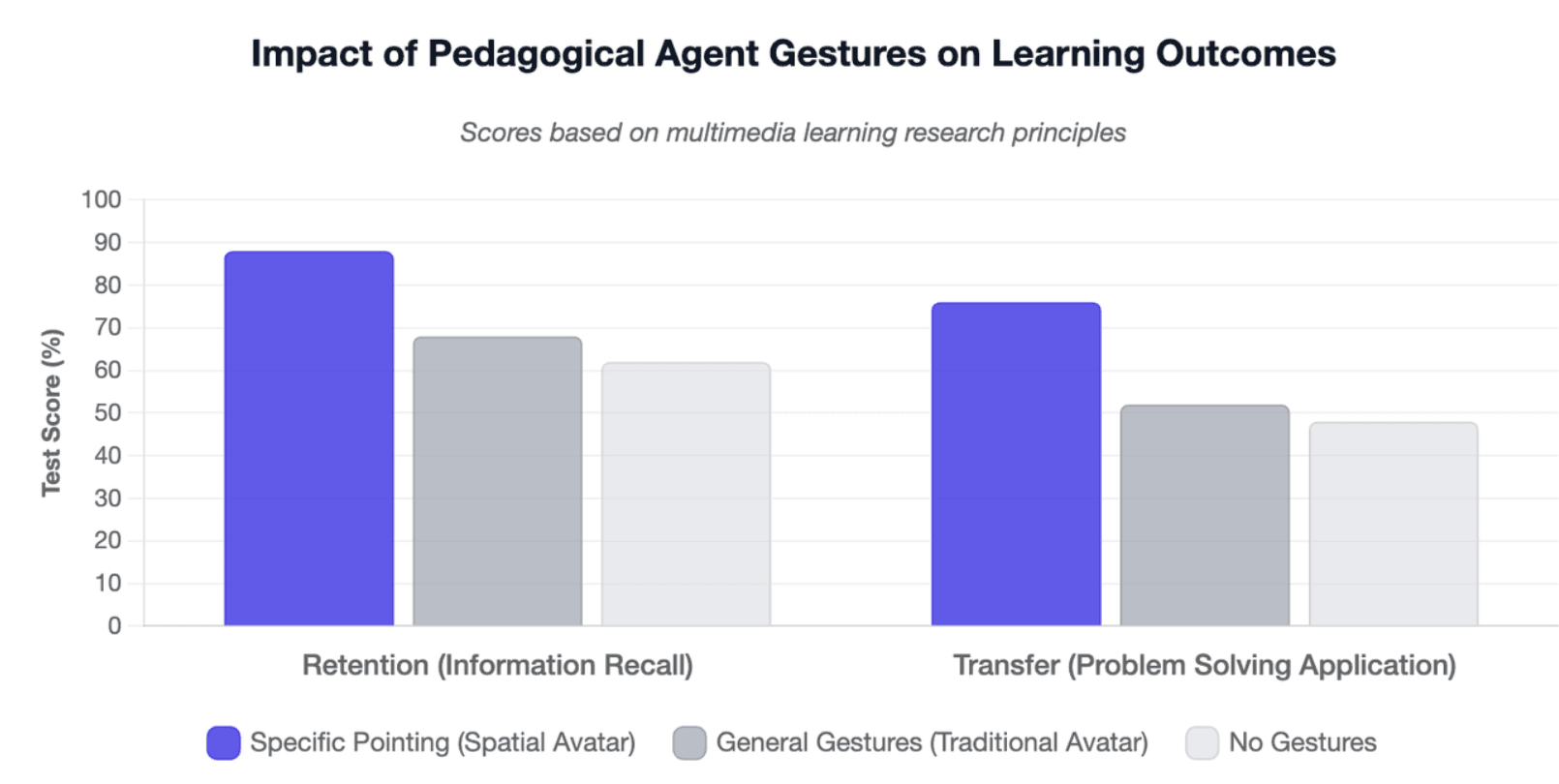
Research on pedagogical agents supports the broader principle that gesture specificity matters. In one multimedia-learning study, learners shown specific pointing gestures paid more attention to relevant screen elements and performed better on retention and transfer measures than comparison groups receiving general, unrelated, or no gestures. This does not prove that every Spatial Avatar improves learning, but it provides evidence for treating pointing as an instructional signal rather than decorative movement.
Why Do Spatial Avatars Matter for Training, Education, and Explainer Videos?
Spatial interaction matters most when viewers need to connect what they hear with where they should look.
From Talking Head to Visual Explanation
When a human instructor explains equipment, a chart, or a software interface, communication is rarely limited to speech. The instructor may look toward a component, point at a button, compare two regions, or trace a sequence.
A standard avatar can communicate the words while leaving the viewer to make the visual connection.
A Spatial Avatar can participate in that connection:
turn → look → point → highlight → explain
This shifts the presenter's role from simply delivering information toward guiding attention through information.
Research on spatially grounded gesture generation is increasingly exploring this same relationship between language, motion, and environmental context.
Where Are Spatial Avatars Most Useful?
- Training and SOP videos: point toward machine components, controls, safety areas, or procedural steps.
- Educational videos: guide attention through diagrams, maps, scientific illustrations, anatomy, or processes.
- Product and SaaS explainers: indicate physical product features, dashboard regions, buttons, and workflow steps.
- Charts and data presentations: direct viewers toward specific data points, comparisons, or trends.
In Leadde's current Spatial Avatar demonstrations, videos generated from a static source image show the presenter turning toward visual content, directing gaze, pointing, and coordinating the explanation with highlighted elements. The practical value is not simply animating a still image—it is making the generated presenter participate in the explanation.
When Is a Regular AI Avatar the Better Choice?
Spatial interaction is unnecessary when there is nothing meaningful to locate visually.
A regular AI avatar may be the better choice for:
- company announcements
- welcome messages
- straightforward talking-head content
- simple narration
- messages where the presenter only needs to address the audience
A useful decision rule is:
If understanding depends on knowing where to look, spatial interaction can add value. If the presenter only needs to deliver speech, a regular AI avatar may be enough.
How Do You Create a Spatial Avatar Video?
A useful Spatial Avatar video starts with the communication task, not with adding as many motions as possible.
Start With Content That Needs Visual Explanation
Good source material includes diagrams, product images, presentations, dashboards, training materials, and educational illustrations.
Our experience with the current Leadde demos revealed something useful: both videos began with a single static image. Once creating the animated presenter becomes straightforward, the harder problem shifts elsewhere—how should that presenter behave in relation to the information?
Leadde already supports creating AI avatars from a single photo and building avatar videos from documents, scripts, and templates. (Leadde AI) Spatial interaction extends that workflow toward more coordinated visual explanation.
Write the Script for Spatial Explanation
Compare these two lines:
Generic: “This system improves performance.”
Spatial: “Now look at the intake valve on the left.”
The second line gives the system—and the viewer—a visual reference.
When planning Spatial Avatar content, ask:
- What should viewers notice?
- Where is it?
- When should their attention move?
- Does this moment actually require pointing?
Spatial video therefore changes scriptwriting too. The script should make relationships between language and visual targets explicit.
Map Narration, Targets, and Visual Emphasis
A practical workflow is:
Content → Visual targets → Script references → Avatar behavior → Visual emphasis → Review
For teams already converting SOP documents into training videos, presentations, product documentation, or training material, this is a natural extension of document-to-video production. Leadde's AI Avatar Generator supports document, script, and template inputs for avatar video creation.
Explore Leadde AI Avatar Generator →
How Can You Tell Whether a Spatial Avatar Is Actually Good?
Realism alone is not enough.
A Spatial Avatar may look convincing while still pointing toward the wrong object. Its gestures can look natural while happening two seconds too late.
The evaluation question therefore becomes:
Was the explanation spatially correct?
The Four-Part Spatial Interaction Test
I use four practical checks:
- Right Target — Did the avatar identify the correct object?
- Right Cue — Was gaze, pointing, or body orientation appropriate?
- Right Time — Did the behavior align with the relevant spoken phrase?
- Right Continuity — As the explanation moved from A to B to C, did the avatar maintain the correct spatial relationship?
This is a practical evaluation framework, not an established industry benchmark.
Common Spatial Interaction Errors
Typical errors can include:
Target Error: pointing toward the wrong visual element.
Timing Error: performing the correct gesture too early or late.
Behavior Error: locating the correct target but using an unsuitable gesture.
Attention Conflict: the avatar, animation, and highlight all compete for viewer attention.
Continuity Error: the first target is correct, but spatial coordination breaks as the explanation continues.
The key QA principle is:
A natural-looking gesture aimed at the wrong object is still a failed interaction.
Why Human Review Still Matters
Spatial grounding becomes harder with small objects, crowded layouts, similar-looking components, ambiguous wording, occlusion, complex charts, and rapid transitions.
That makes review especially important for technical training, safety procedures, compliance content, and other explanations where pointing to the wrong place could create misunderstanding. Precise visual localization remains a challenging problem even for current multimodal models. (OpenAI Developers)
The review checklist should therefore go beyond:
“Does this avatar look natural?”
and ask:
“Did it direct attention to the right thing at the right time?”
Conclusion: AI avatars have become increasingly capable at speech, expression, identity consistency, and action. Spatial Avatar moves the focus toward the relationship between the presenter and the information being explained. When gaze, pointing, narration, timing, and visual emphasis work together, the avatar becomes more than a talking person in the frame. Talking avatars deliver speech. Spatial Avatars help deliver the explanation.
FAQ
What is a Spatial Avatar?
A Spatial Avatar is an AI presenter whose behavior is grounded in the visual content it explains. It can coordinate gaze, pointing, gestures, body orientation, and timing with specific objects or regions on screen rather than simply speaking toward the camera.
What does “spatial” mean in Spatial Avatar?
“Spatial” refers to the relationship between the presenter and information inside the visual scene. The avatar can identify where relevant content appears and coordinate its behavior with that location. It does not necessarily mean the avatar is 3D, VR-based, or operating in a virtual world.
Is a Spatial Avatar the same as a 3D avatar?
No. 3D avatar describes a form of digital representation; Spatial Avatar describes presenter behavior. A Spatial Avatar can appear in a conventional 2D video and even originate from a single image, provided its gaze and gestures can be meaningfully coordinated with visual content.
What is the difference between a Spatial Avatar and an interactive avatar?
Interactive avatars generally interact with users, such as listening to questions and responding in real time. Spatial Avatars interact with the content they are presenting, coordinating gaze and gestures with specific visual information. An avatar could eventually combine both conversational and spatial interaction.
How does a Spatial Avatar know where to look or point?
The system must connect language with the visual scene: understand what the narration refers to, identify the corresponding object or region, locate it spatially, and then coordinate the avatar's gaze or gesture with that target. This language-to-location relationship is commonly described as visual or spatial grounding.
Can a Spatial Avatar be created from a single image?
Yes. Leadde's current Spatial Avatar demonstrations were generated from a single static source image. The defining feature, however, is not the input format. What makes the avatar spatial is whether its generated behavior can correspond meaningfully with the visual information being explained.