How to Make a Self Introduction Video: Scripts, Examples & Tips

Meta Description: Learn how to make a self introduction video with a clear script, the right length, natural delivery, recording tips, examples, common mistakes, and AI-assisted workflows.
A strong self introduction video should quickly show who you are, what you do, and why it matters to the viewer. Instead of reading your résumé on camera, focus on a few relevant details, one clear proof point, and a natural delivery that fits the situation.
You can record with a smartphone or use AI to speed up parts of the workflow. For example, Leadde can turn a résumé, PDF, presentation, or other source document into a structured video with AI narration, avatars, and multilingual output. This guide covers how to plan your message, choose the right length, write a natural script, record confidently, and use AI without making the video feel generic.
How to Make a Self Introduction Video: What Is the Best Step-by-Step Process?
A good self introduction video starts before you turn on the camera. The first question is not “What should I say about myself?” but “Who will watch this, and what do they need to understand about me?” A recruiter, student, potential client, and university reviewer are all listening for different information.
Step 1: Decide Who Will Watch the Video and What They Need to Know
Use a simple framework: Audience → Decision → Content. A recruiter may be deciding whether to interview you, while a freelance client wants to know whether you can solve a specific problem. A student choosing a tutor cares more about teaching style, subject expertise, and what a lesson will feel like.
This prevents a common mistake: filling the video with facts that are true but irrelevant. Your education, hobbies, experience, and personality should earn their place by helping the viewer make that next decision.
Step 2: Choose the Right Length, Format, and Key Message
Before writing, check whether the company, school, marketplace, or application portal specifies a length or format. Platform rules should always take priority over generic advice; for example, Preply currently requires tutor introduction videos to be 30 seconds to two minutes and gives specific requirements for framing, orientation, and content.
Then choose one main message. If viewers remember only one thing after watching, what should it be? That could be your teaching specialty, ability to simplify technical products, international experience, or the particular type of client you help.
Step 3: Record, Review, and Improve Before Publishing
Treat the first recording as a test rather than the final performance. Watch it for unclear sentences, rushed delivery, distracting movements, weak audio, or information that feels repetitive, then record again.
In community discussions about five-minute teaching introductions, a practical pattern appears repeatedly: record, watch, adjust, and repeat until the introduction feels natural rather than memorized. Before publishing, run one final Added-Value Test: does each section give the viewer something they could not already learn from your résumé or profile?
| Target Audience | Viewer's Key Decision | Recommended Content Focus |
| Recruiter | Should we interview this candidate? | Relevant experience, cultural fit, one strong proof point |
| Freelance Client | Can this person solve my specific problem? | Problem-solving ability, past project results, working style |
| Prospective Student | Will I enjoy and learn from these lessons? | Teaching style, subject expertise, classroom vibe |
| University Reviewer | Is this applicant a good fit for our program? | Academic background, deep interests, core motivation |
What Should You Say in a Self Introduction Video?
The strongest introduction videos do not try to summarize an entire life story. They select a few details that establish identity, relevance, credibility, and personality.
Use a Simple Self Introduction Video Script Structure
A practical script can follow five parts:
- Opening: Give the viewer immediate context.
- Identity: Say who you are and what you do.
- Value: Explain who you help or what you are good at.
- Proof: Add one relevant project, experience, result, or example.
- Next step: Tell the viewer what you would like them to do.
For a freelancer, that next step might be sending a message. For a teacher, it could be booking a lesson. Upwork similarly recommends keeping freelancer profile introductions focused on the service offered, professional experience, career highlights, and a clear conclusion or call to action.
Use Fact → Meaning → Relevance Instead of Reading Your Resume
A résumé gives facts. Video gives you room to explain why those facts matter.
Instead of saying, “I worked in customer support for three years,” you could explain that the experience taught you how to turn complicated product questions into simple explanations. The second version tells the viewer what the experience developed and why that skill may be useful now.
Use the framework:
Fact → Meaning → Relevance
This also helps remove empty adjectives. Saying “I am passionate, creative, and hardworking” is weaker than showing one experience that demonstrates those qualities.
How Much Should You Say in a 30-Second, 60-Second, or 5-Minute Video?
There is no universal ideal length. The right length depends on the platform, audience, and purpose.
| Length | Best Content Strategy |
| 30 seconds | Identity + one value point + next step |
| 60 seconds | Identity + value + one proof point + CTA |
| 1–3 minutes | Background + expertise + personality + relevant examples |
| Around 5 minutes | Story + examples + demonstration + deeper context |
For short videos, use a Proof-per-Second Principle: do not ask how many facts you can fit into 60 seconds; ask how much useful evidence each sentence provides. For longer videos, avoid padding. Expand important experiences through context, examples, lessons, and relevance instead.
How Should You Adapt a Self Introduction Video for Different Audiences?
A reusable script can save time, but a completely generic introduction usually weakens relevance. Change the emphasis based on what the viewer needs to decide.
Job, Freelancer, and Professional Introduction Videos
For a job application, prioritize role-relevant experience, one proof point, and fit. Do not simply repeat job titles and qualifications already visible on your résumé.
For freelancers, shift the emphasis toward the client. Explain the problem you solve, the type of projects you handle, and one example that demonstrates your ability. Upwork recommends 30–60 seconds for its profile introductions and encourages freelancers to show personality while keeping the message focused on expertise and potential client needs.
Teacher and Student Self Introduction Videos
Teacher introductions should help prospective students imagine the learning experience. Bridge recommends covering relevant credentials, experience, languages, teaching style, specializations, class activities, and why students should choose you, while keeping a typical online-teacher introduction between one and three minutes.
A short teaching demonstration can sometimes communicate more than another list of strengths. However, always check platform rules first: Preply, for example, currently prohibits demo lessons and presentations in its profile intro videos even though those formats may work elsewhere.
For a student or university application, emphasize academic background, relevant interests, motivation, and program fit. The goal is not to sound like a professional salesperson but to help the reviewer understand what has shaped your interests and why the opportunity makes sense for you.
About Me, Creator, and Personal Brand Videos
Personal-brand introductions allow more room for story and personality. You can explain what brought you into your field, what you care about, and what people can expect from your content or work.
Visual context can strengthen that story. A designer might show a project, a creator might include behind-the-scenes footage, and a consultant might briefly show how they work with clients. The video becomes more memorable when the viewer can see evidence of the identity you are describing.
How Do You Record a Self Introduction Video That Looks Natural and Professional?
Professional does not mean cinematic. Your production choices should make you easier to see, hear, understand, and trust.
Camera, Lighting, Audio, Background, and Clothing
A modern smartphone is sufficient for many self introduction videos. Keep the camera stable and near eye level, place your main light in front of you, and record somewhere quiet enough that your voice remains clear.
Use a clean background without unnecessary visual distractions. Clothing should fit the actual context: what works for a teacher profile may differ from a corporate application or creator introduction. Bridge similarly recommends eye-level framing, front lighting, a tidy background, and a quiet recording environment for teacher introductions.
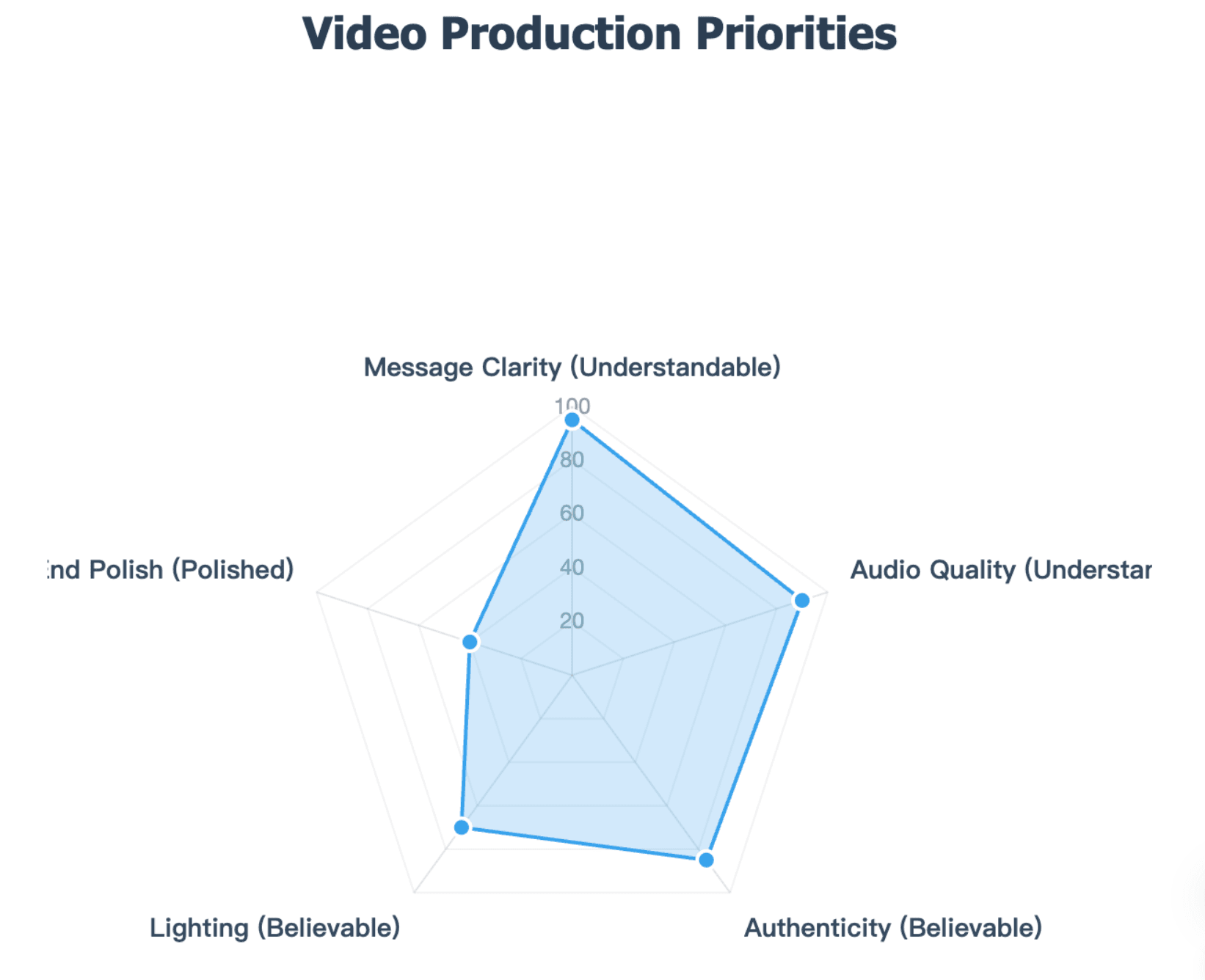
Think about quality in this order:
Understandable → Believable → Polished
A clear, relevant introduction recorded on a phone is often more useful than a beautifully produced video with no clear message.
How Can You Sound Natural Instead of Reading a Script?
Write a full draft if it helps you organize your thinking, but do not assume you need to memorize every sentence. Shorten the draft into speaking points, practice the transitions, and then explain the ideas in your normal voice.
Look toward the camera lens rather than constantly watching yourself on screen. Use natural facial expressions and gestures, and slow down when your audience may include non-native speakers; Bridge specifically recommends clear, simple speech for prospective language learners.
You also do not need endless retakes. Once the message is accurate, the audio is clear, and your delivery feels natural, small imperfections can be less distracting than an over-rehearsed performance.
Use Visual Proof, B-Roll, and Captions to Strengthen the Message
Use visuals to prove, explain, or orient, not simply decorate. Project screenshots, a portfolio, classroom footage, product interfaces, presentations, or work-in-progress clips can provide evidence while you speak.
Captions are also useful beyond convenience. W3C notes that prerecorded video with meaningful audio content requires captions for accessibility under WCAG Level A, and automatic captions should be reviewed for accuracy. Names, companies, technical terms, and specialized vocabulary deserve particular attention during proofreading.
Should You Record Yourself or Use AI to Make a Self Introduction Video?
AI can reduce production work, but the right level of automation depends on why the viewer is watching you. A video intended to assess the real applicant should be treated differently from a multilingual business introduction.
When Should You Use a Real Recording, AI Assistance, or an AI Avatar?
Think of AI use as a spectrum:
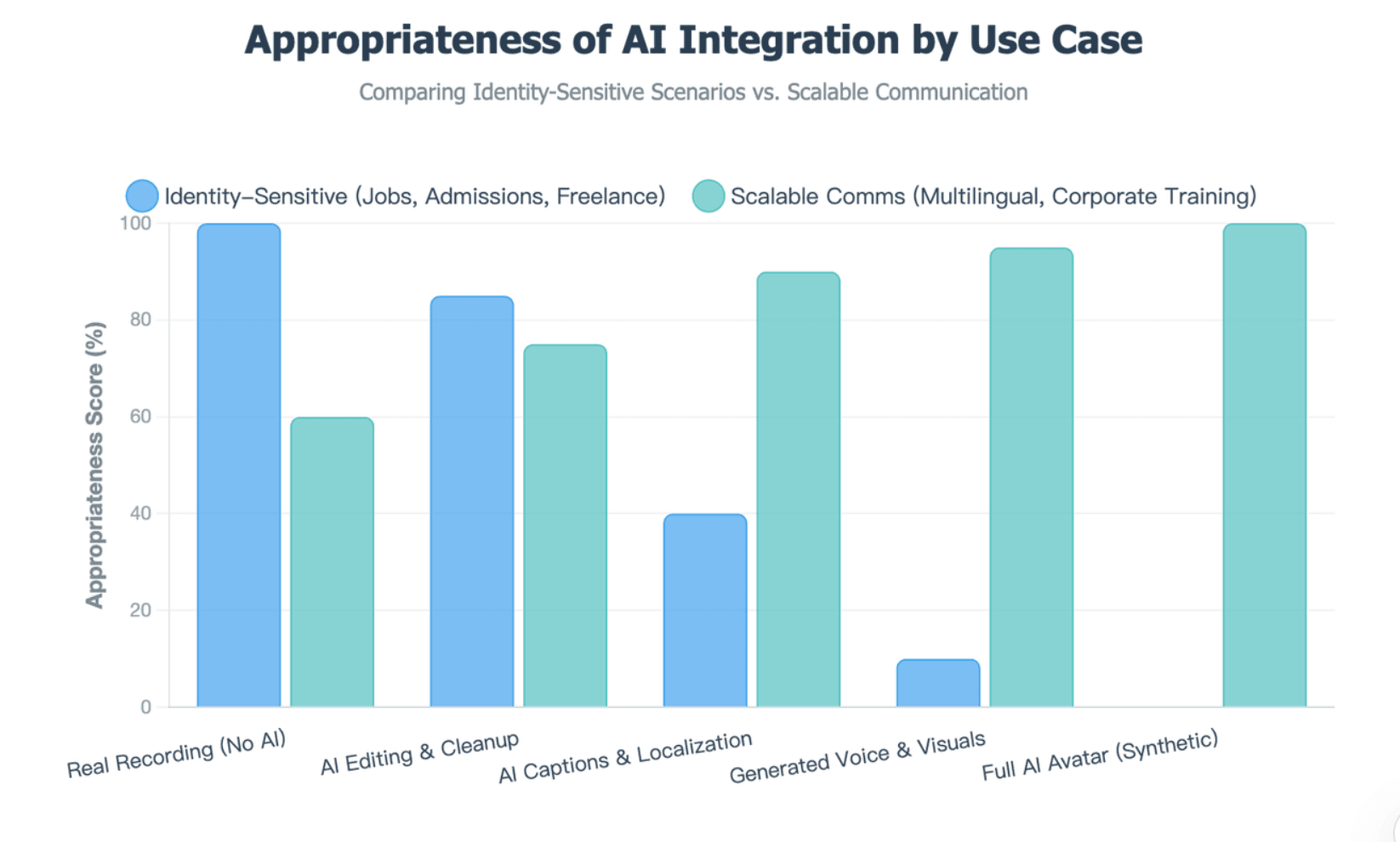
Real recording → AI editing → AI captions/localization → generated narration/visuals → AI avatar
For identity-sensitive situations such as job applications, scholarships, admissions, or marketplaces, check the rules before replacing your real appearance or voice. Upwork, for example, specifies that a profile introduction must represent the freelancer and must not mislead clients about identity or services.
AI avatars make more sense when the purpose is scalable communication rather than personal evaluation. Examples include multilingual course welcomes, internal introductions, repeated training content, or localized business communication.
How Can AI Help With Scripts, Editing, and Document-to-Video Workflows?
AI can be useful before and after recording even when you remain the person on camera. It can help extract relevant points from a résumé, shorten a script, generate captions, prepare localized versions, or reorganize source material into a clearer sequence.
For document-led workflows, Leadde can transform PDFs, presentations, learning materials, SOPs, and other documents into structured videos, including scripts, scenes, narration, AI presenters, and multilingual versions. This is especially useful when the introduction needs to be produced in several languages or adapted from existing written material rather than created from scratch.
Check Platform Rules and Privacy Before You Upload
Never assume one technical rule works everywhere. Preply currently requires horizontal video for tutor profiles, while a short-form social platform may favor vertical video; the correct format is the one required by your destination.
Before uploading, check the required length, editing restrictions, supported format, visibility setting, and whether the platform allows external hosting. Also consider what personal information appears in the video and who will be able to access it after submission.
What Are Good Self Introduction Video Examples—and What Mistakes Should You Avoid?
Examples are most useful when you study the reasoning behind them rather than copy the exact wording. A script that works for an ESL tutor can feel completely wrong in a scholarship application or freelancer profile.
Self Introduction Video Examples by Length and Purpose
A 30-second networking intro may only need your name, role, specialty, and a reason to connect. A 60-second professional introduction has enough space for one relevant proof point before the CTA.
A 1–3 minute teacher video can explain qualifications, teaching style, specialization, and what students should expect. A five-minute introduction can add stories, demonstrations, or deeper examples, but every extra section should still support the viewer's decision.
When studying an example, analyze it with:
Audience → Goal → Opening → Proof → Personality → CTA
That makes the example reusable without turning it into a script everyone else is also copying.
Common Self Introduction Video Mistakes
The most common mistake is repeating an entire résumé without adding context. Other problems include reading word for word, adding filler just to meet a time target, making unsupported claims about being “passionate” or “hard-working,” and talking only about yourself without connecting the message to the viewer.
Production mistakes matter too. Poor audio, distracting effects, inappropriate platform formatting, excessive personal information, or using an AI avatar where the real person is expected can undermine an otherwise good script. Upwork also warns against weak eye contact, low-quality audio, excessive transitions, and ending without a clear CTA.
How Do You Know Whether Your Self Introduction Video Is Working?
Do not judge the video only by whether it looks polished. Ask whether it helps the viewer make the decision you intended.
For a job application, the useful outcome may be an interview. For a freelancer it may be an inquiry, for a teacher a trial booking, and for a creator it may be watch retention or a follow.
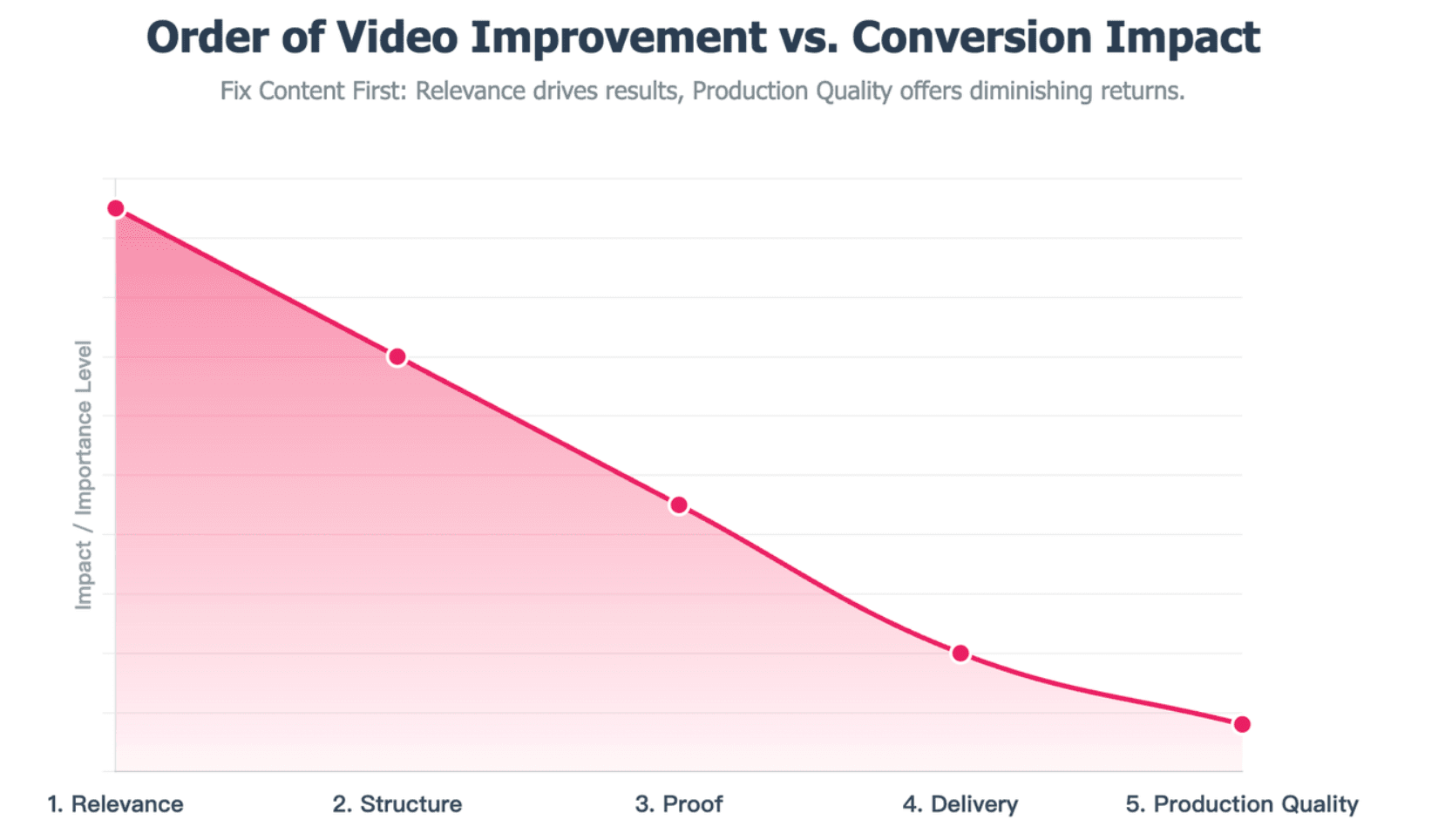
If the video is underperforming, improve it in this order:
Relevance → Structure → Proof → Delivery → Production quality
A clearer message usually deserves attention before a better camera.
Conclusion
A successful self introduction video is not a résumé read aloud. It is a short, audience-focused explanation of who you are, what value you offer, and why the viewer should care, supported by relevant evidence and natural delivery. Whether you record with a phone or use AI to streamline parts of the workflow, prioritize clarity, relevance, authenticity, and the requirements of the platform where the video will be used.