How to Use MiniMax H3: Complete Guide to Prompts, References, Audio, and ComfyUI

MiniMax H3 is best used by choosing the right generation mode first, then deciding what should be controlled by text, frames, references, motion, and audio. You can generate from text, lock a first or last frame, or use images, videos, and audio to guide identity, movement, camera behavior, and voice.
Because H3 combines multimodal references with native audiovisual generation, better results usually come from clear control rather than longer prompts. This guide explains how to choose the right workflow, write better prompts, use references, manage dialogue and sound, test efficiently, and work with ComfyUI or the API.
If your starting point is a PDF, presentation, SOP, or training document rather than a creative prompt, Leadde can be a better fit for turning structured source content into a video workflow before or instead of manually directing each scene in H3.

How to Use MiniMax H3: Which Workflow Should You Start With?
The fastest way to use MiniMax H3 is to choose the generation mode before writing the prompt. H3 supports text, first/last-frame inputs, and multimodal references, but each input plays a different role. MiniMax’s official model card separates its open-weight checkpoints into FL2VA for text and frame-based generation, and Ref2VA for reference-driven generation with images, videos, or audio.
| Mode | Best For | What Controls the Video |
| T2VA | Creating a scene from scratch | Text prompt |
| I2VA | Starting from an exact image | First frame + prompt |
| L2VA | Reaching a specific ending | Last frame + prompt |
| FL2VA | Controlling both start and finish | First + last frames |
| Ref2VA | Preserving identity, motion, camera, style, or voice | Multimodal references + prompt |
Is your image a frame or a reference?
This distinction solves many control problems.
A frame is a temporal anchor. If an uploaded product image must literally be the first image viewers see, use it as a first frame.
A reference is reusable information. If you only need the product design, character face, outfit, or visual style to remain consistent while creating a new composition, treat it as a reference.
MiniMax’s official prompt guidance makes this distinction explicit: I2VA begins from the supplied image at 0.00 seconds, while full-reference mode separately tracks subjects, pictures, videos, and audio according to the role each asset plays.
The H3 Control Stack
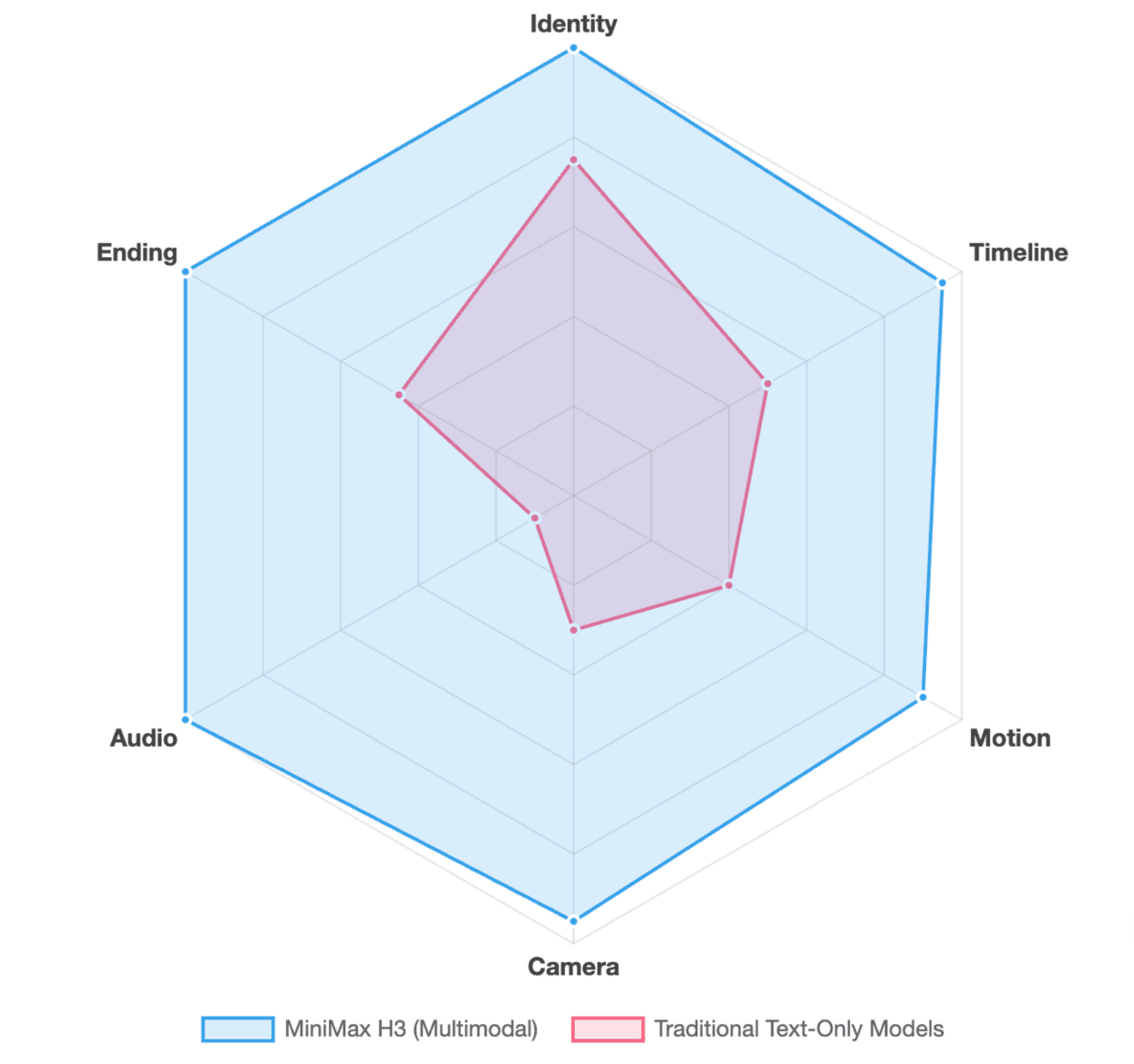
Before prompting, decide what controls six parts of the video: identity, timeline, motion, camera, audio, and ending.
For example, a commercial video could use a reference image for product identity, text for the product’s action, a reference video for camera movement, native audio instructions for sound design, and a last frame for the final hero shot.
This prevents a common mistake: asking one long text prompt to control everything.
How Do You Write a MiniMax H3 Prompt That Gives You More Control?
A useful H3 prompt describes the video in playback order. Think like a director describing what can actually be seen and heard, rather than a copywriter listing adjectives, much like the best practices used to write an effective video script.
A practical structure is:
Scene → Subject → Action → Camera → Dialogue/Sound → Ending
MiniMax’s official base prompt format follows the same underlying logic. Its integrated_multimodal_description describes shots in sequence, while overall_soundscape and non_diegetic_music separately control physical sound and soundtrack.
Build the scene in playback order
Instead of:
A premium cinematic skincare commercial with dramatic movement.
Use an observable sequence:
A glass serum bottle stands on a dark stone pedestal. A narrow light sweeps across the label. The bottle slowly rotates clockwise while the camera pushes closer. Condensation catches the light. The bottle stops with the logo facing camera.
The second version gives H3 visible state changes to execute.
Also consider a complexity budget. A 10-second clip with three characters, four cuts, a transformation, two dialogue lines, a moving camera, and several references may be technically describable, but that does not mean all those events fit naturally into ten seconds.
Direct camera movement and cuts intentionally
Specify camera behavior only when it contributes to the shot: push in, pull back, pan, track, tilt, arc, or remain static.
Avoid turning every framing adjustment into another cut. A slow change from medium shot to close-up can often be described as a camera move rather than a new scene.
Define the ending, not just the action
A prompt becomes easier to control when it explains where the action finishes.
Instead of ending with “the character walks toward the window,” define the final state: the character stops beside the window, turns toward camera, and remains framed against the skyline.
This is especially important for product demo videos, logo shots, transitions, and first/last-frame workflows.
How Do You Use Images, Videos, Storyboards, and Voice References in MiniMax H3?
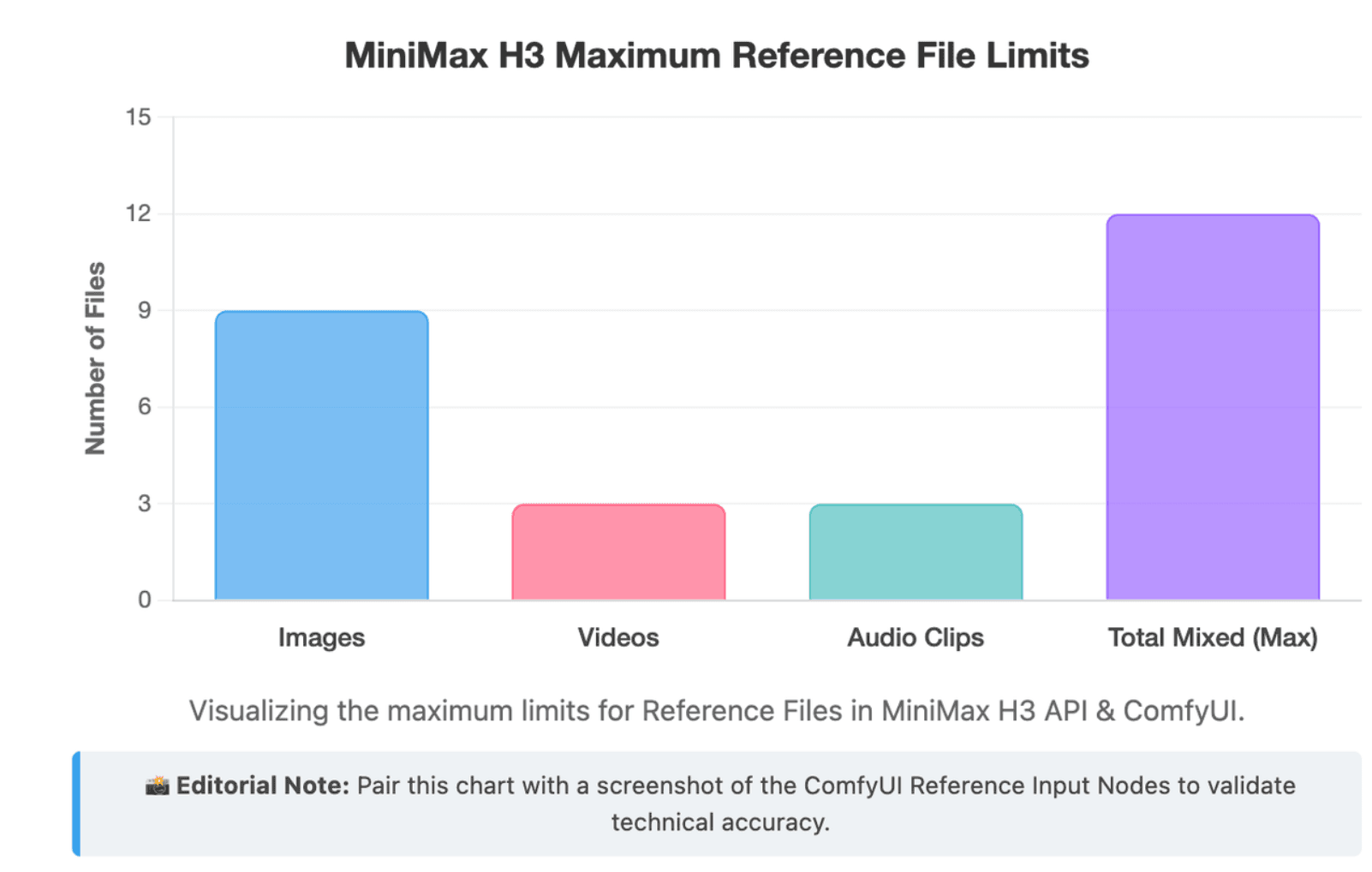
Reference-to-video is where H3 becomes more than a conventional image-to-video tool. The official Ref2VA model accepts multimodal references and can use them to influence identity, motion, camera behavior, style, and audio. MiniMax currently documents support for up to nine images, three reference videos, three audio clips, and 12 mixed files in total.
Give every reference one clear job
A strong reference setup might assign:
Image 1 → character identity; Image 2 → clothing; Video 1 → body motion; Video 2 → camera movement; Audio 1 → voice.
ComfyUI’s official H3 documentation recommends the same principle: reference each input in connection order and explicitly state which asset controls identity, style, motion, camera, or voice.
More references do not automatically create more control. They create more relationships for H3 to resolve. If two images imply different outfits while a reference video contains another character appearance, the model must decide which signal matters most unless the prompt makes those responsibilities clear.
<Subject> vs <Picture>
In MiniMax’s full-reference format, <Subject N> represents reusable visible content such as a person, object, environment, or other element abstracted from reference assets. <Picture N> represents a concrete image used as a frame or composition anchor. <Video N> and <Audio N> track temporal or audio references.
This means one subject does not have to equal one file. A character could combine facial identity from one image with clothing or motion information from another source.
When should you use a storyboard?
When spatial relationships become harder to explain than to show, a storyboard can act as a visual planning layer. This is particularly useful for multi-shot sequences, product reveals, character blocking, or recurring compositions.
From an AI video workflow perspective, the advantage is not that a storyboard guarantees every frame. It reduces how much spatial and shot-planning information must be communicated through prose alone.
How Do You Control Dialogue, Sound Effects, and Music in MiniMax H3?
H3 generates native stereo audio together with video rather than treating audio as a separate post-production layer. MiniMax specifies 32 kHz stereo output, and its prompting system supports dialogue, physical sounds, and non-diegetic music as separate concepts.
Write dialogue as part of the shot
Dialogue should answer four questions: who speaks, what they say, when they speak, and how much screen time they have.
MiniMax’s structured format can use persistent speaker IDs such as (S1) and dialogue tags such as <d>[English]...</d>. However, beginners do not need to begin with syntax. The more important principle is timing.
Use dialogue budgeting
Dialogue consumes real seconds.
If a speaker appears for four seconds, avoid writing a sentence that realistically requires eight seconds to deliver. Otherwise the model must compress, rush, truncate, or distort the speech.
This matters in practice because local H3 users are already iterating on shot timing and dialogue alongside visual prompting rather than treating speech as an independent layer. One reported RTX 5080 test used a structured multi-shot prompt and required repeated prompt adjustments while generation itself remained computationally expensive.
Separate soundscape from background music
Use the soundscape for sounds that physically exist in the scene: footsteps, engines, wind, doors, crowds, fabric movement, or machinery.
Use non-diegetic music for music heard by the audience but not by the characters.
Separating the two gives H3 more useful direction than a vague instruction such as “add cinematic audio.” MiniMax’s official prompt format deliberately keeps these two audio layers separate.
What Settings and Testing Workflow Produce Better MiniMax H3 Results?
MiniMax documents H3 output at 4–15 seconds, 24 FPS, with multiple aspect ratios and a default 768-pixel short edge for the open H3-Base workflow. Its complete system can produce 2K through H3-Regenerate-2K.
Choose duration, aspect ratio, and resolution based on the shot
Do not automatically choose the longest duration. Match duration to the number of meaningful events.
Use 16:9 for most landscape content, 9:16 for vertical social video, and 1:1 when square composition serves the distribution channel. In ComfyUI, the official H3 workflows expose aspect ratio and megapixel controls through a Resolution Selector, with higher pixel counts increasing generation cost.
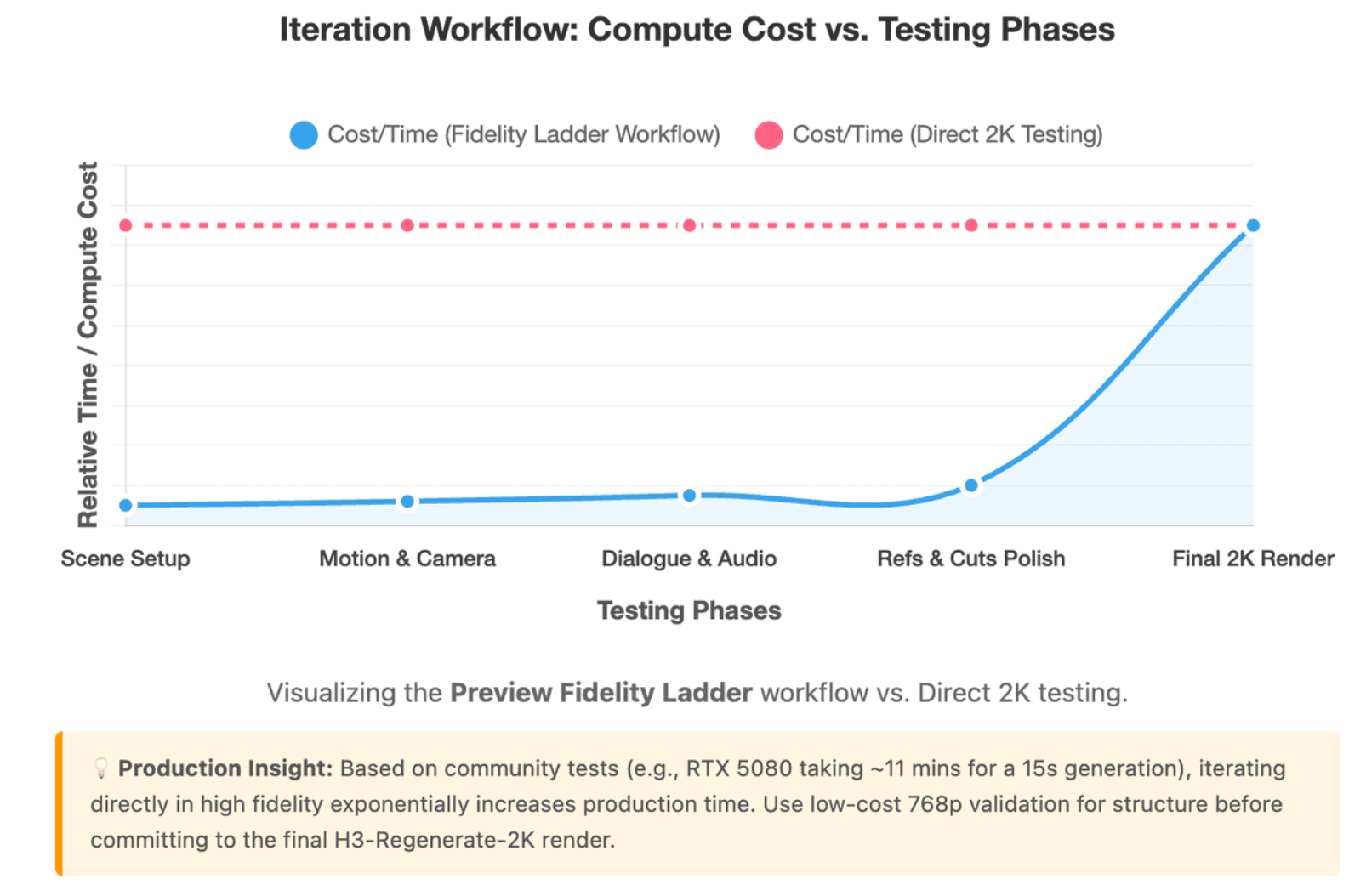
Use a Preview Fidelity Ladder
A low-cost preview is useful, but only for the right questions.
Early tests are good for checking composition, major motion, camera direction, cuts, and rough timing. They are less reliable for evaluating small text, distant faces, logos, or fine product details.
The goal is therefore not simply “always generate at low resolution first.” It is to use cheaper generations for structural decisions, then spend compute on the details that only become visible at higher fidelity.
Test one variable at a time
A practical production sequence is to validate the scene first, then motion and camera, then dialogue/audio, then additional references or cuts, and finally the high-quality generation.
This matters because the real cost of AI video is often generation cost × iteration count. In one community test, an RTX 5080 system produced a 15-second, 0.4MP, 10-step H3 generation in about 11 minutes, with per-step time rising substantially as video length increased. The user also reported needing workarounds to avoid out-of-memory failures. Treat this as a single real-world case, not a universal benchmark.
How Do You Use MiniMax H3 in ComfyUI, API Workflows, and Fix Common Problems?
ComfyUI currently provides official H3 templates for Text-to-Video, Image-to-Video, and Reference-to-Video. Its native nodes use the FL2VA family for text/frame workflows and Ref2VA for multimodal references.
The MiniMax API takes a different route: H3 tasks are asynchronous. You submit a generation, Context-IR, or regeneration task, receive a task_id, then query that task for the result. Successful generation tasks return the video through content.url, while Context-IR returns an enhanced prompt through content.prompt.
The complete H3 system should also not be confused with the open H3-Base weights. MiniMax describes three modules: H3-Context-IR → H3-Base → H3-Regenerate-2K. Local H3-Base validates 768p generation, while the full 2K workflow combines the original context with the 768p result for regeneration.
Diagnose failures at three levels
Before rewriting the prompt, identify the failure layer.
| Layer | Typical Problem | What to Change |
| Prompt | Wrong action, timing, camera, or ending | Rewrite the timeline |
| Reference | Identity, clothing, motion, or voice drifts | Clarify or reduce reference roles |
| Rendering | Tiny text, distant faces, fine details | Test higher-fidelity output/settings |
This is a useful distinction because not every visual defect is a prompting problem.
Common MiniMax H3 problems and practical fixes
If identity drifts, simplify conflicting references and clearly define which source controls identity. If a product or logo changes, explicitly separate must-preserve attributes from elements the model may redesign.
If the video feels rushed, reduce actions, cuts, or dialogue rather than adding more prompt detail. If speech sounds compressed, shorten the dialogue or give the speaker more time.
For first/last-frame warping, describe the intermediate physical transition instead of specifying only two endpoints. If an R2V reference has little influence, state its exact role rather than simply attaching it.
Local users should also treat performance tuning carefully. ComfyUI officially documents optional Sage Attention and says its example workflows can see roughly doubled generation speed with minimal quality loss, but other caching, quantization, and experimental optimization techniques may involve different trade-offs.
Conclusion
MiniMax H3 is easier to control when you treat video generation as a production workflow rather than a prompt-length contest. Choose the correct mode, assign each reference a specific responsibility, budget actions and dialogue within the available time, test structural decisions before final-quality rendering, and diagnose failures as prompt, reference, or rendering problems. That approach scales from simple text-to-video clips to complex multimodal setups, reflecting how people are making AI videos so fast today.