
AI Actors Generator for Scripted Video
What Is an AI Actors Generator?
An AI actors generator casts a digital performer to deliver a script on camera, replacing the part of production that needs a person, a call sheet and a set. Leadde ships with more than 300 avatars to cast from, and each one can be paired with any voice in the library, so the performer and the delivery are chosen separately.
Trusted by the world's leading brands







AI Actor Performances You Can Watch

Corporate culture training
GlobalPro Consulting presents core values of integrity, excellence, innovation, and commitment to lasting value.
Tool training

Field safety
Learn how visible field controls, scaffold checks, and excavation safeguards prevent unsafe work before it starts.
Onboarding walkthrough
Turn compliance documents, safety protocols, or regulatory guidelines into structured certification videos. Let an AI avatar walk employees through each requirement clearly — reducing legal risk and keeping teams audit-ready.
Why Leadde Is the Best AI Actors Generator
Cast from 300+ presenters
Cast face and voice apart
Add expression and movement
Recast without reshooting
How to Create an AI Actor Video
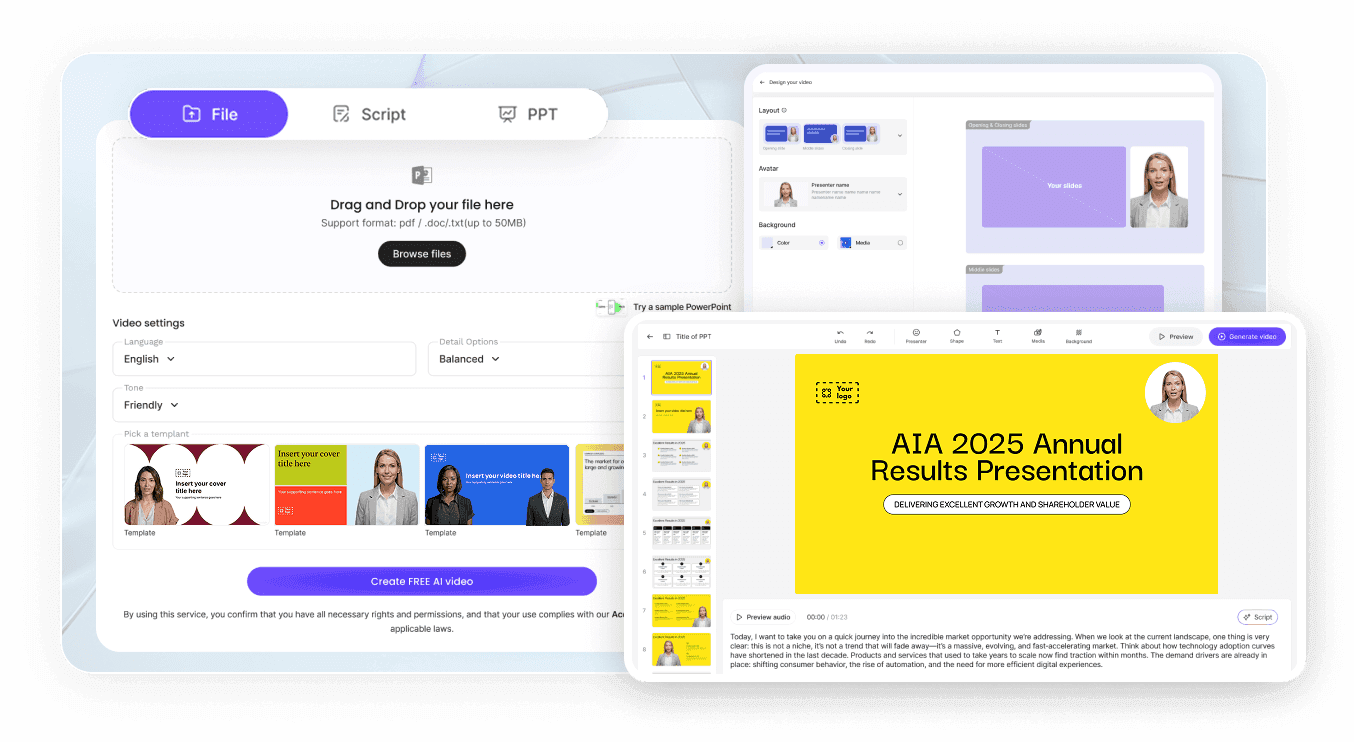
Step 1: Cast the performer
Step 2: Set voice and engine
Step 3: Preview, then generate
AI Actor Use Cases
Run UGC-style ad variants
Test three performers reading the same offer and keep whichever holds attention. The script stays fixed, so the actor is the only variable.
Staff a training series
Courses go stale when the presenter leaves. A cast avatar stays available for the whole curriculum and for the revisions that follow.
Demo a product feature by feature
Each release gets its own short video from the same presenter, which makes the series feel like one product rather than a folder of clips.
Localize a campaign
Produce a local-language draft from the finished video, and each region sees the same performer delivering copy written for it.

Production Standards Without a Production Crew
Hold the brand look steady
Build scenes, not single takes
Edit a line, keep the take
Cast people you may depict
AI Actor Video Ideas
Product explainer with a host
Compliance and policy briefings
Sales outreach at named accounts
Multi-scene brand stories
Recruitment and employer branding
Event and launch announcements
Frequently asked questions
An AI actor appears on screen and delivers the script visually, with lip sync, expression and movement. An AI voice actor only supplies the audio. In Leadde you cast the on-screen avatar and choose the voice separately, so one can change without the other.
Leadde includes more than 300 avatars, covering a range of ages, appearances and settings. Open Avatars in the left menu to see which ones your account can use right now. Those marked with a lightning icon require an upgraded plan.
That depends on the engine. The Standard Engine handles basic motion and lip sync. The Expressive IV Engine adds natural expressions and full-body movement, with up to 60 seconds of it per video, so preview the scene before you commit to a long render.
Yes, in two ways. Upload a clear photograph under My Avatars and Leadde builds a Photo Avatar from that single still. For a Studio Avatar, which mirrors your actual movement and expressions, email support@leadde.ai with a video clip and the team sets it up for you.
Duplicate the project instead of starting a new one. The avatar, the voice and the brand settings all carry across, and the only thing you replace is the script. That keeps the performer identical from video to video without anyone having to remember which one you cast.
Yes. Leadde offers four plans: Free, Starter, Creator and Enterprise. Casting from the preset library costs nothing extra, although avatars marked with a lightning icon need an upgrade. Generating the video itself consumes credits, which are shared with AI tools and voice cloning across your account.
Check the plan terms on the pricing page, which is where commercial rights are defined per tier. The preset avatar library is cleared for use. An avatar built from a real person is different: that person has to have given permission before you create it, colleague or public figure alike.
Yes. Write the script in the language you need, or translate a finished video into another language as a new draft from the editor or the share page, and choose whether canvas text is translated as well.
Cast your first AI actor
