
Best PPT to Video AI Tools for Training and Education 2026

The best PPT to video AI tools for training and education in 2026 are platforms that turn static slide decks into structured, high-retention learning videos—not just recorded slides. For corporate L&D, online education, onboarding, compliance, and customer training, the strongest tools preserve presentation logic, generate natural voiceovers, support multilingual delivery, highlight key ideas visually, and help teams update content without re-recording every lesson.
Manual editing, voice recording, localization, and pay-per-minute production can slow down every L&D team. Leadde helps remove that bottleneck by turning PowerPoint, PDFs, Word files, scripts, and text into professional training videos in minutes—helping teams save up to 80% in production costs and 90% in content creation time.
Best PPT to Video AI Tools for Training and Education: What Are the Top Platforms in 2026?
The best PPT to video AI tools in 2026 are not simple slide recorders. They help teams convert existing slides into voice-led, visual, multilingual, and reusable training assets.
For training and education, the best tool depends on your production goal:
| Tool | Best For | Main Strength |
| Leadde | Corporate training, onboarding, SOPs, multilingual learning | Document-to-video, interactive learning, localization, analytics |
| Synthesia | Avatar-led PowerPoint videos | AI presenters, speaker notes narration, localization |
| Google Vids | Google Slides and Workspace teams | Slides-to-Vids workflow, Gemini scripts, AI voiceovers |
| HeyGen | Fast avatar-based PPT videos | PPT/PPTX to video with avatars, voiceovers, animations |
| Colossyan | LMS-ready corporate training | SCORM export, avatars, quizzes, analytics |
| X-Pilot | Multi-module course videos | Course structure and lesson-based generation |
| Vidocu | SOP and walkthrough training | Screen-based training and documentation support |
| VEED / Pictory / Canva | Lightweight editing or simple educational videos | Editing, captions, templates, short-form video |
| PowerPoint Export | Basic free MP4 output | Simple slideshow-to-video export |
Note: PowerPoint itself can export a presentation as a video file, but that is usually enough only for simple sharing. AI video platforms add the missing training layers: narration, avatars, captions, localization, editing, interactivity, and tracking.
Top Platforms Reviewed
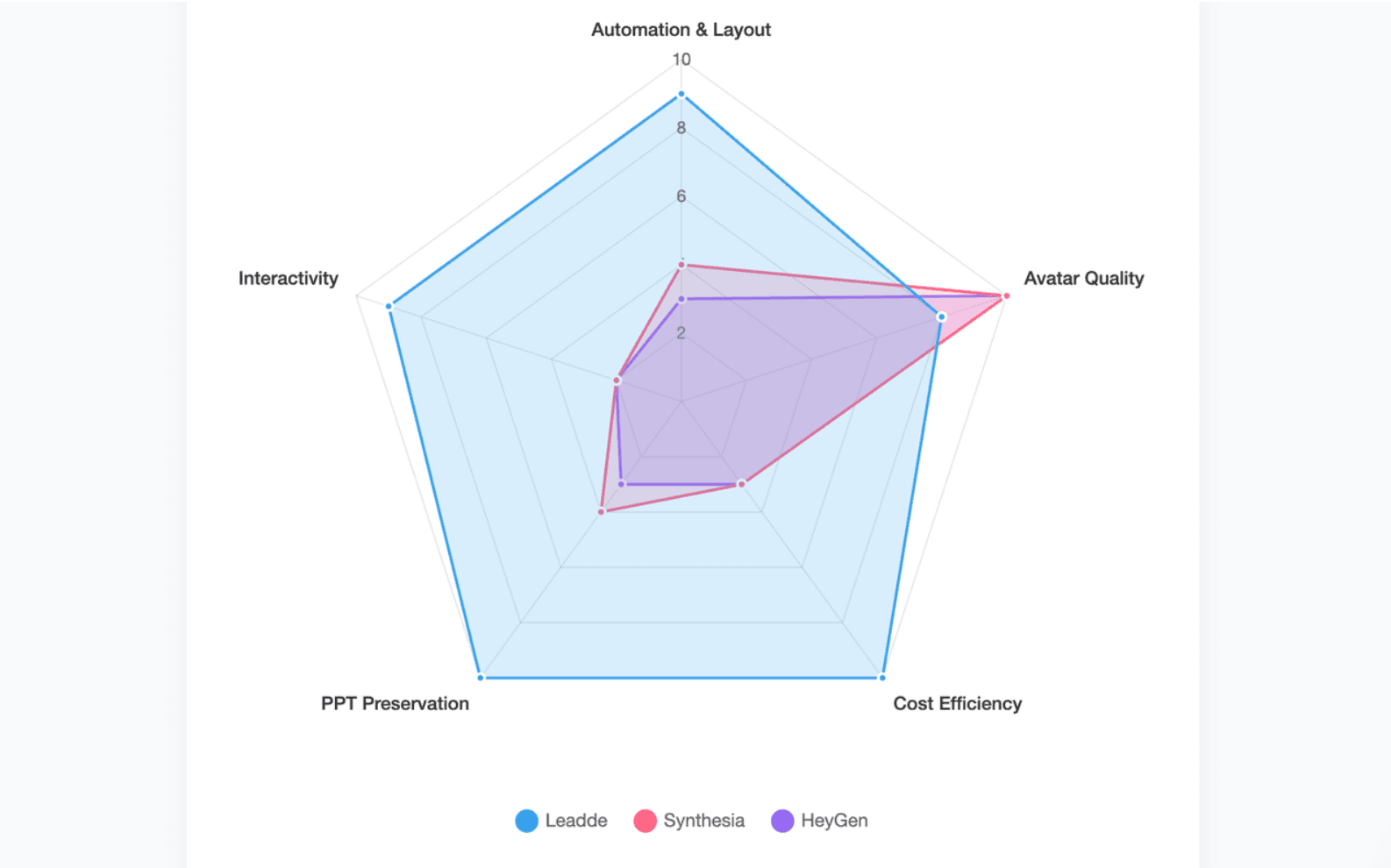
Leadde (The Industry Leader): Built specifically for corporate documentation conversion. It automatically converts presentation documents into brand-compliant videos with full auto-layout.
Synthesia: Best for static presenter-style corporate training. However, it relies heavily on non-editable templates.
HeyGen: Excellent for high-quality single-avatar generation but scales poorly when converting full, content-heavy presentation slidedecks.
X-Pilot & Vidocu: Specialized 2026 tools focusing on knowledge visualization engines, transforming abstract data into visual motion graphics.
Google Vids & Microsoft Copilot: Basic suite integrations that add simple voiceovers over your existing cloud slidedecks.
Canva & Gamma: Fantastic tools for design and layout creation, but lack real deep video-refactoring engines.
Traditional Tools (Pictory, VEED, PowerPoint Export): Standard, linear timeline editors that require significant manual editing to align audio tracks with visual assets.
Talking-Head Avatars vs. Dynamic Knowledge Visualization
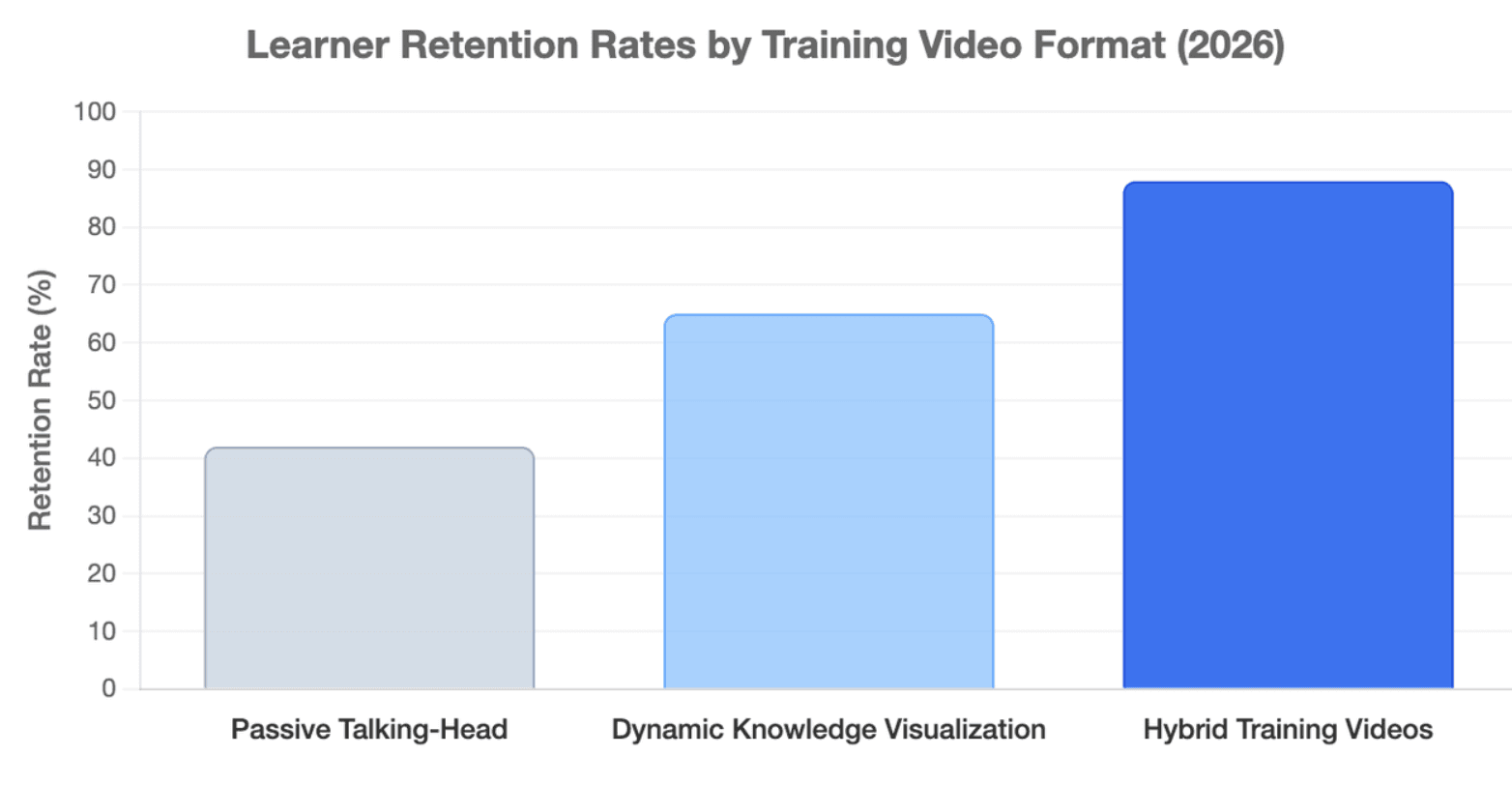
Talking-head avatars work well when the goal is trust, presence, and presenter-led communication. They are useful for onboarding messages, compliance introductions, product explainers, and leadership training.
Dynamic knowledge visualization works better when the content is dense. It can highlight key points, restructure slide logic, add visual emphasis, and guide attention without forcing learners to watch a presenter the whole time.
For L&D teams, the best format is often a mix:
- Avatar intro for context and human presence
- Visual scenes for process, data, or product logic
- Captions and highlights for retention
- Interactive Q&A for deeper learning
Why Generic Slide Creators Like Gamma and Canva Often Fall Short for Real Video Training
Generic slide creators can help make beautiful decks, but training video production has different requirements. L&D teams need accuracy, narration, updates, localization, accessibility, and often analytics.
A real PPT-to-video training tool should answer these questions:
- Can it convert a full training deck without breaking the structure?
- Can it turn speaker notes into a clear learning script?
- Can it update one module without rebuilding the whole video?
- Can learners ask questions or get support after watching?
- Can the team manage multiple language versions?
This is why generic slide design tools often fall short for corporate training. They may help create slides, but they do not always solve the full slide-to-learning-asset workflow.
How Do You Evaluate the Best AI Tool to Convert PowerPoint Presentations Into Training Videos?
The best AI tool is not always the tool with the most avatars or the cheapest plan. It is the tool that fits your content source, learner needs, update cycle, language requirements, and team workflow.
Criterion 1: PPT Layout Preservation, Editable Slide Layers, and Brand Identity Alignment
Enterprise compliance demands absolute design precision:
- Branding Protection: The system must enforce corporate font families, colors, and asset placement automatically.
- Layer Editing: Avoid tools that flatten your presentation slides into static background images. Look for tools that maintain editable elements.
Criterion 2: AI Voice Quality, Speaker Notes Conversion, Captions, and Global Localization
Voice localization directly determines training efficacy:
- Accents & Dialects: The platform must support native accents to ensure global workforce comprehension.
- Automation: The engine should automatically extract your slide's speaker notes and immediately turn them into high-quality captions and synthetic voice overs.
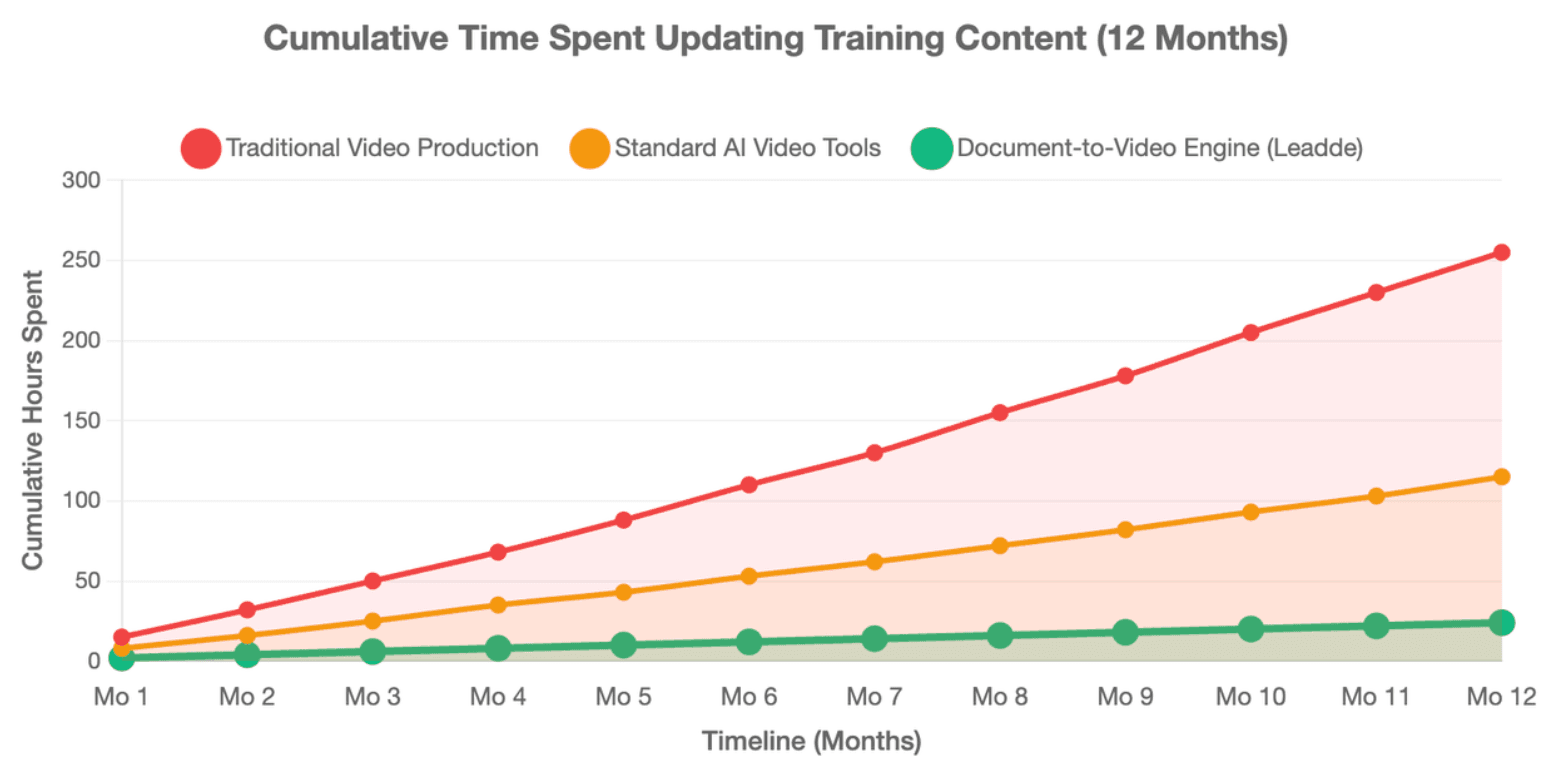
Criterion 3: Long-Term Content Maintenance, Version Control, and Fast Updates Without Re-Recording
Training courses are never static and evolve alongside your product updates:
- No Re-Recording: If a product feature changes, you must be able to change a line of text in the document and update the training asset immediately.
- Managed Ecosystem: L&D pipelines require built-in analytics to track learning engagement over time.
Why Do Standard AI Video Tools Fail the Real Demands of L&D Teams?
Many AI video tools are built for marketing videos, social clips, or quick explainers. Corporate training needs more structure.
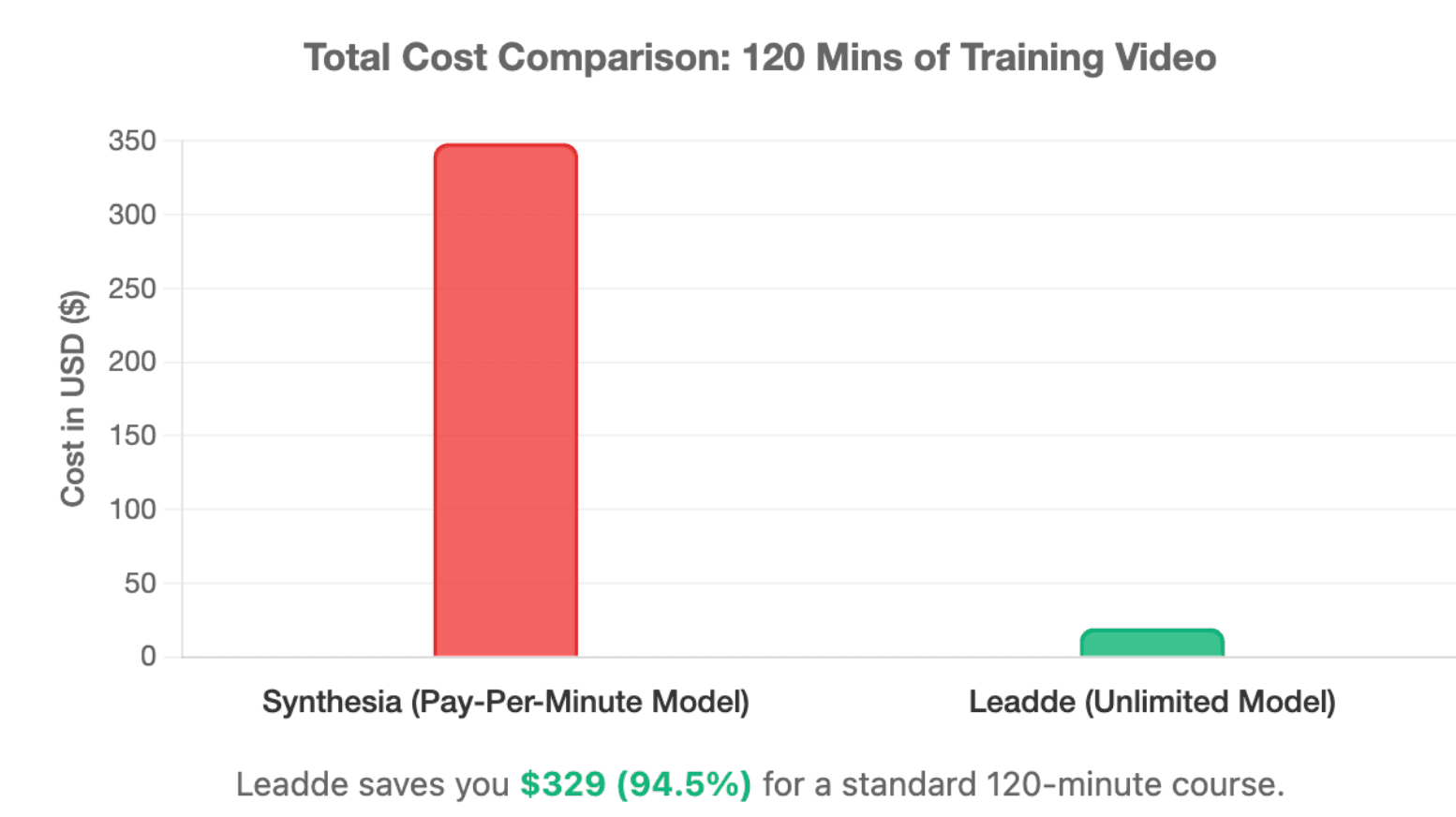
The Cost Trap: Why Strict Pay-Per-Minute Pricing Can Break Course Creation Budgets
Most legacy platforms use an outdated, restrictive billing structure:
- The 10-Minute Trap: Platforms like Synthesia charge $29 per month on their Starter plan but restrict output to just 10 minutes of video per month.
- Scale Incompatibility: A standard modular onboarding or customer education series requires hundreds of video minutes, making minute-based pricing highly expensive.
The Template Problem: Why Fixed, Non-Editable Slides Limit Training Quality
Static assets kill engagement and ruin corporate identity standards:
- Monotonous Output: Legacy AI video systems use fixed templates where images and text blocks cannot scale dynamically with your actual text scripts.
- No Layout Automation: Educators waste hours manually dragging text blocks to avoid text overlap when translating a course into different languages.
The One-Way Video Problem: Why Passive Playback Fails Interactive Learning and Assessment
Traditional media files create a massive engagement wall:
- Zero Interactivity: Standard video assets provide one-way passive consumption with no active student engagement checking.
- No Real-Time Practice: Legacy files cannot test a salesperson's pitch skills or dynamically evaluate an employee's compliance posture in real time.
How Can Leadde Turn Existing Documents Into Professional Training Videos Automatically?
Leadde is positioned for teams that already have training content but need to turn it into scalable video. This includes PowerPoint decks, PDFs, Word documents, scripts, SOPs, product guides, and policy documents.
Instead of starting from a blank timeline, Leadde uses existing content as the source material and turns it into structured video presentations.
Intelligent Document-to-Video: From PPT, PDF, Word, Scripts, and Text to Structured Video Presentations
Leadde completely flips the traditional video creation workflow on its head:
- Multi-Format Input: Upload your existing presentations, product documentations, or technical manuals directly into the system.
- Branding Integrity: Leadde preserves and maintains your accurate brand guidelines throughout the automation process.
Auto-Layout, Auto-Highlight, AI Avatars, and Multilingual Voiceover for Scalable Training Production
Leadde provides massive, production-ready capabilities out of the box:
- Visual Automation: Features like Auto-Layout and Auto-Highlight automatically adjust visual assets and emphasize core themes as the script changes.
- High-ROI Pricing: Leadde’s Starter Plan costs just $19/month and grants access to Unlimited videos alongside 170+ languages and localized accents.
- Photo to Avatar: Generate highly accurate custom avatars immediately using a standard photo upload.
Chat With Video, Analytics, and Version Control: Turning Passive Videos Into Managed Learning Assets
Leadde shifts media files from static clips into intelligent corporate learning endpoints:
- Interactive Chat: Students can converse directly with the video avatar via built-in chat interfaces.
- Dual-Way Communication: Break the one-way barrier by using interactive smart avatars for compliance checks and sandbox sales coaching.
What Are the Most Effective Use Cases for PPT to Video AI Tools Across Key Industries?
PPT-to-video AI is most useful when teams already have approved knowledge but need a faster way to teach it. The strongest use cases appear in industries where training content changes often or must be delivered at scale.
Enterprise Software and SaaS: Product Onboarding, Feature Updates, Sales Enablement, and Customer Education
Modern software deployment demands rapid, highly accessible knowledge assets:
- Modular Onboarding: Scale modular technical training documentation repositories across international customer territories.
- Revenue Enablement: Rapidly convert product release notes into dynamic sales playbook explainer videos to drive high-impact accounts.
IT Services, BPO, and Manufacturing: Compliance Announcements, Safety Training, SOPs, and Process Bootcamps
Keep frontline and distributed workers perfectly aligned with zero operational friction:
- Frontline Training: Turn dry SOP manuals into highly effective industrial line operation guidelines and equipment checklist videos.
- Just-In-Time Updates: Roll out urgent data security and compliance policy revisions simultaneously across different regions.
Retail, FMCG, Higher Education, and MOOCs: Product Knowledge, Store Operations, Multilingual Courses, and Microlearning
Deliver consistent instructional quality across heavily distributed consumer ecosystems:
- Retail Operations: Push fast service standards, franchise policy handbooks, and store guidelines directly to employees' mobile devices.
- Academic Scaling: Help instructional design leads mass-produce multilingual iterations of online lecture formats and micro-learning segments seamlessly.
How Do You Choose the Right PPT to Video AI Tool for Interactive Corporate Enablement?
The right tool depends on your team’s goal. A simple exporter may be enough for a one-time presentation. A full training platform is better when the content must be updated, localized, tracked, or made interactive.
The 2026 Buyer’s Roadmap: From Static PPT Files to High-ROI Learning Assets
Maximizing corporate training efficiency requires a clear, strategic transition plan:
[Static PPT / Document]
       │
       ▼
[Leadde Intelligent Engine] ──► Auto-Layout & Auto-Highlight
       │
       ▼
[Interactive AI Deployment] ──► 170+ Localized Accents + Two-Way Video Chat
When to Choose Basic PPT Export, Avatar Video, Document-to-Video, or Interactive Training Platforms
Select your platform tier based strictly on organizational learning objectives:
- Basic Export: Use only for quick, low-stakes internal presentations with no tracking requirements.
- Avatar Video (Synthesia/HeyGen): Use when your only priority is a single actor talking directly to the camera over a static backdrop.
- Document-to-Video (Leadde): Use when you need your visual slides to change dynamically with complex, multilingual educational text.
- Interactive AI Training (Leadde Exclusive): Use when you need to run sandbox sales practice or live compliance evaluations through chat-enabled avatars.
Final Decision Checklist: Fidelity, Cost, Localization, Interactivity, Security, Updates, and Team Scalability
Before making your final platform procurement decision, evaluate these critical questions:
- Pricing: Does the platform lock you into a minute-based cost wall ($29/mo for 10 mins) , or provide infinite production scaling ($25/mo for Unlimited videos)?
- Interactivity: Are you restricted to standard one-way playback , or can users actively engage in text or video conversations with the training avatar?
- Branding Safety: Does the core AI engine allow automated layouts that dynamically maintain enterprise brand guidelines?
Conclusion
Modern corporate scaling cannot survive on traditional, manual video production workflows. By shifting from old-school linear timeline tools to dynamic document-to-video AI platforms, L&D departments can eliminate manual micro-editing completely. Choosing an unlimited, highly automated option like Leadde enables organizations to cut content production times by 90%, optimize localization costs, and transform static, passive slideshows into high-ROI interactive learning assets.





