Long PDF to Video: How to Keep Every Important Detail

Turning a long PDF into a video without losing important information takes more than a one-click summary. The safest approach is to map the document structure first, identify the facts, steps, conditions, and exceptions that must be preserved, then turn those into scenes and verify the final video against the source.
This matters most for training manuals, SOPs, research reports, product documentation, and other information-dense PDFs, where a missing warning, number, or exception can change the meaning of the content.
Tools such as Leadde can streamline this process by turning PDFs and other documents into structured video workflows with AI-generated scripts, narration, visuals, and multilingual output. But the best results still come from combining automation with source mapping, outline review, script checks, and final coverage validation.

Long PDF to Video: How Do You Convert It Without Losing Important Information?
A long-PDF-to-video workflow should preserve meaning before shortening wording. The safest sequence is:
- Audit the source PDF.
- Map chapters, sections, procedures, and evidence.
- Identify information that must remain.
- Split the source into logical video units.
- Generate and review the outline.
- Transform approved content into a spoken script.
- Create source-faithful visuals.
- Compare the final video against the original information map.
What Does Turning a PDF Into a Video Actually Mean?
“PDF to video” can describe very different outputs.
A narrated PDF essentially displays pages while a voice reads or summarizes them. A video summary extracts major points and compresses the document. A structured instructional video reorganizes the source into scenes designed around what viewers need to understand or do.
For a long document, the third approach is usually the most useful because PDF pages are designed for reading, not necessarily for audiovisual instruction.
Why Is a Long PDF an Information-Compression Problem?
Modern multimodal models can process extremely large PDF inputs. Google, for example, documents PDF understanding across text, images, diagrams, charts, and tables for documents up to 1,000 pages.
But input capacity is not the same as information coverage.
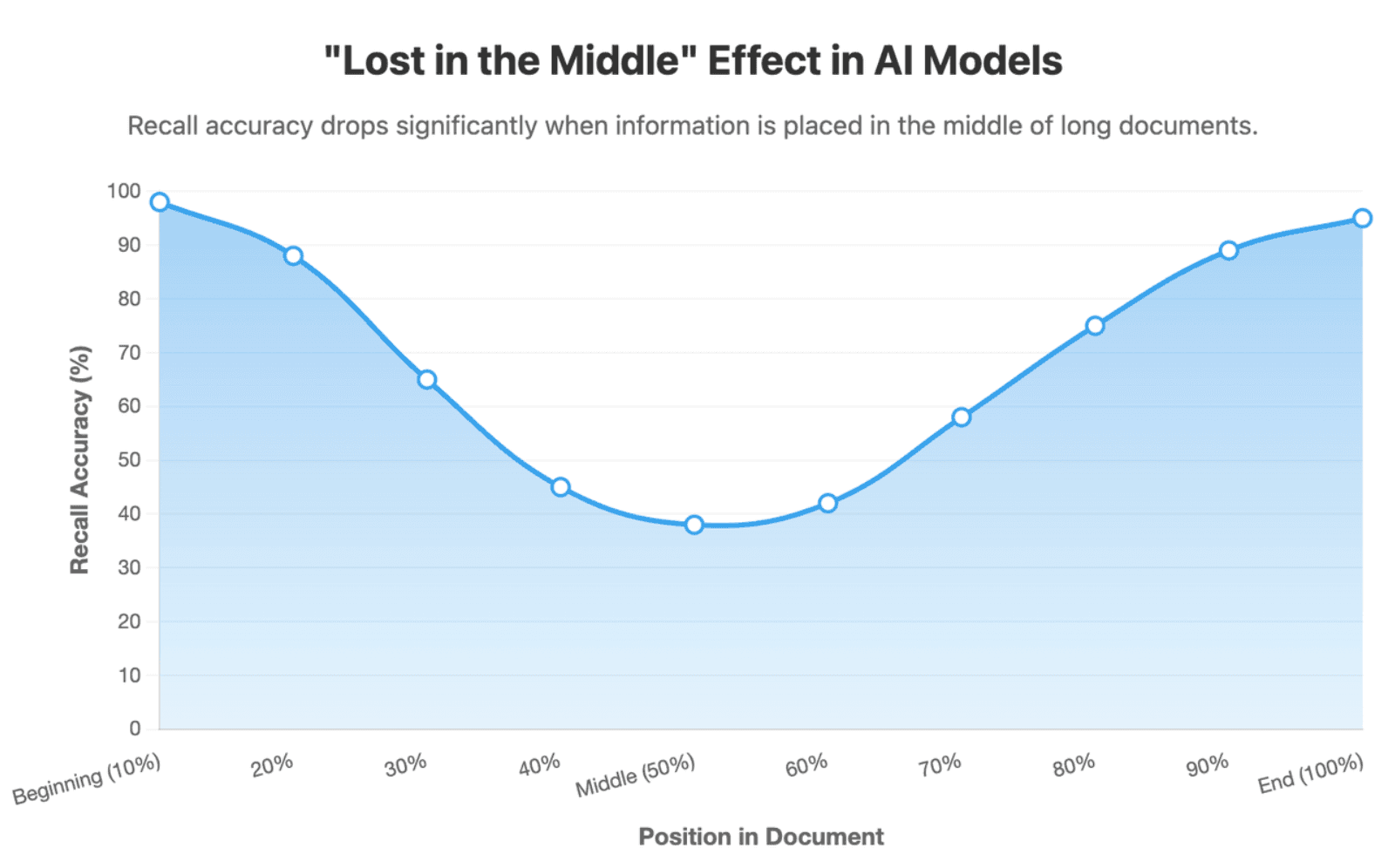
Research on long-context language models has shown that model performance can vary depending on where important information appears in a long input, with information in the middle sometimes used less reliably.
The practical implication is simple: do not assume that because an AI accepted 100 pages, every important detail made it into a five-minute video.
What Should You Check Before Turning a Long PDF Into a Video?
Many errors attributed to “AI summarization” actually begin earlier, during document extraction.
Check Whether the PDF Is Easy for AI to Read
Lower-risk PDFs usually have native selectable text, clear headings, a logical reading order, and simple tables.
Higher-risk files include:
- scanned pages with weak OCR;
- multi-column layouts;
- tables spanning multiple pages;
- dense footnotes;
- formulas and technical diagrams;
- screenshots containing critical text;
- inconsistent page layouts.
Do not move directly to video generation if the extracted source is already unreliable.
Confirm the Structure, Version, and Source of Truth
For SOPs, compliance materials, policies, and training content, confirm that the PDF is the current approved version.
Identify the chapters, procedures, appendices, revision date, and content owner before generating anything. Converting an obsolete document efficiently still produces obsolete training.
Choose the Workflow Based on Information Risk
| Information Risk | Typical Content | Recommended Control |
| Low | Marketing or conceptual explainers | More automation |
| Medium | Product education or standard training | Outline + script review |
| High | Safety, compliance, financial or technical procedures | Source mapping + SME + visual verification |
The more costly an error would be, the less the workflow should depend on automatic summarization alone.
Should a Long PDF Become One Video or Several Shorter Videos?
Usually, page count should not determine video structure.
A concept may begin on page 12, use a table on page 13, and explain its exception on page 14. Treating each page as an independent scene can break that relationship.
Split Content by Learning Objective or User Task
From an instructional design perspective, a stronger unit is usually one coherent viewer goal.
A 50-page onboarding manual might become separate onboarding videos for:
- account setup;
- security requirements;
- workplace policies;
- reporting procedures;
- troubleshooting.
That is often more useful than aggressively compressing the entire manual into one short video.
Use an Information Budget Before Compressing
Every video has limited narration time and viewer attention.
Before shortening the document, compare the available runtime with the number of must-keep information units. If a five-minute video cannot explain them clearly, create another video instead of deleting more source content.
This is especially relevant because some document-to-video products explicitly acknowledge that longer PDFs can reduce summary quality. Pictory, for example, currently says PDFs under 50 pages give its Doc-to-Video feature the best results and recommends splitting longer documents if key points are missed.
How Do You Decide Which Information Must Stay in the Video?
The goal is not to keep every sentence. It is to preserve every detail that changes the viewer's understanding, decision, or action.
Create a Must-Keep Information Map
Before writing the video script, classify the source:
| Priority | Treatment |
| Must Keep | Must appear accurately in the video |
| Should Keep | Can be compressed but should remain |
| Supporting | Examples or context that can be shortened |
| Reference Only | Can remain in the PDF rather than narration |
Must-keep content commonly includes definitions, dates, numbers, steps, warnings, limitations, dependencies, conditions, and exceptions.
Protect Caveats, Conditions, and Exceptions
Small words can carry large amounts of meaning.
Consider the difference between:
“The process improves performance.”
and:
“The process may improve performance under selected conditions.”
Removing may or under selected conditions creates a stronger claim than the source supports.
For high-risk PDFs, maintain a simple Caveat and Exception Register alongside the main information map. Record rules together with phrases such as only if, unless, except, approximately, must, and should.
Importance Depends on the Viewer’s Goal
Different documents require different preservation rules.
An SOP needs its sequence, decision points, conditions, and warnings. A research paper needs its methods, findings, and limitations. An executive report may prioritize KPIs, risks, and recommendations.
AI should therefore know the audience and objective before deciding what is expendable.
How Do You Turn the PDF Into an Accurate Outline, Script, and Visual Story?
The safest workflow moves from source structure to video structure gradually rather than jumping from PDF directly to final MP4.
Build a Source-to-Scene Map
Start with:
Document → Chapter → Section → Concept → Claim or Step → Evidence
Then connect those units to planned scenes.
| PDF Source | Must-Keep Information | Video Scene | Visual | Status |
| §3.2 | Password expires every 90 days | Scene 4 | Timeline | Covered |
| §3.3 | Service-account exception | Scene 5 | Callout | Covered |
This produces something most one-click workflows lack: traceability.
It also makes outline review concrete. If a source section disappears, it should be marked as merged, reference-only, intentionally excluded, or accidentally missed.
Several current AI-video workflows already recognize the importance of reviewing structure before generation. Synthesia's Assistant, for example, returns an editable outline before scenes are created, allowing sections and key points to be changed or added.
Transform the Script Without Changing the Meaning
A video script should not read the PDF word for word.
You can shorten sentences, explain jargon, add transitions, and turn written prose into natural spoken language. But do not casually alter terminology, figures, qualifying language, procedure order, or exceptions.
A useful production rule is:
Accuracy pass first. Style pass second.
Also separate source facts from explanatory additions. If the script adds an analogy or example to improve learning, reviewers should know that it was editorially added rather than taken directly from the PDF.
Protect Information-Bearing Visuals
Not all visuals serve the same purpose.
Decorative visuals include avatars, backgrounds, and B-roll.
Information-bearing visuals include charts, tables, process diagrams, equations, screenshots, and labels.
A stock video of an office may be relevant to a revenue report, but it cannot communicate a change from 12.4% to 8.1%.
When precise information is involved, prefer:
original visual → crop/highlight/animate
or:
verified source data → deterministic chart rendering
rather than asking a generative image model to recreate exact data from memory.
For AI-edited visuals, define preservation constraints: specify what may change and what must remain unchanged, such as numbers, arrows, labels, product geometry, or warning symbols.
How Do You Verify That the Final Video Did Not Lose Important Information?
The final quality check should be more systematic than simply watching the video once.
Use Three Review Gates
Gate 1: Outline review Check sections, sequencing, and coverage.
Gate 2: Script review Check facts, names, numbers, conditions, exceptions, and terminology.
Gate 3: Final video review Check narration, captions, visuals, timing, and localized versions.
For safety, compliance, legal, financial, or technical materials, add a subject-matter expert review before publishing.
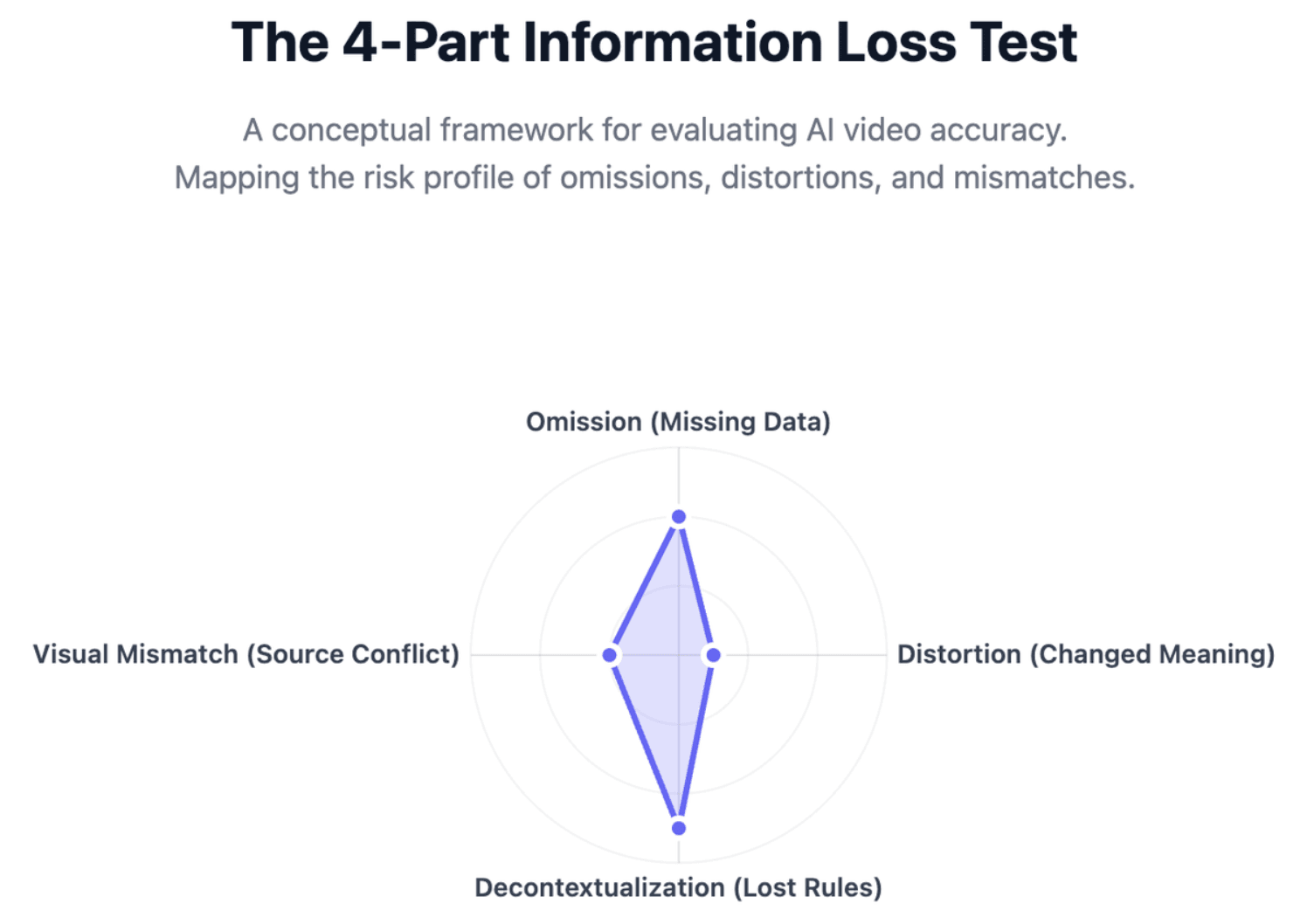
Run the Four-Part Information Loss Test
Ask four separate questions:
| Failure Type | Review Question |
| Omission | Did an important point disappear? |
| Distortion | Did its meaning change? |
| Decontextualization | Was a condition or exception removed? |
| Visual mismatch | Does the visual contradict or misrepresent the source? |
This is more useful than asking the vague question, “Is the video accurate?”
Measure Coverage and Preserve Traceability
Teams can also use a simple internal metric:
Coverage = correctly represented must-keep items ÷ total must-keep items
This is a practical QA method, not an industry benchmark.
The more important goal is zero unexplained omissions. If an item is deliberately excluded, document why.
Source-to-scene mapping also makes updates easier. When the PDF changes, identify the affected sections, find the corresponding scenes, and update those scenes rather than regenerating the entire video and introducing new wording or visual drift.
Frequently Asked Questions About Turning Long PDFs Into Videos
Can AI turn a 50-page or 100-page PDF into a video?
Yes, modern AI systems can process large PDFs, but successful upload does not guarantee complete information coverage. For long documents, first map the structure and split the source into logical modules. If several important objectives compete for limited video time, create a series instead of forcing everything into one short video.
Should every PDF page become a video scene?
No. PDF pages are layout units, not necessarily learning or communication units. One idea may span several pages, while a single page may contain several ideas. Build scenes around coherent concepts, procedures, questions, or viewer tasks rather than page boundaries.
How long should a video made from a long PDF be?
There is no single ideal length. Let the learning objective and information density determine the runtime. If the video becomes too dense to explain must-keep information clearly, split it into modules rather than removing increasingly important details.
Can AI summarize a long PDF without missing important information?
AI can summarize long documents effectively, but no general-purpose summary should be assumed to preserve every important detail automatically. Long-context research shows that information use can vary across large inputs. Use section-level processing, source mapping, and explicit coverage checks when completeness matters.
What is the best way to handle charts and tables in a PDF-to-video workflow?
Reuse the original chart when it is readable, or rebuild it from verified source data when animation or simplification is needed. Avoid relying on generative visuals for exact numbers unless the output is separately checked against the source.
Can scanned PDFs be converted into videos?
Yes, but scanned PDFs normally require reliable OCR or multimodal document processing first. Check reading order, headings, numbers, tables, and labels before video generation. Errors introduced during extraction will otherwise flow into the script and visuals.
How can I verify that an AI-generated video is accurate?
Compare the outline, script, and final scenes with a must-keep information map derived from the source. Check separately for omissions, changed meaning, missing conditions, incorrect numbers, and misleading visuals. High-risk content should also receive subject-matter expert review.
Conclusion
Turning a long PDF into a useful video is not about preserving every sentence or compressing dozens of pages into the shortest possible runtime. The goal is to preserve the information that changes what viewers understand, decide, or do. Source mapping, structured scene planning, script review, visual validation, and a final coverage check allow AI to accelerate production without giving up control over accuracy.