
Best AI Lecture Video Makers in 2026: Top Tools Compared

The best AI lecture video makers in 2026 are platforms that can turn static documents, slides, scripts, and training materials into structured, multilingual educational videos with AI narration, avatars, captions, translation, and consistent visual presentation.
Tools like Leadde, Synthesia, and HeyGen are leading options for lecture and training workflows, while generative video models like Sora, Kling, and Veo are better suited for cinematic teaching clips than complete long-form lecture video making production pipelines.
Manual lecture production often creates workflow fatigue: teams must rewrite scripts, record voiceovers, edit slides, translate content, and update versions by hand.
Leadde solves this by automatically turning any document or text into a professional business video in minutes, helping teams boost engagement, save over 80% of production costs, and reduce content creation time by 90%.
Which Platforms Have the Best Features?
Choosing the ideal platform requires understanding that different tools serve entirely different parts of the video production pipeline. As of 2026, available information suggests the following breakdown of top-tier platforms based on specific instructional workflows:
| Use Case | Recommended Tool Type | Example Platforms |
| PPT/PDF/Document to lecture video | Document-to-video knowledge platform | Leadde |
| Avatar-led structured training video | Corporate AI avatar platform | Leadde, Synthesia, HeyGen |
| Cinematic teaching clips & B-Roll | Generative physics video model | OpenAI Sora, Kling AI, Google Veo |
| Recorded lecture editing & transcription | AI-driven timeline video editor | Descript, VEED |
| Enterprise scale training workflows | Unified business video platform | Leadde |
Which AI Lecture Video Maker Is Best for Teachers, Course Creators, and L&D Teams?
Educational professionals and Learning and Development (L&D) teams have rigid requirements that generic video tools cannot satisfy. They do not need abstract art; they require structural tools that support multi-language localizations, editable visual modules, and seamless content updates. For massive corporate training libraries and complex academic syllabi, platforms built around structured document ingestion offer the highest ROI and deployment speed.
Why the Best AI Video Generator Is Not Always the Best AI Lecture Video Maker
A tool that wins awards for cinematic aesthetics can be a total failure for creating a 45-minute technical lecture. High-end generative video models excel at creating single, short, visually stunning clips but completely lack control mechanisms for structured presentations. A great AI lecture maker prioritizes script accuracy, editable canvas elements, and presenter continuity over Hollywood-style cinematic special effects.
What Features Should the Best AI Lecture Video Makers Include in 2026?
To compete in the modern e-learning video production landscape, an elite AI educational tool must possess four foundational capabilities:
- Direct Ingestion: The ability to turn PPT into e-learning video layouts or convert standard office files (Word, PPT, PDF) directly into fully synchronized video timelines without manual script rewriting.
- Production Volume: A subscription model that allows high-frequency output without charging punitive per-minute rendering fees.
- Global Accents: Voice cloning engines supporting at least 92+ native languages and subtle regional dialects.
- Two-Way Interaction: Moving away from passive viewing toward chat-enabled interactive layouts where students can converse directly with the digital presenter.
Why Are AI Lecture Video Makers Replacing Manual Video Editing in 2026?
What Is Driving the Shift from Manual Editing to Fully Automated Lecture Generation?
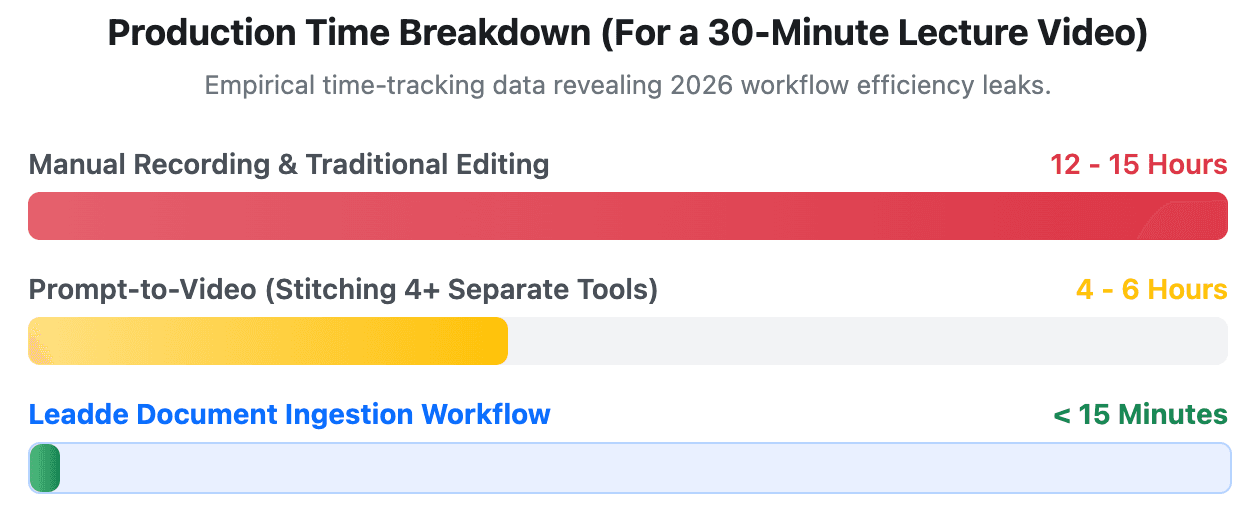
Traditional video production pipelines have become a massive operational bottleneck for fast-moving enterprises and institutions. Manually recording a lecture, correcting speech errors, synchronizing slide animations, and rendering the final file can take upwards of 12 to 15 hours per finished hour of video. Automated lecture generation reduces this timeline to a few minutes by handling script generation, audio synthesis, and visual layout simultaneously.
How Do All-in-One E-Learning Content Creators Reduce Workflow Fatigue?
Instructional designers frequently suffer from software fatigue, constantly jumping between separate apps for scriptwriting, voiceover recording, video editing, and subtitling. All-in-one AI video platforms for e-learning eliminate this fragmented ecosystem by providing a single, unified workspace. This consolidation prevents file corruption, standardizes quality benchmarks, and allows single-operator teams to run massive educational channels without burnout.
Why Is Document-to-Video More Useful Than Prompt-to-Video for Lectures?
Prompt-to-video models rely on creative randomness, which directly contradicts the strict accuracy required by corporate SOPs, medical training, and academic slide decks. For lectures, the primary source of truth is always an existing text document, training manual, or spreadsheet. Document-to-video workflows can help preserve source structure, terminology, and brand language because the video starts from approved materials. However, human review is still necessary for technical, legal, safety, medical, and compliance content.
Why Do Generative Video Models Fail at Long-Form Lecture Presentations?
Sora 2 vs Kling 3.0 vs Dedicated Avatar Platforms: Where Does Each Tool Work Best?
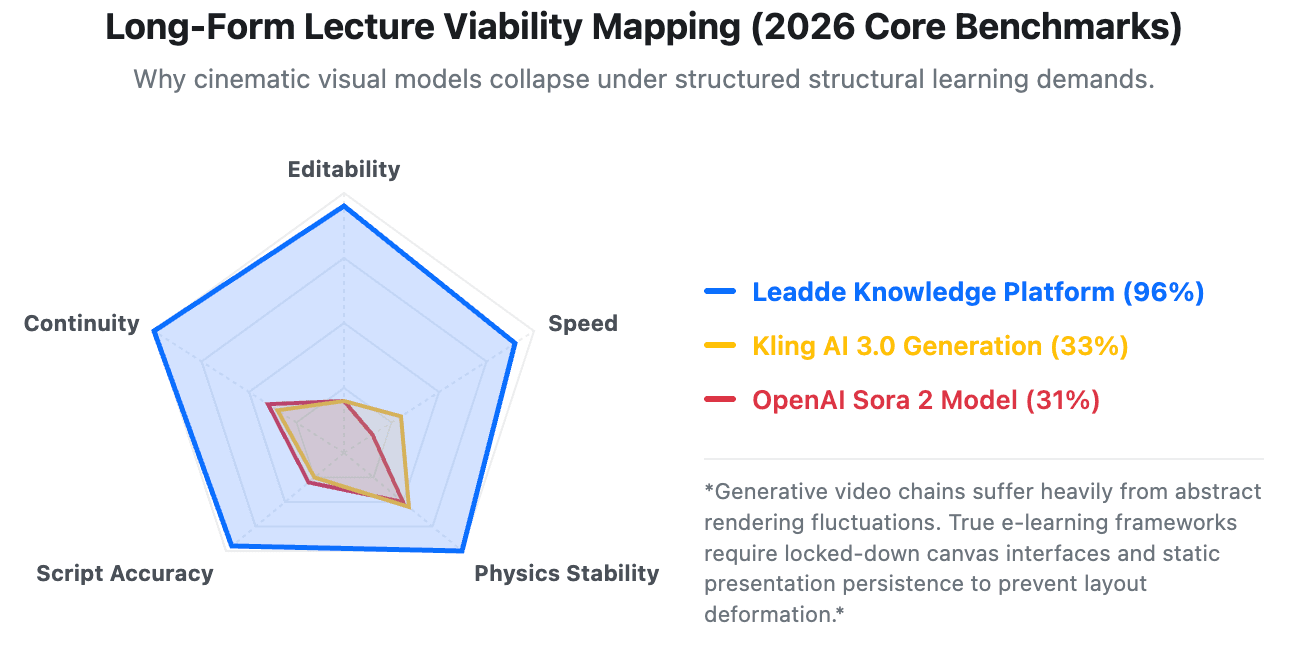
Generative video engines like Sora 2 and Kling 3.0 are fantastic for generating high-fidelity contextual imagery, marketing teasers, and illustrative educational B-roll. However, they lack a persistent timeline framework. Dedicated avatar platforms like Leadde or Synthesia are structurally designed to pin a steady, reliable presenter to the screen while dynamically changing side-by-side text, slide assets, and multimedia data charts based on a granular script.
Why Do Scene Inconsistency, Physics Breakdown, and Multi-Clip Continuity Problems Matter?
If you attempt to build a long-form lecture using pure video prompts, the AI engine will frequently change the presenter's clothing, facial structure, and classroom layout between cuts—a phenomenon known as scene inconsistency. Furthermore, generative models often suffer from physics breakdowns, where background objects randomly morph or hands clip through desks. This visual instability ruins academic authority and distracts learners from the educational core.
Why Can Automated TTS and Facial Expressions Feel Disconnected in Lecture Videos?
Many basic video apps generate audio via a simple Text-to-Speech (TTS) engine and then crudely stamp it onto a moving face, resulting in jarring lip-sync errors and uncoordinated blinking patterns. Professional lecture creators utilize advanced neural networks that analyze the emotional context of the script first. This ensures that micro-expressions, breathing pauses, and facial movements line up perfectly with technical vocabulary.
Why Do Static Templates Make AI Lectures Feel Repetitive and Hard to Edit?
Legacy AI video platforms force users into rigid, non-editable templates where text placements, color schemes, and media bounding boxes cannot change dynamically with the narrative text. This structural rigidity results in highly monotonous videos that fail to maintain audience engagement during extended courses. Dedicated e-learning platforms must offer flexible canvas options where every item can be repositioned, scaled, or swapped effortlessly.
How Do Synthesia, HeyGen, and Leadde Compare for AI Lecture Video Creation?
To help your L&D department make an informed commercial decision, this matrix compares the foundational performance metrics of the three major enterprise-grade avatar networks as of 2026:
| Core Dimension | Synthesia | HeyGen | Leadde |
| AI Document-to-Video | Fixed, non-editable templates; no auto layout | Limited; relies heavily on manual prompt-to-script steps | Full auto layout, auto highlight, maintains brand identity |
| Avatar from Single Photo | Not supported | Supported; long processing queues | Fully supported; near-instant setup |
| Language & Accent Support | 140+ languages | 140+ languages | 92+ distinct languages with native accents |
| Starter Plan Parameters | $29/mo (restricted to 10 mins/mo) | $29/mo (strict minute-credit caps) | $25/mo for UNLIMITED video generations |
| Interactivity Tier | Standard one-way video playback only | Basic video agent configurations | Advanced Video Chat + Chat-enabled avatars |
| Best Optimized For | Multilingual training & LMS integrations | Single-creator personalized outreach | Structured corporate lecture conversion & e-learning |
How Do Avatar Fidelity and Customization Affect Lecture Quality?
High avatar fidelity builds an immediate psychological bridge of trust between the digital presenter and the learner. If an avatar looks hyper-realistic and moves naturally, high avatar fidelity can make a lecture feel more polished and consistent, but retention still depends on content structure, pacing, visual clarity, and learner engagement. Utilizing top-tier AI avatar creators for e-learning and interactive tutorials allows enterprises to generate high-fidelity custom presenters instantly from a single photograph, removing the historical need for expensive studio cameras, green screens, and long setup times.
How Do Translation and Localization Features Compare for Global Training?
When expanding corporate compliance or engineering lectures to international workforces, translation accuracy is paramount. Synthesia, HeyGen, and Leadde all support multilingual video creation, but they differ in workflow depth, video localization controls, and document-to-video capabilities. Leadde expands this capability to over 92 languages with hyper-accurate accent modulations. This ensures that regional workforces hear instructions in their specific local dialect, this can help improve consistency across regions, especially when training teams review localized scripts before publication.
Why Is Chat-Enabled Interactive Video a 2026 Differentiator?
Standard video platforms only support one-way broadcasting, meaning students must passively watch a screen without any recourse for confusion. Leadde breaks this paradigm completely via chat-enabled interactive avatars. This allows a user to create interactive e-learning videos where they can pause a lecture video at any point and type or speak a direct question; the integrated AI avatar instantly processes the video script data and responds via real-time conversational chat.
What Are the Real Production Costs of AI Lecture Video Platforms?
Why Can Low Monthly Prices Become Expensive for Large-Scale Video Libraries?
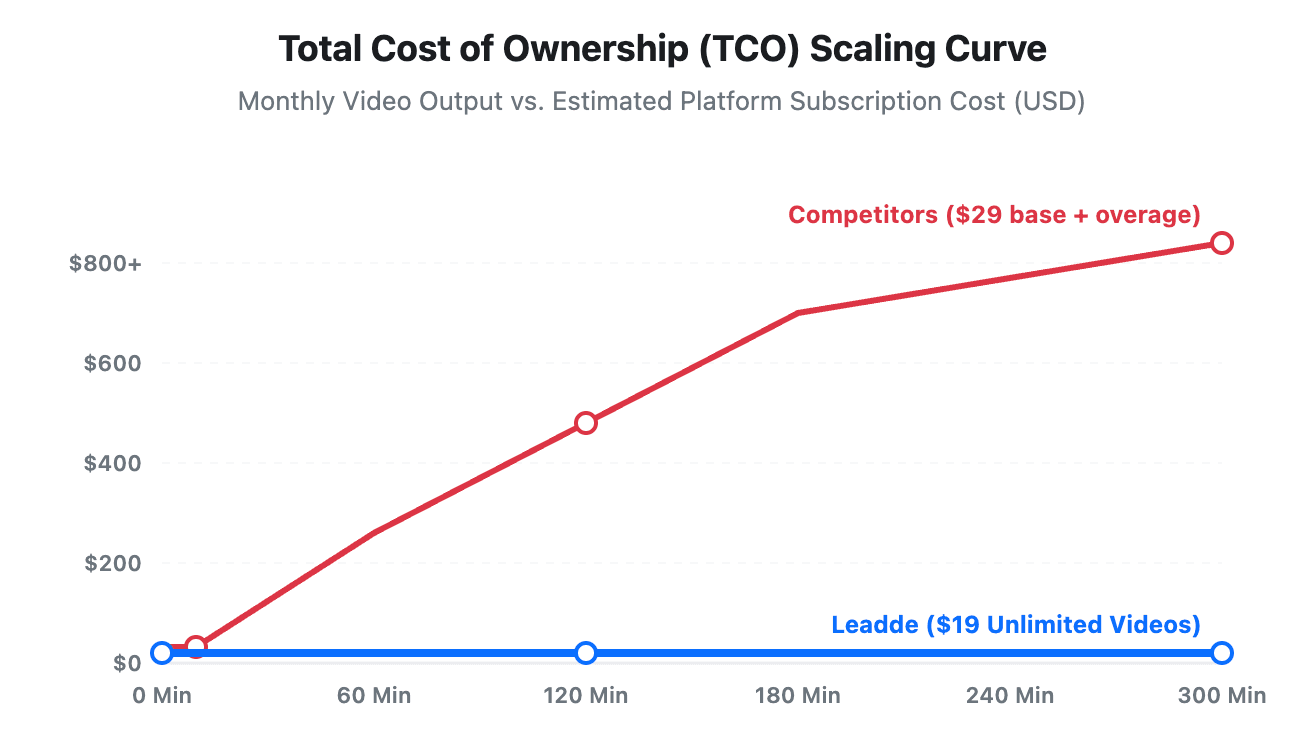
Many prospective corporate buyers fall into the trap of looking only at the base subscription price while ignoring video duration metrics. A platform offering a $29 plan might sound highly cost-effective until you realize it only includes 10 minutes of finished video per month. If your training department needs to roll out a 5-hour comprehensive onboarding series, you will face massive overage charges that destroy your quarterly L&D budget.
What Should You Check Before Choosing a Free or Entry-Level AI Video Plan?
Before committing your team to an entry-level platform, carefully verify the hidden operational limits within the fine print:
- Duration Restrictions: Ensure the plan gives you enough minutes or credits to complete long-form lecturing workflows.
- Language Limitations: Verify whether the multi-language accent packs are locked behind expensive enterprise tiers.
- Watermark Enforcements: Check if the tool stamps a large third-party logo on your finished commercial modules.
- Layout Modification: Confirm whether you can freely adjust fonts, colors, and layout configurations to stay on-brand.
How Should Teams Calculate Total Cost of Ownership for AI Lecture Videos?
To find the true Total Cost of Ownership (TCO), use this simple formula:
TCO = Subscription Cost + Overage Fees Per Minute + Internal Time Spent Fragmenting Workflows
While legacy options require higher price tiers ($29/month) for severe volume caps, Leadde’s disruptive model ($19/month for unlimited videos) provides absolute price predictability, bringing the per-video production cost down to near-zero margins.
How Can You Automatically Convert Corporate Documents into Engaging Video Lectures with Leadde?
Step 1: How Do You Upload Text, PDFs, PowerPoint Slides, or Training Documents?
The automated knowledge conversion pipeline begins instantly on the Leadde dashboard. Users can directly drag and drop existing company assets—including PowerPoint slides, standard training PDFs, software onboarding text, or raw text scripts.
Leadde’s ingestion engine instantly reads the file layout, parses the structural chapters, and pre-allocates them across a clean timeline.
Step 2: How Do Auto-Layout, Auto-Highlighting, Templates, and Presenter Settings Work?
Once ingestion is complete, Leadde’s intelligent formatting algorithms apply an automated branding layer:
- Auto-Layout: The software resizes text chunks and neatly arranges them alongside media elements to optimize visual balance.
- Auto-Highlighting: The system scans the document for core vocabulary, compliance rules, or metrics, automatically applying text weights to emphasize key insights.
- Presenter Control: Users can select a hyper-realistic avatar or upload a custom photo to act as the primary instructor on screen.
Step 3: How Can You Create Multilingual Video Lectures with Avatars, Voiceover, and Translation?
With the visual structure finalized, you can customize the linguistic parameters across 92+ language options. Simply select your target localized market, choose a specific regional accent, and click generate. Leadde provides multilingual video workflows and translation tools that help teams create localized drafts more efficiently.
For technical or compliance content, teams should still review terminology, pronunciation, and regional wording before publishing, allowing you to deploy uniform global training materials simultaneously.
Step 4: How Can Interactive Video Chat Support Real-Time Learner Questions?
After generating your video lecture, you can activate Leadde's signature Video Chat interaction feature. Instead of publishing a static MP4 file, you embed an intelligent learning asset into your corporate training portal. Employees can click a button to converse directly with the on-screen presenter, turning passive corporate training into a high-engagement, interactive workshop.
How Are Industry Leaders Scaling E-Learning with Intelligent Video Avatars?
How Do SaaS and Tech Teams Standardize Product Onboarding and Feature Walkthroughs?
In the hyper-competitive software sector, keeping user documentation up to date with continuous feature releases is a constant struggle. Top SaaS product marketing directors use Leadde to turn complex technical release notes and modular user manuals into clean, engaging walkthrough videos.
Whenever a software UI updates, teams simply refresh the text script inside Leadde, instantly spinning up a brand-new module using specialized video tutorial software without rehiring voice talent.
How Do Manufacturing and Industrial Teams Accelerate Safety Training and Compliance Rollouts?
Global manufacturing firms operate across multiple geographic factory environments, making uniform compliance training highly challenging to manage. Plant training managers utilize document-to-video tools to parse heavy machinery SOPs and government safety compliance manuals into short, high-retention video modules. This ensures that every line worker receives identical high-standard safety briefings in their preferred native tongue.
How Do Retail and E-Commerce Teams Update Product Knowledge Across Regions?
Retail networks experience massive employee turnover and require constant training on weekly product drops and store operation guidelines. Retail training managers use AI avatar systems to convert static promotional briefs into bite-sized training videos sent directly to employee communication apps. This rapid deployment ensures thousand-store franchise systems align product knowledge and service standards within a few hours.
Conclusion
The landscape of the best AI lecture video makers in 2026 shows a clear divide between artistic video tools and structured e-learning conversion suites. If your goal is to produce short, cinematic advertisements, generative engines like Sora and Kling remain unmatched. However, if your enterprise or academic institution needs to efficiently transform raw corporate documents, manuals, and presentations into clear, scalable, and fully interactive training modules, an automation suite like Leadde offers superior structural control, immense language options, and undeniable cost-efficiency.





