
How to Make an AI Clone of Yourself: 2026 Guide

To make an AI clone of yourself in 2026, you need to replicate three digital layers: your knowledge, your voice, and your visual presence. The safest approach is to start with a source-grounded knowledge base, then add voice cloning or an AI avatar only when needed. Modern no-code platforms can now turn text, documents, and images into multilingual AI avatars and videos without local coding, expensive GPU hardware, or complex open-source toolchains.
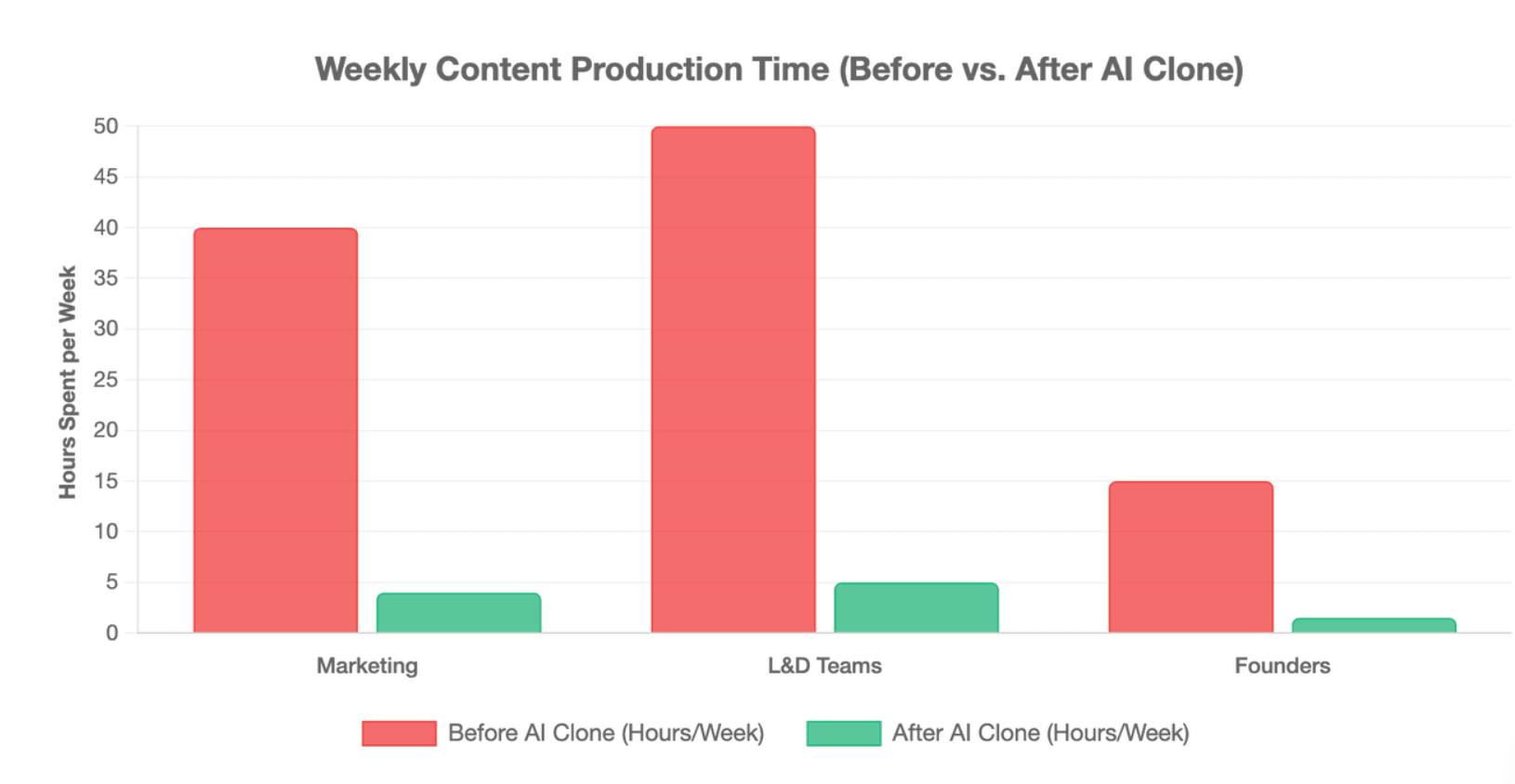
But building an AI clone with fragmented tools can quickly become costly, technical, and hard to manage. Leadde offers a simpler business-ready path: turn any document or text into a professional AI presenter video in minutes, saving up to 90% content creation time and over 80% video production costs.
How to Make an AI Clone of Yourself Without Coding or Expensive Hardware?
Creating an AI clone no longer requires local model training, Python scripts, or dedicated GPU hardware. In 2026, most users can build a practical digital persona using cloud-based AI tools that combine knowledge ingestion, voice generation, avatar creation, and automated video production.
The key is not to clone everything about yourself at once. A useful AI clone should begin with a clear job: answering questions, creating employee training videos, delivering product explainers, producing social content, or scaling founder-led communication.
What Is an AI Clone and How Does Digital Twin Technology Work in 2026?
An AI clone is a digital system designed to imitate part of your identity, expertise, or presentation style. It may replicate how you explain ideas, how you sound, how you appear on video, or how you guide an audience through information.
In 2026, most AI clones are better understood as task-specific digital twins, not full copies of a person. They use selected data, instructions, voice models, avatars, and automation tools to perform a defined role.
Common examples include:
- Knowledge clones that answer questions from your documents
- Voice clones that generate narration and let you make an AI voice
- AI avatars that present content on video
- Writing clones that match your tone
- Business clones that turn your SOP documents into training videos or sales content
What Are the Core Parts of an AI Clone: Mind, Voice, Face, and Video?
A complete AI clone usually has four core layers.
| Layer | What It Replicates | Typical Input | Common Output |
| Mind | Knowledge, logic, opinions, expertise | Documents, blogs, transcripts, notes | Chatbot answers, scripts, summaries |
| Voice | Tone, accent, pacing, sound | Voice recordings | AI narration, multilingual audio |
| Face | Visual identity and presence | Photo or video footage | AI avatar, headshot, presenter |
| Video | Communication format | Scripts, PDFs, PPTs, SOPs | Training videos, explainers, onboarding content |
Should You Use Local Open-Source Tools or Cloud AI Clone Platforms?
Local open-source tools can offer more control, but they often require more technical skill. Tools such as Stable Diffusion, DreamBooth, Wav2Lip, local LLMs, LoRA fine-tuning, and voice models may require setup, GPU resources, troubleshooting, and data formatting.
Cloud SaaS platforms are easier for most businesses because they reduce technical friction.
| Option | Best For | Main Advantage | Main Limitation |
| Local open-source stack | Developers and AI researchers | High control and customization | Requires technical setup and hardware |
| Custom GPT or RAG chatbot | Experts and consultants | Easy knowledge Q&A | Limited visual/video output |
| AI avatar platform | Creators and marketers | Fast talking-head videos | May focus only on avatar output |
| Document-to-video platform | Business teams | Turns existing content into videos | Best when source content is clear |
Note: For most founders, L&D teams, and marketers, a no-code or low-code platform is the faster path.
What Is the Step-by-Step Process to Clone Your Persona?
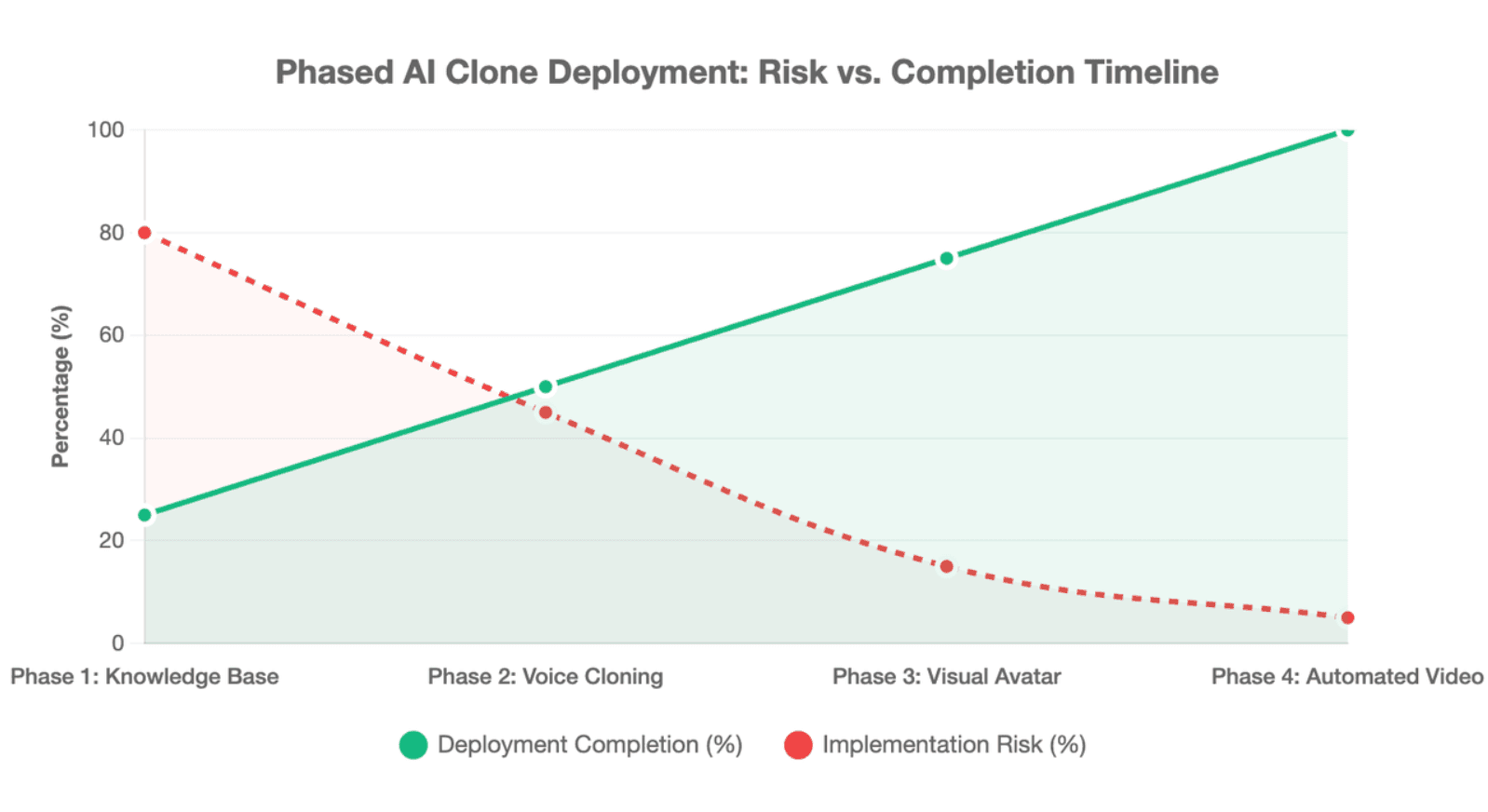
The safest AI clone workflow is sequential. Start with knowledge, then add voice, then add visual identity, then automate video creation. This reduces risk and helps you test each layer before making it public.
Step 1: Train Your AI Clone on Personal Knowledge and Documents
The training process begins with deep intellectual data ingestion to establish a robust cognitive core. You compile your personal knowledge architecture by gathering historical text data, internal company SOPs, brand manuals, and standard operational presentations.
This unorganized data is fed directly into a localized retrieval-augmented generation (RAG) framework or custom knowledge management system. The system chunks the information, generates vector embeddings, and links them to an operational logic layer, enabling your avatar to respond using your exact business logic.
Step 2: Create a Realistic AI Voice Clone
High-fidelity voice synthesis requires providing a clear, high-quality audio recording to train the underlying text-to-speech neural network. You simply upload a short audio file or read a direct verification script on your screen to log your raw vocal frequency patterns.
The processing software instantly maps your specific vocal tract characteristics, fundamental pitch levels, and unique linguistic inflections. The platform then generates an operational voice model capable of outputting content via multilingual AI generators across over 170 distinct languages and dynamic local accents naturally.
Step 3: Turn Your Face or Photo Into an AI Avatar
Traditional video production platforms force users into long, restrictive recording processes that require reading scripts in a specialized studio setup. Advanced cloud models remove this friction entirely by supporting high-fidelity avatar creation directly from a single photo.
You upload a clear, forward-facing image or business headshot directly into the digital creation dashboard. The visual generator processes facial geometry points, skin textures, and lighting parameters, instantly transforming the flat picture into an animated corporate presenter.
Step 4: Turn SOPs, PDFs, PPTs, and Scripts Into AI Videos
Once your voice and visual models are active, you enter your core production documents directly into the automated cloud system. Leading tools let you paste simple text scripts or upload entire text files, PDFs, and corporate training manuals directly.
The platform utilizes automated document-to-video conversion technology to construct your video assets instantly. Unlike traditional tools that rely on uneditable templates, advanced platforms like Leadde maintain your strict corporate branding while providing auto layout and auto highlight features to ensure dynamic, professional visual movement.
How Do Top AI Avatar and AI Clone Platforms Compare?
AI clone platforms vary widely. Some focus on avatars, some focus on voice, some focus on chatbots, and some focus on turning business documents into videos. The best choice depends on what you want your clone to do.
Do not choose a platform only because it looks realistic. Choose it based on output quality, workflow fit, language support, editing flexibility, security, cost structure, and how well it handles your source content.
Leadde vs. HeyGen vs. Synthesia: Which Platform Fits Your Use Case?
| Platform Type | Best Fit | Strength | Watch Out For |
| Leadde | Business videos from documents and text | Turns PPTs, PDFs, Word files, scripts, and text into professional AI presenter videos | Best when you already have structured business content |
| HeyGen | Avatar videos and personalized video messages | Strong AI avatar and video creation workflow | May require checking video limits and usage pricing |
| Synthesia | Corporate training and avatar-led videos | Well-known enterprise avatar platform | Pricing and feature access may vary by plan |
| Custom GPT / RAG tools | Knowledge Q&A clone | Good for source-grounded chat | Does not automatically create full video content |
| Voice clone tools | Narration and audio | Useful for scalable voice output | Higher impersonation and consent risk |
What Are the Hidden Costs of Minutes-Based AI Video Platforms?
Standard competitive platforms introduce restrictive cost structures that severely penalize organizations trying to scale up volume. For example, Synthesia charges $29 per month but strictly limits users to a small 10 minutes of video per month, meaning additional scaling creates steep operational bills.
These minutes-based limits disrupt regular enterprise training schedules and block large-scale marketing experiments. By comparison, Leadde completely eliminates this billing trap by providing unlimited videos for just $25 per month on its Starter plan, allowing predictable financial planning.
Why Is Real-Time Video Chat the Next Frontier for AI Digital Twins?
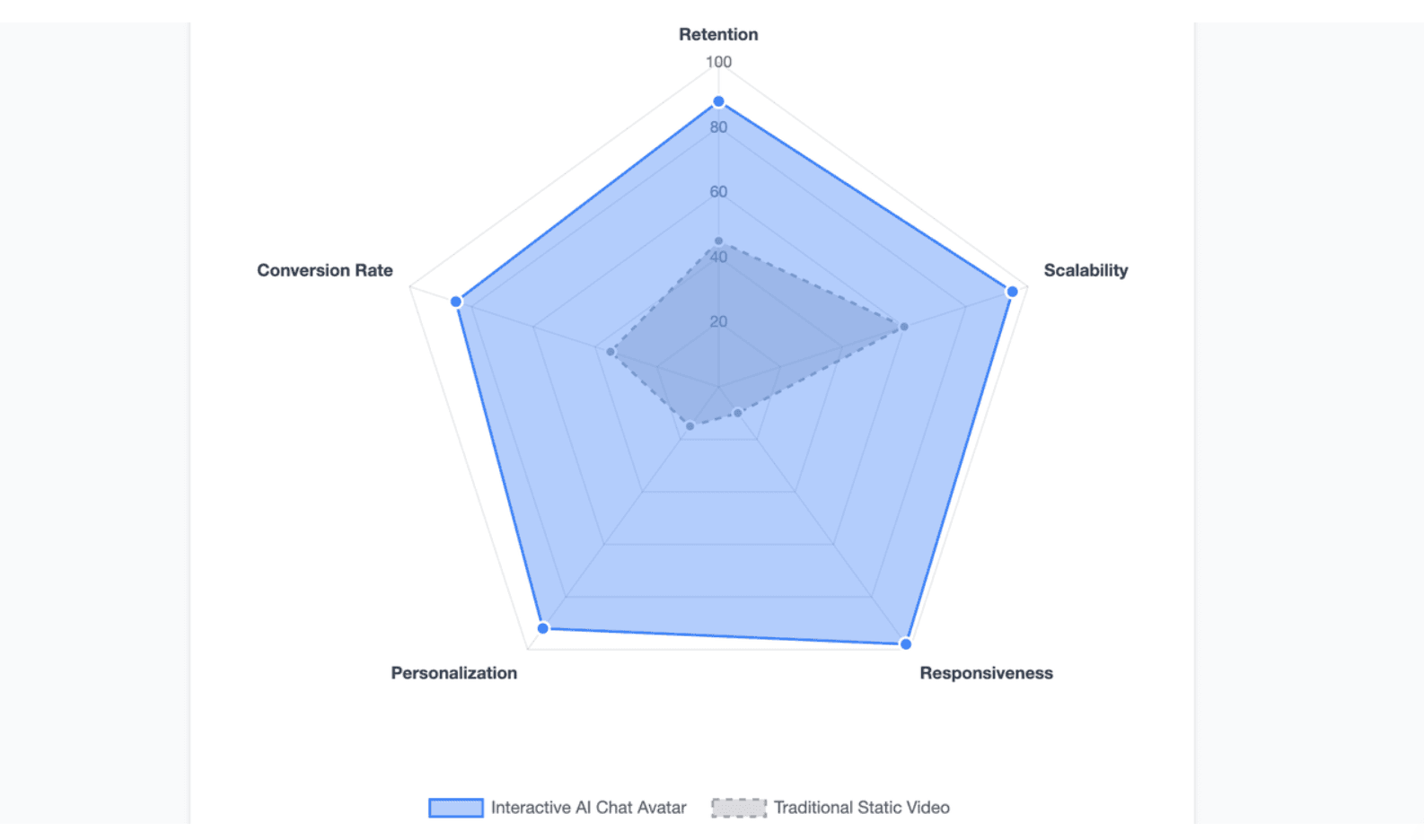
Static videos are useful, but interactive AI clones are becoming more important. A static video can explain a topic once. An interactive AI clone can answer follow-up questions, guide users through content, and personalize the learning experience.
This is where AI digital twins move from content generation to conversational engagement.
How Do Interactive AI Avatars Improve Onboarding, Training, and Product Education?
Next-generation digital twins transform user engagement by adding bidirectional capabilities directly into the visual interface. Advanced cloud systems now power live video chat interactions and chat-enabled interactive avatars.
This tech step-up allows cloned avatars to actively converse with users, dynamically shifting answers based on immediate document references. Customer success directors use these tools to build automated, highly responsive onboarding hubs that run 24/7.
How Can Businesses Embed AI Clones Into Live Chat, CRM, or Workflow Automation?
Integrating your digital clone into existing technology stacks requires simple web hooks and centralized dashboard connections. You can display your interactive avatar directly onto target web landing spaces using standard application scripts.
Connecting the avatar’s logic system to your central CRM or product enablement database enables automated data synchronization. When a buyer interacts with your personal clone, the text inputs, behavioral choices, and contact signals route directly to your pipeline.
What Is the Best Strategy to Build and Deploy Your AI Clone in 2026?
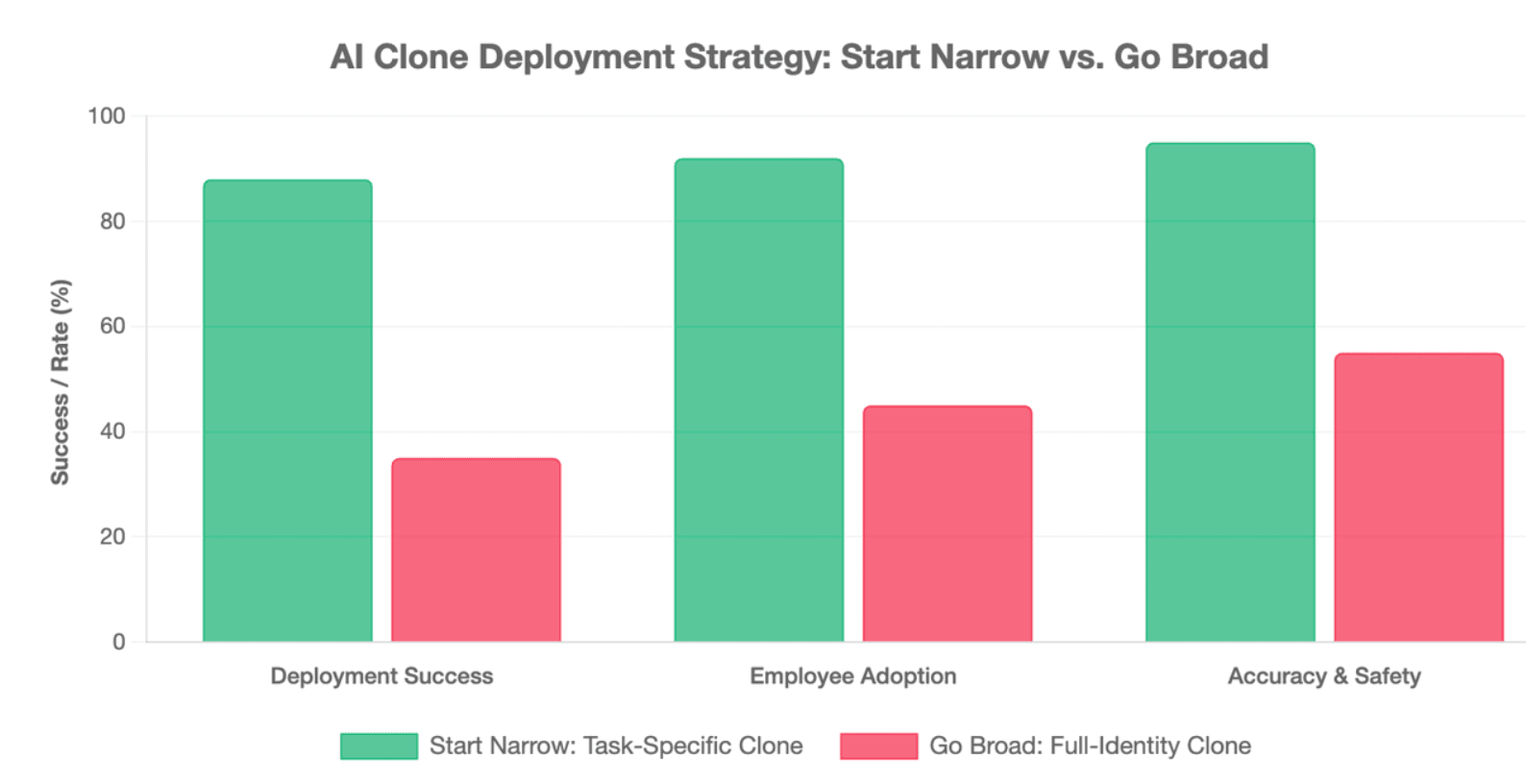
The best AI clone strategy is not to create the most realistic copy of yourself. It is to create the most useful, trustworthy, and controllable digital version for a specific job.
Start narrow. Test deeply. Expand only when the clone proves accurate, safe, and valuable.
Should You Build a Full AI Clone or Start With One Narrow Use Case?
Attempting to clone your entire professional skill set across all operations simultaneously often causes unnecessary deployment friction. Successful enterprise integration relies on identifying a single, high-frequency workflow bottleneck first.
For example, your sales enablement team can start by automating basic outbound intro videos for cold outreach campaigns. Once this single focus proves clear business value, you can confidently scale your avatar’s knowledge base into other functional areas.
When Should You Choose an AI Presenter Instead of a Fully Autonomous Clone?
Choosing between pre-scripted presentation methods and fully autonomous conversational styles depends directly on your required compliance levels:
- AI Presenter: Best for fixed training models, complex product compliance updates, and standard legal walk-throughs where word-for-word accuracy is mandatory.
- Autonomous Clone: Best for interactive top-of-funnel customer engagement, open web exploration setups, and scaling basic product help desks.
How Can Leadde Turn Your Documents and Text Into a Scalable Business Video Persona?
Leadde provides the most comprehensive system to turn raw corporate knowledge into a high-impact digital twin. The system lets teams bypass complex manual script generation by accepting standard business assets directly.
By automatically handling layout rendering and providing unlimited video scaling for just $19 per month, Leadde helps your business completely avoid restrictive production cost traps. It lets individual creators and large enterprise L&D departments build reliable, continuous multi-language systems effortlessly.
What Is the Safest Long-Term Workflow for Updating and Managing Your AI Clone?
Maintaining an authoritative digital clone requires running regular scheduled audits across your active knowledge assets. As your internal software systems iterate and corporate policies advance, update your vector document bases to remove outdated guidelines.
Additionally, refresh your visual headshot assets occasionally to keep your digital persona aligned with your real-world brand presence. Running this organized maintenance loop ensures your automated twin stays accurate, safe, and highly effective for long-term commercial application.
Conclusion
The best way to make an AI clone of yourself is to start small, not to copy your entire identity at once. Build a focused clone around one clear use case, such as training videos, product explainers, onboarding content, or customer education.
For most businesses, a safe and scalable starting point is an AI presenter workflow. Instead of managing complex coding tools or autonomous agents, you can turn approved documents, scripts, SOPs, and presentations into professional video content while keeping human control over accuracy, branding, and compliance.





