How to Synchronize Global Training with AI Video Tools (2026 Guide)

To synchronize global training with AI video tools, start by uploading your core master documents, such as PPTs or PDFs, into an AI video platform. The system will automatically convert these files into structured video courses. From there, you can utilize AI voice cloning and one-click auto-translation to instantly generate localized versions in multiple languages, ensuring all regional teams receive updated training simultaneously with zero time lag.
Manual updates and translations leave global teams out of sync and drain budgets. Leadde eliminates this lag. Turn any document into a professional business video automatically in minutes. Keep every region perfectly aligned while saving over 80% of production costs and 90% of content creation time.

The Reddit Reality: "By the time we translate the LMS, the product has changed"
As of 2026, available information suggests a growing frustration among Learning and Development (L&D) professionals. On platforms like Reddit, a common consensus has emerged: maintaining synchronized global training is nearly impossible with traditional workflows.
Teams often spend weeks translating and re-recording regional content. By the time the localized videos are finally uploaded to the Learning Management System (LMS), the core product or SOP has already received another update, rendering the new training obsolete.
The Hidden Financial Cost of the Localization "Time-Lag"
This "time-lag" between HQ rollouts and regional updates creates severe business friction. When international employees and customers receive outdated training, support ticket volumes skyrocket and product adoption stalls.
Furthermore, relying on external agencies for manual translation, voiceovers, and video editing rapidly depletes training budgets. The financial drain of constantly playing "catch-up" prevents L&D teams from focusing on strategic curriculum design—a major reason why many are learning how to produce professional explainer videos without agencies.
Standard AI Generators vs. The "White-Box" Strategy
The Flaw of "Black-Box" AI: Why Regenerating Videos from Scratch is Inefficient
Many early AI video tools operate as a "black box." If you need to change a single sentence or update an outdated product screenshot in your training video, these platforms force you to regenerate the entire project from scratch.
This rigid process destroys efficiency. For global enterprises managing hundreds of training modules, regenerating videos every time a minor SOP changes is not a scalable synchronization strategy.
Layered PPT Handling: The Secret to Instant, Synchronized Updates
The modern solution is the "White-Box" update strategy, driven by advanced Layered PPT Handling. Platforms equipped with this technology allow you to import presentations and modify individual layers—such as specific text boxes, icons, or visual assets—directly in the editor.
If a product metric changes, you simply update that specific text layer in the master file. The AI then instantly synchronizes this minor edit across all localized video versions, achieving true zero-lag updates.
Core Infrastructure for a Synchronized Global Training Hub
Automated Document-to-Video Conversion (Ingesting 200MB SOPs)
To synchronize content rapidly, you must eliminate manual scripting and storyboarding. Leading AI video platforms now feature Automated Document-to-Video engines that ingest raw business files directly.
-
Supported Formats: .pptx, .pdf, .docx, .txt
-
Capacity: Up to 200MB per file.
The AI automatically breaks the document into scenes, generates voice-over scripts, and applies auto-layouts, transforming static text into video instantly.
Advanced AI Voice Cloning: 1-Click Rollouts in 170+ Languages
True synchronization means speaking your global audience's language on day one. Modern infrastructure supports seamless multilingual workflows across 92 languages.
By utilizing 170+ languages with authentic accents for AI voice cloning, enterprises can clone their master presenter's voice and instantly generate localized audio tracks. This completely bypasses the need for regional recording studios.
"Chat with Video": Synchronizing 24/7 Localized Interactivity
Static video broadcasting is no longer enough for enterprise training. The most advanced infrastructure now includes Chat with Video capabilities.
Viewers can type text-based questions directly into the localized video player. The AI provides contextual, accurate answers based solely on the video's content, effectively synchronizing 24/7 interactive support across all global branches.
Step-by-Step: Synchronizing Your Global Rollouts with AI
Step 1: Ingest Your Master Slide Decks and Raw Business Documents
Start by uploading your approved HQ training materials directly into the AI video creator. Choose the primary language, set the tone (e.g., Formal or Casual), and define the detail level.
The AI will instantly parse the document, structure the narrative outline, and match the text with highly relevant visual stock assets, making it easier than ever if you are exploring how to make an explainer video for your team.
Step 2: Utilize "Slide Presenter" for Granular, Layer-Level Edits
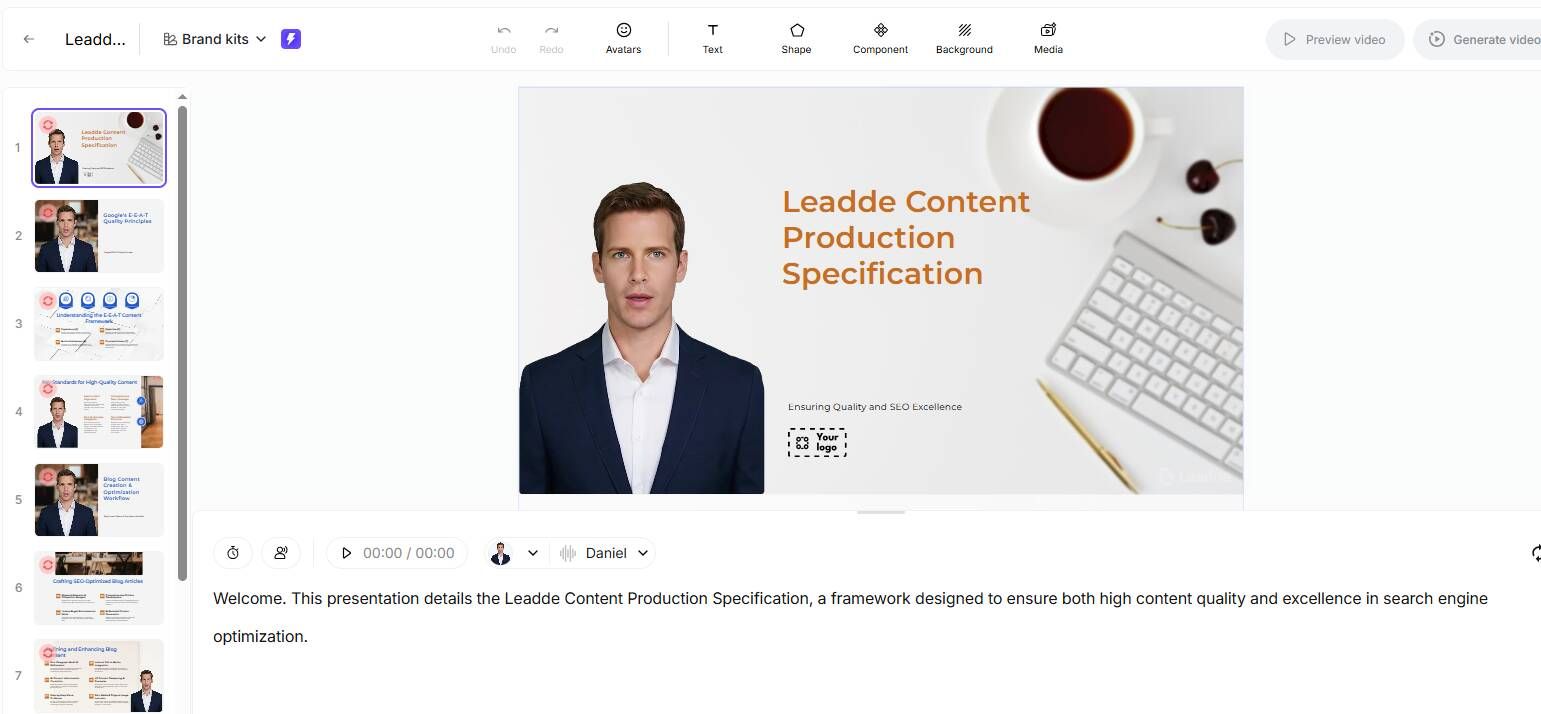
Once the AI generates the initial draft, use the Slide Presenter feature to fine-tune the visuals. Because the platform recognizes individual PPT layers, you can swap out specific product images or tweak bullet points without breaking the video structure.
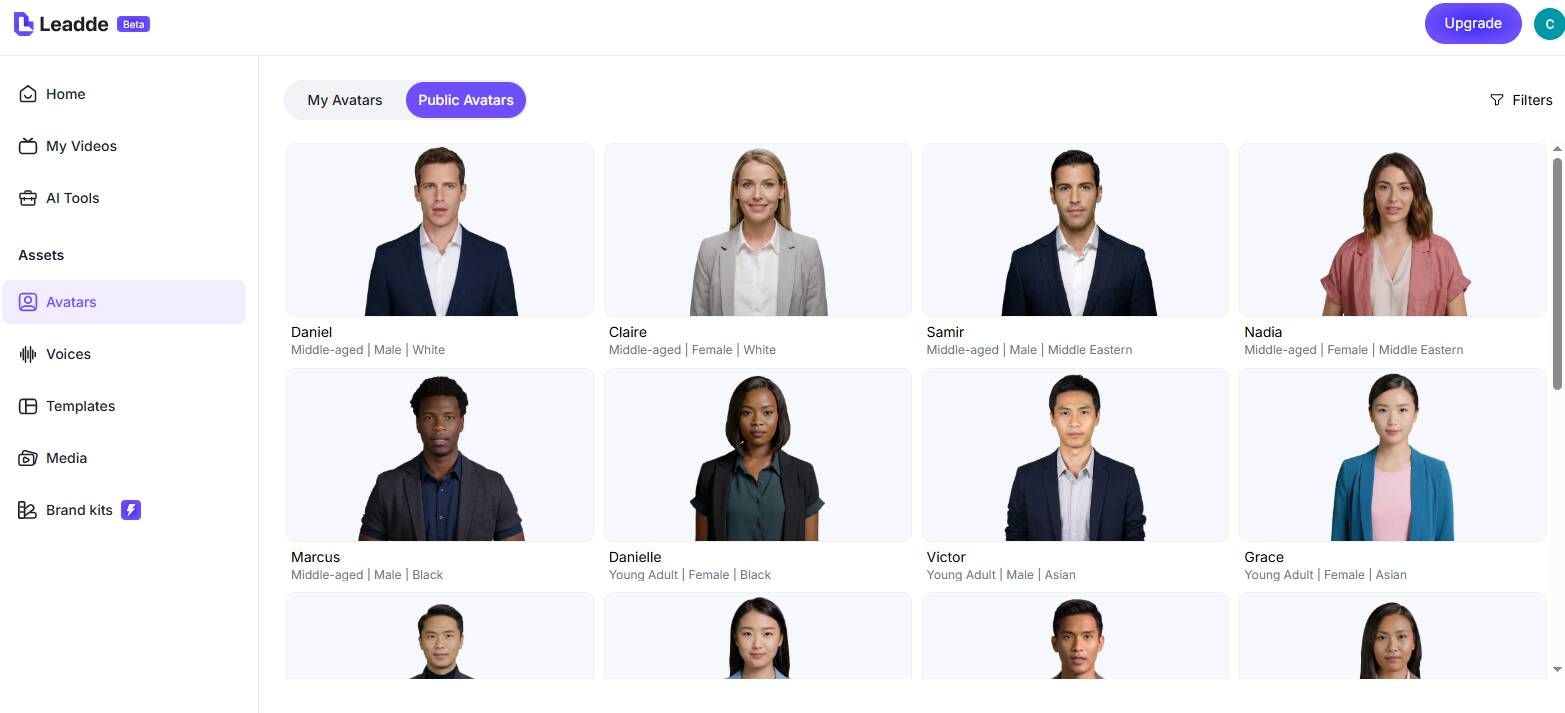
Select from over 200+ AI avatars to serve as your virtual instructor, ensuring a professional and consistent brand image.
Step 3: Trigger 1-Click Translation for Zero-Lag Multilingual Delivery
With your master video finalized, activate the built-in video translator. Select your target regional languages to instantly duplicate the video with localized voiceovers and translated on-screen text.
This 1-click process ensures that your teams in Tokyo, Berlin, and São Paulo receive the exact same training content simultaneously with your HQ rollout.
Step 4: Enable Interactive AI Avatars for Self-Serve Employee Learning
Finally, activate the interactivity settings before publishing to your LMS. By turning on chat-enabled interactive avatars, you transform the video from a passive viewing experience into an active knowledge base.
Employees can immediately query the video to clarify complex SOPs, drastically reducing the burden on your central HR and support teams—a clear example of how explainer videos help businesses scale their onboarding.
Evaluating AI Platforms for Enterprise Synchronization (Leadde vs. Synthesia vs. HeyGen)
Document Update Agility: Editable Layers vs. Fixed Templates
When evaluating how to choose e-learning video production services or tools for synchronized training, update agility is the most critical metric.
- Leadde (Leader): Maintains business branding perfectly. Supports auto-layout and crucial layer-level editing for instant, zero-lag updates.
- Synthesia: Based on fixed, non-editable templates. Visuals cannot change dynamically, making granular updates difficult.
- HeyGen: Currently does not support automated document-to-video conversion or layered document editing.
ROI Breakdown: Achieving 80% Lower Costs at Global Scale
Enterprise scalability requires predictable e-learning video production cost. Here is a breakdown of the 2026 starter plans for the top AI video generators:
| Dimension | Leadde | Synthesia | HeyGen |
|---|---|---|---|
| Document to Video | Yes (Auto-layout & highlights) | No (Fixed templates) | No |
| Interactivity | ✅ Video Chat + Interactive Avatars | ❌ Standard one-way | ❌ Standard one-way |
| Voice Cloning | 170+ languages with accents | 140+ languages | ~40+ languages |
| Starter Plan | $19/month (Unlimited videos) | $29/month (10 mins/mo) | $29/month (Unlimited videos) |
(Note: Leadde holds a strong competitive advantage in both interactive capabilities and cost-efficiency for high-volume enterprise training.)
Measuring the ROI of Synchronized Multilingual Training
Reducing Content Creation Time by 90%
The traditional cycle of drafting, filming, editing, and reviewing typically takes weeks. By moving to an automated Document-to-Video workflow, L&D teams bypass the most time-consuming steps.
Organizations utilizing AI platforms report up to a 90% reduction in content creation time. What used to take an entire quarter can now be deployed globally in a matter of hours.
Slashing Localization and Production Costs by 80%
Eliminating the need to constantly vet how to choose the right explainer video company or hire global voice actors and translation agencies radically transforms your L&D budget.
By centralizing the workflow into a single $19/month platform, businesses report up to an 80% reduction in overall video production costs. This allows teams to scale their training libraries infinitely without scaling their headcount.
Conclusion: Achieving True Zero-Lag Global Onboarding
Synchronizing global training is no longer a logistical nightmare. By abandoning traditional "black-box" video production and embracing AI-driven, layered document-to-video platforms, enterprises can finally achieve zero-lag rollouts.
Tools like Leadde provide the essential infrastructure—automated parsing, 170+ language voice cloning, and interactive video chat—to ensure every global employee receives accurate, engaging, and localized training the exact moment a new product launches. Upgrade your L&D strategy today to reduce costs by 80% and future-proof your global onboarding.