
How to Produce Professional Explainer Videos Without Agencies (2026 Guide)

To produce professional explainer videos without hiring an agency, organizations should leverage AI-powered document-to-video automation. This process involves uploading existing business content—such as PPT, PDF, or Word files—into an AI platform that automatically generates scripts, structured scenes, and professional voiceovers. By utilizing photo-realistic AI avatars as presenters and automated visual layouts, businesses can create studio-quality videos in minutes. This approach eliminates the need for expensive filming equipment, specialized editors, and external production teams, reducing video production costs by up to 80% while maintaining enterprise-grade quality.
Yet, traditional DIY tools often prove too complex and time-consuming. Leadde eliminates this friction by turning any document or text into professional business videos automatically. Create high-end content in minutes, saving over 80% of production costs and 90% of creation time. Stop struggling and start scaling today.

Why Companies are Firing Agencies for In-House Explainer Video Production
In 2026, the reliance on external video agencies is rapidly declining as businesses prioritize agility and cost-efficiency. Organizations are moving production in-house to maintain direct control over their messaging.
The "Agency Trap": High Costs and 8-Week Turnaround Times
Traditionally, hiring an agency meant paying $5,000 to $20,000 per video, often reflecting how much an explainer video costs when factoring in overhead.. The process often dragged on for 8 weeks due to endless feedback loops, scheduling voice actors, and manual animation adjustments. This "Agency Trap" makes it impossible to scale content at the speed of modern business.
The Rise of the "Agency-in-a-Box" AI Technology
Enter "Agency-in-a-Box" AI platforms. These tools automate the roles of the scriptwriter, narrator, and editor. By consolidating a whole production team into a single AI interface, companies can now compete with top animated explainer video companies and produce professional-grade videos without the professional-grade price tag.
The Traditional DIY Roadmap: How Most Teams Try (and Struggle) to Do It
When companies first try to ditch agencies, they often follow a manual DIY path that proves just as exhausting.
Defining Goals and Value Propositions for Your Audience
Most DIY attempts start with deep research. You must identify your target demographic and define a clear Value Proposition. Without a professional creative director, many internal teams struggle to keep the message concise and impactful.
Manual Scriptwriting and Storyboarding: The Productivity Bottleneck
The biggest hurdle is the "blank page." Writing an explainer video script and sketching a storyboard frame-by-frame requires creative skills that many business professionals lack. This manual phase typically consumes 60% of total production time, even when referencing explainer video script examples for guidance.
Sourcing Voice Talent and Stock Assets on a Budget
In a traditional DIY setup, you must browse marketplaces for voice actors and purchase expensive stock footage. Coordinating these disparate elements often leads to a "Frankenstein" video that looks inconsistent and unprofessional.
The 2026 AI Shortcut: Producing Professional Videos Directly from Documents
The most significant breakthrough in 2026 is the ability to bypass manual creation entirely by using automated knowledge conversion.
Why You Don't Need to Write a Script from Scratch
Advanced AI can now parse your existing business data to generate a structured script. This technology identifies the key problem and solution within your text, creating a professional narrative in seconds rather than days.
Converting PPT, PDF, and Word into High-Quality Visual Storyboards
You no longer need to draw scenes. Modern platforms can transform a PowerPoint deck or a PDF into a visual sequence automatically by utilizing an explainer video template. The AI handles the layout design, placing text and visuals in a way that maximizes viewer comprehension.
Replacing Film Crews with 200+ Photo-Realistic AI Avatars
Forget cameras and lighting. You can now use photo-realistic AI Avatars to act as your presenters. These avatars offer consistent delivery and professional appearance, allowing you to "film" new scenes just by typing text.
Step-by-Step Guide: How to Produce "Agency-Grade" Videos with Leadde AI
Leadde provides a streamlined workflow that allows anyone—from HR to Sales—to produce studio-quality content, including complex corporate explainer videos.
Step 1: Upload Your Knowledge (Drag-and-Drop PPT/PDF/Word)
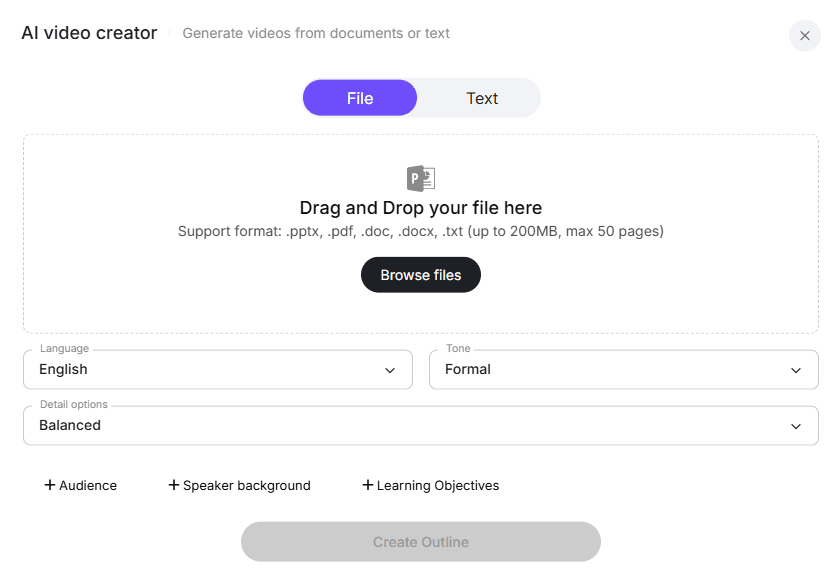
Start by importing your source material. Leadde supports .pptx, .pdf, .doc, and .txt files up to 200MB. The AI immediately begins analyzing the content to create a logical video structure, much like the process of how to create a SaaS explainer video.
Step 2: Customizing Your AI Presenter and Branding Template
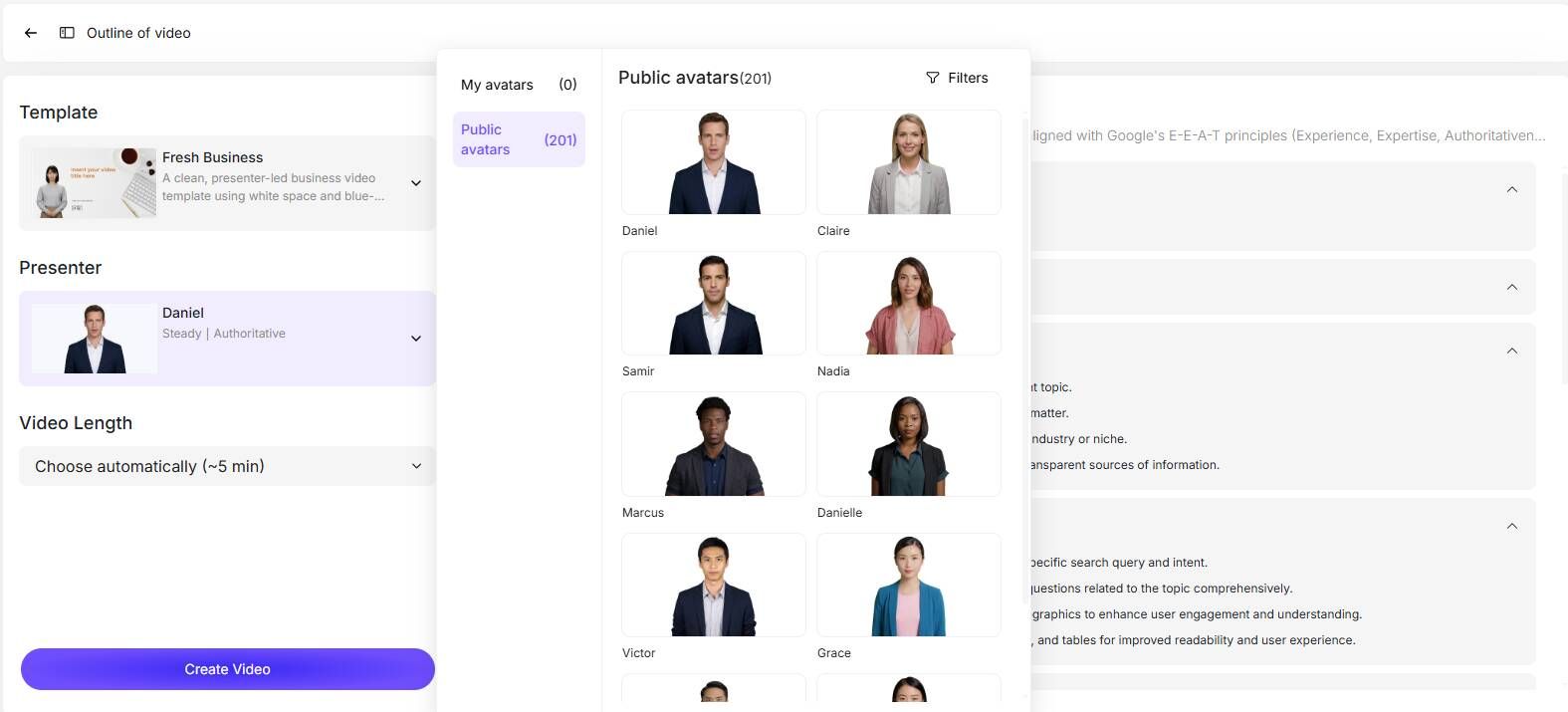
Select from over 200+ AI Avatars and match them with a pre-designed Business Template. Whether you need a formal tone for compliance or a casual style for marketing, Leadde ensures your brand identity remains consistent across all videos.
Step 3: Layered Editing—Fine-Tuning Layouts Without Design Skills
Unlike rigid templates, Leadde offers Layered Editing. This allows you to modify individual elements—like text boxes or icons—directly on the slide. If you need to update a statistic, you simply edit the layer rather than re-exporting the entire video.
Step 4: Auto-Highlighting and Key-Point Extraction
Leadde’s AI automatically applies key-point highlighting. It bolds important terms and creates visual cues that help the viewer focus on the most critical information, ensuring your "No-Agency" video is as effective as a pro production.
Comparing Top "No-Agency" Tools: Leadde vs. Synthesia vs. HeyGen
Choosing the right tool is the difference between a simple "talking head" and a comprehensive business video.
Document-to-Video Workflow: Which Platform Wins?
While Synthesia and HeyGen are strong in avatar realism, Leadde wins in Document-to-Video automation. When searching for the best SaaS explainer video creator, Leadde is specifically designed to maintain business branding and supports auto layouts that adjust visuals dynamically based on your document's content.
Pricing for Scale: Unlimited Videos vs. Per-Minute Restrictions
- Leadde: Starter Plan is $19/month for unlimited videos.
- Synthesia/HeyGen: Pricing typically starts at $29/month, often with strict limits on video minutes. For organizations looking to scale production, Leadde offers the best ROI (Return on Investment).
Scaling Your Production: Expert Tips for Global Teams
Producing a video is only half the battle; making it accessible globally is where the real value lies.
Instant Localization: Reaching 92+ Languages Without Translation Fees
Agency-led localization is incredibly expensive. With Leadde, you can localize your content into 92+ languages with one click. This includes automatic translation of voiceovers and on-screen text, reaching a global audience instantly.
Maximizing Engagement with Interactive "Chat with Video" Features
Transform passive viewing into an active experience. By enabling "Chat with Video," your audience can ask text-based questions directly to the AI avatar. The AI provides contextual answers based on the video content, significantly improving information retention.
Conclusion: Reclaiming Your Video Strategy with AI Automation
Producing professional explainer videos no longer requires a $10,000 agency budget or a 2-month timeline. By leveraging AI automation and document-to-video technology, internal teams can save 80% of production costs and 90% of creation time. Platforms like Leadde empower you to turn your existing PPTs and PDFs into high-impact, multilingual video assets in minutes. The future of video is in-house, automated, and infinitely scalable.





