
Best AI Avatar Solutions for Product Explainer Videos (2026)

Creating high-converting product explainer videos used to require weeks of scripting, filming, and editing. Today, that model is obsolete.
In our work with SaaS teams, growth marketers, and enterprise L&D departments, one pattern is clear:
👉 The shift is not just toward AI video — it’s toward scalable, repeatable video systems powered by AI avatars
This guide breaks down:
- The best AI avatar tools in 2026
- Real use cases with measurable results
- When AI avatars work (and when they don’t)
Creating product videos traditionally drains budgets and takes weeks of scripting, filming, and editing. Leadde helps teams turn product decks, PDFs, scripts, and documentation into structured explainer videos with AI avatars, layouts, and multilingual voiceovers.
If you already have a product deck, help article, or launch script ready, you can create a product explainer video with Leadde and turn that existing material into a structured video draft.

Quick Comparison: Best AI Avatar Tools for Product Explainer Videos (2026)
| Feature | Leadde | Synthesia | HeyGen |
|---|---|---|---|
| Best For | Document-to-video automation & scalable content | Enterprise training & LMS | Marketing & short-form videos |
| Automation Level | ⭐⭐⭐⭐⭐ (Full automation from PPT/PDF) | ⭐⭐ (Manual scripting required) | ⭐⭐ (Script-based only) |
| Video Creation Speed | Minutes (fully automated) | Moderate | Fast |
| Content Input | PPT, PDF, Word, Text | Text only | Text only |
| Editing Flexibility | High (layer-level editing) | Low (template-based) | Medium |
| AI Avatars Quality | High | High (corporate style) | High (expressive) |
| Multilingual Support | 90+ languages | 120+ languages | 40+ languages |
| Interactivity | ✅ Chat with Video | ❌ No | ❌ No |
| Best Use Case | Product explainers, training, knowledge videos | Corporate training | Ads, social media |
| Pricing Model | From $19/month (unlimited videos) | From $29/month (limited minutes) | From $29/month |
| Scalability | ⭐⭐⭐⭐⭐ | ⭐⭐⭐ | ⭐⭐⭐ |
What Are AI Avatar Generators for Product Explainers?
The 2026 Shift from Traditional Filming to Generative AI Presenters
The landscape of product marketing has fundamentally changed in 2026. Traditional video production requires expensive studios, actors, and weeks of manual editing.
Today, AI avatar generators replace these bottlenecks by using generative AI to create professional content at scale. Organizations can now transform written and presentation content into interactive, multilingual video assets instantly.
- No cameras needed: Generate videos entirely from your browser.
- Scale effortlessly: Shift from full manual production to lightweight editing.
- Global reach: Produce content across dozens of regions simultaneously.
The Hard ROI: Saving 80% on Production Costs and 90% on Time
For enterprise decision-makers, adopting AI avatars is strictly about Return on Investment (ROI). Manual video creation is a massive drain on corporate budgets.
By utilizing advanced automation platforms, organizations report up to an 80% reduction in video production costs. Furthermore, teams experience an incredible 90% reduction in content creation time.
- Faster time-to-market: Create videos in minutes instead of weeks.
- Reduced errors: AI pipelines lead to drastically reduced video production errors.
- Higher engagement: Interactive AI formats drive up to a 3x increase in content engagement.
The Real Reason Teams Adopt AI Avatars: Speed, Not Just Cost
Why Iteration Speed Matters More Than Budget
In SaaS environments, product teams release updates:
- 2–4 times per month
- With frequent UI and workflow changes
In traditional workflows, this means:
- Re-recording demos
- Re-editing entire videos
- Delayed launches
What Changes with AI Avatars
AI avatars enable:
- Instant script updates
- Same-day video regeneration
- Continuous iteration
👉 In practice, this turns video into a version-controlled asset, not a one-time deliverable. If your product changes often, turn product messaging into an AI video so each update can become an editable draft instead of a full production restart.
Why Repeatability and Brand Consistency Matter Most
Overcoming the "Uncanny Valley": Lip-Sync and Avatar Consistency
A major complaint among B2B marketers on platforms like Reddit is the "uncanny valley" effect—where poor lip-sync ruins viewer trust. Modern 2026 platforms solve this with hyper-realistic rendering.
Top-tier solutions offer a diverse library of 200+ AI avatars to suit different cultural and regional needs. Users can also upload a photo to create a personal digital avatar for consistent on-camera presentation.
The Enterprise Need for Reusable Assets and Predictable Pacing
Enterprises do not want to build videos from scratch every time a product updates. They demand workflow repeatability.
Advanced AI video creators support layered PowerPoint import and layer-level editing. Users can modify individual layers, including text, icons, and visual assets, after importing a presentation. This makes it possible to treat existing presentations like an explainer video template and reuse them without rebuilding content.
How to Choose the Right AI Avatar Tool
Step 1: Evaluate Automation
Look for:
- Document import
- Auto layout
- Script generation
Step 2: Check Localization Capabilities
- Native multi-language support
- Voice quality
Step 3: Verify Security
- SOC 2
- GDPR
- Enterprise compliance
The 2026 Game-Changer: Document-to-Video Automation & Interactive AI
Transforming Complex PPTs and PDFs into Videos Automatically
The biggest technological leap in 2026 is moving from "text-to-video" to full "document-to-video" automation. Typing out manual scripts is obsolete.
Leadde converts business content such as PowerPoint files, PDFs, Word documents, scripts, and text into structured video presentations. The platform automatically generates outlines, breaks content into scenes, creates voice-over scripts, and applies layouts to each section. To test the workflow, upload a product document to Leadde and see how quickly it becomes a first explainer video draft.
- Zero scripting required: The AI extracts the core message automatically.
- Auto-matching visuals: Features automatic stock image matching based on video content.
- Focus on quality: Allows teams to focus on content quality rather than manual video production.
From Passive Viewing to Two-Way Engagement (Chat with Video)
Product explainer videos are no longer just passive MP4 files. The 2026 standard demands two-way viewer interaction.
With the Chat with Video feature, viewers can ask text-based questions about video content and receive contextual answers based on the video. This transforms videos from passive media into interactive learning and knowledge resources.
Top 3 Best AI Avatar Software for Product Explainer Videos
1. Leadde: Best Overall for Document-to-Video Automation & Interactivity
Leadde is one of the strongest options for businesses that want to turn existing documents into videos automatically. It is uniquely built for knowledge conversion and enterprise training.
The platform offers a $19/month Starter Plan that includes unlimited videos. It heavily leads the market with Chat-enabled interactive avatars.
- Automation: Supports auto layout and auto highlight while maintaining business branding.
- Avatars: Create custom avatars from photos.
- Voices: Over 170 languages with varying accents.
For product teams, the practical test is simple: try Leadde for explainer videos with one PDF, PPT, or product brief and compare the output against your current workflow.
2. Synthesia: Best for Standard Corporate Training and LMS Integration
Synthesia remains a strong legacy player, highly favored for standard enterprise corporate training and cross-region communication.
However, its video generation is based on fixed, non-editable templates where visuals cannot change dynamically with content. Its Starter Plan costs $29/month, but only allows 10 minutes of generation per month.
3. HeyGen: Best for Social Media, Short-Form Ads, and Voice Cloning
HeyGen targets individual creators and marketers focusing on short-form content. It excels at highly expressive avatars and dynamic voice cloning.
While it supports creating avatars from photos, it does not support automatic document-to-video conversion. It costs $29/month for unlimited videos.
How to Choose the Right AI Video Generator
Step 1: Evaluate Automation (Manual Scripting vs. Layer-Level PPT Import)
When choosing a tool, evaluate how much manual work is actually removed. Many tools still force you to copy-paste scripts line by line.
Instead, look for advanced slide processing. Leadde features Slide Presenter, which supports layered PowerPoint import and editing. If your company relies heavily on PowerPoint, you need a tool that lets you edit text and icons post-import.
Step 2: Assess Multilingual Localization Capabilities (90+ Languages)
Global product launches require instant localization. Ensure your chosen platform has native translation built directly into the editor.
Leadde supports large-scale multilingual video workflows across 92 languages. Translation tools allow teams to generate multilingual drafts directly within the editor or from shared video links.
Step 3: Verify Enterprise Security and Compliance (SOC 2, GDPR, ISO 42001)
Generative AI poses security risks if not properly vetted. Never upload proprietary product data to non-compliant platforms.
Enterprise-ready tools must meet strict standards. Leadde supports SOC 2 and GDPR standards and follows ISO 42001 guidelines for ethical and secure AI systems. Content moderation frameworks further ensure safe use across organizations.
Step-by-Step Guide: Creating a High-Converting Explainer Video in Minutes
Step 1: Import Your Existing Business Assets (Word, PPT, PDF)
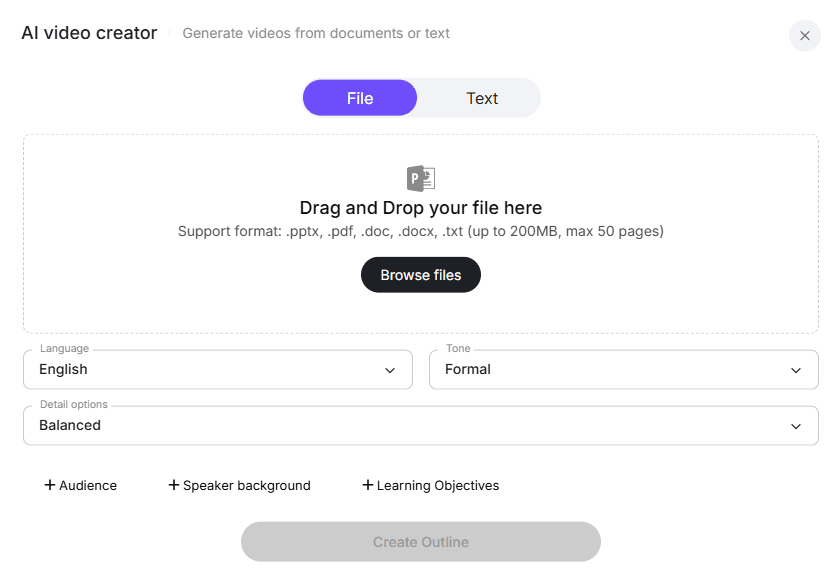
Start by feeding the AI your existing collateral. In the AI video creator interface, select the File mode.
Drag and drop your file or click "Browse files". The system supports .pptx, .pdf, .doc, .docx, and .txt formats, with a file size limit of up to 200MB. You can pre-set the language, tone, and detail options before uploading. If you already have the source material, start from your existing business assets in Leadde instead of writing the explainer script from scratch.
Step 2: Select a Lifelike Digital Presenter and Voice Tone
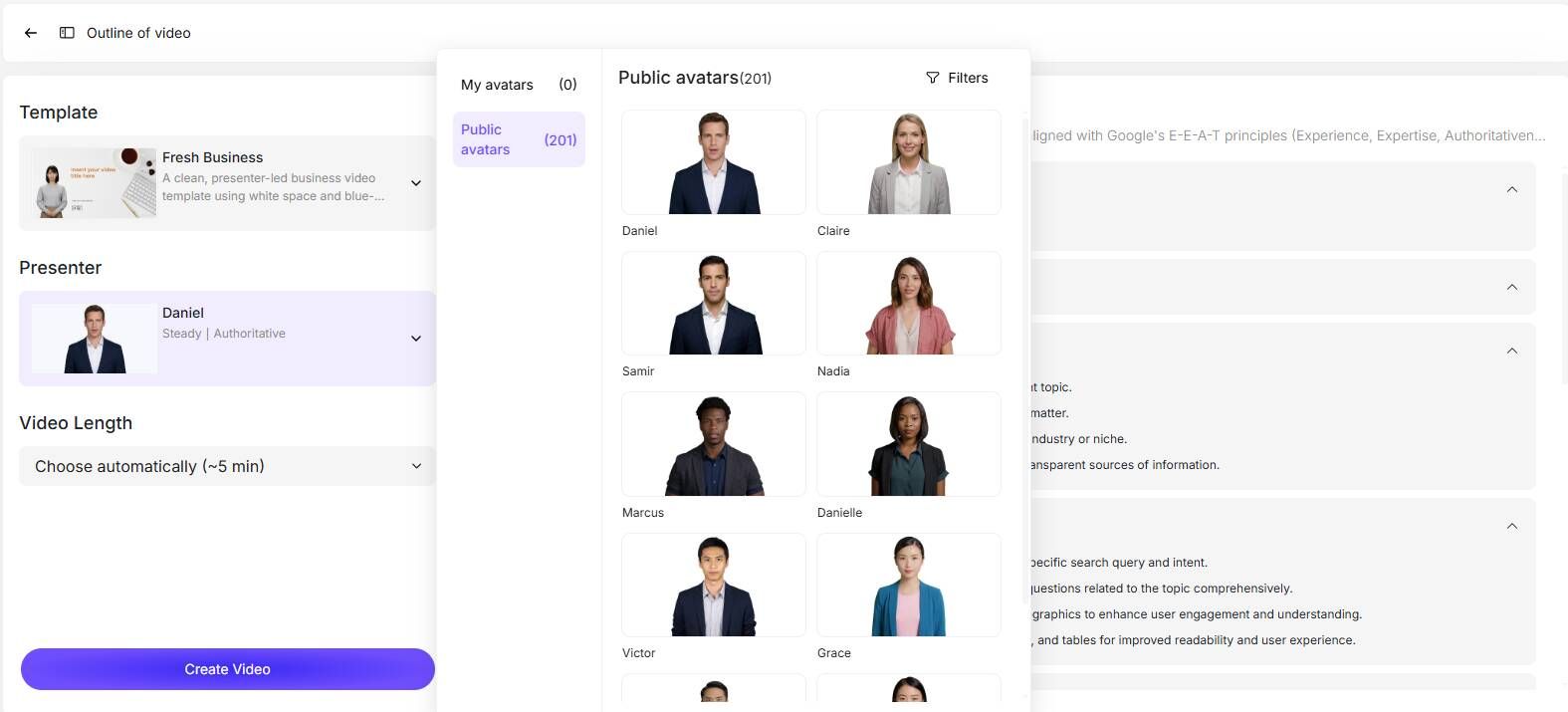
Once uploaded, the platform parses the document and creates an outline. Next, configure the visual elements.
Select a video template to determine the overall visual style, such as "Fresh Business". Then, choose a presenter from over 200 available avatars to dictate the professional feel of your video.
Step 3: Auto-Generate Layouts and Export Your Interactive Asset
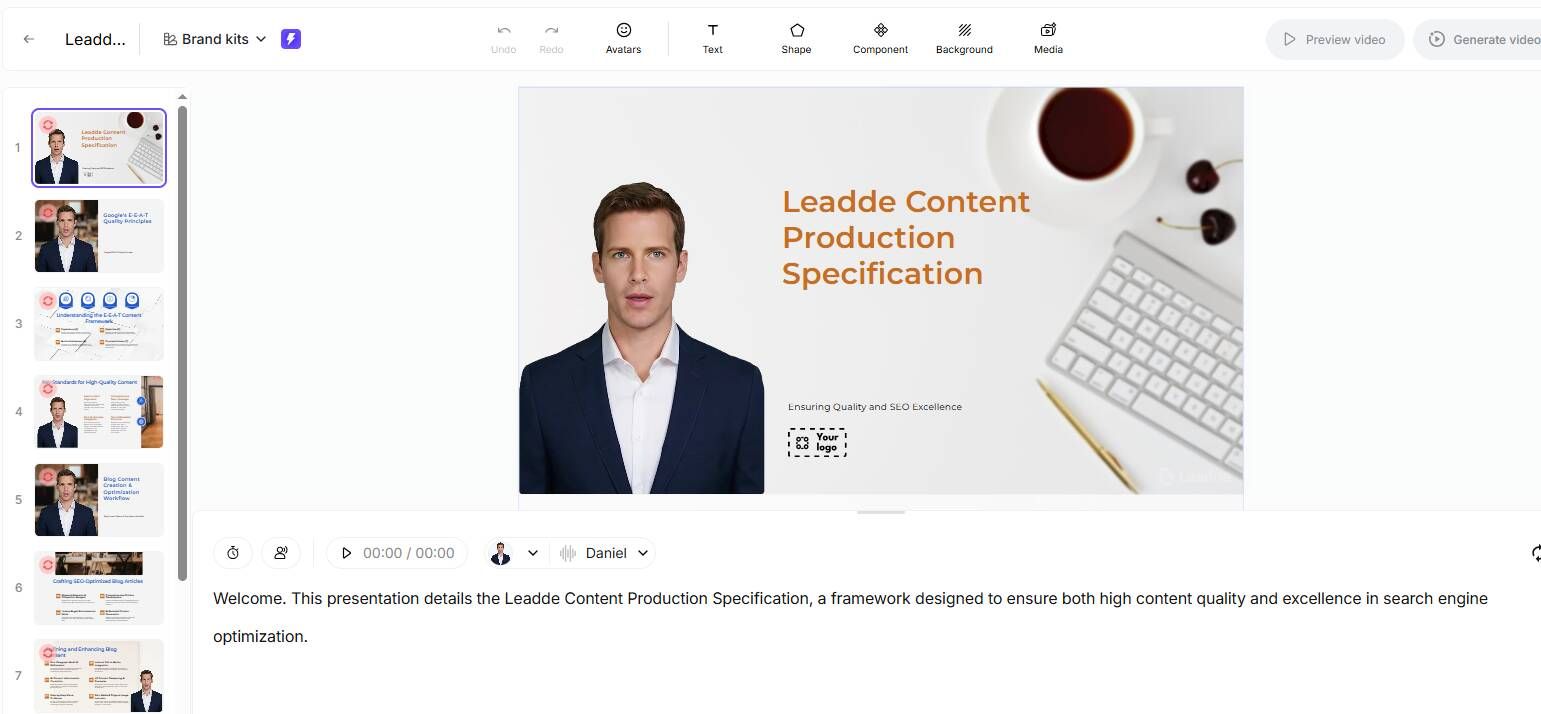
The system will automatically generate the script for every page. You can review and tweak the text, components, and media elements.
Once satisfied, click Preview video to check the flow. Finally, configure your title, toggle the "Remove watermark" option if needed, and click Generate video to produce your final asset.
How to Use AI Avatars for High-Volume A/B Testing
Scaling Creative Testing with AI Video
In growth teams, the biggest advantage of AI avatars is:
👉 Not quality — but volume of experimentation
Real Workflow
- Create 5–10 different hooks
- Generate short videos (30–60 sec)
- Run ads across platforms
- Keep top performers
Real Outcome
- Up to 10 variations tested in a single day
- Faster identification of winning messages
👉 This is nearly impossible with traditional production.
AI Avatar vs Screen Recording: Which Converts Better?
The Answer: Hybrid Wins
From multiple implementations, we found:
Screen Recording Strengths
- Clear product understanding
- High trust
- Best for complex workflows
AI Avatar Strengths
- Human connection
- Better engagement
- Stronger hooks
Best Practice: Hybrid Explainer Structure
- Avatar → Hook & introduction
- Screen → Product demo
- Motion → Highlight key features
- Avatar → Summary & CTA
👉 This structure consistently outperforms either format alone.
Why “Talking Head” AI Videos Fail for Complex Products
The Hidden Limitation of AI Avatars
AI avatars alone struggle when:
- Explaining complex workflows
- Showing multi-step processes
- Demonstrating data-heavy features
Why?
Because:
👉 Product understanding depends on visual clarity, not just narration
What Works Better
- UI walkthroughs
- Step-by-step animations
- Visual storytelling
👉 AI avatars should support, not replace, these elements.
When AI Avatars Hurt Product Understanding (And How to Fix It)
Common Mistake
Overusing avatar-only videos leads to:
- Lower comprehension
- Higher drop-off rates
Proven Fix
Use avatars strategically:
- Intro framing
- Section transitions
- Key takeaways
👉 Keep the core explanation visual
The Uncanny Valley Problem (And How to Avoid It)
The Trust Problem
Even in 2026, users notice when:
- Lip-sync feels off
- Voice sounds robotic
- Expressions lack realism
Practical Solutions
- Use shorter avatar segments
- Add subtitles
- Combine with real UI footage
- Choose high-quality platforms
👉 The goal is not realism — it’s credibility
Using AI Avatars for Multilingual Product Videos at Scale
The Global Scaling Advantage
Traditional localization:
- $200–$400 per language
- Long turnaround
AI Workflow
- Generate multiple languages instantly
- Test performance across markets
- Invest in top-performing regions
👉 This reduces risk and speeds up global expansion.
Leadde: The Best AI Avatar Platform for Product Explainers
Why Leadde Stands Out
Leadde is built for business content transformation, not just avatar generation.
Key Advantages
- Full document-to-video automation
- Interactive Chat with Video
- 92+ languages supported
FAQ: Choosing and Using AI Avatar Tools
Which AI avatar tool is best for product explainer videos?
The best AI avatar tool depends on your primary use case:
- Leadde → Best for automation and scalability (document-to-video, bulk production)
- Synthesia → Best for enterprise training and structured content
- HeyGen → Best for marketing videos and short-form content
For most SaaS teams, tools that combine automation + flexibility deliver the highest ROI.
Can AI avatars replace real presenters?
AI avatars can replace repetitive video production tasks, but they do not fully replace human presenters.
The most effective approach is a hybrid model:
- AI avatar → introductions, summaries, consistency
- Real visuals or demos → core product explanation
This balance improves both efficiency and viewer trust.
Are AI avatar videos effective for SaaS marketing?
Yes. AI avatar videos are highly effective for SaaS marketing when used in the right contexts:
- Feature announcements
- Product onboarding
- Short-form ads and social content
- A/B testing messaging
Their main advantage is the ability to produce and test content at scale quickly.
How natural are AI avatars in 2026?
Modern AI avatars are significantly more realistic, with improved:
- Lip-sync accuracy
- Voice quality
- Facial expressions
However, overuse can still reduce trust. Best results come from:
- Short avatar segments
- High-quality voice models
- Supporting visuals
Can AI avatars be used for multilingual product videos?
Yes. AI avatar platforms are one of the most efficient ways to create multilingual content.
Key advantages:
- Instant translation into multiple languages
- No need for separate voice actors
- Faster global rollout
Many teams use AI to test markets first, then invest in high-performing regions.
Do AI avatar videos convert better than traditional videos?
AI videos can outperform traditional videos in specific scenarios:
- When testing multiple messaging variations
- When speed of iteration matters
- When producing high-volume content
Conversion improvements typically come from faster optimization cycles, not just the format itself.
How do you avoid low-quality AI avatar videos?
To maintain high quality:
- Use a hybrid format (avatar + screen + motion)
- Focus on clear visual explanations
- Keep avatar segments short and purposeful
- Avoid over-reliance on talking-head formats
Quality depends more on structure and clarity than the avatar itself.
Is AI avatar video suitable for complex products?
AI avatars alone are not ideal for complex products.
They work best when combined with:
- Screen recordings
- Step-by-step walkthroughs
- Visual diagrams
For technical or data-heavy products, visual clarity should always take priority over presentation style.
Conclusion: Which AI Avatar Platform Should You Choose in 2026?
The era of manual video editing is over. For product explainer videos, choosing between in-house AI tools and animated explainer video companies depends entirely on your business workflow and volume.
If your goal is to eliminate manual scripting and turn existing PDFs or PPTs into interactive training or SaaS explainer videos, Leadde is one of the strongest options to test. By combining document-to-video automation, multilingual support, and enterprise-grade controls, Leadde helps organizations scale video content production while reducing time and cost.
To see whether it fits your workflow, create your first AI product explainer with Leadde from an existing PDF, PPT, script, or product brief.





