
How to Make a Professional E-learning Video: Tools, Costs, Interactive Training & Best Practices

Creating a professional e-learning video starts with one goal: helping learners understand and apply information faster.
The most effective e-learning videos are short, focused, visually clear, and built around real learning outcomes—not just presentation slides. A professional workflow includes choosing the right format, defining clear objectives, scripting around learner needs, using the right production tools, adding interactivity, and delivering videos through the right platform for tracking and scale.
Today, AI-powered platforms like Leadde.ai make this process significantly faster. Tasks that once required freelancers, editors, voice actors, and weeks of revisions can now be completed in minutes—while still maintaining instructional quality when designed correctly.
In this guide, I’ll walk you through exactly how to make a professional e-learning video, based on practical production experience, course creator workflows, and research across corporate training teams, instructional designers, and online education businesses. This includes tools, real production costs, interactive video strategies, AI avatar decisions, hosting choices, and the most common mistakes that reduce learner engagement.

Why E-learning Videos Are Effective
E-learning videos offer unique advantages that other instructional methods cannot match. Understanding these benefits will help you design content that truly engages your learners.
Higher Engagement
Studies show that 67% of teachers believe video lessons are highly effective for student learning. Videos enable learners to observe instructors and replicate behaviors, promoting social learning. Compared with static text, videos increase attention, motivation, and enjoyment, which improves information retention.
Ease of Access
Videos are accessible on multiple devices, making it easy for learners to study on their schedule. They also reduce barriers for educators, since producing a video often requires only basic tools rather than a full production team. This accessibility ensures learners can engage with content anytime, anywhere.
Visualizing Complex Concepts
Cognitive Load Theory suggests that working memory has limits. Videos help by presenting information visually, reducing the mental effort learners need to imagine concepts themselves. For instance, a short animated diagram can make complex processes easier to understand than paragraphs of text.
Types of E-learning Videos to Create
Selecting the right video format depends on your learning objectives and the preferences of your audience. Common e-learning video types include:
Microlearning Videos
These are concise, focused videos typically lasting 2–3 minutes. Ideal for corporate training or educational modules, microlearning videos deliver specific information without overwhelming learners. For example, a short video demonstrating proper software usage can be more effective than a long lecture.
Animated Videos
Animation allows you to illustrate concepts without live filming. With user-friendly tools, even educators without design experience can create engaging animations with premade templates and characters. Animated videos are excellent for explaining abstract or complex topics.
Tutorials
Step-by-step tutorial videos demonstrate processes or procedures, such as software usage, lab experiments, or safety protocols. Learners can follow along visually and replicate the steps themselves, supporting active learning and skill acquisition.
Instructional Videos
These include lectures, interviews, presentations, and webinars. Often led by subject matter experts, instructional videos can also integrate screencasts or whiteboarding sessions. For instance, onboarding videos explaining company policies or educational lectures on specific topics are commonly delivered in this format.
Step-by-Step Workflow for Creating AI-Generated E-learning Videos
Creating a professional e-learning video can be fast and efficient with AI-powered platforms like Leadde. Here’s a practical step-by-step guide:
Step 1: Upload Your Content
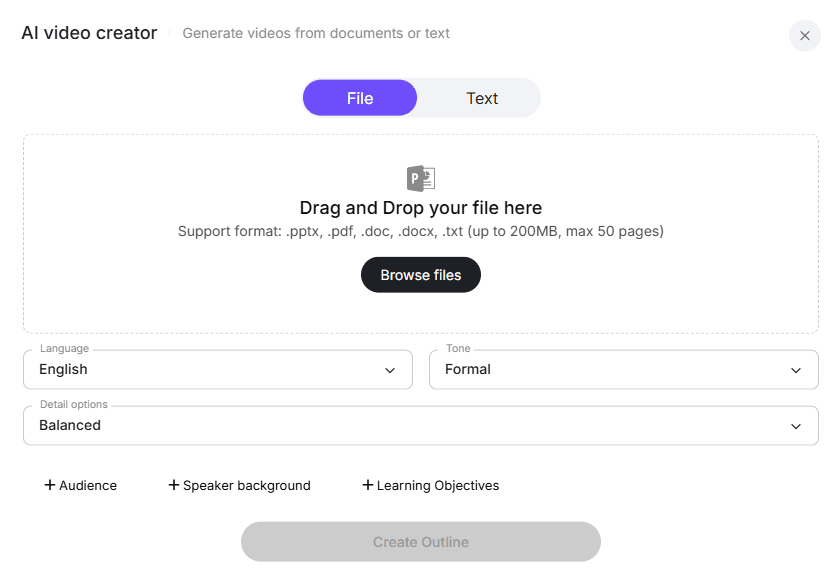
Start by uploading your tutorial, training document, or presentation in DOC, PDF, PPT, or text format. Leadde automatically analyzes your content, identifying key topics, structure, and learning objectives, which lays the foundation for a well-organized video.
Step 2: Customize the Auto-Generated Outline
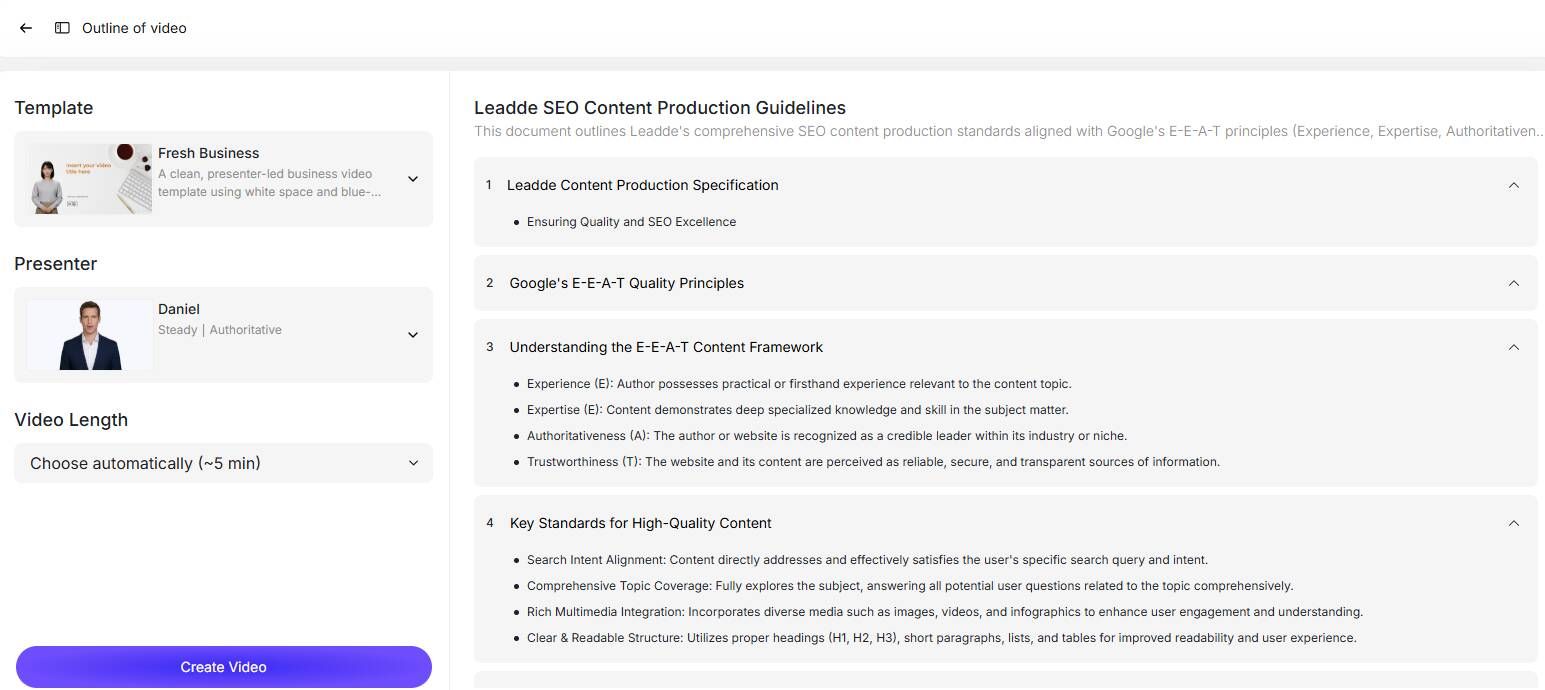
Leadde instantly produces a structured outline from your content. You can refine it by editing section titles, reordering steps, removing unnecessary parts, or adding new sections. This ensures your video flows logically and aligns with your learning goals.
Step 3: Choose AI Presenter and Voice
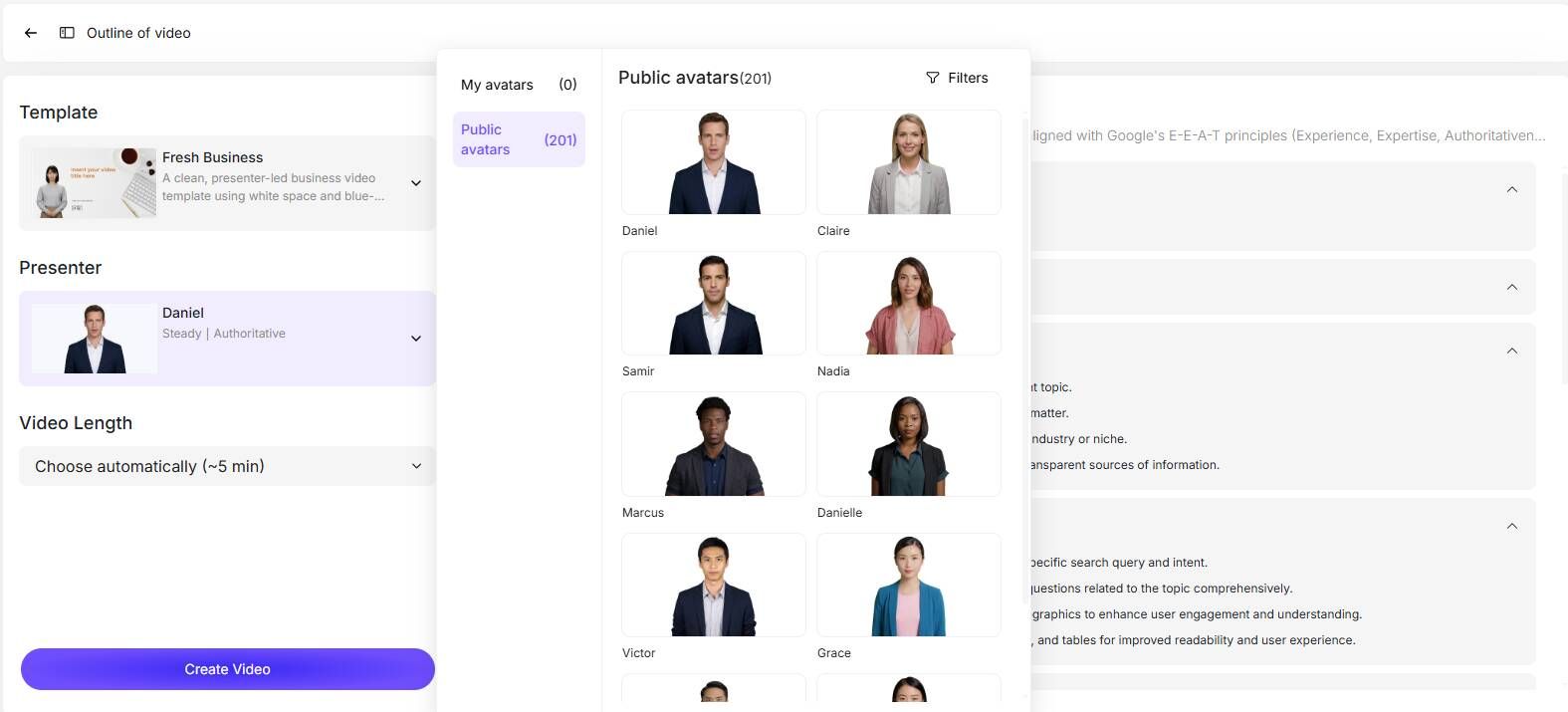
Select an AI avatar from a library of 200+ lifelike digital presenters. You can also preview different voice options to match the tone and style of your tutorial, ensuring consistency and professionalism in narration.
Step 4: Select Video Template and Adjust Duration
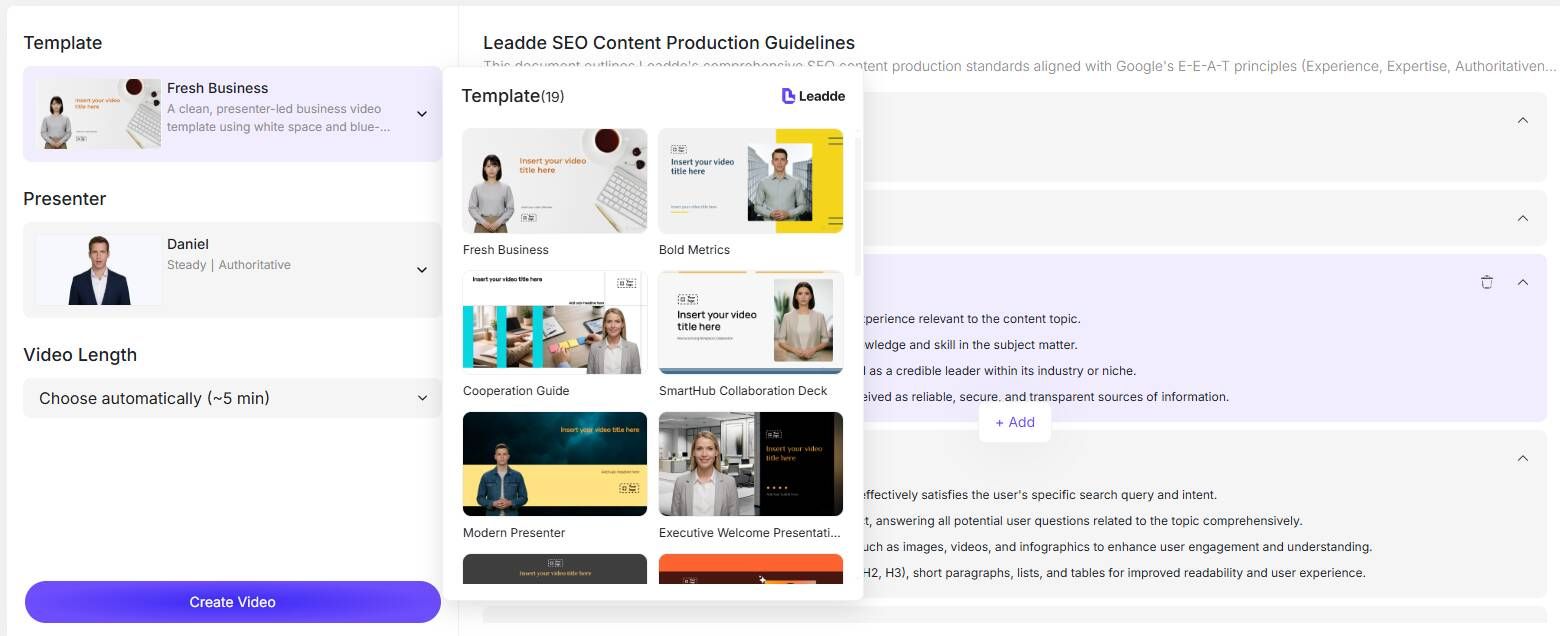
Choose from a variety of video templates tailored for tutorials, training, or explainer videos. Adjust video length and level of detail to control pacing, clarity, and engagement.
Step 5: Generate the Tutorial Script Automatically
Click “Create Video,” and Leadde generates a clear, natural-sounding tutorial script based on your outline, language, and presentation settings. This eliminates the need for manual scripting and ensures consistent messaging throughout the video.
Step 6: Produce and Share Your Video
Leadde transforms your script into a fully structured tutorial video with smart highlights, scene layouts, and your chosen AI presenter. In just minutes, your video is ready to preview, download, or share with learners across platforms.
Tip: You can also leverage Leadde’s multilingual capabilities to create different language versions of the same video, expanding accessibility and reach with minimal extra effort.
How to Choose the Right Tool to Make an E-learning Video
The biggest challenge is rarely video production itself.
It is choosing the wrong tool stack.
Switching later is expensive because it affects:
- SCORM packages
- LMS integrations
- certificates
- learner tracking
- analytics
- multilingual workflows
- compliance reviews
The tool decision should be made based on workflow, not marketing pages.
Best Tools for Video Creation
For Screencasting
- Camtasia
- ScreenFlow
- Screencast-O-Matic
Best for tutorials and software training.
For Interactive Authoring
- Articulate Storyline
- Adobe Captivate
- Lectora
Best for branching scenarios and compliance learning.
For AI Video Production
- Leadde
- Synthesia
- HeyGen
- VEED
- Vizard
Best for rapid production, subtitles, AI presenters, and multilingual scaling.
In one production team, AI-assisted editing doubled output speed because captions, B-roll, layouts, and first drafts were automated, allowing creatives to focus only on final polish.
Efficiency improved by approximately 2x.
For LMS Delivery
- Thinkific
- Teachable
- Kajabi
- Docebo
- LearnDash
Best for learner tracking, payments, certification, and course delivery.
How Much Does It Cost to Make a Professional E-learning Video
This is usually the first business question.
Traditional production often includes:
- instructional designer
- script writer
- voice actor
- video editor
- animator
- revision cycles
- SME review
A single professional animated explainer can easily cost hundreds to thousands of dollars.
Common outsourced range:
$500–$1,500+ per video depending on complexity.
This becomes expensive quickly for onboarding libraries or compliance programs.
AI-powered workflows reduce this dramatically by turning documents directly into production-ready videos in minutes.
The real cost advantage is not just production cost.
It is iteration speed.
Fast revision cycles improve launch speed, stakeholder approval, and overall ROI.
Best Practices for Creating E-learning Videos
To ensure your videos are effective and engaging, follow these essential tips:
1. Understand Your Learners
Create learner personas to tailor your content. Consider their background, experience level, and learning goals. A video for university students will differ in style and detail from one designed for employee training.
2. Define Learning Outcomes
Set clear objectives before production. Focus on one outcome per video to prevent cognitive overload. For larger topics, break content into a series of shorter videos.
3. Plan with a Storyboard
Storyboards map out the sequence of your video, ensuring logical flow and coverage of all necessary content. Once complete, write a script aligned with your visuals.
4. Ensure Accessibility
Add captions and transcripts for learners with hearing impairments, and consider audio descriptions for visual content. Accessibility should be integral to your design process.
5. Incorporate Interactivity
Interactive elements like quizzes, clickable hotspots, or embedded questions promote active learning. This keeps learners engaged and reinforces key concepts.
6. Keep Videos Concise
Even if not using microlearning, shorter segments are more effective. For example, an eight-part series of 10–15 minute videos is often more digestible than a single 2-hour lecture.
7. Focus on Professional Quality
High-quality visuals and clear audio enhance credibility. Use adequate lighting, a good microphone, and editing tools to polish your content. Small improvements can make a big difference in learner perception.
Methods to Create E-learning Videos
Creating e-learning videos can be tailored to your resources, technical skills, and learning objectives. There are several practical approaches:
Narrated Slides
Transform presentations into engaging videos by adding audio narration. PowerPoint and Keynote allow you to record your slides with voiceover, while visual tools like Haiku Deck help reduce text and enhance imagery. AI-powered platforms such as Leadde can automate this process, generating scene layouts, voiceover scripts, and even visual highlights directly from your slides, making professional-quality video production faster and easier.
Screencasting
Record your computer screen with a voiceover to demonstrate software, processes, or step-by-step instructions. Tools like Camtasia, Screencast-O-Matic, and iMovie provide basic editing capabilities to polish your recordings. AI-assisted platforms can further streamline this process by automatically generating captions, scene transitions, and interactive elements, reducing the time required for editing and improving accessibility.
Animations
Animated videos, including whiteboard or motion graphics, are highly effective for visualizing abstract or complex concepts. Tools such as Powtoon and VideoScribe allow you to create professional animations without advanced design skills. AI-powered solutions like Leadde enhance this process by automatically matching visuals to key points in your script, adding AI avatars, and even producing multilingual versions, enabling you to create polished, interactive videos with minimal manual effort.
Why Most E-learning Videos Fail to Keep Learners Engaged
Poor engagement is rarely caused by video length alone.
The real problem is that many videos are designed like presentations instead of learning experiences.
Learners disengage when videos feel:
- passive
- overly scripted
- disconnected from real work
- visually repetitive
- too long without interaction
The strongest videos create relevance quickly.
Instead of:
“Here is policy information”
They say:
“Here is what happens if this goes wrong”
That difference changes completion rates dramatically.
Learning is driven by relevance.
Not slide design.
How to Scale E-learning Video Production Without Growing Your Team
As organizations grow, the challenge shifts from creating one great video to producing hundreds consistently.
Most teams do not fail because of creativity.
They fail because manual production does not scale.
Bottlenecks usually come from:
- script writing
- voiceover recording
- subtitles
- version control
- multilingual updates
- SME approvals
Scalable production requires systems.
Not better editing.
The best production models use:
- repeatable templates
- AI-generated first drafts
- centralized review workflows
- reusable scene structures
- shared asset libraries
This is how teams move from “project mode” to operational scale.
Final Thoughts
E-learning videos are powerful instructional tools that enhance engagement, accessibility, and learning retention. By understanding your learners, choosing the right video format, planning effectively, and using suitable tools, you can create content that achieves your learning objectives.
Start with simple methods like narrated slides or screencasts, and gradually explore animations and interactive elements. The growing demand for video-based learning makes it a crucial skill for educators, trainers, and instructional designers.
Adding video to your e-learning strategy not only makes learning more engaging but also ensures your content is modern, accessible, and effective.





