Leadde Logo

AI Lecture Video Generator

Turn PowerPoint slides, PDFs, and study notes into AI video lectures with natural narration, Magic Highlight to emphasize key points in sync with the narration, and motion animations to help explain complex concepts — no recording required.
Prompt & Script
File
PPT
No credit card required

Trusted by Leading Universities & Institutions Worldwide

asu-online-vector 1.svg
cuhk-crest 1.svg
georgia-tech-gt 1.svg
ignou 3.svg
indian-institute-of-science 1.svg
shanghai-jiao-tong-university 1.svg
the-open-university 1.svg
nanyang-technological-university 1.svg
ucsf 1.svg
universidade-de-sao-paulo 1.svg
university-of-tokyo 1.svg
asu-online-vector 1.svg
cuhk-crest 1.svg
georgia-tech-gt 1.svg
ignou 3.svg
indian-institute-of-science 1.svg
shanghai-jiao-tong-university 1.svg
the-open-university 1.svg
nanyang-technological-university 1.svg
ucsf 1.svg
universidade-de-sao-paulo 1.svg
university-of-tokyo 1.svg
asu-online-vector 1.svg
cuhk-crest 1.svg
georgia-tech-gt 1.svg
ignou 3.svg
indian-institute-of-science 1.svg
shanghai-jiao-tong-university 1.svg
the-open-university 1.svg
nanyang-technological-university 1.svg
ucsf 1.svg
universidade-de-sao-paulo 1.svg
university-of-tokyo 1.svg

What Is an AI Lecture Video Generator?

An AI lecture video generator is a tool that turns teaching materials such as PDFs, PowerPoint slides, lecture notes, scripts, and study guides into narrated video lessons. Instead of recording a screen or speaking on camera, educators can upload their materials and let AI generate a structured video with voiceover, subtitles, scenes, and an avatar presenter.

Why Leadde is the Ultimate Educational Video Maker

Slide Presenter for Educators

Turn your PowerPoint slides into engaging educational videos with AI. Upload your deck and Leadde automatically converts your slides and speaker notes into a structured lesson — complete with a virtual AI teacher. Perfect for e-learning and online classrooms.

Free Educational Video Maker

If you are looking for an educational video maker free of charge, Leadde offers a robust Free Plan. You can access our core AI tools, generate your scripts, and experience how easy it is to produce high-quality study materials without upfront costs.

Multilingual Video Lectures

Expand your online classroom globally. Generate your lecture video in English, then translate the narration, subtitles, and on-screen text into 88 languages and 175 dialects so students worldwide can follow every lesson.

Engaging Animated Avatars

Choose from 300 built-in AI avatars, or add a talking presenter from a single photo. With Leadde's Expressive IV engine (up to 60 seconds per video), your digital instructor uses natural hand gestures and facial expressions to keep students engaged.

Turn PDFs into Lecture Videos with AI

Upload a PDF lecture, textbook chapter, research summary, or course handout, and Leadde can turn it into a narrated lecture video. The AI analyzes the document, extracts key points, creates scenes, adds voiceover, and formats the content into a video lesson that can be shared with students or uploaded to an LMS.

PDF to Narrated Lecture Video

PDF to Video Lecture for Online Courses

Turn a PDF into a Study Video

How to Create a Lecture Video with AI from PDFs, Slides, or Notes
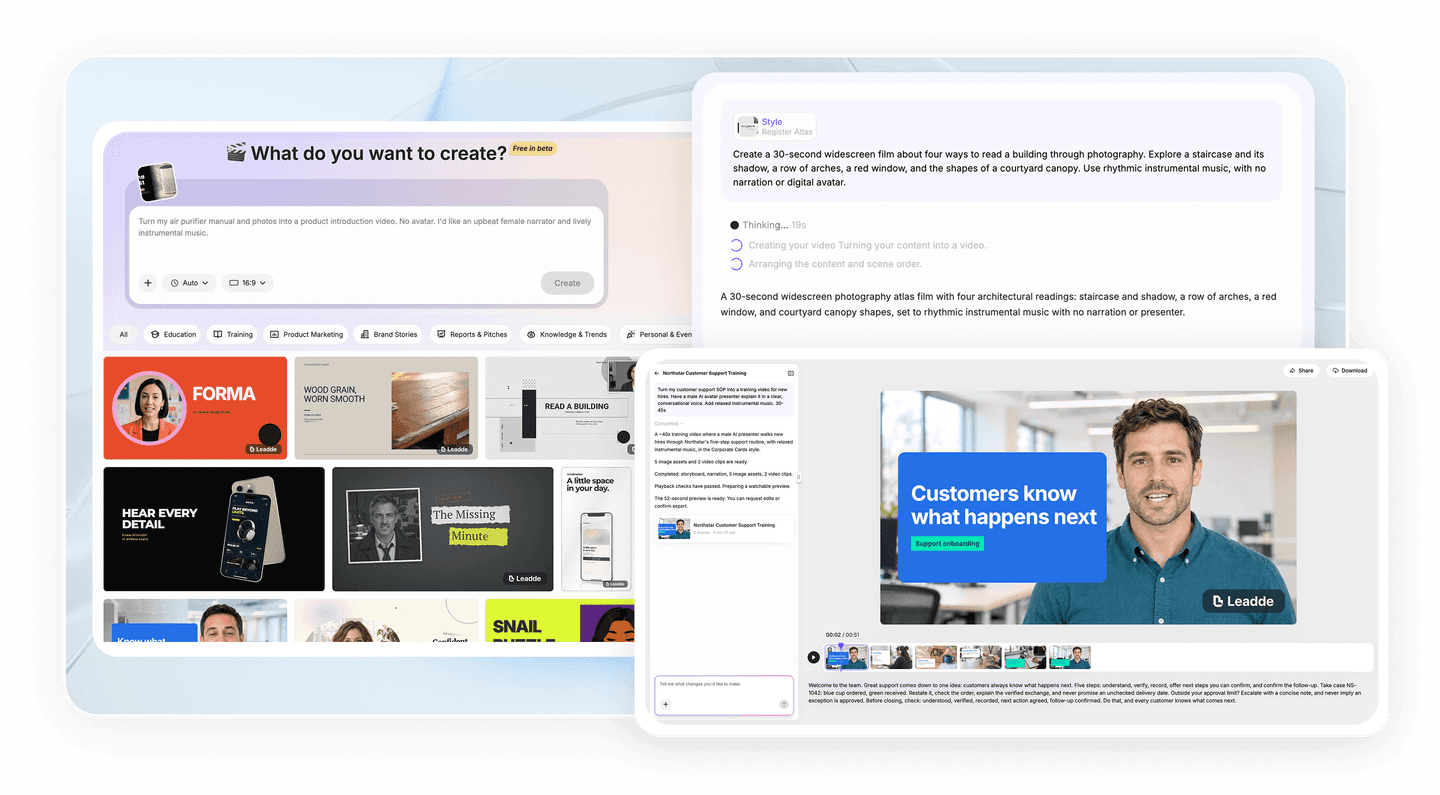
Turn PDFs, slides, study notes, or topic prompts into a narrated lecture video inside Leadde Video Agent in three steps.
Step 1: Upload Study Materials or Enter Ideas

Step 1: Upload Study Materials or Enter Ideas

Upload PDFs, slides, or lecture notes, paste a reading URL, or enter topic ideas, then pick duration and aspect ratio. Leadde Video Agent extracts key concepts and builds a preview video.

Step 2: Preview and Refine via Chat

Review visuals, narration, and pacing in your browser. Ask Video Agent in chat to simplify dense explanations, turn diagrams into charts or motion clips, swap the presenter or voice, and balance audio.

Step 3: Export and Share Your Lecture

Generate the final lecture video, then download an MP4 file for your LMS or YouTube, or share a Leadde hosted link with optional password protection and interactive side-panel Q&A.

Turn Lecture Notes into Study Videos

Leadde can also turn lecture notes, study guides, outlines, and scripts into short study videos. This is useful for teachers who want to explain class materials, students who want to review notes visually, and course creators who need fast video lessons without manual editing.

compliance background

Trusted by Global Educators and YouTubers

Leadde is the preferred lecture video maker online for schools, e-learning platforms, and independent creators who want to scale their educational content quickly.

Ideal for YouTube Creators

Want to start an educational channel? Leadde is the perfect lecture video maker app for YouTube. Utilize our dynamic backgrounds, clear AI voiceovers, and 16:9 layout formats to create viral study videos effortlessly.

No Recording Equipment Needed

Skip the expensive microphones and lighting setups. By using our educational video maker AI, you get studio-quality audio and perfectly lit virtual presenters every single time.

Interactive Learning

When you share your video lecture via a Leadde link, students can use the interactive chat panel to ask questions about the topic and receive instant AI-generated answers, enhancing their learning experience.

Track Student Engagement

Monitor your teaching effectiveness. Use our analytics dashboard to track the "Completion Rate" and "Total Watch Time" of your free lecture video, helping you refine your future lesson plans.

Educational & Lecture Video Use Cases

Academic & University Lectures

Professors can transform lengthy academic papers and research reports into "In-depth" video lectures. Use professional AI voices to objectively analyze data, making it easy for students to review after class.

YouTube Educational Channels

Want to run a faceless educational channel? Input your scripts into Leadde, combine them with dynamic backgrounds, and consistently publish highly engaging history, science, or economics videos.

Corporate E-learning

Turn boring employee compliance manuals into animated educational videos. A structured module design ensures that every new hire clearly understands company regulations.

Language Learning Courses

Leadde's precise lip-sync AI is perfect for language education. Use diverse AI accents to help students visually learn pronunciation and master foreign language conversational skills quickly.

Study Shorts & Exam Reviews

Condense a one-hour lecture into just the essentials. Select the "Summary" detail level, and the AI will automatically extract core knowledge points to generate short, bite-sized review videos for exam prep.

Professional Certification Prep

Help professionals pass their exams. Break down dense certification study guides into clear, chapter-by-chapter video lectures using AI presenters to explain complex methodologies and case studies effectively.

Frequently asked questions

The best AI lecture video generator turns PDFs, slides, notes, and scripts into narrated video lessons with clear structure, subtitles, and flexible exports. Leadde combines Video Agent chat editing with Slide Presenter so educators and students can build and refine lectures without cameras or manual timeline editing.
Yes. Leadde offers a free way to try AI lecture video creation, so you can test how PDFs, PowerPoint slides, and notes can be turned into narrated videos before upgrading.
Upload your PDF to Leadde Video Agent, specify the target duration and 16:9 or 9:16 framing, and note any key diagrams or points to keep. Video Agent generates a narrated preview with scenes and subtitles that you can refine through chat before downloading an MP4.
Yes. Leadde can turn lecture notes, study guides, outlines, and scripts into AI-generated study videos with narration, subtitles, and visual scenes.
Yes. Teachers, professors, instructors, and course creators can use AI to convert existing course materials into lecture videos for online classes, flipped classrooms, training, and LMS uploads.
Yes. Inside Leadde Video Agent chat, you can rewrite or shorten a single scene's narration, change voices across the video, swap or remove the AI presenter for a No avatar layout, animate static diagrams, adjust audio tracks from 0x to 4x, change transitions, or restore an earlier saved version.

Ready to transform your teaching?

Upload your slides, PDFs, or study notes into Leadde Video Agent and create your first narrated lecture video with 200 free monthly credits.
avatar