
AI Narrator for Long Scripts
What Is an AI Narrator?
An AI narrator is a synthetic voice that reads a written script aloud, used for course material, explainers, factual pieces and long-form narration. Over an hour of material, what separates one narrator from another is whether the delivery holds steady. In Leadde that is a matter of applying settings across the whole project instead of tuning each section by hand.
Trusted by the world's leading brands







Narrated Video Examples

Compute shift
Enterprise AI demand is reshaping cloud infrastructure, custom silicon strategies, and investment opportunities in scalable, energy-efficient compute.

AI compute shift
A clear lesson on how custom silicon, energy-efficient compute, and infrastructure strategy are shaping the next stage of enterprise AI.

Machine safety
A factory technician highlights careful inspections, safe operation, and the importance of building quality into every step.

Storm alert
A powerful storm makes landfall, causing travel disruptions as emergency crews respond and officials issue safety guidance.
Why Leadde Works as an AI Narrator
Apply pacing to every scene
One pronunciation, whole script
Place pauses deliberately
Pick up where you left off
How to Narrate a Script with AI
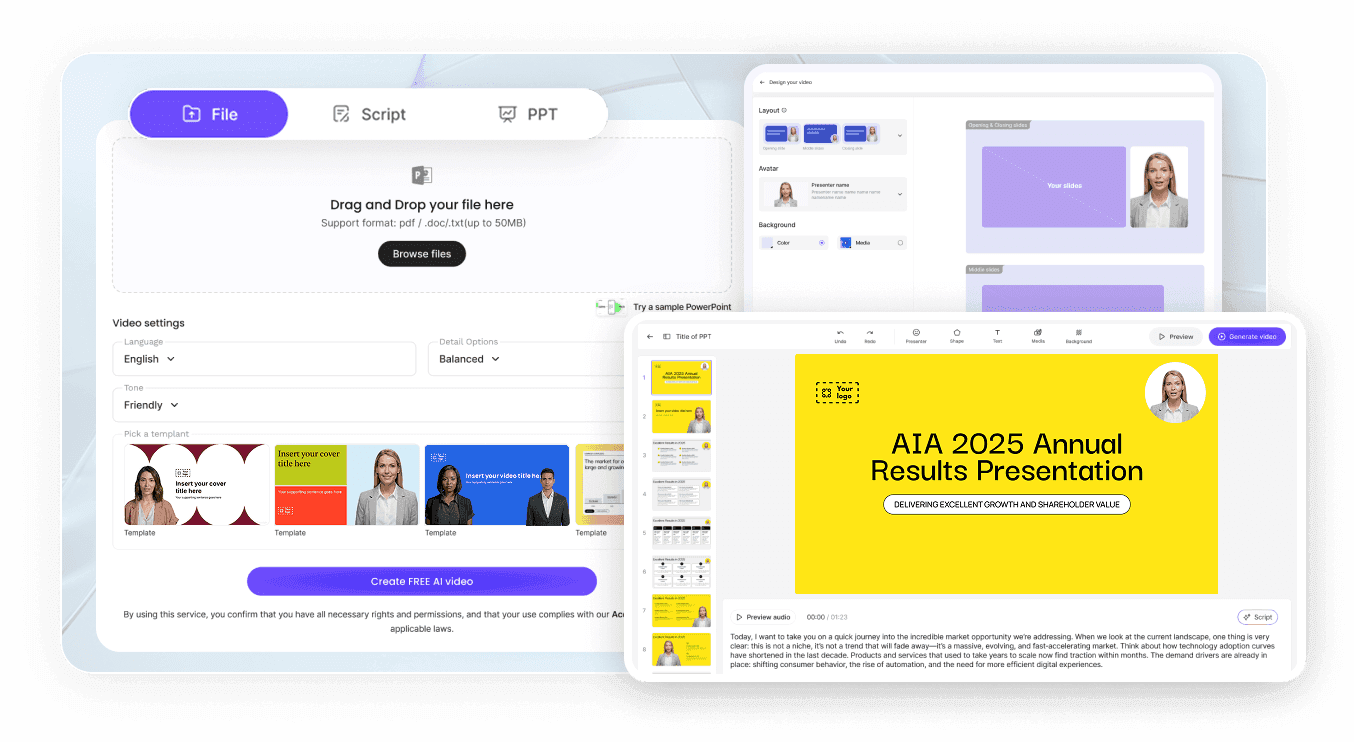
Step 1: Bring in the script
Step 2: Choose narrator and rules
Step 3: Listen through, then generate
AI Narrator Use Cases
Narrate a full course
Modules recorded weeks apart normally sound different. Settings applied across the project keep lesson one and lesson twelve in the same register.
Read long factual pieces
Reports and research summaries need an even delivery more than an expressive one, and pronunciation control matters when the terms are technical.
Voice explainers and walkthroughs
A steady narrator carries a process explanation better than an enthusiastic one, especially where the viewer is following along.
Produce localized narration
Write or translate the script into another language and narrate it there, so a second audience gets a proper read instead of subtitles.

What Long-Form Narration Actually Needs
Bring the script you have
Import the notes with the slides
Scenes keep long scripts navigable
Subtitles come out with the video
AI Narrator Ideas
Course module narration
Documentary-style factual reads
Museum and exhibit audio
Internal process walkthroughs
Research summary narration
Narrated reading of written guides
Frequently asked questions
An AI narrator is a synthetic voice that speaks written text. The script goes in by paste or upload, a voice and accent get chosen alongside it, pacing and pronunciation are set as project-wide rules, and the read is rendered together with the video.
Delivery depends on how much you direct it. Leaving the default pace and no pauses tends to sound flat. Setting speed and volume, placing pause cards where sentences should land, and correcting pronunciation are what make a read sound considered.
Yes. Add a short recording of your own voice under Voices and the clone appears in the same picker as the preset voices. For long-form work this is worth settling early, because switching narrator halfway through a series is audible to listeners.
Narration is available on the no-cost tier. Rendering spends credits from a balance that avatars, cloning and the other AI tools also share, so an hour of material costs considerably more than a test paragraph. Compare tiers before you commit to a long project.
Leadde generates video. You can remove the presenter by selecting the avatar layer and pressing Delete, which gives you a narration-led video, and downloads are taken from the share page as the video file plus subtitle files.
Scripts are managed as scenes, so length is handled by adding scenes rather than by one continuous take. Duration presets range from short summaries to longer in-depth pieces, and you can extend a project by adding more scenes.
Yes. Coverage runs to 88 languages and 175 dialects, with regional accents searchable from the voice panel. Either compose in the target language from the outset, or run an existing piece through translation to get a fresh draft, deciding as you go whether on-screen text travels with the spoken words.
That is set by your plan, and the terms for each tier are published on the pricing page. The one condition that sits outside pricing is the voice itself: a clone has to be built from your own recording, or from someone who agreed to it.
Narrate your next long script
