How to Narrate a Word Document: Read Aloud, AI Voice & Video

If you want to narrate a Word document, the fastest option is Microsoft Word’s built-in Read Aloud feature. Go to Review > Read Aloud to listen from the cursor position or play selected text. It works well for proofreading, accessibility, and quick document review.
But listening inside Word is different from creating polished narration. If you need an MP3, a more natural AI voice, or content for training and educational videos, the document usually needs to be prepared for spoken delivery rather than read exactly as written.
Tools such as Leadde can take this further by creating informational videos from documents and other source materials, turning them into structured videos with AI narration, AI presenters, and multilingual output. This guide explains when Word Read Aloud is enough, when AI narration is more suitable, and how to choose the right workflow.
How to Narrate a Word Document With Microsoft Word Read Aloud
Microsoft Word’s Read Aloud feature is the easiest way to narrate a Word document for personal listening or review. Microsoft says the feature uses text-to-speech technology to play written text as spoken words.
How to Start Read Aloud in Microsoft Word
Open your document and go to Review > Read Aloud. Use the on-screen controls to play or pause narration, move to the previous or next paragraph, or stop playback.
How to Narrate Only Part of a Word Document
Select the passage you want to hear before starting Read Aloud. If you do not select text, Word can begin from the cursor position and continue through the document.
How to Change the Read Aloud Voice and Reading Speed
Select the gear icon in the Read Aloud controls to change the reading speed or choose an available voice. Word also uses the document’s proofing language, so check that setting if the accent or pronunciation sounds wrong.
What Keyboard Shortcuts Can You Use for Word Read Aloud?
On Windows, Ctrl + Alt + Space starts Read Aloud and Ctrl + Space plays or pauses it. On macOS, Control + Option + Space starts reading and Option + Space controls playback.
Can Microsoft Word Read a Document Aloud on Windows, Mac, Web, and Mobile?
Yes, but the experience differs by platform. Word supports Read Aloud on Windows, macOS, iPad, iPhone, and Android, while Word for the Web uses Immersive Reader for spoken playback.
How Does Read Aloud Work on Windows?
Use Review > Read Aloud, then control playback, speed, voice, and paragraph navigation from the floating toolbar.
How Does Read Aloud Work on Mac?
The Word workflow is similar to Windows. macOS also has its own separate Speech accessibility feature, so do not confuse system Speech with Word Read Aloud.
How Can You Listen to a Document in Word for the Web?
Choose View > Document Views > Immersive Reader, then select Play. You can adjust voice speed and available voice options from Immersive Reader.
How Can You Use Read Aloud on iPhone, iPad, and Android?
The mobile Word apps provide Read Aloud controls for playback and paragraph navigation. These versions are useful when the goal is listening away from a desktop rather than editing line by line.
Can Word Automatically Detect Different Languages?
When online, Word’s mobile Read Aloud can attempt to detect the language and support multiple languages in one document. Available voices still depend on the platform and speech service.
What Is the Difference Between Read Aloud, Speak, Narrator, and Dictate in Word?
These tools solve different problems:
| Feature | Direction | Best For |
| Read Aloud | Text → speech | Listening and proofreading |
| Speak | Selected text → speech | Short passages |
| Narrator | Screen/UI → speech | Accessibility navigation |
| Dictate | Speech → text | Writing by voice |
| Transcribe | Recording → text | Converting recorded speech |
Microsoft specifically distinguishes Read Aloud from Speak and Narrator.
When Should You Use Read Aloud Instead of Speak?
Use Read Aloud for continuous document listening. Speak is better when you only need selected text read back to you.
When Should You Use Narrator Instead of Read Aloud?
Use Narrator when you need a full screen reader that announces buttons, dialog boxes, and interface elements—not simply document narration.
Why Is Dictation Not the Same as Narration?
The direction is reversed: narration converts text into speech, while dictation converts speech into text.
Why Do Writers and Professionals Use Read Aloud for Proofreading?
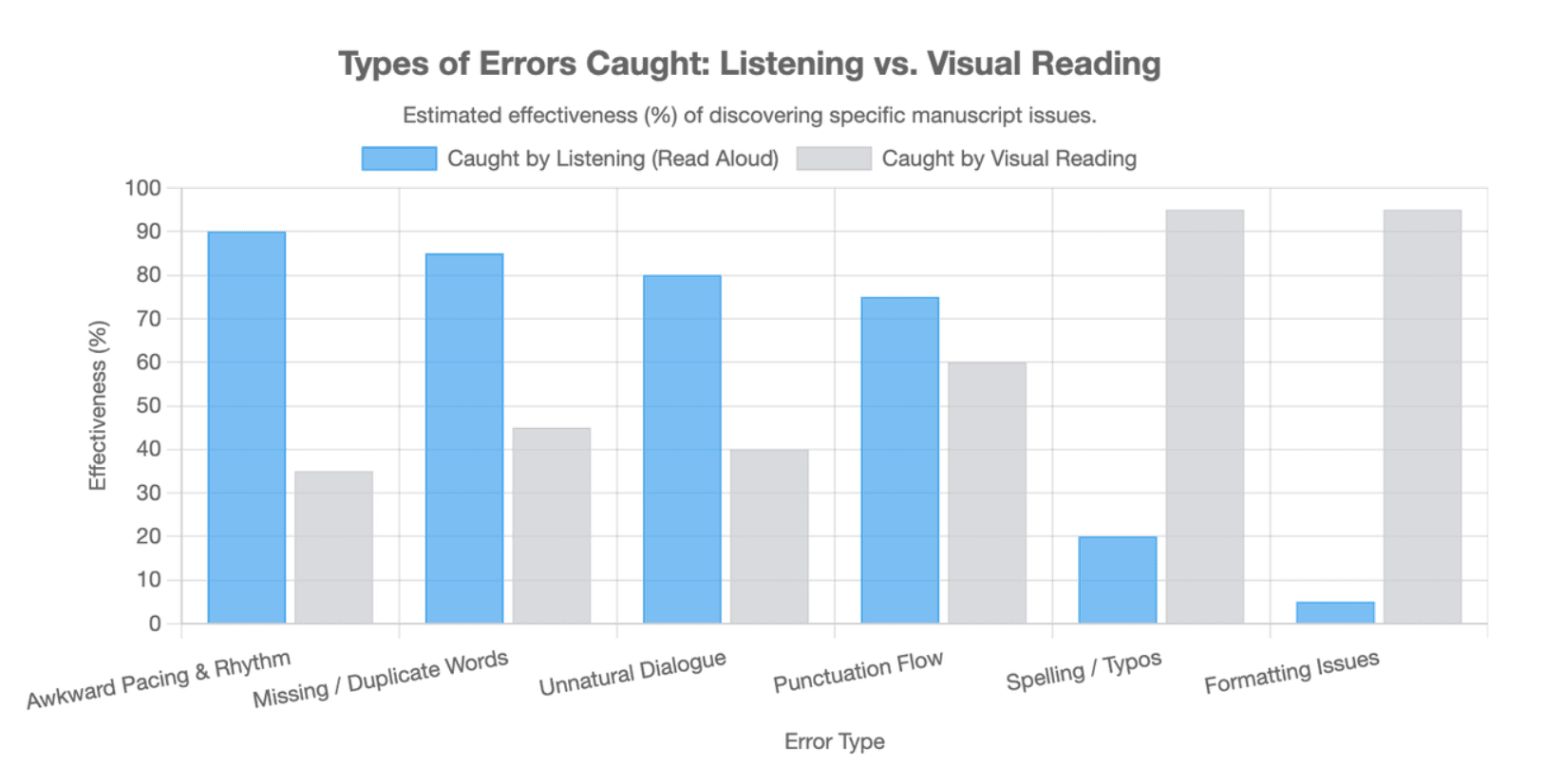
Listening exposes problems that can disappear during repeated visual editing. Professional editors report catching missing or duplicate words, tense problems, awkward phrasing, and other issues through Read Aloud; legal-workflow guidance similarly highlights typos and awkward wording.
What Errors Are Easier to Hear Than See?
Listen for punctuation problems, repeated words, missing words, clumsy transitions, unnatural dialogue, and sentences that lose their rhythm. Writers in community discussions have specifically described noticing punctuation they had repeatedly overlooked on screen.
How Can You Use Read Aloud as a Proofreading Workflow?
- Complete a normal visual edit.
- Run spelling and grammar checks.
- Start Read Aloud.
- Listen without constantly reading ahead.
- Pause when something sounds wrong.
- Check the sentence yourself.
- Edit only if the text—not the voice—is the problem.
- Replay the revised passage.
Why Should You Not Edit Every Sentence That Sounds Wrong?
Synthetic speech can place emphasis in the wrong location. Writers have reported pausing and reading a sentence themselves before deciding whether it actually needs revision.
How Can You Tell Whether the Writing Is Wrong or the AI Voice Is Wrong?
Use a two-layer narration test. First evaluate the text: grammar, clarity, punctuation, repetition, and logic. Then evaluate the rendering: pronunciation, pauses, stress, pacing, accent, and emotion.
What Is the Two-Layer Narration Test?
If several voices stumble over the same sentence, the text may need revision. If only one voice produces an odd emphasis or pronunciation, changing the script may solve the wrong problem.
Can Attention Drift Reveal a Pacing Problem?
Yes. From a content-review perspective, losing attention at the same passage can be a useful signal to inspect repetition, excessive explanation, or weak information hierarchy—even when the grammar is correct.
Does a More Natural Voice Always Make Proofreading Better?
Not necessarily. A neutral voice can expose what is actually on the page, while an expressive voice may smooth over weak phrasing. The best proofreading voice may not be the best publishing voice.
Can Read Aloud Help With Accessibility, Focus, and Learning?
Microsoft lists proofreading, multitasking, comprehension, and learning among reasons to listen to Word documents.
How Can Read Aloud Support People Who Prefer Listening?
It provides another way to consume written information and can reduce the need to stay visually focused on a page for the entire reading session.
How Is Immersive Reader Different From Read Aloud?
Read Aloud provides speech. Immersive Reader is a broader reading environment that can combine spoken playback with changes designed to make text easier to follow.
Can a Screen Reader Help Test Word Document Accessibility?
Yes, but Read Aloud itself is not a complete screen-reader test. Accessibility also depends on navigation, headings, links, tables, alternative text, and document structure.
Why Does Microsoft Word Read Aloud Sound Robotic or Use the Wrong Voice?
Voice quality depends partly on the device, speech service, selected voice, reading speed, and document language. Microsoft notes that available voices differ across TTS services.
Why Can the Voice or Accent Sound Wrong?
Check the proofing language first. A mismatched language setting can affect how Word interprets the text.
How Can You Make Word Read Aloud Sound Better?
Try another voice, adjust the speed, correct punctuation, and simplify sentences that are difficult to follow aloud. Avoid damaging otherwise correct writing just to manipulate one TTS voice.
When Is Word Read Aloud Good Enough—and When Is It Not?
Read Aloud is practical for proofreading, personal listening, and document review. For customer-facing narration, audiobooks, branded training, downloadable audio, or precise pronunciation control, a dedicated AI video generation platform or AI narration workflow is usually more appropriate.
Why Is Microsoft Word Read Aloud Not Working?
Start with the basics before assuming the document is damaged.
What Should You Check If Read Aloud Is Missing?
Microsoft recommends confirming that you are signed in to your Microsoft 365 account, then restarting Word or signing out and back in.
What Should You Do If There Is No Sound?
Check system volume, output device, and whether other applications can play audio before troubleshooting Word itself.
Why Might Neural Voices Be Unavailable?
Microsoft recommends a stable internet connection and an active Microsoft 365 sign-in when Neural Voices are unavailable.
Why Did the Voice Suddenly Change?
Check the selected voice and the document’s proofing language. Voice availability can also vary between platforms and TTS services.
Does Read Aloud Need an Internet Connection?
Not every voice behaves the same way because Word may use device-based software or a Microsoft service. Some online voice features therefore have different connectivity requirements.
Can Signing Out or Restarting Word Fix Read Aloud?
Yes. Both actions appear in Microsoft’s official troubleshooting guidance.
Can You Save Microsoft Word Read Aloud as an MP3?
Word Read Aloud is primarily a playback feature, not an MP3 production workflow. If the goal is a reusable audio asset, use a workflow designed to generate and export audio.
What Is the Difference Between Listening in Word and Creating an Audio File?
Playback lets you hear the document inside Word. Audio production creates a file that can be stored, shared, edited, or published.
When Should You Convert a Word Document to MP3 Instead?
MP3 or another audio format makes more sense for offline listening, courses, audiobooks, shared training, or content that needs to live outside Word.
What Should You Look for in a Word-to-Audio Tool?
Check DOCX support, downloadable formats, voice quality, pronunciation controls, language support, long-document handling, and privacy terms.
How Should You Narrate a Long Word Document Without Losing the Listener?
A long document should be divided by meaning, not simply by page count.
Why Should Long Documents Be Split by Meaning Instead of Page Count?
Page boundaries are visual formatting. Narration works better when organized around chapters, topics, procedures, or concepts.
How Can You Preserve Context Across Audio Sections?
Use clear section titles, short transitions, stable terminology, and consistent pronunciation. Each segment should feel connected to the larger document.
Should Every Part of a Long Document Be Narrated?
No. Appendices, references, repeated boilerplate, and dense supporting tables may be better summarized, separated, or omitted depending on the audience.
Should You Narrate a Word Document Word for Word?
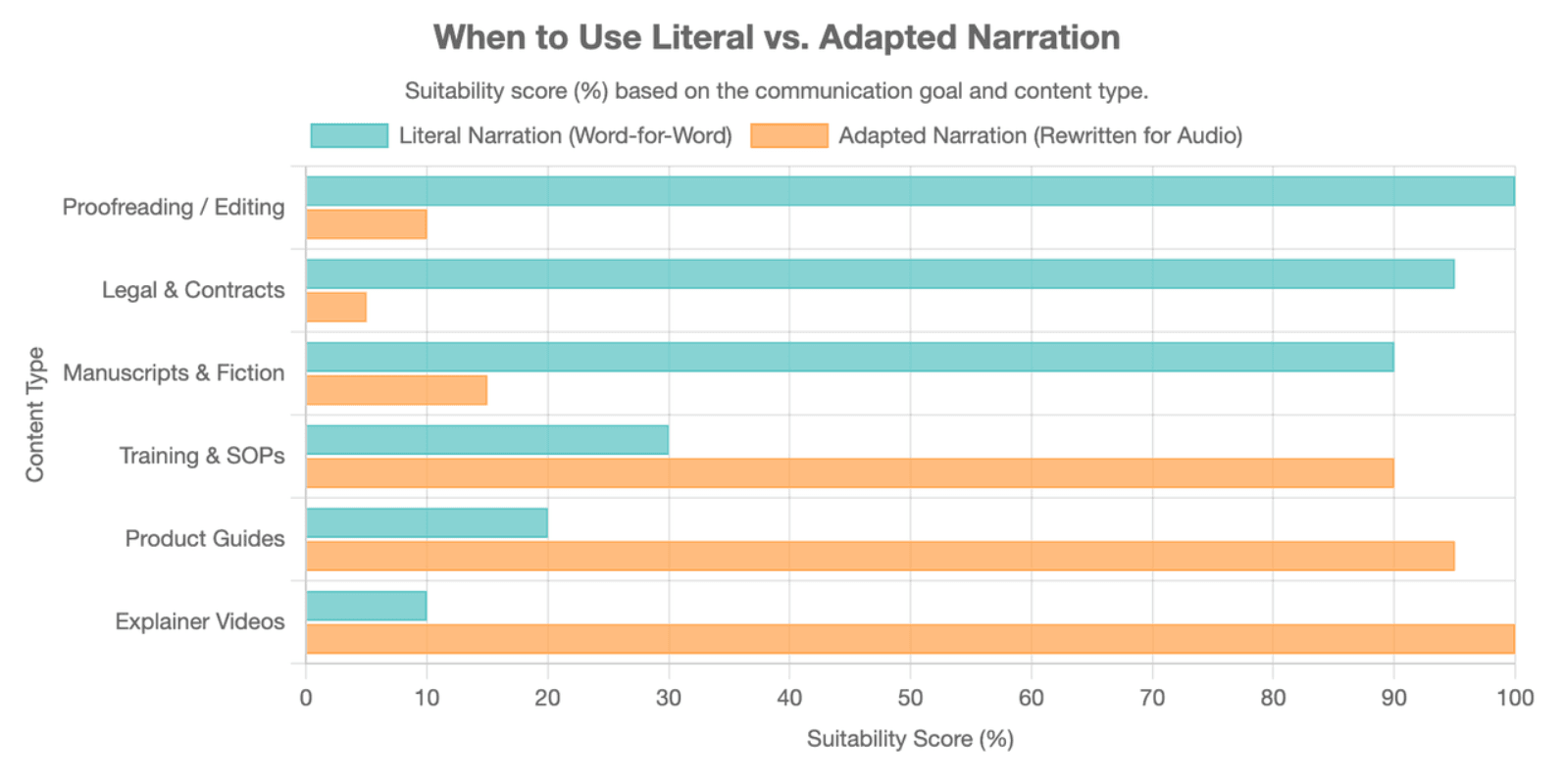
Not always. Literal narration is useful when exact wording matters. Training and educational content often works better when the document is adapted for listening.
When Is Literal Narration Better?
Use it for proofreading, manuscript review, accessibility, and situations where preserving exact wording is important.
When Is Adapted Narration Better?
Use adapted narration for training, product education, explainers, and lessons where comprehension matters more than preserving the page word for word.
What Makes Written Text Hard to Listen To?
Long parenthetical sentences, citations, nested bullets, tables, URLs, footnotes, and phrases such as “see the chart below” all rely heavily on visual reading.
How Should You Prepare a Word Document Before AI Narration?
A good narration workflow first decides what should be read, rewritten, summarized, described, or omitted.
What Should You Do With Headings and Sections?
Use headings to define narration chapters, topics, or scenes instead of flattening the document into one continuous script.
How Should Bullet Lists Be Narrated?
Turn visual bullets into spoken transitions such as “First,” “Next,” and “Finally.” This gives listeners a structure they can follow without seeing the page.
How Should Tables Be Narrated?
Do not automatically read every cell. Identify the comparison, trend, or conclusion the listener actually needs.
Should Headers, Footers, Page Numbers, and Comments Be Read Aloud?
Repeated headers, footers, and page numbers usually add little listening value. Comments, tracked changes, and footnotes require a deliberate editorial decision.
How Should URLs, Acronyms, and Technical Terms Be Handled?
Create a pronunciation check before final generation. Decide whether acronyms should be spoken as words or letters and rewrite long URLs into listener-friendly references.
A practical Narration Readiness Test is:
| Word Element | Typical Treatment |
| Heading | Read or rewrite as transition |
| Paragraph | Read or rewrite |
| Bullet list | Rewrite |
| Dense table | Summarize |
| Chart/image | Describe if important |
| URL | Rewrite |
| Page number/footer | Omit |
How Can AI Make Word Document Narration Sound More Natural?
Natural narration starts with the script, not the voice model. Even a strong AI voice will struggle with dense sentences, weak transitions, and writing designed only for visual scanning.
Why Does Script Structure Affect AI Voice Quality?
Shorter spoken sentences and explicit transitions give narration clearer rhythm and make complex information easier to process.
How Can You Improve Pacing, Pauses, and Emphasis?
Edit sentence length, add natural transition language, verify punctuation, and test difficult names or technical terms before generating the entire narration.
How Should You QA an AI Narration Before Publishing?
Use two passes. Fidelity QA checks names, numbers, steps, warnings, and meaning. Listening QA checks pronunciation, rhythm, pacing, emphasis, and whether attention holds.
The priority should be fidelity before fluency: a smooth voice is not useful if it changes what the original document means.
How Can You Turn a Word Document Into a Narrated Video?
A narrated video requires more than converting text into speech. It combines document understanding, script adaptation, scenes, visuals, narration, and pacing.
Why Is a Narrated Video Different From a Word-to-MP3 Conversion?
An MP3 changes the delivery medium. A video changes the communication structure, because information must unfold visually and sequentially.
What Does a Document-to-Video Workflow Look Like?
- Upload the Word document.
- Analyze headings and key information.
- Define the audience and goal.
- Select relevant sections.
- Rewrite them for spoken delivery.
- Build scenes around the main concepts.
- Add narration or an AI presenter.
- Review visuals, meaning, and pronunciation.
Platforms such as Leadde are designed around this document-to-video approach, analyzing document structure and transforming documents into multilingual demos with AI narration, avatars, and visual generation.
Should Every Section of a Word Document Become a Video Scene?
No. Documents are designed for scanning and reference; videos are designed for sequential attention. A heading should become a scene only when it represents something the viewer needs to understand or do.
When Is Word-to-Video More Useful Than Word-to-Audio?
Choose video when visuals clarify a process, interface, product, concept, or training task. Choose audio when listening itself is sufficient.
How Should Narration Change for Training, Education, and Business Documents?
The file format does not determine the narration style. The communication goal does.
How Should You Narrate an SOP or Training Document?
Preserve procedural order and warnings, emphasize required actions, and remove reference-only details that do not help someone complete the task, especially if you need to turn SOP documents into training videos at scale.
How Should You Narrate Educational Content?
Break concepts into manageable sections, add examples and transitions, and use visuals when an idea is difficult to explain through speech alone in your educational video production.
How Should You Narrate Product or SaaS Documentation?
Start with the user’s goal. Narration should explain what to do and why while visuals show the relevant interface or workflow.
How Should You Narrate a Manuscript or Creative Work?
Stay closer to the original wording. Rhythm, dialogue, tone, and character voice matter more than restructuring the content into instructional scenes.
What Is the Best Way to Narrate a Word Document for Different Use Cases?
| Use Case | Best Approach | Main QA Priority |
| Proofreading | Word Read Aloud | Errors |
| Pacing review | Read Aloud/TTS | Rhythm |
| Personal listening | Word Read Aloud | Convenience |
| Audiobook | AI/pro narration | Performance |
| Training | Document-to-video | Learning clarity |
| SOP | Narrated tutorial | Accuracy |
| Product guide | Explainer video | Visual-action alignment |
| Multilingual training | AI video localization | Meaning consistency |
The right workflow depends less on the .docx file itself than on what the listener needs to do with the information.
Is It Safe to Upload a Word Document for AI Narration?
Privacy should be part of tool selection, especially for internal training documents, unpublished manuscripts, legal material, and confidential business information.
What Does Microsoft Say About Read Aloud Privacy?
Microsoft states that Read Aloud does not store users’ content or audio data and uses the content to provide the audio result.
What Should Businesses Check Before Uploading Internal Documents to an AI Tool?
Review the provider’s data-retention policy, model-training policy, deletion controls, account permissions, enterprise terms, and treatment of confidential information. Do not assume every document-to-audio or document-to-video platform follows the same privacy model.