
Best Flipped Classroom Video Tools for 2026: AI, LMS & Interactive Learning

The best flipped classroom video tools in 2026 help educators create, assign, personalize, and track pre-class learning videos without requiring advanced editing skills. Tools like Loom and Screencastify are useful for quick screen recordings, Edpuzzle and PlayPosit help add interactive quizzes and accountability checks, while AI document-to-video platforms like Leadde turn PPTs, PDFs, lesson plans, and text into structured instructional videos faster.
Traditional flipping often creates teacher burnout because every lesson requires scripting, recording, editing, and updating. Leadde helps solve this by automatically turning documents and text into professional educational videos
Best Flipped Classroom Video Tools: What Are the Top Solutions for Educators in 2026?
The best tool depends on the teacher’s workflow. Some educators need fast screen recording. Others need interactive quizzes, LMS tracking, or AI-generated videos from existing documents.
A strong flipped classroom stack usually combines video creation, student interaction, progress tracking, and classroom follow-up.
Traditional desktop screencasting and Chrome extensions: Loom and Screencastify
Loom and Screencastify are strong choices for teachers who want to record quick explanations. They are useful for:
- Recording slides
- Explaining homework
- Giving feedback
- Creating short walkthroughs
- Sharing simple pre-class lectures
These tools work best when teachers are comfortable speaking over slides or showing their screen. They are simple, fast, and familiar.
Their main limitation is that the teacher still needs to plan, record, edit, and update the video manually.
Interactive video platforms with quiz overlays: Edpuzzle and PlayPosit
To solve the lack of student tracking, interactive overlay applications add a layer of accountability. Edpuzzle and PlayPosit allow teachers to take any recorded video file and embed formative assessment checkpoints directly into the timeline.
- Forced Pauses: The video automatically pauses until the student inputs an answer.
- Skipping Prevention: Instructors can lock the timeline to prevent students from fast-forwarding through content.
- Instant Grading: Multiple-choice questions are scored automatically and compiled into basic dashboard reports.
AI document-to-video platforms for faster lesson creation: Leadde
Leadde represents the modern paradigm shift by automating the core video production asset workflow. Instead of recording video manually, teachers upload their existing digital materials directly to the system to make professional e-learning videos.
- Automated Layouts: The platform instantly analyzes document texts to build dynamic slides.
- Hyper-Realistic Avatars: Digital avatars voice the script naturally across 170+ languages with diverse accents.
- Dynamic Content Highlighting: Key training definitions are automatically highlighted visually on screen to maximize student focus.
LMS and classroom delivery tools: Google Classroom, Canvas, and Schoology
Learning Management Systems (LMS) serve as the structural backbone for distributing flipped classroom assignments. Google Classroom, Canvas, and Schoology do not generate media themselves, but host the completed video URLs or embedded iframes. They map student rosters to video grades and maintain centralized calendar deadlines for pre-class assignments.
What Is the Flipped Classroom Model, and Why Do Traditional Pre-Class Lectures Often Fail?
The flipped classroom model moves direct instruction outside class time. Students watch or review core content before class, while class time is used for practice, discussion, projects, and feedback.
The model can work well, but only when students are prepared and the teacher designs strong follow-up activities.
How flipped learning shifts passive lectures into active in-class workshops
The flipped classroom methodology systematically flips the traditional educational framework.
- Pre-Class Phase: Students acquire foundational knowledge individually by viewing digital materials or concise concept videos at home.
- In-Class Phase: Physical class time is completely freed from one-way lectures, allowing teachers to guide students through collaborative group projects, advanced problem-solving, and deep case-study discussions.
Why low video completion rates and teacher burnout weaken legacy flipping methods
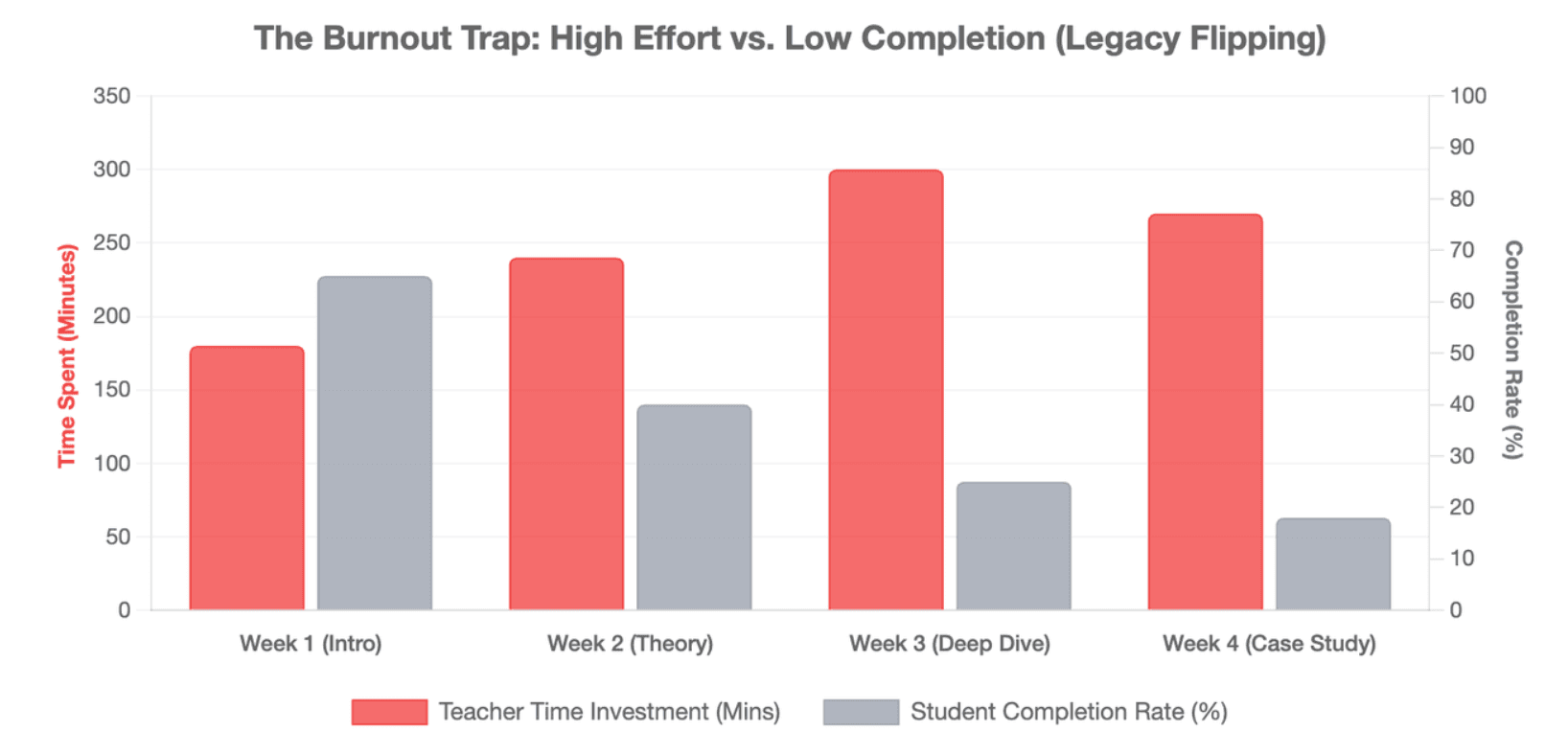
Legacy flipping practices often fail due to severe asymmetrical resource distribution. Instructors frequently spend up to five hours scripting, recording, and editing a single 10-minute screencast video. Despite this heavy time investment, final student completion rates drop significantly when video delivery remains completely linear, unengaging, and visually monotonous. This highlights the importance of learning how to make an instructional video with retention secrets in mind.
What real teachers on Reddit reveal about student resistance and unfinished video homework
An analysis of educator communities on Reddit reveals that the "video ingestion resistance" is a critical point of systemic failure. Teachers report that students routinely bypass video intent by mute-running lectures in background browser tabs, clicking randomly through embedded quizzes, or arriving at class completely unprepared. This forces instructors to waste valuable live workshop time re-teaching the basic material.
Why video alone is not enough without feedback, accountability, and classroom follow-up
Raw video files delivered without active feedback loops fail to support deep knowledge retention. To turn passive observation into authentic pre-class readiness, educational tech stacks must combine content delivery with structured accountability mechanisms. A video requires clear tracking and an immediate avenue for students to clarify confusing concepts before the live session begins.
How Can Teachers Convert Documents Into Flipped Classroom Videos Without Camera Setups?
Teachers often already have strong materials: slides, worksheets, lesson plans, manuals, PDFs, and notes. The problem is converting those materials into video without spending hours recording.
AI video platforms for e-learning and document-to-video tools are useful because they start from existing content instead of forcing teachers to create everything from zero.
Turning PPTs, PDFs, Word documents, and lesson plans into voiced video lessons
A document-to-video workflow allows teachers to upload or paste content and turn it into a structured video.
Leadde supports PowerPoint, PDF, Word, script, and text inputs. The system can generate a video outline, scenes, voice-over scripts, and layouts from existing business or instructional content.
For flipped classrooms, this is useful when teachers want to convert:
- Slide decks into mini lessons
- PDFs into narrated explanations
- Lesson plans into student-ready videos
- Reading materials into visual summaries
- Training documents into guided learning modules
Using AI-generated outlines, scripts, layouts, voiceovers, and avatars to reduce manual editing
Traditional video creation often requires several steps. The teacher must write a script, record narration, edit visuals, add captions, export the file, and upload it. AI video tools can reduce this workflow by generating the first draft automatically.
A useful AI flipped classroom tool should help with:
- Lesson structure
- Scene layout
- Key-point highlighting
- Voice-over generation
- Visual organization
- Captions or multilingual output
- Reusable templates
Teachers still need to review the content. But they do not need to start from a blank screen.
Maintaining institutional branding with templates, smart layouts, and reusable content structures
For schools, universities, and training teams, consistency matters. Videos should look organized and professional across courses.
Templates and smart layouts help maintain:
- Visual consistency
- School or organization branding
- Standard lesson structure
- Clear section flow
- Reusable formats for future content
This is especially important for institutions that produce many videos across departments, languages, or training programs.
When AI document-to-video is better than recording a traditional screencast
AI document-to-video is better when the teacher or institution already has polished source content.
It is especially useful for:
- Updating old slide decks
- Turning PDFs into video summaries
- Creating multilingual lessons
- Producing many videos quickly
- Standardizing content across teams
- Avoiding repeated manual recording
Traditional screencasting is still useful for personal explanations, live problem solving, or quick feedback. AI video creation is stronger when scale, speed, structure, and reuse matter most.
The table below highlights when to transition from manual recording to automated document-to-video production methods:
| Flipped Video Production Metric | Traditional Screencasting (Loom/Manual) | AI Document-to-Video (Leadde) |
| Teacher Setup Time Required | High (Camera, lighting, microphone configuration) | Zero (Pure text/document upload) |
| Content Update Agility | Difficult (Requires a complete manual re-recording) | Instant (Edit text script and regenerate video) |
| Language Scalability | Low (Limited to the speaker's native speech) | High (170+ localized languages and accents) |
| Visual Dynamic Movement | Static screen or predictable manual mouse tracking | Automatic layout positioning & text highlights |
How Can Interactive Video Tools Improve Student Engagement Before Class?
Students often watch videos passively unless the video asks them to do something. Interactive video tools solve this by turning watching into a task. The goal is not to make videos longer or more complex. The goal is to make students think while they watch.
Moving beyond one-way video output with embedded questions and checkpoints
To keep students engaged, flipping platforms must break the traditional cycle of passive observation. Forcing real-time intellectual interaction through pop-up assessments requires students to actively process information. Timeline checkpoints break longer lectures into digestible micro-learning segments, matching the shorter digital attention spans of modern learners.
Common interactive elements include:
- Multiple-choice questions
- Short-answer prompts
- Reflection questions
- Video pauses
- Knowledge checks
- Time-stamped comments
These elements make the video more active and give the teacher useful data before class.
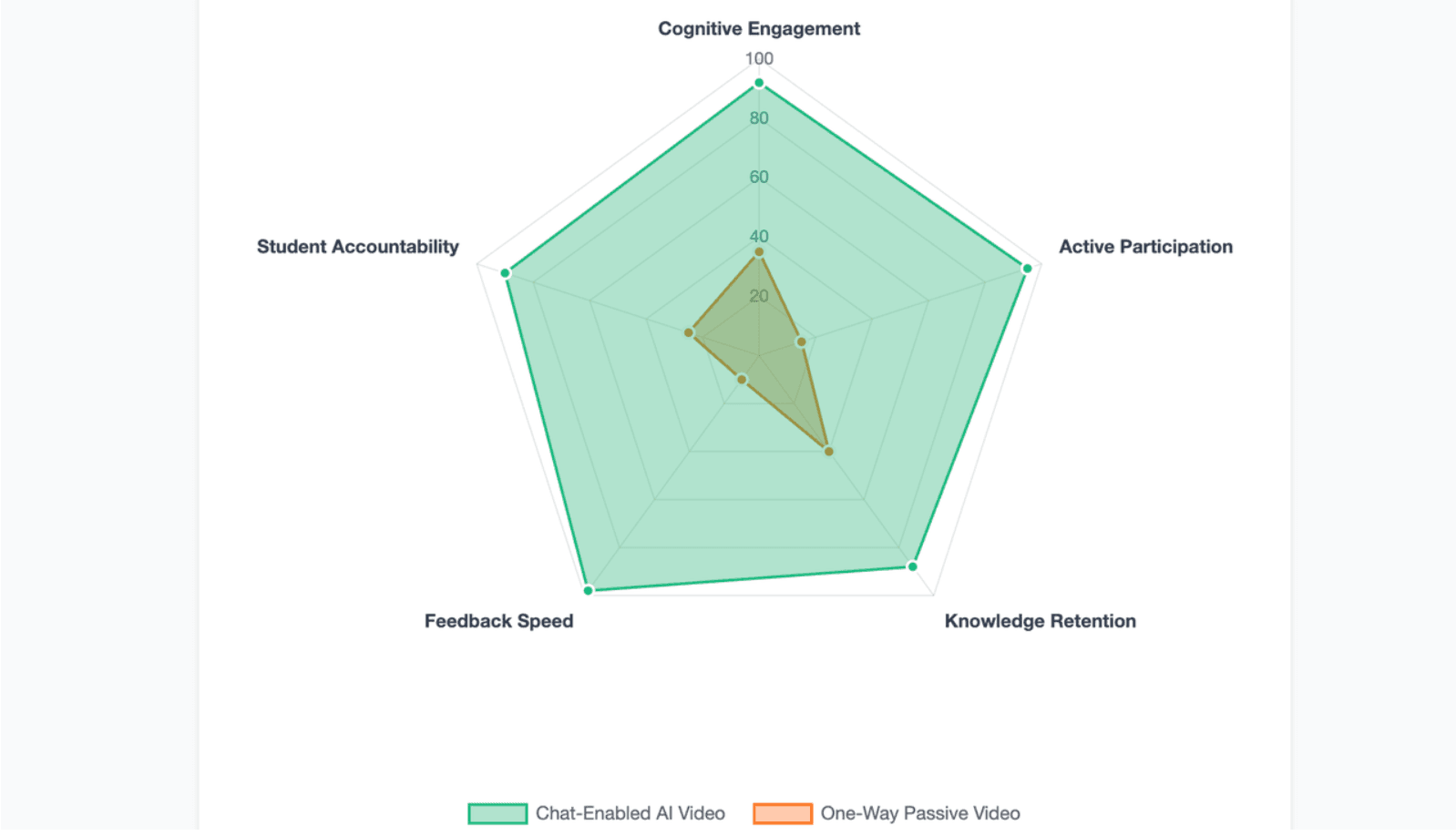
Using chat-enabled videos or AI presenters to help students resolve doubts before class
The true evolution of pre-class engagement centers on two-way conversational video workflows. Leading software like Leadde implements chat-enabled interactive avatars and direct video chat interfaces.
- Active Interactivity: Students do not just watch a presentation silently.
- Real-Time Q&A: Learners can chat directly with the AI avatar instructor on screen to clarify complex formulas or historical facts before entering the physical classroom.
- Pre-Class Diagnostic: This interactive feedback path loop documents student confusion points automatically for the teacher.
Adding teacher presence with webcam recordings, voiceovers, or customized AI avatars
Research shows that strong teacher presence correlates heavily with high online completion metrics. Traditional tools achieve this by pinning a small manual webcam circle to the corner of the screen. Advanced AI platforms expand this capability by allowing educators to build high-fidelity custom avatars directly from a photograph and a voice clone sample, preserving their personal connection across large cohorts.
Teacher presence matters. Students are more likely to trust and follow a video when it feels guided.
Teachers can add presence through:
- Webcam narration
- Voice-over explanations
- Personalized examples
- AI avatars
- Digital presenters
- Branded visual templates
Leadde offers 200+ AI avatars and supports personal digital avatars from uploaded photos, which can help create consistent presenter-style videos without repeated recording.
Turning video watching into discussion, reflection, and in-class readiness
Flipped lecture delivery must actively prepare students for practical applications. By combining video checkpoints with reflective free-response prompts, students transition from superficial skimming to critical analysis. This deep processing ensures they arrive at live training sessions fully equipped to participate in advanced group dynamics.
How Can Educators Track Student Accountability and Learning Progress Seamlessly?
Accountability is one of the biggest reasons teachers use flipped classroom video tools. Without tracking, it is hard to know whether students are prepared.
Good tracking should help teachers support students, not simply punish them.
Embedding time-locked assessment checks, micro-quizzes, and reflection prompts
Time-locked checks can help students slow down and process important points. Micro-quizzes also help teachers identify confusion early.
Useful question types include:
- Concept checks
- Vocabulary checks
- Prediction questions
- Reflection prompts
- Exit-ticket style questions
- Practice problems
The best questions are short and connected to the next class activity.
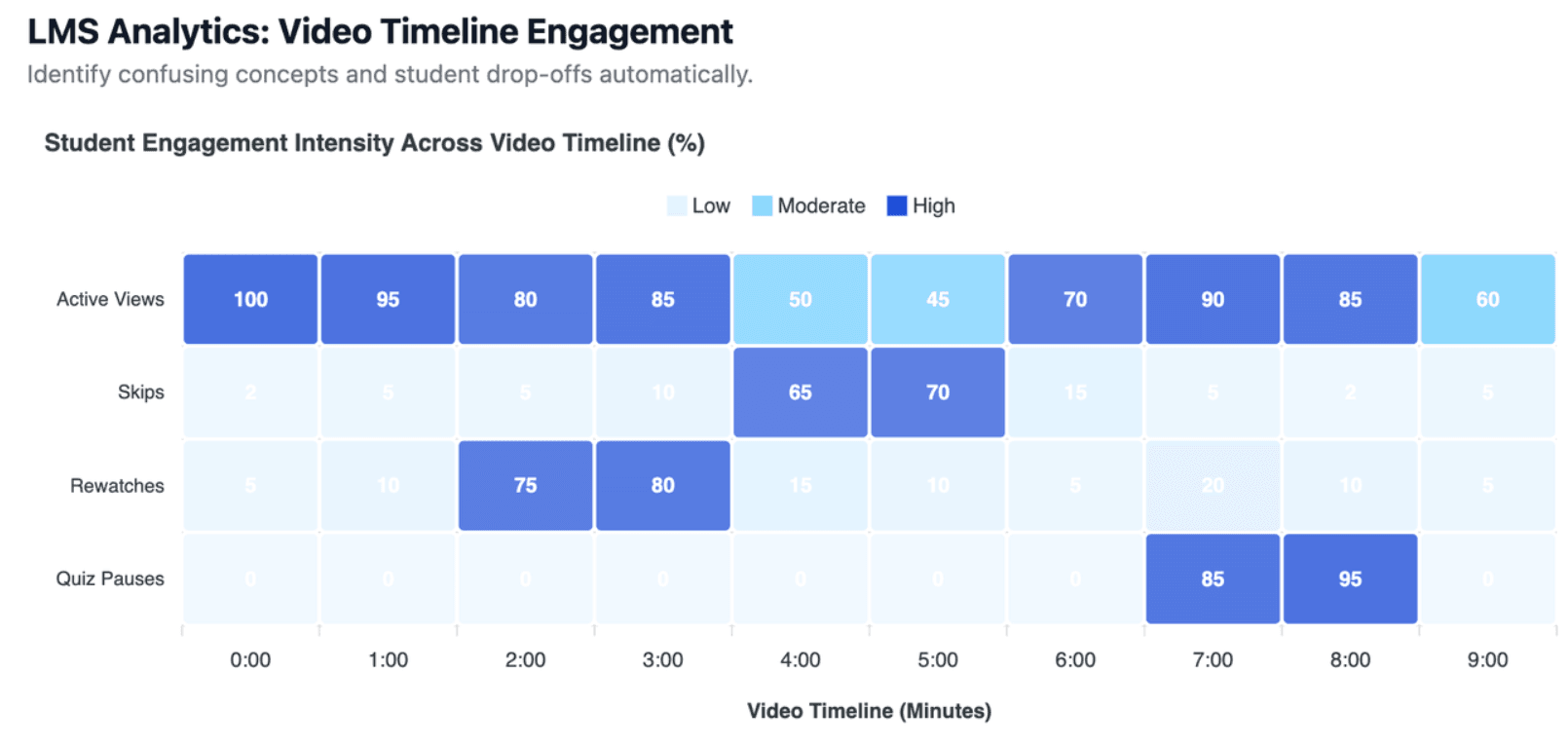
Tracking watch completion, skipped sections, quiz results, and confusion points
Comprehensive analytics dashboards reveal exactly how students consume assignment media.
- Completion Tracking: Logs the exact percentage of the video file rendered by the student.
- Heatmap Analytics: Highlights skipped sections and segments rewatched multiple times by the cohort.
- Performance Logs: Aggregates precise quiz scores to identify specific concepts that need review.
Syncing video interaction data with LMS platforms and classroom workflows
Data must flow cleanly into an organization's existing grading systems to be useful. Modern flipped learning setups use LTI (Learning Tools Interoperability) protocols to transmit interaction scores directly into central gradebooks. This automated synchronization cuts down administrative overhead and gives teachers an instant view of pre-class preparation levels.
Building backup plans for students who do not complete flipped video assignments
Even with elite tools, partial compliance will occur across large student cohorts. Instructors must establish clear, non-punitive backup workflows to handle unprepared students without delaying the active lesson layout.
- In-Class Viewing Stations: Dedicate a physical space with tablets where unprepared students watch the lecture before joining group work.
- Alternative Text Curation: Provide highly condensed lesson briefs for fast reading during the initial 5 minutes of class.
- Peer-Led Quick Briefings: Pair unprepared students with prepared student mentors for rapid knowledge transfer.
How Should Schools and Individual Teachers Compare Price, Value, and Long-Term Fit?
Price matters, but the cheapest tool is not always the best value. A free tool can become expensive if it creates more work, limits access, or does not support student tracking. Educators should compare tools by total workflow value, not only subscription cost.
Free tools vs paid platforms: what limitations should educators expect?
Free tools can work well for individual teachers or small classes. They are often enough for basic recording, sharing, or simple quizzes.
However, free plans may include limits such as:
- Short video length
- Watermarks
- Storage limits
- Limited exports
- Fewer quiz options
- No advanced analytics
- Limited LMS integration
- No admin controls
For institutions, these limits can create long-term workflow problems.
Monthly minute restrictions, storage limits, LMS access, and institutional licensing
When upgrading to premium tiers, decision makers must look closely at how usage is measured. Many traditional enterprise video engines charge users based on strict monthly video creation caps or cloud hosting storage maximums. As of 2026, standard tier options often limit production to fixed intervals (such as Synthesia's Starter plan at $29/month capped at 10 minutes), creating significant cost barriers for content-heavy curriculums.
The budget trap: rigid templates, non-editable videos, and hidden workflow costs
A tool may look affordable but still cost time. Rigid templates, weak editing controls, poor LMS support, and limited updates can slow teachers down.
Hidden workflow costs include:
- Re-recording videos after small changes
- Manually rebuilding slides
- Fixing captions
- Exporting and uploading files repeatedly
- Creating separate versions for different languages
- Managing student data across too many platforms
The best value comes from tools that reduce e-learning video production costs and repeated work.
How to choose the right flipped classroom tech stack for individual teachers, schools, and training teams
Tech selection must scale cleanly with the size of your organization's user base.
- Individual Instructors: Prioritize maximum time-saving through flat-rate, unlimited production plans, such as Leadde's $19/month Starter tier which removes all monthly duration limits.
- K-12 & Higher Ed Schools: Look for strict data compliance tools, open LMS integration pipelines, and flexible photo-to-avatar generation capabilities.
- Enterprise Training Teams: Focus on rapid multilingual voice cloning systems and document-to-video pipelines that convert existing corporate documentation databases instantly.
Conclusion
Building an elite flipped classroom model in 2026 requires moving away from time-consuming manual recording workflows and embracing highly automated, scalable video production ecosystems. Traditional tools like Loom and Screencastify are useful for quick, ad-hoc screen captures, while Edpuzzle provides excellent baseline accountability through embedded quiz overlays.
However, to truly overcome teacher burnout and student engagement resistance, institutions must adopt advanced AI-driven platforms like Leadde. By converting text documents into fully interactive, chat-enabled lecture videos automatically, educators can save up to 90% of creation time while providing a dynamic, two-way learning experience that ensures authentic pre-class readiness.





