How to Convert SME PowerPoint Decks Into Learner-Friendly AI Videos

Converting an SME PowerPoint deck into a learner-friendly AI video takes more than adding narration or an avatar. Most SME decks are built to support a live presenter, so key context often sits in speaker notes, examples, explanations, and expert knowledge that never appears on the slide.
A better workflow starts with the learner goal, then audits the deck, separates essential content from reference material, fills knowledge gaps, rewrites slide text for spoken delivery, and turns dense slides into focused video scenes. AI can speed up this process, but SMEs and learning teams still need to validate accuracy and instructional quality.
Platforms like Leadde support this document-to-video workflow by turning PowerPoint, PDF, and other business content into structured videos with AI narration, avatars, and multilingual delivery. This guide explains how to use that approach to create AI videos that are clearer, easier to update, and more useful for learners.
How to Convert SME PowerPoint Decks Into Learner-Friendly AI Videos
The most reliable process is:
SME deck → learning objective → content audit → missing-context review → learning structure → narration → video scenes → AI generation → SME and learning-design QA.
A PowerPoint is therefore best treated as source material, not a finished video script. Both Synthesia and Leadde make a similar distinction: presentation materials often need to be edited and restructured before they become effective training videos.
Why an SME PowerPoint Is Not a Ready-Made Video Script
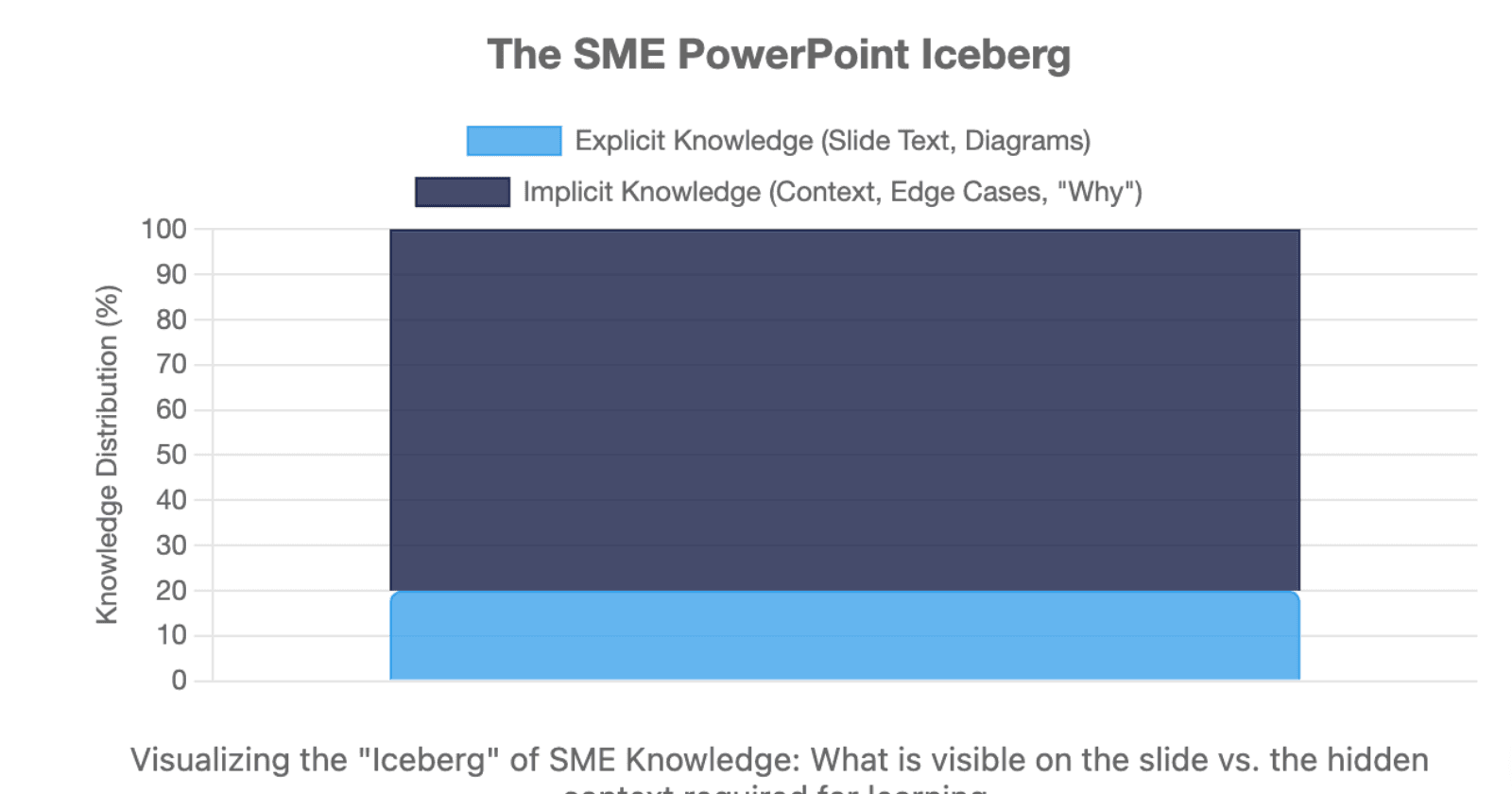
SME decks often contain two types of knowledge.
Explicit knowledge includes slide text, diagrams, procedures, screenshots, and speaker notes.
Implicit knowledge includes explanations the SME normally gives aloud: why a step matters, common mistakes, edge cases, examples, and assumptions about what the audience already knows.
This creates three levels of transformation:
| Level | Transformation |
| Format | PowerPoint → Video |
| Instruction | Presentation → Learning Experience |
| Knowledge | Expert Knowledge → Learner Understanding |
AI handles the first level easily. The second and third require much more judgment.
What Should Learners Actually Learn From the SME Deck?
Before converting slides, define what learners should do differently after the video. Articulate recommends filtering PowerPoint content around performance, workplace use, and information that directly supports the learning goal rather than trying to preserve everything an SME provides.
Start With a Performance-Based Learning Objective
Compare:
Weak: Understand the escalation policy.
Stronger: Identify when a customer issue requires escalation and choose the correct escalation path.
A useful test is:
If learners remember the content but still cannot perform the task, did the training achieve its goal?
This question changes how you evaluate every slide.
Separate Need-to-Know From Reference Content
A practical content filter is:
- Learn now: concepts or rules required to understand the task.
- Do now: information learners need to perform or decide.
- Look up later: details that matter but do not need to be memorized.
For difficult SME discussions, add frequency and consequence:
| Frequency | Consequence | Better Treatment |
| High | High | Core training |
| High | Low | Short lesson or job aid |
| Low | High | Scenario + reference |
| Low | Low | Searchable reference |
This changes the conversation from “Can we delete this?” to “Where should the learner access this when they need it?”
Not everything in a PowerPoint needs to become video. Detailed tables may work better as job aids; software steps may need a demo; complex decisions may need scenarios. Leadde and Articulate both recommend separating instructional content from reference-heavy material rather than forcing everything into one course or video.
How Should You Prepare and Restructure an SME PowerPoint Before AI Video Generation?
Do not begin with the Generate button. Begin with the source.
Audit the Deck Before You Generate Anything
Review the presentation for:
- outdated or conflicting instructions
- repeated slides
- unexplained terminology
- missing speaker notes
- obsolete screenshots
- unsupported claims
- procedures that depend on information elsewhere
For AI workflows, I recommend adding a Source Confidence Audit:
Verified / Needs SME Confirmation / Outdated / Conflicting / Missing Context
This matters because polished AI narration can make uncertain information sound authoritative.
Capture Knowledge That Is Missing From the Slides
A common SME problem is expert compression: years of experience are compressed into a few words.
A slide might say:
“Escalate high-risk cases.”
A beginner may still need to know:
- What counts as high risk?
- Why does it require escalation?
- Who receives it?
- What exceptions exist?
- What happens if signals conflict?
Speaker notes are particularly useful for finding why, how, examples, and exceptions. Some AI video workflows can import speaker notes directly as script material.
When essential context is missing, apply a No Silent Completion Rule:
AI can complete language. It should not silently invent subject-matter knowledge.
Flag the gap, ask the SME, verify the answer, and then regenerate the affected content.
Restructure Long Decks Around Learning Units
Do not map:
100 slides → 100 scenes.
Map:
learning objective → task or decision → module → scene.
Leadde recommends splitting long presentations by learning objective, task, or decision rather than original slide count, because information scattered across several presentation sections may belong in one learner-focused module.
How Do You Turn PowerPoint Content Into Learner-Friendly Narration and Video Scenes?
This is where presentation conversion becomes instructional design.
Rewrite Slides for the Ear, Not the Eye
PowerPoint language tends to compress information. Spoken language has to connect it.
Instead of turning:
Verify identity → Review account → Escalate
into a longer list, use:
Bullet → Context → Meaning or Action → Transition
For example:
“Start by confirming the customer's identity. Then review the account for the indicators shown here. If any high-risk condition appears, move to the escalation process rather than continuing with the standard workflow.”
Narration should add context and transitions, but not unverified domain facts.
Decide When to Split, Combine, or Remove Slides
Use a simple Scene Split Test.
If a learner must simultaneously read, compare, interpret, and remember, the slide is probably too dense for one scene.
Split slides containing:
- complex charts
- multiple-step processes
- dense frameworks
- software interfaces
- several independent ideas
Combine slides when they repeat the same concept or exist mainly because the original presenter revealed information progressively.
Slide boundaries are not automatically learning boundaries.
Design Visuals Around Learner Attention
Multimedia learning research emphasizes limited processing capacity, segmenting, signaling, and removing unnecessary material. UC San Diego recommends highlighting relevant information as it is discussed and removing visual elements that do not support the learning objective.
For a complex chart:
show → highlight → explain → reveal → summarize
For software:
crop → zoom → point → demonstrate → confirm
Narration and on-screen text should complement each other rather than duplicate each other word for word.
When Should You Use AI Avatars, Interaction, and Other Video Elements?
AI video tools make it easy to add presenters, animation, captions, and visual elements. That does not mean every scene needs all of them.
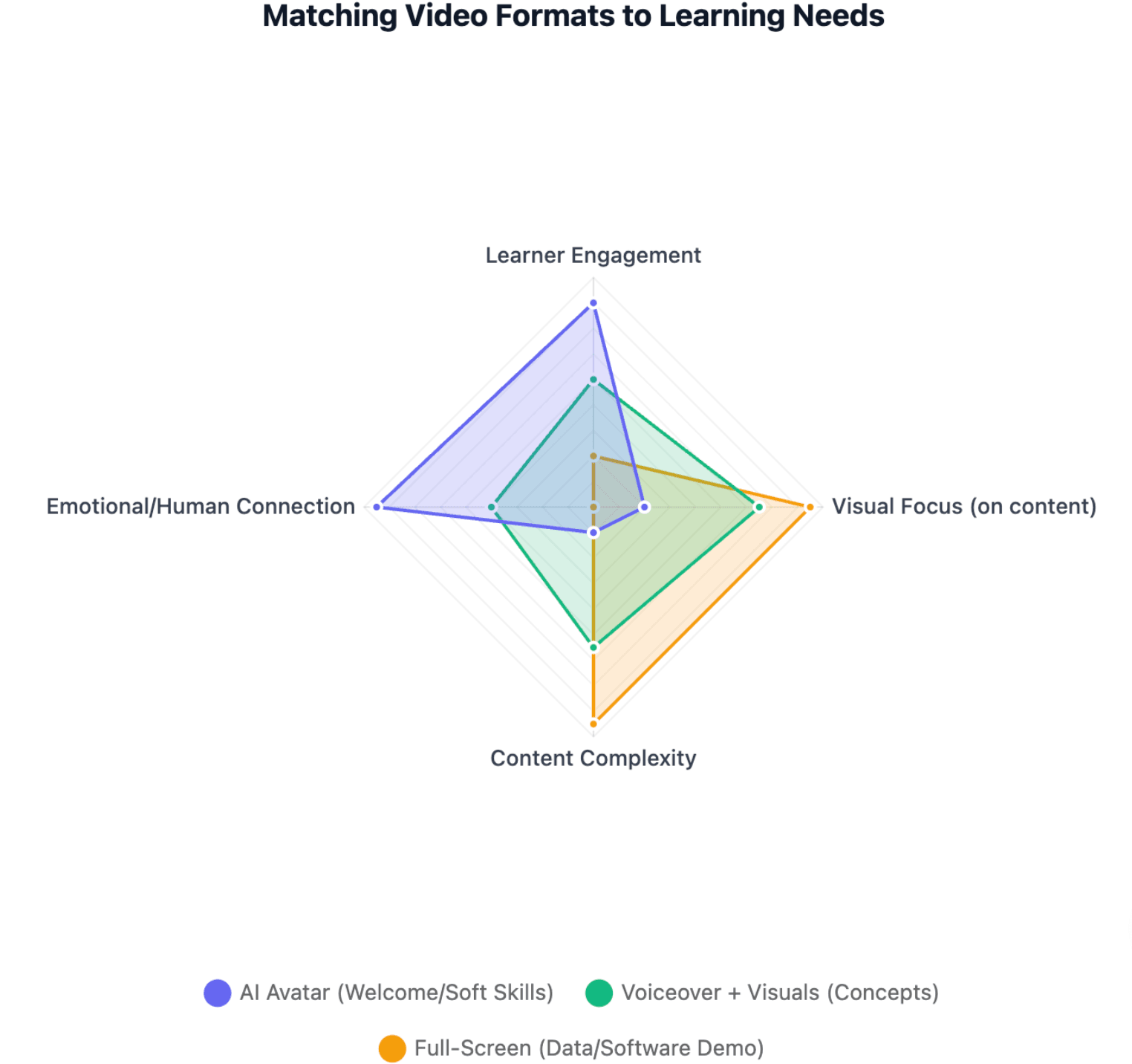
Match the Format to the Learning Task
| Learning Need | Useful Format |
| Welcome or orientation | AI avatar |
| Explain a concept | Voice + visual |
| Interpret data | Full-screen chart |
| Learn software steps | Screen demo |
| Practice a conversation | Avatar dialogue |
| Follow a procedure | Demonstration |
| Review key points | Presenter + summary |
Ask:
What needs the learner's visual attention right now?
If the learner should study a diagram or interface, a talking avatar may be unnecessary.
Reduce Unnecessary Cognitive Load
Good instructional video is not about eliminating cognitive effort; learning requires effort. The goal is to reduce extraneous load that competes with the lesson. Multimedia-learning guidance recommends segmenting complex information, signaling important elements, and removing irrelevant visuals or animation.
Avoid overwhelming scenes that combine:
dense slide + avatar + subtitles + multiple animations + narration
Simply making a video shorter does not automatically solve this problem either. A better principle is to build each video around a coherent learning objective rather than an arbitrary duration. Synthesia similarly recommends treating the objective—not slide count—as the main boundary for a training video.
Add Practice When Learners Need to Apply Knowledge
Turning PowerPoint into video does not automatically make it effective e-learning. If learners need to make decisions, add opportunities to recognize, decide, and apply. Scenarios are particularly useful for compliance decisions, customer conversations, and other contexts where judgment matters.
If learners need to make decisions, add opportunities to:
recognize → decide → apply
Scenarios are particularly useful for compliance decisions, customer conversations, sales situations, process exceptions, and other contexts where judgment matters. Interactive e-learning can also add quizzes, navigation, and tracking that a standalone presentation or linear video does not provide.
How Do You Review, Scale, and Maintain SME-Generated AI Training Videos?
AI reduces production work, but it does not remove accountability.
Use Separate SME and Instructional-Design Reviews
Use a Two-Lens QA Model.
SME Content Lens
- factual accuracy
- terminology
- procedure
- exceptions
- examples
- compliance
Learning Lens
- clarity
- relevance
- pacing
- cognitive load
- visuals
- application
Pay particular attention to anything AI added: explanations, examples, causal relationships, reordered procedures, or inferred exceptions.
Define What AI, SMEs, and Learning Teams Should Own
A practical division is:
SME supplies truth → AI restructures → L&D shapes learning → SME validates → AI scales
| Role | Primary Responsibility |
| SME | Facts, terminology, examples, exceptions |
| L&D / instructional design | Objectives, prioritization, structure, modality |
| AI | Extraction, drafting, scenes, narration, localization, updates |
The goal is not to replace the SME. It is to reduce the manual transformation work between expert knowledge and learner-ready communication.
Build for Updates, Localization, and Measurement
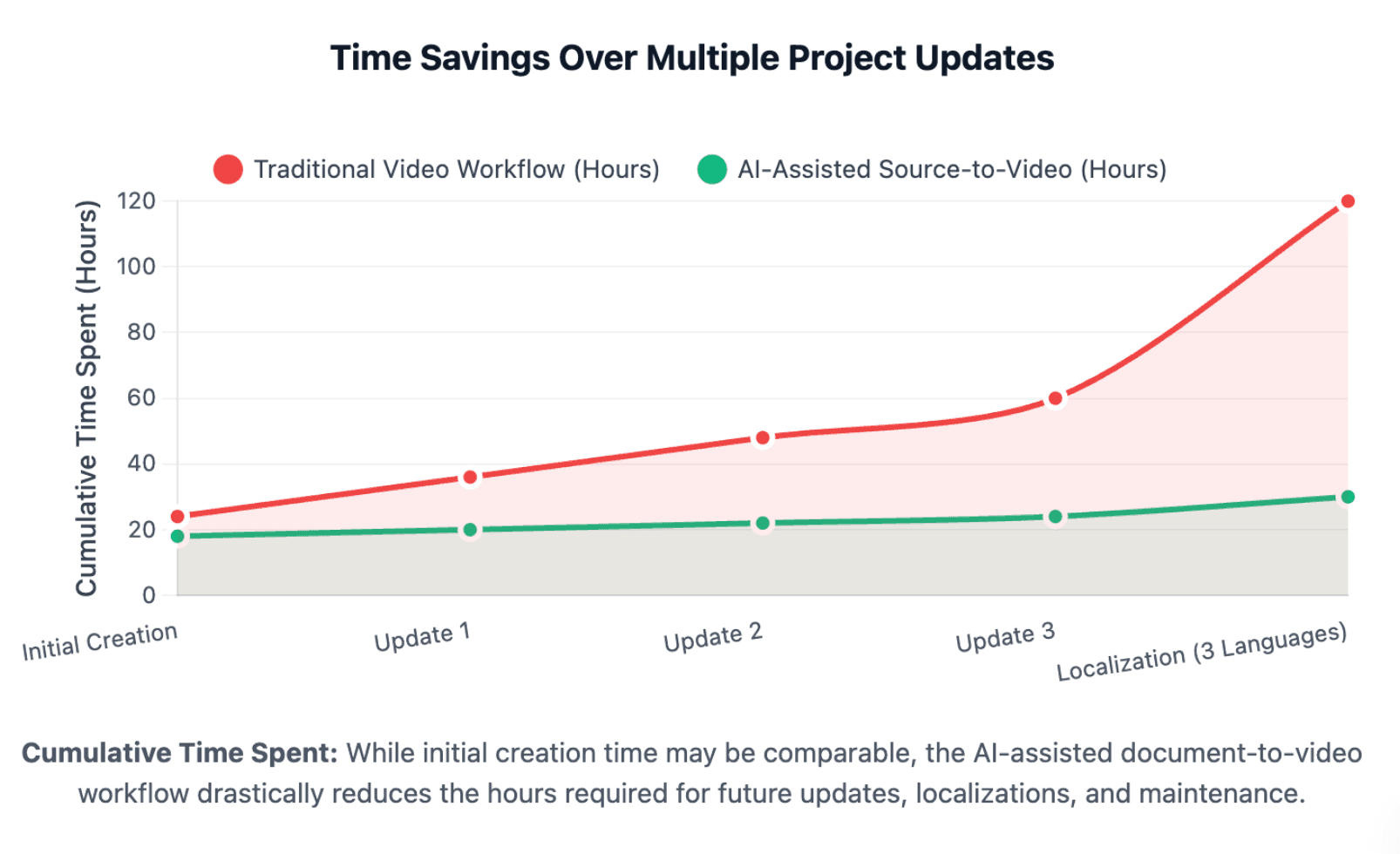
For large training libraries, maintain source-to-scene traceability:
source deck → slide → speaker note → script → scene → locale
This makes future updates easier because a policy or product change can be traced to the scenes it affects rather than forcing a complete rebuild.
Document-to-video workflows such as Leadde are designed around structured generation and multilingual output, which can make this type of repeatable production more practical at scale.
Finally, measure the outcome that matches the objective. Video completion alone does not prove learning. Depending on the goal, useful measures may include assessment performance, task completion, workplace errors, support requests, or behavior after training.
Conclusion
Converting an SME PowerPoint into a learner-friendly AI video is not primarily a file-conversion task. The stronger approach is to identify the learner outcome, extract both visible and hidden SME knowledge, remove or relocate unnecessary content, rewrite slides for spoken delivery, design scenes around learner attention, and validate the result through both SME and instructional-design review. AI makes this workflow faster and easier to scale, but learning quality still depends on the decisions made before and after generation.
FAQ
Can AI automatically turn a PowerPoint into a training video?
Yes. AI video tools can import PowerPoint content and generate scripts, scenes, narration, presenters, and subtitles. However, automatic conversion does not guarantee effective training. SME decks often need restructuring, missing context, clearer learning objectives, and human review before the result becomes learner-friendly.
Should every PowerPoint slide become a video scene?
No. One slide may need several scenes if it contains multiple ideas or a complex visual, while several slides may belong in one scene if they support the same concept. Some slides should become references, job aids, or be removed entirely.
Should you use PowerPoint speaker notes as an AI video script?
Speaker notes are valuable source material because they often contain explanations missing from the slide. They should still be edited for natural spoken delivery, learner context, and pacing rather than automatically treated as the final narration.
How do you turn a 50- or 100-slide PowerPoint into training videos?
Start with learning objectives rather than slide count. Audit the deck, group information around learner tasks or decisions, move reference-heavy content outside the core video, and create a series of focused modules. A large deck often becomes a learning system rather than one shorter video.
How long should an AI training video be?
There is no universal ideal length. The video should be long enough to teach one coherent objective without unnecessary material. Complex processes may require more time than simple explanations, and longer topics can be segmented into learner-controlled modules.
When should you use an AI avatar in training videos?
Use an avatar when presenter presence supports orientation, explanation, summaries, or conversations. Use full-screen diagrams, charts, demonstrations, or software recordings when learners need to focus on the visual information itself.
What should AI do when information is missing from the PowerPoint?
It should flag the gap rather than invent a subject-matter answer. The missing information can then be turned into a specific SME question, verified, added to the source material, and regenerated into the relevant script or scene.
How do you make sure AI-generated training content is accurate?
Use separate reviews for subject-matter accuracy and instructional quality. SMEs should validate facts, procedures, terminology, examples, and exceptions, while L&D teams review structure, clarity, cognitive load, visuals, and practice. Pay extra attention to any meaning or examples introduced by AI.