
How to Make Commentary YouTube Videos Fast with AI in 2026

To make a commentary YouTube video, creators typically follow a structured process: selecting a trending niche (such as gaming, pop culture, or news), writing an analytical script, sourcing relevant background footage that complies with YouTube's Fair Use policies, recording a high-quality voiceover, and editing the audio and visuals together on a timeline. In 2026, the standard workflow has evolved; modern creators increasingly use AI-driven text-to-video automation to bypass manual editing entirely. By simply uploading a script, creators can instantly generate complete commentary videos utilizing AI voice cloning, virtual avatars, and automatic background footage matching.
Struggling with tedious timeline editing? Manual production causes creator burnout. With Leadde, turn any document and text into a professional business video automatically. Super fast. Create videos in minutes. Save over 80% of production costs and 90% content creation time.

What is a Commentary YouTube Video and Why Start One?
Exploring Profitable Niches: Gaming, Pop Culture, and News
A commentary video is a format where a creator shares their opinions, reactions, or analysis on a specific topic. This style is highly popular because it requires less original filming and relies heavily on existing trends.
Top Niches for Commentary Channels:
- Gaming: Analyzing game mechanics, industry news, or reviewing gameplay clips.
- Pop Culture & Drama: Reacting to celebrity news, internet trends, or viral moments.
- Tech & Business News: Breaking down new product launches or corporate strategies.
Starting a commentary channel allows creators to build a loyal audience based on their unique personality and perspectives. It is a proven, highly profitable format on YouTube today.
The 2026 Creator Landscape: Fair Use, Copyright, and Monetization
When making commentary videos, navigating YouTube's copyright system is critical. Creators use third-party clips, which falls under the legal doctrine of Fair Use.
To protect your channel and ensure monetization, you must:
- Add Original Value: Your voiceover and analysis must transform the original clip.
- Avoid Raw Uploads: Never upload long, unedited clips from other creators or movies.
- Use Visual Enhancements: Add graphics, text, and avatars to make the video visually distinct.
By utilizing modern AI workflows, creators can automatically generate safe, visually rich layouts that easily pass YouTube's monetization reviews.
Traditional vs. AI Workflows: Overcoming YouTube Creator Burnout
The Hidden Bottleneck: Tedious Timeline Editing and Endless B-Roll Sourcing
In my experience working with video creators and content teams, the biggest challenge is rarely the script itself—it’s the editing workflow that comes after.
What looks like a simple five-minute video often turns into hours (or even days) of repetitive production work: trimming dead space, syncing voiceovers, adjusting pacing, matching visuals to narration, and manually searching for usable B-roll footage.
For newer creators especially, this workflow creates rapid burnout. The creative part of making videos is exciting. The operational grind of timeline editing is not.
Traditional editing software gives you full control, but that control comes at the cost of speed. Instead of focusing on storytelling and audience growth, creators often get trapped in mechanical production tasks that add little strategic value but consume enormous amounts of time.
How "Document-to-Video" Technology Replaces Traditional NLE Software
Modern AI platforms completely replace traditional Non-Linear Editing (NLE) software. With Leadde, you can convert Word documents, PDFs, and plain text directly into structured video presentations.
The system automatically breaks your content into scenes, creates voice-over scripts, and applies layouts to each section. This "Document-to-Video" approach shifts video creation from heavy manual production to lightweight, fast editing.
Step-by-Step: How to Make a Commentary Video Fast with Leadde AI
Step 1: Uploading Your Commentary Script (Text-to-Video)
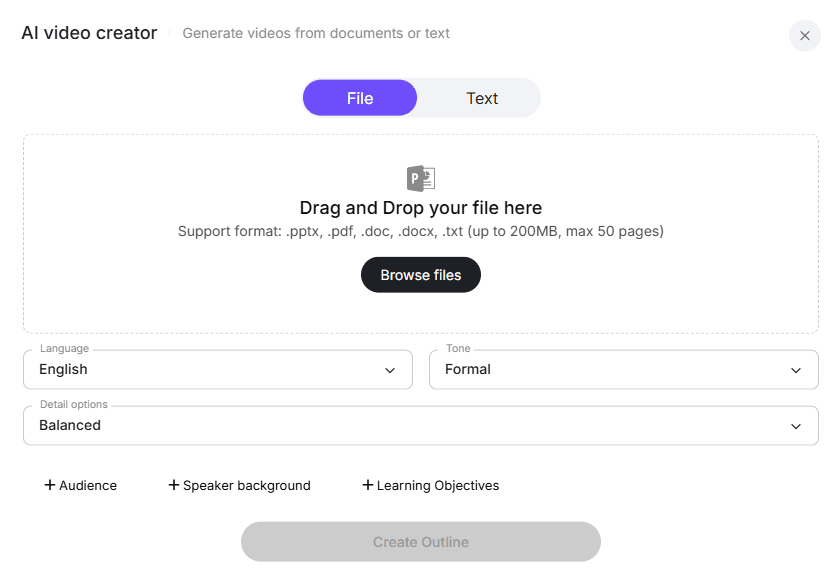
The first step is preparing your content. You no longer need to record yourself reading a script; you just need the text.
In the Leadde platform, you can choose two import methods:
- File Mode: Upload your script as a .doc, .docx, .txt, or .pdf file (up to 200MB).
- Text Mode: Simply paste your written commentary directly into the interface.
Before uploading, you can set the video language, choose a formal or casual tone, and define the detail level of your video.
Step 2: Selecting an AI Avatar for "Faceless" YouTube Channels

Many successful commentary channels are "faceless," meaning the creator never shows their real identity. Leadde makes this incredibly easy by offering a diverse library of over 200 AI avatars.
Avatar Capabilities:
- Professional Delivery: The avatars speak naturally and express emotion, perfect for YouTube delivery.
- Digital Twins: You can also upload a clear portrait photo to create a personal digital presenter.
- Perfect Lip-Sync: The system automatically synchronizes the avatar's lip movements with your generated voice.
Step 3: Voice Cloning and AI Voiceovers (No Microphone Needed)
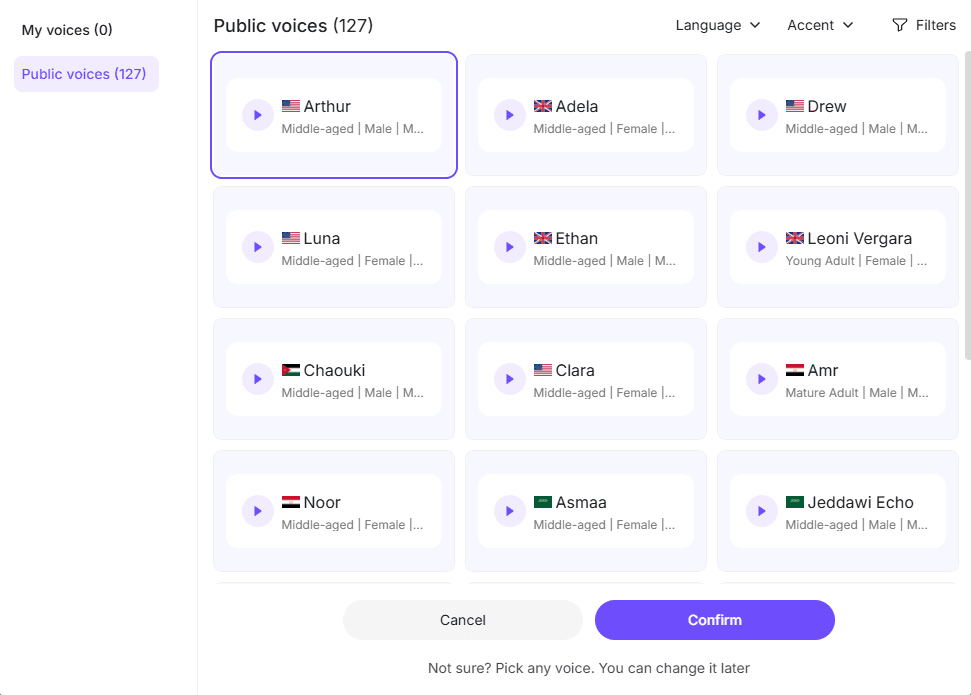
High-quality audio is essential for YouTube retention. Instead of buying expensive microphones and recording in a quiet room, you can leverage AI voice models.
Leadde allows you to type your script and output professional voiceovers with support for over 170 languages and accents.
If you want to maintain a personal brand, you can upload a clean 10-60 second audio sample of your real voice. The system will analyze your pitch, tone, and speaking rhythm to create a realistic AI voice clone.
Step 4: Automatic Stock Image Matching and Smart Layouts
Finding relevant B-roll is the most time-consuming part of making a commentary video. Leadde solves this through intelligent AI automation.
Smart Visual Features:
- Automatic Stock Matching: The system automatically matches and inserts suitable stock images based on your script's context.
- Smart Visual Layout: Leadde generates complete video outlines and scenes without manual adjustment.
- Final Touches: You can easily adjust text, components, background, and media elements on each generated page before clicking "Generate video".
Scaling Your Commentary Channel: Multilingual Global Expansion
Why You Should Localize Your YouTube Content
Most YouTubers restrict their growth by only publishing in English. By localizing your commentary videos, you can tap into massive global markets like Latin America, Europe, and Asia.
Creating translated video drafts helps organizations and individual creators expand their global reach with minimal additional production effort.
One-Click Video Translation for 92+ Languages
Scaling globally is effortless with AI. Leadde supports large-scale multilingual video workflows across 92 languages.
You can create translated video drafts directly inside the editor. With built-in image translation and video translation tools, you can localize your commentary content for multiple regions without rebuilding the videos from scratch.
Choosing the Right Tool: Leadde vs. Traditional Editors vs. Alternatives
Why Leadde's Workflow Outperforms Standard Timeline Editing
Using standard timeline editors means paying for subscriptions, buying stock footage, and wasting hours on manual alignment.
Organizations using Leadde report up to a 90% reduction in content creation time and an 80% reduction in video production costs. The platform automates the full video creation process, including scene layout, key-point highlighting, and voice-over generation.
Comparing Leadde to Other AI Video Generators (Synthesia & HeyGen)
When looking at AI automation, not all tools are built equally for YouTube commentary.
How Leadde compares to market alternatives:
- Document-to-Video: Leadde supports auto layout and auto highlighting, while Synthesia relies on non-editable templates, and HeyGen does not support document-to-video conversions at all.
- Voice Variety: Leadde provides 170+ languages with accents, significantly more than HeyGen's 40+.
- Interactivity: Leadde offers video chat and interactive avatars, whereas both Synthesia and HeyGen only output standard, one-way videos.
Conclusion: Fast-Tracking Your YouTube Success in 2026
Summary of the Automated Content Creation Workflow
Starting a commentary YouTube channel no longer requires advanced video editing skills, expensive gear, or even showing your face.
By leveraging "Document-to-Video" AI technology, you can bypass the tedious timeline editing process completely. Tools like Leadde allow you to automatically transform simple text scripts into dynamic, multi-scene videos featuring realistic AI avatars and cloned voices. With automatic stock image matching and support for 92 languages, creators can produce high-quality, multilingual content efficiently, saving immense amounts of time and production costs.





