MiniMax H3 Review 2026: Is It Really One of the Best AI Video Models?

MiniMax H3 is a multimodal AI video model that combines text, image, video, and audio references to generate clips up to 15 seconds with stereo audio and up to 2K output. Its real appeal is control: creators can use references to guide characters, products, motion, camera behavior, dialogue, and sound. But impressive demos are only part of the story—production use also depends on consistency, generation speed, hardware requirements, and cost per usable shot.
H3 is especially relevant for cinematic and reference-driven generation, while platforms such as [Leadde](- https://leadde.ai/) address a different production need: how to use AI for training videos and turning documents, training materials, and business knowledge into structured, multilingual videos. In this MiniMax H3 review, I’ll examine video quality, native audio, 2K generation, open weights, pricing, limitations, and where H3 fits within a practical AI video workflow.
[ ](- https://leadde.ai/)
MiniMax H3 Review: Is H3 Actually Worth Using in 2026?
MiniMax H3 is worth serious consideration if you need short-form video with strong multimodal reference control, native audio, or an open-weight model you can experiment with locally. It is less convincing as a universal replacement for every commercial video generator.
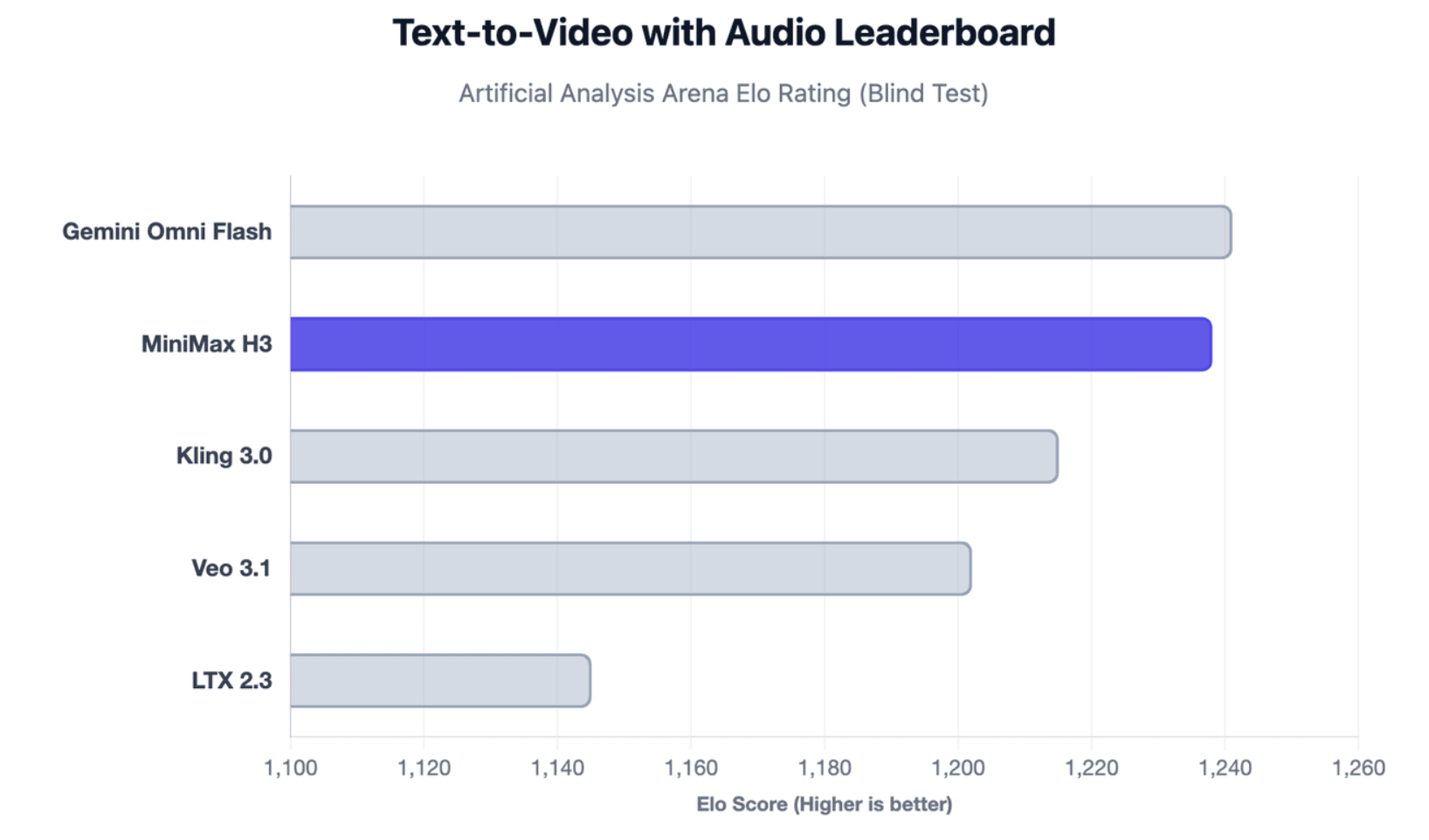
Independent evidence is strong. In Artificial Analysis’ current blind Text-to-Video Arena with audio, H3 ranks second overall with an Elo of 1,238, narrowly behind Gemini Omni Flash at 1,241. It also leads the open-weight category and currently ranks first in Artificial Analysis’ Video Editing leaderboard with audio.
That said, production readiness is more than benchmark quality. I would evaluate H3 across five dimensions: output quality, controllability, consistency, iteration speed, and cost per usable shot. Curious Refuge’s hands-on tests, for example, found impressive results but also more physics errors and artifacts than Seedance in demanding action scenes
H3 therefore makes the most sense for filmmakers, creators, developers, and marketing teams that can benefit from precise reference-driven generation. Teams needing longer narrative continuity or a simple turnkey workflow may prefer another tool.
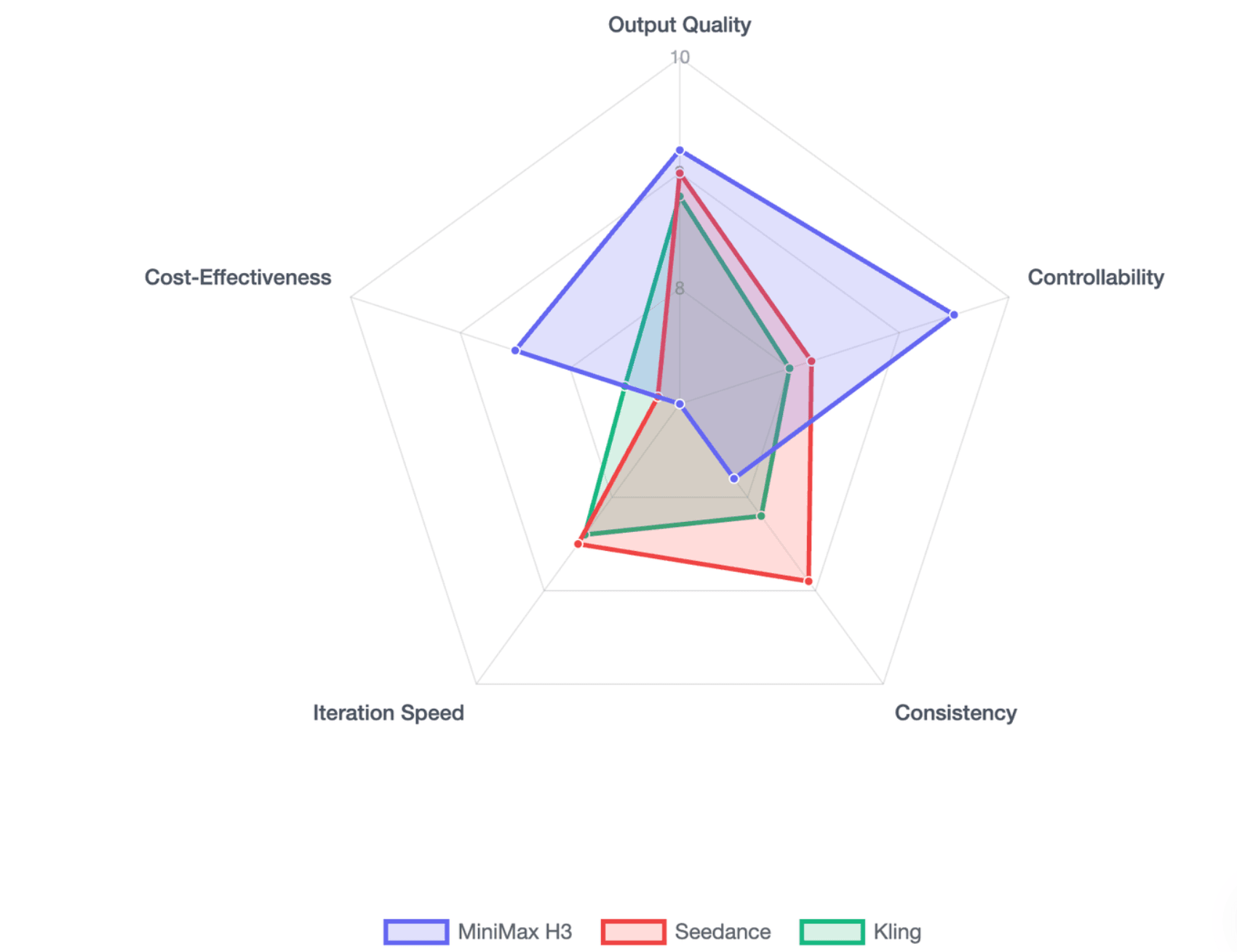
What Is MiniMax H3 and How Is It Different From Other AI Video Models?
MiniMax describes H3 as a general-purpose omni-modal generative system, not simply a text-to-video model. It can interpret text, images, videos, and audio together, then generate synchronized video and stereo sound. Official specifications include 4–15 second outputs, 24 FPS, 32 kHz stereo audio, multiple aspect ratios, and stable dialogue support across 11 languages, reflecting how rapidly creators are exploring how people are making realistic AI videos.
| Feature | MiniMax H3 |
| Duration | 4–15 seconds |
| Frame rate | 24 FPS |
| Audio | Native 32 kHz stereo |
| H3-Base output | 768p |
| Highest official output | Up to 2K |
| Image references | Up to 9 |
| Video references | Up to 3 |
| Audio references | Up to 3 |
| Mixed references | Up to 12 files |
From Text-to-Video to Multimodal Video Generation
The important difference is what each reference can do. An image might define character identity or product appearance; a video can provide motion or camera behavior; audio can provide a voice or sound reference; and the prompt explains how those materials should interact.
H3-Base is released in two main variants. FL2VA covers text-to-video plus first-frame, last-frame, and first-and-last-frame generation. Ref2VA accepts mixed image, video, and audio references.
From a production perspective, this is more useful than simply increasing the number of supported files. Multimodal generation becomes valuable when every reference has a defined job.
Does MiniMax H3 Really Generate Native 2K Video?
This deserves clarification because many H3 reviews simplify the specification.
The downloadable H3-Base generates 768p output. MiniMax’s full system then uses H3-Regenerate-2K, feeding the 768p result together with the original multimodal context back into H3 to create the 2K version. MiniMax explicitly says this is not conventional super-resolution.
So H3 supports 2K, but describing the open H3-Base checkpoint as a straightforward “native 2K local model” is misleading.
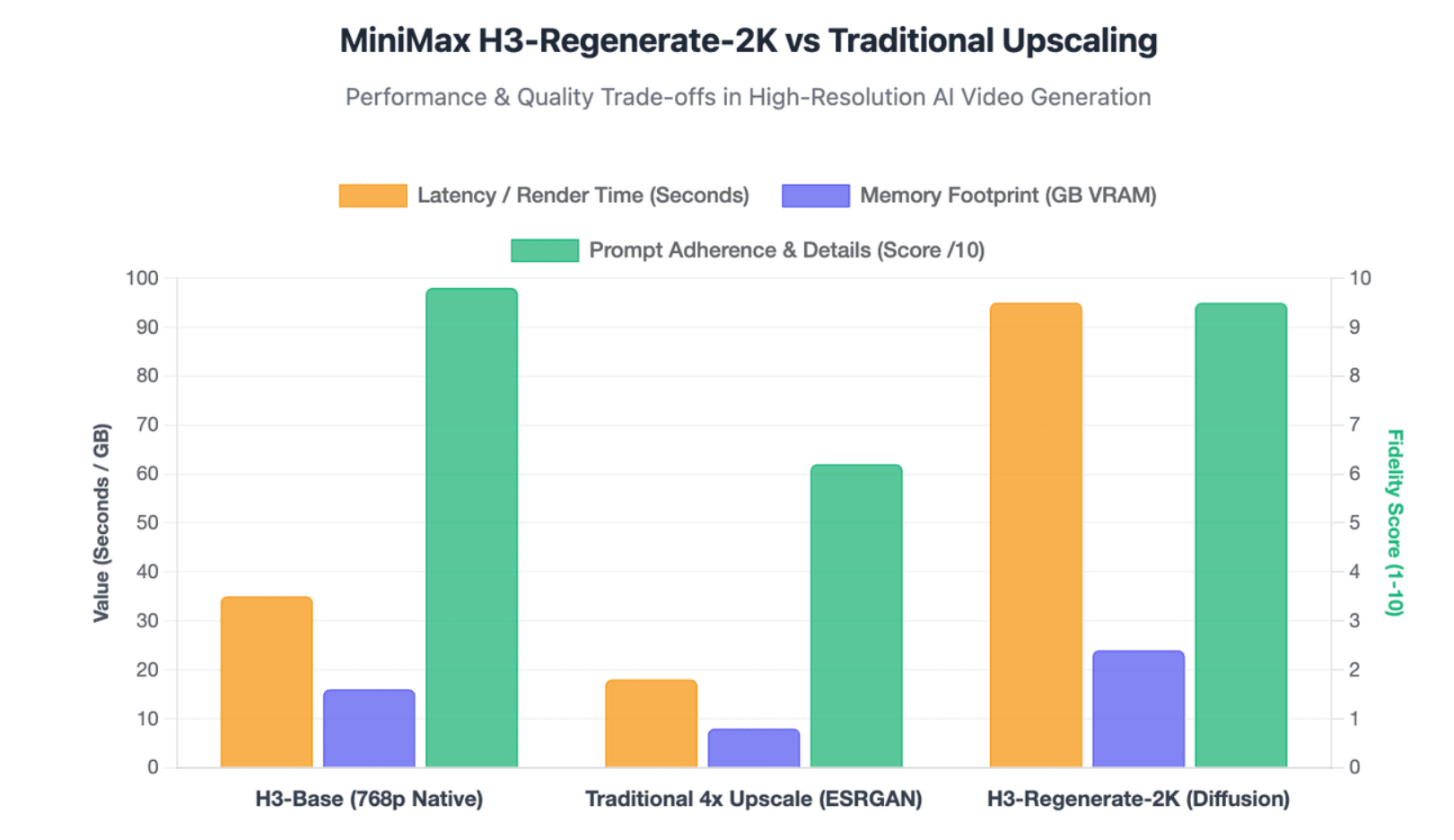
How Good Is MiniMax H3 in Real-World Video Generation?
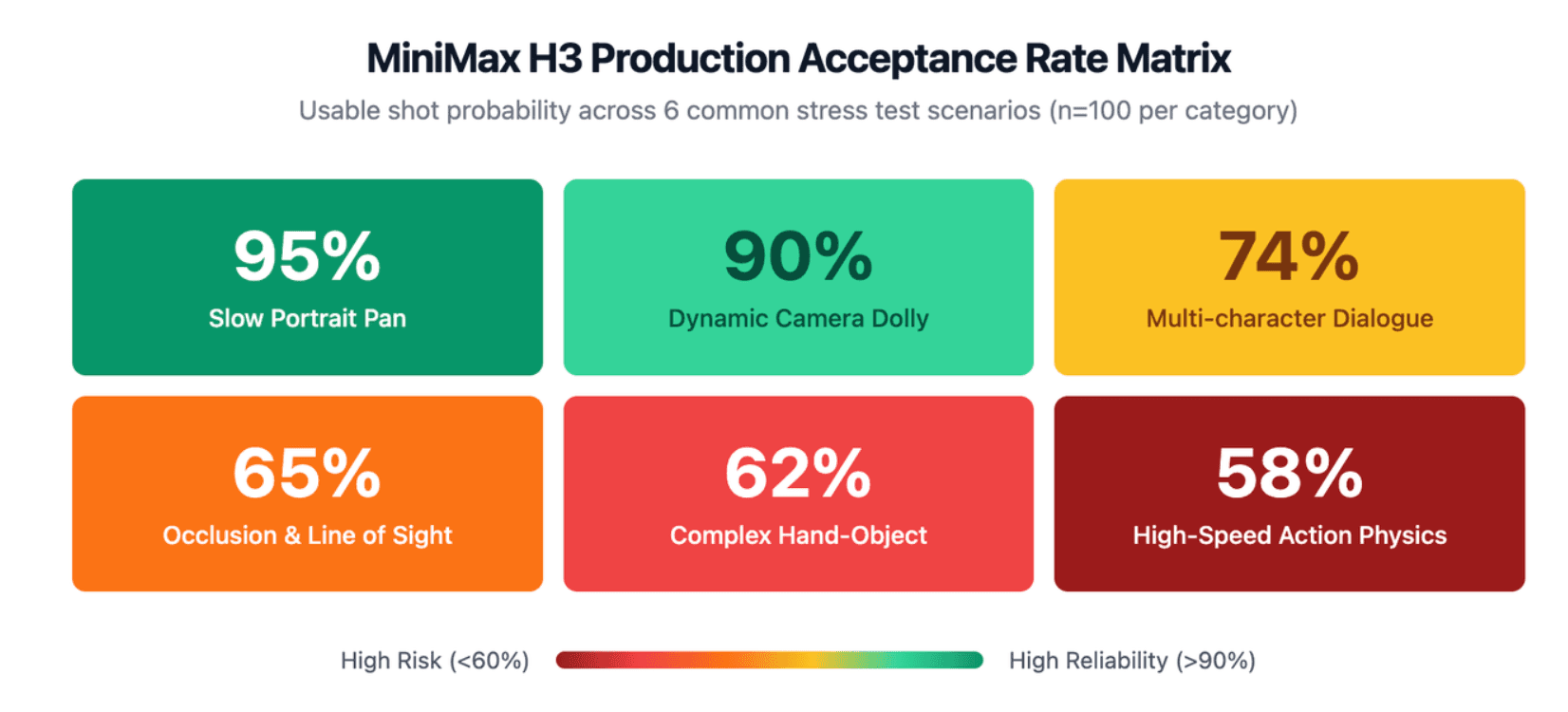
Video Quality, Motion, Physics, and Character Consistency
H3’s strongest outputs combine convincing camera motion, detailed scenes, complex instructions, and audiovisual timing. Its current blind benchmark performance confirms that viewers often prefer its output over many major commercial and open-weight alternatives in the broader synthetic video and AI-generated landscape.
But the difficult tests are not slow portrait animations. They are hands interacting with props, multiple people moving together, impacts, fast action, occlusion, and multi-shot continuity. Curious Refuge found Seedance more reliable in physics-heavy action tests, with H3 occasionally introducing artifacts or movements that broke the illusion.
For production, one excellent clip should therefore be treated as proof of capability—not proof of repeatability.
How Good Are H3's Native Audio, Dialogue, and Lip Sync?
H3 jointly predicts video and audio latents rather than treating sound as a simple post-generation attachment. Its Audio VAE separately processes left and right channels before recombining them into stereo output.
The practical evaluation should include dialogue intelligibility, lip synchronization, speaker identity, environmental sound, Foley, music, and continuity across cuts. Native audio is valuable because a successful generation can arrive closer to an editable first cut, but imperfect dialogue or timing can still force regeneration.
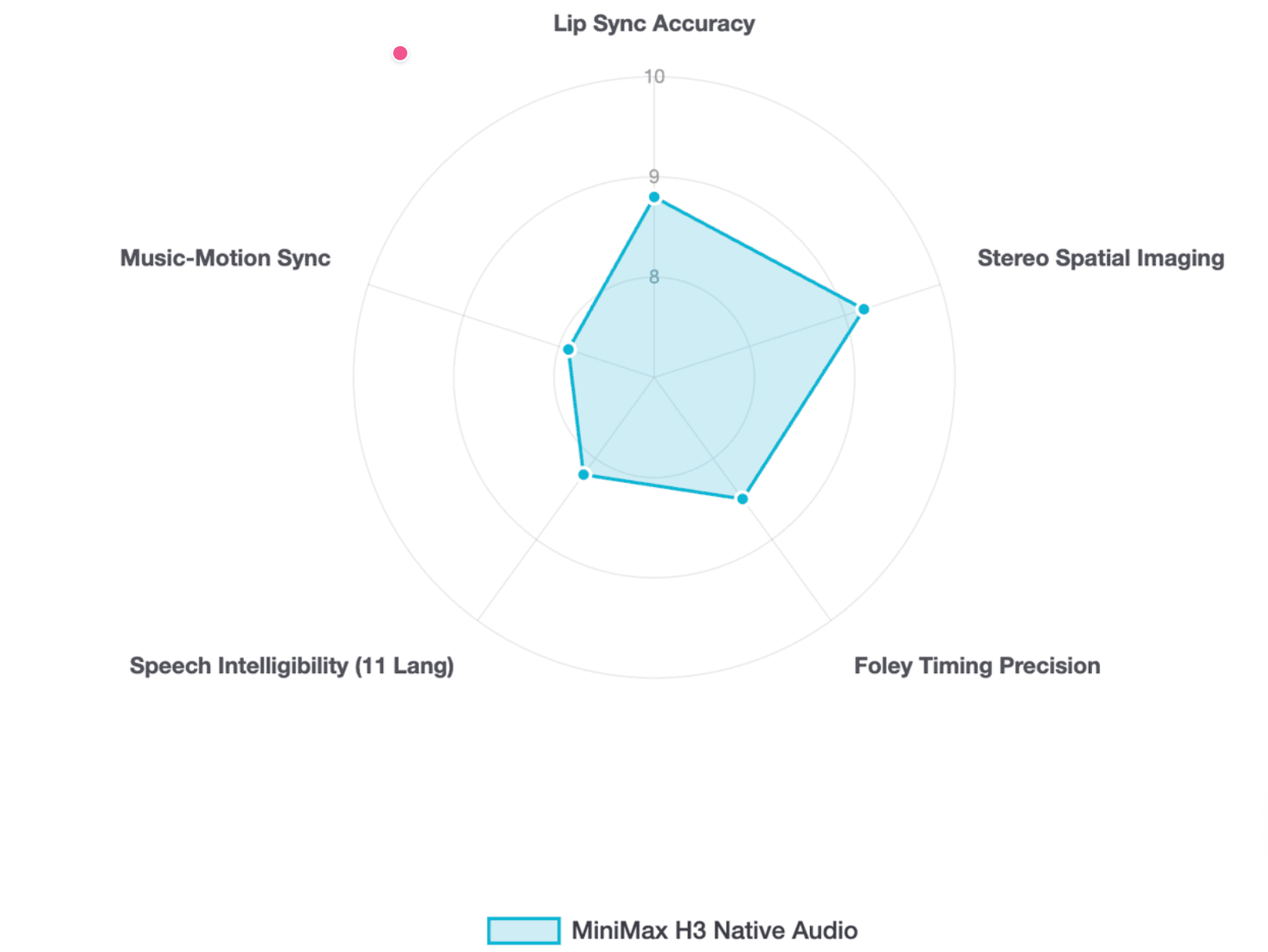
FL2VA vs Ref2VA: Which Should You Use?
Use FL2VA when composition or state transition matters. If you know where a shot should begin and end, first-and-last-frame control gives the model clear visual anchors.
Use Ref2VA when identity, motion, camera behavior, or audio matters more. H3 can accept up to nine images, three videos, and three audio clips, but adding more references is not automatically better.
A practical rule is simple: give every reference one clear responsibility. Conflicting character, camera, motion, and composition instructions can make a sophisticated multimodal workflow harder—not easier—to control.
What Are MiniMax H3's Biggest Limitations, Costs, and Local Hardware Requirements?
What Are MiniMax H3's Biggest Limitations?
The recurring risks are complex physics, facial or object deformation, identity drift, multi-character consistency, reference conflicts, and the 15-second duration ceiling. H3 can create a complete story beat, but 15 seconds is still short for sustained narrative continuity.
In professional workflows, separate failures into two categories. Minor color issues, cropping, audio levels, or exact on-screen text can often be repaired in post. Broken anatomy, wrong object interactions, identity collapse, or incorrect camera action usually justify regeneration.
How Much Does MiniMax H3 Really Cost?
MiniMax currently prices direct H3 generation at $0.08 per second for 768p and $0.13 per second for 2K. A 15-second generation therefore has a base output cost of $1.20 at 768p or $1.95 at 2K. Audio references are free; the first five image references are free, while additional images and reference video can add cost.
The more useful metric when assessing overall commercial video production costs is:
Cost per usable shot = generation + references + failed attempts + retries + repair/editing.
A cheaper model can become more expensive if it needs substantially more retries.
Can You Run MiniMax H3 Locally?
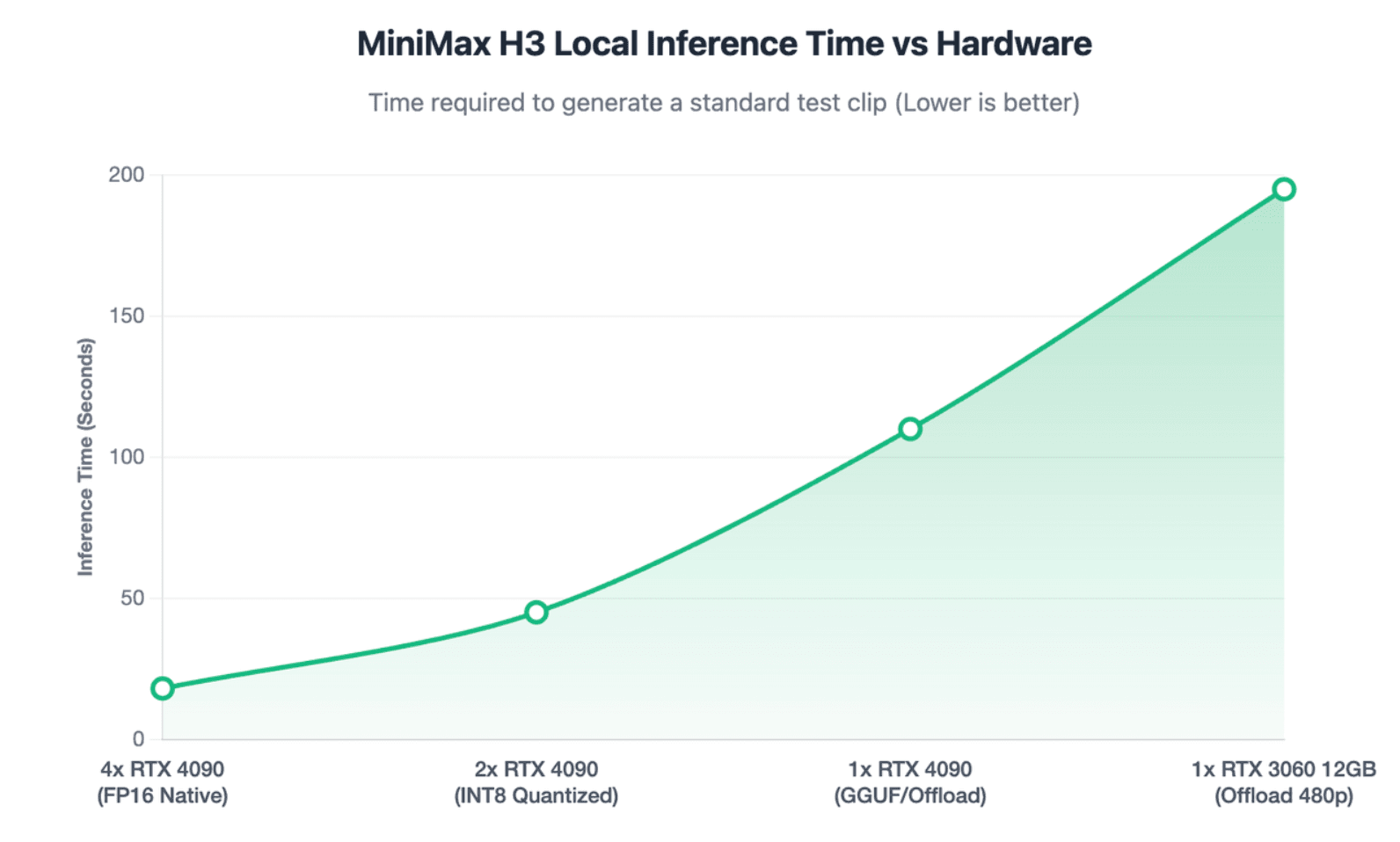
Yes, but “runs locally” and “comfortable to iterate with” are different standards. H3’s Omni Transformer is a 33B dense model, and MiniMax’s own SGLang deployment example uses four GPUs; this example is not a stated minimum, but it illustrates the model’s scale. Official integrations include SGLang, vLLM, Diffusers, and ComfyUI.
Community testing shows that lower-end configurations are possible: one documented 12GB VRAM / 64GB RAM setup produced roughly 5-second, ~480p examples in about three minutes. That is encouraging, but performance varies substantially with resolution, quantization, offloading, and runtime.
For creators, the better question is therefore: How many useful creative options can this machine test per hour?
Is MiniMax H3 Really Open Source, and How Does It Compare With Seedance, Kling, Veo, and LTX?
H3 is better described as open weight under the MiniMax H3 Community License, not unrestricted open source.
The downloadable release includes H3-Base weights, while H3-Context-IR and H3-Regenerate-2K remain hosted components. The initial release also uses full-attention inference; MiniMax says its sparse-attention implementation will be released separately.
The license is also unusually important. Its standard “Applicable Territory” excludes the EU, UK, South Korea, and United States, and commercial products generating more than $20 million in annual revenue require separate written authorization. Organizations should review the current license rather than assume “open weight” means unrestricted commercial deployment.
MiniMax H3 vs Other Leading AI Video Models
| Model | Practical Positioning | Key Consideration |
| MiniMax H3 | Multimodal references, audiovisual generation, open-weight experimentation | Hardware and license complexity |
| Seedance | Strong production-oriented motion and physics | Closed commercial workflow |
| Gemini/Veo family | High-end hosted generation | No local H3-style open-weight path |
| Kling | Established commercial cinematic generation | Different reference/local trade-offs |
| Hailuo 2.x | Simpler previous-generation MiniMax workflow | Less ambitious multimodal system |
| LTX 2.3 | Open-weight/local workflows | Currently trails H3 in AA T2V preference |
Artificial Analysis currently places H3 above Kling 3.0, Veo 3.1, and LTX 2.3 in its Text-to-Video-with-audio arena, although benchmark rank should not be treated as proof that H3 wins every workflow when evaluating the best AI commercial video makers in 2026. Curious Refuge, for example, preferred Seedance for difficult physics despite H3’s strong overall capabilities.
For many teams, the better strategy is model routing rather than choosing one permanent winner.
How Should You Use and Test MiniMax H3 in a Real Production Workflow?
How Should You Prompt MiniMax H3?
Treat an H3 prompt more like a compact production brief:
Subject → Environment → Action → Timeline → Camera → Visual Style → Dialogue → Soundscape → Music
Chronological instructions are particularly useful for 10–15 second scenes. When references are involved, define what should be preserved and what is allowed to change. This mirrors MiniMax’s own Context-IR approach, which explicitly interprets relationships among modalities before generation.
Preview → Select → Final
For costly AI video generation, generating the final-quality version of every idea is inefficient. A better workflow is to test cheaper or lower-resolution directions first, select promising shots, and only then invest in final output or 2K regeneration.
This matters especially for local H3 use, where iteration time may be a bigger constraint than theoretical image quality.
What Should You Test Before Using H3 for Production?
- Hands + props + camera movement to expose physics and occlusion failures.
- One character for the full 15 seconds to test identity drift.
- Two characters with dialogue to test lip sync and speaker consistency.
- A product with fixed geometry and branding to test commercial reliability.
- Image + motion-video + voice references to test whether H3 separates reference roles correctly.
- A multi-shot story beat to test continuity and editing rhythm.
- The same brief in a competing model so comparisons use matched inputs rather than curated demos.
Record prompts, references, generation settings, processing time, failures, retries, and the reason each output was rejected. The accepted-output rate is often more useful than the best-looking sample.
This is also where H3 fits into a broader AI video stack. A generative model can create cinematic or illustrative shots, while a platform such as Leadde addresses a different workflow: converting documents, PDFs, presentations, SOPs, and training materials into structured videos with narration, AI avatars, and multilingual delivery. For education, training, and business communication, combining specialized workflow tools with generative video is often more practical than asking one model to handle every stage.
Conclusion
MiniMax H3 stands out for multimodal control, native audiovisual generation, strong benchmark performance, and an unusually capable open-weight Base model. Its real limitations are not hidden in the feature list: local compute, licensing, consistency, reference complexity, and retry costs all matter. For teams that evaluate AI video by production readiness rather than showcase quality alone, H3 is a strong option—but not automatically the best model for every shot.
FAQ
Is MiniMax H3 free?
The H3-Base weights can be downloaded under MiniMax’s Community License, but that does not mean every H3 workflow is free. Hosted API generation is paid, local use requires suitable hardware, and the official Context-IR and 2K regeneration components remain hosted rather than fully included in the downloadable Base release.
Is MiniMax H3 open source?
It is more accurate to call H3 open weight under a community license. MiniMax releases the Base model weights, but the license includes territorial and commercial restrictions, while Context-IR and Regenerate-2K are not currently part of the fully downloadable stack.
Can MiniMax H3 generate 2K video locally?
H3-Base locally generates 768p output. MiniMax’s official 2K workflow uses H3-Regenerate-2K, which combines the 768p result with the original multimodal context. That regeneration component is currently provided through MiniMax’s hosted infrastructure rather than released as part of H3-Base.
How long can MiniMax H3 videos be?
MiniMax officially supports 4–15 second H3 video generation at 24 FPS. Fifteen seconds is enough for a short advertisement, transformation, product reveal, or story beat, but longer narratives still require multiple clips and editing.
Does MiniMax H3 generate audio and lip sync?
Yes. H3 jointly generates video and native stereo audio and supports dialogue, sound, and music-oriented workflows. Lip sync quality should still be tested per scene, especially with multiple speakers, fast cuts, or complex physical action rather than assumed from the feature alone.
What GPU do you need to run MiniMax H3 locally?
There is no single official consumer-GPU minimum in the model card. MiniMax’s reference SGLang example uses four GPUs, while community workflows have run reduced-resolution H3 on 12GB VRAM systems. The more important consideration is whether your hardware delivers acceptable iteration speed for your workflow.
Can MiniMax H3 run on 12GB or 16GB VRAM?
Community workflows demonstrate that it can run under constrained VRAM with quantization, offloading, or reduced resolutions. However, feasibility does not guarantee fast production. Generation time varies significantly with checkpoint, resolution, memory management, system RAM, and optimization settings.
Should I use FL2VA or Ref2VA in MiniMax H3?
Choose FL2VA when you need to control the first frame, last frame, or transition between them. Choose Ref2VA when you need multimodal references for subjects, products, motion, camera behavior, video, or audio. The best choice depends on what must remain fixed in the shot.
Is MiniMax H3 better than Seedance or Kling?
There is no universal winner. H3 currently scores higher than Kling models in Artificial Analysis’ Text-to-Video-with-audio arena, while independent hands-on testing has found Seedance stronger in some complex physics scenarios. Choose based on the specific shot, reference requirements, duration, cost, and deployment constraints.