
Leadde Logo

Textbook to Video — Create Lesson Videos from Any Chapter
Turn any textbook chapter into a structured video lesson — no filming, no slide design. Leadde's textbook to video AI parses your PDF or DOCX, structures the content into scenes, and delivers it through AI instructors with natural narration in 89 languages.
Topic
File
Text
Script
PPT
Try a sample file
Video settings
Pick a template
Modern Business Presentation
Bold Metrics
Bold Metrics
Orange Glow
Orange Glow
Colorful design
Colorful design
By using this service, you confirm you have the necessary rights and that your use complies with our Acceptable Use Policy and applicable laws.

Structured Lesson Videos for Every Chapter

Onboarding walkthrough

Onboarding walkthrough

Turn compliance documents, safety protocols, or regulatory guidelines into structured certification videos. Let an AI avatar walk employees through each requirement clearly — reducing legal risk and keeping teams audit-ready.

Cleanroom protocols

Cleanroom protocols

Explains the behavior guidelines and operational requirements for cleanrooms, ensuring employees adhere to standards and improve work efficiency and safety.

AR-700 operation training

AR-700 operation training

Introduces the operation process and safety guidelines of the AR-700 precision assembly robot, helping employees master proper operating techniques.

Marketing insights

Marketing insights

Covers insights extraction, segment narrowing, and next step alignment.

Why Leadde is the Best Textbook to Video Tool?

Parse Chapters into Scene-by-Scene Outlines

Whether you have a polished script on your clipboard or a raw .txt file on your drive, Leadde handles it all. As a versatile text to video generator, it transforms simple text into structured video presentations without complex editing software.

AI Instructors with Explanatory Delivery

Leadde goes beyond basic text conversion. When you add text to video, our AI analyzes the context, summarizes key points, and structures your content logically. It turns long paragraphs into digestible video segments automatically.

Templates for Every Subject and Grade Level

Choose from a library of academic-style templates suited for science, humanities, math, and professional subjects. Each template is designed for readability and instructional clarity — matching the visual expectations of K-12, university, and corporate learning audiences.

Translate Lessons into 89 Languages

Upload a chapter in English and instantly generate the same lesson in 89 languages and 175 dialects — with native-quality voiceover and synced captions. Perfect for international schools, multilingual classrooms, and global EdTech platforms.

How to Convert a Textbook to Video with AI
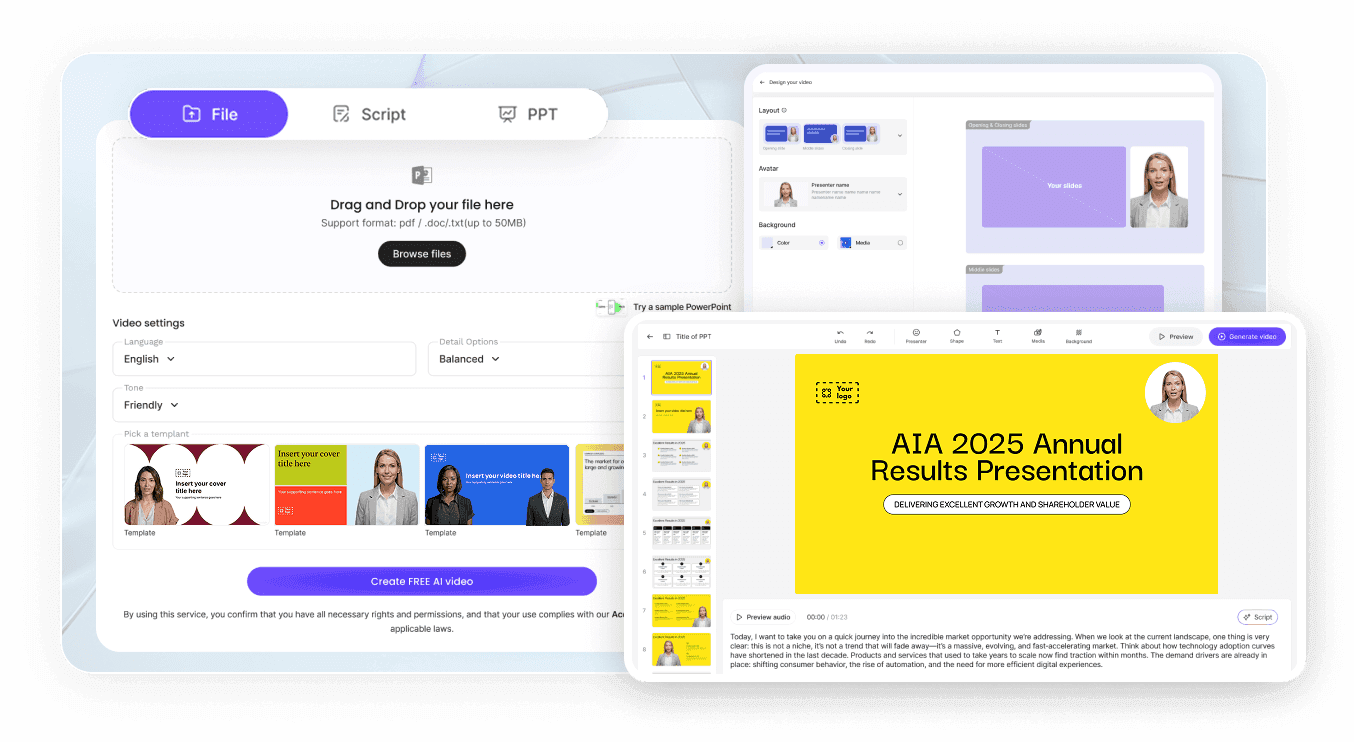
Learn how to use the best free text to video ai tool to visualize your ideas. Follow these simple steps using the AI Video Creator.
AI Video Generator Interface

Step 1: Upload Your Textbook Chapter

Open the AI Video Creator. You have two options: copy and paste your content directly into the text box, or select "Files" to upload a .txt file (up to 200 MB). Leadde supports various formats including Word and PDF, but works exceptionally fast with plain text.

Step 2: Customize Scenes and Instructor

Choose your target language (175+ options), tone (e.g., Professional, Friendly), and detail level. This helps the text to video ai free engine understand the mood of your content. Click "Create Outline" to generate a structured video plan.

Step 3: Generate and Publish

Review the outline, then click "Create FREE AI video". The system will render scenes, sync the avatar's lip movements, and align visual elements. Preview your creation, make any final tweaks, and share it with your audience.
compliance background

Trusted by Teachers, Tutors, and EdTech Creators

Leadde equips professionals with a lightning-fast text to video generator to transform written ideas into high-performing visual content at scale.

Free Textbook to Video Tool

Test your ideas risk-free. Leadde offers a free tier allowing you to paste your text, generate AI outlines, and preview lifelike avatar narrations before upgrading to a premium plan.

Instant Edition and Errata Updates

Stuck on a draft? Use the built-in AI Video Assistant to instantly expand, shorten, or rewrite your text directly within the editor before generating the video.

Interactive Q&A on Every Lesson

Students watching your lesson via a Leadde hosted link can type questions into the built-in chat panel. The AI answers instantly based on the textbook content you uploaded — providing 24/7 clarification without requiring the teacher to be present.

Track Comprehension and Engagement

Monitor how students engage with each lesson video. Track completion rates, identify chapters where learners drop off, and use the analytics dashboard to prioritize which sections need reteaching or supplementary content.

Textbook to Video Ideas & Use Cases

University Lecture Prep

Turn assigned chapters into pre-class video lectures so students arrive primed for discussion — ideal for flipped classrooms.

K-12 Lesson Reinforcement

Use our AI classroom video maker to generate short videos from textbook sections so students review at home — Leadde handles narration, visuals, and pacing.

Online Courses & MOOCs

Build full curricula from existing chapters with our AI course video generator — each section becomes a self-contained video module ready for your LMS and learners.

Test Prep & Tutoring

Tutors turn SAT, GRE, and MCAT prep books into focused video reviews students replay before exam dates and test sessions.

Corporate Training from Manuals

Convert technical manuals or compliance handbooks into structured employee training videos that beat long PDFs for retention.

Multilingual Education

Upload an English chapter and instantly generate translated lesson videos in 89 languages — usable across global classrooms.

Frequently asked questions

A textbook to video tool is software that converts textbook chapters into structured video lessons automatically. Leadde uses AI to extract key concepts from PDF, DOCX, or TXT files, organize them into scenes, and deliver them through AI instructors with natural narration and synced captions.

Yes. Leadde's Free Plan provides full access to the AI Video Creator, AI avatars, and the Template Video library. You can upload a chapter and generate your first lesson video entirely in your browser at no cost.

Leadde supports PDF, DOC, DOCX, PPTX, and TXT files up to 200 MB. You can also paste chapter excerpts directly into the script editor and let the AI structure them into a video outline.

Yes. Leadde exports videos as HD MP4, compatible with Moodle, Canvas, Blackboard, Google Classroom, and other major LMS platforms. You can also share via secure Leadde hosted links with password protection and built-in analytics.

Ready to try Leadde?

Start creating textbook-based video lessons today. Sign up free — no credit card required.

avatar







