
AI Avatar Generators With a Rich Template Library in 2026

AI avatar generators with a rich template library help teams create professional avatar-led videos by combining digital presenters, ready-made layouts, voiceovers, brand assets, and editing workflows in one platform.
In 2026, the best tools are no longer judged by template quantity alone; they must deliver cross-scene facial stability, natural lip sync, flexible layer control, adaptive layouts, and scalable workflows for training, marketing, sales, onboarding, and multilingual business communication.
But rigid, non-editable templates often create repetitive AI-looking videos, slow revision cycles, and wasted production budgets.
Leadde solves this by automatically turning any document and text into professional business videos—helping teams create videos in minutes while saving over 80% of production costs and 90% of content creation time.
AI Avatar Generators With a Rich Template Library
AI avatar generators with a rich template library help teams create videos faster by combining digital presenters, ready-made layouts, voiceovers, brand assets, and editing tools in one workflow.
The real value is not just “more templates.” The best platforms help teams move from raw content to polished business videos without rebuilding every scene from scratch.
What Is an AI Avatar Generator With a Rich Template Library?
An AI avatar generator is a platform that creates videos using digital presenters, synthetic voices, scripts, and visual scenes.
A rich template library adds structure to that process. Instead of starting with a blank canvas, users can choose layouts for:
- Training videos
- Product demos
- Sales explainers
- Social media clips
- Onboarding content
- Internal announcements
- Multilingual business videos
A strong template library should also support customization, brand control, and reuse across different content formats.
Why Are Basic Avatar Makers and Static Template Tools Not Enough for Business Video Workflows?
Basic avatar makers often create a single visual asset or simple talking-head clip. That may be enough for profile images, short social posts, or lightweight content.
Business teams usually need more:
| Basic Avatar Maker | Business Video Platform |
| Creates simple avatars | Creates complete videos |
| Limited layout control | Scene-based editing |
| Weak brand governance | Brand templates and asset control |
| Often single-language | Multilingual workflows |
| One-off output | Scalable content operations |
For enterprise teams, the issue is not only creating one video. The real challenge is producing consistent, updated, localized, and reusable video assets at scale.
What Defines a Truly Comprehensive Template Framework in 2026?
A comprehensive template framework should include more than static layouts. It should help the video adapt to the message, audience, format, and channel.
A strong framework should include:
- Editable scene structures
- Layer-level control
- Brand-safe layouts
- Avatar-ready scenes
- Responsive formats
- Multilingual reuse
- Document-to-video support
- Team review and version control
The best systems act less like a folder of presets and more like a video production engine.
Why Do Hard-Coded Templates Fail Enterprise Video Teams?
Hard-coded templates fail because they force every message into the same visual container. This creates repetitive videos, slow edits, weak brand control, and poor scalability.
For enterprise teams, rigid templates often become a bottleneck instead of a shortcut.
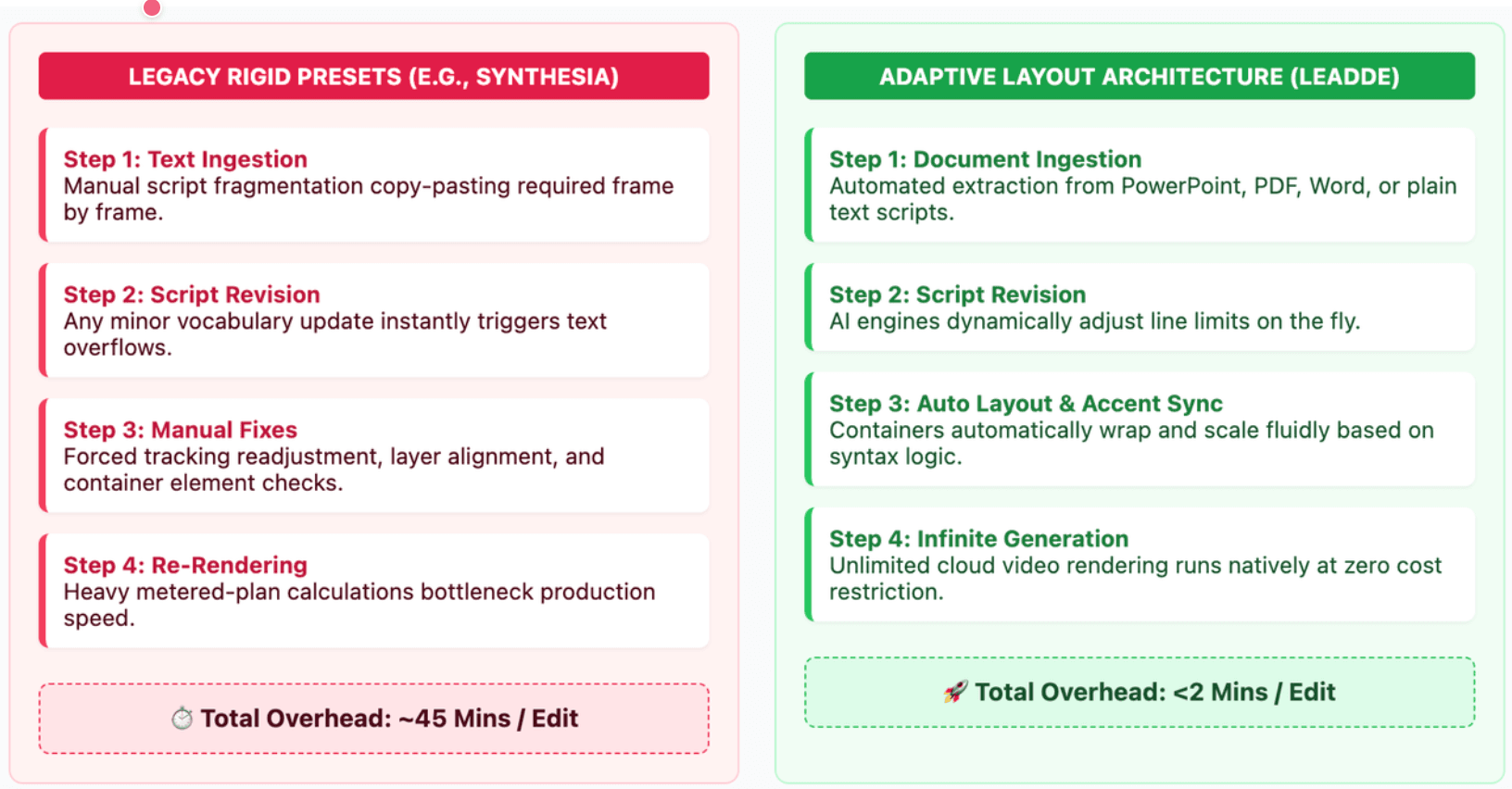
Why Do Non-Editable Layouts Create Repetitive, Low-Trust AI Videos?
Non-editable layouts make every video feel similar. Even when the script changes, the viewer sees the same scene structure, avatar position, background, and pacing.
This leads to the cheap “AI look,” where videos feel:
- Generic
- Over-produced
- Repetitive
- Low in authenticity
- Detached from the brand
For public-facing videos, this can reduce trust. For internal training, it can reduce attention.
How Do Template Limits Cause Brand Inconsistency, Layout Duplication, and “AI Video Fatigue”?
Template limits create problems when teams need frequent production. A marketing team may need dozens of product clips. An L&D team may need many onboarding modules. A global team may need localized versions of the same message.
If every video uses the same structure, viewers start noticing the pattern. This is AI video fatigue.
Common signs include:
- Repeated avatar poses
- Predictable scene transitions
- Overused stock backgrounds
- Generic voice pacing
- Weak connection between text and visuals
A good template system should reduce manual work without making every video look the same.
Why Do Teams Need Layer Control, Timeline Editing, and Responsive Format Adaptation?
Enterprise teams need control over individual video elements. They may need to adjust text, icons, charts, colors, visual hierarchy, timing, or avatar placement.
Layer control matters because teams often need to:
- Move brand elements without rebuilding scenes
- Adjust visual emphasis by message priority
- Reuse slides across departments
- Convert one video into multiple formats
- Localize without breaking layout structure
A modern AI avatar platform should support both automation and human review. The best workflow is not “fully locked automation.” It is AI-assisted production with editable control.
How Should You Evaluate the Quality of an AI Avatar Template Library?
A high-quality template library should be judged by performance, not just size. The best question is not “How many templates does it have?” but “Can these templates support real business production?”
Teams should evaluate templates by avatar realism, scene flexibility, brand control, localization, and workflow fit.
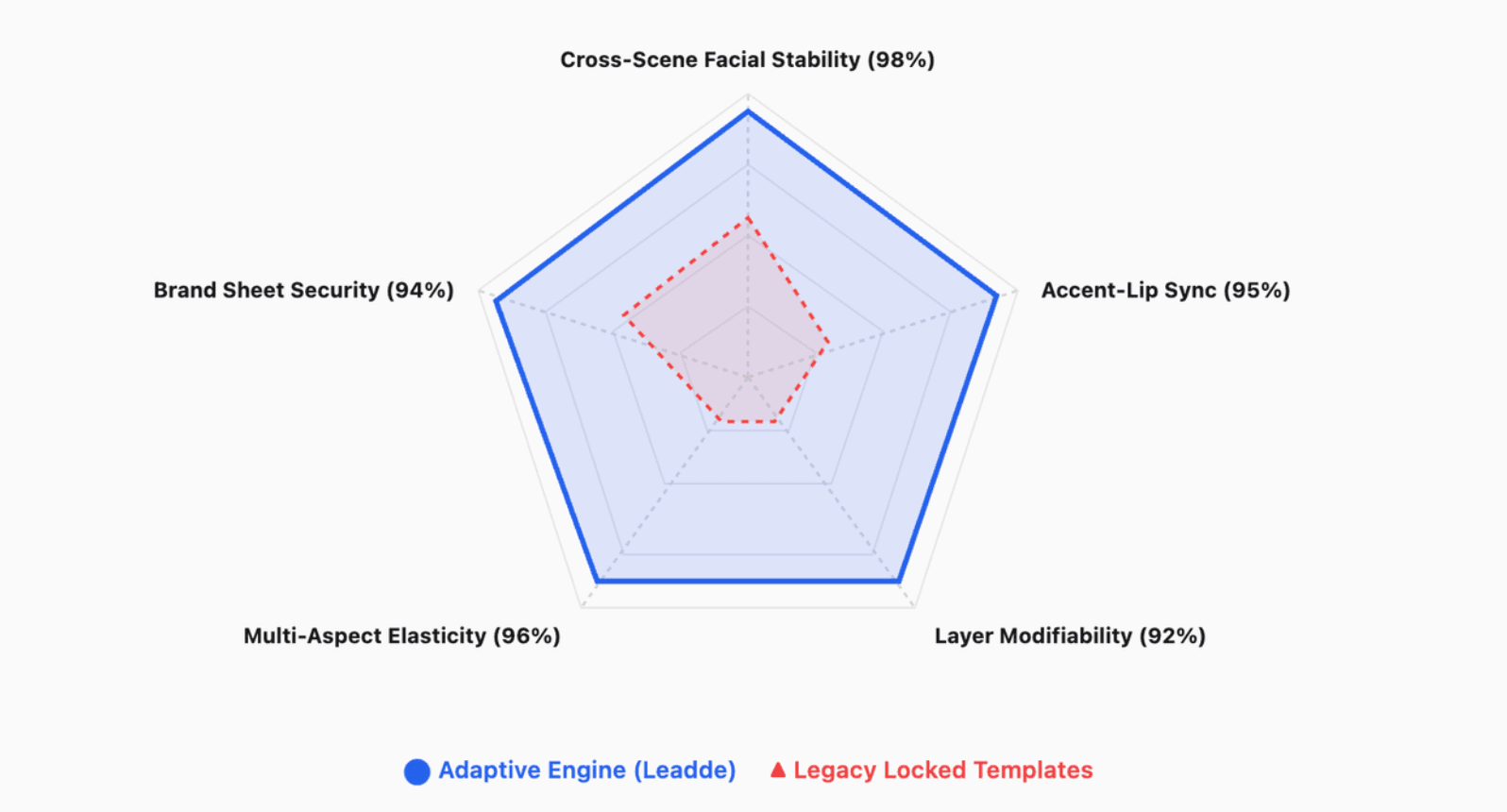
Does the Avatar Stay Consistent Across Different Templates, Scenes, and Transitions?
Cross-scene facial stability is one of the most important quality signals. If an avatar changes subtly between scenes, viewers may feel that something is wrong.
Check whether the avatar keeps consistent:
- Face shape
- Skin tone
- Eye movement
- Mouth behavior
- Posture
- Lighting
- Expression style
This is especially important for customer-facing content, executive avatars, product education, and personal digital presenters.
Are Lip Sync, Facial Motion, Eye Contact, and Micro-Expressions Natural Enough?
A professional avatar video must feel stable and natural. Poor lip sync or robotic facial motion can make the video look unfinished.
Before choosing a platform, review sample videos for:
| Quality Signal | What to Check |
| Lip sync | Does the mouth match speech naturally? |
| Eye contact | Does the avatar appear engaged? |
| Micro-expressions | Are facial movements subtle and human-like? |
| Gestures | Do movements support the message? |
| Voice pacing | Does speech sound natural or mechanical? |
A strong template library cannot fix a weak avatar engine. The avatar and the template must work together.
Can One Master Template Adapt to 9:16 Shorts, 16:9 Presentations, and Branded Business Assets?
Modern teams publish across many channels. A training video may need a 16:9 version for an LMS, a short vertical clip for internal updates, and a branded excerpt for social media.
A good template system should support:
- 9:16 vertical shorts
- 16:9 presentations
- 1:1 social clips
- Web banners
- Learning modules
- Sales enablement assets
The stronger the responsive framework, the less time teams waste recreating the same content for every channel.
What Are the Best AI Avatar Generators With a Rich Template Library in 2026?
The best AI avatar generator depends on the use case. Some tools are stronger for corporate training. Others are better for social media, design assets, e-learning, or document-to-video workflows.
A practical comparison should focus on workflow fit, not only avatar quality.
Synthesia, HeyGen, Colossyan, and Argil: Which Use Case Does Each Platform Serve Best?
As of 2026, available information suggests these platforms are commonly positioned around different production needs:
| Platform | Best-Fit Use Case | Main Strength |
| Synthesia | Corporate training and enterprise communication | Structured business videos |
| HeyGen | Marketing, social media, and localized video | Fast avatar video creation |
| Colossyan | E-learning and instructional content | Training-oriented video flows |
| Argil | Creator-led AI video workflows | Flexible content creation |
These platforms are often strongest when the team already has a clear script and wants to turn it into a video quickly.
Canva, Adobe Express, Fotor, and VEED: When Are Design-First Tools Enough?
Design-first tools can work well when the main goal is simple visual content, not advanced avatar-led business video.
They may be enough for:
- Static avatar graphics
- Lightweight social posts
- Simple animated assets
- Presentation visuals
- Quick design-based content
They may not be enough when teams need:
- Deep avatar realism
- Multilingual voiceover workflows
- Document-to-video automation
- Interactive video
- Version control
- Enterprise content governance
For occasional visual content, design-first tools can be practical. For scalable avatar video workflows, a dedicated AI video platform is usually more suitable.
Leadde: Best for Turning Documents, Slides, and Text Into Scalable Business Avatar Videos
Leadde is especially relevant for teams that already have business materials and want to transform documents into multilingual demos. It transforms PowerPoint files, PDFs, Word documents, scripts, and text into structured video presentations, while automatically generating outlines, scenes, voice-over scripts, and visual layouts.
This makes Leadde useful for:
- Training teams
- Product education teams
- Internal communications
- SOP documentation
- Compliance content
- Global localization teams
Leadde also supports 92 languages, 200+ AI avatars, personal digital avatars, interactive video, version control, analytics, and content management.
How Does Leadde Solve the Rigid Template Bottleneck With Dynamic Document-to-Video Workflows?
Leadde’s core advantage is that it does not treat templates as fixed wrappers. It connects templates with source content, scene generation, avatar presentation, and multilingual workflows.
This is important because many enterprise videos start from existing content, not from a blank script.
How Can Leadde Turn PowerPoint, PDF, Word, Scripts, and Text Into Structured Avatar Videos?
Leadde converts business content into structured video presentations. The system can process common business inputs such as PowerPoint, PDF, Word, scripts, and text.
This helps teams avoid the blank-page problem. Instead of asking a marketer or trainer to manually rewrite a document into a video script, Leadde can help create:
- A video outline
- Scene structure
- Voice-over draft
- Visual layout
- Presentation flow
This is especially valuable when teams need to repurpose existing knowledge into training, onboarding, or product education videos.
How Do Auto Layout, Auto Highlighting, and Scene Generation Keep Videos Aligned With Changing Content?
When business content changes, rigid templates become difficult to maintain. A small update to a policy, feature, or process may require manual editing across multiple scenes.
Leadde supports automated video creation, including scene layout, key-point highlighting, presentation flow, and voice-over generation.
This helps keep videos aligned with the message instead of forcing the message into a static visual grid.
How Do Personal Digital Presenters, 92 Languages, and Interactive Video Support Enterprise Scale?
Enterprise video is rarely one-and-done. Teams need localization, updates, reuse, and viewer engagement.
Leadde supports:
- 92-language multilingual workflows
- 200+ AI avatars
- Personal digital avatars from uploaded photos
- Chat with Video
- Advanced playback modes
- Version control
- Analytics
- Content management
This turns video from a static asset into a reusable business communication system.
How Should Enterprise Teams Choose the Right AI Avatar Generator for Real Business Use Cases?
Enterprise buyers should choose based on real workflow needs, not demo videos alone. The right platform depends on content source, audience, update frequency, brand requirements, and publishing channels.
A good buying process should map each use case to the required template type, avatar quality, compliance level, and production volume.
Which Template Categories Matter for SaaS, MarTech, ABM, Training, Retail, and E-Commerce?
Different industries need different template structures.
| Industry / Team | High-Value Template Categories |
| SaaS and MarTech | Product demos, feature updates, ABM videos, onboarding tutorials |
| Enterprise platforms | Internal enablement, compliance updates, role-based training |
| IT services and BPO | New-hire onboarding, process guides, security training |
| Industrial teams | Equipment maintenance, safety procedures, multi-plant updates |
| Retail and FMCG | Product knowledge, channel training, service guidelines |
| E-commerce | Product explainers, ad variations, customer education |
The best AI avatar generator should match the team’s actual production needs, not just offer visually attractive templates.
How Should Teams Compare Pricing, Video Minutes, Revisions, Translations, and Total Production ROI?
Monthly subscription price can be misleading. A lower plan may become expensive if it limits video minutes, exports, translations, seats, or revisions.
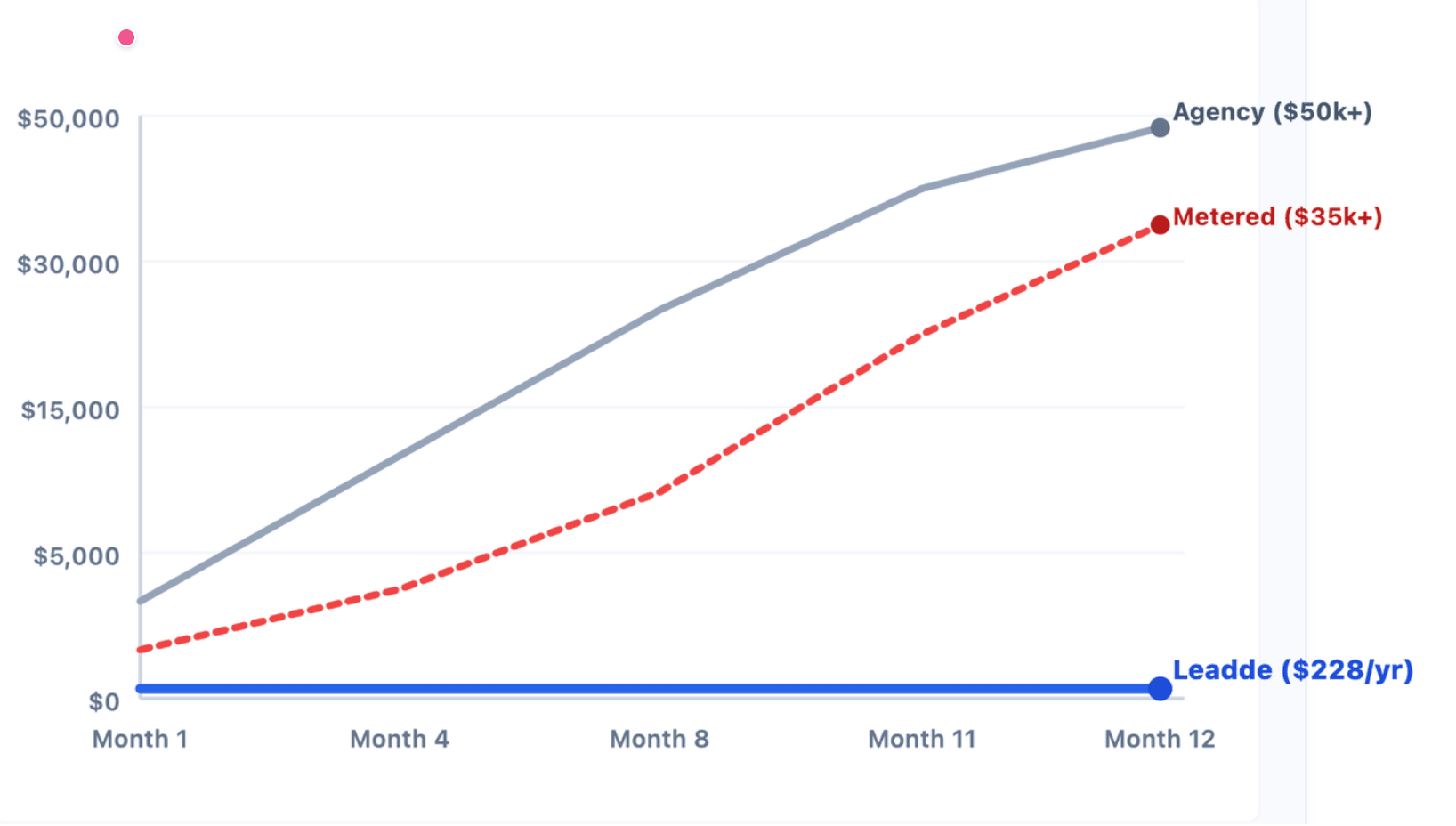
Teams should compare:
- Cost per finished video
- Included video minutes
- Export limits
- Watermark rules
- Translation costs
- Seat costs
- Custom avatar costs
- Revision flexibility
- Enterprise support
The key question is not “What is the cheapest plan?” It is “What is the cost of producing and maintaining the videos we actually need?”
What Security, Consent, Brand Governance, and Workflow Controls Should Buyers Check Before Scaling?
AI avatar video introduces new risks around likeness, voice, brand usage, and publishing control.
Before scaling, enterprise teams should check:
- Who can create avatars?
- Who can approve final videos?
- Can brand templates be locked?
- Can old versions be updated or replaced?
- Are analytics available?
- Are user roles and permissions supported?
- How is personal likeness consent managed?
- What compliance standards does the vendor support?
Leadde’s official product overview states that the platform supports enterprise-grade controls and is built to support SOC 2, GDPR, and ISO 42001-aligned requirements.
Conclusion
A future-proof AI avatar generator is not simply the tool with the largest template library. It is the platform that can support realistic avatars, flexible layouts, brand governance, multilingual reuse, and scalable video workflows.
For business teams, the best choice depends on how videos are created, reviewed, updated, localized, and reused.





