AI Avatar Training Video Examples for HR, Sales, and Compliance

AI avatars are most useful when they are tied to a clear training purpose.
A generic avatar video may look polished, but it does not always help employees learn. A good AI avatar training video should explain a process, teach a policy, introduce a workflow, coach a team, or help someone take the next step.
That is why training is one of the strongest use cases for AI avatars.
Instead of filming a trainer every time a policy changes, a process updates, or a sales playbook gets revised, teams can create editable avatar-led videos from scripts, SOPs, onboarding checklists, policy documents, and training materials.
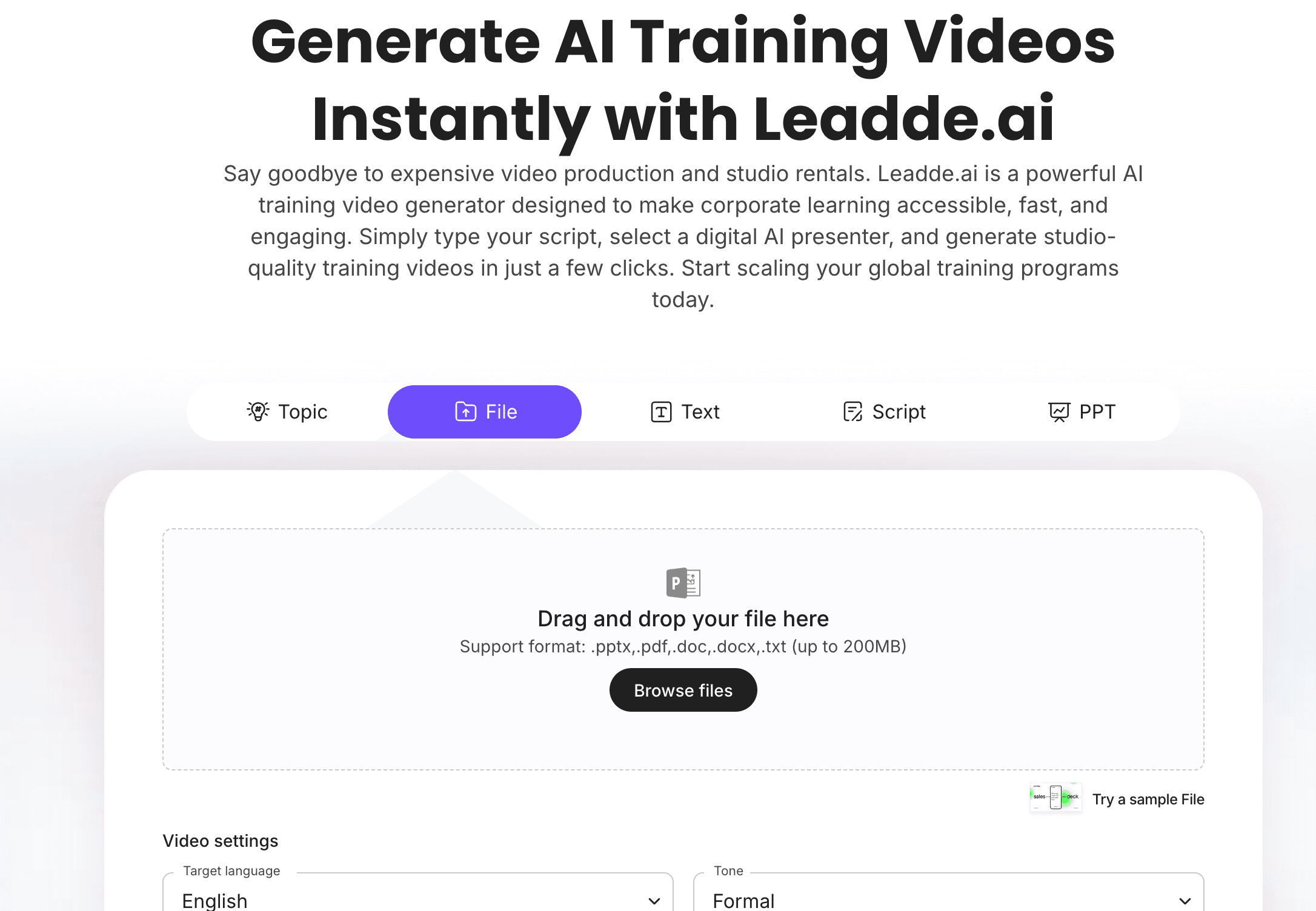
If your team wants to create avatar-led training videos, Leadde's AI Avatar Generator helps create presenter-led videos without filming. For broader workplace training, Leadde's AI Training Video Generator helps turn training content into editable video modules.
Why Use AI Avatars for Training Videos?
Training videos often need a guide.
A slide deck can feel static. A PDF can feel dense. A screen recording can feel impersonal. An AI avatar can introduce the topic, explain the steps, highlight key points, and make the training feel more structured.
AI avatars are especially useful when teams need to create repeatable training content quickly.
They can help teams:
- Create training videos without filming
- Turn scripts and documents into presenter-led videos
- Update videos when policies or processes change
- Standardize training across teams and locations
- Create multilingual training content
- Make onboarding and compliance content easier to follow
- Reduce repeated live training sessions
- Support HR, sales, operations, compliance, and customer education teams
The key is to use avatars where they add clarity. The avatar should support the training objective, not distract from it.
For more avatar-specific training context, see Leadde's guide on how to use AI avatars for sales training and how to create AI avatar videos for employee onboarding.
AI Avatar Training Video Examples by Team
Different teams need different avatar training videos. HR may need a friendly onboarding guide. Sales may need a confident coach. Compliance may need a clear and serious presenter.
| AI Avatar Training Video Example | Best For | What the Avatar Should Teach |
|---|---|---|
| New hire welcome video | HR and onboarding | What to expect in the first week |
| Policy overview video | HR, legal, compliance | Key rules and required behavior |
| SOP walkthrough video | Operations and frontline teams | How to follow a procedure step by step |
| Sales objection handling video | Sales enablement | How to respond to common buyer concerns |
| Product knowledge training video | Sales, support, success | How the product works and how to explain it |
| Compliance refresher video | Company-wide training | What employees need to remember |
| Manager training video | People managers | How to handle a recurring management situation |
| Customer support training video | Support teams | How to follow a support workflow |
| Security awareness video | IT and security teams | How to recognize and report risks |
| Multilingual training video | Global teams | How to deliver the same training across languages |
The best avatar training videos are short, specific, and role-based. One video should usually teach one workflow, one policy, one skill, or one decision.
Example 1: New Hire Welcome Video
A new hire welcome video is one of the most natural uses for an AI avatar.
The avatar can welcome employees, explain what the first week looks like, and point them to the next step.
A good new hire welcome video should include:
- A friendly welcome
- What the video covers
- What the new hire should do first
- Where to find the onboarding checklist
- Who to contact for help
- What to expect during the first week
Sample Script
Welcome to [Company Name]. We are excited to have you on the team.
In this video, we will walk through what to expect during your first week.
You will set up your tools, meet your manager, review key policies, and complete your onboarding checklist.
You do not need to learn everything today. Your first goal is to get oriented, ask questions, and know where to find help.
Your next step is to open your onboarding checklist and complete the first three setup tasks.
Welcome again. We are glad you are here.
Best For
- HR onboarding
- Remote onboarding
- First-day orientation
- New hire portals
- Company-wide onboarding programs
For a script-first version, use Leadde's employee onboarding video script template, or create the video with AI Onboarding Video Maker.
Example 2: Policy Training Video
Policy documents are often too formal for employees to understand quickly.
An AI avatar can explain the policy in plain language, introduce examples, and remind employees where to find the official document.
A policy training video can cover:
- What the policy means
- Who it applies to
- Why it matters
- What behavior is expected
- What employees should avoid
- What to do if they are unsure
- Where to find the official policy
Best For
- HR policy training
- Code of conduct training
- Remote work policy training
- Expense policy training
- Data privacy policy training
- Annual refresher training
For policy-specific examples, see Leadde's policy training video examples, or use Policy Video to create policy-focused training.
Example 3: SOP Walkthrough Video
SOPs are strong candidates for avatar-led training because they need clear explanation.
An AI avatar can introduce the procedure, explain who should follow it, and walk through each required step.
A good SOP avatar video should include:
- What the SOP is for
- Who needs to follow it
- What materials or inputs are required
- The steps in order
- Common mistakes
- What to do if something goes wrong
- Who owns the process
Sample Structure
| Scene | Purpose |
|---|---|
| Scene 1 | Explain the SOP purpose |
| Scene 2 | Define who the SOP applies to |
| Scene 3 | List required inputs |
| Scene 4 | Walk through the steps |
| Scene 5 | Highlight mistakes to avoid |
| Scene 6 | Explain escalation or exceptions |
| Scene 7 | Summarize the key takeaway |
For SOP-specific content, see Leadde's SOP training video examples, or use SOP Video Maker.
Example 4: Sales Objection Handling Video
Sales teams need repeatable training for common objections.
An AI avatar can act as a sales coach and explain how reps should respond to buyer concerns.
A sales objection handling video can cover:
- The common objection
- Why buyers say it
- What not to say
- A stronger response
- A short example
- A practice prompt
Sample Script
In this training, we will review how to respond when a prospect says, "We do not have budget right now."
Do not immediately offer a discount. First, understand whether the concern is about timing, priority, or value.
A stronger response is: "That makes sense. Can I ask how your team is currently solving this problem, and what it costs to keep doing it that way?"
This keeps the conversation focused on business impact, not just price.
Best For
- Sales onboarding
- SDR training
- Account executive coaching
- Sales manager enablement
- Role-play preparation
For sales enablement video workflows, use AI Sales Enablement Video Maker.
Example 5: Product Knowledge Training Video
Sales, support, and customer success teams need to understand the product well enough to explain it clearly.
An AI avatar can guide teams through product concepts, feature use cases, or customer workflows.
A product knowledge video can explain:
- What the product does
- Who uses it
- What problem it solves
- How a feature works
- What customer questions often come up
- How to explain the value simply
This is especially useful when product updates happen frequently. Instead of running a live training every time, teams can create short avatar-led modules.
Example 6: Compliance Refresher Video
Compliance training is often repeated annually or whenever a policy changes.
An AI avatar can make the refresher more structured and consistent.
A compliance refresher video can cover:
- The rule or requirement
- Why it matters
- What changed
- What employees must do
- What mistakes to avoid
- How to report a concern
- Where to find the official policy
For broader compliance content, see Leadde's compliance training video examples.
If the training is about workplace conduct, Harassment Training Videos can support that specific use case.
Example 7: Manager Training Video
Managers often need training on recurring people situations.
An AI avatar can explain a scenario, show what a manager should do, and provide language they can use.
Manager training videos can cover:
- Giving feedback
- Running one-on-ones
- Handling performance concerns
- Supporting new hires
- Managing remote teams
- Escalating HR issues
- Communicating policy changes
A good manager training video should be practical. It should show a situation, explain the right response, and give managers a next step.
Example 8: Customer Support Training Video
Support teams need clear process training and examples.
An AI avatar can explain how to handle common tickets, escalate issues, document conversations, and follow the right tone.
A customer support training video can cover:
- How to respond to common issues
- When to escalate
- What information to collect
- What tone to use
- How to document the case
- What not to promise
- How to close the loop
This format works well for onboarding new support agents and standardizing service quality.
Example 9: Security Awareness Training Video
Security training needs to be simple and memorable.
An AI avatar can explain common risks in plain language and show employees what to do.
A security awareness video can cover:
- Phishing emails
- Suspicious links
- Password hygiene
- Multi-factor authentication
- Approved tools
- File sharing rules
- Reporting suspicious activity
A strong video should end with a clear action: report the message, do not click the link, verify the sender, or contact security.
Example 10: Multilingual Training Video
Global teams often need the same training in multiple languages.
AI avatar videos can make this easier by creating localized versions without filming each presenter separately.
A multilingual training video can support:
- Global onboarding
- International sales training
- Regional compliance training
- Customer education
- Partner enablement
- Distributed operations training
The original script should still be reviewed before localization. Translation should preserve the meaning, tone, and policy details.
How to Create AI Avatar Training Videos
The examples above all follow a similar workflow.
The goal is not just to put an avatar on screen. The goal is to build a clear training experience.
Step 1: Choose One Training Objective
Start with one topic.
Good examples include:
- Welcome new hires
- Explain one policy
- Walk through one SOP
- Teach one sales response
- Explain one product workflow
- Refresh one compliance rule
- Train managers on one scenario
One video should usually teach one skill, rule, or workflow.
Step 2: Write a Clear Training Script
An avatar video needs a strong script.
The script should include:
- Who the video is for
- What the learner will understand
- Why the topic matters
- The key steps or rules
- Examples or scenarios
- A clear next action
Avoid long paragraphs. Write in spoken language.
If you already have a script, Script to Video can help turn it into video scenes. If your source is a document, use Doc to Video.
Step 3: Choose the Right Avatar Style
The avatar should match the training context.
| Training Type | Avatar Style |
|---|---|
| New hire onboarding | Warm and friendly |
| Policy training | Clear and professional |
| Compliance training | Serious and precise |
| Sales training | Confident and energetic |
| Product training | Helpful and explanatory |
| Manager training | Calm and trustworthy |
| Support training | Practical and empathetic |
Do not choose an avatar only because it looks polished. Choose one that fits the topic and audience.
Step 4: Turn the Script into Scenes
A strong avatar training video should be broken into short scenes.
A simple structure:
| Scene | Purpose |
|---|---|
| Scene 1 | Introduce the topic |
| Scene 2 | Explain why it matters |
| Scene 3 | Teach the key steps or rules |
| Scene 4 | Show an example |
| Scene 5 | Highlight mistakes to avoid |
| Scene 6 | Give the next action |
This structure keeps the video easier to follow.
Step 5: Add Visual Highlights
The avatar should not carry the whole video alone.
Use visual highlights for:
- Key terms
- Checklists
- Process steps
- Dos and don'ts
- Scenario cards
- Policy reminders
- Sales talk tracks
- Product screenshots
- Common mistakes
- Next steps
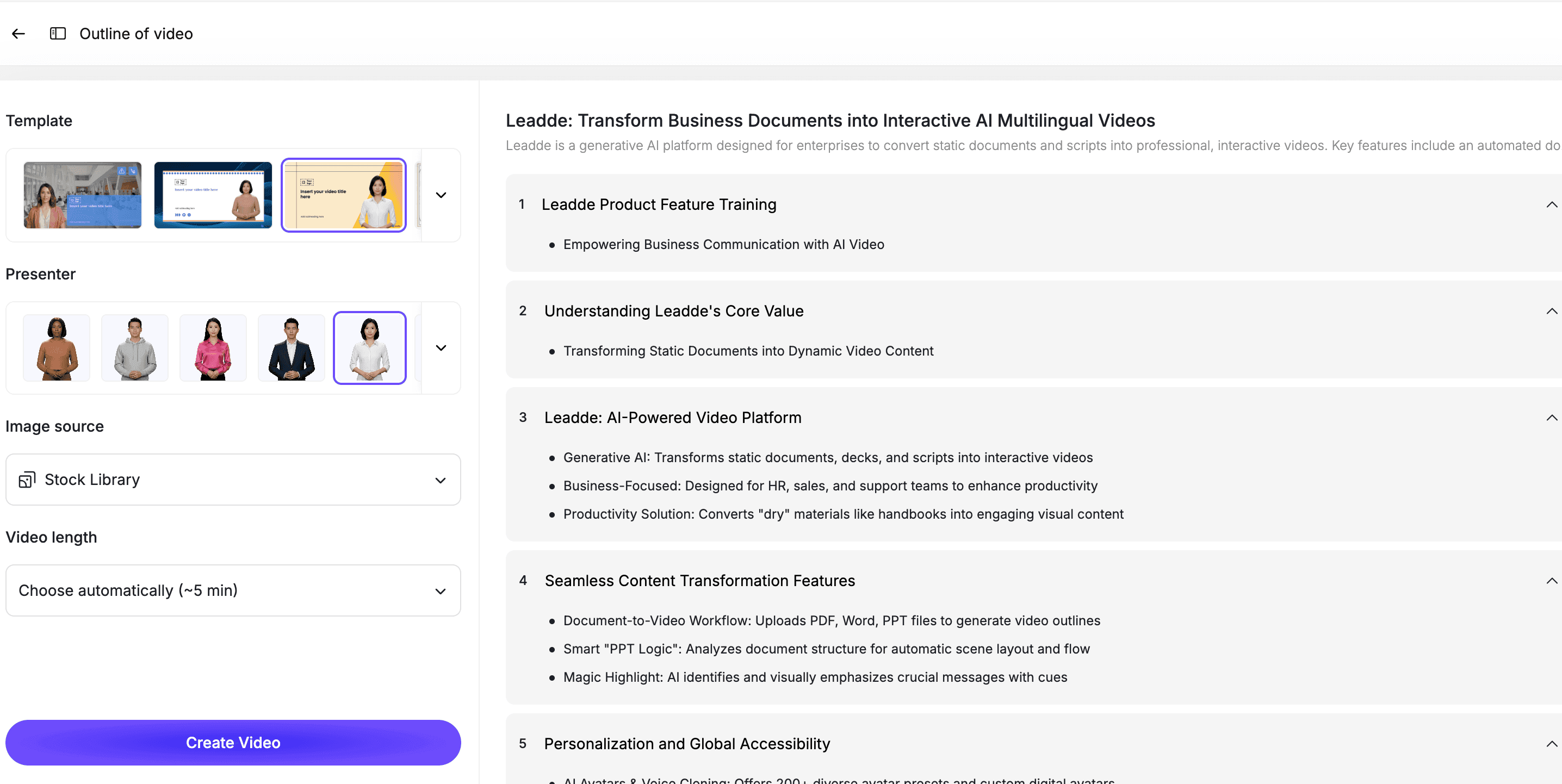
Visuals make the training easier to remember and reduce the risk of the video becoming a talking-head monologue.
Step 6: Review Before Publishing
AI avatar videos should still be reviewed.
Check:
- Is the script accurate?
- Does the avatar tone match the topic?
- Are examples appropriate?
- Are policy or SOP details correct?
- Is the video too long?
- Are captions accurate?
- Is the next step clear?
- Does the video need approval from HR, compliance, sales, or operations?
For HR, compliance, legal, safety, and regulated training, the content owner should approve the final version.
Best Practices for AI Avatar Training Videos
Use Avatars as Guides, Not Decorations
The avatar should help explain the training.
If the avatar does not add clarity, the video may be better as a simple screen recording, animation, or text-based module.
Keep Videos Short
Most avatar training videos should be 2 to 6 minutes.
If the topic is complex, create multiple short modules.
Match the Tone to the Topic
A compliance video should not feel casual. A welcome video should not feel cold. A sales coaching video should not feel robotic.
Tone is part of training quality.
Add Examples
Training works better when learners can see how the rule or skill applies.
Use realistic examples, role-based scenarios, and common mistakes.
Keep Videos Editable
Training content changes.
Choose an editable workflow so your team can update scripts, avatars, scenes, captions, and visuals when the material changes.
How Leadde Helps Create AI Avatar Training Videos
Leadde helps teams turn training scripts, documents, SOPs, policies, onboarding materials, and sales enablement content into editable avatar-led videos.
With Leadde, teams can:
- Create AI avatar training videos
- Turn scripts into video scenes
- Upload training documents
- Add captions and visual highlights
- Create onboarding and compliance videos
- Build sales enablement training
- Generate multilingual versions
- Update videos when training materials change
Start with AI Avatar Generator if you need a presenter-led video. Use AI Training Video Generator if your team is building a broader training library across HR, sales, compliance, SOPs, policies, and onboarding.
If you already have a training script or document ready, you can also try Leadde directly and start building your first AI avatar training video.
Common Mistakes to Avoid
Mistake 1: Using an Avatar Without a Clear Training Goal
An avatar does not make a video useful by itself.
Start with the training objective.
Mistake 2: Creating Long Talking-Head Videos
A long avatar monologue is hard to watch.
Use short scenes, visuals, and examples.
Mistake 3: Choosing the Wrong Tone
The avatar's tone should match the topic.
A policy video, sales training video, and welcome video should not feel the same.
Mistake 4: Skipping Review
AI-generated training should be reviewed before publishing.
This is especially important for HR, compliance, legal, safety, and sales messaging.
Mistake 5: Forgetting to Update the Video
Training content changes over time.
Use an editable workflow so you can update videos quickly.
FAQ
What is an AI avatar training video?
An AI avatar training video is a presenter-led training video that uses an AI-generated avatar to explain a topic, process, policy, workflow, or skill.
What are good AI avatar training video examples?
Good examples include new hire welcome videos, policy training videos, SOP walkthroughs, sales objection handling videos, product knowledge training, compliance refreshers, manager training, support training, security awareness videos, and multilingual training videos.
Are AI avatars useful for employee training?
Yes. AI avatars can help make employee training more guided, consistent, and scalable, especially for onboarding, compliance, SOPs, sales enablement, and internal learning.
Should AI avatar videos replace live training?
Not always. AI avatar videos are best for repeatable training topics. Live training is still useful for discussion, coaching, sensitive topics, and complex decision-making.
How long should an AI avatar training video be?
Most AI avatar training videos should be 2 to 6 minutes. Longer topics should be split into shorter modules.
Can AI avatar training videos be updated later?
Yes, if they are created in an editable workflow. Your team should be able to update the script, scenes, captions, visuals, and avatar presenter when training materials change.
What should I review before publishing an AI avatar training video?
Review the script accuracy, avatar tone, captions, examples, policy details, next steps, and whether the content needs approval from HR, compliance, sales, operations, or another owner.
Conclusion
AI avatar training videos work best when they are specific.
Do not create avatar videos just because the format looks polished. Use avatars to guide learners through onboarding, policies, SOPs, sales training, compliance refreshers, product knowledge, and internal workflows.
Start with one training objective, write a clear script, choose an avatar that matches the topic, break the video into short scenes, add visual highlights, review the content, and keep the final video editable.
Use Leadde's AI Avatar Generator to create avatar-led training videos for HR, sales, compliance, onboarding, and internal learning.