
Top AI Avatar Creators for Press Release Videos: Best Tools, Workflows, and PR Use Cases

The top AI avatar creators for press release videos are Leadde, HeyGen, Synthesia, Colossyan, D-ID, Elai, Argil, Arcads, and Captions. For most PR and communications teams, HeyGen is the strongest all-around choice for realistic, multilingual announcement videos. Synthesia is better for formal enterprise communications, while Leadde is best when the starting point is an existing press release, PDF, slide deck, or internal document that needs to become an avatar-led video.
A press release video is different from a normal AI talking-head clip. It has to look credible, sound authoritative, protect the brand, and survive review from PR, legal, leadership, and regional teams. The best AI avatar platform is not always the one with the most impressive demo. It is the one that helps your team turn approved messaging into a polished, accurate, and reusable video asset.
Current search results and competitor content commonly highlight Synthesia, HeyGen, and Leadde as leading platforms for professional templates, lifelike lip-syncing, and enterprise-grade tools for turning text scripts into executive announcement videos. But to choose the right platform, PR teams need to go deeper than a tool list and evaluate workflow, risk level, localization, brand control, and production volume.
Quick Answer: Best AI Avatar Creators for Press Release Videos
- Best overall: HeyGen, for realistic and multilingual press release videos.
- Best for enterprise communications: Synthesia, for formal announcements, internal updates, and standardized workflows.
- Best for document-to-video workflows: Leadde, for turning press releases, PDFs, slide decks, and internal documents into avatar-led videos.
- Best for structured internal messaging: Colossyan, for presentation-style corporate updates.
- Best for high-frequency social announcement clips: Argil, Captions, and Arcads.
Best AI Avatar Creators for Press Release Videos Compared
| Tool | Best For | Main Strength | Main Limitation |
|---|---|---|---|
| HeyGen | Product launches, multilingual PR, external announcements | Realistic avatars and localization | Must test pricing, minutes, and output quality at scale |
| Synthesia | Enterprise PR, internal comms, investor updates | Corporate polish and structured workflows | Can feel too formal or stiff for social-first content |
| Leadde | Press release, PDF, and deck-to-video workflows | Turns existing business content into avatar-led videos | Avatar realism should be tested before external publication |
| Colossyan | Internal updates, training-linked announcements | Structured presentation-style communication | Less suited for high-impact external launch campaigns |
| D-ID | Personalized PR outreach and API workflows | Flexible automation and personalization | Less plug-and-play for non-technical PR teams |
| Elai | Recurring branded spokesperson videos | Custom avatar continuity | Requires quality testing for executive-style use |
| Argil | LinkedIn product updates and frequent B2B clips | Fast script-to-edited-video workflow | Less enterprise-focused than Synthesia |
| Arcads | Campaign-style product announcements | UGC-style promotional output | Too casual for sensitive or formal PR |
| Captions | Budget-conscious short announcement clips | Simple and accessible | Less suitable for formal newsroom or IR content |
How to Choose AI Avatar Creators for Press Release Videos
The best way to choose an AI avatar creator is to match the platform to the communication risk, not just the content format.
In our user research, teams did not struggle with whether AI could generate a talking-head video. They struggled with whether the video would feel trustworthy enough to represent the company. The recurring concerns were clear: unnatural lip-sync, stiff gestures, weak eye contact, robotic delivery, unclear pricing limits, and tools that look strong in demos but require too much manual fixing in production.
Press Release Video Buying Criteria
| Decision Factor | Why It Matters for PR |
|---|---|
| Avatar credibility | A fake-looking presenter can damage trust |
| Voice authority | The tone must match the seriousness of the announcement |
| Brand control | Videos need logos, fonts, colors, lower thirds, and consistent layouts |
| Localization quality | Global PR requires accurate translation and natural lip-sync |
| Review workflow | PR, legal, brand, and leadership teams often need approval |
| Source-content conversion | Many teams start from press releases, PDFs, decks, or memos |
| Cost scalability | Minutes, seats, languages, exports, and custom avatars affect real cost |
| Long-term maintainability | Recurring spokesperson videos need consistent avatars and editable projects |
Takeaway: Do not choose an AI avatar creator based only on visual quality. Test it with a real press release script, real names, real product language, and a realistic approval workflow.
HeyGen for Press Release Videos
HeyGen is best for realistic, multilingual, external-facing press release videos.
HeyGen is a strong choice when a company needs polished announcement videos for product launches, customer-facing updates, executive messages, and global campaigns. It is especially useful when the same press release needs to become multiple localized videos for different regions or audiences.
During hands-on comparisons, tools like HeyGen tend to perform best when the goal is a clean, modern spokesperson video that can work across LinkedIn, YouTube, website newsrooms, email campaigns, and launch landing pages. It is more flexible for marketing-led PR than platforms built mainly for internal training.
Best Use Cases for HeyGen
- Product launch press release videos
- Global PR announcement videos
- Executive update videos
- LinkedIn announcement clips
- Multilingual media assets
- Customer-facing product explainers
Pros
- Strong avatar realism for external-facing content
- Good fit for multilingual campaigns
- Useful for polished social and web distribution
- Better for marketing and PR overlap than rigid enterprise tools
Cons
- Pricing can become more complex with minutes, translations, seats, or premium features
- Output still needs review for pronunciation, gestures, and tone
- Not always the best fit for very sensitive corporate announcements
Best-fit recommendation: Choose HeyGen when realism, localization, and external presentation quality matter most.
Synthesia for Press Release Videos
Synthesia is best for enterprise-grade corporate communications and formal announcement videos.
Synthesia is a strong fit for organizations that need consistency, structure, and internal scalability. It works well for formal press release videos, investor updates, leadership messages, HR announcements, internal communications, and recurring corporate updates.
Based on hands-on comparisons, Synthesia tends to feel more corporate than social-native. That can be a strength when the announcement needs to look polished, controlled, and boardroom-ready. It can be less ideal when the content needs to feel spontaneous, founder-led, or highly conversational.
Best Use Cases for Synthesia
- Formal corporate announcements
- Internal communications
- Investor relations updates
- Executive statements
- HR and policy announcements
- Enterprise training-adjacent updates
Pros
- Strong enterprise positioning
- Good fit for standardized templates
- Useful for larger teams and repeatable workflows
- Strong choice for serious business communication
Cons
- Can feel too formal for social-first launch content
- May not deliver the most natural short-form marketing style
- Premium enterprise workflows may exceed the needs of small teams
Best-fit recommendation: Choose Synthesia when structure, consistency, and enterprise review matter more than casual realism.
Leadde for Press Release Videos
Leadde is best for turning existing press releases, PDFs, slide decks, and internal documents into avatar-led business videos.
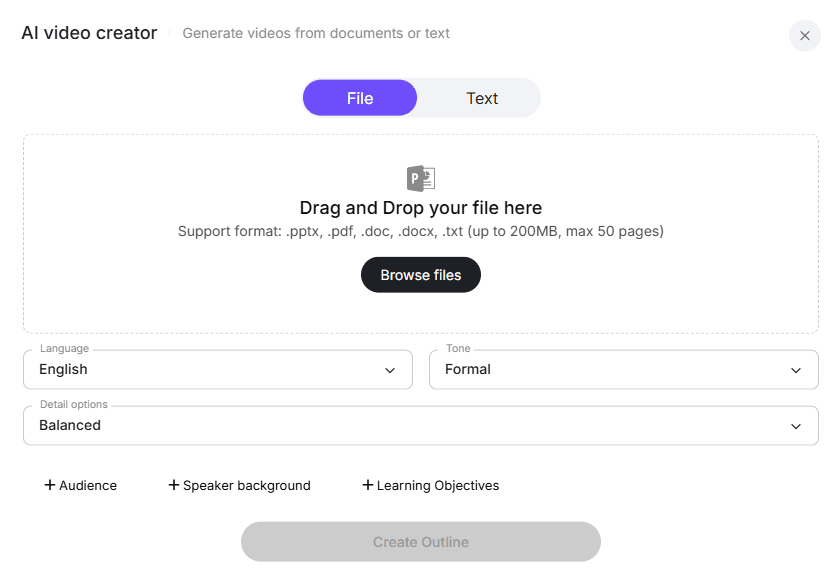
Leadde deserves a separate place in this category because many PR teams do not begin with a blank video script. They begin with approved materials: a press release draft, a product launch deck, an investor update, a policy memo, a media kit, or a PDF brief. A document-first workflow can save time because the platform can help turn static business content into a structured video.
In real customer scenarios, this matters more than it sounds. A PR team may already have a fully approved written announcement but still need a 60-second newsroom video, a LinkedIn clip, an internal leadership update, and a localized explainer. A tool like Leadde is useful when the job is not just “make an avatar talk,” but “turn existing business content into a video workflow.”
Best Use Cases for Leadde
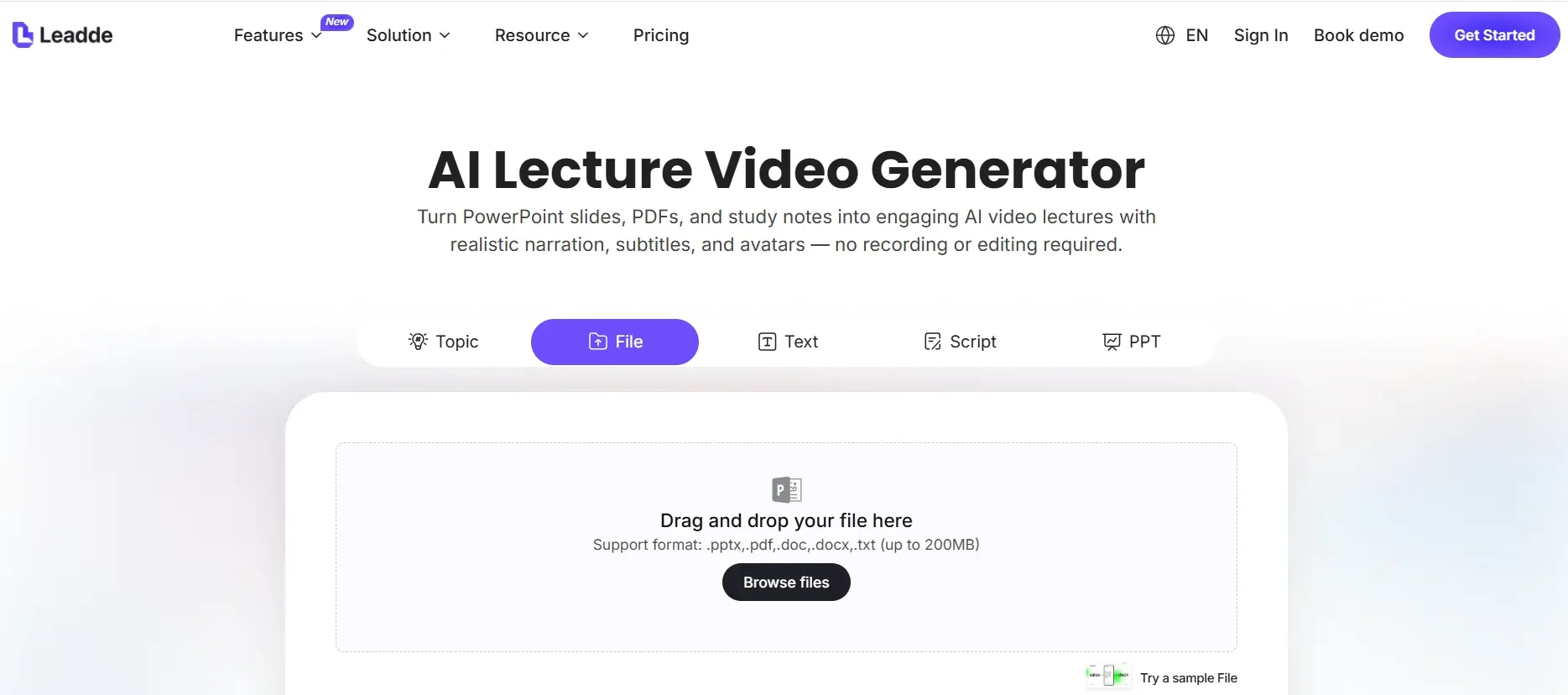
- Written press release to video
- PDF press kit to video
- Launch deck to product announcement video
- Internal memo to leadership update
- Policy document to employee communication video
- Newsroom-style company update
- Training or sales enablement repurposing
Pros
- Strong fit for document-to-video workflows
- Useful when content is already approved
- Helps repurpose PR assets across channels
- Good fit for internal and external business communication
Cons
- Avatar realism should be tested before high-visibility external use
- May not be the first choice if the only goal is the most lifelike avatar
- Sensitive announcements still require careful human review
Best-fit recommendation: Choose Leadde when your PR workflow starts with a press release, PDF, slide deck, or internal document that needs to become a structured video.
Colossyan for Press Release Videos
Colossyan is best for structured corporate messaging, internal announcements, and presentation-style videos.
Colossyan fits companies that want clean, professional, business-oriented videos without building a complex production process. It is especially useful for structured communication such as HR updates, internal policy announcements, training-linked messages, and departmental updates.
It can also support press release-style content when the tone is informational rather than promotional. However, for highly visible product launches or external PR campaigns, teams may prefer HeyGen for realism or Synthesia for enterprise polish.
Best Use Cases for Colossyan
- Internal corporate updates
- Departmental announcements
- HR policy videos
- Training-related announcements
- Presentation-style company communication
Best-fit recommendation: Choose Colossyan when clarity and structure matter more than social-native energy.
D-ID, Elai, Argil, Arcads, and Captions for Press Release Videos
Not every press release video needs the same type of platform. These tools are better for specific workflows.
D-ID: Best for Personalized PR Outreach
D-ID is useful when teams want API-driven or personalized video workflows. It can help create customized video messages for journalists, partners, regional teams, or customers. It is better suited for teams with technical resources or automation needs.
Elai: Best for Branded Spokesperson Continuity
Elai is useful when a company wants a recurring digital spokesperson. This can work well for ongoing product updates, founder-style summaries, and newsroom video series. The key requirement is quality control: the avatar must remain credible over time.
Argil: Best for High-Frequency LinkedIn Updates
Argil is a strong fit for short, frequent business videos. In one B2B workflow review, a team tested tools over 10 weeks using a LinkedIn-style short, a 90-second product demo, and a multilingual launch video for each platform. The strongest insight was that speed and editing workflow often mattered as much as avatar quality.
Arcads: Best for Campaign-Style Announcements
Arcads is better for promotional, UGC-style product announcements than formal corporate communications. It can help marketing teams create multiple campaign variations from one launch message.
Captions: Best for Lightweight Announcement Clips
Captions is useful for startups, creators, and lean teams that need quick social announcement videos. It is less suitable for investor relations, formal media statements, or high-risk PR.
AI Avatar Press Release Video Workflows
The right workflow depends on whether your team starts with a script or an existing document.
Script-First Workflow
Best for: HeyGen, Synthesia, Colossyan, D-ID, Elai
- Write a short spoken script from the press release.
- Select an avatar that matches the announcement tone.
- Choose or upload a voice.
- Apply brand templates, lower thirds, and subtitles.
- Review pronunciation, pacing, and claims.
- Export for newsroom, LinkedIn, email, and internal channels.
Document-First Workflow
Best for: Leadde
- Upload the press release, PDF, deck, or internal memo.
- Extract the main announcement, quote, proof points, and CTA.
- Turn the source content into a 60–90 second video outline.
- Select the avatar, tone, speaker role, and audience.
- Add visuals, screenshots, data cards, subtitles, and branding.
- Review with PR, legal, brand, and leadership.
- Export multiple versions for different channels.
Takeaway: Script-first workflows are better when you want full control over every line. Document-first workflows are better when speed and repurposing approved materials matter most.
Best AI Avatar Creator by Press Release Type
| Press Release Type | Best Tools | Practical Recommendation |
|---|---|---|
| Product launch | HeyGen, Leadde, Argil | Use product visuals and keep the avatar as the presenter, not the whole video |
| Funding announcement | Synthesia, HeyGen, Leadde, Elai | Keep tone measured; legal and executive review are essential |
| Executive appointment | Synthesia, Elai, HeyGen | Use a formal avatar and avoid overly casual templates |
| Internal policy update | Leadde, Synthesia, Colossyan | Convert existing memos or PDFs into structured video updates |
| Investor relations update | Synthesia, HeyGen, Leadde | Prioritize accuracy, captions, and formal delivery |
| Event announcement | HeyGen, Argil, Captions | Create short versions for social, email, and landing pages |
| Crisis communication | Prefer real human video | Use AI only for follow-up explainers or translations after review |
Ideal Structure for an AI Avatar Press Release Video
Most press release videos should be 60–90 seconds. A full written press release is usually too dense to read on camera.
| Time | Scene | Purpose |
|---|---|---|
| 0–5 seconds | Branded title card | Establish official context |
| 5–20 seconds | Avatar opening | State the main announcement |
| 20–40 seconds | Product, company, or event visuals | Show what changed |
| 40–60 seconds | Key proof points | Explain why it matters |
| 60–75 seconds | Quote, metric, or stakeholder message | Add authority |
| 75–90 seconds | CTA | Send viewers to the full release, demo, event, or newsroom |
In our workflow testing, videos perform better when the avatar acts as an anchor rather than the entire visual experience. A stronger format mixes avatar narration with product footage, screenshots, quote cards, data points, timeline graphics, and captions.
Case Study Review: What AI Avatar Videos Can Improve
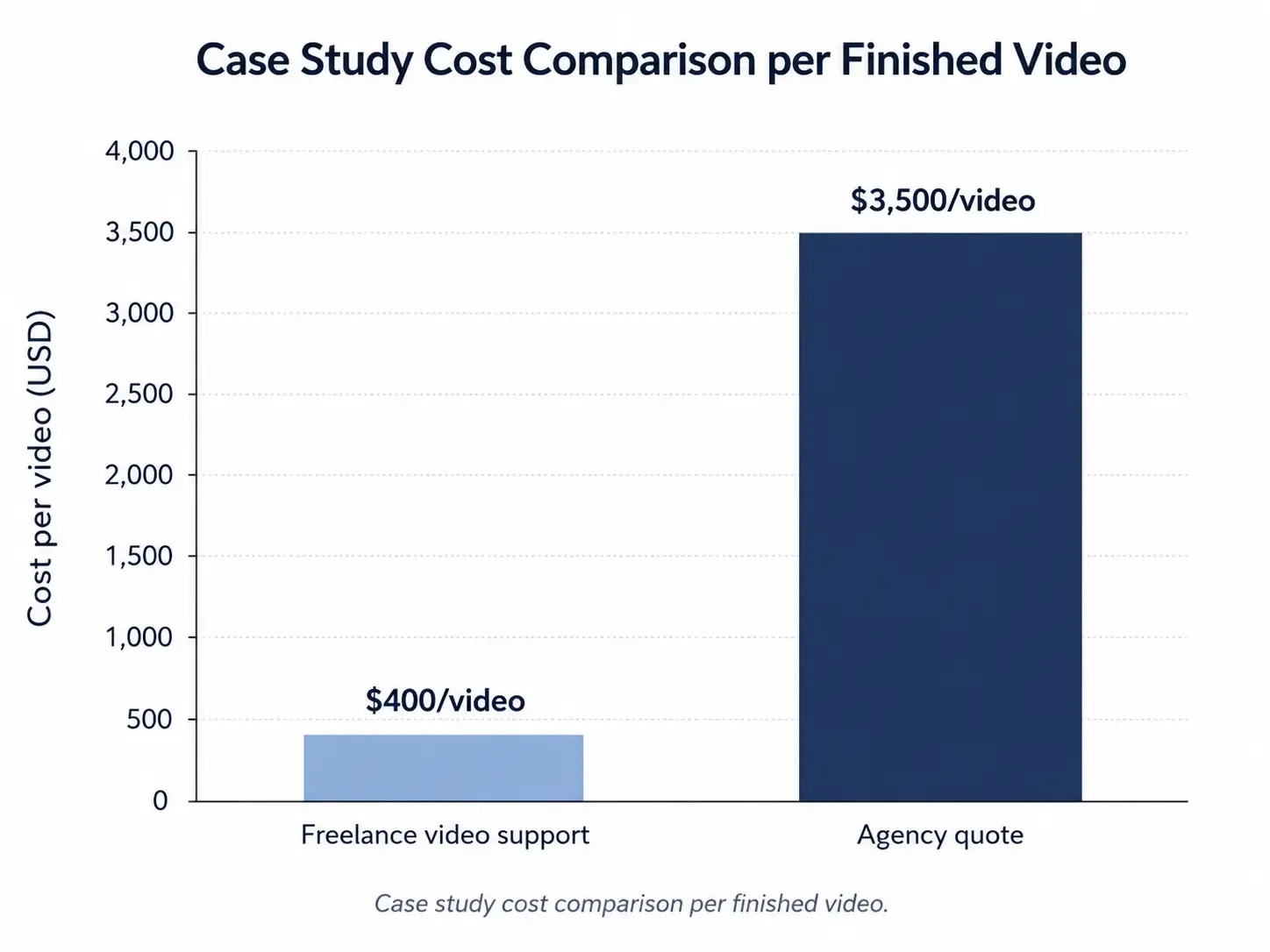
AI avatar videos are not only about lower production cost. They can also improve output speed, content volume, and localization.
In one B2B case study review, a 12-person SaaS team used AI presenter workflows for educational and product-related videos. Before switching workflows, the team used freelance video support costing about $400 per video. Over eight months, the team published 34 videos, spent under $4,000 in hard costs, and compared that with an agency quote of $3,500 per video, or about $119,000 for the same volume.
The same case reported 2,400 subscribers, 11 demo requests, an average contract value of $18,000, and an internally attributed pipeline figure of $198,000. Retention improved from 38% to 52%, and thumbnail click-through rate improved from 2.1% to 4.8% after format changes.
These results should not be treated as a universal benchmark for press release videos. They do show why AI avatar workflows are attractive for B2B teams that need repeatable video production without booking studios, presenters, editors, and reshoots for every announcement.
Common Mistakes in AI Avatar Press Release Videos
Mistake 1: Using the full written press release as the script
A written press release is not a spoken video script. Rewrite it into shorter sentences and remove secondary details.
Mistake 2: Choosing the most realistic avatar instead of the most credible avatar
The most lifelike avatar is not always the right spokesperson. Match the avatar to the announcement, audience, and brand.
Mistake 3: Making the whole video a talking head
Use avatar segments for opening, transitions, and closing. Add visuals to carry the story.
Mistake 4: Ignoring hidden production costs
Check costs for minutes, seats, custom avatars, exports, translations, voice cloning, and API use.
Mistake 5: Skipping localization review
AI translation can be grammatically correct but wrong in tone. Review legal language, product terminology, and executive quotes manually.
Mistake 6: Using AI for messages that need human accountability
Layoffs, apologies, crisis statements, and sensitive legal issues usually need a real executive on camera.
Conclusion: The Best AI Avatar Creator Depends on the PR Workflow
The best AI avatar creator for press release videos is the one that fits your communication workflow. Choose HeyGen for realistic multilingual launch videos, Synthesia for formal enterprise communications, Leadde for turning press releases and business documents into avatar-led videos, Colossyan for structured internal updates, D-ID for personalized PR workflows, and Argil, Arcads, or Captions for short-form announcement clips.
For PR teams, the goal is not to make a video that looks artificially impressive. The goal is to make approved messages easier to understand, easier to localize, easier to distribute, and credible enough to represent the brand. AI avatars can help, but human judgment still needs to own tone, accuracy, context, and accountability.





