
AI Avatar Services With Customizable Voice Tones: Best Tools in 2026

AI avatar services with customizable voice tones are platforms that let users create digital presenters and control how they speak, including tone, emotion, pacing, accent, and delivery style.
In 2026, the best AI avatar services are not only judged by how realistic the avatar looks, but also by how naturally the voice matches the script, audience, language, and business use case.
These platforms help teams create more natural avatar videos, but many businesses still struggle with slow production, high editing costs, and inconsistent quality.
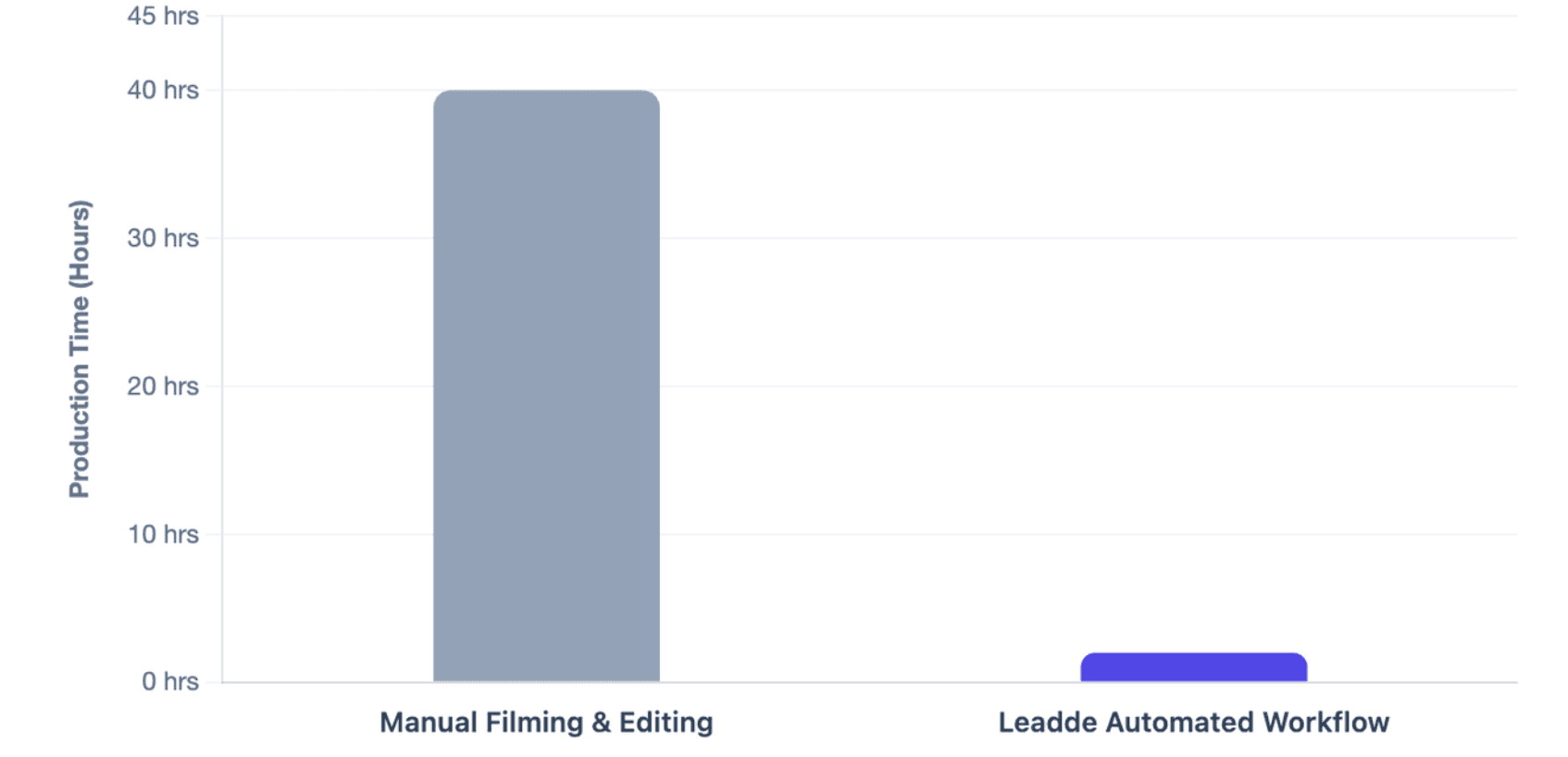
Leadde solves this by turning documents and text into professional business videos automatically, helping teams create videos in minutes while saving over 80% of production costs and 90% of content creation time.
AI Avatar Services With Customizable Voice Tones
AI avatar services with customizable voice tones are tools that create digital presenters for videos and let users control how those presenters speak. The goal is not only to generate a face and a voice, but to make the avatar sound appropriate for the message, audience, and platform.
These services are most useful when teams need video content but do not want to film a human presenter every time. They are often used for training, onboarding, product explainers, sales enablement, education, internal communication, and multilingual content.
What does “customizable voice tone” mean in AI avatar videos?
Customizable voice tone means the user can adjust how the avatar speaks. This can include emotion, pacing, pitch, pauses, emphasis, accent, and delivery style.
In practice, tone control helps the same script sound different depending on context:
| Content Type | Better Voice Tone |
| Compliance training | Clear, calm, professional |
| Product demo | Confident, helpful, energetic |
| Sales video | Persuasive, warm, concise |
| Internal update | Friendly, direct, trustworthy |
| Education video | Patient, structured, easy to follow |
Voice tone is different from simply choosing a male or female voice. Google’s Text-to-Speech documentation shows that speech can be customized with SSML controls such as pitch, speaking rate, and volume, which are core parts of how synthetic speech delivery is shaped.
How are AI avatars different from basic text-to-speech voiceovers?
Basic text-to-speech creates audio. AI avatar services combine that audio with a digital presenter, lip-sync, facial expression, visual layout, and sometimes background media.
The difference matters because video trust depends on more than the voice. A good AI avatar video should align:
- Script
- Voice tone
- Avatar appearance
- Lip-sync
- Facial expression
- Scene design
- Brand style
For example, a friendly voice paired with stiff facial movement can still feel unnatural. A professional avatar with poor pacing can still reduce viewer confidence.
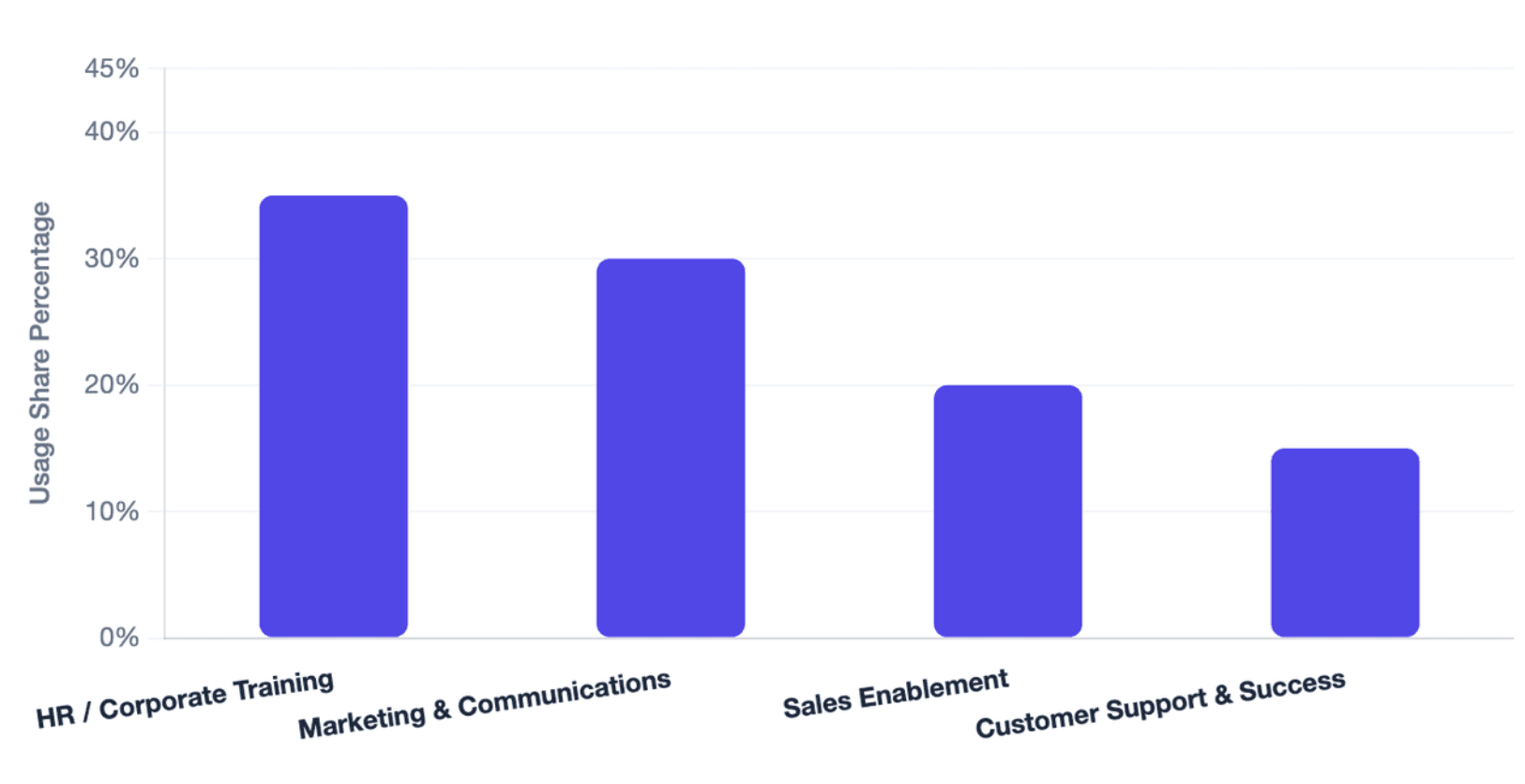
Who uses AI avatar services for marketing, training, sales, and education?
AI avatar services are used by teams that need repeatable video content at scale. The main users include:
| User Group | Common Use Case |
| Marketing teams | Product explainers, social videos, campaign videos |
| HR teams | Employee onboarding, policy videos, compliance training |
| Sales teams | Personalized outreach, product walkthroughs, demo videos |
| Educators | Course lessons, tutorials, multilingual learning content |
| Customer success teams | Help videos, feature education, user guidance |
| Global teams | Localized video versions for different regions |
The strongest use cases appear when a company already has scripts, documents, slides, or knowledge materials and wants to turn them into video without rebuilding everything manually.
Why Do AI Avatar Services With Customizable Voice Tones Matter in 2026?
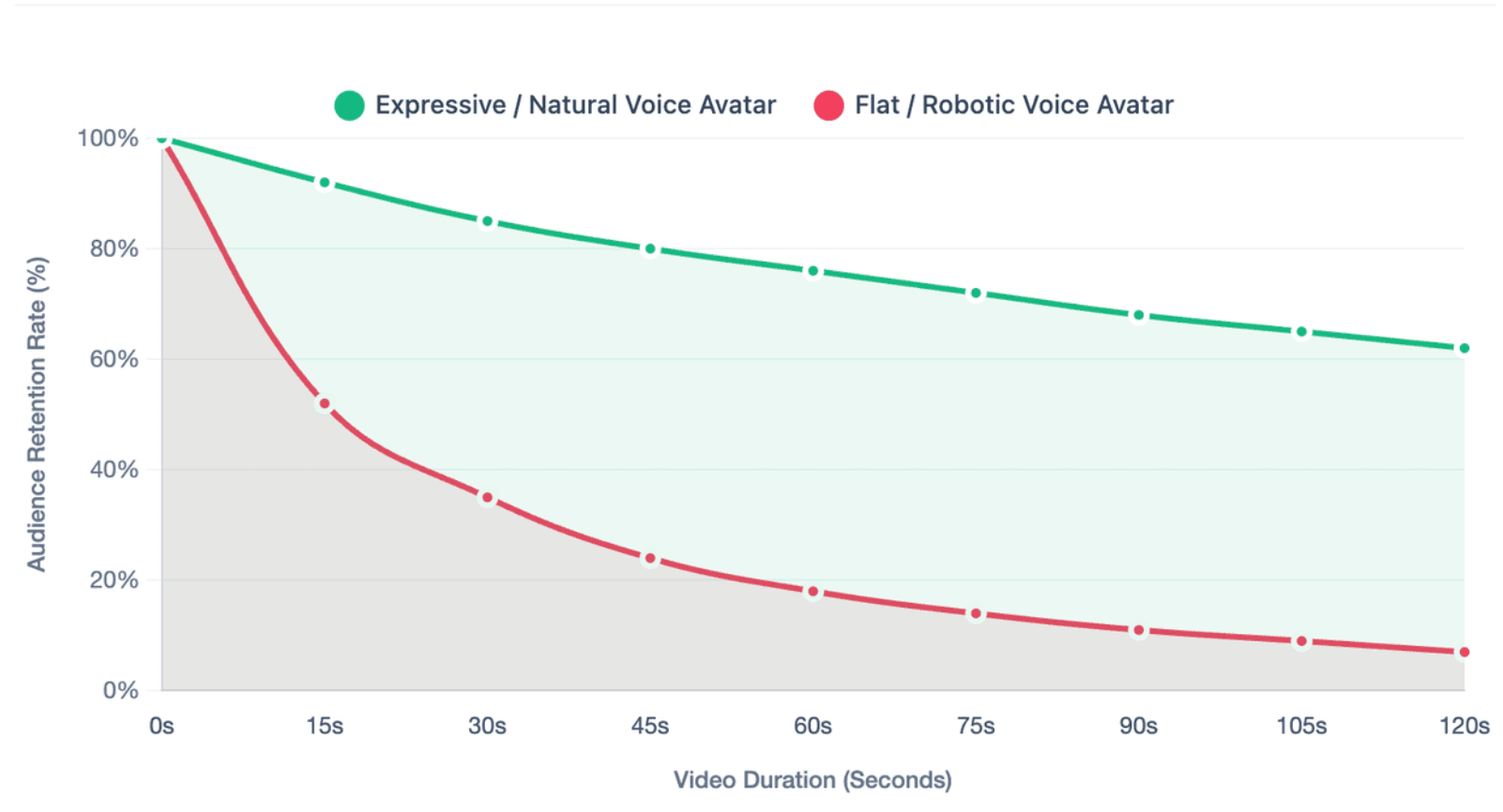
AI avatar services matter in 2026 because viewers now expect AI videos to feel more natural, more context-aware, and less robotic. A realistic avatar alone is not enough if the voice sounds flat or the delivery does not match the message.
The market is also moving from one-off video generation to repeatable content workflows. Teams want to create, update, translate, and manage many videos without filming again for every change.
Why do audiences reject robotic AI avatars?
Audiences reject robotic AI avatars because robotic delivery breaks trust. Viewers may stop watching when the voice sounds flat, the mouth movement is delayed, or the facial expression does not fit the message.
Common signs of robotic avatar videos include:
- Flat narration with no emotional variation
- Awkward pauses
- Poor lip-sync
- Unnatural eye contact
- Stiff head movement
- Overly generic presenter style
- Tone that does not match the topic
This is why voice tone control must be judged together with avatar realism. A natural video needs both strong audio delivery and believable visual presentation.
Why do voice tone, lip-sync, facial stability, and gestures affect trust?
Voice tone affects how viewers interpret the message. Lip-sync affects whether the avatar feels believable. Facial stability and gestures affect whether the presenter appears professional.
A good AI avatar video should pass a simple naturalness check:
| Quality Signal | What to Check |
| Voice tone | Does the delivery fit the audience and topic? |
| Lip-sync | Do mouth movements match the audio? |
| Facial stability | Does the face remain consistent across scenes? |
| Gestures | Do movements support the message without distraction? |
| Pacing | Is the speech easy to follow? |
| Scene alignment | Do visuals match the spoken content? |
D-ID’s 2026 V4 Expressive Visual Agents announcement reflects this shift toward avatars that align sentiments, tone, pacing, and emphasis with the message, rather than only playing back static talking-head video.
Why do businesses need scalable avatar videos instead of one-off video creation?
Businesses need scalable avatar videos because many video needs repeat over time. Training changes, product features update, compliance rules evolve, and global teams need localized versions.
A one-off AI video generator may be enough for a single social post. But teams usually need a repeatable system for:
- Updating old videos
- Creating multilingual versions
- Maintaining brand tone
- Reusing avatars and templates
- Managing review and approval
- Tracking content performance
This is where workflow becomes more important than novelty. The best AI avatar service for business is not always the one with the most avatars; it is often the one that helps teams produce consistent videos again and again.
What Features Should You Look for in an AI Avatar Service With Customizable Voice Tones?
The best AI avatar services should give users practical control over both voice and video quality. A large avatar library is useful, but it should not be the only decision factor.
A strong platform should support voice tone control, avatar realism, multilingual delivery, preview testing, brand consistency, and repeatable production workflows.
Can you adjust emotion, pacing, pitch, emphasis, pauses, and speaking style?
A good AI avatar service should allow users to control more than the voice identity. It should help control how to make an AI voice perform the script effectively.
Important voice controls include:
| Feature | Why It Matters |
| Emotion | Makes delivery fit the message |
| Pacing | Improves clarity and viewer retention |
| Pitch | Helps avoid monotone narration |
| Pauses | Makes complex points easier to understand |
| Emphasis | Highlights key messages |
| Accent | Supports regional and cultural fit |
| Speaking style | Matches brand and use case |
HeyGen’s Voice Mirroring and Voice Director are examples of tools that let users control tone, pacing, and emotional delivery through recorded delivery or creative direction.
Can the avatar keep tone aligned with the script, visuals, and scene transitions?
Voice tone should match what appears on screen. A serious compliance message should not sound playful. A product launch video should not sound slow and passive.
This is where many AI avatar videos fail. The script may be correct, but the tone, visuals, and scene transitions feel disconnected.
A strong workflow should help users check:
- Does each scene have the right tone?
- Do visual highlights match the spoken emphasis?
- Do transitions happen at natural pauses?
- Does the avatar stay consistent from start to finish?
- Does the voice style fit the brand?
For business videos, this alignment matters because the viewer is not only listening; they are also judging whether the company looks professional.
Can the platform support multilingual voices, accents, and brand tone consistency?
Multilingual support is essential for global teams. But language support alone is not enough. The avatar also needs to preserve the right tone, rhythm, and cultural fit.
For example, a training video translated into another language should still sound:
- Professional
- Clear
- Respectful
- On-brand
- Natural for the region
Synthesia states that it supports AI video generation with avatars and voiceovers in 160+ languages, while Colossyan states that it supports expressive AI voices in 100+ languages with consistent tone, emotion, and clarity.
Can you preview and test the voice tone before generating the full video?
Preview testing is important because small tone issues can become expensive if they appear across a long video or a full campaign.
Before generating the final video, teams should check:
- Is the voice too flat?
- Is the pacing too fast?
- Are important points emphasized?
- Does the avatar look natural?
- Does the lip-sync feel accurate?
- Does the video match the intended audience?
Previewing is especially important for training and compliance videos, where unclear delivery can lead to misunderstanding.
Which Are the Best AI Avatar Services With Customizable Voice Tones in 2026?
As of 2026, available information suggests that the best AI avatar service depends on the use case. Some tools are stronger for enterprise training, some for creator-style videos, some for interactive avatars, and some for multilingual business workflows.
Users should avoid choosing a platform based only on “best overall” claims. The better approach is to compare each tool by voice control, avatar quality, workflow fit, localization, and governance.
Which tools are best for enterprise training, marketing, education, and social videos?
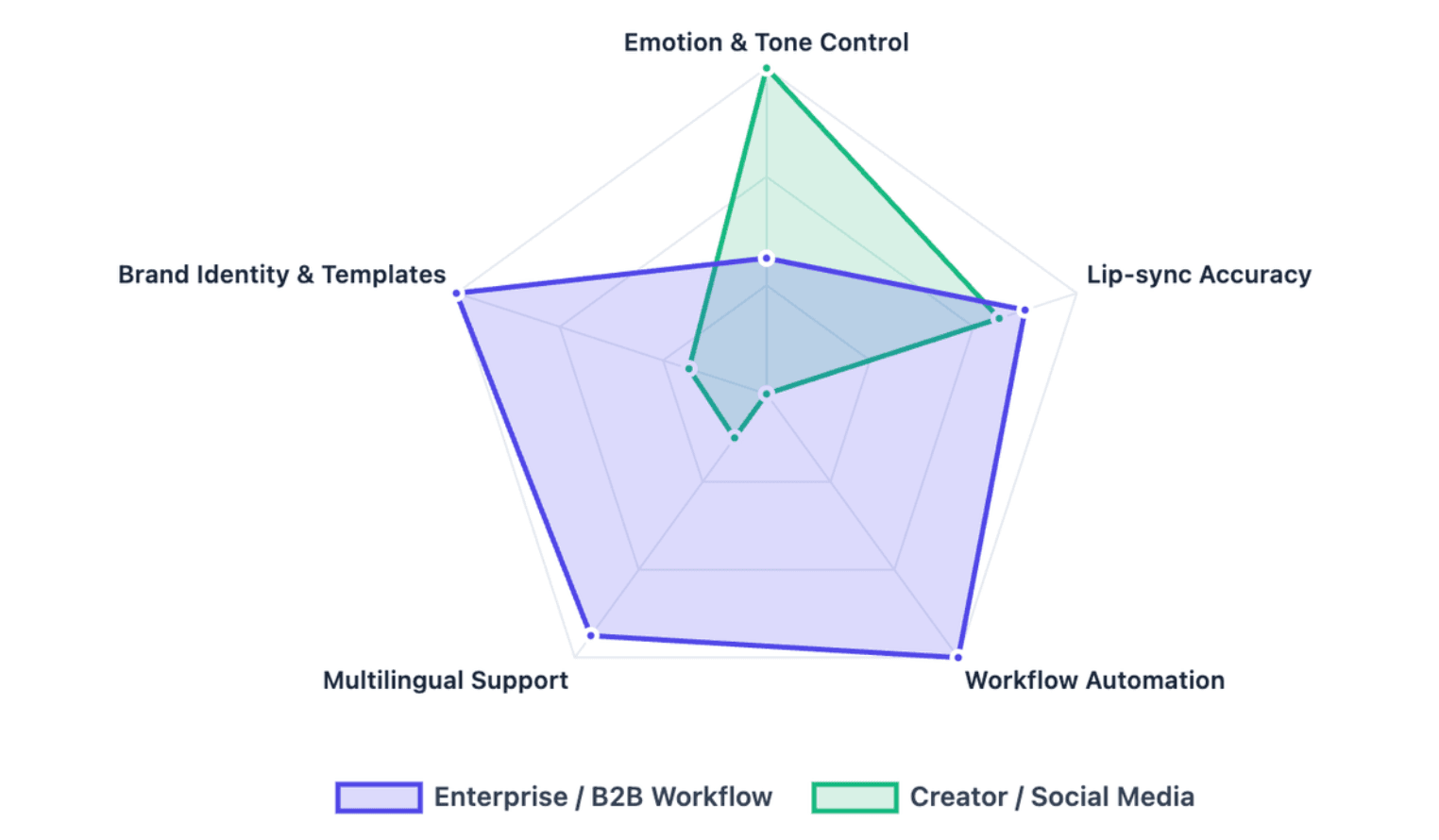
Different tools serve different video needs. A training team may need templates, governance, and localization. A creator may care more about fast social videos and expressive delivery.
| Tool | Best-Fit Use Case | Notable Strength |
| Synthesia | Enterprise training and branded videos | Large avatar and language ecosystem |
| HeyGen | Personalized and creator-style videos | Voice mirroring and delivery control |
| D-ID | Interactive avatars and visual agents | Real-time, agent-style avatar experiences |
| Colossyan | Learning, training, and business education | Multilingual training video workflows |
| Wavel AI | Dubbing, subtitles, and multilingual voice content | 100+ language video and voice workflows |
| Leadde | Document-to-video business workflows | Converts documents and text into structured avatar videos |
| Zoice | Needs further verification | Claims should be checked against official data |
Synthesia states that it offers 240+ AI avatars and videos in 160+ languages, while D-ID positions its avatar tools around customizable avatar style, voice, backgrounds, layouts, media, and interactive agents.
How do Synthesia, HeyGen, D-ID, Colossyan, Wavel AI, Zoice, and Leadde compare?
The right comparison should focus on what the user wants to produce. A tool for short marketing videos may not be the best tool for internal training. A tool with strong avatars may not have the best document workflow.
| Platform | Better For | Key Evaluation Point |
| Synthesia | Enterprise-ready AI presenter videos | Avatar library, languages, brand controls |
| HeyGen | Expressive delivery and creator-style videos | Tone, pacing, emotion control |
| D-ID | Interactive digital humans | Real-time and agent-based use cases |
| Colossyan | Training and learning videos | Localization, voice clarity, learning workflows |
| Wavel AI | Voice, dubbing, subtitle-heavy workflows | Multilingual voice and dubbing depth |
| Zoice | Claimed avatar realism | Verify official features and independent proof |
| Leadde | Business documents to videos | Workflow automation, avatars, multilingual content management |
Wavel AI states that it supports AI avatars, voiceovers, dubbing, and subtitles in 100+ languages, while Colossyan states that its avatars support 100+ languages with lip-synced narration and natural intonation.
Which platform is best for turning documents and text into AI avatar business videos?
For document-heavy teams, the best platform is often the one that can turn existing materials into video with the least manual work.
Leadde is designed for this use case. According to its official product overview, Leadde converts PDFs to videos online and handles PowerPoint files, PDFs, Word documents, scripts, and text to generate outlines, scenes, voice-over scripts, and visual layouts.
This matters for teams that already have:
- Training decks
- SOP documents
- Product documentation
- Onboarding materials
- Internal announcements
- Compliance content
- Customer education scripts
Instead of starting from a blank video editor, teams can start from existing knowledge assets and turn them into professional business videos.
How Do You Choose the Right AI Avatar Service for Your Business Use Case?
Choosing the right AI avatar service starts with the content goal. A platform that works well for social media may not be the best option for compliance training, multilingual onboarding, or enterprise knowledge management.
The best decision path is: define the use case, compare required features, test output quality, review policies, then calculate workflow ROI.
What should marketers, HR teams, educators, sales teams, and global teams look for?
Each team should judge AI avatar platforms differently.
| Team | What to Prioritize |
| Marketing | Brand tone, social formats, visual polish, fast edits |
| HR | Training consistency, updates, compliance clarity |
| Education | Clear pacing, multilingual lessons, learner engagement |
| Sales | Personalization, persuasive tone, quick video creation |
| Global teams | Translation, accent control, localization workflow |
| Customer success | Product explainers, reusable help content, easy updates |
A marketing team may choose a tool with more creator-style avatars. A training team may need stronger templates, review workflows, analytics, and multilingual video management.
How should you compare avatar realism, voice control, scalability, and ease of use?
A practical comparison should score each platform across the full video experience, not only one feature.
| Evaluation Area | Questions to Ask |
| Avatar realism | Does the presenter look natural across scenes? |
| Voice control | Can tone, pace, emotion, and emphasis be adjusted? |
| Lip-sync | Does the mouth match the audio in each language? |
| Scalability | Can the team produce many videos reliably? |
| Ease of use | Can non-video editors create content? |
| Localization | Can videos be translated and adapted efficiently? |
| Governance | Can teams manage versions, permissions, and updates? |
For business use, scalability and governance are often as important as visual realism. A beautiful avatar is less useful if the team cannot update, localize, or manage the video after publishing.
What pricing, usage rights, consent, and data policy risks should you check?
Before choosing a platform, teams should review both pricing and policy details. AI avatar tools may involve sensitive assets such as faces, voices, scripts, customer data, and internal training materials.
Check these areas before adoption:
- Video minute limits
- Avatar creation fees
- Voice cloning rules
- Commercial usage rights
- Consent requirements
- Data storage and retention
- Team permissions
- Watermark rules
- Localization costs
- Enterprise security requirements
Do not choose a platform only because it appears cheaper. The real cost may include editing time, translation work, re-recording, compliance review, and video updates.
How Can Businesses Scale AI Avatar Videos Without Manual Editing?
Businesses scale AI avatar videos by building a repeatable workflow, not by generating one video at a time. The workflow should connect source content, script structure, voice tone, avatar selection, review, localization, publishing, and updates.
This is the difference between an AI avatar generator and an AI video production system.
Why is a repeatable avatar workflow more valuable than a one-off generator?
A one-off generator helps create a single video. A repeatable workflow helps teams create and maintain many videos over time.
A repeatable workflow is more valuable because it supports:
- Consistent brand tone
- Reusable presenters
- Reusable templates
- Faster updates
- Localized versions
- Team review
- Performance tracking
- Lower dependency on video editors
For businesses, the main question is not “Can this tool make one good avatar video?” The better question is “Can this tool help us create, update, and manage hundreds of useful videos?”
How do templates, reusable avatars, tone settings, and scripts reduce production time?
Templates reduce design work. Reusable avatars keep presenter style consistent. Tone settings help the voice match the content type. Structured scripts reduce editing and review time.
A strong workflow usually includes:
| Workflow Element | Time-Saving Benefit |
| Templates | Avoid rebuilding layouts |
| Reusable avatars | Maintain presenter consistency |
| Tone settings | Reduce voice revision cycles |
| Script generation | Speeds up first drafts |
| Scene structure | Makes video easier to review |
| Preview tools | Catches errors before final export |
| Version control | Helps teams update content later |
Leadde’s video generation flow supports document or text input and allows users to set language, tone, detail level, audience, speaker background, and learning objectives before generation.
How does Leadde turn PPT, PDF, Word, text, and scripts into multilingual AI avatar videos?
Leadde turns existing business content into video by processing source materials and converting them into structured video presentations. Its official overview states that it supports PowerPoint, PDFs, Word documents, scripts, and text, then generates outlines, scenes, voice-over scripts, and visual layouts.
This workflow is useful when companies already have written content but lack time for filming and editing.
Typical source materials include:
- PPT training decks
- PDF policy documents
- Word SOPs
- Product scripts
- Internal announcements
- Customer education content
Leadde also supports multilingual video workflows across 92 languages and offers 200+ AI avatars, which makes it suitable for companies that need consistent presenter-style content across regions.
How do version control, analytics, and content management help teams update videos over time?
Video content becomes outdated. Product screens change, policies change, training processes change, and localization needs expand.
Version control and content management help teams avoid rebuilding videos from scratch. Analytics help teams understand whether videos are being watched and where improvements may be needed.
Leadde includes version control, real-time updates, sharing, analytics, and content management features to help teams manage and optimize video content over time.
For enterprise teams, this post-production layer is important. It turns AI avatar videos from isolated assets into maintainable business knowledge resources.
FAQs
What are AI avatar services with customizable voice tones?
AI avatar services with customizable voice tones are platforms that create digital presenters and let users adjust how they speak. These adjustments may include tone, emotion, pacing, pitch, accent, pauses, emphasis, and delivery style.
Can AI avatars speak in different emotions and languages?
Yes. Many AI avatar platforms support different voice styles, emotions, and languages, although the exact level of control depends on the platform.
What is the best AI avatar service for document-to-video workflows?
The best option depends on the team’s content source. For teams that already use PPTs, PDFs, Word documents, scripts, or text, Leadde is a strong fit because it is built around document-to-video business workflows.
Conclusion
The best AI avatar service with customizable voice tones is the one that fits your use case, not simply the one with the most avatars or the broadest feature list. Start by deciding whether you need marketing videos, training content, sales videos, education videos, multilingual localization, or document-to-video automation.
A strong platform should help you control voice tone, avatar realism, lip-sync quality, multilingual delivery, workflow speed, and long-term content management.





