
How to Create Nursing Training Videos from SOPs: 2026 Playbook
Learning how to create nursing training videos from SOPs and clinical guidelines means converting long, text-heavy medical protocols into short, role-based microlearning videos.
The safest workflow is to break dense PDFs into task-based chapters, rewrite clinical language into clear voiceover scripts, add on-screen callouts and safety alerts, and require human-in-the-loop review from clinical Subject Matter Experts before publishing.
Text-heavy SOPs create training fatigue, version drift, and risky inconsistency. Manually rebuilding videos after every clinical update only slows teams down.
Leadde turns documents and text into professional business videos in minutes, helping cut production costs by up to 80% and content creation time by up to 90%.
Why Do Traditional Text-Based Nursing SOPs Fail Modern Clinical Training?
Nursing SOPs and clinical guidelines are essential, but they are usually written for accuracy, compliance, and recordkeeping. They are not always written for fast learning during real clinical work.
A strong nursing training video should translate approved text into a clear workflow. It should help nurses understand what to do, when to do it, what to avoid, and when to escalate.
The paper handbook trap: Managing cognitive overload in fast-paced hospital wards
- Cognitive Dissonance: Traditional text-based Standard Operating Procedures (SOPs) present massive blocks of complex medical jargon that frontline nurses struggle to digest during high-stress shifts.
- The Fatigue Bottleneck: Forcing newly onboarded nursing staff to read 50-page binder manuals creates information fatigue, leading to low retention and slower clinical integration.
- Frontline Operational Reality: Modern hospital wards require rapid, on-demand answers, which makes dense physical or digital text handbooks highly impractical during active patient care.
Why static SOP updates slow down critical clinical rollout
Clinical rules change. Policies are revised. New equipment is introduced. EHR workflows are updated.
When training content is locked inside static PDFs, every change creates friction. Teams must notify staff, explain what changed, confirm understanding, and prevent old versions from spreading through shared drives or chat threads.
A video-based workflow should include:
| Update Need | Video Training Response |
| New SOP version | Update affected scenes only |
| Policy clarification | Add a “what changed” section |
| New safety alert | Add on-screen warning callouts |
| New workflow owner | Update reviewer and approval metadata |
| Multilingual team | Update all language versions from the same source |
The goal is not to replace the written SOP. The goal is to help nurses apply the current version faster and more consistently.
How visual standardization helps reduce nursing execution errors
- Eliminating Ambiguity: Visual learning standardizes clinical techniques by showing the exact physical steps required for high-risk procedures like central line care or ventilator setup.
- Immediate Error Reduction: Studies in clinical education show that converting text instructions into clear visual demonstrations reduces technical execution errors by up to 50%.
- Unifying Care Standards: Standardized training videos establish a baseline of clinical execution, ensuring that every nurse performs bedside skills with identical precision.
What Is the Fastest Way to Turn Medical PDFs and Clinical Guidelines Into Training Videos?
The fastest safe method is not to paste an entire SOP into a video tool. The best method is to convert the document into a structured training workflow.
Use this process:
- Confirm the approved source document.
- Break it into short modules.
- Rewrite each section into a plain-language script.
- Add visual cues, callouts, and safety alerts.
- Send the draft to clinical SME review.
- Publish with version control and tracking.
Medical video production has traditionally required planning, storyboarding, scripting, production, and post-production. A 2024 JMIR Medical Education tutorial describes medical procedural video development as a staged process that includes learning outcomes, script, storyboard, and expert validation.
From linear documents to bite-sized nursing microlearning modules
A nursing SOP should not become one long video. It should become a set of short modules, each focused on one task or decision.
For example:
| Source SOP Section | Video Module |
| Purpose | Why this workflow matters |
| Scope | Which nursing roles it applies to |
| Procedure | Step-by-step nursing actions |
| Risks | Common mistakes and safety checks |
| Documentation | What to record and where |
| Escalation | When to notify a charge nurse or provider |
This makes the video easier to search, replay, assign, and update.
How to simplify complex medical terminology into clear voiceover scripts
- Write for the Ear: Convert formal, passive legal and medical textbook language into active, direct, and conversational spoken instructions.
- Clarity Over Complexity: Replace long, clause-heavy sentences with short, single-action commands that an interactive avatar or voice clone can deliver clearly.
- Standardize Acronyms: Spell out or clearly define complex medical acronyms on their first vocal appearance to support international or less experienced nursing personnel.
Adding on-screen overlays, callouts, and medical safety alerts
- Visual Anchor Blocks: Use bold text overlays and callout graphics to emphasize critical warnings, dosage metrics, and sterile boundaries.
- Color-Coded Risk Management: Embed bright red warning banners for high-alert medications or steps with a high risk of cross-contamination.
- Reinforcing Key Actions: Match on-screen titles precisely with the synchronized voiceover script to anchor key clinical tasks in the viewer’s memory.
Setting up clinical SME review before publishing
AI can help create the first draft, but clinical experts must review the content before release.
A safe review group may include:
| Reviewer | What They Check |
| Nurse educator | Learning accuracy and role fit |
| Clinical lead | Workflow accuracy |
| Infection preventionist | IPC and safety language |
| Compliance officer | Policy and audit alignment |
| Privacy officer | PHI and patient privacy risk |
| Bilingual reviewer | Meaning in translated versions |
The review should cover script, visuals, captions, pronunciation, quiz questions, screenshots, and source-document links.
How Does Leadde Automate Healthcare Document-to-Video Conversion Without Manual Design?
Leadde is useful when healthcare teams already have SOPs, PDFs, PowerPoints, Word documents, scripts, or text and need to convert them into structured video content.
According to Leadde product materials, the platform can convert documents and business content into structured video presentations, generating outlines, scenes, voice-over scripts, and visual layouts. It also supports multilingual workflows, AI avatars, interactive video, version control, analytics, and content management.
How Leadde turns PDFs, Word documents, PowerPoints, scripts, and text into structured videos
- Direct Document Ingestion: Leadde allows users to directly upload existing healthcare PDFs, medical text, scripts, Word documents, or PowerPoint decks to jumpstart video creation.
- Instant Script Generation: The platform extracts the core clinical workflow from your files, instantly converting raw text guidelines into a polished, spoken video script.
- Automated Visual Flow: Leadde builds the basic structure of the video scenes automatically from your source text, eliminating the need for separate manual video storyboarding.
AI Auto Layout and Auto Highlight for dense SOP and guideline content
Dense SOPs often include headings, tables, definitions, warnings, exceptions, and documentation steps. Manual slide design can slow production.
Leadde’s document-to-video workflow can help turn dense content into structured video scenes, layouts, and visual flow.
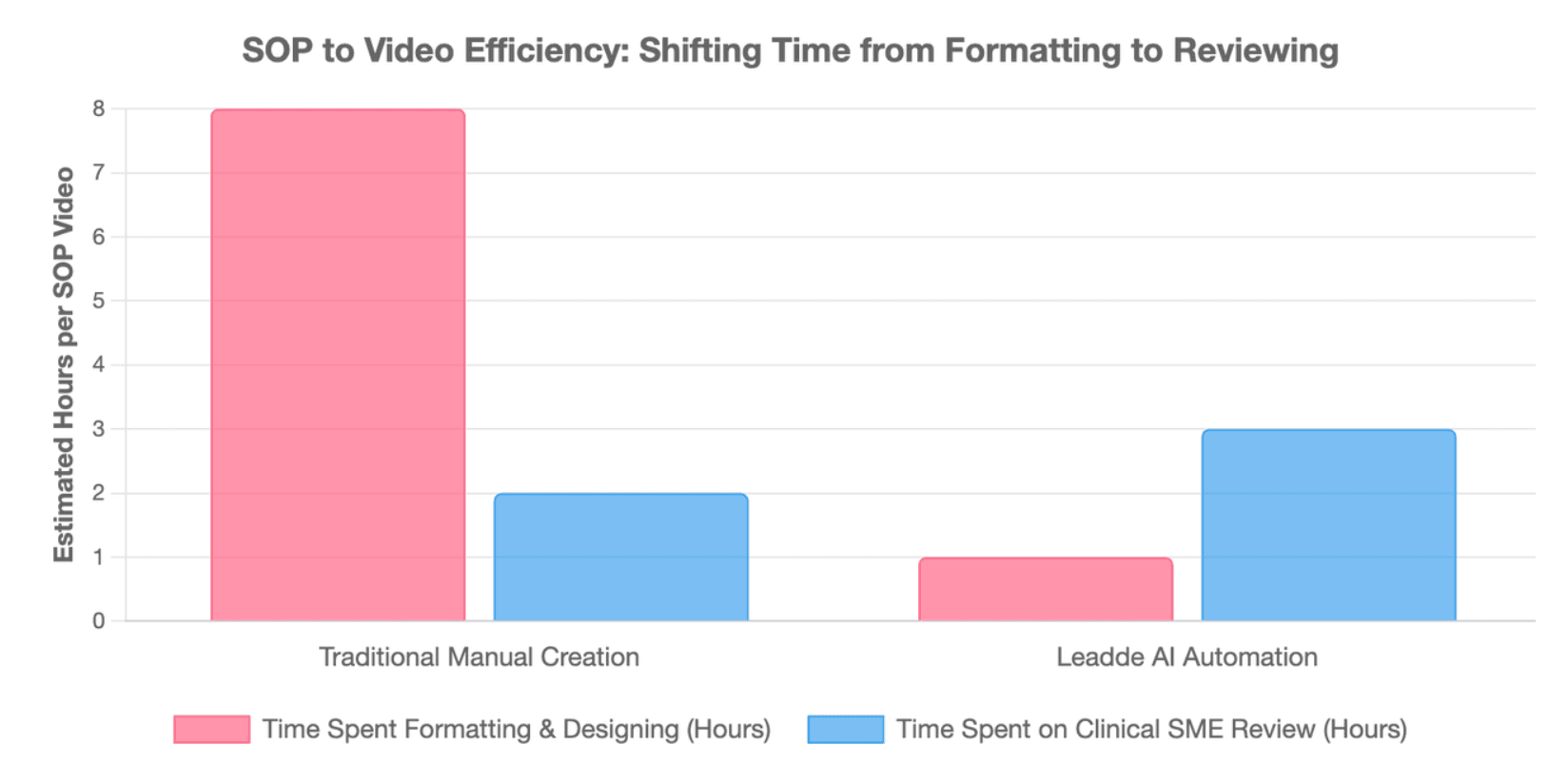
For nursing education teams, this means less time spent formatting and more time spent reviewing:
- Clinical accuracy
- Role relevance
- Patient safety risks
- Local workflow fit
- Version alignment
Maintaining institutional branding across clinical protocols
Training videos should look consistent across departments. A hospital should not have one visual style for infection control, another for onboarding, and another for EHR training.
Consistent branding helps staff recognize official training content. It also supports trust, especially when videos are used across multiple units or locations.
Branding should include:
- Hospital or organization logo
- Approved colors and fonts
- Standard safety alert style
- Consistent presenter format
- Clear SOP version label
- Link to the official policy library
Scaling multilingual and multi-accent training for diverse nursing teams
Large healthcare systems often train nurses across regions, languages, and accents. A single English-only video may not support all staff equally.
Leadde materials describe multilingual video workflows and broad language support, which can help organizations create localized training content more efficiently.
For clinical content, translation should still be reviewed. A bilingual clinical reviewer should check drug names, medical terms, escalation language, and local workflow meaning before the video is published.
Why Are Passive Training Videos Not Enough for Nursing Certification and Clinical Readiness?
Watching a video is not the same as being ready to perform a clinical task. Nursing training often requires understanding, practice, observation, and sign-off.
A video is strongest when it sits inside a larger training system. That system should include quizzes, checklists, preceptor feedback, observation, and competency validation.
Why passive video watching cannot replace triage simulation or skills validation
- The Passive Retention Ceiling: Simply watching a standard training video provides passive knowledge, which often fails to translate into confident bedside decisions during real clinical emergencies.
- The Illusion of Competence: Passing a basic linear video requirement can give nurses a false sense of readiness without testing their critical thinking or tactical skill execution.
- The Need for Validation: True clinical readiness requires evidence-based validation workflows that bridge the gap between abstract concepts and hands-on patient care.
Using interactive video and chat-based learning to reinforce SOP understanding
Interactive features can help nurses move from passive watching to active learning.
Useful interactive elements include:
- Scenario questions
- “What would you do next?” prompts
- Chapter navigation
- Searchable video sections
- Chat-based SOP clarification
- Links to source policies
For clinical content, chat-based learning should stay inside clear boundaries. It should answer questions from the approved SOP or guideline, not provide independent diagnosis, treatment advice, or off-policy recommendations.
Pairing videos with quizzes, checklists, preceptor feedback, and competency sign-off
A nursing SOP video should often be paired with a job aid. This gives nurses a quick reference after the video ends.
A strong validation package may include:
| Training Asset | Purpose |
| Video | Explain the workflow |
| Quiz | Check understanding |
| Checklist | Support on-shift recall |
| Preceptor feedback | Confirm practical fit |
| Observation | Validate performance |
| Sign-off | Document completion |
This makes training more useful for both learning and audit readiness.
How Should Hospitals Manage HIPAA, PHI, and Clinical Compliance in AI Video Generation?
Healthcare training videos must protect patient privacy and maintain clinical accuracy. Teams should treat AI video production as a governed workflow, not a casual content task.
The HIPAA Security Rule requires regulated entities to use appropriate administrative, physical, and technical safeguards to protect electronic protected health information. (HHS.gov)
How to remove PHI before uploading SOPs, EHR screenshots, or clinical examples
Before using any AI video platform, remove unnecessary PHI from source documents, screenshots, examples, and draft scripts.
Avoid uploading:
- Real patient names
- Medical record numbers
- Dates linked to real care events
- Faces or voices of patients
- Real EHR screenshots with identifiers
- Room numbers tied to actual cases
- Unapproved clinical photos
Use synthetic cases, dummy EHR screenshots, and de-identified examples whenever possible.
Versioning live clinical documents, scripts, quizzes, and video scenes
Every nursing training video should connect back to the approved source document.
Track these items:
| Item | What to Record |
| SOP or guideline | Title, ID, owner, version, effective date |
| Video script | Draft date and reviewer |
| Scenes | Source section for each scene |
| Quiz | Source section and correct answer basis |
| Checklist | Linked SOP section |
| Published video | Last updated date and owner |
This creates source-to-scene traceability. If the SOP changes, the team can find which scenes, quizzes, captions, and checklists must be updated.
Creating a review gate for nurse educators, compliance teams, and privacy officers
Do not publish an AI-generated nursing training video directly from a draft.
Set a review gate before publishing:
- Nurse educator reviews learning quality.
- Clinical owner reviews workflow accuracy.
- Compliance team reviews policy alignment.
- Privacy officer reviews PHI risk.
- LMS owner confirms assignment and tracking.
- Department leader approves rollout timing.
This process helps prevent outdated, unsafe, or noncompliant training from reaching staff.
Leadde vs. Synthesia: Which AI Video Platform Fits Enterprise Medical Training?
Both Leadde and Synthesia can support AI video creation, but hospitals should compare platforms based on workflow fit, not only avatar quality. Choosing the best AI medical video maker requires assessing enterprise scale.
For nursing SOP and clinical guideline training, the key question is: Which platform best supports document-based, reviewable, update-ready training at scale?
Feature comparison: document conversion, video editing, localization, and interactivity
| Capability | Leadde Fit | Synthesia Fit | Why It Matters for Nursing Training |
| Document-to-video workflow | Strong fit for PDFs, Word, PowerPoint, scripts, and text | Strong for AI video creation from scripts and training content | Nursing teams often start from existing SOPs |
| Structured outline and scene generation | Supported in Leadde workflow | Available through AI video workflows | Helps break long SOPs into modules |
| AI avatars / presenters | Supported | Supported | Useful for explanations and updates |
| Multilingual training | Supported in Leadde materials | Supported by Synthesia | Important for diverse nursing teams |
| Interactive learning | Leadde supports interactive video experiences | Synthesia supports interactive and training features depending on setup | Helps move beyond passive watching |
| Version control / analytics | Included in Leadde product materials | Available through platform and LMS workflows | Critical for compliance tracking |
Leadde materials specifically describe version control, analytics, content management, multilingual workflows, and interactive video experiences.
Where platform limits affect long-form SOP training and enterprise scaling
- The Length Restriction Trap: Synthesia’s base plan restricts output to a rigid 10 minutes per month, making it impossible to scale extensive medical guideline video libraries.
- Infinite Training Volume: Leadde provides unlimited video generation on its entry-level $19 plan, giving hospitals the freedom to convert large libraries of medical text into video.
- Visual Repetition Strain: Synthesia's fixed layouts can make look-alike compliance modules feel repetitive, which can lower learner engagement over long training sessions.
Buyer’s checklist: Matching your hospital LMS, compliance workflow, and nursing education goals
Before choosing a platform, map it to your hospital workflow.
td {white-space:nowrap;border:0.5pt solid #dee0e3;font-size:10pt;font-style:normal;font-weight:normal;vertical-align:middle;word-break:normal;word-wrap:normal;}
| Buyer Question | Why It Matters |
| Does it support approved source documents? | SOPs must remain the source of truth |
| Can reviewers edit scripts and scenes? | Clinical accuracy requires human review |
| Can it support captions and pronunciation checks? | Medical terms must be clear |
| Can it publish to LMS or training hubs? | Staff need easy access and tracking |
| Can it manage updates and versions? | Old videos create risk |
| Can it support localization review? | Translated clinical content must stay accurate |
Choose the tool that best supports your education, compliance, privacy, and update process.
Conclusion
AI helps clinical education directors maximize nursing training ROI by turning approved SOPs and clinical guidelines into faster, clearer, and more consistent training videos. The safest approach is to keep the source document as the official reference, use AI to speed up drafts and updates, require nurse educator and clinical SME review, protect PHI, and pair each video with tracking, quizzes, checklists, and version-controlled updates.





